Follow Up Email Format After No Response: 2026 Guide
Most replies come from follow-ups, not first emails. Here is the exact follow up email format after no response — structure, timing, sequence length, and templates that get answers.
TL;DR
- Most positive replies in a cold sequence arrive after the first email, so the follow up email format matters more than the opener.
- A working follow-up has five parts: a threaded subject, a one-line context anchor, one new piece of value, one specific ask, and an easy exit.
- Space follow-ups on a widening curve — roughly day 3, day 7, day 12, day 20 — instead of hammering every 24 hours.
- Never send "just bumping this" or "circling back." Each touch needs a new reason to exist.
- Deliverability kills more follow-up sequences than copy does. Verify addresses before the second send, not after the fifth bounce.
Why does the follow up email format matter more than the first email?#
Because the first email is a coin flip and the follow-up is where the compounding happens.
Think of it like knocking on a door. The first knock might land while your prospect is in a meeting, on a plane, or staring at 340 unread messages. The second and third knocks are what turn a miss into a conversation. Vendor-published benchmarks from cold outreach platforms consistently show that reply rates roughly double when a sequence runs 3–5 touches instead of one — and that the single biggest self-inflicted wound is stopping at email one.
But there's a catch: the wrong follow-up is worse than no follow-up. A "just checking in" email teaches the recipient that your emails contain nothing, which trains them to delete on sight. Once you're pattern-matched as noise, even a genuinely relevant message from you six months later gets ignored.
So the format isn't cosmetic. It's the difference between a sequence that earns attention and one that burns a domain.

What is the exact follow up email format after no response?#
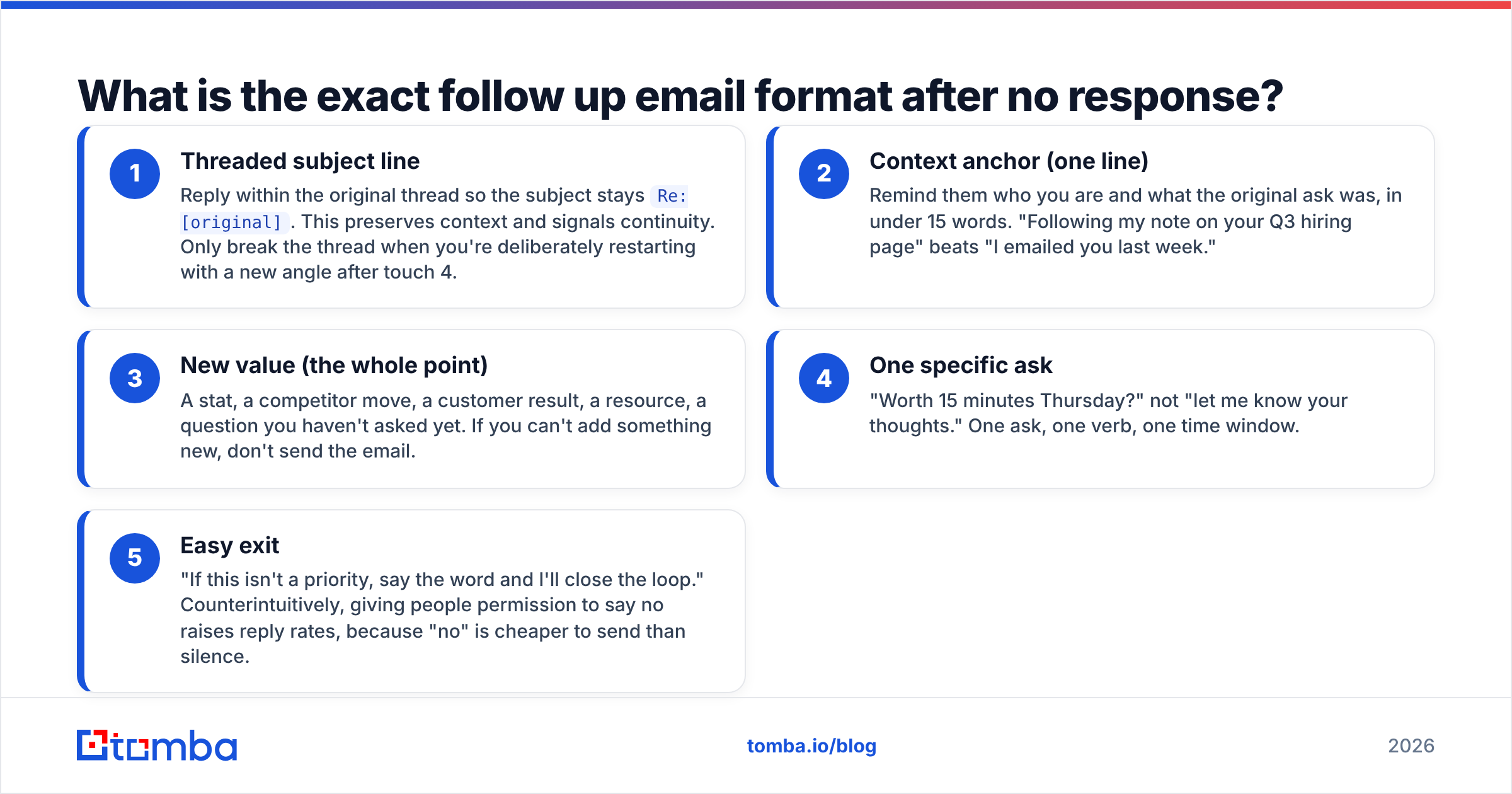
Five components, in this order. Every follow-up you send should contain all five, and nothing else.
- Threaded subject line — Reply within the original thread so the subject stays
Re: [original]. This preserves context and signals continuity. Only break the thread when you're deliberately restarting with a new angle after touch 4. - Context anchor (one line) — Remind them who you are and what the original ask was, in under 15 words. "Following my note on your Q3 hiring page" beats "I emailed you last week."
- New value (the whole point) — A stat, a competitor move, a customer result, a resource, a question you haven't asked yet. If you can't add something new, don't send the email.
- One specific ask — "Worth 15 minutes Thursday?" not "let me know your thoughts." One ask, one verb, one time window.
- Easy exit — "If this isn't a priority, say the word and I'll close the loop." Counterintuitively, giving people permission to say no raises reply rates, because "no" is cheaper to send than silence.
Here's the skeleton in practice:
Subject: Re: Cutting onboarding time at [Company]

Hi [Name] — following up on my note about your onboarding flow.

Since I wrote, [Competitor] shipped a self-serve trial. Teams that
made that move usually see support tickets drop ~30% in the first
quarter.

Worth 15 minutes Thursday or Friday to compare notes?

If it's not a priority this quarter, tell me and I'll stop here.

[Name]
Ninety words. One idea. One ask. One exit.
How many follow-ups should you send, and when?#
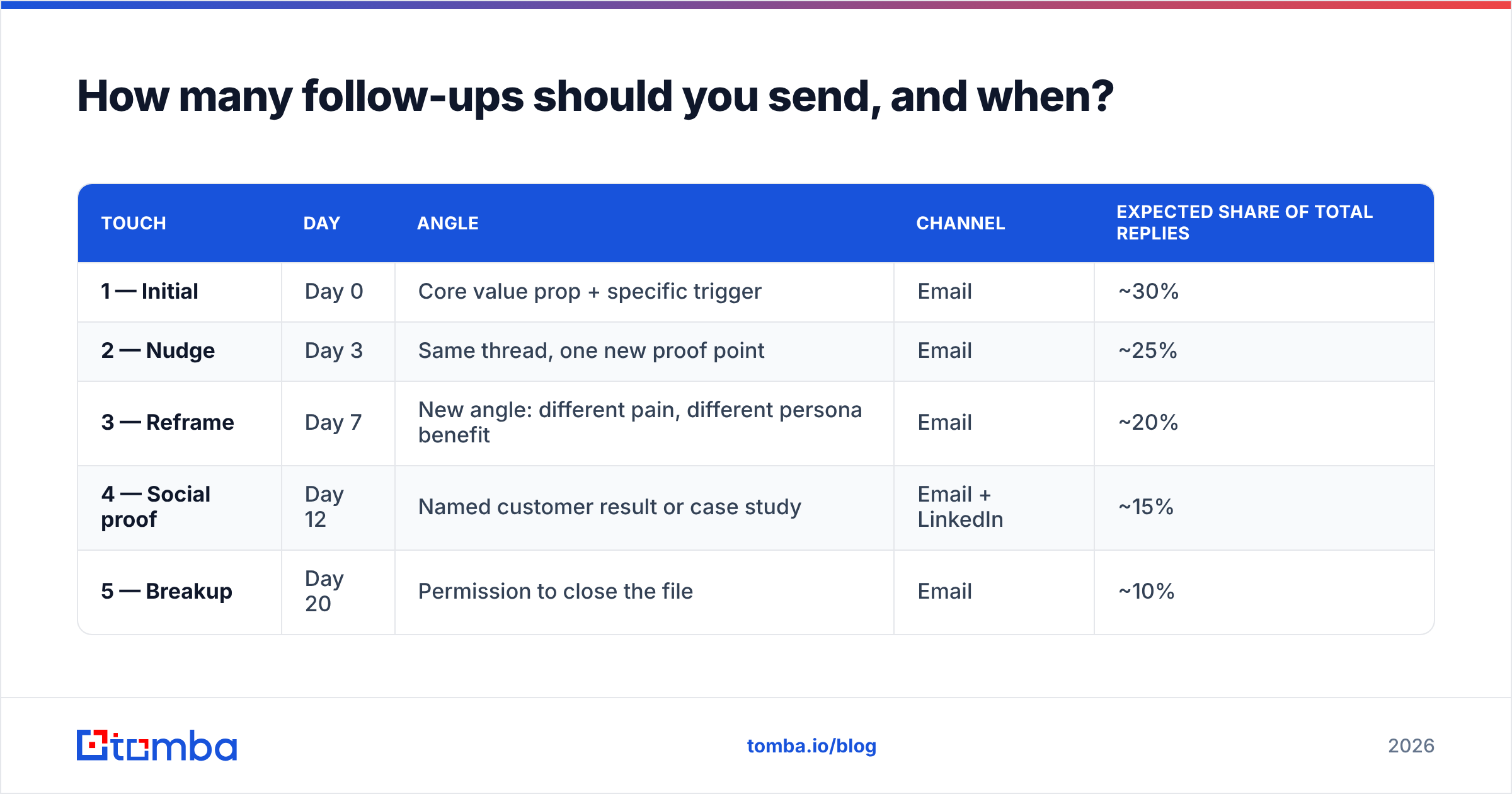
Four follow-ups after the initial email, spaced on a widening curve. Here's the cadence that holds up across most B2B contexts:
| Touch | Day | Angle | Channel | Expected share of total replies |
|---|---|---|---|---|
| 1 — Initial | Day 0 | Core value prop + specific trigger | ~30% | |
| 2 — Nudge | Day 3 | Same thread, one new proof point | ~25% | |
| 3 — Reframe | Day 7 | New angle: different pain, different persona benefit | ~20% | |
| 4 — Social proof | Day 12 | Named customer result or case study | Email + LinkedIn | ~15% |
| 5 — Breakup | Day 20 | Permission to close the file | ~10% |
Two rules govern the spacing. First, widen the gaps as you go — day 3, then 4 days, then 5, then 8. Early follow-ups ride the memory of the first email; later ones need breathing room so they don't read as desperate. Second, send on weekday mornings in the recipient's timezone, not yours. A 9am Tuesday send in Berlin lands at 3am if you're scheduling from New York and forgot.
Should you go past five touches? Only if you have five genuinely different things to say. Reps who run 9-touch sequences almost always pad touches 6–9 with filler, which is where spam complaints start. If you want to keep the relationship warm past touch five, move to a quarterly check-in with actual news attached — not another sequence.
What should each follow-up actually say?#
Different touch, different job. Reusing the same argument louder is the most common failure mode.
Touch 2 — the nudge (day 3). Same thread. Add one proof point you held back. "Quick addition to my last note: [Similar Company] runs the same stack you do and cut their data cleanup time in half." Keep it under 60 words. This is the shortest email in the sequence.
Touch 3 — the reframe (day 7). Assume your first angle missed. Pick a different pain. If touch 1 sold speed, touch 3 sells cost. If touch 1 was aimed at the VP's headcount problem, touch 3 aims at the operational headache their team feels daily. New subject line is acceptable here.
Touch 4 — social proof (day 12). A named customer, a number, and a one-line mechanism. "Nutshell's SDR team went from 4% to 11% reply rates by verifying lists before send — same problem you flagged on your careers page." Pair with a LinkedIn connection request the same day; multi-channel touches lift response rates because the two channels reinforce each other. If you're building that motion, our notes on LinkedIn outreach cover the sequencing.
Touch 5 — the breakup (day 20). The highest-reply single email in most sequences, because it triggers loss aversion. "I'll assume the timing's wrong and close your file. If that's a mistake, reply 'later' and I'll ping you in Q4." Do not fake finality — if you say you're closing the file, close it.
What to never write: "Just following up." "Bumping this to the top of your inbox." "Did you see my last email?" "Per my previous email." These sentences contain zero information and read as guilt-tripping. Cut them from your snippets today.
Is your follow-up sequence failing because of copy or deliverability?#
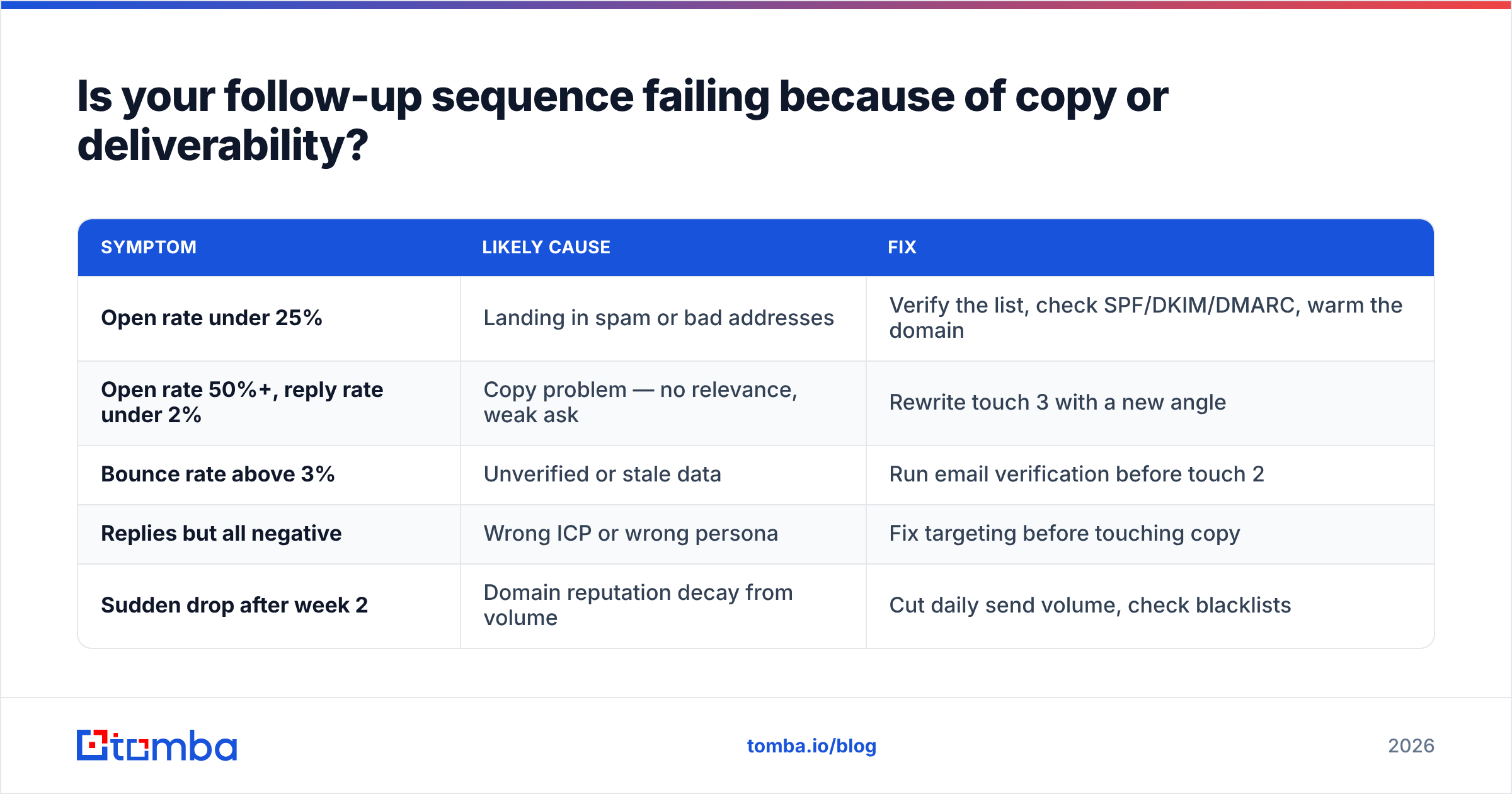
Usually deliverability. Reps rewrite subject lines for a week when the real problem is that 18% of their list never received anything.
Here's the diagnostic: pull your sequence stats and compare against these thresholds.
| Symptom | Likely cause | Fix |
|---|---|---|
| Open rate under 25% | Landing in spam or bad addresses | Verify the list, check SPF/DKIM/DMARC, warm the domain |
| Open rate 50%+, reply rate under 2% | Copy problem — no relevance, weak ask | Rewrite touch 3 with a new angle |
| Bounce rate above 3% | Unverified or stale data | Run email verification before touch 2 |
| Replies but all negative | Wrong ICP or wrong persona | Fix targeting before touching copy |
| Sudden drop after week 2 | Domain reputation decay from volume | Cut daily send volume, check blacklists |
A 3% bounce rate is the line most inbox providers watch. Cross it repeatedly and your sender reputation degrades — which means your good emails to your good prospects stop arriving too. Follow-up sequences amplify this, because you're hitting the same bad address five times instead of once. One dead contact in a five-touch sequence generates five bounces.
The sequencing fix is simple: verify before touch 1, and re-verify anything that bounced soft before touch 3. Google's Postmaster Tools and Microsoft SNDS both expose reputation data for free — check them weekly if you're sending at any volume. Gartner's coverage of sales engagement platforms is a reasonable starting point if you're evaluating tooling to automate this layer.
Which follow-up tools handle sequencing best?#
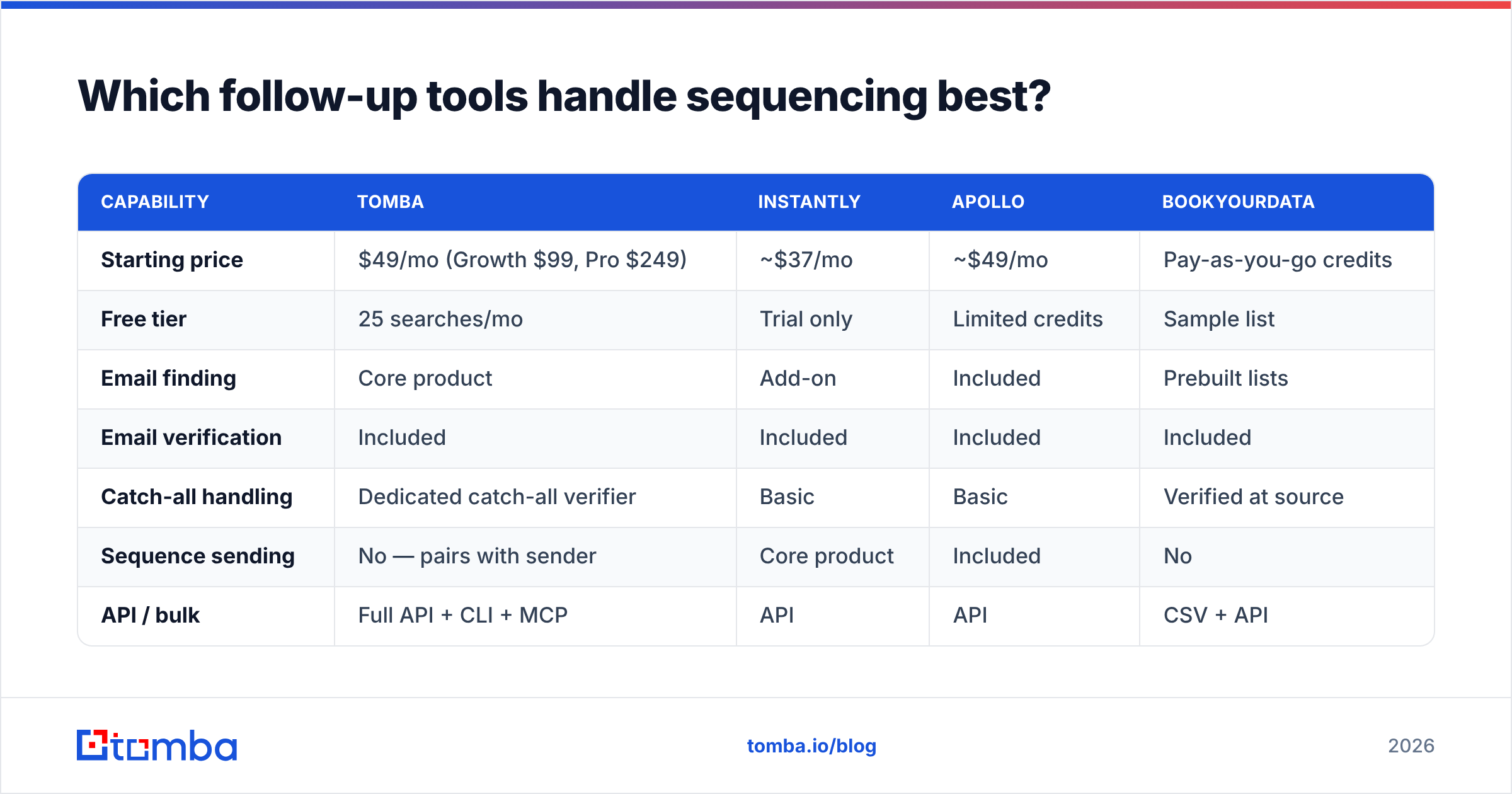
Depends on whether you need the data, the sending, or both. Here's how the common stacks compare for teams running follow-up sequences.
| Capability | Tomba | Instantly | Apollo | BookYourData |
|---|---|---|---|---|
| Starting price | $49/mo (Growth $99, Pro $249) | ~$37/mo | ~$49/mo | Pay-as-you-go credits |
| Free tier | 25 searches/mo | Trial only | Limited credits | Sample list |
| Email finding | Core product | Add-on | Included | Prebuilt lists |
| Email verification | Included | Included | Included | Included |
| Catch-all handling | Dedicated catch-all verifier | Basic | Basic | Verified at source |
| Sequence sending | No — pairs with sender | Core product | Included | No |
| API / bulk | Full API + CLI + MCP | API | API | CSV + API |
| Best for | Data accuracy before send | High-volume sending | All-in-one SMB stack | Ready-made verified lists |
The honest read: no single tool wins every column. Instantly is built for the sending layer and does it well. Apollo bundles data and sequencing into one subscription, which suits small teams that value fewer vendors over best-in-class components. BookYourData works well when you'd rather buy a pre-verified list than build one — a legitimately different motion, and a good fit for teams without a research function.
Tomba sits on the data side: finding and verifying the addresses your sequence runs on, then handing off to whatever sender you already use. If your bounce rate is the problem, that's the layer to fix. If your copy is the problem, no data tool saves you. Compare specifics on Tomba pricing or look at the Apollo alternative breakdown if you're consolidating.
For teams that want independent input, G2's sales engagement category carries enough reviews to spot pattern complaints — usually around deliverability and data decay, not features.
How do you write follow-ups that don't sound automated?#
Three habits separate human-sounding follow-ups from mail-merge sludge.
Reference something that changed. "Saw you're hiring three more AEs" or "noticed you moved off Zendesk" proves a human looked. Static personalization tokens ({{first_name}}, {{company}}) prove nothing — everyone has those.
Vary sentence length. Automated copy has a rhythm: every sentence 12–18 words, every paragraph three sentences. Break it. Use a four-word sentence. Then a longer one that carries the actual argument and gives the reader something to chew on.
Write the ask like you'd say it out loud. "Worth a quick call?" is how people talk. "I would love to explore potential synergies" is how nobody talks. Read your follow-up aloud before sending — if you'd be embarrassed saying it to a stranger at a conference, rewrite it.
One more: strip the signature block down. A follow-up with a 200-pixel banner image, six social icons, and a legal disclaimer looks like marketing, not a person. Plain text, name, one link. If you need to build one, a email signature generator will keep it lean.
What does a complete five-touch sequence look like?#
Here's a full sequence for a fictional prospect, so you can see the arc rather than isolated templates.
Day 0 — Initial. Subject: Onboarding drop-off at Acme. Trigger observation, one-line hypothesis, ask for 15 minutes.
Day 3 — Nudge. Reply in thread. "One more data point: teams on your stack usually lose 40% of trials in the first 48 hours. Worth comparing notes Thursday?" 45 words.
Day 7 — Reframe. New subject: Different angle on Acme's trial flow. Shift from retention to support cost. "If trials are churning, your support team is absorbing the calls. That's the version of this problem that shows up in your budget."
Day 12 — Social proof + LinkedIn. Named result, one sentence on mechanism, connection request sent same morning.
Day 20 — Breakup. "Closing your file — reply 'Q4' if the timing is just wrong." Two sentences. Nothing else.
Total: five emails, about 400 words combined across 20 days. That's less text than most reps put into a single opener, and it outperforms because each touch does one job.
If you want to start from proven structures rather than a blank page, our library of cold email templates covers the common sequence shapes, and the subject line tester will flag openers likely to trip spam filters before you commit a domain to them.
Where should you start?#
Fix the data first, then the cadence, then the copy. That order matters — polishing touch 3 while a fifth of your list bounces is rearranging furniture in a burning room.
Start by pulling your last 500 sends and checking the bounce rate. Above 3%, your problem is list quality, not writing. Run those contacts through verification, rebuild from clean sources, and only then rewrite your sequence using the five-part format above.
Find addresses that actually exist before you build a five-touch sequence on top of them. Tomba Email Finder locates verified professional emails by name, domain, or company, with a free tier of 25 searches a month to test accuracy against a list you already know. Paid plans start at $49/mo, and everything is available through the Tomba API if you'd rather verify inside your existing sequencing tool than in another dashboard. Clean data won't write your follow-ups for you — but it makes sure the good ones arrive.
Related guides#
Ready to find emails that actually work?
Join 150,000+ professionals who stopped guessing and started sending. Free credits on signup — no credit card required.
Get the Tomba newsletter
Practical outbound tactics and product updates — once every two weeks.
About the author