Free Spam Checker Tools in 2026: What Actually Works
Most free spam checker tools score your copy and call it a day — while the real reason you land in spam is authentication and list quality. Here's how to test properly in 2026.
TL;DR
- A free spam checker scores your content — subject line, HTML, links, spam trigger words. That's roughly 20% of why messages land in spam.
- The other 80% is authentication (SPF, DKIM, DMARC), domain and IP reputation, list hygiene, and engagement signals. No content scanner sees any of it.
- SpamAssassin-based scores (Mail-Tester, GlockApps, and most free tools) are still useful as a floor check — a score under 5 means you have obvious problems, not that you're safe.
- Gmail and Microsoft stopped weighting keyword filters heavily years ago. Complaint rate above 0.3% will bury you regardless of how clean your copy scores.
- The correct test order: authenticate → verify your list → seed-test placement → then run a free spam checker on the copy.
Every deliverability panic starts the same way. Open rates drop, someone runs the email through a free spam checker, it comes back 8.2/10, and the team concludes the copy is fine. Two weeks later, the domain is cooked.
The tool wasn't lying. It was answering a narrower question than the one you asked.
What is a free spam checker actually measuring?#
Almost every free spam checker on the market is a wrapper around Apache SpamAssassin, an open-source rules engine that assigns point values to characteristics of a message. Words like "free," "act now," and "guarantee" add points. A missing plain-text alternative adds points. A high image-to-text ratio adds points. Cross a threshold — usually 5.0 — and SpamAssassin flags the message.
That framework was designed in 2001 for on-premise mail servers. It still catches genuinely lazy spam. What it does not do is model how Gmail, Outlook, or Yahoo actually decide placement in 2026, because those systems are engagement-driven machine-learning classifiers, not rule lists.
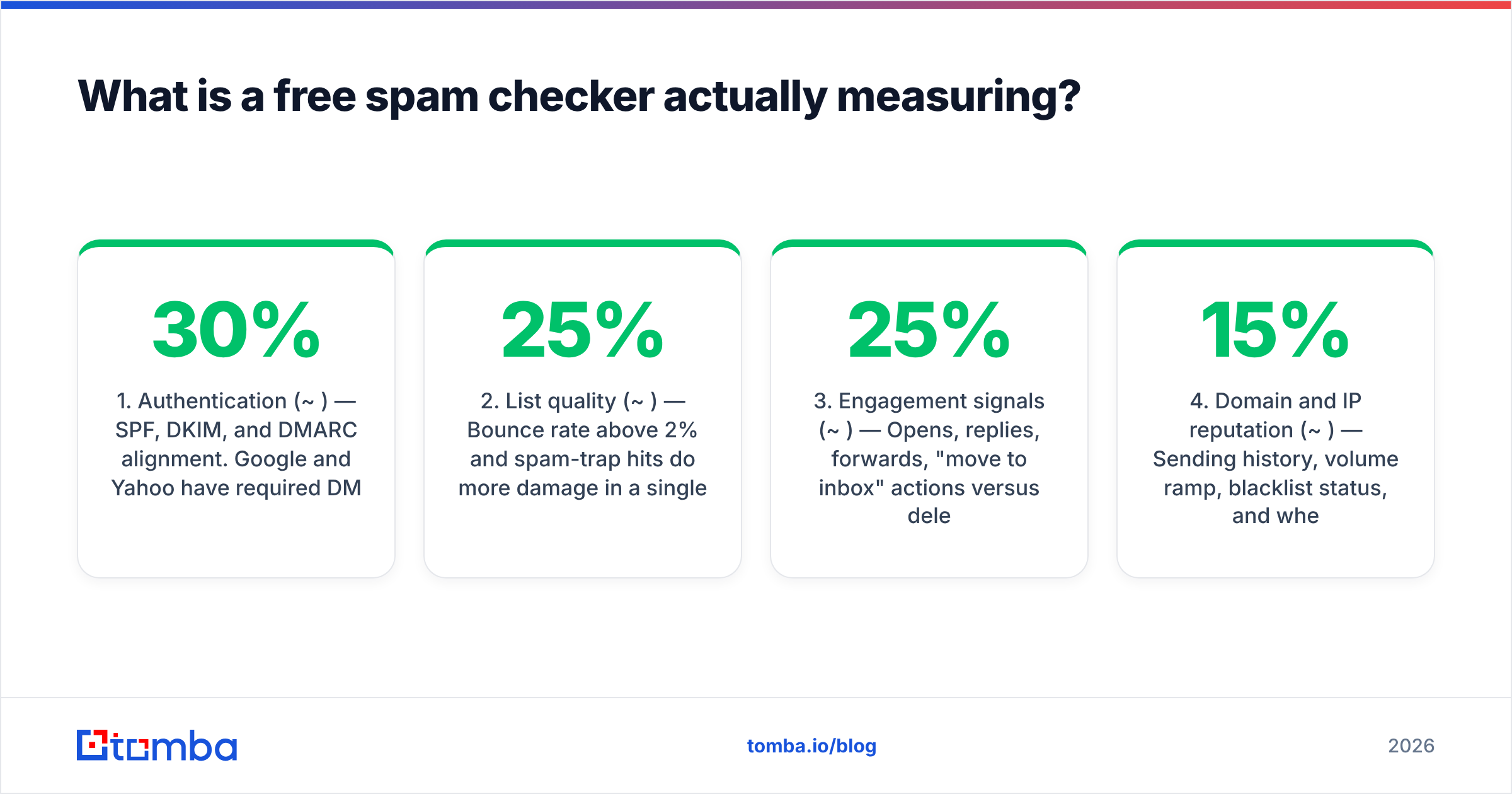
Here's the practical split of what determines whether your email reaches the inbox:
- Authentication (~30%) — SPF, DKIM, and DMARC alignment. Google and Yahoo have required DMARC for bulk senders since February 2024. A missing or misaligned record is a hard fail, not a soft penalty. Check yours with an SPF checker.
- List quality (~25%) — Bounce rate above 2% and spam-trap hits do more damage in a single send than a decade of aggressive subject lines. This is why an email verifier pass is non-negotiable before any campaign.
- Engagement signals (~25%) — Opens, replies, forwards, "move to inbox" actions versus deletes-without-reading and complaints. Mailbox providers weight recent behavior heavily.
- Domain and IP reputation (~15%) — Sending history, volume ramp, blacklist status, and whether your domain has been abused before.
- Content (~5-10%) — The only part a free spam checker sees.
That last line is the whole article in one sentence. You're optimizing the smallest lever with the loudest tool.
Correction on the syntax — the image renders as:

Why do spam filters ignore trigger words now?#
Because keyword filtering broke under its own weight. If "free" reliably triggered a spam flag, every legitimate SaaS trial email, every airline promo, and every nonprofit appeal would be quarantined. Providers found the false-positive cost unacceptable.
What replaced it is behavioral. Gmail's filters weigh how your specific recipients have treated your specific sending domain over the last 30 to 90 days. Microsoft's SmartScreen successor does something similar with tenant-level signals. The classifier is asking "do people who receive mail from this sender engage with it?" — not "does this message contain the word 'discount'?"
You can watch this play out. Take a cold outreach email that scores 9.5/10 on any free spam checker, send it from a two-week-old domain with no sender reputation, and it lands in spam. Take the exact same copy, send it from a five-year-old domain with a 40% reply rate, and it lands in Primary. Identical content, opposite outcomes.
The corollary matters too: a bad content score still hurts. If your email has three link shorteners, a 90% image body, no unsubscribe link, and a misaligned Return-Path, SpamAssassin is right to flag it and so will Gmail. The score is a floor, not a ceiling.
Which free spam checker tools are worth using in 2026?#
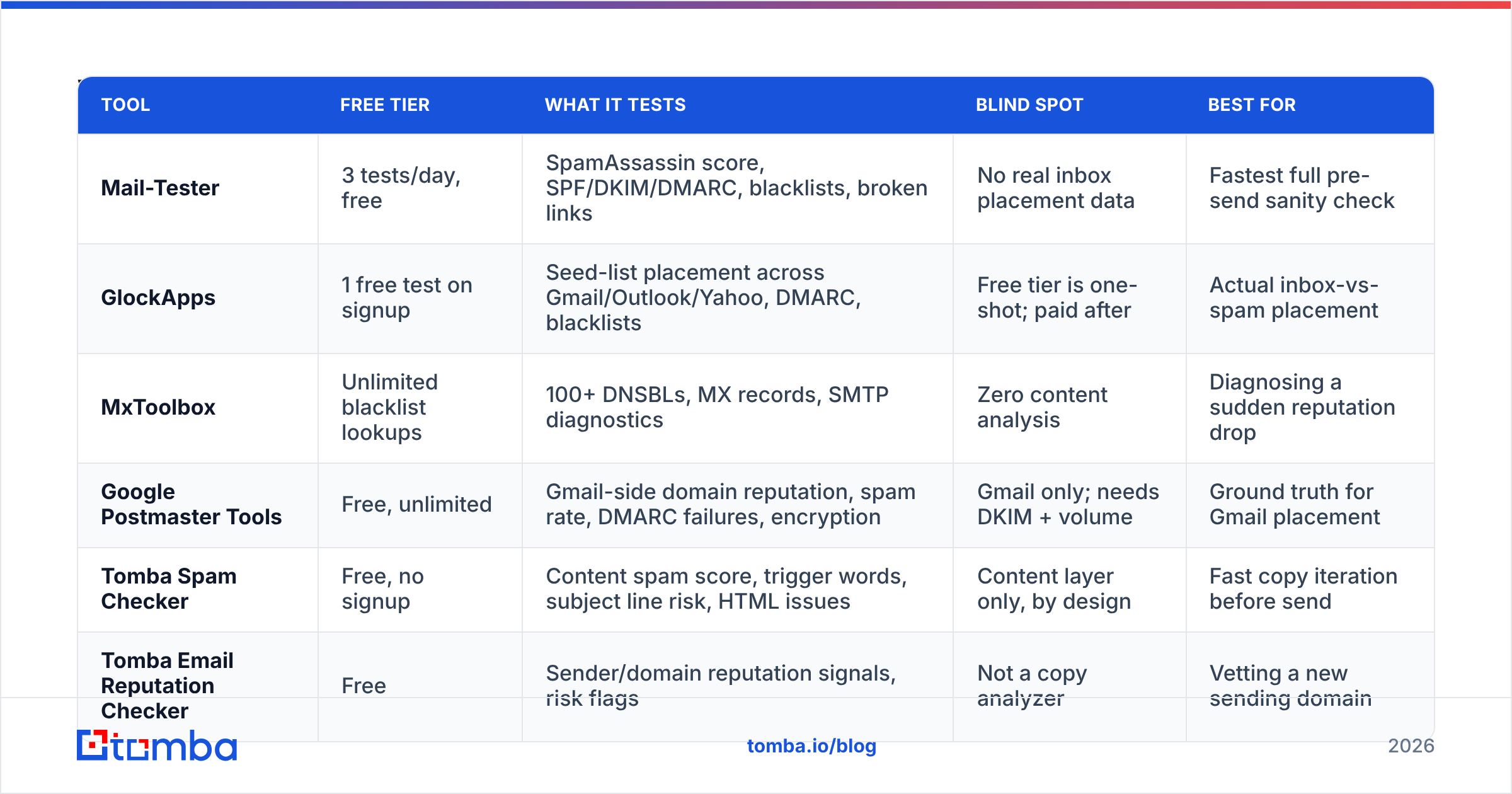
Different tools answer different questions. Running one and stopping is the mistake. Here's how the main free options compare on what they actually test.
| Tool | Free tier | What it tests | Blind spot | Best for |
|---|---|---|---|---|
| Mail-Tester | 3 tests/day, free | SpamAssassin score, SPF/DKIM/DMARC, blacklists, broken links | No real inbox placement data | Fastest full pre-send sanity check |
| GlockApps | 1 free test on signup | Seed-list placement across Gmail/Outlook/Yahoo, DMARC, blacklists | Free tier is one-shot; paid after | Actual inbox-vs-spam placement |
| MxToolbox | Unlimited blacklist lookups | 100+ DNSBLs, MX records, SMTP diagnostics | Zero content analysis | Diagnosing a sudden reputation drop |
| Google Postmaster Tools | Free, unlimited | Gmail-side domain reputation, spam rate, DMARC failures, encryption | Gmail only; needs DKIM + volume | Ground truth for Gmail placement |
| Tomba Spam Checker | Free, no signup | Content spam score, trigger words, subject line risk, HTML issues | Content layer only, by design | Fast copy iteration before send |
| Tomba Email Reputation Checker | Free | Sender/domain reputation signals, risk flags | Not a copy analyzer | Vetting a new sending domain |
Use the free spam checker and the email reputation checker together — one covers the message, one covers the sender. Pair them with a blacklist checker run and you've covered the three cheap failure modes in about four minutes.
Google Postmaster Tools deserves special mention. It's the only source of truth on this list, because Gmail is telling you directly what it thinks of your domain. If your Postmaster spam rate is above 0.10%, nothing a content scanner says is relevant — fix the list and the targeting first. Google's own documentation on bulk sender guidelines is the closest thing to a rulebook that exists.
How do you run a spam test that actually predicts placement?#
Run it in this order. Skipping ahead wastes the later steps.
Step 1 — Fix authentication first. SPF record published, DKIM signing enabled with a 2048-bit key, DMARC at minimum p=none with a reporting address. Verify alignment, not just existence — an SPF record that passes for a different domain than your From header is a DMARC failure. This step is binary. You either pass or you're throttled.
Step 2 — Clean the list. Every unverified address is a coin flip on your bounce rate. Run the list through verification and drop hard bounces, role accounts you didn't intend to hit, and anything flagged as a trap risk. If a large share of your list sits on catch-all domains, a catch-all verifier tells you which of those are actually deliverable rather than guessing.
Step 3 — Warm the domain. A new sending domain that jumps from 0 to 500 emails a day looks exactly like a compromised account. Ramp over 3-4 weeks. A warmup calculator gives you the daily volume curve so you're not eyeballing it.
Step 4 — Seed test. Send to a seed list of real mailboxes across Gmail, Outlook, Yahoo, and at least one corporate Microsoft 365 tenant. This is the only step that tells you where the message landed, as opposed to where a model predicts it might land.
Step 5 — Now run the free spam checker. With the infrastructure sound, content becomes the marginal variable, and the score is finally informative. Fix whatever it flags, re-run, ship.
Step 6 — Watch Postmaster for 7 days. Spam rate, domain reputation, and DMARC failures post-send. This closes the loop and catches the problems that only appear at volume.
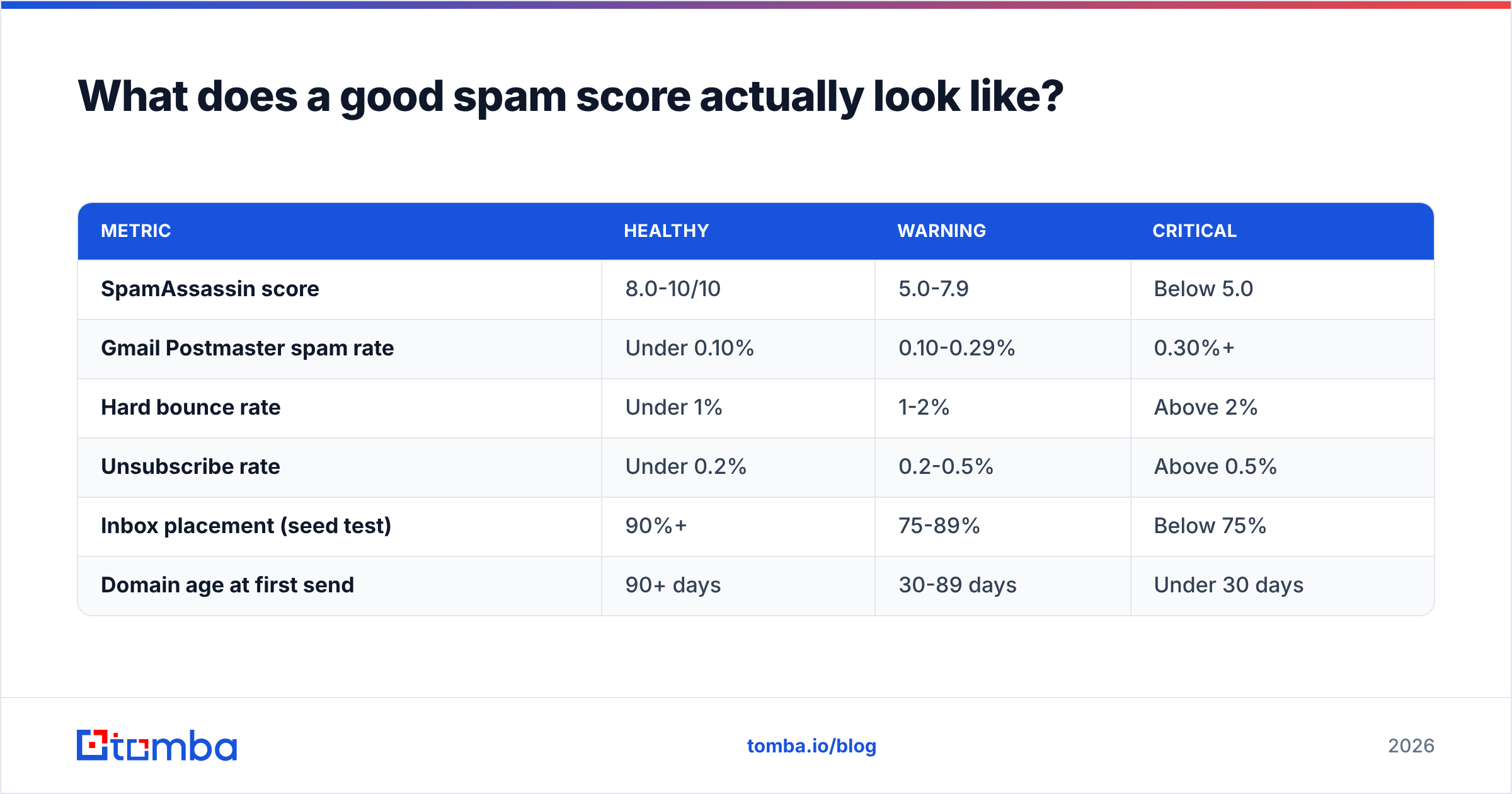
What does a good spam score actually look like?#
Targets, with the caveat that these are thresholds to clear, not goals to optimize:
| Metric | Healthy | Warning | Critical |
|---|---|---|---|
| SpamAssassin score | 8.0-10/10 | 5.0-7.9 | Below 5.0 |
| Gmail Postmaster spam rate | Under 0.10% | 0.10-0.29% | 0.30%+ |
| Hard bounce rate | Under 1% | 1-2% | Above 2% |
| Unsubscribe rate | Under 0.2% | 0.2-0.5% | Above 0.5% |
| Inbox placement (seed test) | 90%+ | 75-89% | Below 75% |
| Domain age at first send | 90+ days | 30-89 days | Under 30 days |
A 10/10 SpamAssassin score with a 0.4% complaint rate is a domain in trouble. A 7/10 score with a 0.02% complaint rate is fine. When the two disagree, the complaint rate wins every time.
What content changes still move the needle?#
Content is a small lever, but it's a free one. These are the changes that still correlate with placement in current filter behavior:
- Ship a plain-text alternative. Multipart/alternative with a genuine text version, not a stripped HTML dump. Missing plain text is one of the few SpamAssassin rules that still tracks real-world filtering. Convert cleanly with an HTML to text pass.
- Keep the image-to-text ratio under 40%. Image-only emails are a classic obfuscation pattern and get treated as such.
- Use your own domain for links. Bit.ly and other shorteners share reputation with whatever else is being shortened that week. Link tracking on a subdomain of your sending domain is safer.
- One CTA link, maybe two. Seven links in a cold email reads as a newsletter blast to a classifier that expects a person-to-person message.
- Write subject lines you'd send a colleague. No ALL CAPS, no more than one punctuation mark, no leading emoji. A subject line tester catches the obvious offenders before you send.
- Include a working unsubscribe. List-Unsubscribe header plus a visible link. Required for bulk senders at Google and Yahoo, and its absence pushes complaints up, which is the metric that actually hurts.
None of this saves a bad list. All of it is worth twenty minutes.
Is a paid deliverability suite worth it over free tools?#
For most teams sending under 10,000 emails a month: no, not initially. The free stack — Postmaster Tools, MxToolbox, a content scanner, and disciplined list verification — covers the failure modes that account for the overwhelming majority of deliverability incidents.
Paid tools earn their price at three specific points. First, when you need continuous automated seed testing across dozens of providers rather than manual spot checks. Second, when you're managing multiple sending domains and need per-domain reputation dashboards. Third, when you need DMARC aggregate report parsing at a volume where reading raw XML stops being viable.
Until you hit one of those, spend the budget on data quality instead. A verified list of 2,000 contacts outperforms an unverified list of 20,000 on every metric that matters, and it protects the domain you'll be sending from for the next five years. Providers like BookYourData and Tomba both approach this from the data-accuracy side rather than the scanner side, which is where the actual leverage sits.
How does list quality connect back to spam scores?#
Directly, and it's the connection most teams miss.
Every invalid address you send to produces a hard bounce. Bounces are reported to mailbox providers as a sender-quality signal. Enough of them and your email deliverability degrades across the board — including for the valid addresses on the same list. At that point your content score becomes irrelevant, because the filter has already decided about your domain before it parses the body.
Spam traps make it worse. A recycled trap is an address that was once real and has been repurposed by a blocklist operator. Hitting one signals that you're mailing a list you haven't cleaned in years. Pristine traps — addresses that were never valid — signal scraped data. Both produce immediate reputation damage that no amount of subject-line polish reverses.
This is why the sequencing in the workflow above puts verification before content testing. You're not being pedantic about order. You're avoiding the situation where you spend a week rewriting copy to fix a problem that was always in the list.
If you're building prospect lists from scratch, sourcing verified addresses at the point of collection is cheaper than cleaning them later. A domain search that returns confidence-scored addresses gives you a list that's already been filtered, rather than one you have to rescue.
Where should you start this week?#
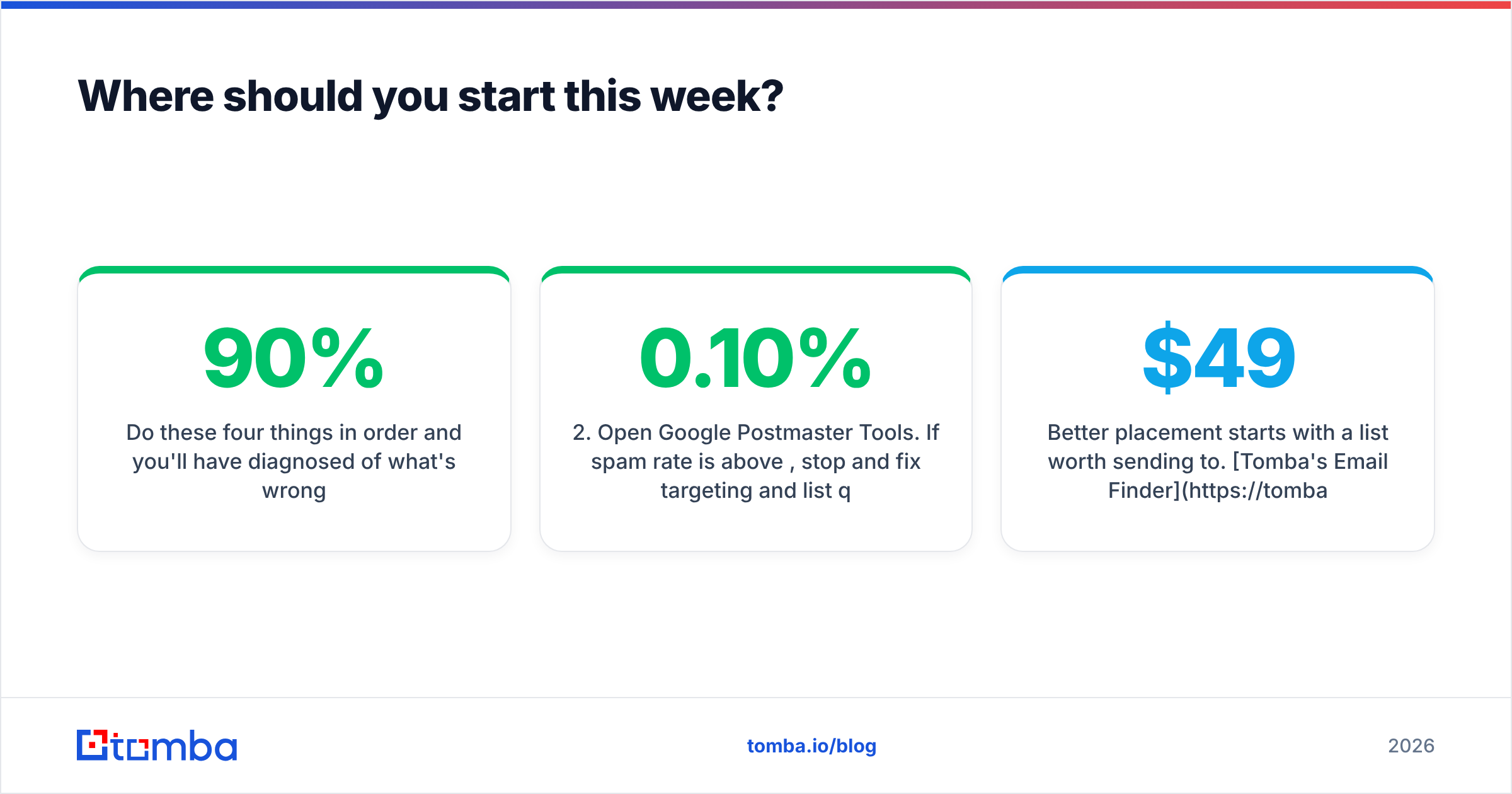
Do these four things in order and you'll have diagnosed 90% of what's wrong:
- Check SPF, DKIM, and DMARC alignment. Fix any failures before touching anything else.
- Open Google Postmaster Tools. If spam rate is above 0.10%, stop and fix targeting and list quality.
- Run a blacklist check on your sending domain and IP.
- Only then run a free spam checker on your actual campaign copy and fix what it flags.
If steps 1-3 come back clean and you're still in spam, the problem is engagement — you're mailing people who don't want to hear from you. That's a targeting problem wearing a deliverability costume, and no tool fixes it.
Better placement starts with a list worth sending to. Tomba's Email Finder returns verified professional addresses with confidence scores so you're not building reputation risk into your list before the first send — free tier included, with transparent pricing from $49/mo when you scale past it.
Related guides#
Ready to find emails that actually work?
Join 150,000+ professionals who stopped guessing and started sending. Free credits on signup — no credit card required.
Get the Tomba newsletter
Practical outbound tactics and product updates — once every two weeks.
About the author