Gmail Changes Since 2024: The 2026 Deliverability Guide
Gmail's 2024 sender rules were never a one-off announcement — they became the permanent floor. Here's what changed, what stuck, and the exact thresholds your domain has to clear in 2026.
TL;DR
- The Gmail changes announced in October 2023 and enforced from February 2024 were not a campaign — they became the permanent baseline. Nothing has been rolled back since.
- Authentication (SPF + DKIM) is required for every sender. Bulk senders — roughly 5,000+ messages a day to Gmail accounts — also need DMARC, aligned domains, one-click unsubscribe, and a spam-complaint rate under 0.3%.
- Microsoft applied near-identical rules to Outlook and Hotmail in May 2025, which means the "Gmail changes" are now effectively the industry standard across the three biggest inbox providers.
- The single metric that kills most cold email programs is the complaint rate, not the bounce rate — but a dirty list drives both.
- Practical fix order: fix DNS records first, then list hygiene, then volume ramp, then content. Doing it in any other order wastes weeks.
What actually changed in Gmail in 2024?#
Google published new email sender guidelines in late 2023 and started enforcing them on February 1, 2024. Yahoo shipped a matching policy on the same timeline. The rules split senders into two buckets.
Every sender, regardless of volume, had to:
- Publish either an SPF or a DKIM record for the sending domain.
- Have valid forward and reverse DNS (a PTR record that resolves back to the sending IP).
- Transmit over TLS.
- Keep spam complaints low, with 0.3% named as the ceiling.
- Format messages according to RFC 5322 and stop impersonating Gmail
From:headers.
Bulk senders — defined as anyone sending close to 5,000 messages or more per day to Gmail addresses — had to do all of the above plus:
- SPF and DKIM, not just one.
- A DMARC record on the sending domain, even at
p=none. - Alignment: the domain in the visible
From:header must match the SPF domain or the DKIM domain. - One-click unsubscribe implemented per RFC 8058, with a visible unsubscribe link in the body, and unsubscribes processed within two days.
Enforcement was phased. Google returned temporary failures on non-compliant mail through spring 2024, then moved to outright rejection later that year. That phasing is why so many teams remember 2024 as "the year our open rates broke" without ever connecting it to a DNS record they never published.
Which Gmail changes still apply in 2026?#
All of them. That is the short version, and it is the reason a post about 2024 still matters two years later.
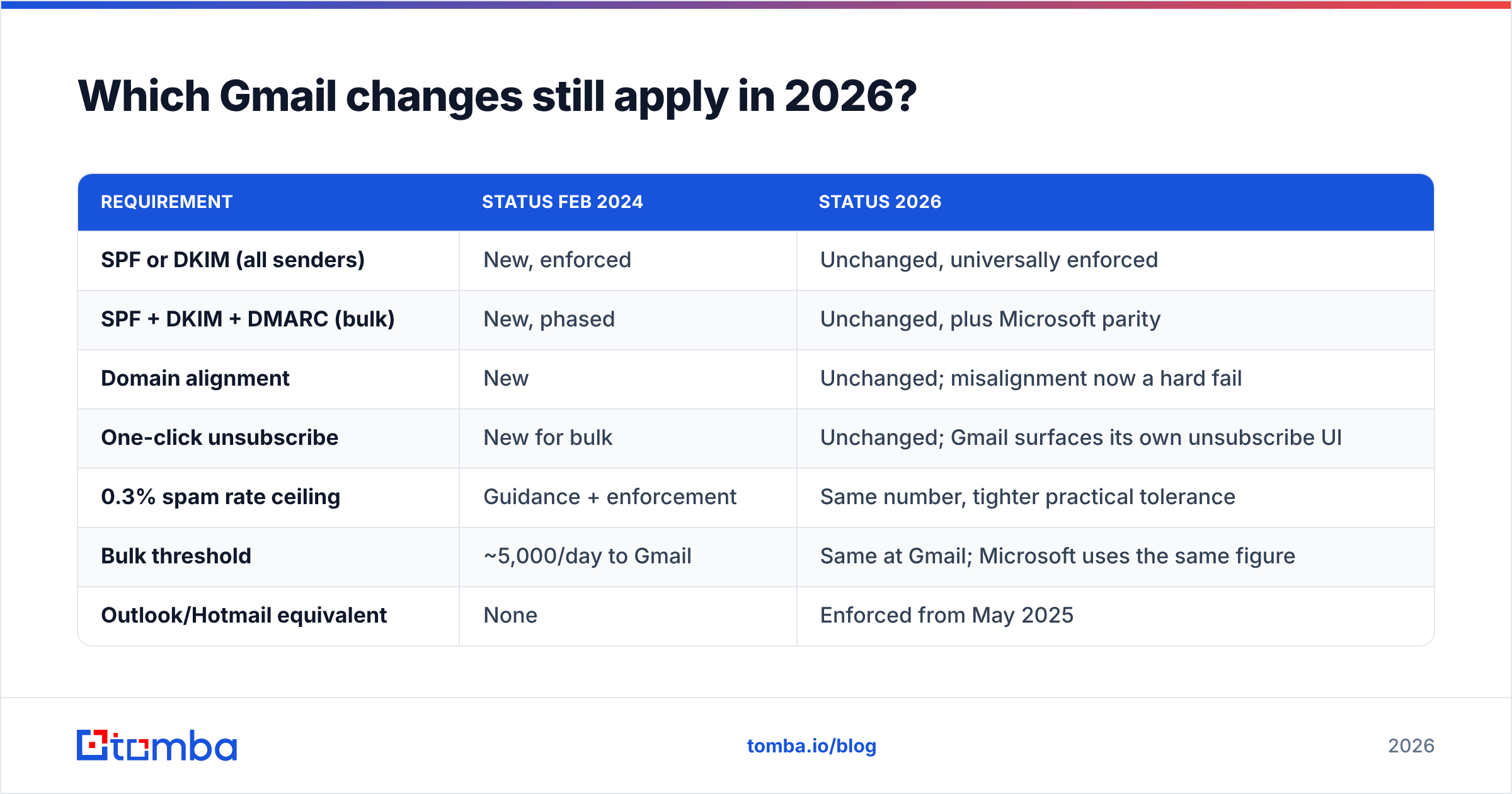
What has shifted is the surrounding landscape, not the Gmail rules themselves:
| Requirement | Status Feb 2024 | Status 2026 |
|---|---|---|
| SPF or DKIM (all senders) | New, enforced | Unchanged, universally enforced |
| SPF + DKIM + DMARC (bulk) | New, phased | Unchanged, plus Microsoft parity |
| Domain alignment | New | Unchanged; misalignment now a hard fail |
| One-click unsubscribe | New for bulk | Unchanged; Gmail surfaces its own unsubscribe UI |
| 0.3% spam rate ceiling | Guidance + enforcement | Same number, tighter practical tolerance |
| Bulk threshold | ~5,000/day to Gmail | Same at Gmail; Microsoft uses the same figure |
| Outlook/Hotmail equivalent | None | Enforced from May 2025 |
The one genuinely new pressure since 2024 is that Gmail keeps making it easier for recipients to unsubscribe or report. Subscription management surfaces added in 2025 pull bulk mail into a dedicated view where a user can cut off an entire sender in one tap. When the cost of a complaint drops for the user, complaint volume rises for you. The threshold did not move. The odds of hitting it did.

Do the Gmail changes apply to you if you send 300 emails a day?#
Yes — just fewer of them, and that distinction trips up more teams than any other part of the policy.
Here is the honest breakdown for a typical outbound setup:
- Authentication applies at any volume. A one-person agency sending 40 cold emails a day still needs SPF or DKIM. There is no small-sender exemption for auth. Missing records is the most common cause of a brand-new domain landing in spam on day one.
- The 5,000/day threshold counts Gmail recipients only. It is not your total daily send. If half your list is Gmail-hosted, you can send 9,000 a day and stay under the bulk definition — technically.
- The threshold is a floor, not a shield. Google has said that once you cross 5,000 in a day, you're treated as a bulk sender permanently. And nothing stops Gmail from filtering a 200/day sender with a 2% complaint rate.
- Sending from a Google Workspace domain does not exempt you. Workspace tenants are subject to the same rules for outbound mail to consumer Gmail.
- Multiple sending domains do not divide your risk cleanly. Reputation is tracked per domain and per IP, but patterns across a domain family are visible to the filter. Domain rotation buys time, not immunity.
- Complaint rate is measured by the receiver, not by you. Your ESP's "unsubscribe rate" is a different number from Gmail's spam rate. Only Postmaster Tools shows you Google's version.
If you want to check the first item in under a minute, run your domain through a SPF checker before you touch anything else. A missing or malformed SPF record explains a startling share of "our deliverability suddenly tanked" tickets.
How do Gmail, Yahoo, and Microsoft requirements compare?#
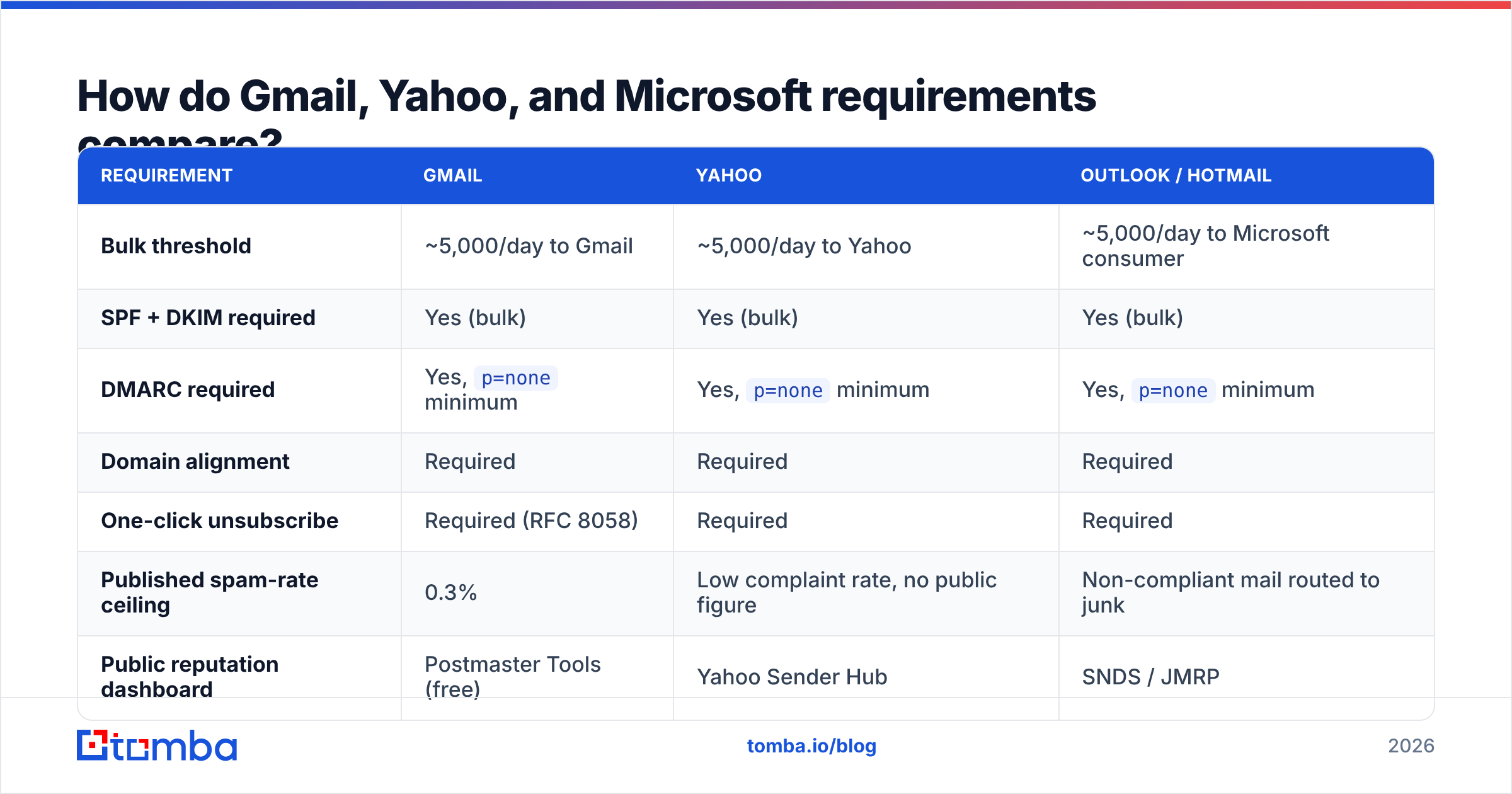
The practical answer in 2026 is that you build for one standard and you satisfy all three. But the details differ enough to matter when you're debugging a specific provider.
| Requirement | Gmail | Yahoo | Outlook / Hotmail |
|---|---|---|---|
| Bulk threshold | ~5,000/day to Gmail | ~5,000/day to Yahoo | ~5,000/day to Microsoft consumer |
| SPF + DKIM required | Yes (bulk) | Yes (bulk) | Yes (bulk) |
| DMARC required | Yes, p=none minimum |
Yes, p=none minimum |
Yes, p=none minimum |
| Domain alignment | Required | Required | Required |
| One-click unsubscribe | Required (RFC 8058) | Required | Required |
| Published spam-rate ceiling | 0.3% | Low complaint rate, no public figure | Non-compliant mail routed to junk |
| Public reputation dashboard | Postmaster Tools (free) | Yahoo Sender Hub | SNDS / JMRP |
| Enforcement start | Feb 2024 | Feb 2024 | May 2025 |
Microsoft's approach at launch was softer in one specific way: rather than rejecting non-compliant bulk mail outright, it routes it to the junk folder. That sounds gentler. It is arguably worse, because you get no bounce, no error code, and no signal that anything is wrong — your campaign just quietly stops working. If your Outlook-heavy segment went silent sometime in 2025, that is the first place to look.
What is the 0.3% spam rate rule really measuring?#
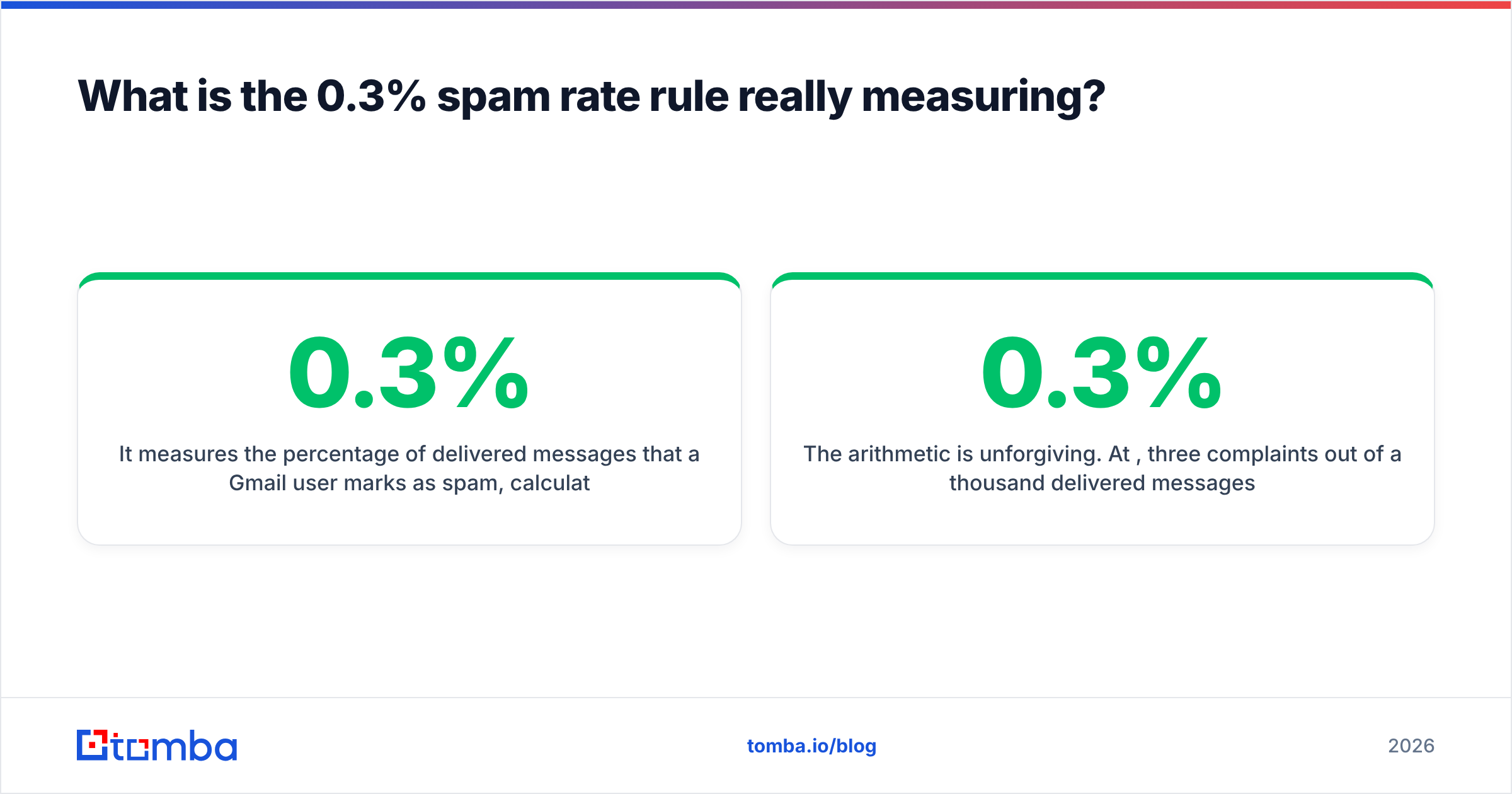
It measures the percentage of delivered messages that a Gmail user marks as spam, calculated daily and visible in Postmaster Tools. Google's own guidance is to stay below 0.3% and treat 0.1% as the real operating target.
The arithmetic is unforgiving. At 0.3%, three complaints out of a thousand delivered messages puts you at the ceiling. If you send 500 emails a day to Gmail addresses, two complaints blows past it. There is no averaging grace period that saves you — Postmaster reports a daily figure, and sustained days above the line are what damages reputation.
Three things drive complaints on cold outbound, in order of impact:
- Sending to people who never should have been on the list. Wrong role, wrong company, wrong continent. This is a data problem, not a copy problem.
- Sending to addresses that were never verified. Bounces and complaints correlate. Dead and guessed addresses on a domain drag the whole domain's reputation down before your good sends ever get judged on merit.
- No obvious way out. If the recipient can't find an unsubscribe link in two seconds, the spam button is the faster exit.
The first two are solvable with data hygiene. Run every list through an email verifier before it goes near a sequencer, and treat catch-all domains as a separate risk tier rather than lumping them in as "valid." A catch-all verifier exists precisely because the standard SMTP handshake tells you nothing useful on those domains — the server accepts everything, including addresses that will hard-bounce internally.
What breaks cold email under the new Gmail rules?#
Six failure modes account for the overwhelming majority of what we see:
Unaligned DMARC. SPF passes, DKIM passes, DMARC still fails because the From: domain is yourcompany.com while the SPF-authenticated envelope domain is your ESP's shared sending domain. Alignment is the requirement — not just individual record validity.
Shared IPs with poor neighbours. Cheap sending infrastructure means your mail leaves from an IP whose reputation you don't control. Check whether your sending IP or domain is listed with a blacklist checker before assuming your content is the issue.
Cold volume ramps. A brand-new domain that goes from zero to 400 sends a day in week one looks exactly like a spam operation, because that is what spam operations do. Model the ramp with a warmup calculator and add weeks, not days.
Guessed addresses at scale. Permutation patterns (first.last@, flast@, first@) produce plausible strings, not real mailboxes. Sending to a permutation list without verification is the fastest known way to manufacture a bounce spike.
Missing list-unsubscribe headers on cold mail. Many teams assume one-click unsubscribe only applies to marketing newsletters. If you cross the bulk threshold, it applies to you, and Gmail checks the header — not your intent.
Treating open rates as a health metric. Privacy proxies inflate and distort opens. Reply rate and Postmaster's reputation graph are the honest signals; open rate is decoration.
Which tools help you comply, and what do they cost?#
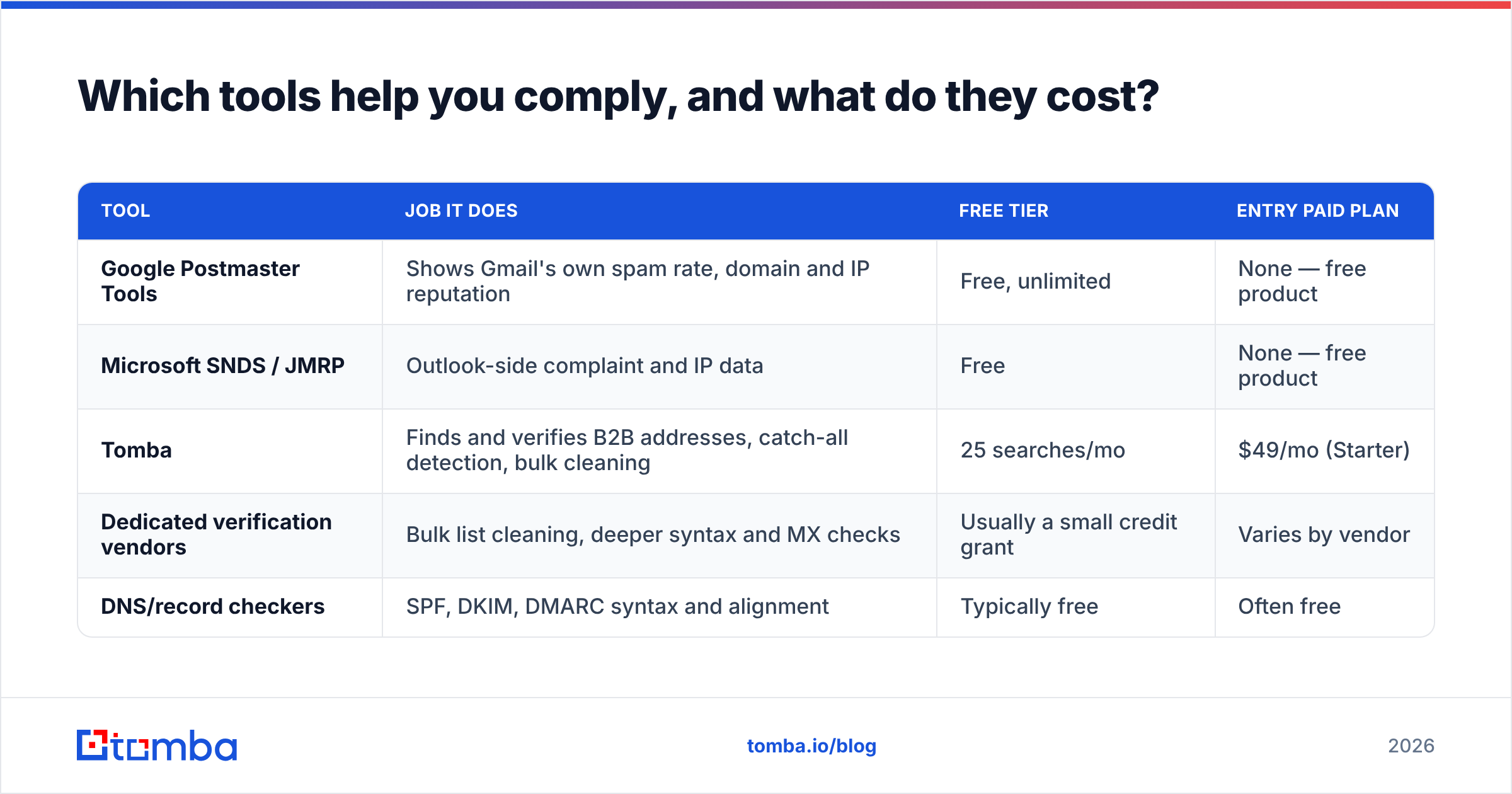
No single product makes you compliant. The stack splits into three jobs: verify the DNS, verify the data, and watch the reputation.
| Tool | Job it does | Free tier | Entry paid plan |
|---|---|---|---|
| Google Postmaster Tools | Shows Gmail's own spam rate, domain and IP reputation | Free, unlimited | None — free product |
| Microsoft SNDS / JMRP | Outlook-side complaint and IP data | Free | None — free product |
| Tomba | Finds and verifies B2B addresses, catch-all detection, bulk cleaning | 25 searches/mo | $49/mo (Starter) |
| Dedicated verification vendors | Bulk list cleaning, deeper syntax and MX checks | Usually a small credit grant | Varies by vendor |
| DNS/record checkers | SPF, DKIM, DMARC syntax and alignment | Typically free | Often free |
Two notes on reading that table honestly. First, Postmaster Tools is non-negotiable and costs nothing — if you are not looking at it weekly, you are guessing about a number Google publishes to you directly. Second, verification vendors overlap heavily; the differentiator is usually catch-all handling and how they price bulk. On the finder side, Tomba pricing runs Free (25 searches/mo), Starter at $49/mo, Growth at $99/mo, and Pro at $249/mo, with verification bundled rather than sold as a separate SKU — which matters when your compliance workflow requires verifying everything you find.
How do you build a Gmail-compliant sending setup from scratch?#
Do these in order. Skipping ahead is how three-week fixes become three-month fixes.
- Publish SPF, DKIM, and DMARC on the sending domain. Start DMARC at
p=nonewith a reporting address so you can see failures before you enforce. - Confirm alignment. Send a test to a Gmail address, open "Show original," and check that SPF, DKIM, and DMARC all read PASS and that the domains match your
From:. - Verify reverse DNS. Your sending IP should resolve to a hostname that resolves back to the same IP.
- Clean the list before the first send. Remove invalids, flag catch-alls, deduplicate. A bulk verify pass on a 10,000-row list typically removes enough dead weight to move your bounce rate by a full percentage point.
- Add List-Unsubscribe and List-Unsubscribe-Post headers. Then actually honor them within two days, automatically.
- Ramp volume over 4–6 weeks and watch Postmaster daily during the ramp.
- Set an alert threshold at 0.1%, not 0.3%. By the time you hit the published ceiling, the damage is already reflected in your reputation score.
If you want the background reading, DMARC is worth understanding at the protocol level rather than as a checkbox — the difference between p=none, p=quarantine, and p=reject determines what happens to mail that fails, including mail forwarded by mailing lists you don't control. Our email deliverability glossary entry covers the shorter version.
Are the Gmail changes actually bad for outbound?#
No — and this is the part most commentary gets wrong.
The 2024 rules punished volume-without-relevance. They did not punish targeted outbound. A team sending 150 well-researched emails a day to verified addresses at accounts that plausibly need the product has never been closer to the ceiling than a team blasting 8,000 scraped rows. The rules raised the cost of bad data and left the cost of good data unchanged.
What changed is where the work sits. Before 2024, you could compensate for a mediocre list with volume. After 2024, volume amplifies list quality in both directions. That pushes effort upstream — into finding the right person, confirming the address resolves, and confirming the company is a real fit — which is where it should have been.
The bottom line#
The Gmail changes from 2024 are now permanent infrastructure, matched by Yahoo and, since May 2025, by Microsoft. Nothing about them is exotic: authenticate properly, let people leave easily, and don't send to addresses that generate complaints. The technical half is a weekend of DNS work. The data half is ongoing.
Start with the data half, because it is the part that never stops mattering. Build your lists with the Tomba Email Finder so every address is sourced and verified before it enters a sequence, rather than cleaned up after the bounce report lands. The free tier covers 25 searches a month if you want to test the accuracy against a domain you already know well — which is exactly how you should evaluate any provider in this category.
Related guides#
Ready to find emails that actually work?
Join 150,000+ professionals who stopped guessing and started sending. Free credits on signup — no credit card required.
Get the Tomba newsletter
Practical outbound tactics and product updates — once every two weeks.
About the author