Gmail Email Deliverability: The 2026 Guide to the Inbox
Gmail decides in milliseconds whether your cold email lands in Primary, Promotions, or spam. Here is exactly what its 2026 rules check, how to read Postmaster Tools, and the fixes that actually move the needle.
TL;DR
- Gmail handles roughly 1.8 billion mailboxes. If your cold email program is broken anywhere, it is usually broken at Gmail first — and Gmail tells you almost nothing directly.
- Since February 2024, bulk senders (5,000+ messages/day to Gmail) must pass SPF, DKIM, and DMARC alignment, use TLS, offer one-click unsubscribe, and keep the Postmaster Tools spam rate under 0.30%. In 2026 those rules are enforced tightly and applied in spirit to smaller senders too.
- The single biggest lever most teams ignore is list quality. Invalid addresses trigger hard bounces, hard bounces wreck domain reputation, and reputation drives placement more than copy ever will.
- Promotions-tab placement is not a deliverability failure — it is a content classification. Fix it with plain-text-style formatting and fewer tracked links, not with authentication changes.
- Run this order: authenticate → warm up → verify the list → cap volume per domain → monitor Postmaster daily. Skipping straight to copy tweaks is how teams burn domains.
Why is Gmail the deliverability benchmark everyone worries about?#
Because Gmail is both the biggest receiver and the strictest grader. When a B2B list gets pulled from a CRM, somewhere between 35% and 60% of it is typically Google Workspace — which runs the same filtering stack as consumer Gmail. So your Gmail placement rate effectively is your campaign's ceiling.
Gmail also grades on a curve you cannot see. Microsoft gives you SNDS data. Gmail gives you Postmaster Tools, which shows domain reputation as a four-bucket label (Bad / Low / Medium / High) and only unlocks data once you cross a daily volume threshold. Below that threshold you are flying blind, which is exactly where most outbound teams live.
The practical consequence: with Gmail you cannot debug reactively. You have to get the inputs right before you send, because the feedback loop is slow, coarse, and sometimes silent. A domain can go from "everything's fine" to "every message lands in spam" in 48 hours with no warning email.
What does Gmail actually check before delivering your email?#
Gmail's filtering runs in layers. Each layer can downgrade you, and failing an early layer makes the later ones irrelevant.
- Connection and authentication. Is the connection over TLS? Does SPF pass? Is there a valid DKIM signature? Does DMARC pass with alignment — meaning the domain in the visible From header matches the SPF or DKIM domain? Fail here and you are frequently rejected outright.
- Sender identity and reputation. Gmail keeps reputation scores on your sending domain, your sending IP, and increasingly the subdomain. New domains start neutral-to-suspicious. Old domains with clean histories get benefit of the doubt.
- Recipient engagement signals. Opens matter less than people think; replies, stars, "move to Primary," and "not spam" matter enormously. Deletes-without-open and spam complaints matter in the other direction.
- List hygiene signals. Hard bounces to nonexistent addresses tell Gmail you did not verify your list. A spike is read as list purchasing or scraping.
- Content classification. Only after you clear the above does Gmail decide Primary vs Promotions vs Updates. This is a tab assignment problem, not a spam problem.
That ordering matters. Rewriting subject lines to escape the spam folder when your DMARC is failing is like repainting a car with no engine.
What are Gmail's 2026 bulk sender requirements?#
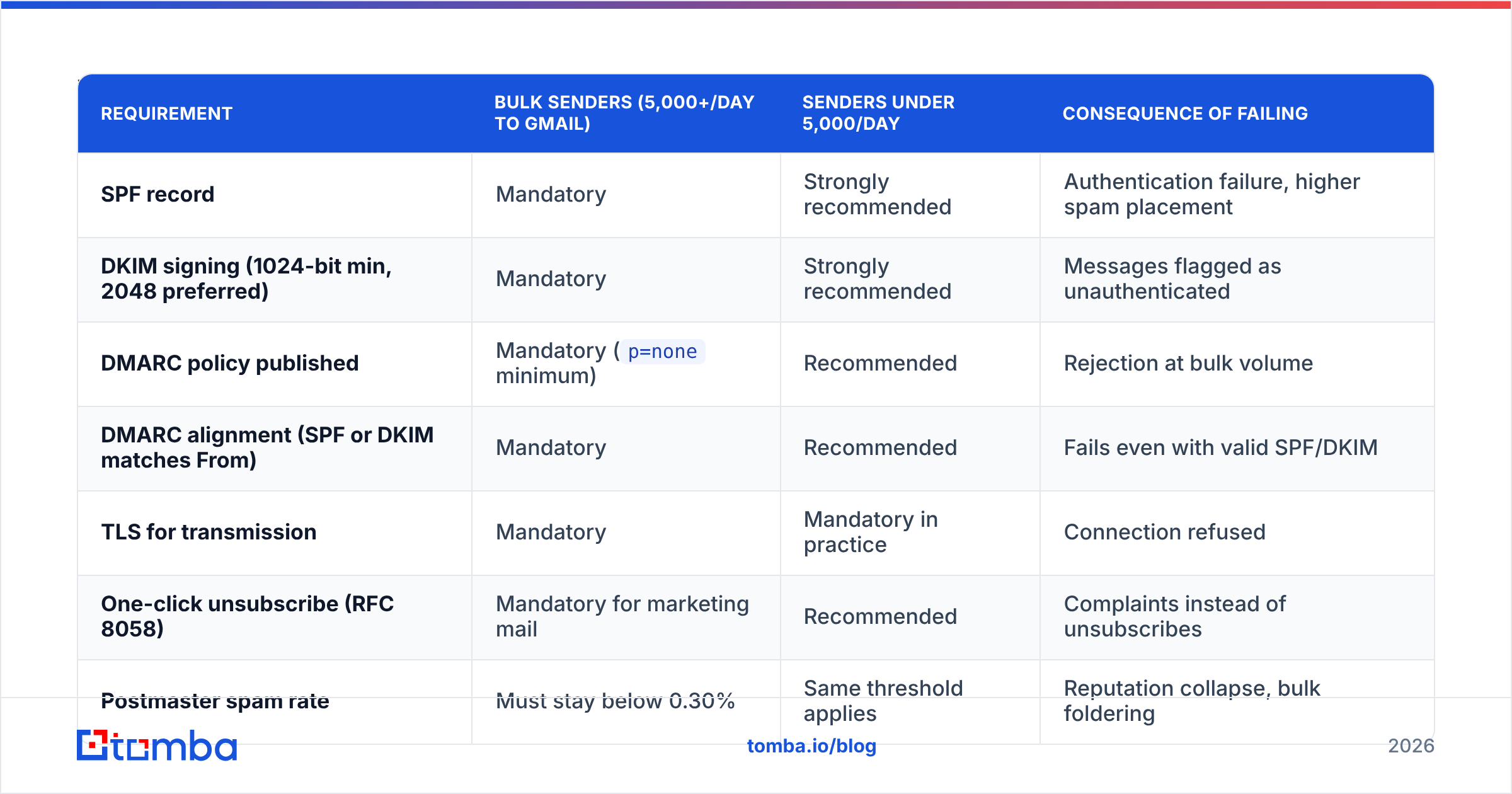
Google's bulk sender guidelines set the floor. They were introduced in 2024, tightened through 2025, and are now the assumed baseline. Here is the current shape of them alongside what smaller senders should do even when technically exempt.
| Requirement | Bulk senders (5,000+/day to Gmail) | Senders under 5,000/day | Consequence of failing |
|---|---|---|---|
| SPF record | Mandatory | Strongly recommended | Authentication failure, higher spam placement |
| DKIM signing (1024-bit min, 2048 preferred) | Mandatory | Strongly recommended | Messages flagged as unauthenticated |
| DMARC policy published | Mandatory (p=none minimum) |
Recommended | Rejection at bulk volume |
| DMARC alignment (SPF or DKIM matches From) | Mandatory | Recommended | Fails even with valid SPF/DKIM |
| TLS for transmission | Mandatory | Mandatory in practice | Connection refused |
| One-click unsubscribe (RFC 8058) | Mandatory for marketing mail | Recommended | Complaints instead of unsubscribes |
| Postmaster spam rate | Must stay below 0.30% | Same threshold applies | Reputation collapse, bulk foldering |
| Valid forward and reverse DNS (PTR) | Mandatory | Mandatory in practice | Connection throttling |
The 0.30% spam-rate number deserves emphasis. That is three complaints per thousand delivered messages. Google's own guidance is to target under 0.10% and treat 0.30% as the cliff edge, not the target. At 0.30% Gmail does not politely degrade — placement falls off sharply and recovery takes weeks.
One nuance teams miss: DMARC alignment is separate from DMARC passing. You can have a perfect SPF record for your ESP and still fail alignment because the envelope-from domain is the ESP's, not yours. Custom return-path or a DKIM signature on your own domain fixes it. Check with a SPF checker before you assume your setup is clean.
How do you read Gmail Postmaster Tools without guessing?#
Postmaster Tools is free, takes ten minutes to set up (you verify your sending domain via DNS TXT record), and is the only direct window Gmail gives you.
[Screenshot placeholder: Google Postmaster Tools domain reputation dashboard showing a High/Medium reputation timeline over 30 days]
The dashboards that matter, in priority order:
- Spam Rate. User-reported complaints as a share of delivered mail. Watch daily. Any single-day spike above 0.10% means investigate the campaign that sent that day.
- Domain Reputation. Four buckets. "High" is where you want to live. "Medium" means you are one bad campaign from trouble. "Low" or "Bad" means stop sending from that domain and start remediation.
- IP Reputation. Relevant if you send on dedicated IPs. On shared ESP infrastructure this reflects your neighbors as much as you.
- Authentication. Per-day percentages of mail passing SPF, DKIM, and DMARC. This should be 100% or near it. Anything below 98% means a misconfigured stream somewhere — often a transactional system nobody remembers.
- Encryption. Should be 100% TLS. If not, your sending infrastructure has a gap.
- Delivery Errors. Shows rate-limiting and rejection reasons. A rising "rate limited" share means you are sending too fast for your reputation level.
[Screenshot placeholder: Postmaster Tools spam rate graph with a visible spike after a campaign send]
The interpretation trick: correlate the graphs with your send calendar. Reputation dips are almost never mysterious. They map to a specific list, a specific day, and usually a specific source of addresses.
Why does list quality matter more than copy for Gmail deliverability?#
Because bounces are the fastest way to convince Gmail you are a spammer, and no subject line survives a bad reputation.
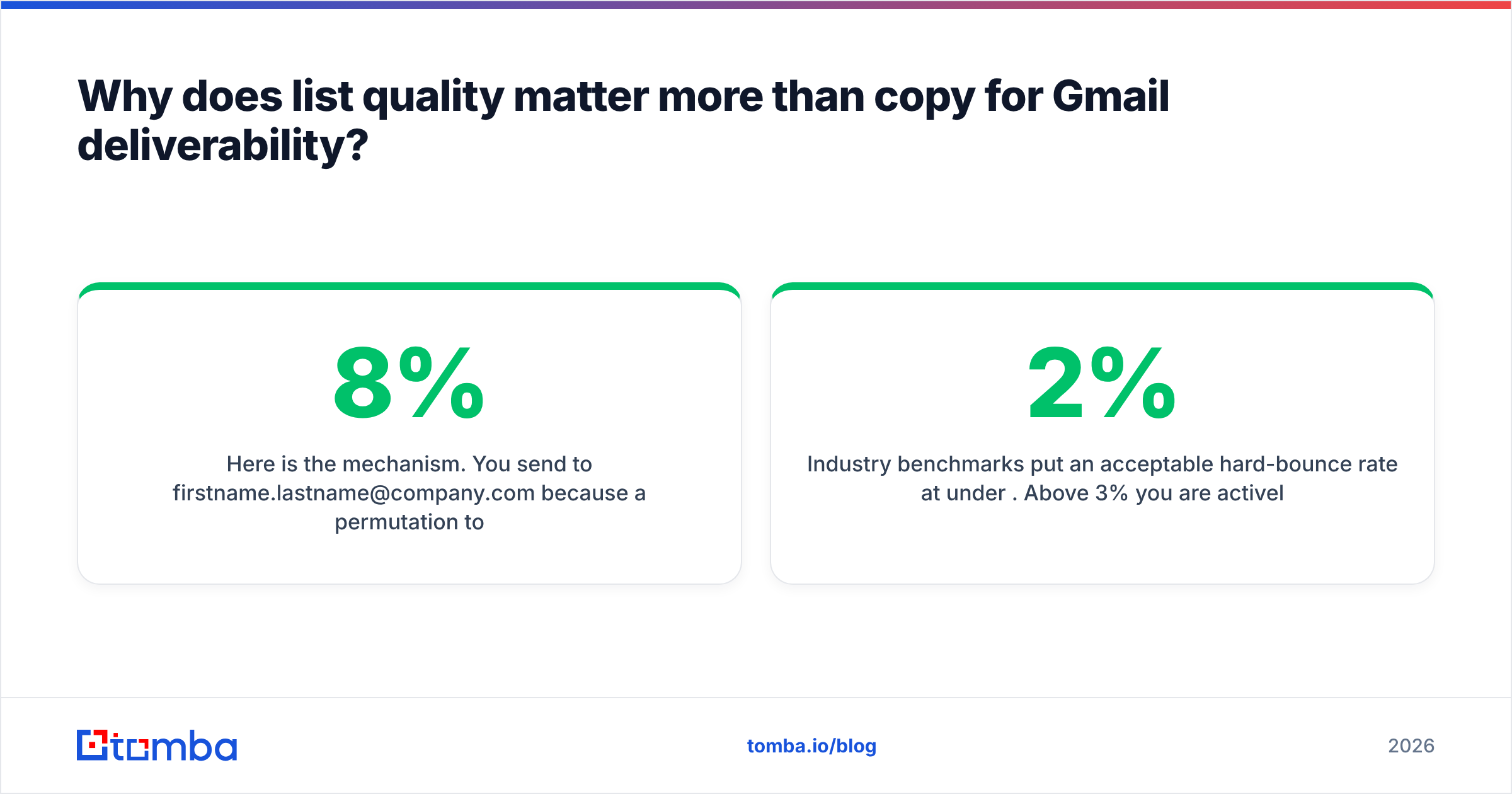
Here is the mechanism. You send to firstname.lastname@company.com because a permutation tool guessed it. The address does not exist. Google Workspace returns a 550 hard bounce. Do that on 8% of a 2,000-address campaign and you have generated 160 hard bounces in an hour — a pattern that no legitimate opt-in list produces. Gmail's classifier reads that as list acquisition without consent, and it throttles you.
Industry benchmarks put an acceptable hard-bounce rate at under 2%. Above 3% you are actively damaging reputation. Above 5% you are in remediation territory.
This is why verification is not an optional cost line. Running addresses through an email verifier before send converts a reputation risk into a known quantity. Catch-all domains are the tricky middle: they accept everything at the SMTP layer, so a naive verifier marks them "valid" and you find out the truth from bounce logs. A dedicated catch-all verifier narrows those down using pattern confidence and secondary signals rather than shrugging.
The sourcing side matters just as much. Addresses found via a domain search against a company's actual verified pattern bounce far less than permutated guesses, because they are derived from observed addresses rather than invented ones.

How should you warm up a domain for Gmail specifically?#
Slowly, and with real conversations mixed in.
Gmail evaluates trajectory, not just volume. A brand-new domain that sends 500 emails on day one looks like a burner. A domain that sends 15 on day one, 25 on day three, and 60 by week two — with replies coming back — looks like a person starting a job.
A workable ramp for a fresh sending domain:
- Days 1–7: 10–20 sends/day. Mostly to colleagues and warm contacts who will reply. Reply rate is the signal you are buying here.
- Days 8–21: 25–60/day. Introduce real prospects, keep replies flowing, keep the list surgically verified.
- Days 22–45: 60–120/day. Watch Postmaster daily. Any reputation dip means hold volume flat, do not push.
- Day 45+: Cap at 150–250/day per mailbox for cold outbound. Add mailboxes rather than raising per-mailbox volume.
Two constraints most guides skip. First, warm your domain, not just your mailbox — reputation attaches primarily to the domain. Second, if you are using a subdomain (mail.yourcompany.com) for outbound, it inherits some parent-domain trust but builds its own reputation, which is the entire point of using one: your cold outbound cannot torch your corporate domain.
On warmup tools: automated reciprocal warmup networks (Instantly, Warmbox, Mailreach) still work, but Gmail has gotten measurably better at spotting synthetic engagement loops since 2024. Treat them as supplementary, not as the strategy. A warmup calculator helps you plan a ramp; real replies from real humans are what actually build trust.
Primary or Promotions — how do you influence which tab Gmail picks?#
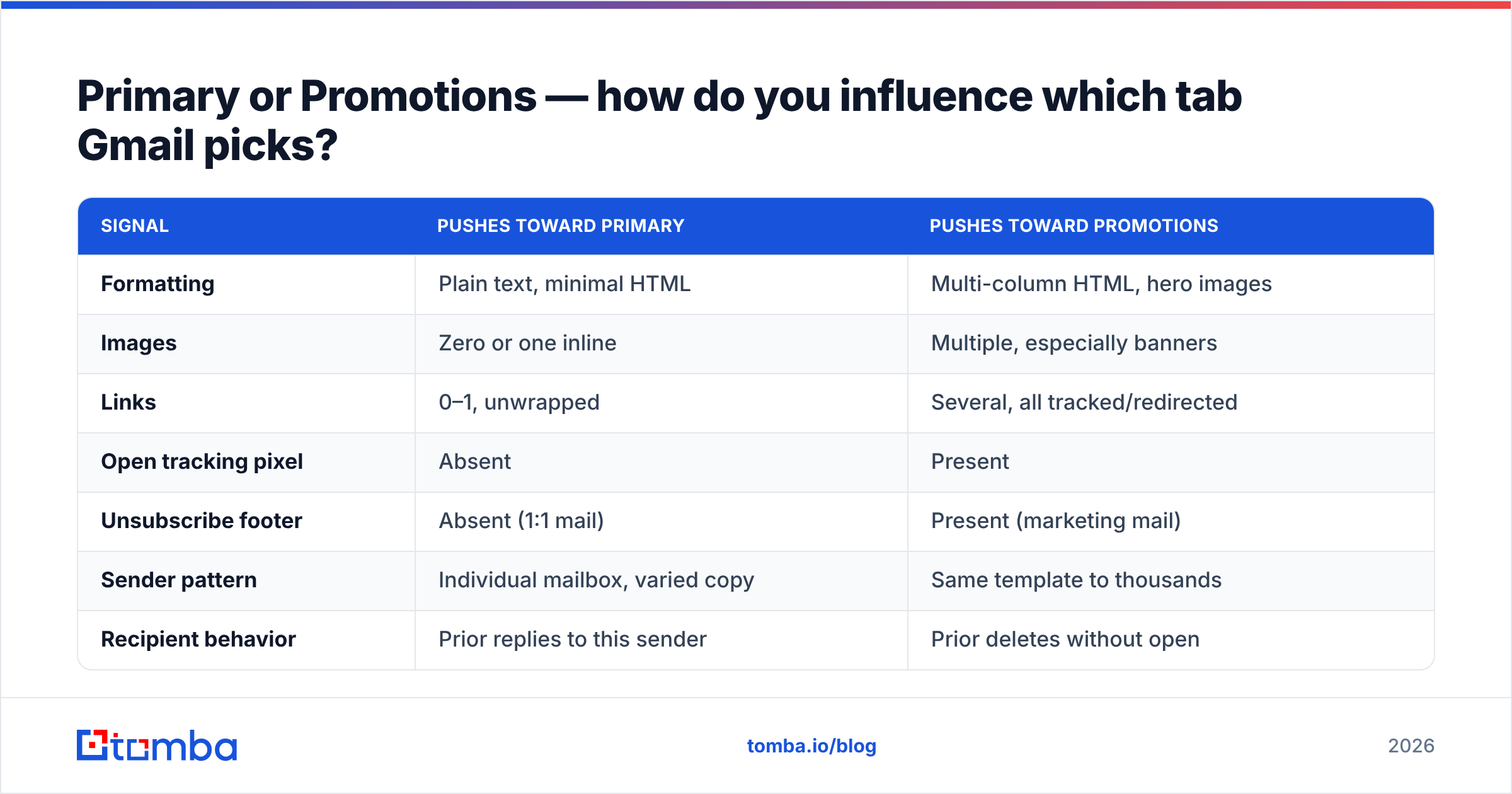
Tab placement is a content-classification decision, and it responds to different levers than spam filtering.
| Signal | Pushes toward Primary | Pushes toward Promotions |
|---|---|---|
| Formatting | Plain text, minimal HTML | Multi-column HTML, hero images |
| Images | Zero or one inline | Multiple, especially banners |
| Links | 0–1, unwrapped | Several, all tracked/redirected |
| Open tracking pixel | Absent | Present |
| Unsubscribe footer | Absent (1:1 mail) | Present (marketing mail) |
| Sender pattern | Individual mailbox, varied copy | Same template to thousands |
| Recipient behavior | Prior replies to this sender | Prior deletes without open |
For cold outbound, the practical recipe is boring on purpose: send from a real named mailbox, write in plain text or the barest HTML, use at most one link, and turn open tracking off. Link-tracking redirects through a shared tracking domain are one of the most common causes of Promotions placement — and of spam placement when the shared domain has been abused by someone else. If you must track, use a custom tracking domain you control.
Note the tradeoff honestly: killing open tracking means losing open-rate data. Given that Apple Mail Privacy Protection already made open rates largely fictional, that is a small price for better placement. Measure replies instead.
What does a working Gmail deliverability stack look like?#
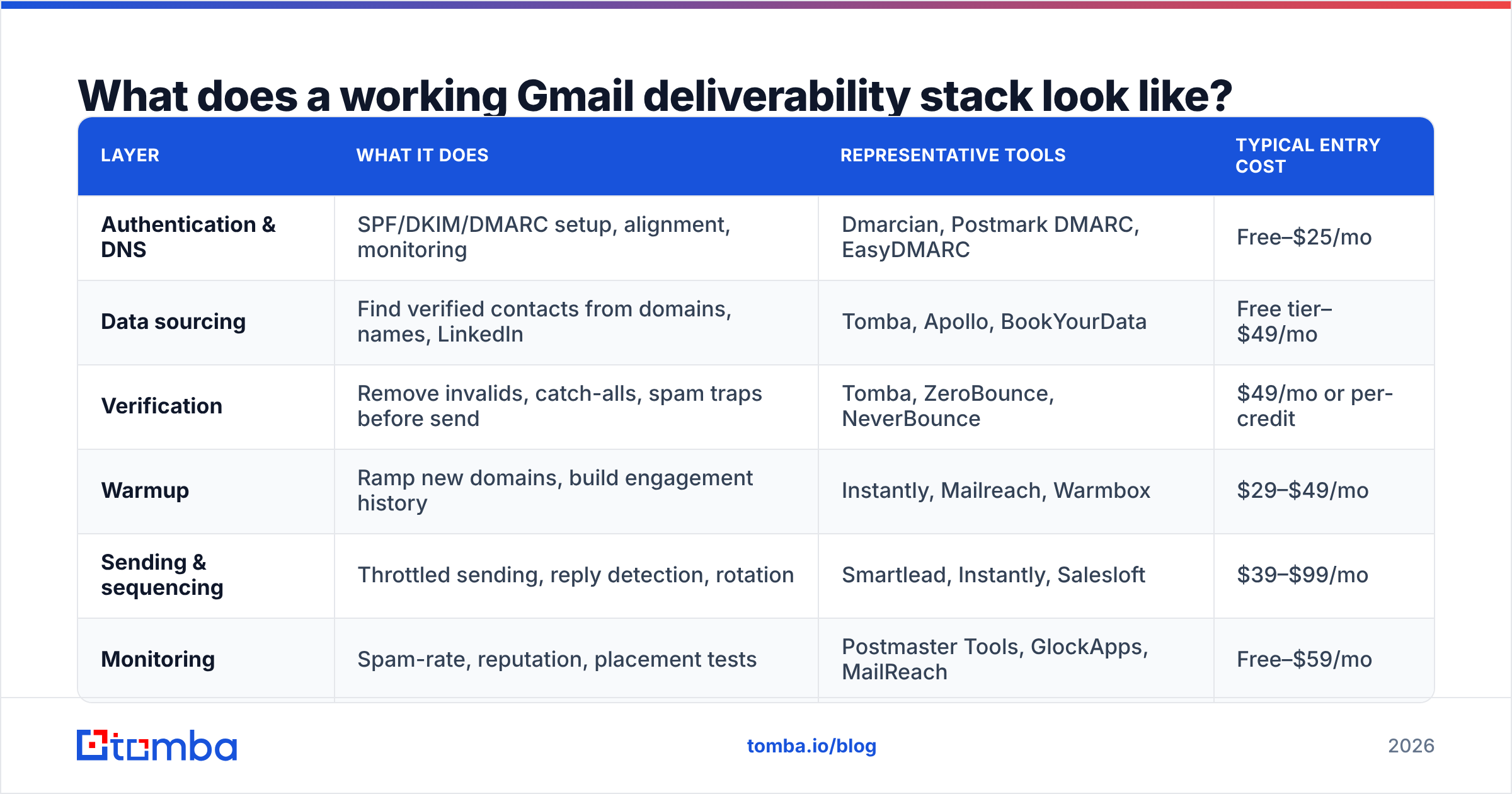
Different tools solve different layers, and no single vendor covers all of them well. Here is how the common categories compare.
| Layer | What it does | Representative tools | Typical entry cost |
|---|---|---|---|
| Authentication & DNS | SPF/DKIM/DMARC setup, alignment, monitoring | Dmarcian, Postmark DMARC, EasyDMARC | Free–$25/mo |
| Data sourcing | Find verified contacts from domains, names, LinkedIn | Tomba, Apollo, BookYourData | Free tier–$49/mo |
| Verification | Remove invalids, catch-alls, spam traps before send | Tomba, ZeroBounce, NeverBounce | $49/mo or per-credit |
| Warmup | Ramp new domains, build engagement history | Instantly, Mailreach, Warmbox | $29–$49/mo |
| Sending & sequencing | Throttled sending, reply detection, rotation | Smartlead, Instantly, Salesloft | $39–$99/mo |
| Monitoring | Spam-rate, reputation, placement tests | Postmaster Tools, GlockApps, MailReach | Free–$59/mo |
On the data layer specifically: Tomba pricing starts with a free tier at 25 searches/month, then $49/mo Starter, $99/mo Growth, and $249/mo Pro, with finder and verifier bundled rather than sold as separate SKUs — which matters because sourcing and verification should be one workflow, not two vendors. BookYourData takes a different and legitimate approach with pay-as-you-go prebuilt B2B lists and a bounce guarantee, which suits teams that want a delivered list rather than a search workflow. Both are reasonable; the choice depends on whether you are enriching known accounts or buying net-new coverage.
Whatever you assemble, avoid the trap of buying a sending tool first. Sending infrastructure amplifies whatever list quality you feed it — in both directions.
What breaks Gmail deliverability fastest? (Ranked)#
- Unverified lists. Hard-bounce spikes are the number one reputation killer. Verify every address, every time, no exceptions.
- DMARC misalignment. Silent, common, and fatal at volume. Test it, do not assume it.
- Volume ramps that outpace reputation. Going 20 → 400/day in a week reads as compromise or abuse.
- Shared tracking domains. You inherit the reputation of everyone else using it.
- Spam-trap hits. Recycled addresses on old lists. Anything sourced more than 12 months ago should be re-verified or discarded.
- Complaint-generating copy. Fake personalization ("I loved your post about—") and false-familiarity openers ("as discussed") drive the spam button harder than a straightforward pitch.
- No unsubscribe path on bulk mail. People who cannot opt out will report instead. That is a 0.30% problem waiting to happen.
For a deeper background on how receivers score senders, G2's deliverability category and the DMARC specification overview are both worth an hour of reading. Also worth bookmarking Tomba's glossary entries on email deliverability and sender reputation for the working definitions.
What is the 30-day recovery plan if Gmail already flagged you?#
If your Postmaster domain reputation is Low or Bad, stop sending from that domain immediately. Continuing to send is the most common mistake, and it extends recovery from weeks to months.
- Days 1–3: Halt all cold outbound from the affected domain. Audit SPF, DKIM, DMARC, PTR, and TLS. Fix any authentication gap.
- Days 4–7: Re-verify your entire remaining list. Discard anything you cannot confirm, including all catch-alls you have not validated. Delete addresses older than 12 months outright.
- Days 8–14: Resume at 10–15 sends/day to warm contacts only. Target replies, not volume. Watch spam rate daily.
- Days 15–30: Ramp to 40–60/day if and only if reputation moves toward Medium. If it does not move, the domain may be unrecoverable — provision a fresh subdomain and rebuild.
Reality check: badly burned domains sometimes do not recover. If you are three weeks in with no movement, cut losses, register a new sending subdomain, and apply everything above from day one. The cost of a new domain is trivial next to the cost of a quarter of throttled pipeline.
Getting the inputs right#
Gmail deliverability is not a copywriting problem or a mystery. It is a chain: authenticate correctly, ramp honestly, send to addresses that exist, and watch the one dashboard Gmail gives you. The chain breaks most often at the third link — the list.
If you want to close that gap, start where the bounces come from. The Tomba Email Finder sources addresses from verified company patterns rather than guessing permutations, and every result runs through verification before it reaches your sequencer — so the list you hand Gmail is one it has no reason to distrust. Free tier is 25 searches a month if you want to test the bounce rate against your current source before committing.
Related guides#
Ready to find emails that actually work?
Join 150,000+ professionals who stopped guessing and started sending. Free credits on signup — no credit card required.
Get the Tomba newsletter
Practical outbound tactics and product updates — once every two weeks.
About the author