Gmail Emails Going to Spam? How to Fix It in 2026
Gmail is the strictest inbox in B2B. Here's the exact diagnostic order — auth, complaint rate, list hygiene, content — that gets cold and transactional email back into the primary tab.
TL;DR
- Gmail placement is decided mostly by recipient behavior, not by your subject line. Complaint rate above 0.30% in Postmaster Tools is the single loudest signal that you are headed for spam.
- Since Google's February 2024 bulk-sender rules — now fully enforced in 2026 — SPF, DKIM, and DMARC are table stakes. Missing any one of them explains a large share of "my Gmail emails are going to spam" cases outright.
- Bad data is the hidden cause. Sending to stale or guessed addresses drives bounces and spam-trap hits, which Gmail reads as list-buying behavior.
- Fix in this order: authentication → list quality → volume and ramp → complaint rate → content. Skipping to content rewrites is why most teams stay stuck.
- One tab drop is a signal, not a verdict. Measure over 7-day rolling windows in Google Postmaster Tools, not per-campaign.
Why are my Gmail emails going to spam in the first place?#
Because Gmail treats every incoming message as a prediction problem, not a rules check. It asks: will this specific recipient want this? Everything else — SPF records, DKIM keys, sending IPs — feeds that one prediction.
Think of it like a nightclub door. Authentication is your ID: without it you don't get past the rope at all. But having valid ID doesn't get you in. The bouncer also remembers who caused trouble last weekend, whether people who came with you got thrown out, and whether the guest list looks bought. That memory is your domain and IP reputation.
Two things follow from this model:
- Content is the last input, not the first. A perfectly written email from a domain with a 0.8% complaint rate lands in spam. A mediocre email from a clean domain lands in the primary tab.
- Gmail decides per recipient cluster. Your email can hit the inbox for one Gmail user and spam for another, based on how similar users treated your prior messages.
If you only take one thing away: stop A/B testing subject lines to fix deliverability. Open Google Postmaster Tools and read the actual numbers first.
What are the five causes of Gmail spam placement, in priority order?#
Work them top to bottom. Each layer gates the ones below it — there is no point tuning copy if DMARC is failing.
- Authentication failures — SPF, DKIM, or DMARC missing, misaligned, or broken after a domain change. Gmail requires all three for anyone sending 5,000+ messages a day to Gmail addresses, and increasingly penalizes unauthenticated low-volume senders too.
- List quality and bounce rate — hard bounces above roughly 2–3% tell Gmail your list wasn't earned. Spam traps and recycled addresses are the fastest route to a domain-level block.
- Volume shape and ramp — going from 20 sends/day to 800 in a week reads as a compromised account. New domains need 3–6 weeks of gradual ramp.
- Complaint rate — the "Report spam" button. Google's own guidance is to stay under 0.30% and aim for under 0.10%. This is the metric that turns a soft warning into a hard reputation drop.
- Content and link signals — link shorteners, mismatched display domains, image-only emails, spammy tracking-domain reputation, and unsubscribe headers. Real, but far down the list.
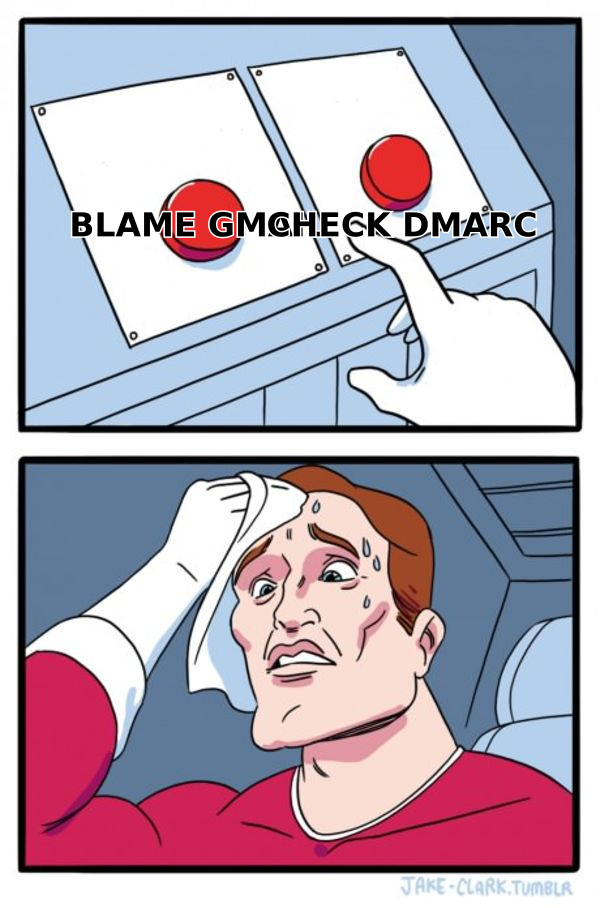
How do I check if authentication is actually the problem?#
Run three checks. Each takes under five minutes and each has a binary answer.
SPF. Look up your sending domain's TXT record and confirm every sending service is included. The most common failure is exceeding the 10-DNS-lookup limit after adding a fourth or fifth tool — SPF then returns permerror and Gmail treats it as a fail. Use an SPF checker to confirm the record resolves and count the lookups.
DKIM. Send yourself a message at a Gmail address, open it, click the three dots, and choose "Show original." You want PASS on SPF, DKIM, and DMARC. If DKIM shows the shared domain of your email platform rather than your own, you have not completed custom-domain signing — do that before anything else.
DMARC. A published policy of at least p=none with a reporting address is the minimum in 2026. p=quarantine or p=reject is stronger and increasingly expected. Critically, DMARC requires alignment: the From: domain must match the DKIM signing domain or the SPF envelope domain. Misalignment is why plenty of senders show SPF pass, DKIM pass, and DMARC fail simultaneously.
If all three pass and you're still in spam, the problem is reputation — move on.
What does list quality have to do with Gmail spam placement?#
More than most teams believe. Gmail's classifier looks at the composition of your recipient list as an indicator of how you obtained it.
Three distinct data problems produce three distinct symptoms:
- Invalid addresses → hard bounces. Above 2%, mailbox providers start throttling. Above 5%, expect a reputation drop that takes weeks to reverse.
- Recycled spam traps → abandoned addresses that Gmail reactivated as traps. They accept mail silently, so you see no bounce — just a quiet decline in inbox rate. This is the most insidious failure mode.
- Catch-all domains → addresses that accept everything and reveal nothing. They inflate your "valid" count while a chunk of them route to nowhere or to a shared inbox that reports spam.
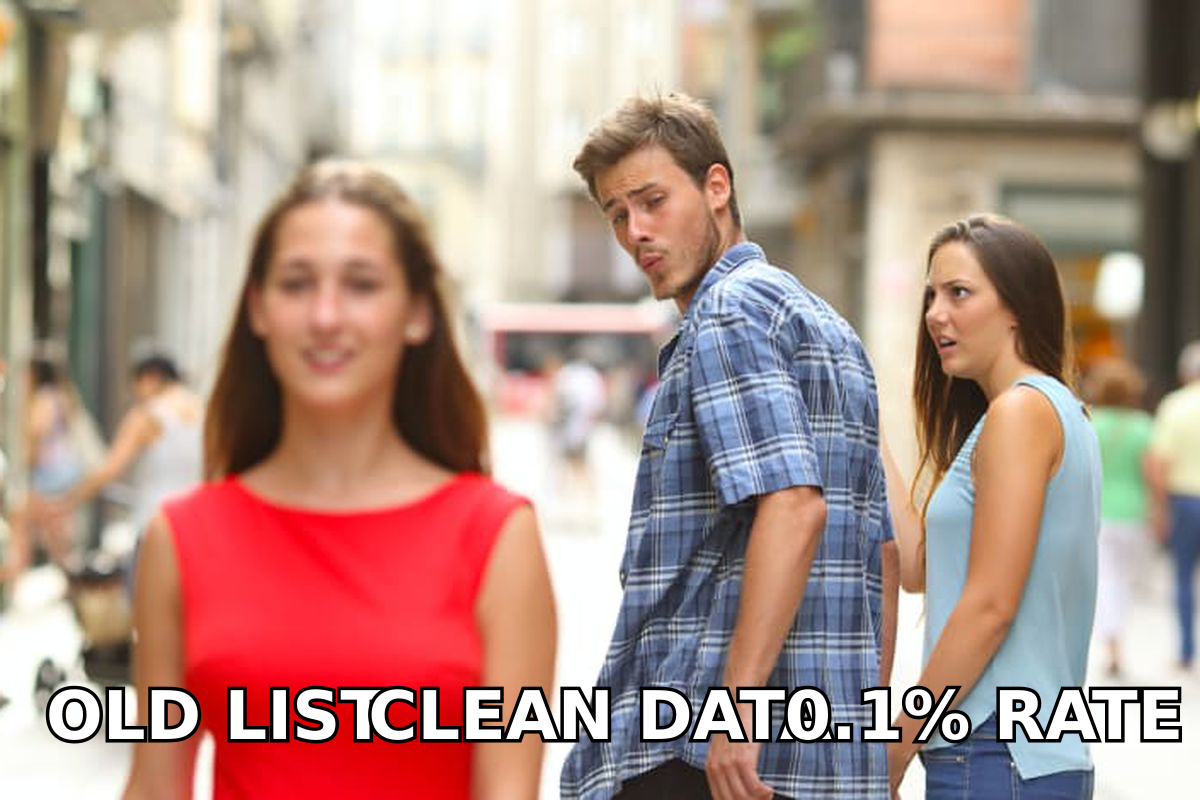
The fix is upstream of sending. Do not export a list and blast it. Verify before the first send, and re-verify anything older than 90 days. A proper email verifier catches syntax errors, dead domains, role accounts, and disposable addresses; a catch-all verifier handles the ambiguous middle that basic checkers mark "unknown" and quietly pass through.
Guessed patterns are a related trap. Permutating first.last@domain.com and hoping is exactly the behavior Gmail's models are tuned to detect, because the misses generate a bounce signature no legitimate opt-in list produces. Sourcing verified addresses through an email finder rather than a permutator changes your bounce profile immediately.
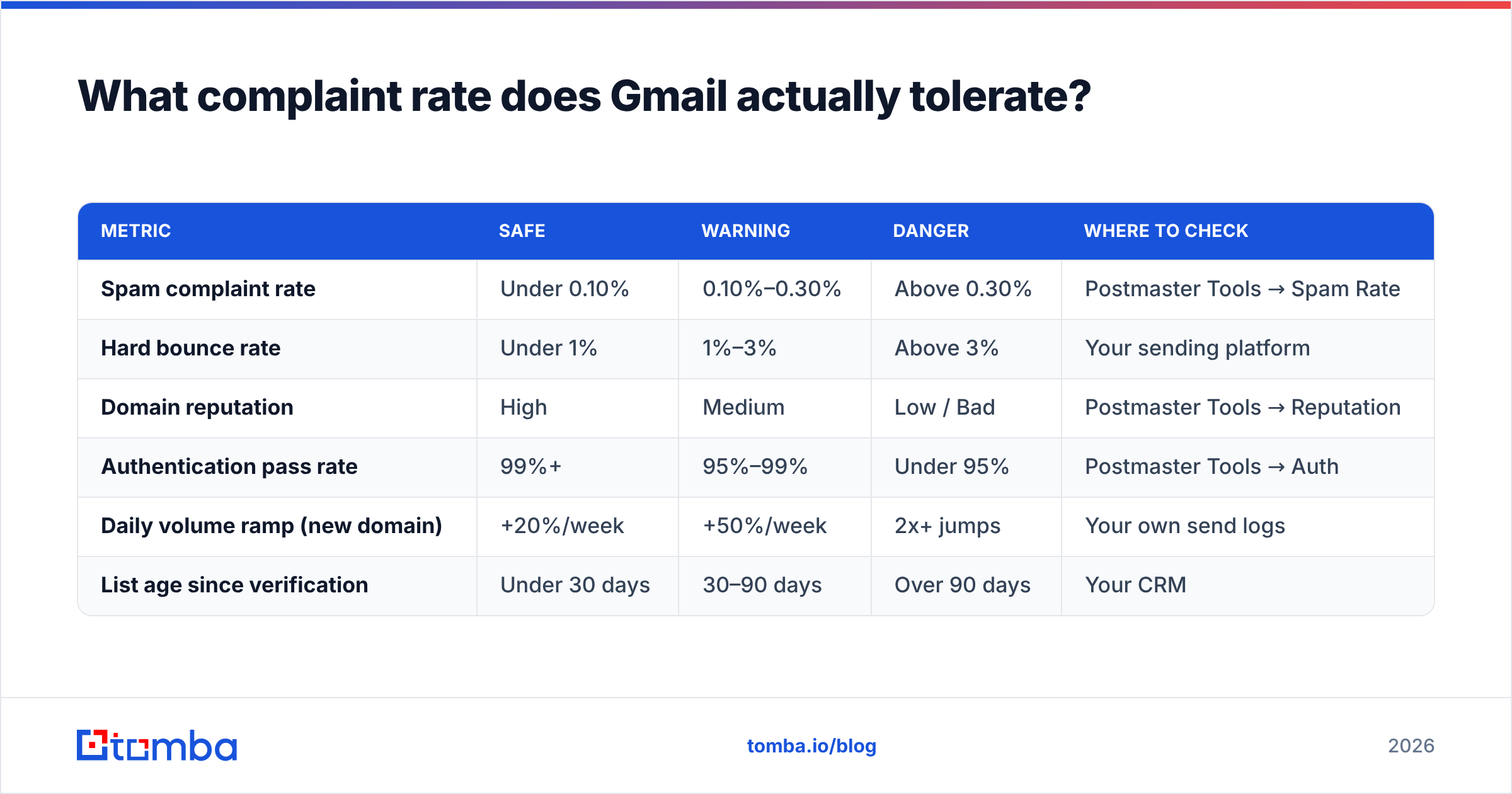
What complaint rate does Gmail actually tolerate?#
Here's the concrete benchmark set, drawn from Google's published bulk-sender requirements and what practitioners observe in Postmaster Tools:
| Metric | Safe | Warning | Danger | Where to check |
|---|---|---|---|---|
| Spam complaint rate | Under 0.10% | 0.10%–0.30% | Above 0.30% | Postmaster Tools → Spam Rate |
| Hard bounce rate | Under 1% | 1%–3% | Above 3% | Your sending platform |
| Domain reputation | High | Medium | Low / Bad | Postmaster Tools → Reputation |
| Authentication pass rate | 99%+ | 95%–99% | Under 95% | Postmaster Tools → Auth |
| Daily volume ramp (new domain) | +20%/week | +50%/week | 2x+ jumps | Your own send logs |
| List age since verification | Under 30 days | 30–90 days | Over 90 days | Your CRM |
Two notes on reading this table. First, Postmaster Tools only shows spam rate once you cross roughly 100–200 daily Gmail recipients, so small senders are flying partly blind — which makes list hygiene even more important. Second, spam rate is volume-weighted: one bad segment inside an otherwise healthy program can drag the whole domain down, which is why segmenting cold outreach onto a separate sending domain is standard practice.
Should I use a separate domain for cold outreach?#
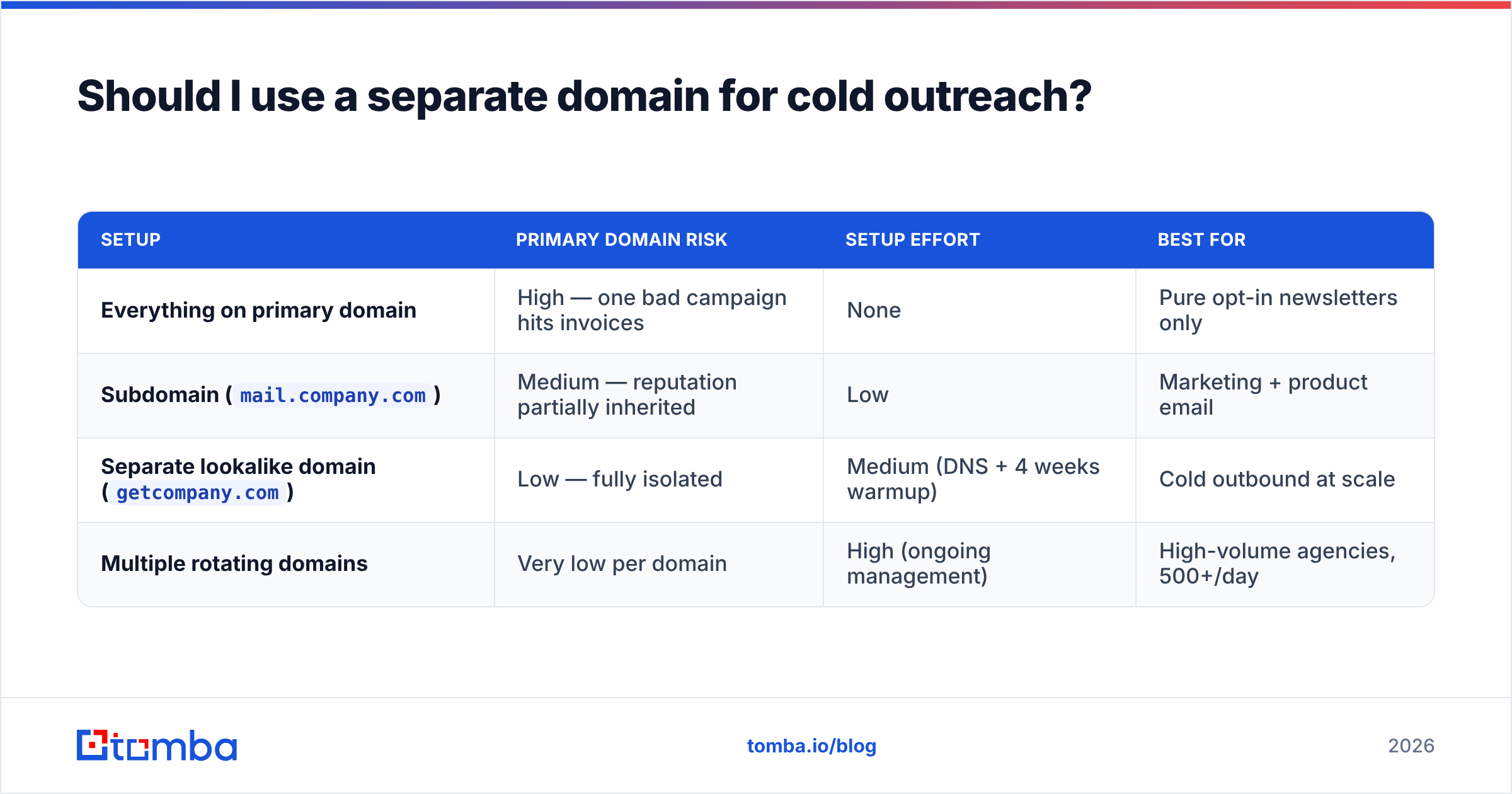
Yes, if cold email is a meaningful part of your volume. This is the highest-leverage structural decision in the entire deliverability stack.
The logic is containment. Your primary domain carries transactional mail, invoices, password resets, and replies to existing customers. Those must never be at risk. Cold outreach, by definition, goes to people who did not ask for it, and will always carry a higher complaint rate than opt-in mail.
| Setup | Primary domain risk | Setup effort | Best for |
|---|---|---|---|
| Everything on primary domain | High — one bad campaign hits invoices | None | Pure opt-in newsletters only |
Subdomain (mail.company.com) |
Medium — reputation partially inherited | Low | Marketing + product email |
Separate lookalike domain (getcompany.com) |
Low — fully isolated | Medium (DNS + 4 weeks warmup) | Cold outbound at scale |
| Multiple rotating domains | Very low per domain | High (ongoing management) | High-volume agencies, 500+/day |
If you go the separate-domain route, budget for warmup. A cold domain sending 200 emails on day one will be filtered regardless of how clean the list is. Use an email warmup calculator to plan the ramp, and keep each mailbox under roughly 40–50 cold sends per day even after warmup completes.
Does email content still matter for Gmail spam filtering?#
It matters, but not the way the old folklore suggests. Gmail is not scanning for the word "free" in 2026. What it does penalize:
- Link and domain mismatch. Your click-tracking domain has its own reputation. If you're on a shared tracking domain used by hundreds of other senders, you inherit their behavior. Set up a custom tracking domain.
- URL shorteners. bit.ly and similar are heavily abused. Avoid them entirely in cold email.
- Image-heavy, text-light messages. A single large image with 12 words of text looks like a template blast. Plain-text-heavy cold email consistently outperforms designed HTML.
- Missing List-Unsubscribe. Google's bulk-sender rules require one-click unsubscribe (RFC 8058 headers) for bulk senders. Missing it is now a direct filtering signal, not a nicety.
- Attachments in first-touch email. Unexpected attachments from an unknown sender are a strong spam correlate.
- Reply-baiting patterns. Excessive personalization tokens that render wrong (
Hi {{first_name}},) get reported at high rates — a merge-field failure is a complaint generator.
Run a draft through a spam checker before a large send to catch obvious content-level issues, then stop optimizing there and go back to the reputation layer.
How do I recover a domain that's already in Gmail spam?#
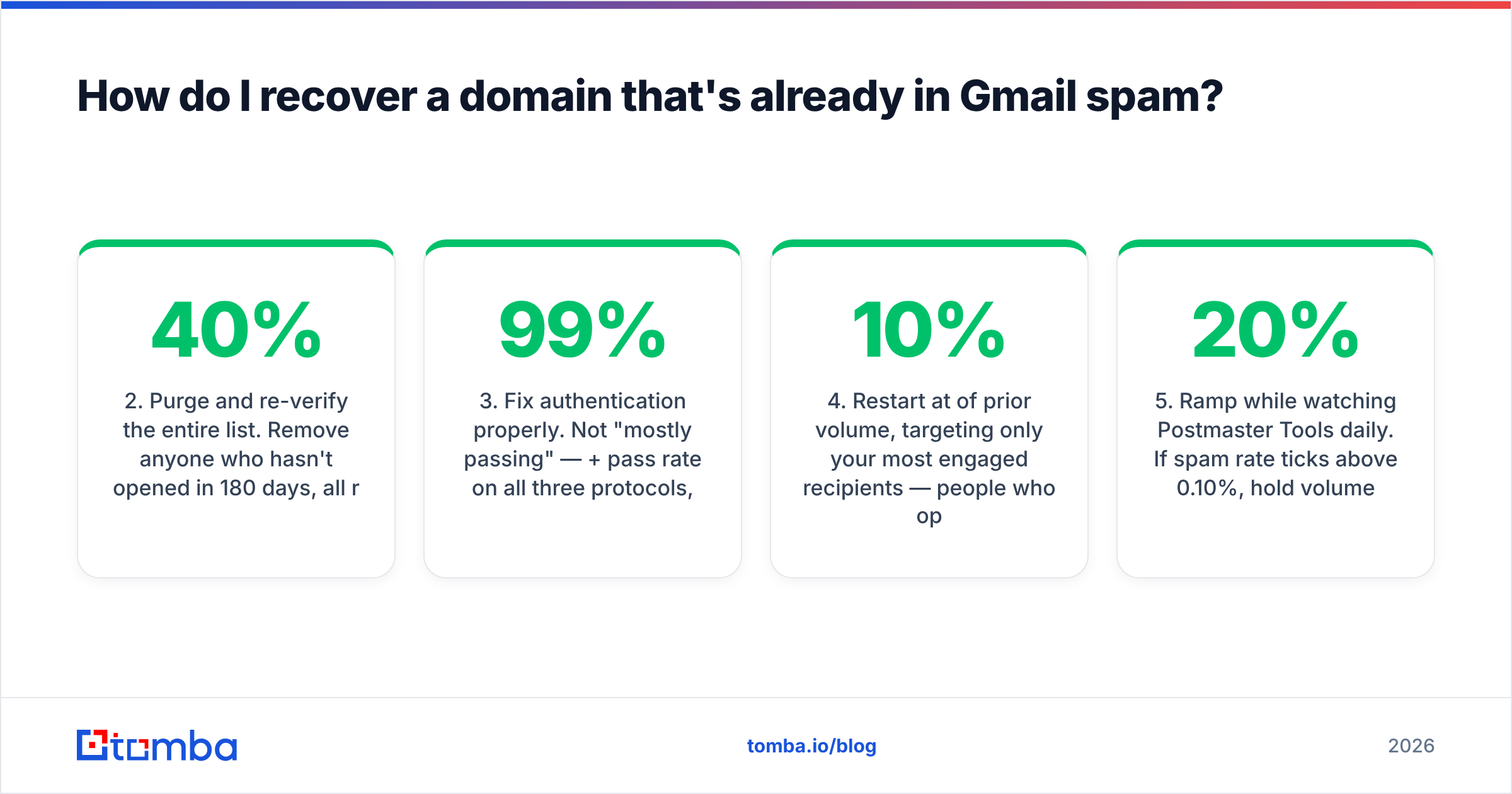
Recovery is slower than damage. Plan for three to six weeks.
- Stop sending to the affected segment immediately. Every additional send while your reputation is low reinforces the classification. Pause, don't push harder.
- Purge and re-verify the entire list. Remove anyone who hasn't opened in 180 days, all role accounts (
info@,sales@,support@), and everything that fails verification. Expect to cut 15–40% of a neglected list. - Fix authentication properly. Not "mostly passing" — 99%+ pass rate on all three protocols, with alignment.
- Restart at 10% of prior volume, targeting only your most engaged recipients — people who opened or replied in the last 30 days. Their positive engagement is the signal that rebuilds reputation.
- Ramp 20% per week while watching Postmaster Tools daily. If spam rate ticks above 0.10%, hold volume flat for a week rather than continuing to climb.
- Check blacklists with a blacklist checker. Gmail doesn't use public RBLs directly, but a Spamhaus listing usually means something upstream is genuinely wrong.
The counterintuitive part is step 4. Teams instinctively want to email more people to make up for lost pipeline. That's precisely backward — narrow to your best recipients and let their engagement do the repair work.
Which tools help most with Gmail deliverability?#
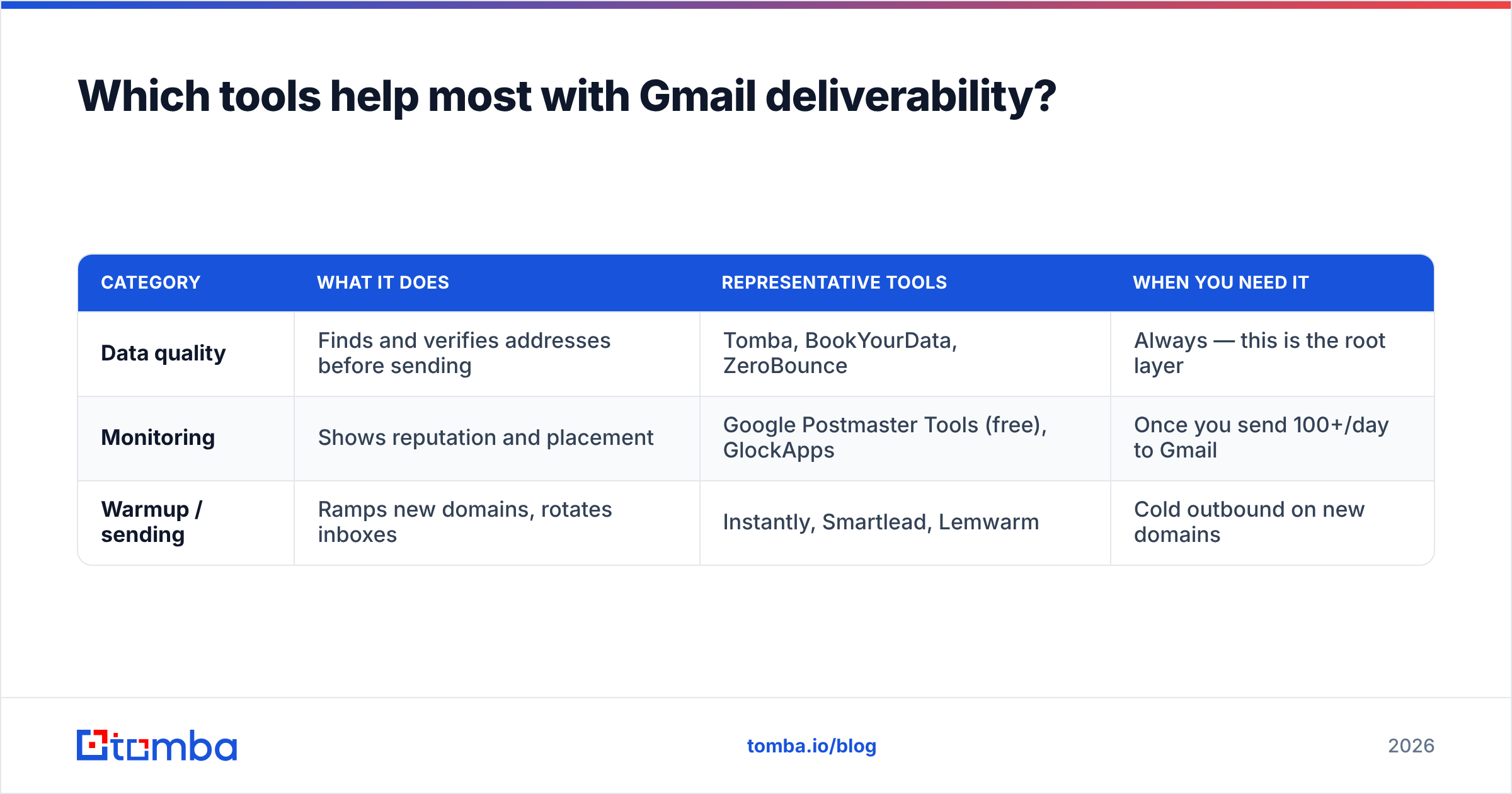
Deliverability tooling splits into three categories, and most teams over-buy in one and under-buy in another.
| Category | What it does | Representative tools | When you need it |
|---|---|---|---|
| Data quality | Finds and verifies addresses before sending | Tomba, BookYourData, ZeroBounce | Always — this is the root layer |
| Monitoring | Shows reputation and placement | Google Postmaster Tools (free), GlockApps | Once you send 100+/day to Gmail |
| Warmup / sending | Ramps new domains, rotates inboxes | Instantly, Smartlead, Lemwarm | Cold outbound on new domains |
Data quality is where the leverage is, because it's the only layer that prevents the problem instead of measuring it. If your list is verified and sourced legitimately, you rarely need to think about the other two. If it isn't, no amount of warmup rescues you.
For B2B teams building lists from scratch, domain search plus verification in one pass is the cleanest workflow: pull the addresses that exist at a target company, verify them, and never send to a guess. BookYourData takes a complementary approach with pre-built verified datasets, which suits teams that want a list handed over rather than built. Both beat exporting an unverified scrape.
On pricing, verification is cheap relative to a burned domain. Tomba pricing starts free at 25 searches/month, with Starter at $49/mo, Growth at $99/mo, and Pro at $249/mo — an order of magnitude less than the pipeline cost of a month in the spam folder.
What should I check first, this week?#
A practical 30-minute audit, in order:
- Send a test to a Gmail address, open "Show original," confirm three
PASSresults. - Open Postmaster Tools. Read spam rate, domain reputation, and auth pass rate over the last 30 days.
- Pull your last 1,000 sends and calculate your actual hard bounce rate.
- Verify a random 200-address sample of your active list. If more than 5% fail, verify all of it.
- Confirm List-Unsubscribe headers are present on every bulk send.
- Check whether cold outreach and transactional mail share a domain. Separate them if so.
Whatever that audit surfaces, fix it in the priority order from earlier — authentication before data, data before volume, volume before content. Most teams find their answer in the first two steps.
Reference material worth bookmarking: Google's Email sender guidelines is the authoritative source for what Gmail requires, and M3AAWG's sender best practices cover the industry consensus beyond any single provider.
Start where the leverage is. Most Gmail spam problems trace back to a list nobody verified. The Tomba Email Finder sources professional addresses by domain, name, or company and verifies them in the same pass, so your bounce rate never gets a chance to damage your domain reputation. Free tier gives you 25 searches a month to test it against your current list — run 25 of your worst-performing contacts through it and see how many were never real to begin with.
Related guides#
Ready to find emails that actually work?
Join 150,000+ professionals who stopped guessing and started sending. Free credits on signup — no credit card required.
Get the Tomba newsletter
Practical outbound tactics and product updates — once every two weeks.
About the author