Gmail Inbox Placement: How to Land in the Primary Tab in 2026
Gmail accepts your mail, then quietly files it under Promotions or Spam. Here is how Gmail actually decides placement in 2026 — and the diagnostic order that fixes it.

TL;DR
- Gmail inbox placement is decided per-recipient, not per-campaign. The same message can hit Primary for one user, Promotions for another, and Spam for a third — on the same send.
- Your ESP's "98% delivered" number tells you nothing about placement. Delivered means Gmail accepted the SMTP transaction, not that a human saw it.
- The three levers that actually move Gmail, in order of weight: recipient engagement history, domain and IP sending reputation, and authentication hygiene (SPF, DKIM, DMARC, one-click unsubscribe).
- Gmail's 2024 bulk-sender rules (5,000+ messages/day to Gmail addresses) set a hard spam-complaint ceiling of 0.30% and a target of under 0.10%. Those thresholds still govern in 2026.
- Fix placement in this order: authentication → list quality → content and link hygiene → volume ramp. Skipping to "rewrite the subject line" wastes weeks.
What is Gmail inbox placement, and why is it not the same as deliverability?#
Deliverability is whether the mail server accepted your message. Inbox placement is where it landed after acceptance. Those are two different questions, and almost every "our deliverability is fine" conversation confuses them.
Think of it like a mailroom in a large office. Delivery means the courier handed the envelope to the front desk and got a signature. Placement means the mailroom clerk decided whether to walk it to the recipient's desk, drop it in the bulk-mail bin by the elevator, or bin it entirely. The signature was never the point.
Technically: your ESP reports a 250 OK from Gmail's MX and increments the "delivered" counter. Gmail then runs the message through its classification stack — reputation lookups, per-recipient engagement models, content and link analysis — and assigns it to Primary, Promotions, Updates, Social, Forums, or Spam. None of that is reported back to you over SMTP. That gap is why a 98% delivery rate can coexist with a 4% open rate.

How does Gmail actually decide where your email goes?#
There is no single scoring formula, and Google has never published one. But between the Gmail sender guidelines, Postmaster Tools' exposed metrics, and a decade of tested behaviour, the inputs cluster into four groups.
- Recipient-level engagement history — Has this specific person opened, replied to, starred, or moved your mail before? Have they deleted it unread repeatedly? This is the heaviest signal and it is why placement varies recipient by recipient on the same blast.
- Domain reputation — Aggregated behaviour of everyone who receives mail from your sending domain. Slow to build, fast to lose, and it now outweighs IP reputation for most senders because domains are harder to rotate.
- IP reputation — Still relevant on dedicated IPs and during warmup. On a shared pool, you inherit your neighbours' behaviour, good or bad.
- Authentication and compliance — SPF, DKIM, DMARC alignment, valid forward and reverse DNS, TLS, List-Unsubscribe headers with one-click support. These are pass/fail gates rather than ranking boosts: passing them earns you nothing, failing them caps your ceiling.
- Content and link signals — Image-to-text ratio, tracking-link domains, redirect chains, shortener use, attached files, and whether the linked domains themselves have a reputation problem.
- Complaint and bounce rates — Spam-button presses and hard bounces. These are the fastest way to fall from Primary to Spam, and recovery takes weeks.
The practical implication: if you are debugging placement by rewriting copy first, you are optimising input #5 while inputs #1 through #4 are broken.
What is the difference between Primary, Promotions, and Spam?#
Tabs are not a punishment. Promotions is still the inbox — Gmail users who have tabs enabled do check it, particularly for mail they expect. Spam is a different category of failure entirely.
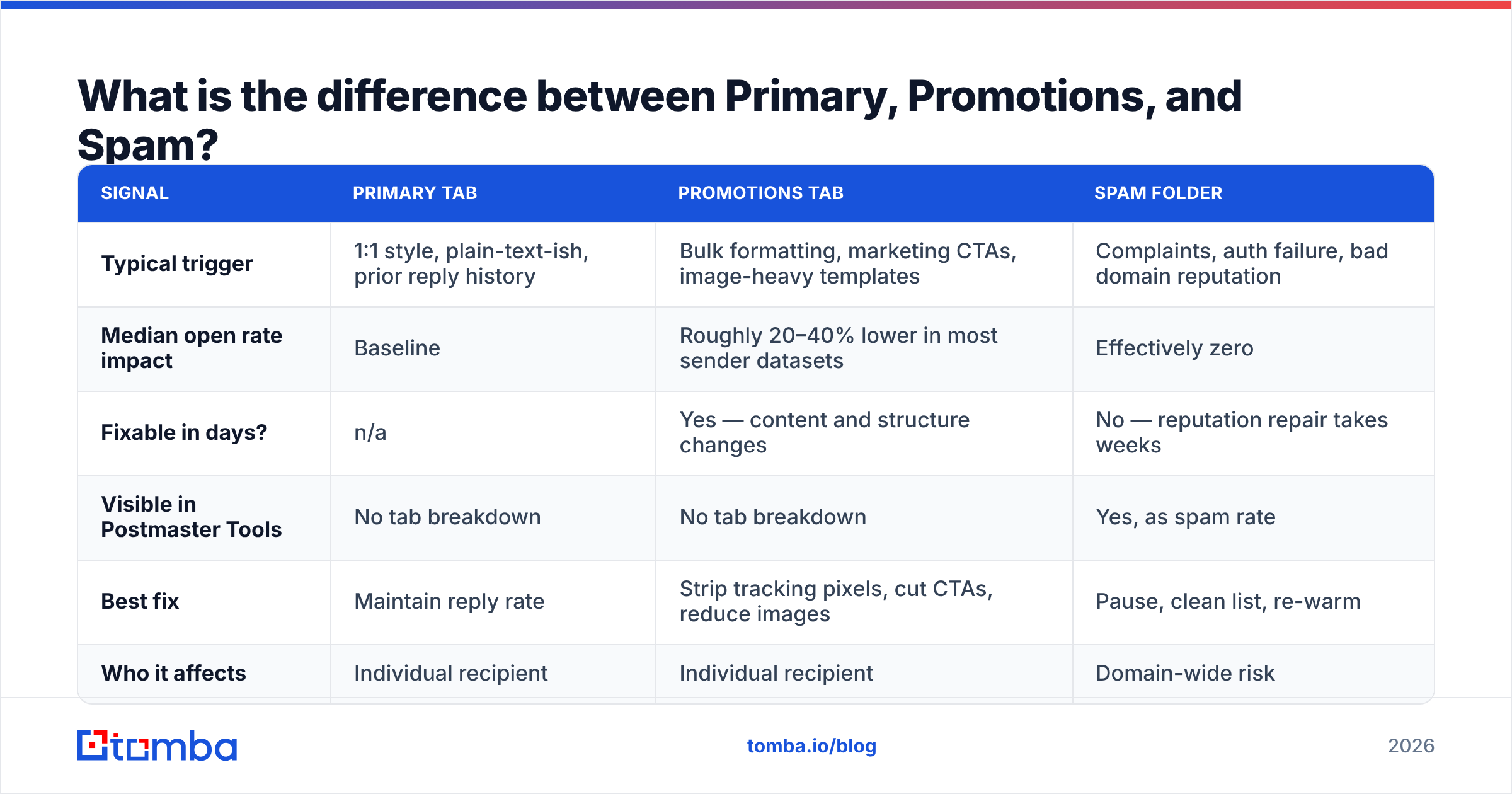
| Signal | Primary tab | Promotions tab | Spam folder |
|---|---|---|---|
| Typical trigger | 1:1 style, plain-text-ish, prior reply history | Bulk formatting, marketing CTAs, image-heavy templates | Complaints, auth failure, bad domain reputation |
| Median open rate impact | Baseline | Roughly 20–40% lower in most sender datasets | Effectively zero |
| Fixable in days? | n/a | Yes — content and structure changes | No — reputation repair takes weeks |
| Visible in Postmaster Tools | No tab breakdown | No tab breakdown | Yes, as spam rate |
| Best fix | Maintain reply rate | Strip tracking pixels, cut CTAs, reduce images | Pause, clean list, re-warm |
| Who it affects | Individual recipient | Individual recipient | Domain-wide risk |
The distinction matters for cold outbound specifically. A cold email in Promotions is a wasted send; a cold email in Spam is a reputation event that damages the next 10,000 sends.
Which tools help you measure Gmail inbox placement?#
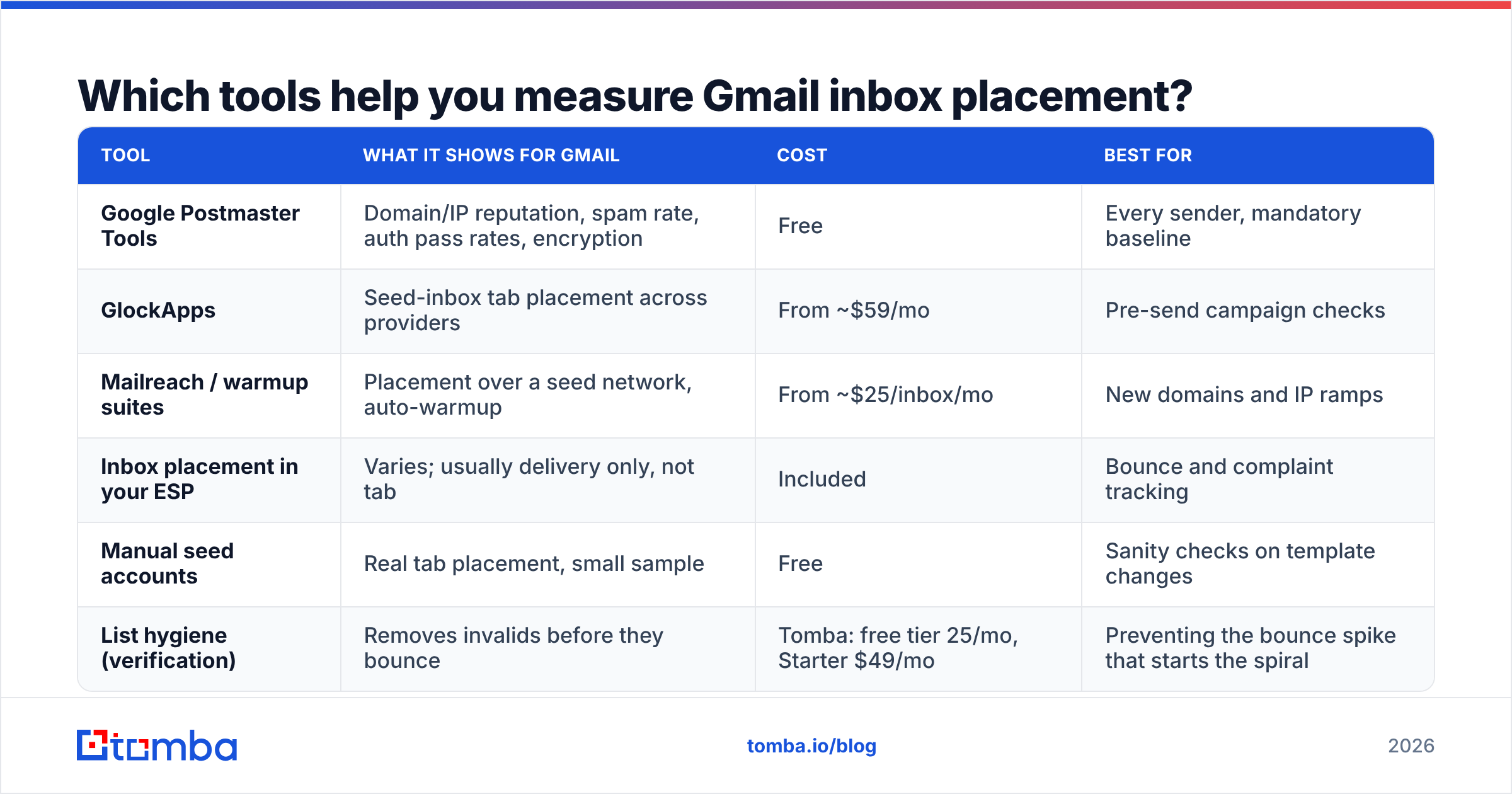
You cannot fix what you cannot see, and Gmail deliberately does not report tab placement. So you triangulate: Postmaster Tools for reputation and spam rate, seed testing for tab-level placement, and your own reply data as ground truth.
| Tool | What it shows for Gmail | Cost | Best for |
|---|---|---|---|
| Google Postmaster Tools | Domain/IP reputation, spam rate, auth pass rates, encryption | Free | Every sender, mandatory baseline |
| GlockApps | Seed-inbox tab placement across providers | From ~$59/mo | Pre-send campaign checks |
| Mailreach / warmup suites | Placement over a seed network, auto-warmup | From ~$25/inbox/mo | New domains and IP ramps |
| Inbox placement in your ESP | Varies; usually delivery only, not tab | Included | Bounce and complaint tracking |
| Manual seed accounts | Real tab placement, small sample | Free | Sanity checks on template changes |
| List hygiene (verification) | Removes invalids before they bounce | Tomba: free tier 25/mo, Starter $49/mo | Preventing the bounce spike that starts the spiral |
Postmaster Tools requires a DNS TXT verification and only reports once you cross a daily volume floor to Gmail addresses — roughly a few hundred messages per day. Below that, you rely on seed testing and reply rate. Set it up before you need it; the data is not retroactive.
Why does list quality decide placement more than copy does?#
Because bounces and complaints are the two inputs Gmail weights most aggressively, and both are list problems.
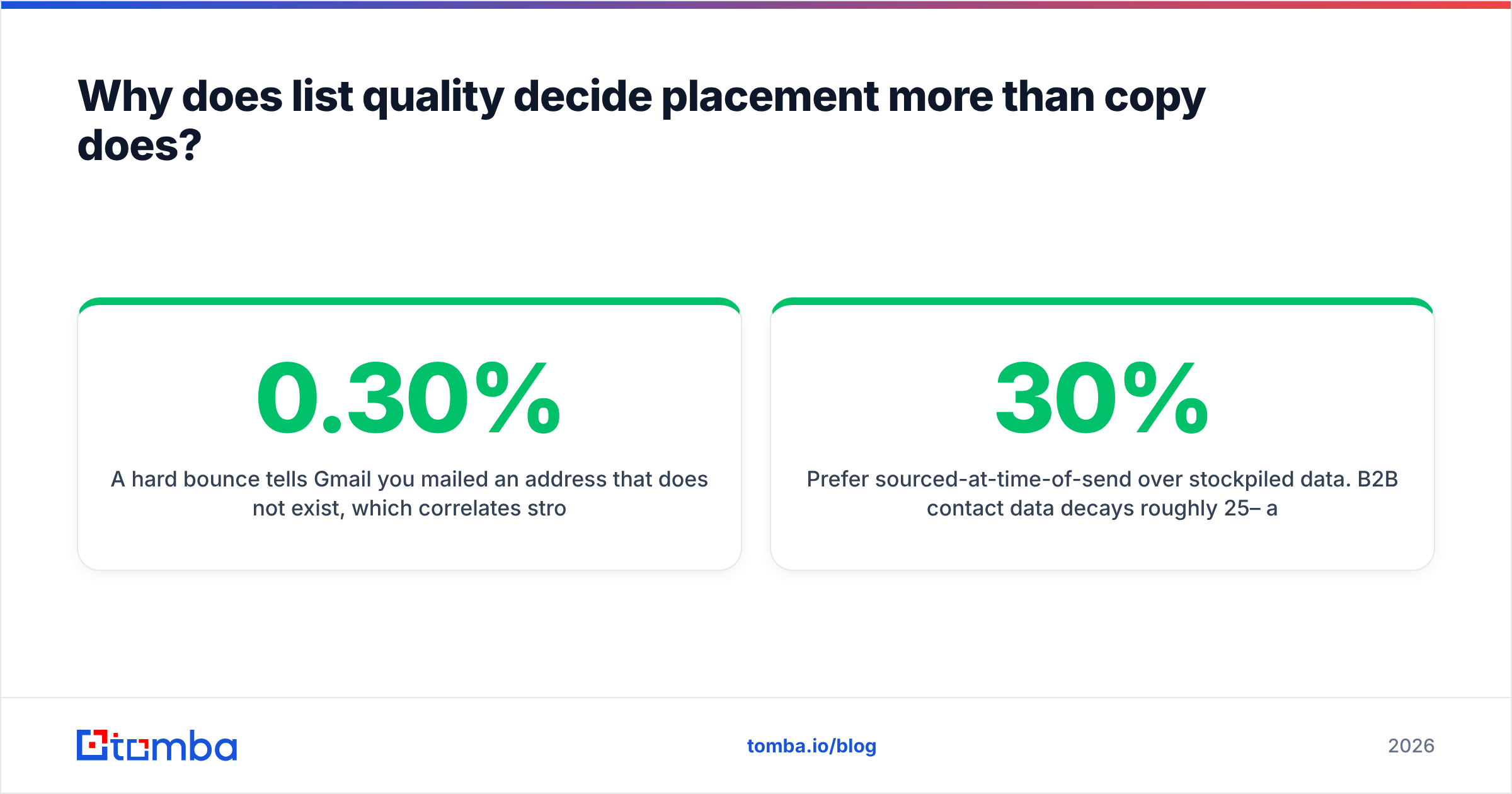
A hard bounce tells Gmail you mailed an address that does not exist, which correlates strongly with purchased or scraped lists. A cluster of hard bounces inside one send is one of the clearest bad-sender signals available. Spam complaints compound it. Under Google's bulk-sender rules, you must keep reported spam under 0.30% and should sit under 0.10% — that is one complaint per thousand messages, which a single badly targeted segment can blow through.
This is the unglamorous fix. Before you touch a subject line:
- Verify every address before it enters a sequence. An email verifier that checks syntax, MX records, and mailbox existence removes the bulk of hard bounces.
- Handle catch-all domains separately. Catch-all servers accept everything, so a standard verifier returns "unknown". A dedicated catch-all verifier narrows that pool instead of letting you guess.
- Suppress non-openers. After four or five sends with zero engagement, that recipient is now dragging your per-recipient model down. Remove them.
- Deduplicate before import. Sending the same person two copies from two aliases doubles the complaint probability for zero incremental pipeline.
- Prefer sourced-at-time-of-send over stockpiled data. B2B contact data decays roughly 25–30% per year as people change roles. A list you bought 18 months ago is now mostly wrong.
If you are building lists from company domains rather than buying them, a domain search that returns verified addresses with confidence scores gets you a cleaner starting set than any post-hoc cleaning pass.
How do you fix a Promotions-tab problem specifically?#
Promotions placement is the most fixable failure mode because it is largely content-driven and does not carry reputation damage. Work through this list in order:
- Kill the open-tracking pixel on cold outbound. A 1x1 image loaded from a shared tracking domain is one of the strongest bulk-mail tells, and shared tracking domains often carry poor reputations you did not earn.
- Use your own link domain, or no links at all in the first touch. Public shorteners (bit.ly and friends) are heavily abused and correlate with filtering.
- Cut images entirely from first-touch outbound. Plain text with one link reads like human correspondence; an HTML template with a hero image reads like a newsletter.
- Remove the marketing furniture — no "View in browser", no social icons row, no multi-column footer, no branded header bar.
- Trim to one call to action, ideally an interest-check question rather than a booking link. Reply-generating mail trains the per-recipient model in your favour.
- Match the From name to a real person with a matching signature and a reachable reply-to. Mismatched From/Reply-To pairs are a classic filtering trigger.
One caveat worth stating plainly: if you are sending genuine marketing email — newsletters, product announcements, promotions — Promotions is the correct tab and fighting it is a losing game. Optimise for open rate within Promotions instead. The Primary-tab chase is for 1:1 and cold outbound.

What does a Gmail warmup schedule look like in 2026?#
New domains have no reputation, and Gmail treats "no reputation" as "unknown risk". You earn a reputation by sending small volumes that get engaged with, then scaling.
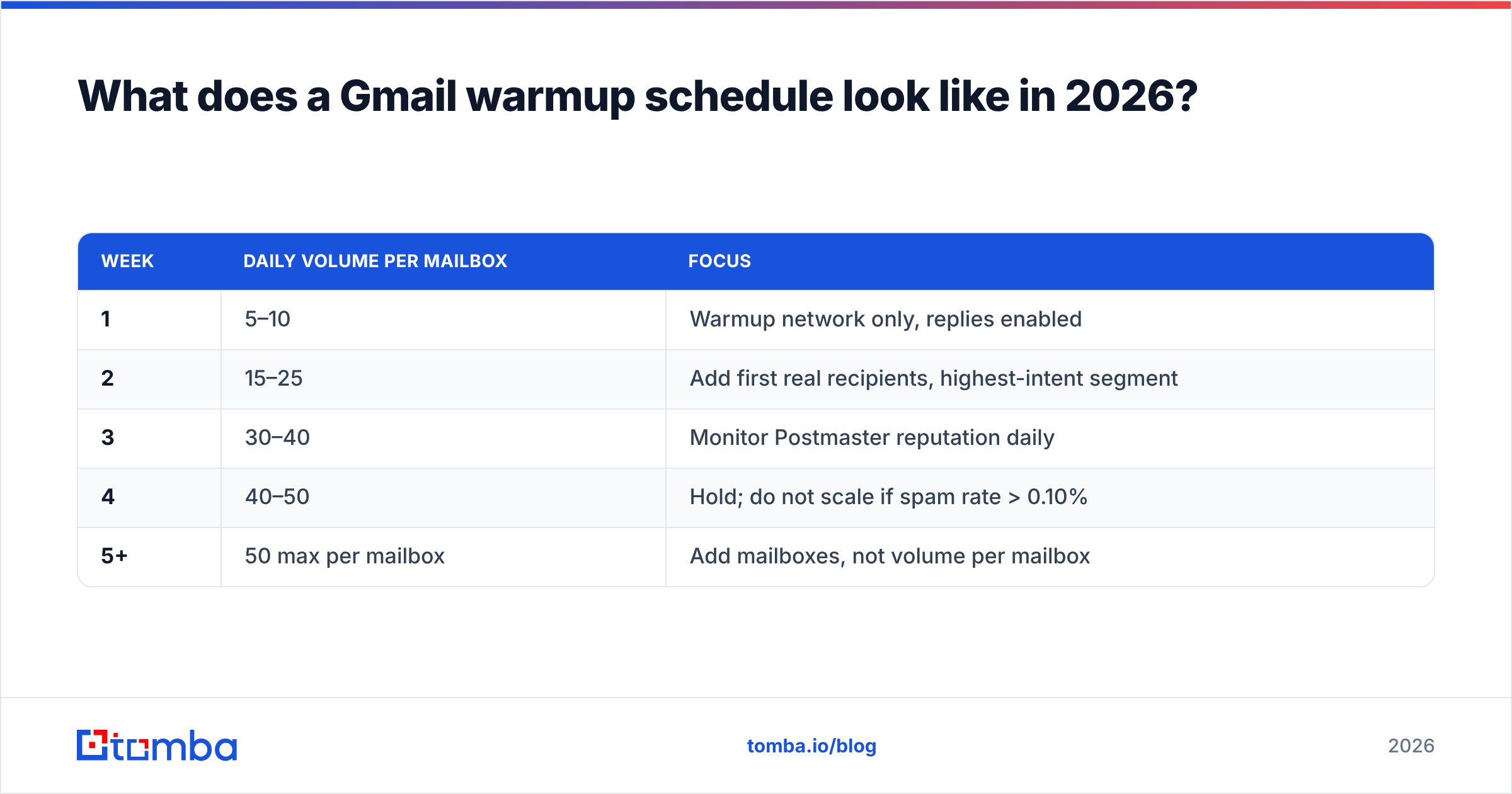
A workable ramp on a fresh domain, per mailbox:
| Week | Daily volume per mailbox | Focus |
|---|---|---|
| 1 | 5–10 | Warmup network only, replies enabled |
| 2 | 15–25 | Add first real recipients, highest-intent segment |
| 3 | 30–40 | Monitor Postmaster reputation daily |
| 4 | 40–50 | Hold; do not scale if spam rate > 0.10% |
| 5+ | 50 max per mailbox | Add mailboxes, not volume per mailbox |
The rule that matters more than the numbers: scale horizontally, not vertically. Ten mailboxes at 40/day is far safer than two mailboxes at 200/day, because per-mailbox volume spikes are themselves a signal. Run the arithmetic for your target with a warmup calculator before you commit to a sequence schedule.
Also: keep the warmup running after the ramp. Reputation is a rolling window, not a permanent grade. Senders who cut warmup at week five and jump to full volume routinely land back in Spam by week seven.
What authentication does Gmail require in 2026?#
Non-negotiable, in this order:
- SPF — a valid record authorising every sending source. Watch the 10-lookup limit; nested
include:chains silently break it. Check yours with an SPF checker after every ESP change. - DKIM — 1024-bit minimum, 2048-bit preferred, signed by your own domain rather than the ESP's.
- DMARC — at minimum
p=nonewith anruareporting address. Google's bulk-sender requirements mandate a published DMARC policy, and alignment between the DMARC domain and either the SPF or DKIM domain. - One-click unsubscribe —
List-UnsubscribeplusList-Unsubscribe-Post: List-Unsubscribe=One-Click, honoured within two days, for bulk senders. - Forward and reverse DNS — the sending IP must resolve to a hostname that resolves back to the IP.
- TLS on the SMTP connection — required, and reported in Postmaster Tools.
These are gates, not accelerators. Passing all six does not put you in Primary; failing any one of them puts a ceiling on everything else you do. Google's own bulk sender FAQ is the authoritative reference and is worth re-reading each time the requirements are revised.
What should you do first if you are already in Spam?#
Stop sending. Everything else comes second, because each additional send while your reputation is "Bad" in Postmaster Tools deepens the hole.
Then, in sequence:
- Pause all sequences on the affected domain. Not "reduce volume" — pause.
- Read Postmaster Tools for domain reputation, IP reputation, spam rate, and auth failures. Identify which one moved first.
- Fix the identified cause. Auth failure is a same-day fix. A complaint spike is a segmentation and consent problem. A bounce spike is a list-hygiene problem.
- Purge the list. Re-verify every remaining address; remove everyone with zero engagement across the last five sends.
- Re-warm for two to three weeks at 5–10/day per mailbox before touching real prospects again.
- Do not switch domains to escape. Rotating to a fresh lookalike domain resets nothing about your list or your targeting, and Gmail is good at correlating related domains. You will repeat the cycle in six weeks.
Recovery is measured in weeks, which is exactly why the prevention items — verification, suppression, slow ramps — are cheaper than they look. A single bulk verify pass on a 20,000-row list costs less than one week of a paused outbound team.
Which metrics should you actually watch?#
Three, checked weekly:
- Spam rate in Postmaster Tools. Target under 0.10%. Anything sustained above 0.30% is an emergency.
- Reply rate, not open rate. Apple Mail Privacy Protection and Gmail image proxying have made open rates directionally useful at best. Replies are unfakeable and correlate directly with the engagement signal Gmail weights hardest.
- Bounce rate per send. A jump from 2% to 8% on one campaign means a data-source problem, and it will show up in reputation within days.
Add seed-based tab placement testing before major template changes, and check sender reputation against a blacklist lookup whenever reply rate drops without an obvious cause. G2's deliverability tooling category on g2.com is a reasonable place to compare seed-testing vendors if you need one.
Start with the list, not the subject line#
Gmail inbox placement is downstream of who you send to. Authentication is a one-afternoon fix, warmup is a calendar problem, and content is a template edit — but a list full of dead addresses, catch-alls, and people who never asked to hear from you will defeat all three.
Build the list correctly and the placement problem shrinks to a maintenance task. Tomba's Email Finder returns verified, confidence-scored business addresses with sources attached, so the contacts entering your sequence are real people at real companies rather than permutator guesses. The free tier covers 25 searches a month to test the accuracy against your own known-good data; paid plans start at $49/mo, with full Tomba pricing published if you need higher volume. Verify first, warm up properly, then worry about the subject line.
Related guides#
Ready to find emails that actually work?
Join 150,000+ professionals who stopped guessing and started sending. Free credits on signup — no credit card required.
Get the Tomba newsletter
Practical outbound tactics and product updates — once every two weeks.
About the author