GMass Email Deliverability: The Complete 2026 Playbook
GMass sends through your own Gmail account, which means your deliverability is your domain's reputation — not GMass's. Here's what actually moves inbox placement, and what quietly kills it.

TL;DR — what actually drives GMass email deliverability
- GMass sends through your own Gmail or Google Workspace account. That means GMass email deliverability rides on your domain and mailbox reputation. GMass has almost no shared-IP reputation to lend you, or to damage you.
- The single biggest variable in a GMass campaign is list quality. Bounce rate above roughly 3% is the fastest way to get a Workspace account rate-limited or suspended.
- Google's 2024 bulk-sender rules (SPF, DKIM, DMARC, one-click unsubscribe, spam complaints under 0.3%) apply to you even at low volume. Gmail-to-Gmail sending is the most filtered path there is.
- GMass's built-in warmup, unsubscribe handling, and merge tags all help. None of them make up for scraped lists, high daily volume, or a cold domain.
- Fix the inputs first — verified addresses, correct DNS, sane volume ramp — then tune send settings. Doing it in the reverse order wastes weeks.
What is GMass, and how does it actually send email?#
GMass is a Chrome extension and Gmail add-on that turns your Gmail compose window into a mail-merge and cold-outreach tool. You load recipients from a Google Sheet or a Gmail search. You write one message with {FirstName}-style merge tags. GMass then fires it out one message at a time through your own mailbox.
That design is the whole story for GMass email deliverability. Other ESPs (Mailchimp, SendGrid, Instantly's own relays) send from their servers — shared or dedicated IPs they own, with reputations built by thousands of other senders. GMass does not. Every message leaves Google's own servers under your signed-in account. Your domain sits in the From: header, and your DKIM signature rides along.
What that means in practice:
- You inherit Google's IP reputation, which is excellent. No shared-IP roulette, no "another customer torched the pool" incidents.
- You own 100% of your domain reputation. There is nobody to blame and nobody to hide behind. A bad week of bounces lands entirely on you.
- You are bound by Gmail's sending limits, not by a credit balance. Free Gmail caps around 500 recipients per rolling 24 hours. Google Workspace caps at 2,000 per day on standard plans.
- Gmail-to-Gmail filtering is unusually strict. Google can see both sides of the conversation. That makes engagement signals carry huge weight: opens that lead to replies, messages moved out of Promotions, no "Report spam" clicks.
- Suspension risk is account-level. A relay ban costs you a vendor. A Workspace suspension costs you your calendar, Drive, and team email.
Is GMass email deliverability better than other tools?#
Better than most, for one narrow reason: it never hides your identity. But "good tool" and "good outcomes" are separate things. Here is how the sending model compares with the tools people weigh against GMass.
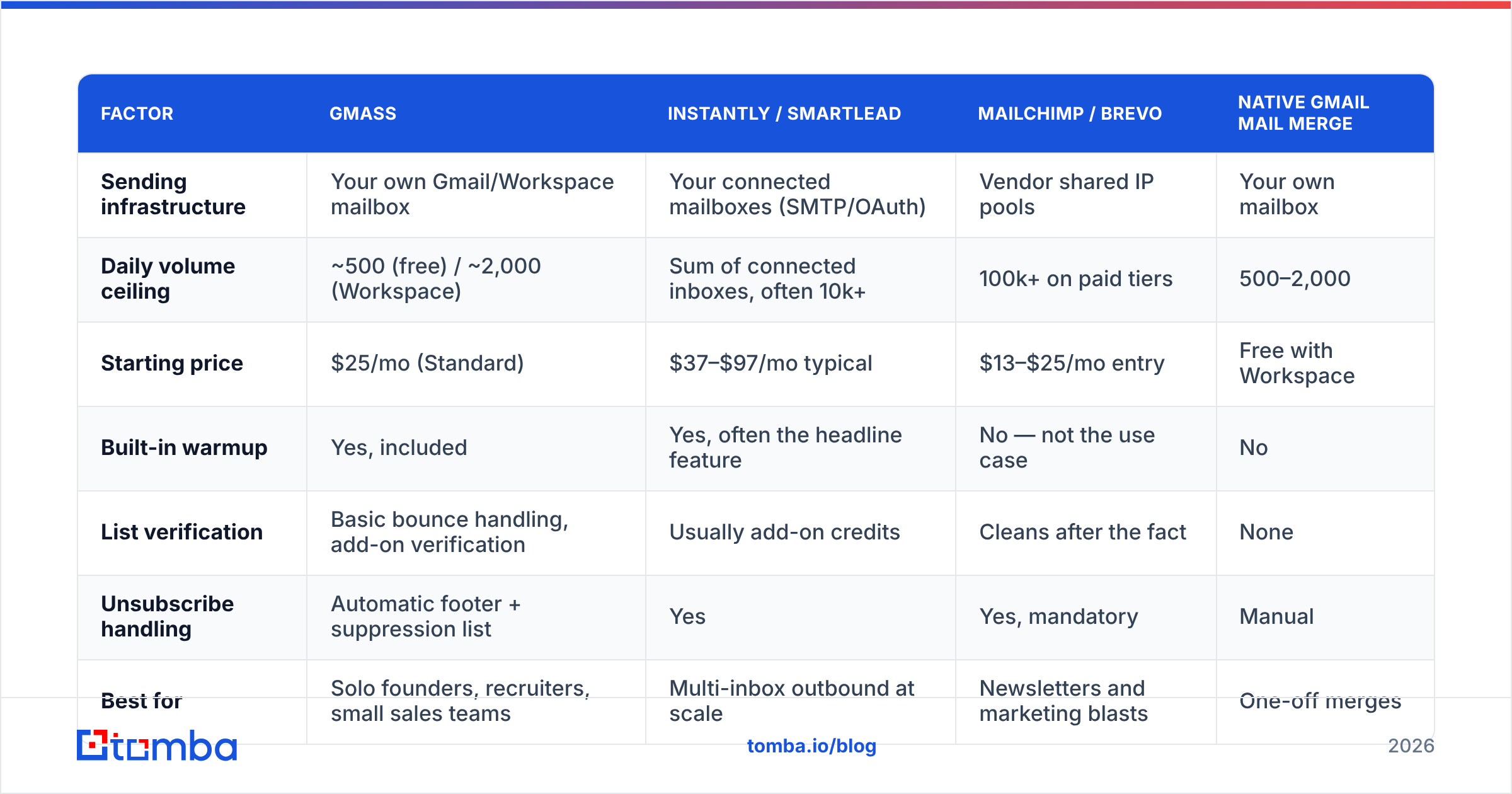
| Factor | GMass | Instantly / Smartlead | Mailchimp / Brevo | Native Gmail mail merge |
|---|---|---|---|---|
| Sending infrastructure | Your own Gmail/Workspace mailbox | Your connected mailboxes (SMTP/OAuth) | Vendor shared IP pools | Your own mailbox |
| Daily volume ceiling | ~500 (free) / ~2,000 (Workspace) | Sum of connected inboxes, often 10k+ | 100k+ on paid tiers | 500–2,000 |
| Starting price | $25/mo (Standard) | $37–$97/mo typical | $13–$25/mo entry | Free with Workspace |
| Built-in warmup | Yes, included | Yes, often the headline feature | No — not the use case | No |
| List verification | Basic bounce handling, add-on verification | Usually add-on credits | Cleans after the fact | None |
| Unsubscribe handling | Automatic footer + suppression list | Yes | Yes, mandatory | Manual |
| Best for | Solo founders, recruiters, small sales teams | Multi-inbox outbound at scale | Newsletters and marketing blasts | One-off merges |
| Deliverability failure mode | Your Workspace account gets limited | A burned inbox gets rotated out | Vendor throttles or bans you | Silent Gmail rate-limit |
The column that matters most is the last row. GMass puts all the risk on one asset you cannot cheaply replace. Multi-inbox tools spread that risk across throwaway domains. Neither model is safer by default. But GMass punishes list mistakes much harder, because the blast radius is your main mailbox.
Why do GMass campaigns land in spam or Promotions?#
Five causes explain almost every GMass email deliverability complaint. Here they are, roughly in order of how often they show up.
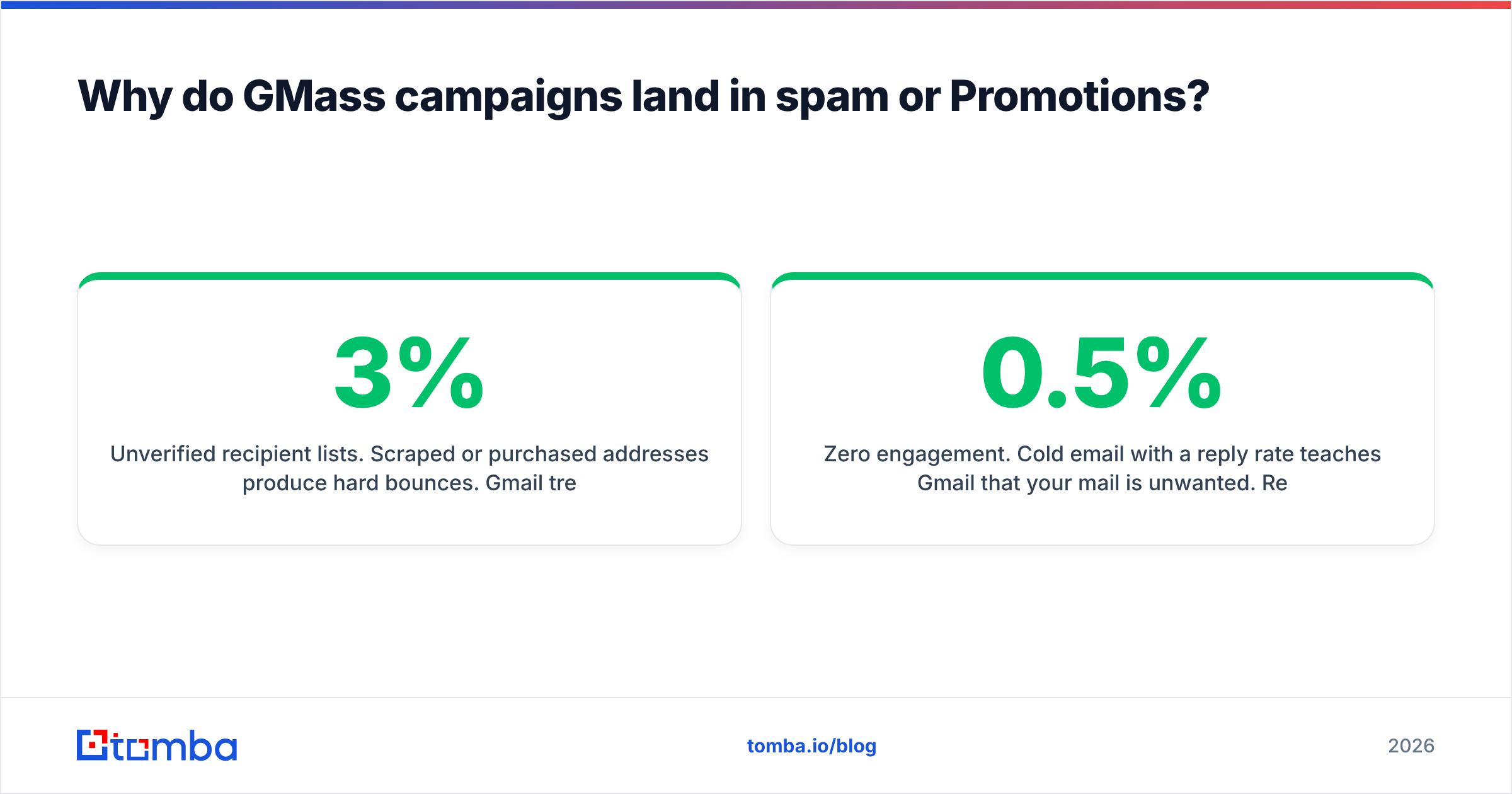
- Unverified recipient lists. Scraped or purchased addresses produce hard bounces. Gmail treats a rising hard-bounce rate as proof you did not collect these addresses yourself. Above roughly 3%, Google starts to throttle you. Above 5–8%, short sending blocks are common.
- Missing or misaligned DNS records. Workspace signs with DKIM only after you publish the DKIM record and switch it on in the Admin console. It is not on by default for custom domains. Missing SPF hurts too. So does a
p=noneDMARC record with no reports, or aFrom:domain that does not match your DKIMd=value. - Volume ramped too fast on a young domain. A domain you bought three weeks ago suddenly sends 400 cold emails a day. That looks exactly like a throwaway spam domain.
The last two causes are about the message itself, not the plumbing.
- Content that trips the Promotions filter. Tracking pixels, link shorteners, heavy HTML, many links, and sales phrasing ("exclusive offer", "limited time") push mail to the Promotions tab. They do it even when the mail clears the spam filter. GMass's open tracking also rewrites your links through a tracking domain. That is a small but real negative signal.
- Zero engagement. Cold email with a 0.5% reply rate teaches Gmail that your mail is unwanted. Reply rate is the strongest good signal you control. It is a copy problem, not a settings problem.

How do you set up GMass for maximum inbox placement?#
Work through these in order. GMass email deliverability is built in sequence: DNS before warmup, warmup before volume, volume before send-time tweaks.
1. Fix DNS authentication completely.
Publish an SPF record that includes include:_spf.google.com. Enable DKIM in Google Workspace Admin (Apps → Google Workspace → Gmail → Authenticate email). Use a 2048-bit key and publish the TXT record it gives you. Then add DMARC, starting at v=DMARC1; p=none; rua=mailto:dmarc@yourdomain.com. Read the reports for two weeks. Move to p=quarantine once alignment is clean. Verify with an SPF checker before you send anything. New to the terms? The email deliverability and SPF record glossary entries cover the basics.
2. Use a subdomain or a separate sending domain for cold outreach.
Do not send cold campaigns from the same domain that carries your invoices, password resets, and customer support threads. A separate domain (getyourcompany.com) or subdomain keeps the damage away from your main one. Buy it, point the DNS correctly, and set up 301 redirects to your main site. Then let it age three to four weeks before real volume.
3. Warm up the mailbox before the first campaign. GMass includes an automated warmup. It trades seeded messages with a peer network, marks them as important, and replies to them. Run it for 2–4 weeks on a new mailbox. Warmup is not magic. It just sets a baseline: this mailbox sends mail that humans engage with. Run the numbers with a warmup calculator before you commit to a ramp schedule.
4. Verify every address before it enters a campaign.
People skip this step. It is also the step that decides GMass email deliverability. Run your list through an email verifier. Drop anything that comes back invalid, disposable, or role-based (info@, sales@, support@), unless a role address is really your target. Catch-all domains accept everything at the SMTP layer, so they tell you nothing. Use a catch-all verifier instead of guessing. Aim to enter every campaign under 2% expected bounce.
5. Ramp volume on a schedule, not on impulse. Week 1: 20 emails/day. Week 2: 40. Week 3: 75. Week 4: 120. Cap at 200–300/day per mailbox for cold outreach, even if Workspace allows 2,000. That ceiling is a technical limit, not a safe one. GMass's throttling setting spreads sends across hours. Use it.
6. Configure GMass settings for cold, not for marketing. Turn open tracking off for cold campaigns. It adds a pixel and buys you nothing on a 40-word plain-text email. Keep click tracking only if you really need it. Use plain text or minimal HTML. Keep the unsubscribe line human. GMass adds a footer for you, and stripping it out is both a legal risk and a fast way to earn spam complaints.
What bounce and complaint rates should you actually target?#
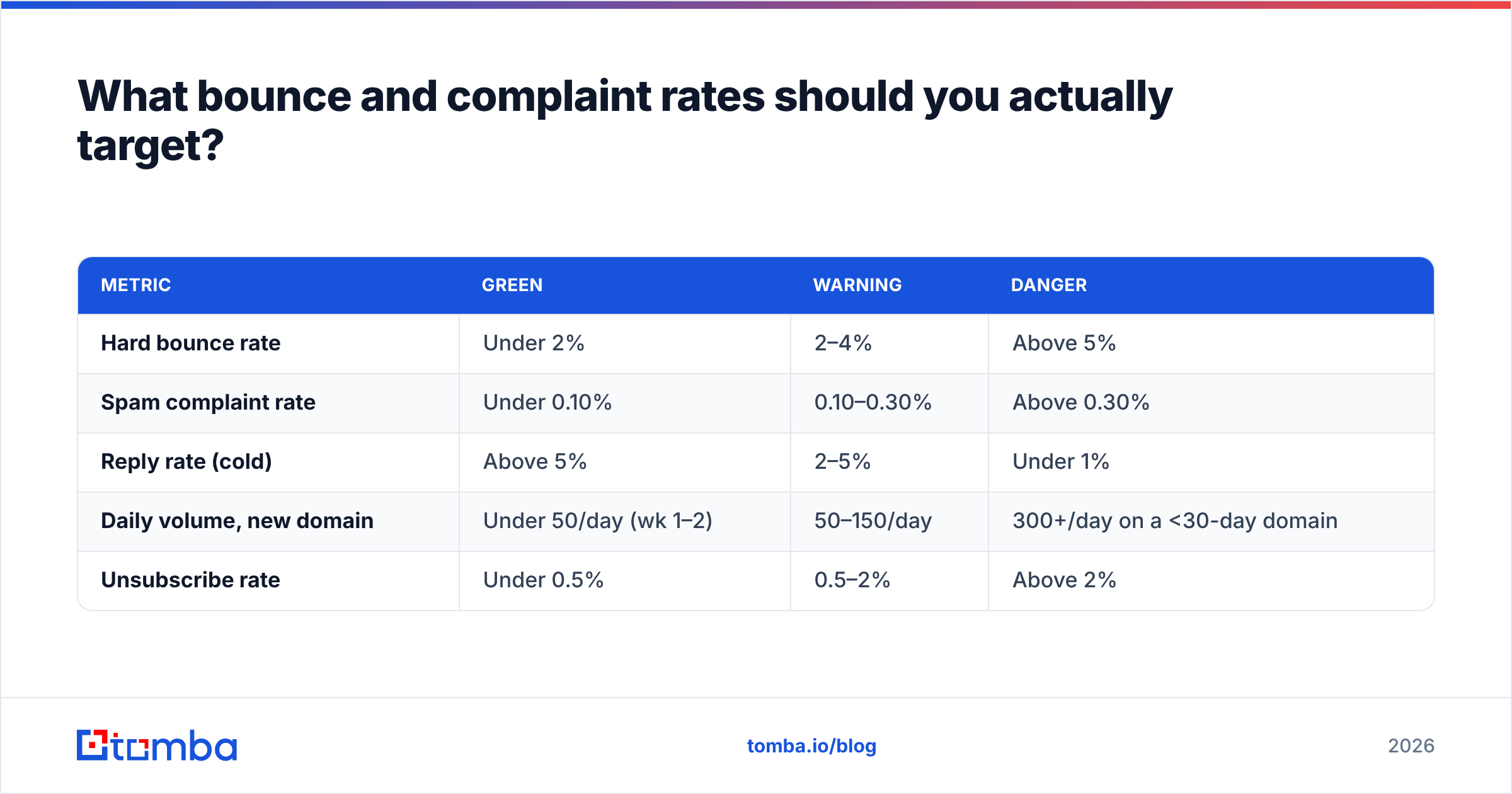
Google's bulk sender guidelines set the floor. Healthy GMass email deliverability sits well below it.
| Metric | Green | Warning | Danger |
|---|---|---|---|
| Hard bounce rate | Under 2% | 2–4% | Above 5% |
| Spam complaint rate | Under 0.10% | 0.10–0.30% | Above 0.30% |
| Reply rate (cold) | Above 5% | 2–5% | Under 1% |
| Daily volume, new domain | Under 50/day (wk 1–2) | 50–150/day | 300+/day on a <30-day domain |
| Unsubscribe rate | Under 0.5% | 0.5–2% | Above 2% |
Two notes on this table. First, the 0.30% complaint line is a hard ceiling, not a target. Aim for under 0.10%, which is what Gmail itself advises. Second, GMass does report bounces in your campaign dashboard. It reports them after the damage is done. Monitoring is not prevention. Pre-send verification is.
Register your domain with Google Postmaster Tools on day one. It shows domain reputation (Bad/Low/Medium/High), spam rate, and DNS pass rates for Gmail recipients. For a GMass sender, that is most of your list. If your reputation reads "Low" or "Bad," stop sending and fix the list before you touch anything else.

Does list quality matter more than GMass settings?#
Yes. List quality drives GMass email deliverability more than any setting, and it is not close.
Think of it like a restaurant health inspection. You can buy better plates, retrain the servers, and repaint the dining room. If the walk-in cooler runs warm, none of that saves you. List quality is the cooler. Send settings are the plates.
Here is the arithmetic. A 1,000-address list with a 12% invalid rate produces 120 hard bounces. Spread over five days at 200/day, that is a 12% bounce rate every single day — four times Google's danger threshold. No warmup schedule, sending window, or subject line rewrite offsets that. Now verify the same list down to 880 valid contacts. You get roughly 15 bounces total, a 1.7% rate, and Gmail never flinches.
The fix sits upstream of GMass: build the list from a source that returns verified, sourced data rather than a scrape. A domain search returns the addresses tied to a company, with a confidence score and the pages they were found on. That is a different quality tier than guessing first.last@company.com and hoping. Have names and companies but no addresses? An email finder resolves them one by one or in bulk. Each result carries a verify status, so you know what you are loading into your Google Sheet.
For larger imports, run everything through bulk verification before the sheet ever touches GMass. Ten minutes of clean-up beats three weeks of reputation repair.
When is GMass the wrong tool?#
Be honest about fit. GMass is great for a solo founder, recruiter, agency owner, or two-person sales team. Think 50–300 tailored emails a day from a real mailbox that people can reply to. It is the wrong tool when:
- You need more than ~2,000 sends/day. Gmail's cap is a wall. Multi-inbox tools exist for this.
- You are sending newsletters or transactional mail. Use an ESP built for broadcast, with list tools, templates, and unsubscribe handling.
- You cannot risk your primary Workspace account. If your calendar, Drive, and team email live in the same tenant, a suspension costs far too much. Move to a separate domain and tenant first.
- Your team needs shared sequences, call tasks, and CRM sync. GMass is a sending layer, not a sales platform. Outreach and Salesloft own that space. Review sites like G2 are a fair place to compare them.
- Your list is unverified and you have no plan to fix it. No sending tool survives that. GMass just fails faster, and it costs you more.
What does a healthy GMass workflow look like end to end?#
- Source contacts from company domains and named prospects rather than bulk lists.
- Verify every address, drop invalids and risky catch-alls, and deduplicate.
- Enrich with the fields you will merge — first name, company, role — so merge tags do not fall back to
{FirstName|there}for half the list. Contact enrichment fills the gaps that break merge tags. - Load into Google Sheets, connect GMass, and send a five-recipient test batch to seed accounts you control across Gmail, Outlook, and a corporate domain.
- Check placement on the test batch — Primary, Promotions, or Spam — before scaling.
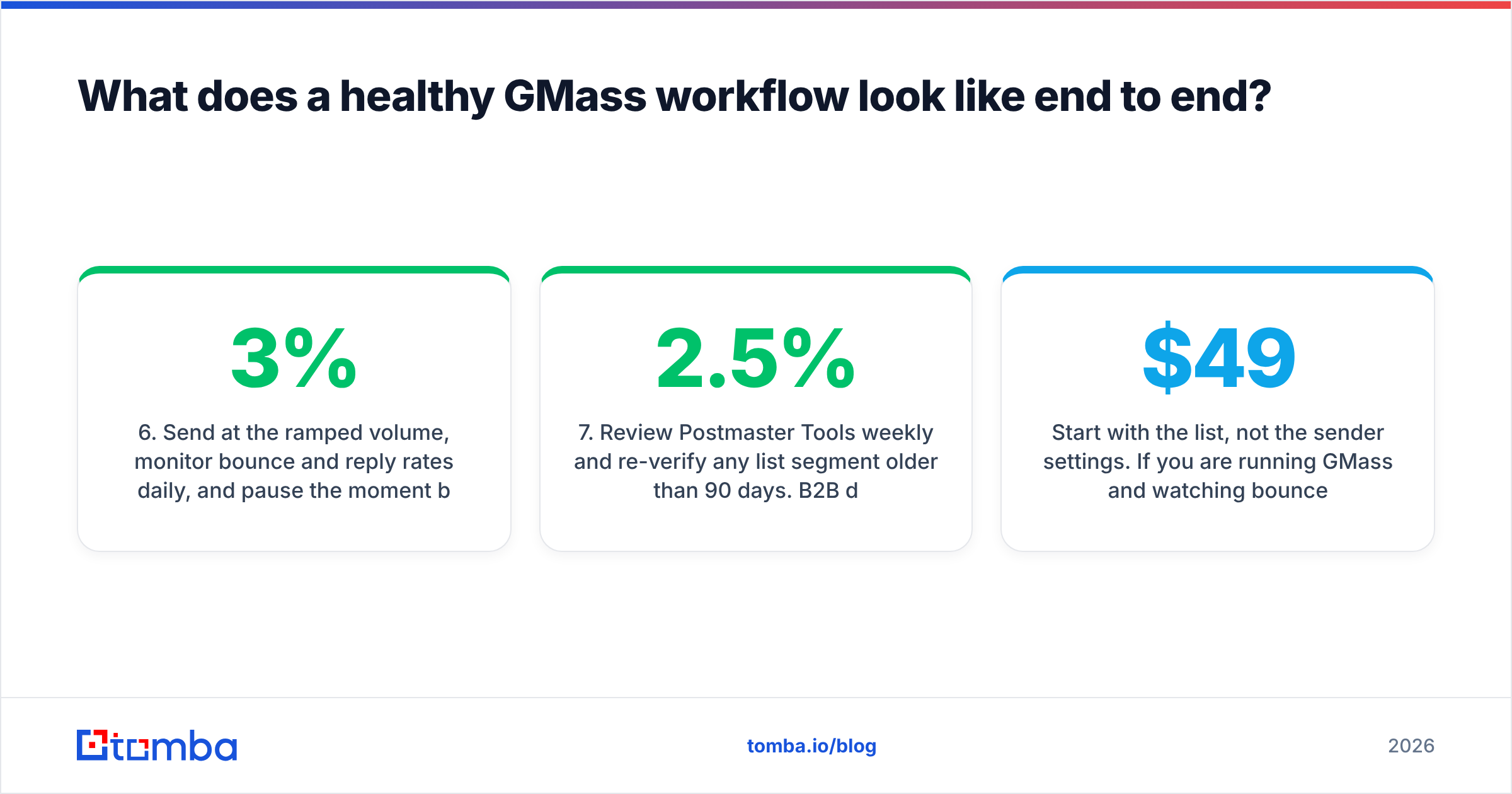
- Send at the ramped volume, monitor bounce and reply rates daily, and pause the moment bounces cross 3%.
- Review Postmaster Tools weekly and re-verify any list segment older than 90 days. B2B data decays at roughly 2–2.5% per month as people change jobs.
That loop is boring and it works. Most GMass email deliverability disasters come from skipping steps two and six.
Start with the list, not the sender settings. Watching bounces climb? The fastest fix is to verify and re-source your contacts before the next campaign goes out. Tomba's Email Finder returns verified business addresses by domain, name, or company. The free tier gives you 25 searches a month to test a list you already suspect. Paid plans start at $49/mo when you are ready to run volume. Clean inputs, ramped sending, correct DNS. That is the whole GMass email deliverability playbook, and the first one does most of the work.
Related guides#
Ready to find emails that actually work?
Join 150,000+ professionals who stopped guessing and started sending. Free credits on signup — no credit card required.
Get the Tomba newsletter
Practical outbound tactics and product updates — once every two weeks.
About the author