Why Your GoDaddy Email Is Going to Spam (2026 Fix Guide)
GoDaddy email going to spam is almost never one broken setting. Here's how to tell whether it's your DNS, your relay, your list, or GoDaddy's shared IP pool, and the exact order to fix it in.

TL;DR
- GoDaddy email going to spam usually comes down to four things: incomplete DNS authentication, sending through a shared relay IP, a domain with no sending history, and a list full of dead addresses.
- Fix DNS first. SPF, DKIM and DMARC have to all pass and align on the same domain you put in the From header. Most GoDaddy setups have SPF only.
- GoDaddy's outbound relay (
smtpout.secureserver.net) is shared infrastructure with daily caps. If you're sending cold outreach or bulk marketing through it, no DNS fix will save you. - Bounce rate is the fastest way to burn a new domain. Clean the list before the first send, not after the first bad campaign.
- If you send more than a few hundred cold or marketing emails a week, move that traffic off GoDaddy mail entirely and keep GoDaddy for transactional and person-to-person mail.
What does "GoDaddy email going to spam" actually mean?#
Start by naming the failure precisely, because three very different problems get reported with the same sentence.
Problem 1: your mail lands in the recipient's Junk folder. The message was accepted, scanned, and filed as low-trust. This is a reputation and authentication problem.
Problem 2: your mail is rejected outright. You get a bounce with a 5xx code mentioning a blocklist, policy, or "message rejected as spam." This is a blocklist or content problem.
Problem 3: your mail never leaves. GoDaddy's relay throttled you, or you hit a daily send cap, and messages sit in a queue. This is a limits problem and it looks like a deliverability problem from the outside.
Read the actual bounce or the message headers before you touch a single DNS record. The headers tell you whether SPF, DKIM and DMARC passed, which server relayed the message, and often which filter scored it. Guessing costs you days.
Why is GoDaddy email going to spam in the first place?#
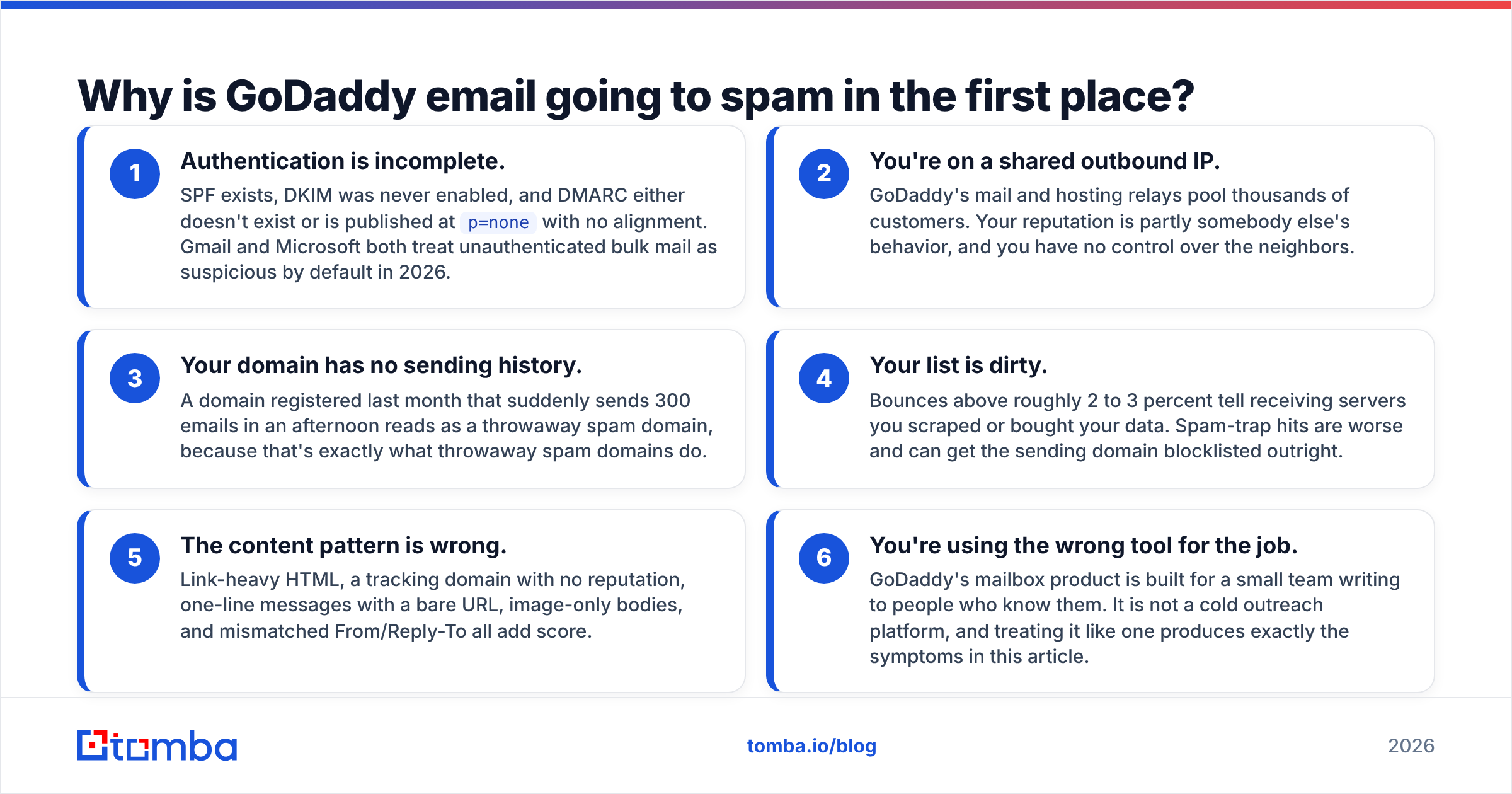
There is rarely a single cause. In practice these six factors stack, and each one on its own is survivable while three together are not.
- Authentication is incomplete. SPF exists, DKIM was never enabled, and DMARC either doesn't exist or is published at
p=nonewith no alignment. Gmail and Microsoft both treat unauthenticated bulk mail as suspicious by default in 2026. - You're on a shared outbound IP. GoDaddy's mail and hosting relays pool thousands of customers. Your reputation is partly somebody else's behavior, and you have no control over the neighbors.
- Your domain has no sending history. A domain registered last month that suddenly sends 300 emails in an afternoon reads as a throwaway spam domain, because that's exactly what throwaway spam domains do.
- Your list is dirty. Bounces above roughly 2 to 3 percent tell receiving servers you scraped or bought your data. Spam-trap hits are worse and can get the sending domain blocklisted outright.
- The content pattern is wrong. Link-heavy HTML, a tracking domain with no reputation, one-line messages with a bare URL, image-only bodies, and mismatched From/Reply-To all add score.
- You're using the wrong tool for the job. GoDaddy's mailbox product is built for a small team writing to people who know them. It is not a cold outreach platform, and treating it like one produces exactly the symptoms in this article.

Is it GoDaddy's fault or your domain's fault?#
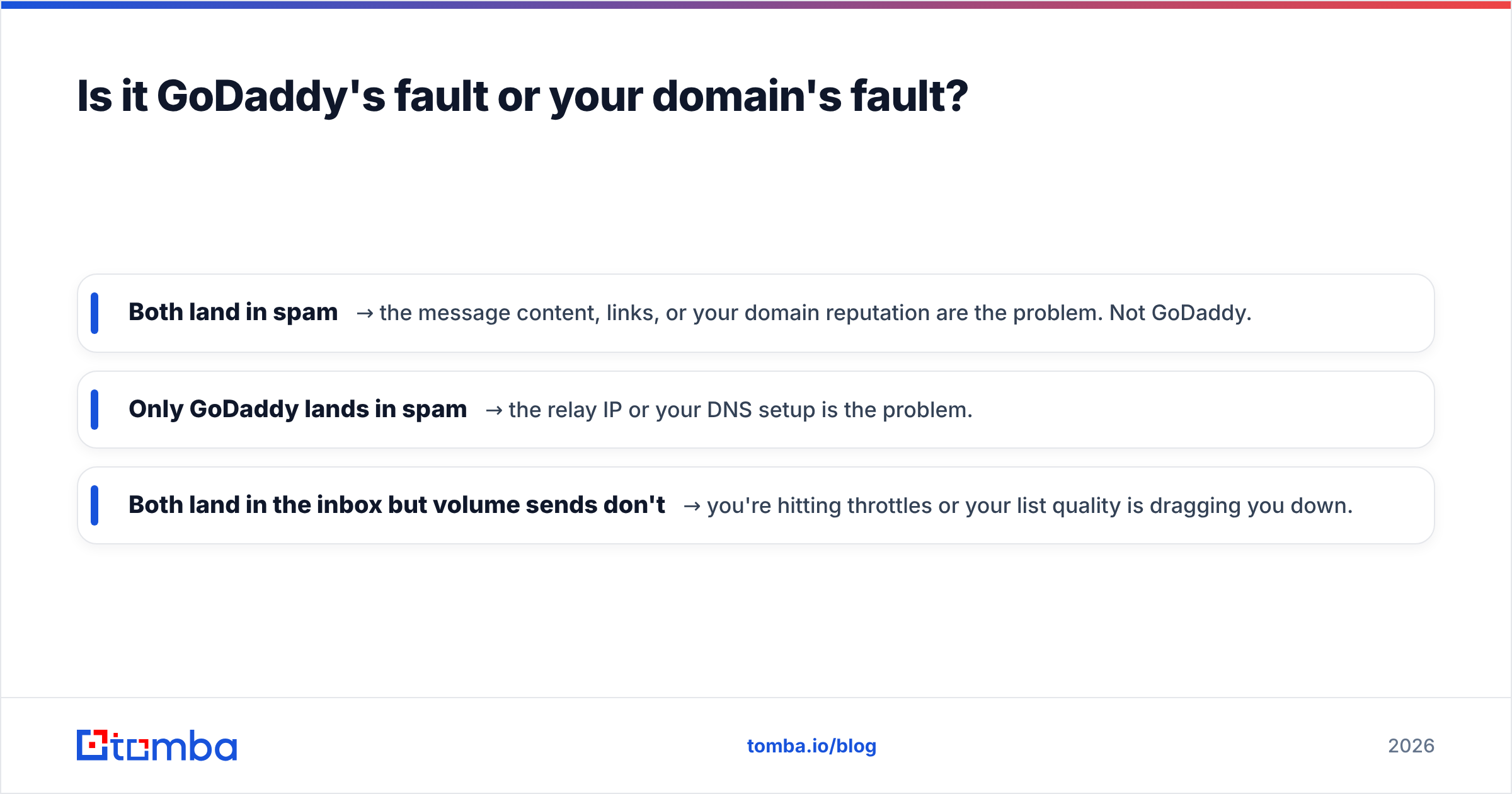
Both, in different proportions, and you can separate them in about ten minutes.
Send the same message from your GoDaddy address and from a fresh address on a different provider to the same test inbox. Then compare.
- Both land in spam → the message content, links, or your domain reputation are the problem. Not GoDaddy.
- Only GoDaddy lands in spam → the relay IP or your DNS setup is the problem.
- Both land in the inbox but volume sends don't → you're hitting throttles or your list quality is dragging you down.
Next, check the outbound IP recorded in the message headers against public blocklists. A blacklist checker will tell you within seconds whether the relay IP is listed on Spamhaus, SORBS, or Barracuda. If it is, and the IP is shared GoDaddy infrastructure, you cannot fix that yourself. You either wait for delisting or you move your outbound sending elsewhere.
Finally, pull your domain's reputation signals. Google Postmaster Tools shows domain reputation, spam rate, and authentication pass rates for mail delivered to Gmail addresses, and it's free. If your Gmail spam-complaint rate is above 0.3 percent, no DNS change will rescue you. Fix the targeting and the list.
What DNS records does GoDaddy email need to pass authentication?#
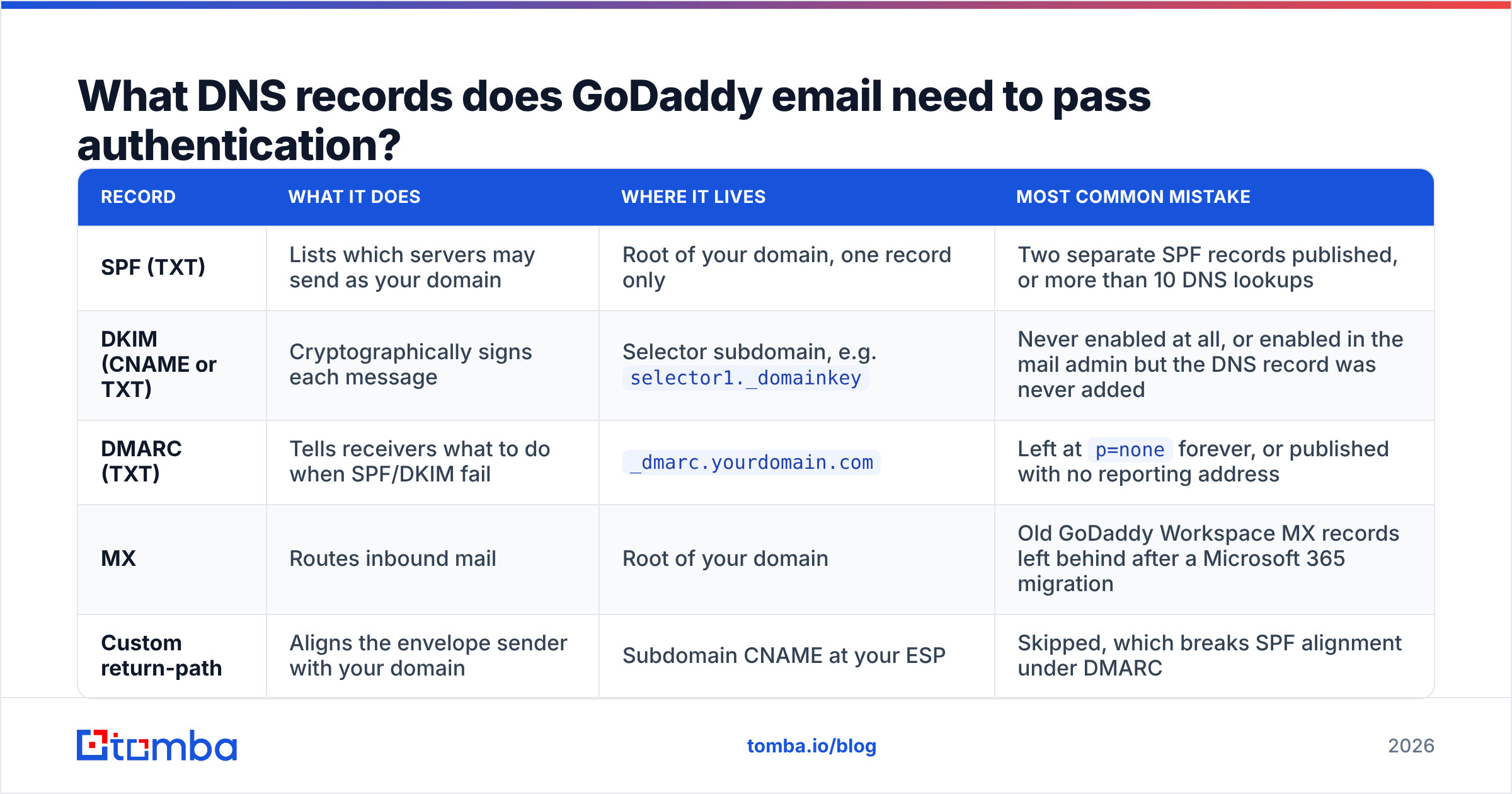
This is where most fixes live. The table below covers what has to exist, where it goes, and the mistake that most often breaks it.
| Record | What it does | Where it lives | Most common mistake |
|---|---|---|---|
| SPF (TXT) | Lists which servers may send as your domain | Root of your domain, one record only | Two separate SPF records published, or more than 10 DNS lookups |
| DKIM (CNAME or TXT) | Cryptographically signs each message | Selector subdomain, e.g. selector1._domainkey |
Never enabled at all, or enabled in the mail admin but the DNS record was never added |
| DMARC (TXT) | Tells receivers what to do when SPF/DKIM fail | _dmarc.yourdomain.com |
Left at p=none forever, or published with no reporting address |
| MX | Routes inbound mail | Root of your domain | Old GoDaddy Workspace MX records left behind after a Microsoft 365 migration |
| Custom return-path | Aligns the envelope sender with your domain | Subdomain CNAME at your ESP | Skipped, which breaks SPF alignment under DMARC |
Three specifics that trip up GoDaddy users in particular:
Your SPF must include every service that sends as you. GoDaddy's own mail, your website's contact form relay, your CRM, your invoicing tool, your newsletter platform. Miss one and that service's mail fails SPF. Confirm the published record resolves correctly with an SPF checker rather than trusting the DNS editor's preview.
Enable DKIM manually. On GoDaddy-resold Microsoft 365 mailboxes, DKIM signing is not always on out of the box. You turn it on in the mail admin, then publish the two CNAME selector records in DNS. If you only did one of those two steps, DKIM fails silently and DMARC alignment collapses.
Move DMARC past p=none. A monitoring-only policy proves nothing to receiving servers. Run at p=none with an RUA reporting address for two weeks, read the aggregate reports, confirm every legitimate sender is aligned, then step to p=quarantine and eventually p=reject. The DMARC.org overview explains the record syntax if you're building it by hand.
If you're unsure whether DNS is the bottleneck at all, run a message through a spam checker first. It scores authentication, content, and blocklist status in one pass, which stops you from spending a weekend on SPF when the real problem was a link to a burned tracking domain.
Does GoDaddy have sending limits that cause this?#
Yes, and they matter more than most people expect.
GoDaddy's hosting relay historically caps outbound messages per day per account, and GoDaddy blocks outbound port 25 on shared hosting to prevent abuse. Mailbox products carry their own recipient and message-per-day limits. The exact numbers change by plan and by year, so check the current figures in GoDaddy's help center rather than trusting a forum post from three years ago.
The practical consequence is simple. When you exceed a throttle, mail queues or gets deferred. Deferred mail retried aggressively looks like spam behavior to the receiving side, which then makes your reputation worse. A limits problem turns into a reputation problem if you keep pushing.
How do you fix GoDaddy email going to spam, step by step?#
Work in this order. Each step depends on the one before it.
- Audit DNS. One SPF record, under 10 lookups, every sender included. DKIM enabled and the selector records published. DMARC present with a reporting address. Old MX and Workspace records removed.
- Check the relay IP against blocklists. If it's listed and it's shared, plan to move outbound sending, because delisting a shared IP is not in your control.
- Clean the list before you send again. Remove hard bounces, role addresses like info@ and sales@, duplicates, and anything you can't verify. This single step moves the needle more than any DNS tweak for cold outreach senders.
- Warm the domain. Start at 20 to 30 messages a day and increase roughly 30 percent per week. If you also bought a new sending domain, warm it for two to three weeks before real volume. A warmup calculator will give you a concrete daily ramp instead of a guess.
- Fix the message itself. Plain-text-leaning HTML, one link maximum in a cold email, no image-only bodies, a real signature, a working unsubscribe path for anything marketing-adjacent, and a Reply-To that matches the From domain.
- Split your traffic. Keep GoDaddy for human-to-human and transactional mail. Route campaigns through a dedicated sending platform on a separate subdomain so a bad campaign can't take down your main domain.
- Monitor with real data. Google Postmaster Tools for Gmail, Microsoft SNDS for Outlook, DMARC aggregate reports for everything else. Deliverability is a metric you watch, not a project you finish.

Should you move off GoDaddy email entirely?#
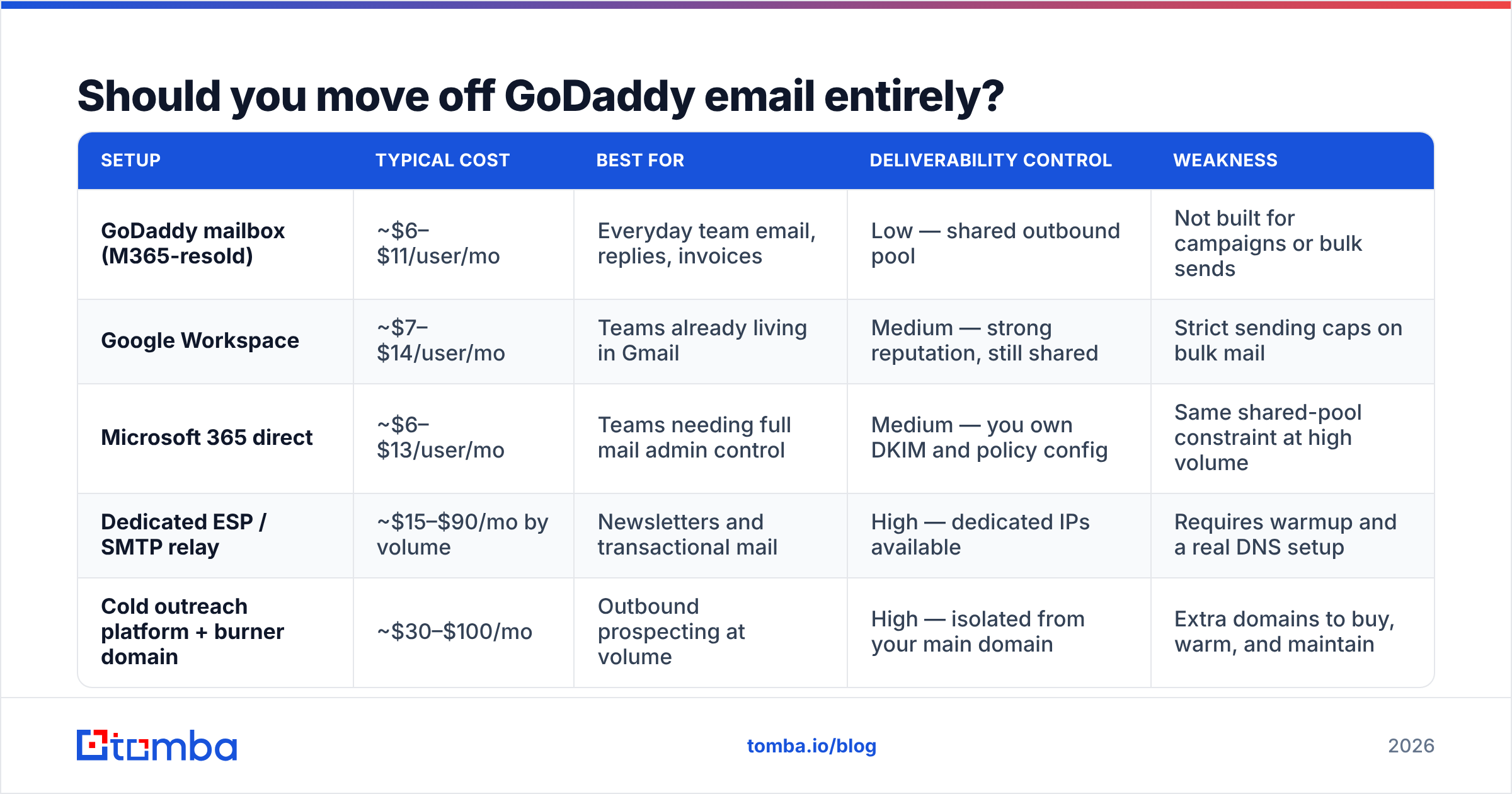
Not necessarily. It depends on what you're sending. Here's how the realistic options compare for a small B2B team.
| Setup | Typical cost | Best for | Deliverability control | Weakness |
|---|---|---|---|---|
| GoDaddy mailbox (M365-resold) | ~$6–$11/user/mo | Everyday team email, replies, invoices | Low — shared outbound pool | Not built for campaigns or bulk sends |
| Google Workspace | ~$7–$14/user/mo | Teams already living in Gmail | Medium — strong reputation, still shared | Strict sending caps on bulk mail |
| Microsoft 365 direct | ~$6–$13/user/mo | Teams needing full mail admin control | Medium — you own DKIM and policy config | Same shared-pool constraint at high volume |
| Dedicated ESP / SMTP relay | ~$15–$90/mo by volume | Newsletters and transactional mail | High — dedicated IPs available | Requires warmup and a real DNS setup |
| Cold outreach platform + burner domain | ~$30–$100/mo | Outbound prospecting at volume | High — isolated from your main domain | Extra domains to buy, warm, and maintain |
The pattern most teams settle on: GoDaddy or Microsoft 365 for the mailbox everyone replies from, a separate lookalike domain and outreach tool for prospecting, and an ESP for the newsletter. Three lanes, three reputations, one bad campaign can only damage one of them.
Why does list quality matter more than DNS for cold email?#
Because bounce rate is the loudest negative signal you can send, and it's the one you control most directly.
Perfect SPF, DKIM and DMARC on a list where 18 percent of the addresses no longer exist will still land you in spam. Receiving servers read a high bounce rate as proof you didn't earn the data. Two or three campaigns like that and your domain reputation is measurably worse, at which point the DNS work you did stops mattering.
The order that actually works is: verify, then warm, then send. Running your list through an email verifier before the first send removes syntax errors, dead mailboxes, disposable domains, and role accounts. For domains that accept everything, a catch-all verifier narrows the risk instead of leaving you guessing. Aim to get under 2 percent bounce before you press send, not after.
The other half of the equation is where the data came from. Addresses guessed by a permutation tool bounce far more often than addresses confirmed against real sources. If you're building prospect lists by pattern-matching first initial plus last name at a domain, your bounce rate is doing the damage, not GoDaddy.
What should you monitor after the fix?#
Give it two to three weeks and track four numbers.
- Bounce rate. Target under 2 percent. Above 4 percent, stop sending and re-verify.
- Spam complaint rate. Under 0.1 percent is healthy. Above 0.3 percent and Gmail will start filtering you regardless of authentication.
- Authentication pass rate. SPF, DKIM and DMARC should all pass on close to 100 percent of mail. Anything less means a sender is missing from your SPF record.
- Reply rate. The one nobody watches. Real replies are a positive reputation signal, and a campaign that gets replies rarely has a spam problem for long.
If those four look good and specific recipients still report Junk placement, the problem has moved to their side: an org-level Outlook rule, a Mimecast or Proofpoint policy, or an individual filter. Ask the recipient to mark it Not Junk and add you as a contact. That's a one-off fix, not a systemic one.
Where do you go from here?#
The sequence is boring and it works: read the headers, fix DNS properly, check the relay IP, clean the list, warm the domain, split your traffic by purpose, then monitor. Skip the list-cleaning step and you'll be back here in a month.
If cold outreach is what pushed your GoDaddy mail into spam, start upstream. The Tomba Email Finder returns verified business addresses with a confidence score attached, so you're sending to mailboxes that actually exist instead of permutations that bounce. Free tier covers 25 searches a month, Starter is $49/mo, and Growth is $99/mo. Check Tomba pricing for the full breakdown. Fix the data first, and the deliverability problem gets a lot smaller.
Related guides#
Ready to find emails that actually work?
Join 150,000+ professionals who stopped guessing and started sending. Free credits on signup — no credit card required.
Get the Tomba newsletter
Practical outbound tactics and product updates — once every two weeks.
About the author