Good Email Signatures: What Actually Works in 2026
Most email signatures are cluttered vanity blocks that hurt replies and deliverability. Here is what separates good email signatures from the ones prospects skip — with templates, a comparison table, and the elements to cut.
TL;DR
- A good email signature does three jobs: confirm who you are, prove you are reachable, and give one next step. Everything else is noise.
- Image-heavy signatures (logos, banner GIFs, social icon strips) increase message size, trip image-blocking, and correlate with worse cold-email placement. Plain text or near-plain text wins in outbound.
- The reply-safe core is 4–6 lines: name, role + company, one phone or booking link, one URL. Legal disclaimers go last and short.
- Internal signatures, cold outbound signatures, and marketing-newsletter signatures are three different objects. Using one everywhere is the most common mistake.
- Signature quality only matters if the address is real. Bad data kills more campaigns than bad design — verify before you send.
Your signature is the only part of your email that appears in every single message you will ever send. That is thousands of impressions per year, and most people fill that space with a 180 KB logo, six social icons nobody clicks, and a "Please consider the environment before printing" line written in 2009.
This guide covers what good email signatures actually look like in 2026, what to cut, how signature choices interact with deliverability, and which format to use for cold outbound versus internal threads.
What makes a good email signature in 2026?#
A good signature is a credential, not a billboard. The reader's brain scans it for one question: is this person real and worth answering? Anything that does not answer that question is competing with the thing that does.
Four properties separate signatures that help from signatures that hurt:
- Scannable in under two seconds. Four to six short lines. If the reader has to parse a layout, you have already lost the scan.
- Text-first rendering. No critical information locked inside an image. Outlook, Gmail's "images off" default for unknown senders, and most mobile clients will strip or delay images — your phone number should never live inside a PNG.
- One call to action, maximum. A booking link or a website or a case study. Two CTAs is the same as zero.
- Consistent identity signal. The name in the signature matches the From name, which matches the domain, which matches the LinkedIn profile. Mismatches read as spoofing to both humans and filters.
- Lightweight in bytes. Under ~10 KB of HTML for the signature block. Heavy signatures inflate every message and push threads toward Gmail's clipping threshold.
- Reply-safe. After eight replies, the signature should not have turned the thread into a wall of repeated logos. Short signatures degrade gracefully; designed ones do not.
What should you actually include — and what should you cut?#
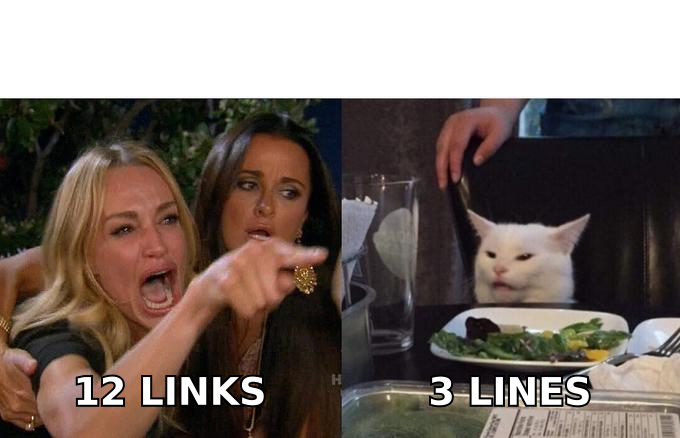
Here is the honest split. The "keep" column is what earns its space. The "cut" column is what people add because a signature generator offered a field.
| Element | Keep, cut, or conditional | Why |
|---|---|---|
| Full name | Keep | Matches From name; anchors identity |
| Job title + company | Keep | Sets context for why you are emailing |
| Direct phone | Conditional | Keep for AE/CS roles; cut for high-volume outbound where it invites nothing |
| Booking link | Conditional | Strong for warm threads, pushy in first-touch cold |
| Company URL | Keep | One link, plain text, no tracking parameters |
| Company logo image | Cut for outbound | Adds weight, blocked by default, no measurable lift |
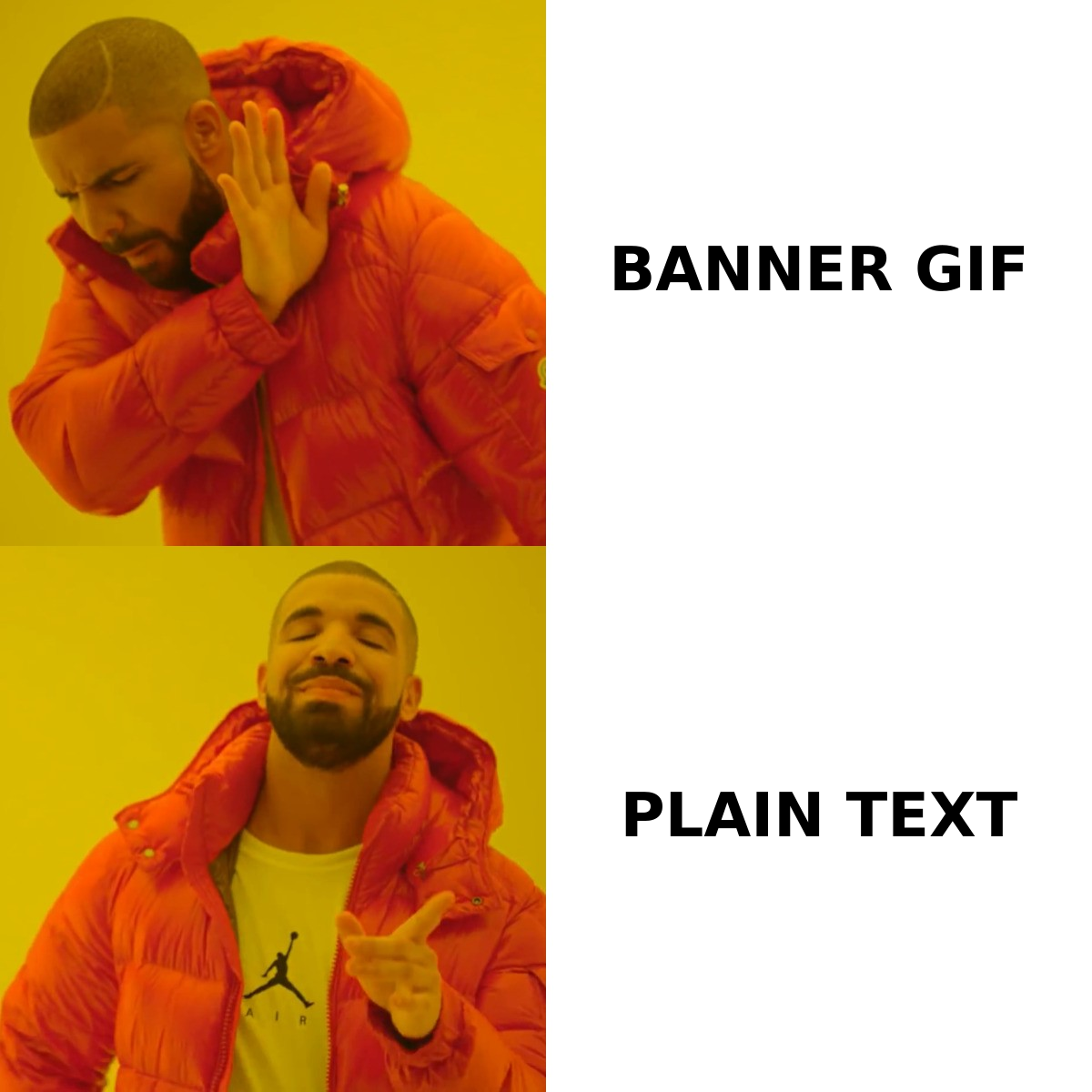
| Banner/promo GIF | Cut | Largest file, lowest click rate, strongest spam correlation |
| Social icon strip | Cut | 6 images for links almost nobody clicks in a B2B thread |
| Pronouns | Conditional | Fine; costs one short line |
| Legal disclaimer | Conditional | Required in some jurisdictions/industries; keep to 1–2 lines |
| "Sent from my iPhone" | Cut | Unless you want an excuse for typos, which is a real strategy |
| Quote or motto | Cut | Reads as personal branding in a business context |
| Physical address | Conditional | Required for CAN-SPAM-covered marketing mail, not for one-to-one sales mail |
The pattern: every image is a liability, every link past the first dilutes the first, and every optional line steals attention from the four that matter.
Which signature format fits which type of email?#
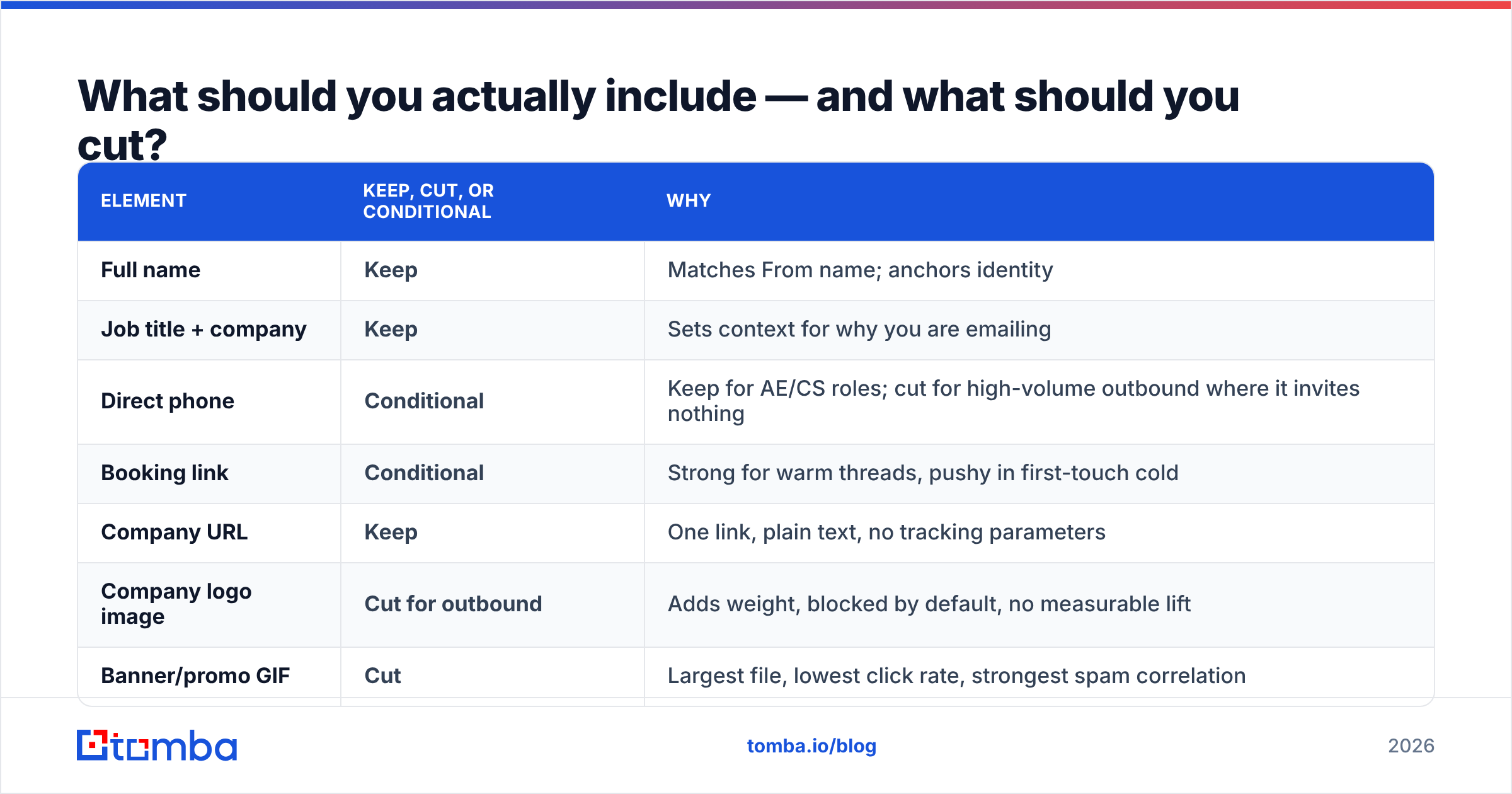
Treating all outgoing mail the same is why so many signatures underperform. Three contexts, three formats.
| Cold outbound (first touch) | Warm / reply thread | Newsletter & marketing | |
|---|---|---|---|
| Format | Plain text | Light HTML | Full HTML |
| Lines | 3–4 | 4–6 | 6–10 |
| Images | None | Optional small logo | Logo + banner OK |
| Links | 0–1 | 1–2 | 2–4 + unsubscribe |
| Phone | Usually omit | Include | Support line |
| Legal block | No | No | Address + unsubscribe (required) |
| Typical size | < 1 KB | 2–6 KB | 20–80 KB |
| Primary risk | Spam signals | Thread clutter | Clipping at 102 KB |
Cold outbound, first touch. Three lines. Name, role at company, one URL. No images, no icons, no disclaimer. It should look like a note a human typed, because a signature that looks designed announces "this is a campaign" before the reader finishes the first sentence.
Sarah Chen
Head of Partnerships, Northwind Analytics
northwind.io
Warm thread or inbound reply. You have permission to be more useful. Add the phone number or booking link, keep everything text.
Sarah Chen
Head of Partnerships | Northwind Analytics
+1 415 555 0142 · northwind.io
Book 20 min: cal.com/sarahchen
Newsletter. Different rules apply — you are legally required to include a postal address and unsubscribe mechanism under CAN-SPAM, and the design constraints are marketing constraints, not sales ones. Note that Gmail clips messages over roughly 102 KB, so a heavy signature on top of a heavy template is how the unsubscribe link ends up below the fold in a "View entire message" link.
Do email signatures affect deliverability?#
Yes, but indirectly — and the mechanism is worth understanding because most advice on this is either alarmist or dismissive.
Signatures do not carry their own reputation score. What they do is change the composition of your message in ways filters measure:
- Image-to-text ratio. A three-sentence cold email plus a logo, headshot, and six social icons is mostly images by pixel weight. That ratio is a classic spam heuristic and it is entirely self-inflicted.
- Link count and link quality. Each link in a signature is a link in the message. Shortened links (bit.ly and friends) in signatures are a genuine risk — they are shared infrastructure with an unpredictable reputation.
- Tracking-domain mismatch. If your signature links go through a tracking domain that does not match your sending domain, filters see a redirect chain. Use a branded tracking domain or drop the tracking on signature links entirely.
- Message size. Bigger messages are marginally more likely to be truncated or deprioritized, and clipped threads break unsubscribe and CTA visibility.
- Repetition across a thread. Ten replies with a full HTML signature each time produces a message with ten logos. Some filters read heavy repetition as template mail.
None of this outweighs the fundamentals — authentication, list quality, sending volume, complaint rate. If your SPF record is broken, no signature design saves you. But signature bloat is a free win: cutting it costs nothing and removes a category of risk entirely. Google's own sender guidelines put authentication and low complaint rates first, which is the right priority order.
The single biggest deliverability lever is still whether the address exists. Bounce rate above roughly 2–3% damages sender reputation faster than any formatting decision. Run your list through an email verifier before the campaign, not after the bounces come back.
How do signature builders compare to writing it yourself?#
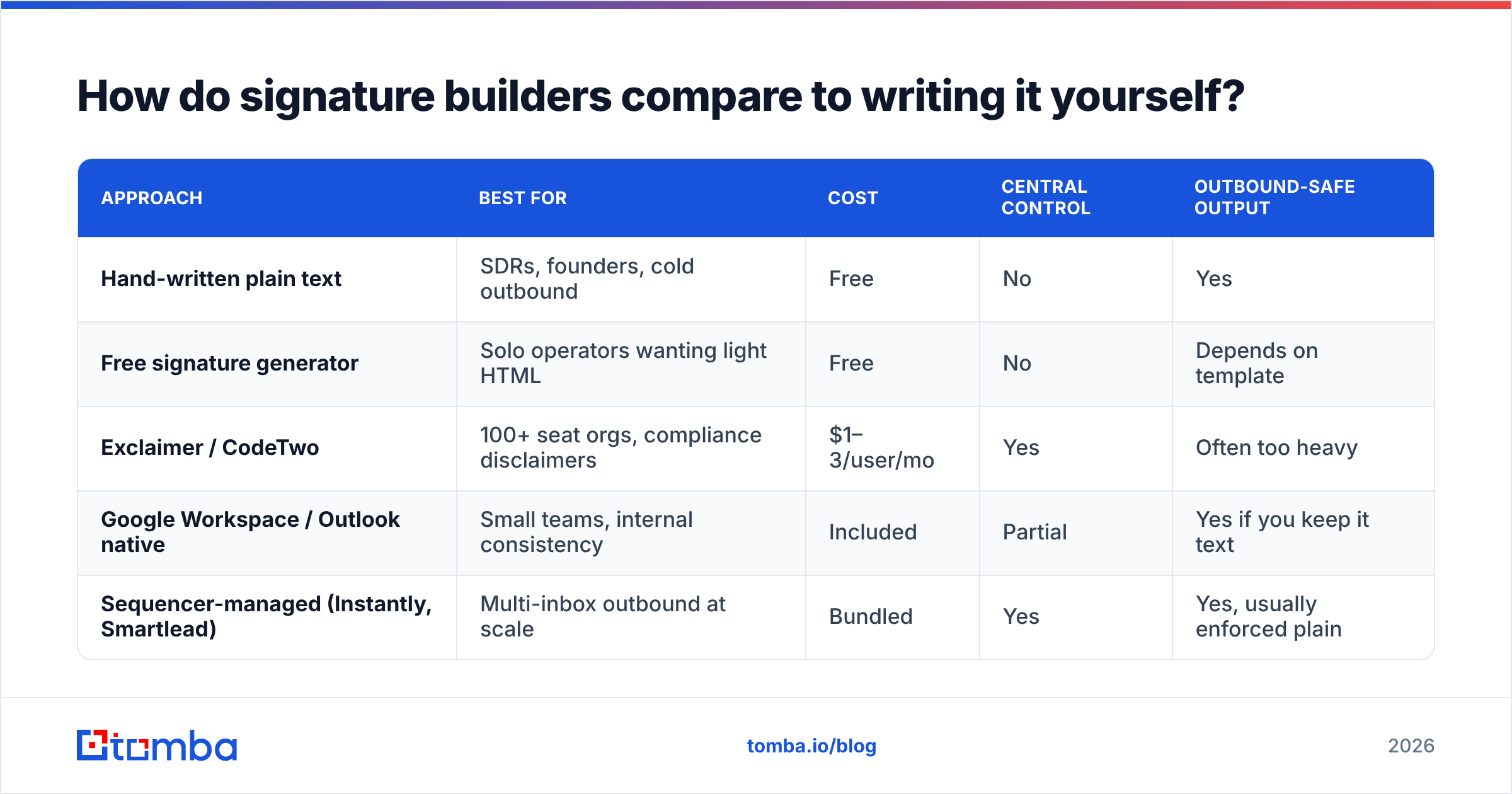
You do not need a tool for a four-line text signature. You might need one if you are enforcing 200 employees' signatures centrally. Here is the honest landscape.
| Approach | Best for | Cost | Central control | Outbound-safe output |
|---|---|---|---|---|
| Hand-written plain text | SDRs, founders, cold outbound | Free | No | Yes |
| Free signature generator | Solo operators wanting light HTML | Free | No | Depends on template |
| Exclaimer / CodeTwo | 100+ seat orgs, compliance disclaimers | $1–3/user/mo | Yes | Often too heavy |
| Google Workspace / Outlook native | Small teams, internal consistency | Included | Partial | Yes if you keep it text |
| Sequencer-managed (Instantly, Smartlead) | Multi-inbox outbound at scale | Bundled | Yes | Yes, usually enforced plain |
For most sales teams the answer is boring: write the text version once, paste it into every inbox, and spend the saved effort on the list. If you want a starting layout without hand-coding HTML, an email signature generator gets you a clean block you can then strip down.
What do good email signature examples look like by role?#
Templates are only useful with the reasoning attached, so here is what changes and why.
Founder / CEO — cold outreach
Marcus Reid
Founder, Ledgerpoint
ledgerpoint.com
Three lines. The title is the credibility, so nothing else needs to work. Adding a phone number here reduces replies — it signals a sales motion rather than a peer note.
SDR / BDR — sequenced outbound
Priya Nadar
Northwind Analytics
priya@northwind.io
No title. "SDR" in a signature tells the prospect they are in a queue. The email address line is redundant on desktop but useful on mobile clients that hide the From address.
Account executive — active deal thread
Tom Alvarez
Enterprise AE, Northwind Analytics
+1 415 555 0188 · Book time: cal.com/tomalvarez
northwind.io
Phone and booking link both belong here because the reader has already decided to engage. Friction reduction beats minimalism once the deal is live.
Customer success — support threads
Dana Whitfield
Customer Success, Northwind Analytics
Support: help@northwind.io · Docs: northwind.io/docs
Mon–Fri, 9–6 PT
Availability hours prevent the "why haven't you replied" spiral. The support alias matters more than her direct address.
Recruiter — candidate outreach
Ellis Mbeki
Talent, Northwind Analytics
linkedin.com/in/ellismbeki
The LinkedIn URL is the credential in recruiting — candidates check it before they reply. This is the one role where a social link earns its line.
Notice what none of them have: a headshot, a logo, a quote, or a disclaimer. Those exist in the corporate-mandated version, and that version belongs on internal mail.
How do you set up and test a signature that renders everywhere?#
Rendering is where good signatures die. A block that looks right in Gmail web can collapse into a stack of underlined blue text in Outlook desktop, which still uses a Word-based HTML renderer with limited CSS support.
A workable process:
- Write the plain-text version first. If it does not work as text, the HTML version is decoration on a weak foundation.
- Use a middot or pipe separator, not a table, for anything you want on one line. Tables are the only reliable HTML layout in Outlook, but if you have no images you do not need layout at all.
- Test in Outlook desktop, Gmail web, Gmail iOS, and Apple Mail. These four cover the majority of B2B inboxes. Send yourself the same message in each.
- Send with images blocked and confirm nothing important disappears.
- Reply to yourself four times and read the resulting thread. If it is unreadable, your signature is too heavy.
- Check the raw size. View the source of the sent message. If the signature is over 10 KB, something in it is an image you forgot about.
One more step people skip: verify that your authentication is intact after any change to your sending setup. Run an SPF checker and confirm your DMARC policy is published. Signature design is a rounding error next to a failed authentication check, and email deliverability problems almost always trace back to the DNS layer first.
What are the most common signature mistakes?#
Ranked by how much damage they do:
- Information trapped in an image. Blocked images mean an unreachable sender. This is the worst one and it is everywhere.
- Multiple competing CTAs. Booking link, demo link, case study, newsletter signup, and a webinar banner. The reader clicks nothing.
- Shortened or mismatched tracking links. Free reputation risk with no benefit at signature scale.
- A disclaimer longer than the email. If legal requires 200 words, put it in a smaller font at the bottom and accept it, but do not add one voluntarily.
- Titles that change per campaign. "Growth Consultant" in one sequence and "Head of Sales" in another, from the same address, is a trust break if a prospect ever compares notes.
- Signature on every reply in a thread. Set your client to use a short version for replies — usually just your first name.
- A phone number nobody answers. Worse than no number.
Where does prospecting data fit into this?#
Signature polish is the last 2% of an outbound email. The first 90% is sending to a real person at a real address who plausibly has the problem you solve.
The order of operations that actually matters:
- Build the target list from firmographic criteria, not from whatever export you inherited.
- Find verified addresses for named contacts rather than guessing at
firstname@patterns. A domain search returns the addresses and the company's dominant email pattern in one pass, which also tells you what format to expect for contacts you find later. - Verify before sending, including catch-all domains, which need their own handling.
- Enrich with role and seniority so your title line and your pitch match the reader.
- Then worry about whether your signature has three lines or four.
Teams that invert this order end up A/B testing signature fonts while a fifth of their list bounces. If you are building outbound volume, the bulk email finder workflow and a verification pass will move your reply rate more than any design change discussed above. Independent review sites like G2 are a reasonable place to sanity-check vendor claims about match rates before you commit budget.
The verdict#
Good email signatures are short, text-first, single-CTA, and role-appropriate. Cut the logo, cut the social icons, cut the banner, cut the quote. Keep your name, your role, one way to reach you, and one link. Use a heavier version internally if your company requires it, and never use that version for cold outbound.
Then go spend the time you just saved on the part that actually determines whether the email gets read: the address it is sent to and the person behind it.
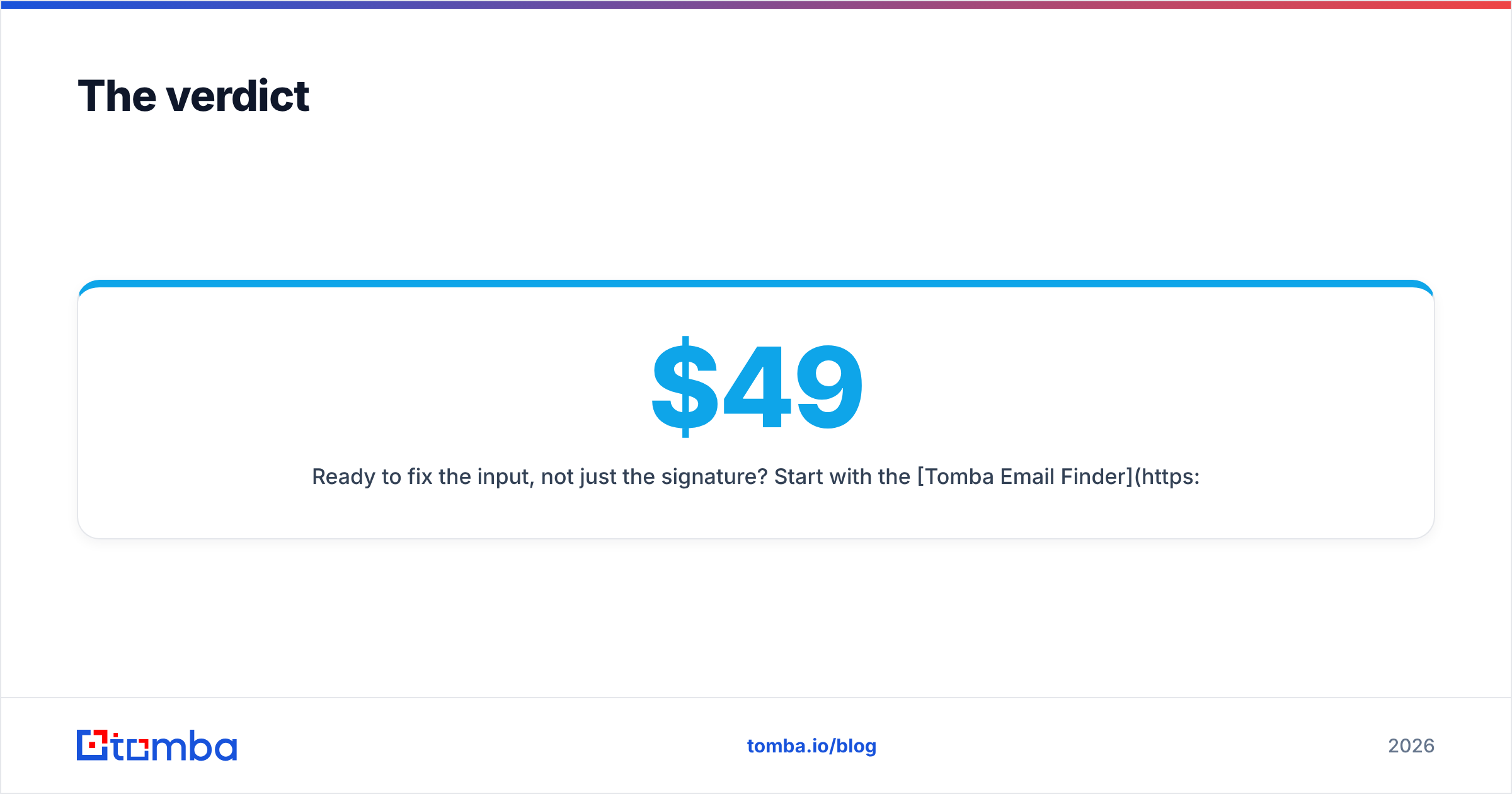
Ready to fix the input, not just the signature? Start with the Tomba Email Finder — find verified professional addresses by name, company, or domain, with a free tier of 25 searches per month and paid plans from $49/mo. See full Tomba pricing for Growth ($99/mo) and Pro ($249/mo) tiers if you are running outbound at volume.
Related guides#
Ready to find emails that actually work?
Join 150,000+ professionals who stopped guessing and started sending. Free credits on signup — no credit card required.
Get the Tomba newsletter
Practical outbound tactics and product updates — once every two weeks.
About the author