Google Blocking Emails? Why Gmail Rejects You in 2026
Gmail rejects, spam-folders, or rate-limits mail for reasons that show up in the SMTP response code. Here is how to read the error, find the real cause, and get delivery back.
TL;DR
- Google almost never blocks you without telling you why — the reason is in the SMTP response string (
550 5.7.1,421 4.7.28,550 5.7.26), and every fix starts by reading that string instead of guessing. - The three causes behind most blocks in 2026: missing or misaligned authentication (SPF/DKIM/DMARC), a spam-complaint rate above 0.3% in Postmaster Tools, and sending volume that ramps faster than your domain's reputation.
- Bulk senders (5,000+ Gmail recipients/day) have been under enforced rules since February 2024 — DMARC, one-click unsubscribe, and a complaint ceiling are now hard requirements, not suggestions.
- List hygiene is the cheapest lever. Bounces from dead addresses feed directly into the reputation score Google uses to decide whether to reject, throttle, or spam-folder you.
- Blocks tied to IP reputation lift in hours. Blocks tied to domain reputation take weeks. Know which one you're in before you decide to move domains.
You sent a campaign. Half of it never arrived, and your ESP is showing a wall of red. Before you buy a new domain or blame the copy, understand this: Google publishes the reason for nearly every rejection, and the remedy for a 421 throttle is completely different from the remedy for a 550 5.7.26 authentication failure. Treating them the same is why most senders stay blocked for months.
This guide covers what Google's filters actually evaluate, how to decode the error you got, and the sequence to work through — ordered by how much delivery each step buys back.
What does "Google blocking emails" actually mean?#
It means one of four different things, and lumping them together is the core mistake.
- Hard rejection at the SMTP layer. Google's server refuses the message outright with a
5xxcode. The recipient never sees anything. This is a true block. - Temporary deferral (throttling). A
4xxcode — Google says "not right now" and your sending server retries. Volume-driven, usually self-resolving, and often mistaken for a block. - Spam folder placement. The message is accepted with a
250 OKand quietly filed away. Your ESP reports 100% delivery. Nobody replies. This is the most expensive failure because your dashboard says everything is fine. - Suppression of images and links. Delivered to the inbox but stripped, with a "Be careful with this message" banner. Reputation is damaged but not fatal.
Only the first is literally a block. But when people say Google is blocking their emails, they usually mean two or three, which need different fixes.
Google's decision engine weighs domain reputation, IP reputation, authentication results, user engagement signals (opens, replies, "not spam" clicks), and complaint rate. Domain reputation is the heaviest input and the slowest to change — Google explicitly documents this in the Gmail sender guidelines.
How do you read the Gmail error code you got?#
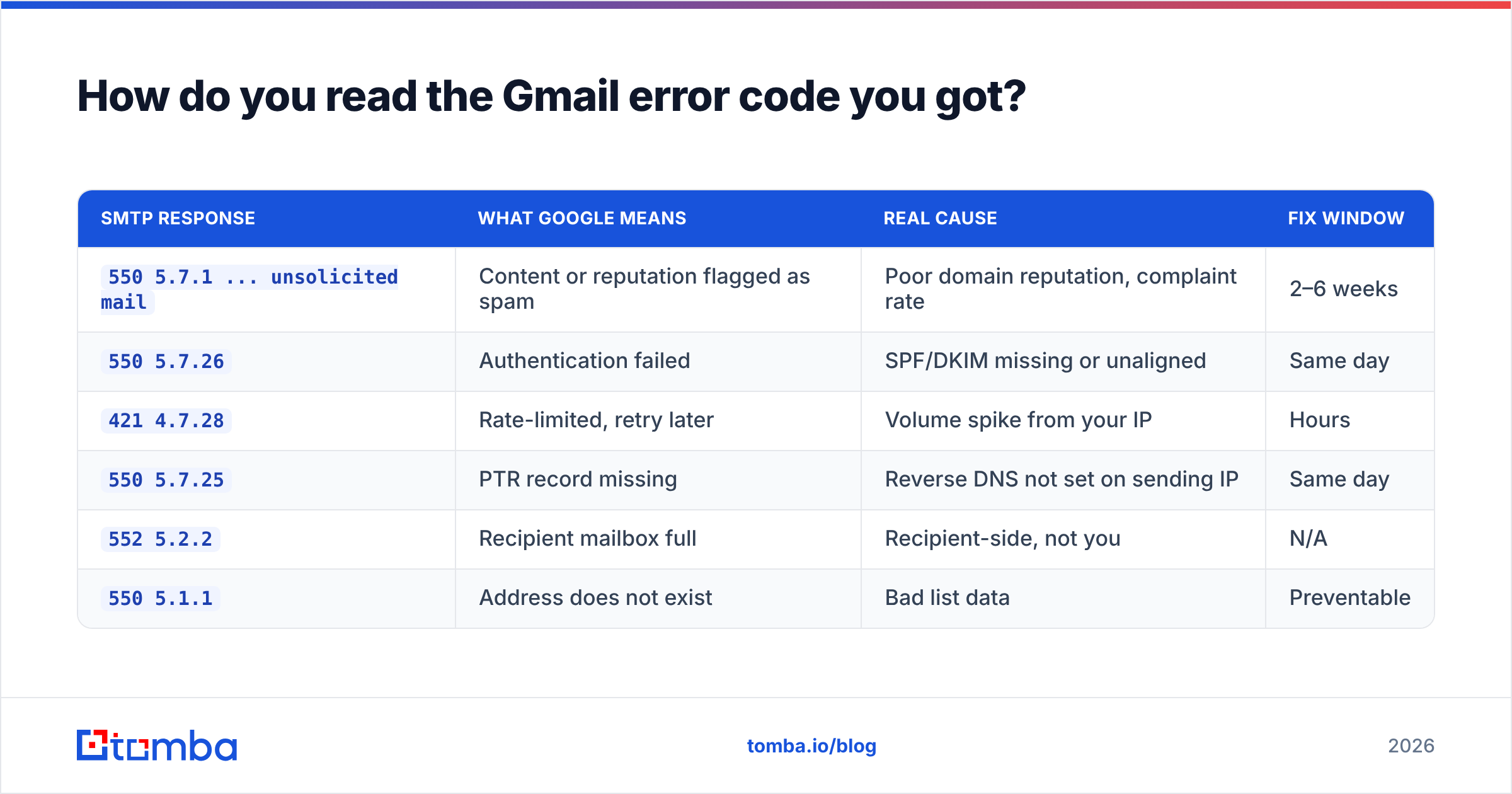
Every rejection carries a string. Pull it from your ESP's bounce log or your mail server's exim/postfix log. Here is what the common ones mean and what actually fixes them.
| SMTP response | What Google means | Real cause | Fix window |
|---|---|---|---|
550 5.7.1 ... unsolicited mail |
Content or reputation flagged as spam | Poor domain reputation, complaint rate | 2–6 weeks |
550 5.7.26 |
Authentication failed | SPF/DKIM missing or unaligned | Same day |
421 4.7.28 |
Rate-limited, retry later | Volume spike from your IP | Hours |
550 5.7.25 |
PTR record missing | Reverse DNS not set on sending IP | Same day |
552 5.2.2 |
Recipient mailbox full | Recipient-side, not you | N/A |
550 5.1.1 |
Address does not exist | Bad list data | Preventable |
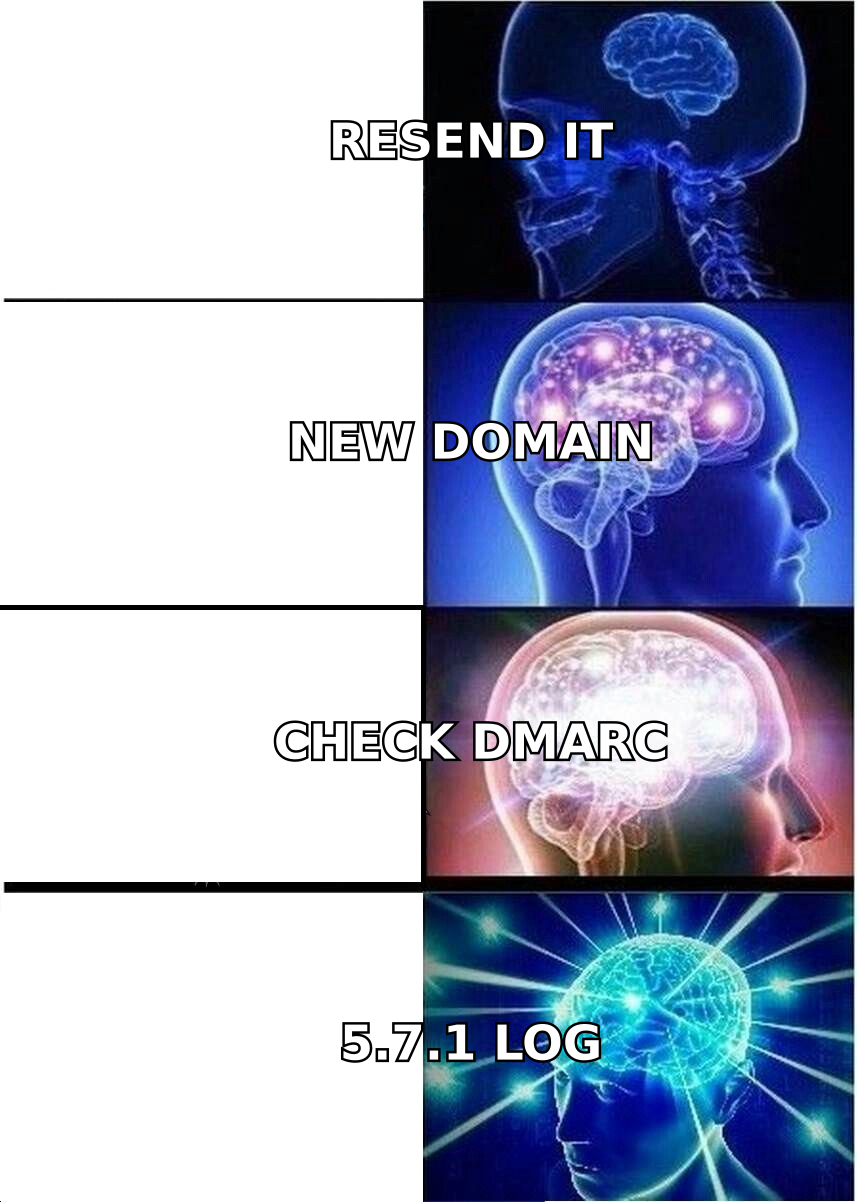
The last row matters more than it looks. A high 550 5.1.1 rate is not just wasted sends — it's a signal Google reads as "this sender does not maintain a list," and it drags down the reputation score that drives the 5.7.1 rejections above it. If more than 2% of a campaign bounces as nonexistent, fix the list before you touch anything else. Running addresses through an email verifier before send removes that signal entirely.
The 421 4.7.28 deferral is the one people panic about unnecessarily. It's Google saying your sending IP exceeded a per-hour threshold. Well-behaved mail servers retry with backoff and the mail lands. If your ESP is reporting it as a permanent failure, your ESP's retry logic is the problem, not Gmail.
Is your authentication actually passing?#
This is the first thing to check, because it's the only cause you can fix in an afternoon.
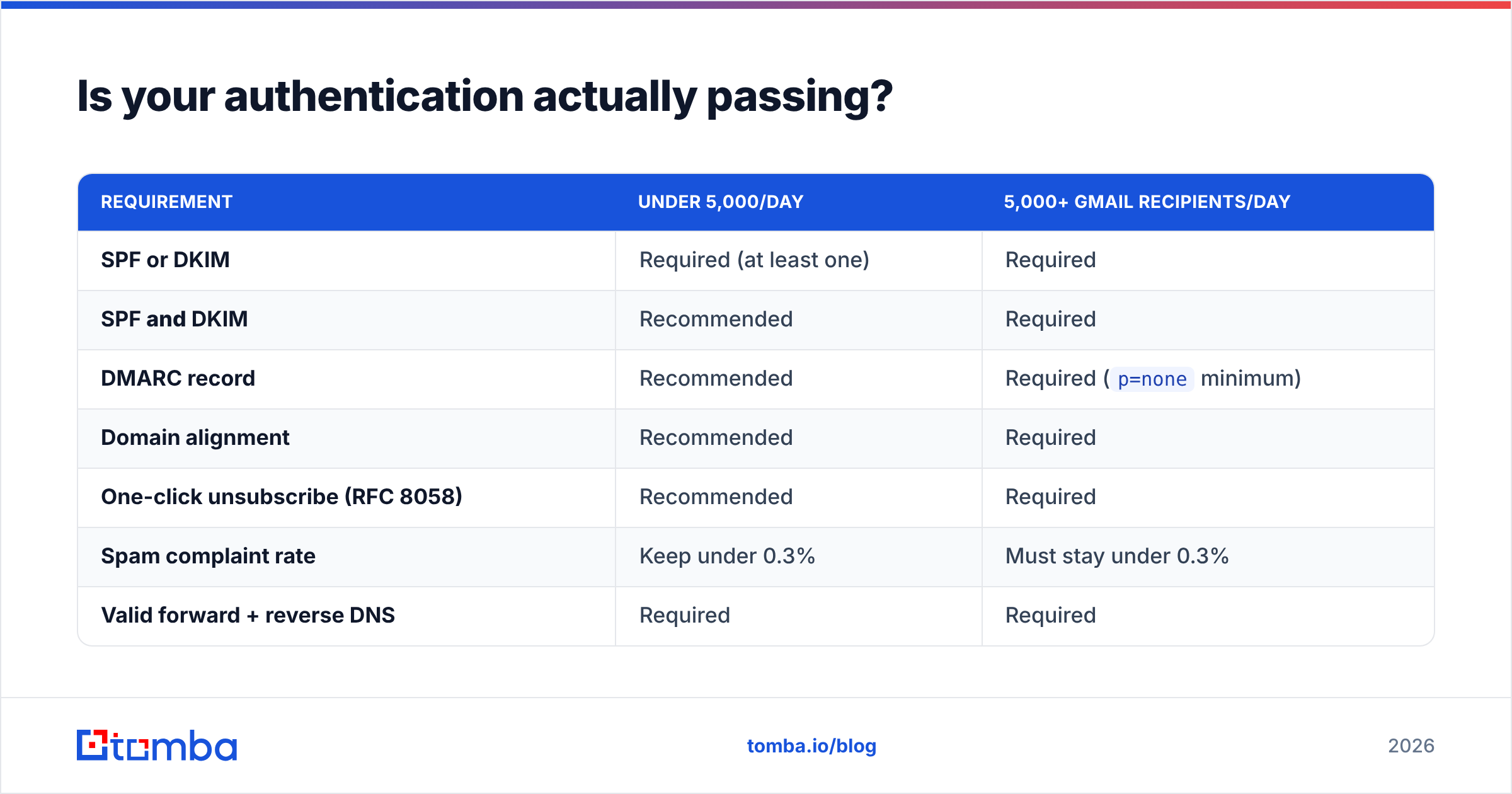
Since February 2024, Google enforces a tiered requirement set. As of 2026 the thresholds look like this:
| Requirement | Under 5,000/day | 5,000+ Gmail recipients/day |
|---|---|---|
| SPF or DKIM | Required (at least one) | Required |
| SPF and DKIM | Recommended | Required |
| DMARC record | Recommended | Required (p=none minimum) |
| Domain alignment | Recommended | Required |
| One-click unsubscribe (RFC 8058) | Recommended | Required |
| Spam complaint rate | Keep under 0.3% | Must stay under 0.3% |
| Valid forward + reverse DNS | Required | Required |
| TLS for transmission | Required | Required |
Three failure modes trip up senders who believe they're compliant:
- SPF passes but doesn't align. Your envelope sender is
bounces.sendingtool.comwhile your From: header isyou@yourcompany.com. SPF passes for the first domain, DMARC fails because they don't match. You need DKIM signed with your own domain to fix alignment. - DKIM key rotated and never re-published. The ESP rotated keys, the DNS record wasn't updated, and signing silently fails. Check the
Authentication-Resultsheader of a message you sent to your own Gmail account — it will readdkim=failordkim=none. - DMARC record exists but has a typo.
v=DMARC1; p=noneon the wrong subdomain, or a stray semicolon. A malformed record is treated as no record.
Verify all three by sending a test to a Gmail address you control, opening the message, clicking the three-dot menu, and choosing "Show original." You want SPF: PASS, DKIM: PASS, DMARC: PASS. Anything else is your problem. You can also run a quick SPF checker against your domain to confirm the record resolves and stays under the 10-lookup limit — an SPF record with too many include: statements silently returns permerror, which DMARC reads as a failure.
What does Google Postmaster Tools tell you that your ESP doesn't?#
Your ESP shows what it sent. Google Postmaster Tools shows what Google thought of it. If you send meaningful volume to Gmail and haven't set it up, you are diagnosing blind.
Verify your domain there and you get:
- Domain reputation — Bad / Low / Medium / High. "Low" means most of your mail goes to spam. "Bad" means most of it is rejected.
- IP reputation — Per sending IP, same scale. Diverging from domain reputation tells you which one is the problem.
- Spam rate — Complaints as a percentage of delivered mail. The 0.3% ceiling is not a soft target; sustained breaches trigger enforcement.
- Authentication pass rates — SPF, DKIM, and DMARC pass percentage over time. A sudden dip pinpoints exactly when a DNS change broke something.
- Delivery errors — Breakdown of rejection reasons by percentage.
The diagnostic that matters: if IP reputation is High but domain reputation is Low, moving to a new IP fixes nothing. You're carrying a domain-level problem, and the only cure is weeks of clean sending. Conversely, if domain reputation is High and one IP is Bad, you have a shared-IP neighbor problem and switching IPs (or ESPs) genuinely helps.
Why does list quality decide whether Google blocks you?#
Because Google's reputation model is fed almost entirely by recipient behavior, and bad list data poisons every input at once.
Send to a scraped, unverified list and you generate: hard bounces to dead addresses, spam complaints from people who never opted in, near-zero open rates, and zero replies. Google reads that pattern as bulk unsolicited mail regardless of what your copy says. No amount of subject-line tuning fixes a list problem.
The mechanics of how a list decays:
- B2B email addresses churn at roughly 22–30% per year. People change jobs. A twelve-month-old list is a quarter dead.
- Every hard bounce is a reputation event. Google logs it against your domain, not just your campaign.
- Spam-trap addresses are recycled dead accounts. Mailing one confirms you are not cleaning your list.
- Catch-all domains hide the damage. They accept everything at SMTP time, so bounces don't show up — but the mail lands nowhere and engagement stays flat.
- Role addresses (
info@,sales@,support@) draw disproportionate complaints. Strip them from cold campaigns. - Engagement decays fastest in the tail. Contacts who haven't opened in 180 days should be suppressed, not re-mailed harder.
Point four is the one that silently ruins deliverability metrics. A catch-all domain returns 250 OK for asdfgh@company.com as readily as for a real employee. Your bounce rate looks perfect while half the volume evaporates. A catch-all verifier resolves these to a real confidence signal rather than an optimistic guess, and sourcing addresses from a verified B2B database instead of a scraper avoids the problem upstream.
How do you recover a domain Google has already blocked?#
Recovery follows a fixed order. Skipping steps wastes weeks.
Week 0 — Stop and diagnose. Pause all cold sending on the affected domain. Continuing to send into a block deepens it. Pull your bounce logs, categorize errors by code, and check Postmaster Tools for domain vs IP reputation. Decide which of the four failure types you're in.
Week 0 — Fix authentication.
Publish SPF, DKIM, and DMARC properly aligned. Set reverse DNS on your sending IPs. Add RFC 8058 one-click unsubscribe headers if you send bulk. This is same-day work and it removes the entire 5.7.25 / 5.7.26 class of rejection.
Week 1 — Clean the list. Remove hard bounces, role addresses, and anyone who hasn't engaged in 180 days. Verify what remains. If the list came from a scrape, rebuild rather than clean — the complaint rate is baked in.
Weeks 1–4 — Re-warm slowly. Restart at 10–20 sends per day per mailbox, to your most engaged recipients only. Increase roughly 30% per week. Any campaign that generates complaints resets the clock. A warmup calculator gives you a realistic per-mailbox ramp instead of a guess.
Weeks 2–6 — Watch the trend, not the day. Postmaster reputation updates on a rolling window. Daily noise means nothing. What you want is a Low → Medium → High progression over consecutive weeks.
A note on the shortcut everyone asks about: buying a fresh domain and starting over. It works technically, but it resets nothing about the behavior that caused the block. If your list, targeting, or complaint rate caused the problem, the new domain burns in six weeks. Fix the inputs first. And if you do move, use a genuinely separate domain for cold outreach so your primary corporate domain is never at risk — this is standard practice among high-volume outbound teams and the one thing worth doing before you ever hit a block.
Which fixes buy back the most delivery per hour of work?#
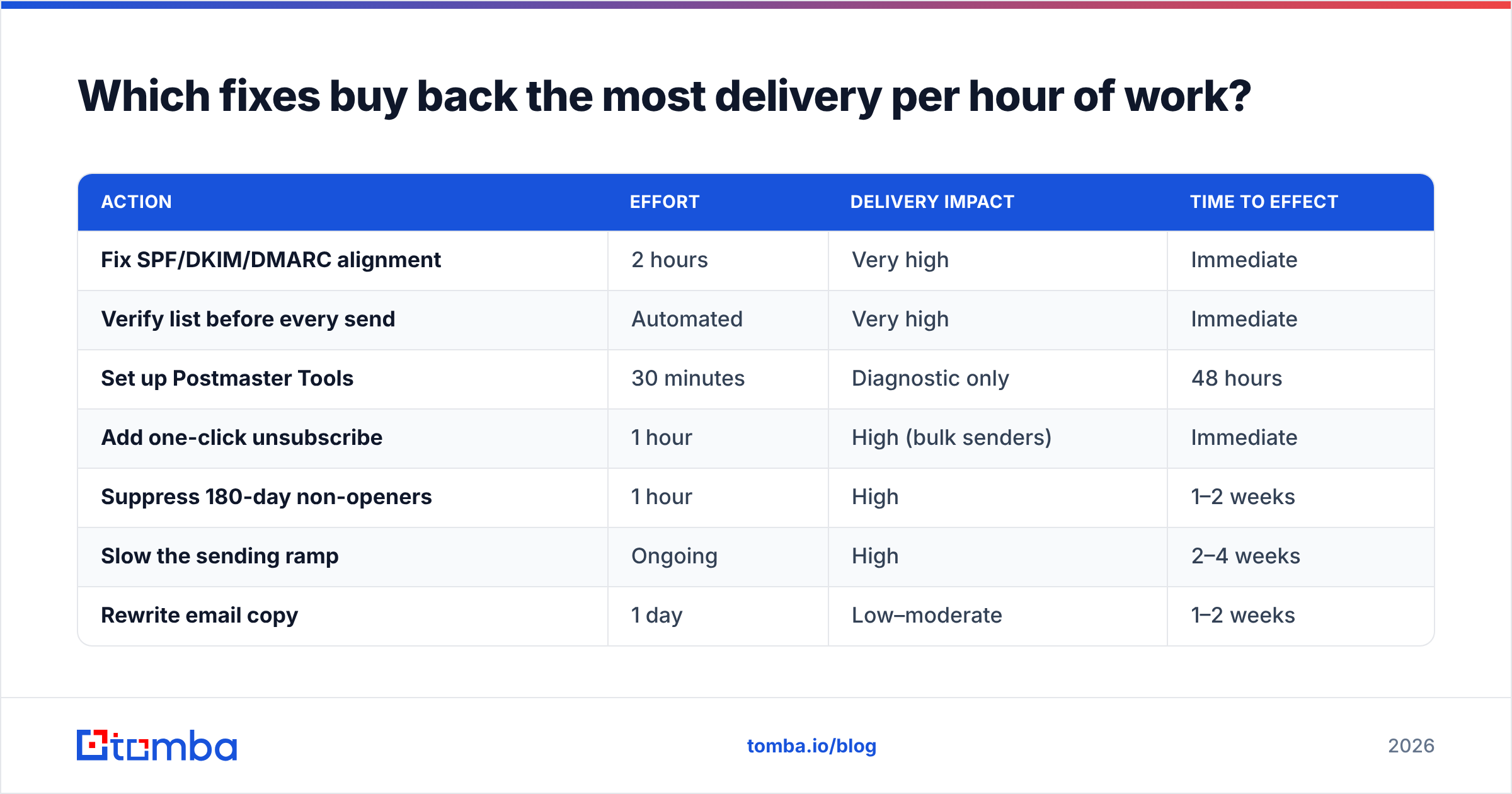
Ranked by return, based on how Google's filters weight each signal:
| Action | Effort | Delivery impact | Time to effect |
|---|---|---|---|
| Fix SPF/DKIM/DMARC alignment | 2 hours | Very high | Immediate |
| Verify list before every send | Automated | Very high | Immediate |
| Set up Postmaster Tools | 30 minutes | Diagnostic only | 48 hours |
| Add one-click unsubscribe | 1 hour | High (bulk senders) | Immediate |
| Suppress 180-day non-openers | 1 hour | High | 1–2 weeks |
| Slow the sending ramp | Ongoing | High | 2–4 weeks |
| Rewrite email copy | 1 day | Low–moderate | 1–2 weeks |
| Move to a new IP | 1 day | Only if IP-specific | Days |
| Move to a new domain | 1 day | Resets, doesn't fix | 4–8 weeks |
Copy sits low on that list deliberately. Content filtering matters, but it's a tiebreaker — Google evaluates content in the context of reputation. Well-reputed senders get away with words that would spam-folder a cold domain. If your reputation is Bad, no subject line saves you. If it's High, mediocre copy still lands. That said, running a draft through a spam checker before a large send costs two minutes and catches the obvious trigger patterns.
For a broader picture of what happens between "send" and "inbox," Gmail's own bulk sender FAQ and the sender requirement documentation are the authoritative references. Vendor blogs will tell you what to buy; Google's docs tell you what it measures.
What should you monitor so this doesn't happen again?#
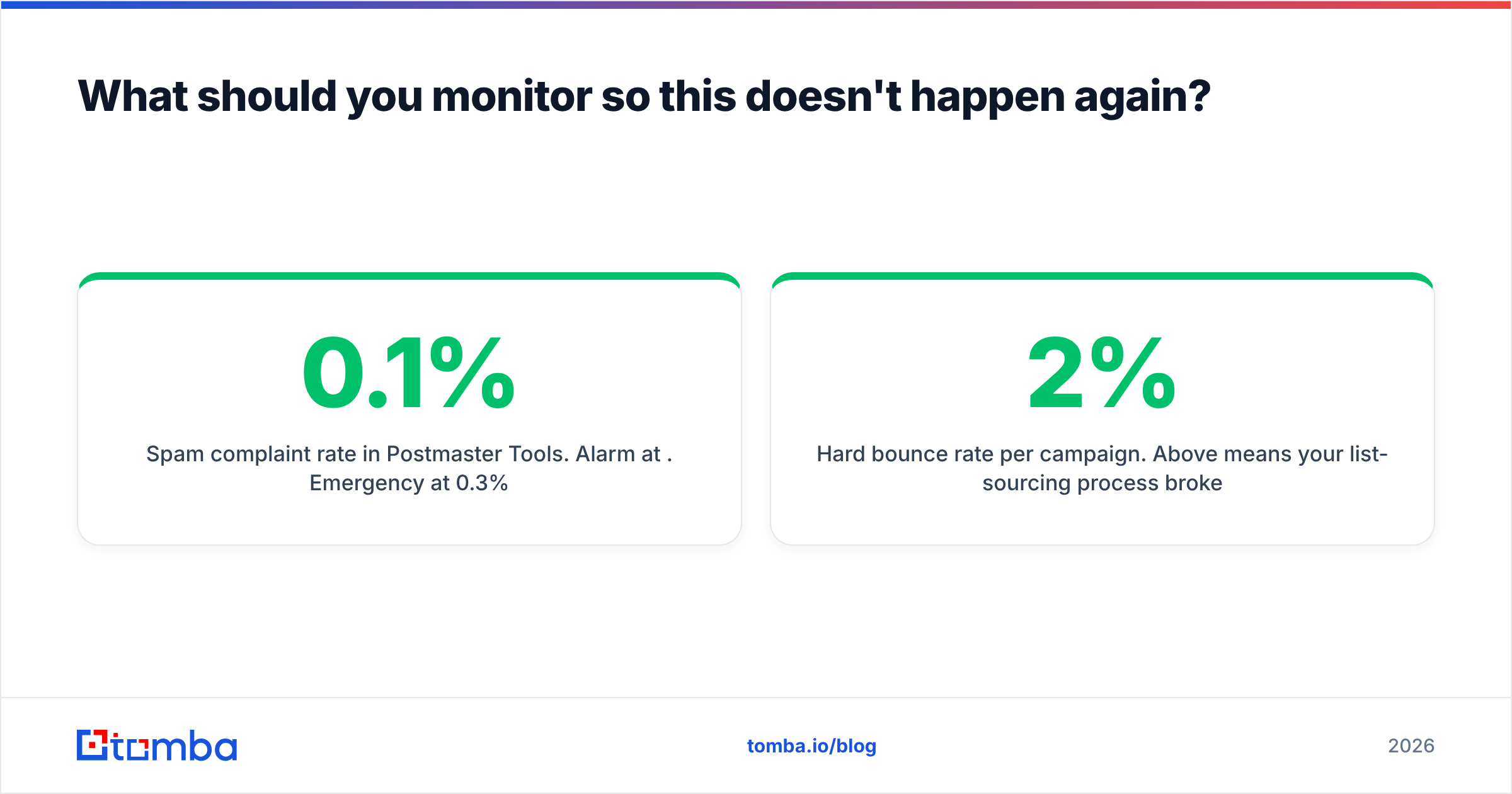
Four numbers, checked weekly:
- Spam complaint rate in Postmaster Tools. Alarm at 0.1%. Emergency at 0.3%.
- Hard bounce rate per campaign. Above 2% means your list-sourcing process broke.
- Domain reputation trend. A single drop from High to Medium is a two-week warning, not a crisis — but ignore it and it becomes one.
- Reply rate. The single best proxy for whether your targeting is real. Falling replies with steady opens usually means you're reaching the wrong people, and Google will notice before you do.
Set a calendar reminder. Deliverability failures are gradual until the day they aren't, and the senders who never get blocked are the ones checking a dashboard they mostly find boring.
Where does contact data fit into all of this?#
Upstream of everything. Authentication is a configuration problem you solve once. Reputation is a consequence — and the single largest input into it is whether the addresses you send to are real, current, and belong to people plausibly interested in hearing from you.
If your list is built from verified, freshly-sourced addresses, bounce rates stay near zero, complaint rates stay low, and Google's filters have nothing to hold against you. If it's built from a two-year-old scrape, no DNS record in the world compensates.
Start there. Use the Tomba Email Finder to source addresses that resolve to real, current mailboxes, with verification built into the lookup instead of bolted on afterwards. The free tier gives you 25 searches a month to test accuracy against your own known-good contacts before committing; paid plans start at $49/mo on Starter, with Growth at $99/mo for teams running continuous outbound. Full Tomba pricing is on the site. Clean input is the cheapest deliverability insurance you will ever buy — and it's the one fix that keeps working after your DNS is already perfect.
Related guides#
Ready to find emails that actually work?
Join 150,000+ professionals who stopped guessing and started sending. Free credits on signup — no credit card required.
Get the Tomba newsletter
Practical outbound tactics and product updates — once every two weeks.
About the author