Google Domain Reputation: How It Works and How to Fix It
Gmail scores your sending domain, not just your IP. Here is how Google domain reputation is calculated, how to read Postmaster Tools, and what actually moves a Bad rating back to High.

TL;DR
- Google domain reputation is Gmail's per-domain trust score (Bad, Low, Medium, High) shown in Postmaster Tools. It follows your domain, not your IP — switching IPs or ESPs does not reset it.
- Spam complaint rate is the dominant input. Google's published threshold is 0.30% max, 0.10% target; sustained complaints above 0.30% will pull any domain toward Low or Bad.
- Reputation lags behind behavior by roughly 7–30 days. Fixes you ship today show up in Postmaster Tools next week, not tomorrow.
- Recovery is volume-controlled, not trick-based: cut volume, mail only recent engagers, verify the list, fix authentication, then rebuild.
- Buying a fresh domain to escape a Bad rating is a treadmill. It works once, costs you brand equity, and fails again if the list quality never changed.
What is Google domain reputation?#
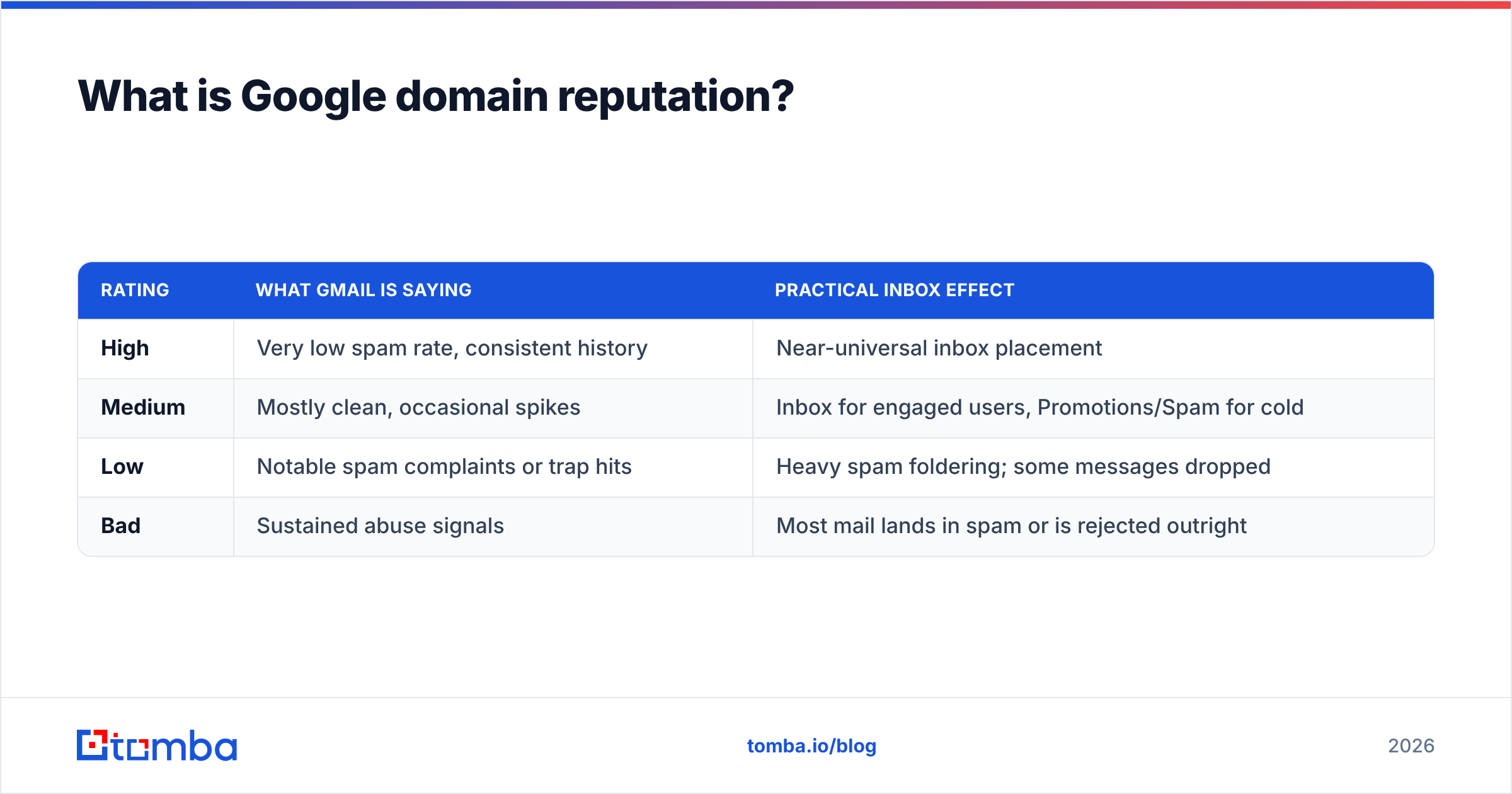
Google domain reputation is a rating Gmail assigns to the domain in your message's From: header — specifically the domain that passes DKIM alignment — based on how Gmail users react to mail from it. You see it in Google Postmaster Tools as one of four buckets:
| Rating | What Gmail is saying | Practical inbox effect |
|---|---|---|
| High | Very low spam rate, consistent history | Near-universal inbox placement |
| Medium | Mostly clean, occasional spikes | Inbox for engaged users, Promotions/Spam for cold |
| Low | Notable spam complaints or trap hits | Heavy spam foldering; some messages dropped |
| Bad | Sustained abuse signals | Most mail lands in spam or is rejected outright |
Think of it like a credit score for your sending domain. One missed payment does not tank it. Six months of missed payments does — and paying off the balance today does not restore the score tomorrow.
Two details trip people up constantly:
- Domain reputation and IP reputation are separate scores. Postmaster Tools shows both. On shared ESP infrastructure, IP reputation is largely out of your hands; domain reputation is entirely yours.
- Subdomains carry their own reputation but inherit influence from the root.
mail.yourcompany.combuilds its own score, but a scorched root domain drags it down. That is why the "just spin up a subdomain" advice only half-works.
How does Google actually calculate it?#
Google does not publish the algorithm, but its Bulk Sender Guidelines and Postmaster documentation make the inputs clear enough to act on. The signals that matter, ranked by how much they move the needle:
- User-reported spam rate — the single heaviest input. Google's Bulk Sender Guidelines set a hard ceiling of 0.30% and a target below 0.10%. That is 3 complaints per 1,000 delivered messages at the ceiling.
- Authentication and alignment — SPF, DKIM, and DMARC are mandatory for bulk senders to Gmail. Unauthenticated mail does not just get filtered; it prevents Gmail from attributing good behavior to your domain at all.
- Recipient engagement — opens, replies, moving mail out of spam, adding you to contacts. Negative engagement (deleting without reading, ignoring for months) counts too.
- Invalid recipient rate — high bounce volume signals a scraped or stale list. Gmail treats a wall of
550 5.1.1responses as a quality tell. - Volume consistency — 200 emails/day for a month then 20,000 on a Tuesday reads as compromise or list purchase.
- Spam trap hits — recycled addresses and pristine traps. One hit is noise; a pattern is a verdict.
The thing to internalize: Gmail is not judging your content in isolation. It is judging whether people who receive your mail want it. Every technical fix below exists to make that signal legible.

Why did my domain reputation drop suddenly?#
"Suddenly" is usually a reporting artifact. Postmaster Tools aggregates over a rolling window, so a drop you notice on Monday reflects sending from one to four weeks prior. Work backwards from the date, not from today.
The usual culprits, in rough order of frequency:
- A cold list went out on your main domain. Purchased or scraped contacts complain at 5–20x the rate of opted-in ones. One 5,000-address blast at a 1% complaint rate is enough to visibly move a mid-volume domain.
- You reactivated a dormant segment. Emailing people who last opened in 2023 is functionally cold outreach with a warmer excuse.
- Authentication broke. A DNS migration dropped the DKIM record, or you added an ESP without updating SPF. Check your SPF record and DKIM selectors first — this is the cheapest possible cause to rule out.
- Volume spiked. Product launch, Black Friday, a funding announcement. The content was fine; the ramp was not.
- Someone else is sending as you. No DMARC enforcement means spoofers can burn your domain for free. Set up a DMARC record at
p=nonewith a reporting address before you need it. - Unsubscribe friction. If the easiest exit is the spam button, users take it. Gmail requires one-click list-unsubscribe (RFC 8058 headers) for bulk senders — a "reply to opt out" line does not satisfy it.
Bounce rate deserves its own note. If your invalid-recipient rate is above 3%, list hygiene is your root cause and nothing else you fix will matter much. Running contacts through an email verifier before send is the fastest way to take that variable off the table.
What is a good spam complaint rate?#
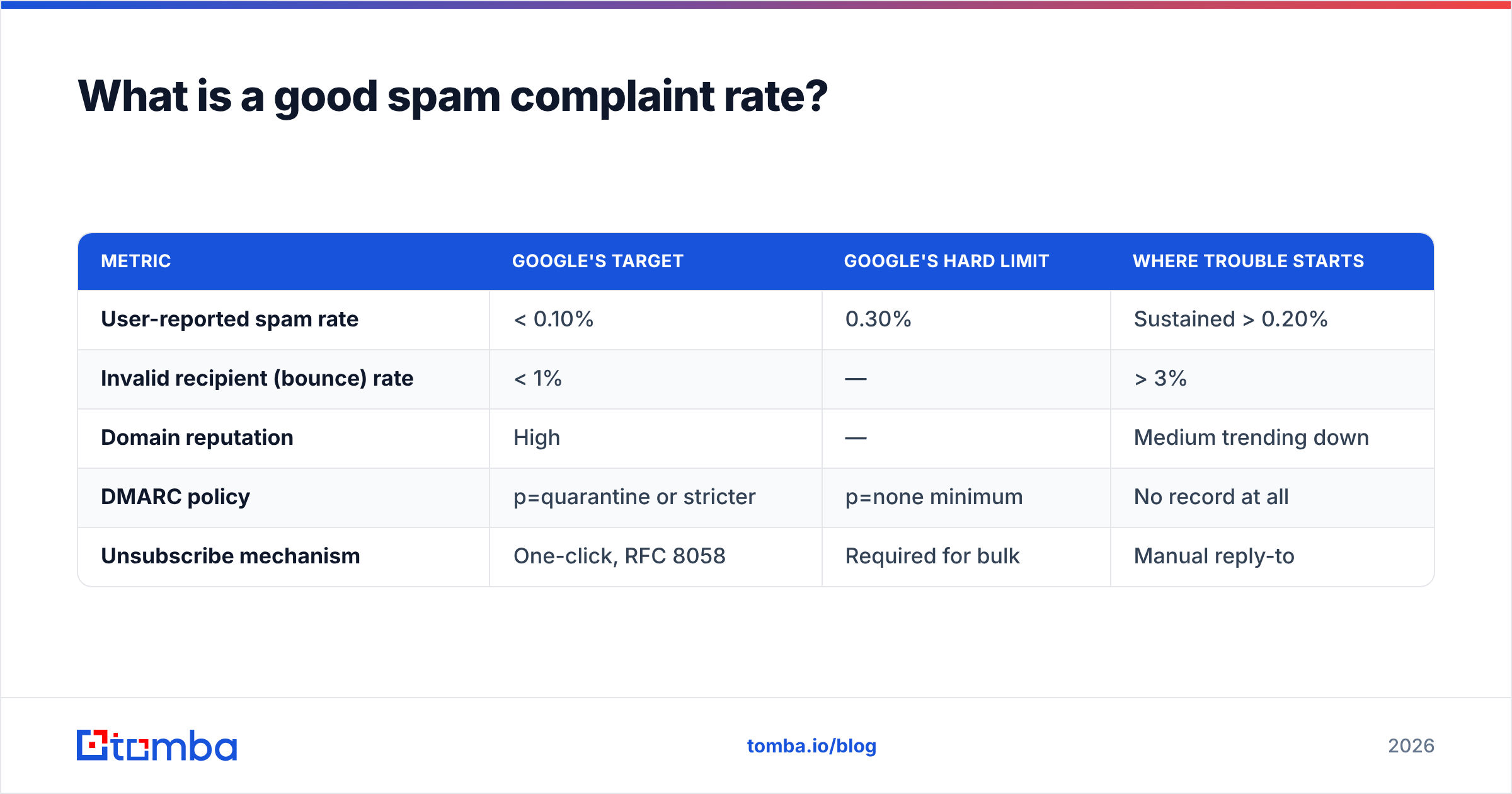
| Metric | Google's target | Google's hard limit | Where trouble starts |
|---|---|---|---|
| User-reported spam rate | < 0.10% | 0.30% | Sustained > 0.20% |
| Invalid recipient (bounce) rate | < 1% | — | > 3% |
| Domain reputation | High | — | Medium trending down |
| DMARC policy | p=quarantine or stricter | p=none minimum | No record at all |
| Unsubscribe mechanism | One-click, RFC 8058 | Required for bulk | Manual reply-to |
The 0.30% ceiling is deceptively generous-sounding. At 50,000 sends a month it means 150 complaints — and by the time you hit that number, the reputation damage is already baked in and will take weeks to unwind. Treat 0.10% as your operating line and 0.20% as your alarm.
How do you fix a Bad domain reputation?#
There is no fast path. There is a correct path, and it takes about 30 days of discipline. Here is the sequence that actually works, in order — skipping ahead wastes the weeks you already spent.
Week 1 — Stop the bleeding.
- Pause all cold, reactivation, and bulk promotional sends on the affected domain. Transactional mail continues.
- Fix authentication completely: SPF (single record, under 10 DNS lookups), DKIM on every sending source, DMARC published with an rua address. Verify with an SPF checker rather than eyeballing the TXT record.
- Add one-click unsubscribe headers if they are missing.
- Check whether your domain or IP is on a public blocklist with a blacklist checker. Spamhaus and SURBL listings need separate delisting requests.
Week 2 — Rebuild the list, not the domain.
- Segment to recipients who opened or clicked in the last 90 days. That is your rebuild audience. Everyone else is on hold.
- Verify the entire remaining list. Remove hard bounces, role accounts (
info@,sales@,support@), and anything a verifier flags as risky. Catch-all domains need their own handling — a catch-all verifier tells you which ones are worth the risk instead of guessing. - Suppress every address that has not engaged in 6+ months. Permanently. The revenue you think is in there is not worth the reputation.
Week 3–4 — Ramp deliberately.
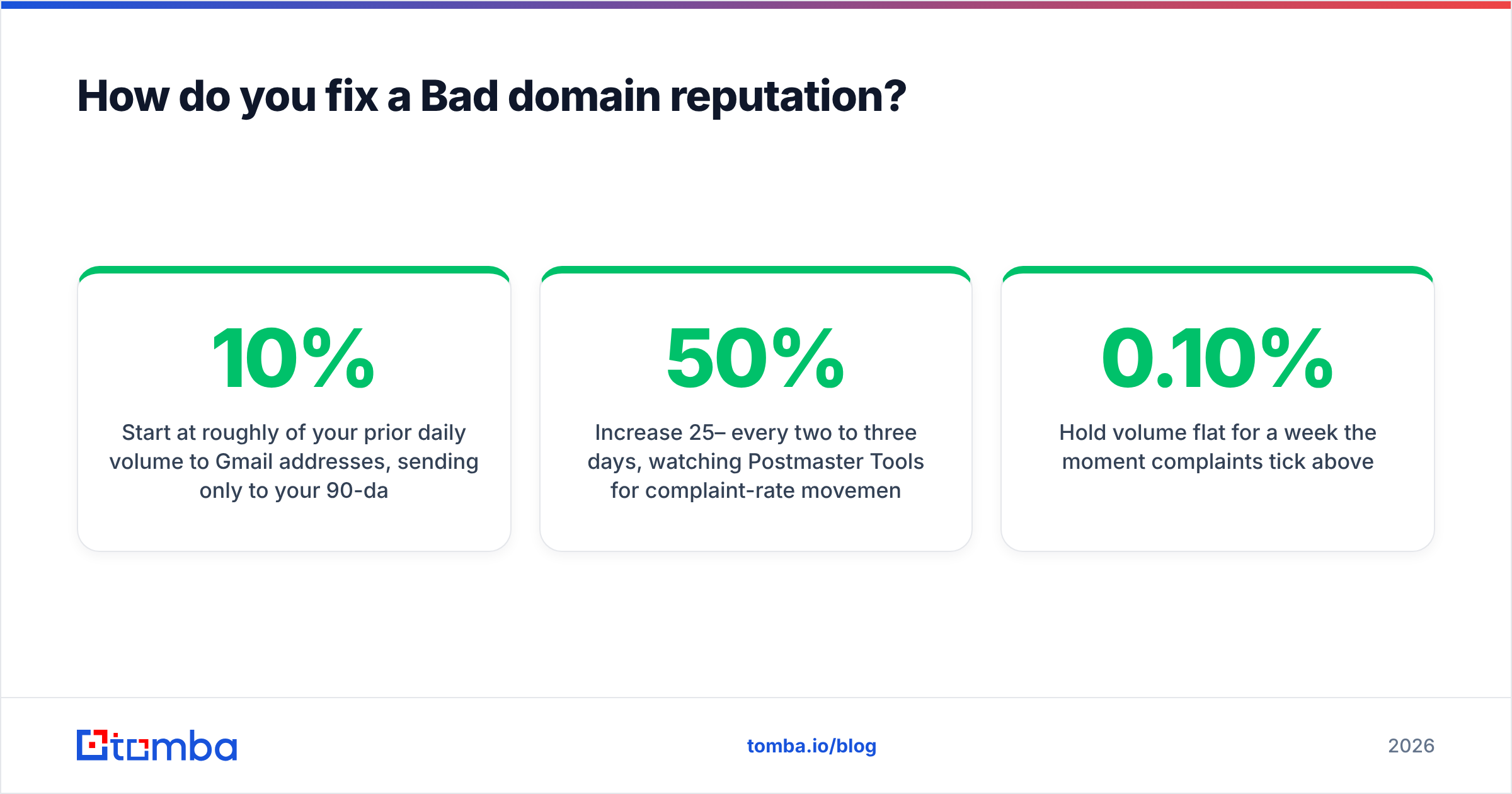
- Start at roughly 10% of your prior daily volume to Gmail addresses, sending only to your 90-day engaged segment.
- Increase 25–50% every two to three days, watching Postmaster Tools for complaint-rate movement before each step.
- Send content that earns replies. Replies are the strongest positive engagement signal available to you.
- Hold volume flat for a week the moment complaints tick above 0.10%.
Ongoing — Make it structural.
- Split sending by purpose across subdomains:
news.yourcompany.comfor marketing,notify.yourcompany.comfor transactional, and keep cold outreach off your primary domain entirely. - Verify every list before every campaign, not once a quarter.
- Monitor sender reputation weekly, not after something breaks.
Expect 3–6 weeks from Bad to Medium if the underlying list problem is genuinely fixed, and a similar stretch from Medium to High. Domains with trap hits or blocklist history run longer.
Should you just buy a new domain instead?#
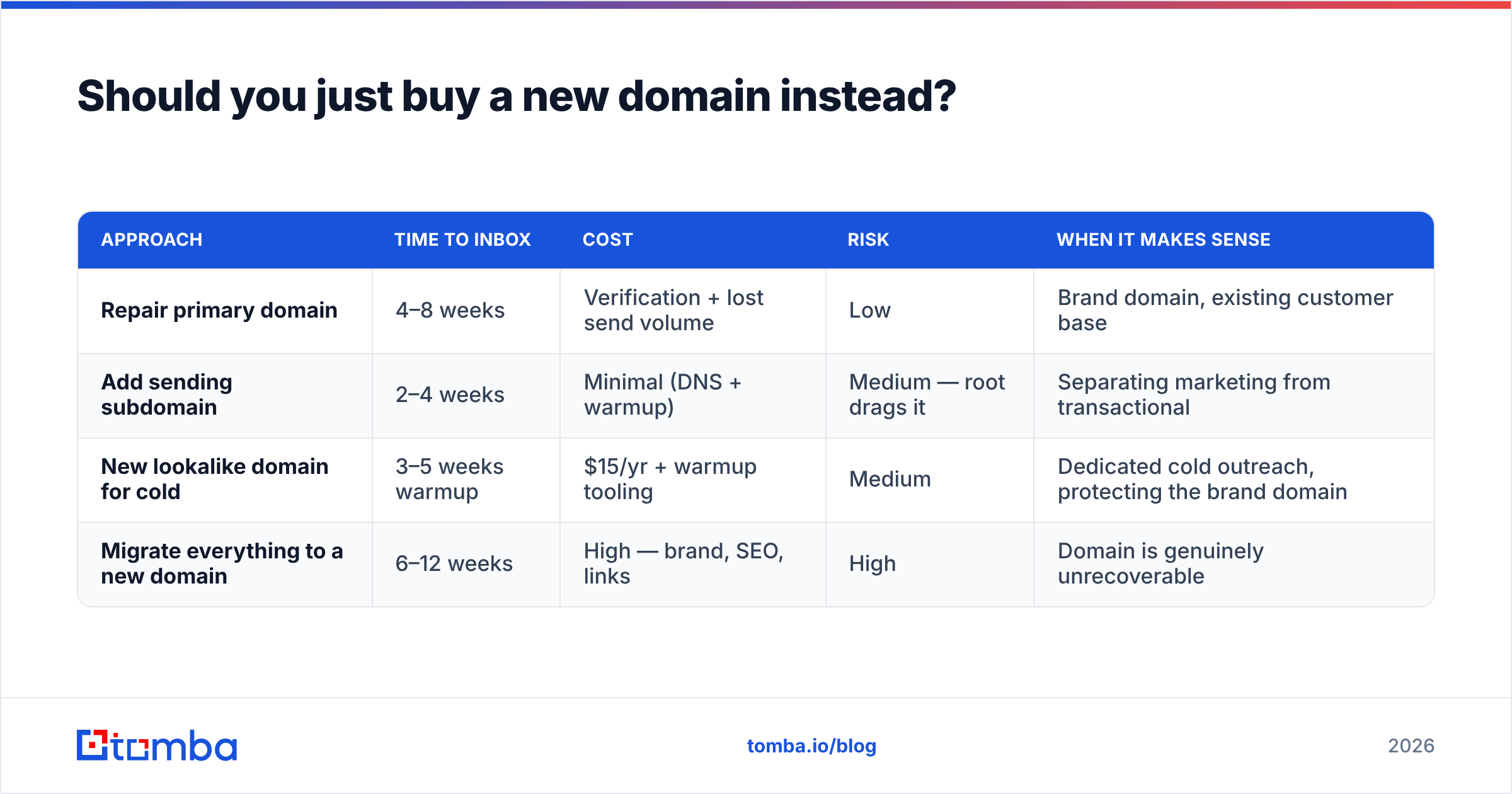
Sometimes — but far less often than the cold email industry implies, and never as a substitute for fixing the list.
| Approach | Time to inbox | Cost | Risk | When it makes sense |
|---|---|---|---|---|
| Repair primary domain | 4–8 weeks | Verification + lost send volume | Low | Brand domain, existing customer base |
| Add sending subdomain | 2–4 weeks | Minimal (DNS + warmup) | Medium — root drags it | Separating marketing from transactional |
| New lookalike domain for cold | 3–5 weeks warmup | $15/yr + warmup tooling | Medium | Dedicated cold outreach, protecting the brand domain |
| Migrate everything to a new domain | 6–12 weeks | High — brand, SEO, links | High | Domain is genuinely unrecoverable |
The honest read: buying a new domain resets the score, not the behavior. If a Bad rating came from a purchased list, that same list will produce a Bad rating on the new domain in about six weeks — you will just have paid twice and split your brand.
Where a separate domain genuinely helps is architectural. Run cold outreach from a dedicated lookalike domain (getyourcompany.com, yourcompany-team.com) with its own warmup and its own inboxes, and keep your primary domain for people who asked to hear from you. That is not evasion; it is compartmentalizing risk, and it is what mature outbound teams do by default. Warm any new domain over 3–4 weeks — a warmup calculator will give you a defensible ramp schedule instead of a guess.
How do you monitor domain reputation properly?#
Postmaster Tools is free, and it is the only place you see Gmail's actual verdict rather than a proxy for it. Set it up once:
- Verify your domain at postmaster.google.com via a DNS TXT record. Verify every sending subdomain separately — they report independently.
- Wait for data. Postmaster requires meaningful volume to Gmail addresses before it populates. Low-volume senders see sparse or empty dashboards; that is a limitation, not a bug.
- Watch four charts weekly — Spam Rate, Domain Reputation, IP Reputation, and Authentication. The Authentication chart catches broken DKIM faster than any alert you would build yourself.
- Correlate with your send calendar. Annotate campaign dates. When the spam rate moves, you want to know which send caused it within minutes, not days.
Postmaster only covers Gmail. For Microsoft 365 and Outlook.com, enroll in Microsoft SNDS for IP-level data. Between the two you cover the large majority of B2B inboxes. Yahoo and smaller providers you infer from your own bounce and engagement data.
One more habit worth building: check inbox placement with seed testing before large sends, and treat your own reply rate as a leading indicator. A campaign whose reply rate halves week over week is telling you about placement before Postmaster does. If you want the vocabulary straight, the email deliverability glossary entry covers how these metrics relate.
Does list quality matter more than technical setup?#
Yes — and it is not close.
SPF, DKIM, and DMARC are table stakes. Getting them right does not earn you a High reputation; getting them wrong caps you at Low no matter what else you do. They are the entry fee, not the game.
The game is whether the people receiving your mail want it. That is decided before a single header is written, at the point where addresses enter your list:
- Sourcing. Addresses found and verified against live company data behave differently from addresses scraped off a directory in 2021. Verified-at-source contacts bounce less and complain less because they are real people currently in those roles.
- Consent context. Someone who downloaded a whitepaper expects a follow-up. Someone whose address you bought in a 100k-record CSV does not, and their spam button is right there.
- Freshness. B2B email data decays at roughly 25–30% annually as people change jobs. A two-year-old list is majority-invalid whether or not it looked clean when you bought it.
- Verification cadence. Verifying at import and again before each send catches the decay that happens in between.
This is where sourcing tooling and deliverability stop being separate disciplines. If your prospecting workflow pulls verified, current addresses — via domain search for account-based lists, or bulk verification for imported ones — your complaint rate stays low structurally instead of because you are managing it heroically after the fact.
What should you do first?#
If you have not opened Postmaster Tools this month, start there — you cannot fix a number you are not looking at. If your rating is already Low or Bad, run the Week 1 checklist today: pause bulk sending, fix authentication, check blocklists.
Then fix the input. Google domain reputation is a lagging measurement of list quality, and every hour spent tuning subject lines while mailing a stale list is an hour spent on the wrong variable.
Clean sourcing is the cheapest deliverability insurance available. The Tomba Email Finder returns verified, current business addresses with a confidence score attached, so the contacts entering your sequences are people who actually hold those roles today — not addresses that will bounce and take your reputation with them. The free tier gives you 25 searches a month to test it against your own data; paid plans start at $49/mo on Starter, with Growth at $99/mo and Pro at $249/mo. Full Tomba pricing is public, and there is an email finder API if you would rather verify inside your own pipeline before anything reaches a send queue.
Related guides#
Ready to find emails that actually work?
Join 150,000+ professionals who stopped guessing and started sending. Free credits on signup — no credit card required.
Get the Tomba newsletter
Practical outbound tactics and product updates — once every two weeks.
About the author