Google Email Changes: What Still Matters for Senders in 2026
Google's 2024 bulk sender rules didn't expire — they became the baseline every mailbox provider copied. Here's what still gets enforced, what changed since, and how to audit your setup in an afternoon.
TL;DR
- The Google email changes announced in October 2023 took effect on 1 February 2024, and they were never rolled back — they're now the permanent floor for reaching Gmail.
- Five things matter: SPF, DKIM, DMARC with alignment, one-click unsubscribe (RFC 8058), and a spam complaint rate below 0.3%.
- The 5,000-messages-per-day threshold decides which rules are hard requirements, but the complaint-rate rule applies to everyone, at every volume.
- Yahoo shipped nearly identical rules the same week; Microsoft followed for Outlook consumer domains in May 2025. Compliance is no longer a Gmail-specific project.
- The requirement most senders still fail isn't DNS — it's list quality. Unverified addresses produce bounces and complaints that push you past 0.3% before your copy ever gets a chance.
What exactly were the Google email changes of 2024?#
In October 2023, Google published updated sender guidelines and gave the industry roughly three months of warning. On 1 February 2024, Gmail began enforcing a set of authentication and hygiene requirements on anyone sending it meaningful volume. Yahoo announced a matching policy within days.
The headline items:
- Authenticate with SPF and DKIM. Both, not one. Your sending domain needs a valid SPF record and your mail needs to carry a DKIM signature that verifies.
- Publish a DMARC record. Even
p=nonesatisfies the letter of the rule, but yourFrom:domain must align with either the SPF or DKIM domain. Alignment is where most setups quietly fail. - Support one-click unsubscribe. Marketing and subscribed mail must include
List-UnsubscribeandList-Unsubscribe-Postheaders per RFC 8058, and honour the request within two days. - Keep spam complaints under 0.3%. Google's own guidance says to aim below 0.1% and treat 0.3% as the line you never cross.
- Get the plumbing right. Valid forward and reverse DNS (PTR) on your sending IPs, TLS for transmission, and RFC 5322-compliant message formatting. No sending as
@gmail.comfrom your own infrastructure.
Google phased in enforcement rather than flipping a switch. Non-compliant mail started getting temporary 4xx errors in spring 2024, and outright rejection followed later that year. The one-click unsubscribe requirement got its own grace period into June 2024.
You can read the current version of the policy directly in Google's Email sender guidelines — it's been quietly updated several times since, which is exactly why "we did this in 2024" isn't the same as "we're compliant now."

Do the Google email changes still apply in 2026?#
Yes — and they've hardened.
Three things happened between February 2024 and today that changed the practical picture:
Enforcement moved from soft to silent. In 2024, failing authentication got you a bounce with a readable error code. That was actually helpful. Today, a lot of borderline mail simply lands in spam with no bounce, no error, and no signal in your sending tool. Your open rate drops and you blame the subject line.
The rules stopped being Gmail-specific. Yahoo's requirements landed alongside Google's. Microsoft announced equivalent requirements for high-volume senders to Outlook, Hotmail, and Live addresses effective 5 May 2025. If your B2B list is a mix of Google Workspace and Microsoft 365 domains — and most are — you now face the same checklist twice.
Reputation became the real gate. Authentication is now table stakes, not a differentiator. Passing SPF, DKIM, and DMARC gets you considered. What decides placement after that is your complaint rate, your bounce rate, and your domain's history. Google's own documentation is explicit that meeting the requirements doesn't guarantee inbox placement.
The practical read: the 2024 changes were a filter, and the filter is still on. What's changed is that everyone else caught up on the DNS part, so the differentiation moved downstream to data quality.
Which rules apply to me — do I count as a bulk sender?#
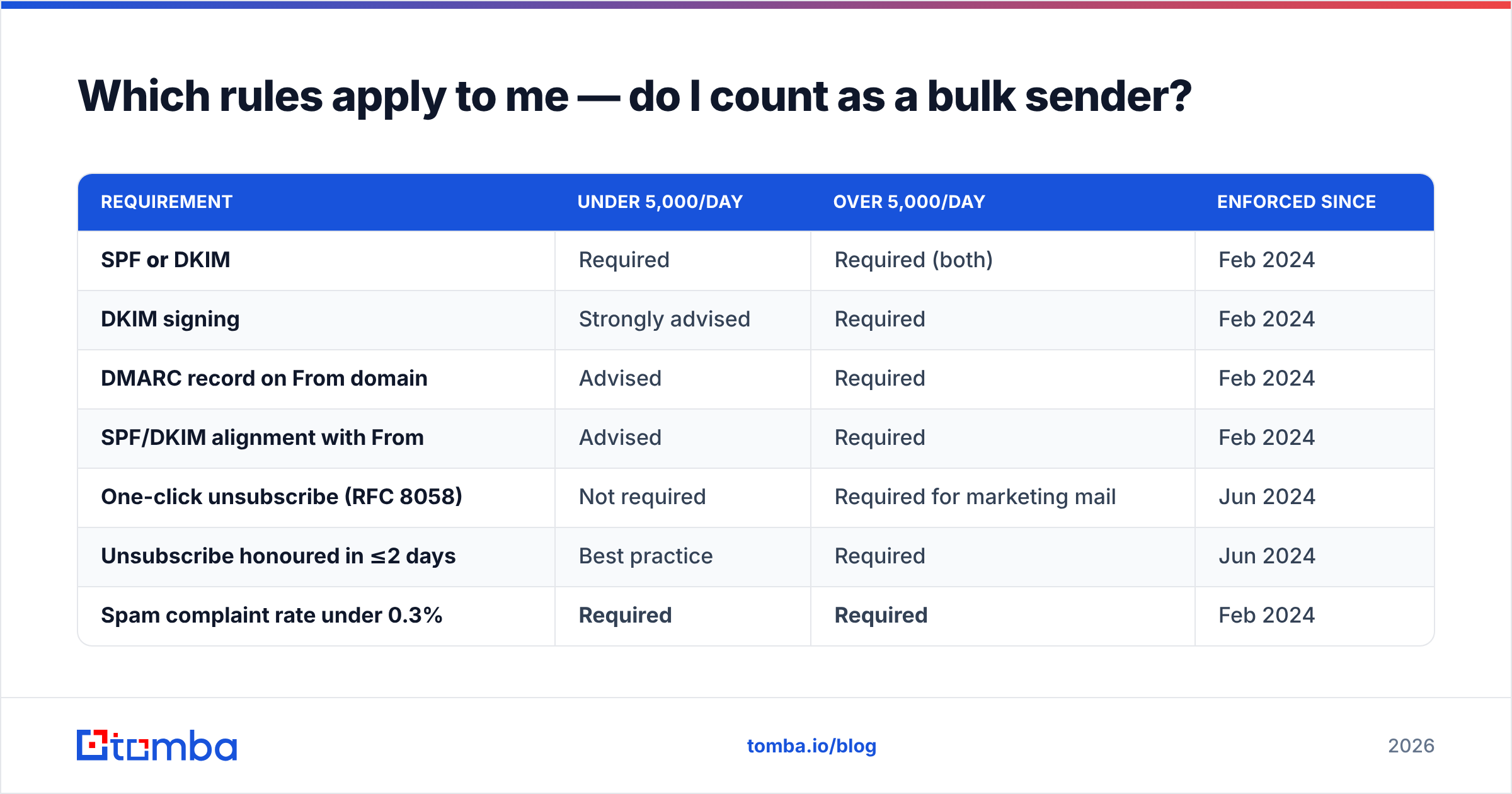
Google's threshold is 5,000 messages to Gmail addresses in a single day, counted per sending domain including subdomains. Cross it once and you're treated as a bulk sender going forward.
Here's how the requirements split by volume:
| Requirement | Under 5,000/day | Over 5,000/day | Enforced since |
|---|---|---|---|
| SPF or DKIM | Required | Required (both) | Feb 2024 |
| DKIM signing | Strongly advised | Required | Feb 2024 |
| DMARC record on From domain | Advised | Required | Feb 2024 |
| SPF/DKIM alignment with From | Advised | Required | Feb 2024 |
| One-click unsubscribe (RFC 8058) | Not required | Required for marketing mail | Jun 2024 |
| Unsubscribe honoured in ≤2 days | Best practice | Required | Jun 2024 |
| Spam complaint rate under 0.3% | Required | Required | Feb 2024 |
| Valid PTR / reverse DNS | Required | Required | Feb 2024 |
| TLS on transmission | Required | Required | Feb 2024 |
Note the row that has no exemption. Complaint rate applies at any volume. A 400-address cold campaign that generates six spam clicks is sitting at 1.5% — five times over the line. Volume protects nobody here.
There's also a trap in how the threshold is counted. Cold outreach teams often run 30 mailboxes at 40 sends a day each and assume they're a small sender. If those mailboxes sit on subdomains of one root domain, Google may aggregate them. 30 × 40 is only 1,200 — fine — but scale to 150 mailboxes and you've crossed into bulk-sender territory without ever running a "campaign."
How do Google, Yahoo, and Microsoft requirements compare?#
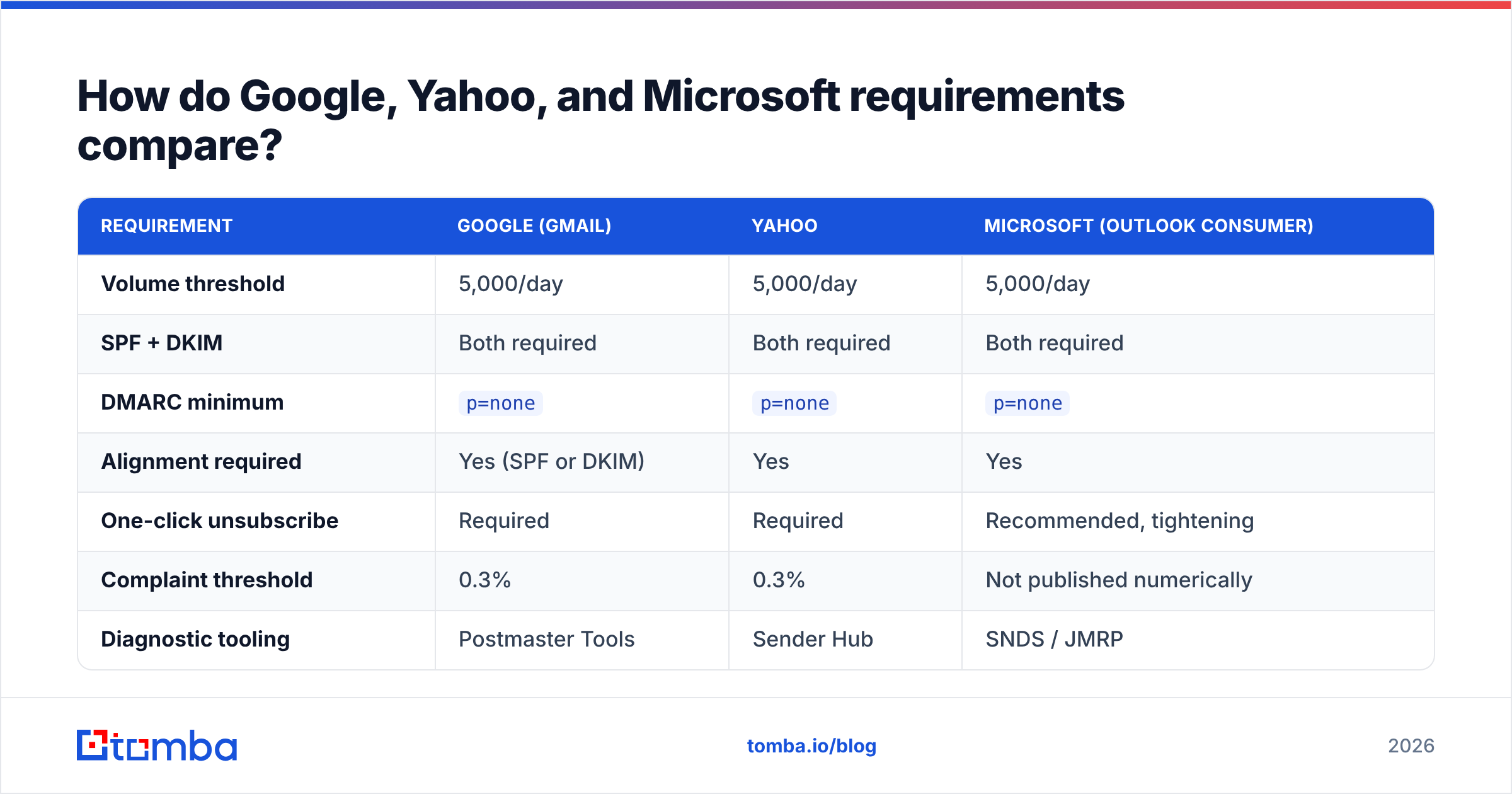
| Requirement | Google (Gmail) | Yahoo | Microsoft (Outlook consumer) |
|---|---|---|---|
| Volume threshold | 5,000/day | 5,000/day | 5,000/day |
| SPF + DKIM | Both required | Both required | Both required |
| DMARC minimum | p=none |
p=none |
p=none |
| Alignment required | Yes (SPF or DKIM) | Yes | Yes |
| One-click unsubscribe | Required | Required | Recommended, tightening |
| Complaint threshold | 0.3% | 0.3% | Not published numerically |
| Diagnostic tooling | Postmaster Tools | Sender Hub | SNDS / JMRP |
| Effective from | Feb 2024 | Feb 2024 | May 2025 |
The convergence is the story. Three providers covering the large majority of B2B inboxes now publish substantially the same checklist. That's good news operationally: one remediation project satisfies all three. It's bad news if you were relying on one provider being lax.
What breaks first when you ignore these rules?#
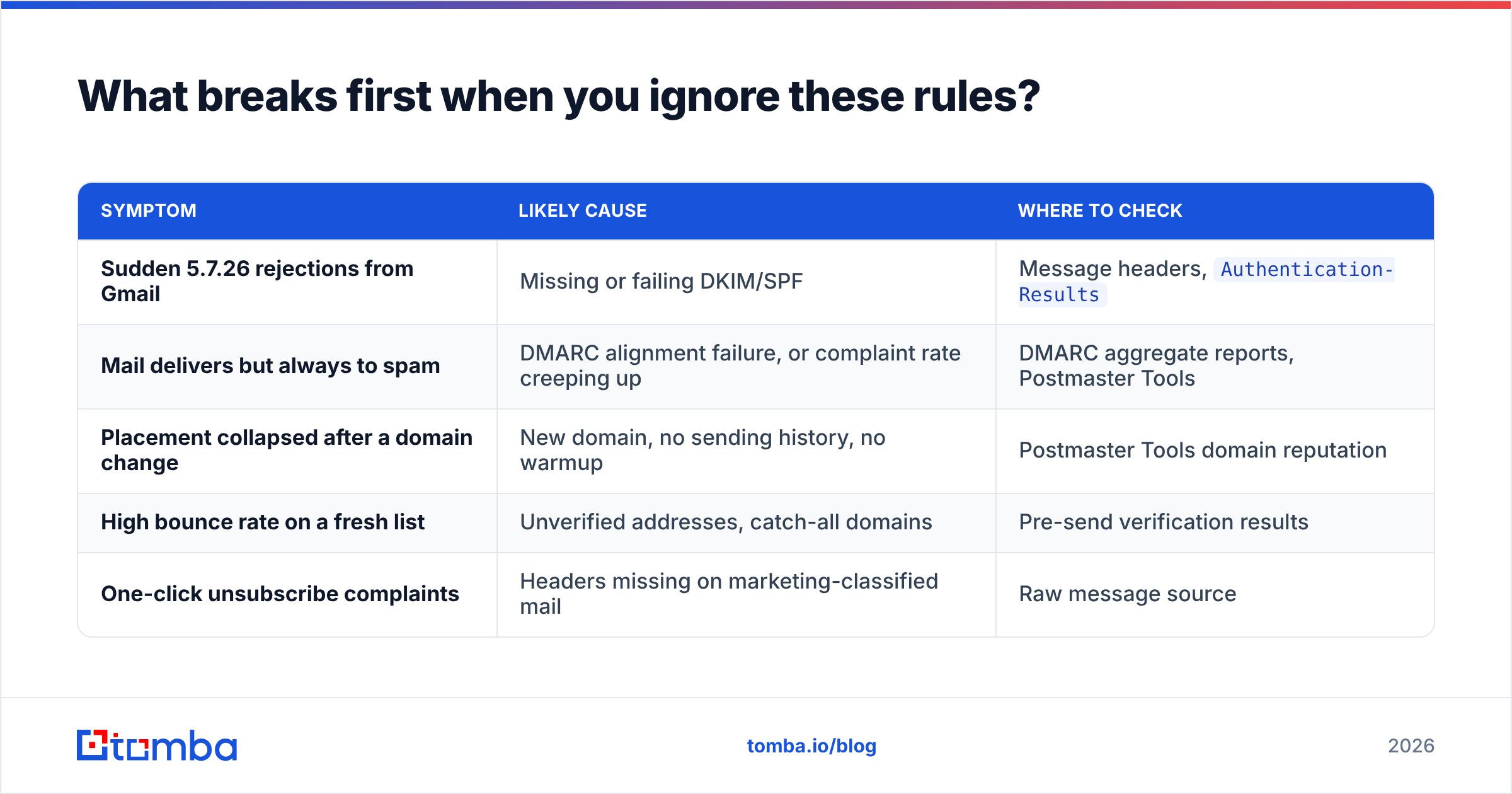
Failures arrive in a predictable order, and each one is diagnosable.
| Symptom | Likely cause | Where to check |
|---|---|---|
| Sudden 5.7.26 rejections from Gmail | Missing or failing DKIM/SPF | Message headers, Authentication-Results |
| Mail delivers but always to spam | DMARC alignment failure, or complaint rate creeping up | DMARC aggregate reports, Postmaster Tools |
| Placement collapsed after a domain change | New domain, no sending history, no warmup | Postmaster Tools domain reputation |
| High bounce rate on a fresh list | Unverified addresses, catch-all domains | Pre-send verification results |
| One-click unsubscribe complaints | Headers missing on marketing-classified mail | Raw message source |
The first three are DNS and reputation problems. The last two are data problems — and data problems are the ones that keep coming back, because you fix your SPF record once but you import a new list every week.
Why does list quality decide whether you pass?#
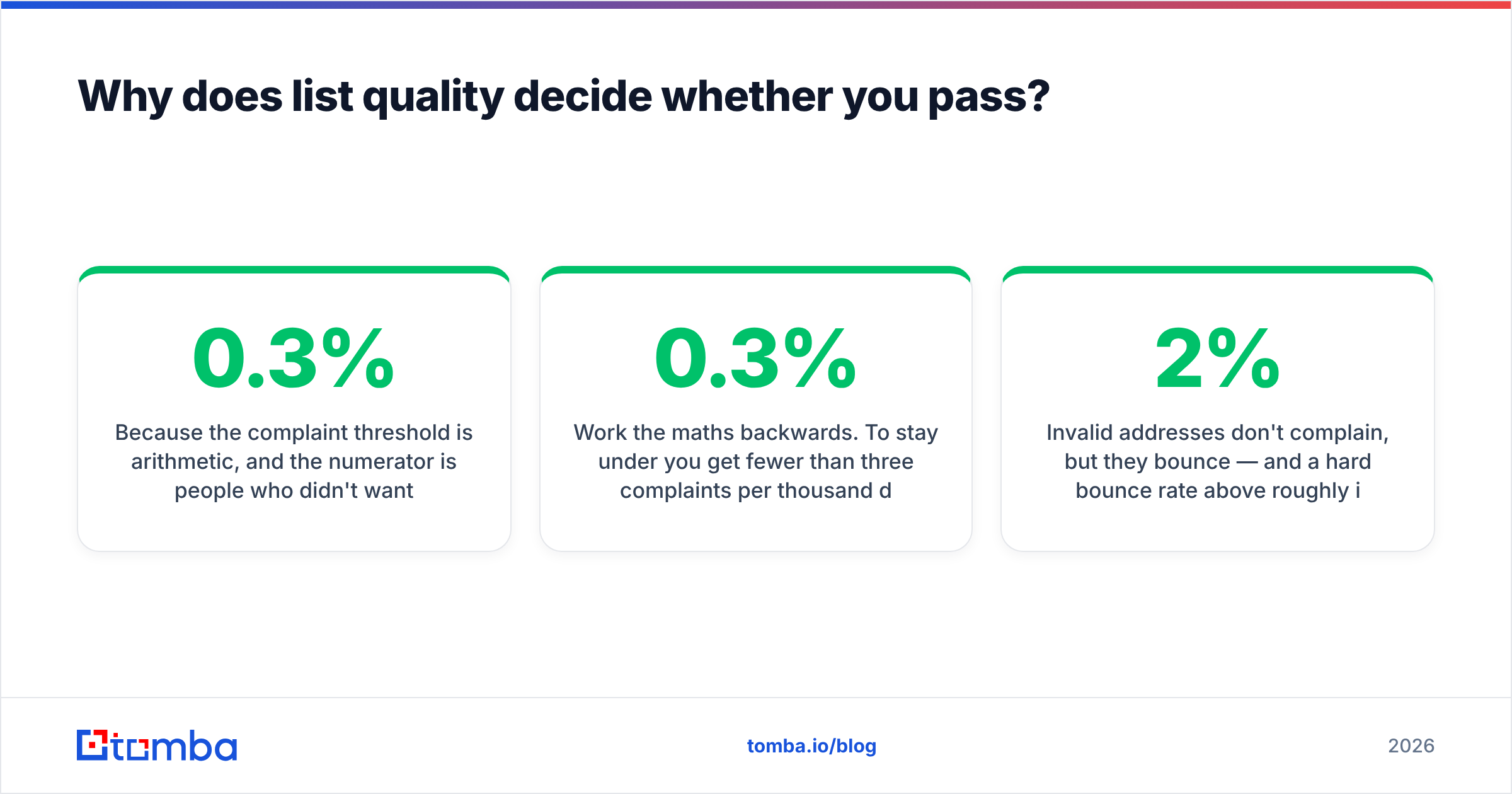
Because the 0.3% complaint threshold is arithmetic, and the numerator is people who didn't want to hear from you.
Work the maths backwards. To stay under 0.3% you get fewer than three complaints per thousand delivered messages. Under Google's own recommended 0.1% target, fewer than one per thousand. Every element of list quality feeds that number:
- Invalid addresses don't complain, but they bounce — and a hard bounce rate above roughly 2% is itself a reputation signal that degrades placement before complaints even enter the picture.
- Role addresses (
info@,sales@,support@) get routed to shared inboxes where whoever opens them has no context and reaches for the spam button faster than an individual would. - Stale addresses on a two-year-old list have a meaningful chance of being converted to spam traps by the provider after abandonment. Hitting one of those is worse than a hundred complaints.
- Catch-all domains accept everything at SMTP time and tell you nothing, so they inflate your apparent deliverability while quietly discarding mail — or worse, routing it to a human who never expected it.
- Wrong-person matches from pattern-guessing tools land your pitch in front of someone with zero relevance to it. That's a complaint waiting to happen, dressed up as a valid send.
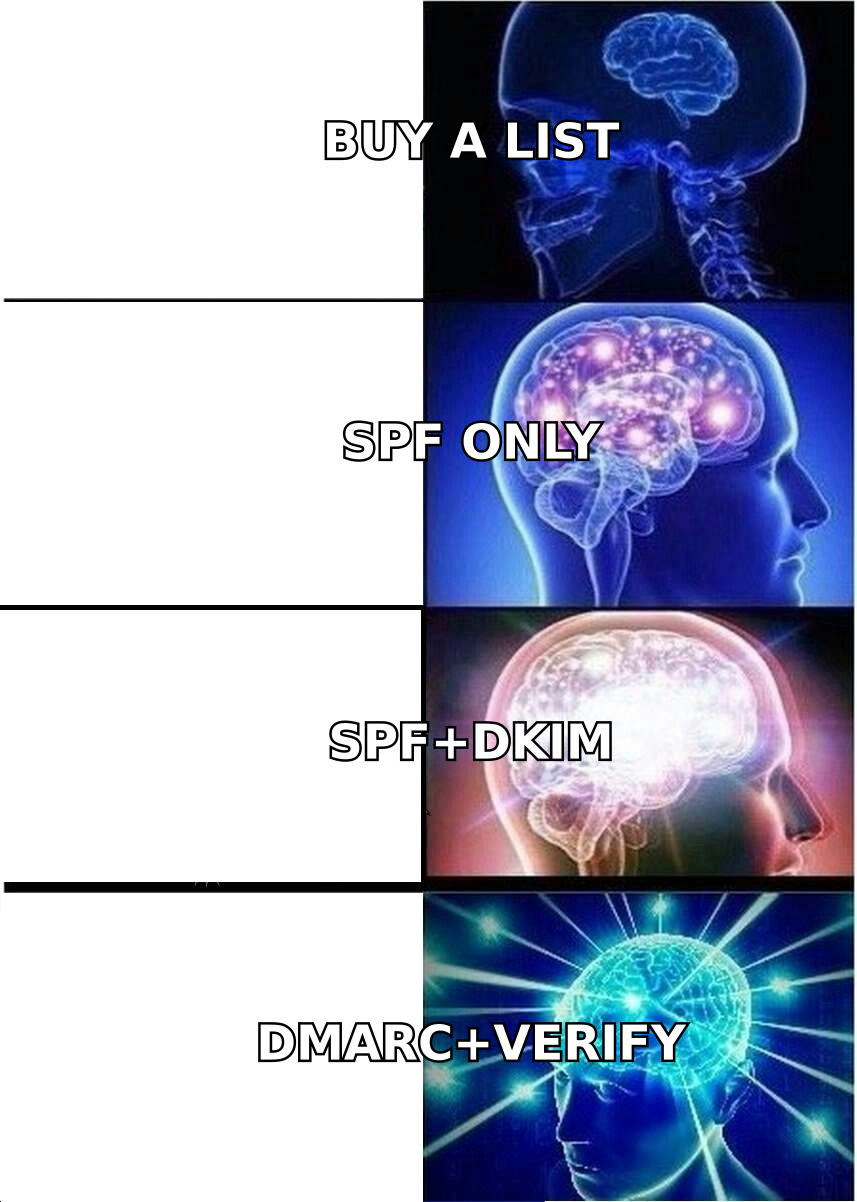
This is where a genuine email verifier stops being a nice-to-have. Verification before send removes the bounces and the obvious traps; a catch-all verifier handles the domains that plain SMTP checks can't resolve. The goal isn't a bigger list — it's a list where the denominator in that complaint-rate fraction is made entirely of real, reachable, plausibly-interested people.
How do you get compliant in a weekend?#
A realistic remediation sequence, in dependency order:
- Audit your DNS. Confirm your SPF record exists, resolves, and stays under the 10-lookup limit. A quick SPF checker run against every sending domain takes minutes and catches the flattening problems that break silently as you add tools.
- Verify DKIM is actually signing. Send a test to a Gmail address, open the raw message, and read
Authentication-Results. You wantdkim=passwith ad=value that matches yourFrom:domain — that's the alignment check in one line. - Publish DMARC. Start at
p=nonewith arua=address so you collect aggregate reports. Read them for a month before you considerquarantine. Moving straight top=rejectwithout report data is how teams accidentally block their own invoicing system. The DMARC standard is worth twenty minutes of reading before you touch the record. - Add List-Unsubscribe headers to anything that could be classified as marketing or subscribed mail, and wire the POST endpoint so removals process within two days. Most ESPs do this for you; most custom SMTP setups don't.
- Register in Postmaster Tools. You cannot manage a complaint rate you can't see. Google shows domain reputation, spam rate, and authentication pass rates — the same signals it's grading you on.
- Clean the list before every send, not once a quarter. B2B contact data decays fast as people change jobs. Verification is a per-campaign step, not an annual project.
If you're standing up a new sending domain as part of this, resist the urge to go from zero to full volume. Run the numbers through a warmup calculator and hold to the ramp. A new domain has no reputation history, which under the post-2024 rules means every early signal counts double.
What should you stop doing entirely?#
Three habits that were survivable before February 2024 and aren't now:
Pattern-guessing addresses at scale. Generating firstname.lastname@ permutations and firing them into a sequence produces a bounce rate that will flag your domain within a week. If you use a permutator, treat its output as candidates to verify, never as a list to send.
Sending from your primary corporate domain. If cold outreach burns your root domain's reputation, your invoices and support replies burn with it. Use a dedicated sending domain with its own authentication, and keep the blast radius contained.
Treating "it delivers" as "it's compliant." Under the current enforcement model, a large share of non-compliant mail is accepted and filed in spam. Silence isn't a pass. Postmaster Tools and DMARC reports are the only honest feedback loop you have.
What's the actual takeaway?#
The Google email changes did something useful: they made deliverability a solved engineering problem for anyone willing to spend an afternoon on DNS. SPF, DKIM, DMARC, unsubscribe headers, PTR records — all of that is a checklist, and checklists get finished.
What they didn't solve, and can't, is who you're emailing. The 0.3% complaint ceiling is a rule about relevance, enforced with arithmetic. You cannot authenticate your way past a list of people who never wanted your email. Teams that treated 2024 as a DNS project got their mail accepted. Teams that treated it as a data-quality project got their mail read.
Start with the addresses. Use the Tomba Email Finder to source verified, source-attributed contacts by domain, name, or company rather than guessing patterns and hoping — every result comes back with a confidence signal and the sources it was confirmed against, so your list starts clean instead of getting cleaned after the damage. The free tier gives you 25 searches a month to test the match quality against a list you already trust; paid plans start at $49/mo when you're ready to run it at volume. Fix the data, and the 0.3% rule stops being a threat and starts being a floor you never come close to.
Related guides#
Ready to find emails that actually work?
Join 150,000+ professionals who stopped guessing and started sending. Free credits on signup — no credit card required.
Get the Tomba newsletter
Practical outbound tactics and product updates — once every two weeks.
About the author