Google Email Sender Guidelines 2026: The Complete Compliance Guide
Google's sender rules are no longer suggestions — they are enforced at the gateway. Here is exactly what bulk and low-volume senders must do in 2026 to keep landing in the inbox.
Google email sender guidelines are now pass-or-fail. Meet them and your mail reaches the inbox. Miss one and Gmail can refuse it at the door. Here is what to fix, in order.
TL;DR
- The Google email sender guidelines set three hard rules. Sign your mail with SPF and DKIM under a DMARC record. Honor one-click unsubscribe within two days. Keep spam complaints under 0.30%, and aim for 0.10%.
- The 5,000-a-day "bulk sender" line is a trigger, not a plan you sign up for. Cross it once with Gmail addresses and the strict rules stay.
- Most senders do not fail on setup. They fail on list quality: old contacts, spam traps, and addresses nobody checked.
- TLS, valid forward and reverse DNS, and a
From:header that matches your real domain are hard rules. Mail that misses them gets rejected, not filtered. - The fastest win is upstream. Verify addresses before they enter a sequence, so bounces and complaints never pile up.
What Are the Google Email Sender Guidelines?#
The Google email sender guidelines are Gmail's published rules for senders. They decide whether your message reaches the inbox, drops into spam, or gets refused at the gateway. Google announced them in October 2023 and rolled them out through 2024. They have tightened since.
Think of it like airport security. For years, Gmail ran a friendly bag check. Odd items got pulled aside, and the rest went through. Now it runs full screening, with the rules posted at the entrance. You have your papers in order, or you do not board. In plain terms: Gmail used to score you on reputation alone. Now it applies pass-or-fail gates first.
The Google email sender guidelines split senders into two tiers:
- All senders — anyone who sends mail to a Gmail address. You need SPF or DKIM, valid forward and reverse DNS, TLS on the connection, a spam rate under 0.30%, and honest headers that follow RFC 5322.
- Bulk senders — anyone near 5,000 messages a day to personal Gmail accounts. You need SPF and DKIM, a DMARC record, a
From:domain that matches the signed domain, one-click unsubscribe (RFC 8058), and unsubscribe handling within two days.
The count covers @gmail.com and @googlemail.com only. Google Workspace inboxes do not count. But cross the line once, and Google treats you as a bulk sender from then on, even if your volume drops later.

Above: Gmail Postmaster Tools compliance dashboard showing per-requirement pass/fail status for a sending domain.
Which Google Email Sender Guidelines Block Delivery?#
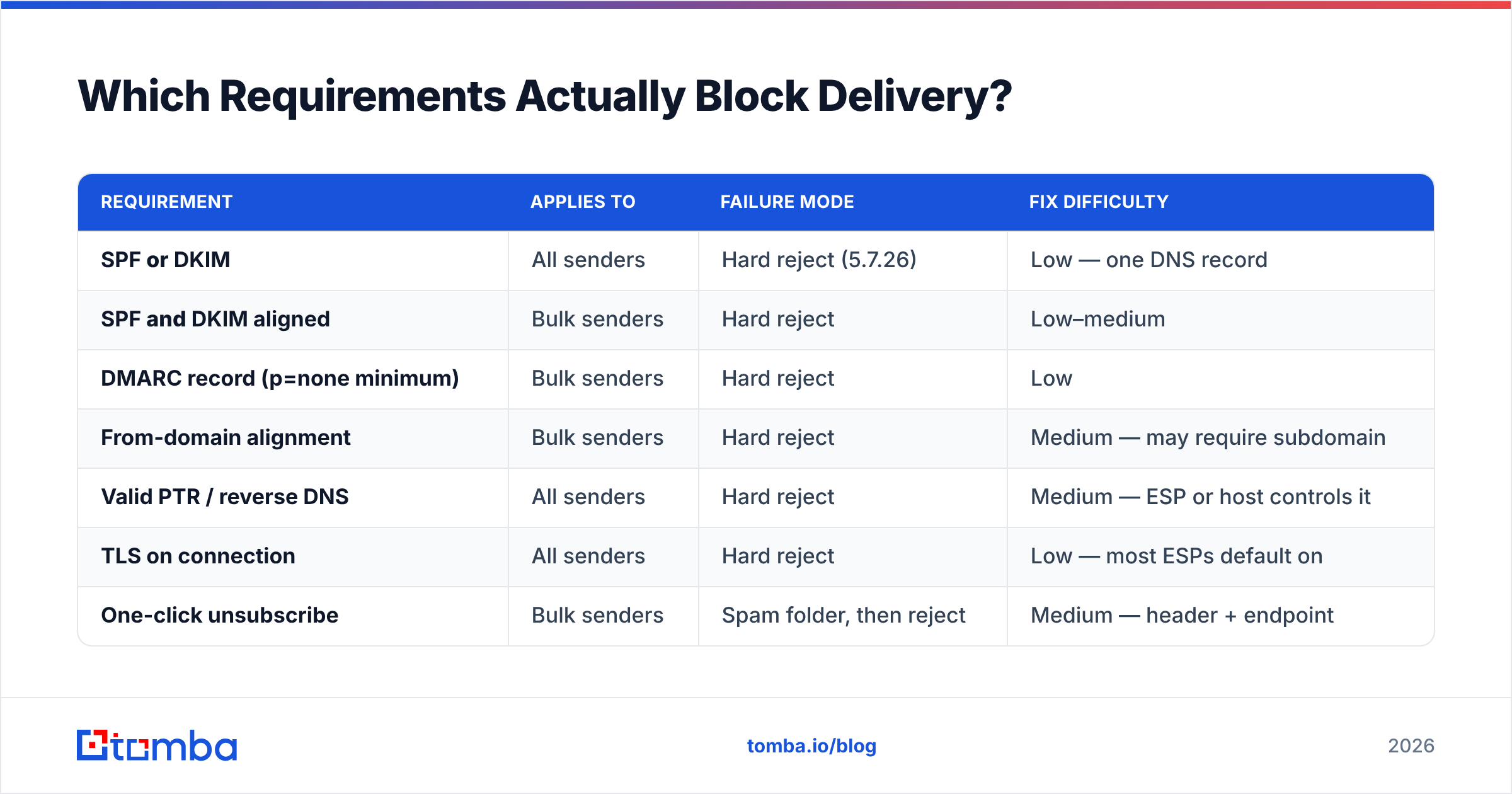
Not all Google email sender guidelines carry the same weight. Some push you into the spam folder. Others trigger a hard 5.7.26 bounce at the gateway. Here is the split.
| Requirement | Applies to | Failure mode | Fix difficulty |
|---|---|---|---|
| SPF or DKIM | All senders | Hard reject (5.7.26) | Low — one DNS record |
| SPF and DKIM aligned | Bulk senders | Hard reject | Low–medium |
| DMARC record (p=none minimum) | Bulk senders | Hard reject | Low |
| From-domain alignment | Bulk senders | Hard reject | Medium — may require subdomain |
| Valid PTR / reverse DNS | All senders | Hard reject | Medium — ESP or host controls it |
| TLS on connection | All senders | Hard reject | Low — most ESPs default on |
| One-click unsubscribe | Bulk senders | Spam folder, then reject | Medium — header + endpoint |
| Unsubscribe honored ≤ 2 days | Bulk senders | Complaint spike, reputation loss | Medium — process change |
| Spam rate < 0.30% | All senders | Progressive filtering, then block | Hard — list quality problem |
| No spoofed Gmail From: headers | All senders | Hard reject | Low |
The pattern is easy to spot. Everything in the "low difficulty" column is a one-afternoon DNS job. The hard part is who you send to, not how you send. That is where most B2B outbound programs break.
How Do You Set Up SPF, DKIM, and DMARC?#
The Google email sender guidelines lean on three DNS records. Each does a different job. Mixing them up is the most common reason a domain ends up half-configured.
SPF (Sender Policy Framework) — a TXT record that lists which servers may send for your domain. One record per domain. Ten DNS lookups, max. End it in
~allor-all, never+all. Run an SPF checker before you go live. Go past ten lookups and you get a silentpermerrorthat most dashboards hide.DKIM (DomainKeys Identified Mail) — a signature added to every message you send, checked against a public key in DNS. Use a 2048-bit key and rotate it once a year. Your ESP makes both halves. You publish the public half at
selector._domainkey.yourdomain.com.DMARC — the policy record. It tells inbox providers what to do when SPF or DKIM fails, and where to send reports. Start at
v=DMARC1; p=none; rua=mailto:dmarc@yourdomain.com. Read the reports for two to four weeks. Then move top=quarantine, and laterp=reject.Alignment — the step most people miss. SPF and DKIM passing is not enough. The domain they sign must match the domain in your visible
From:header. Send asyou@company.comwhile your ESP signs asmail.espvendor.com, and you get a technical pass with an alignment fail.Subdomain strategy — send marketing from
news.company.com, receipts frommail.company.com, and cold outbound from a separate domain. Google tracks reputation per subdomain. A rough quarter on outbound then leaves your invoice mail alone.Reverse DNS — the PTR record for your sending IP must point to a hostname, and that hostname must point back to the same IP. Shared ESP setups handle this for you. On a dedicated IP, check it yourself.
Google's own Email sender guidelines documentation is the source of truth, and it changes often. Read it directly rather than trusting a vendor summary — this one included.
What Is the Spam Rate Limit?#
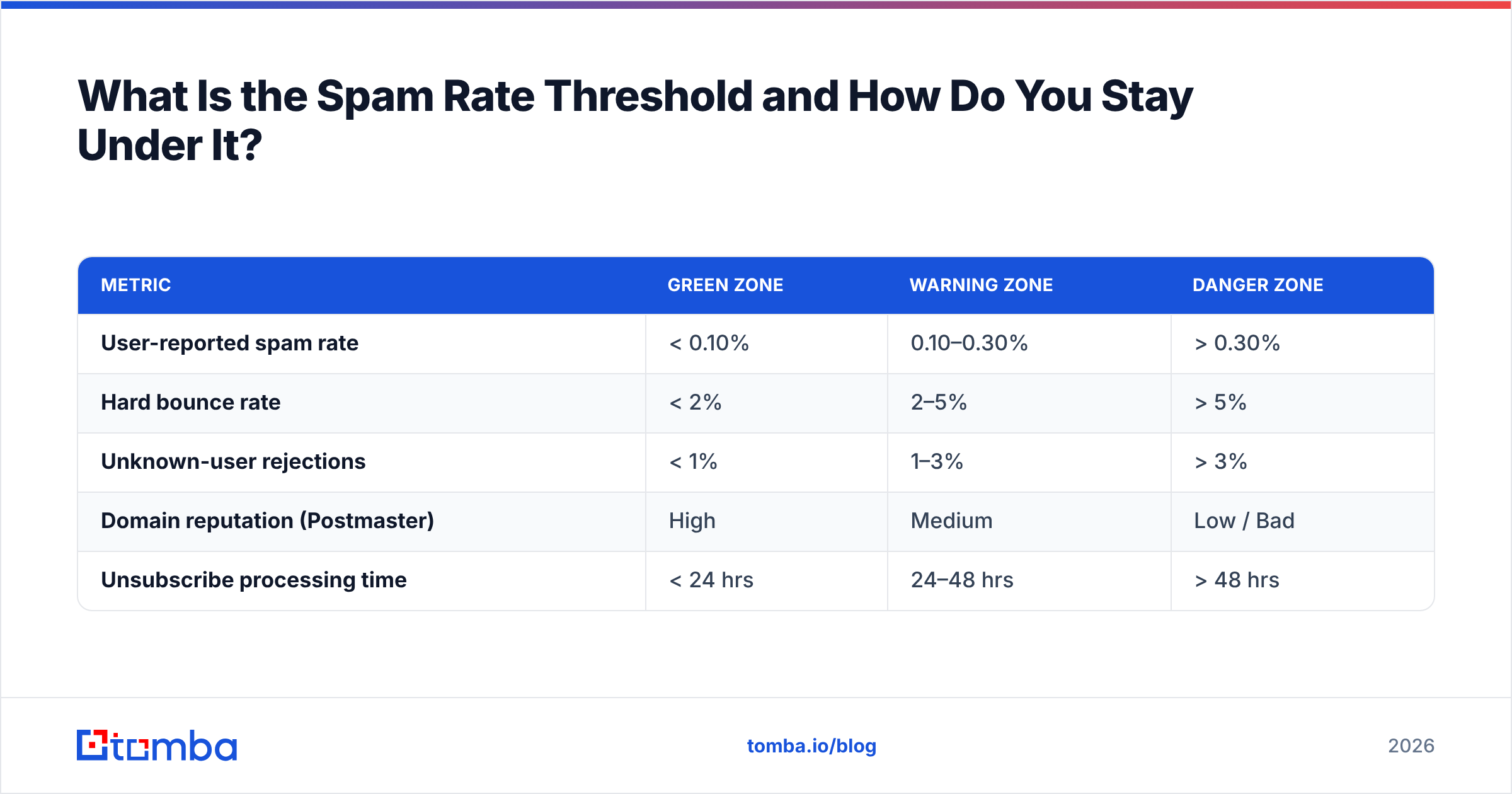
Google caps user-reported spam at 0.30%. Treat 0.10% as your real target.
The gap matters. Google says senders should never hit 0.30%. Damage starts well before that. At 0.30% you are already in the penalty box. The number is a failure line, not a budget to spend. A sender at 0.25% is not safe. They are one bad campaign from a domain-wide block.
Gmail Postmaster Tools measures spam rate as complaints divided by mail delivered to the inbox — not mail sent. That denominator matters. As more of your mail lands in spam, the measured rate can climb even when complaints hold steady. The metric works against you.
| Metric | Green zone | Warning zone | Danger zone |
|---|---|---|---|
| User-reported spam rate | < 0.10% | 0.10–0.30% | > 0.30% |
| Hard bounce rate | < 2% | 2–5% | > 5% |
| Unknown-user rejections | < 1% | 1–3% | > 3% |
| Domain reputation (Postmaster) | High | Medium | Low / Bad |
| Unsubscribe processing time | < 24 hrs | 24–48 hrs | > 48 hrs |
Four things actually move the number:
- Verify before you send. Every dead address is a guaranteed bounce. A cluster of them looks like a bought or scraped list. Run addresses through an email verifier before import and you cut the biggest source of self-inflicted damage.
- Treat catch-all domains with care. Catch-all servers accept everything, so a plain SMTP check says "valid" for addresses that do not exist. A catch-all verifier uses pattern confidence and other signals instead of trusting the accept.
- Segment by engagement. Contacts who have not opened in 180 days file most of your complaints. Suppress them, or move them to a slow reactivation track.
- Make it easy to leave. A hidden unsubscribe link turns an opt-out into a spam report. One costs you a contact. The other costs you reputation.
Do the Google Email Sender Guidelines Apply to Cold Outbound?#
Yes. And cold outbound is the hardest case, because the rules assume consent that cold email does not have.
Nothing in the Google email sender guidelines bans cold email. What they punish is the sloppy habits that come with it: unverified lists, faked headers, no way to opt out, and volume that ramps faster than the domain can carry.
Practical changes for cold sequences:
- Use a separate sending domain. Never run outbound from your main company domain. A lookalike domain (
get-company.com,company-hq.com) keeps the risk in one place. - Warm up for three to four weeks. Start at 10–20 messages a day per mailbox and climb slowly. An email warmup calculator gives you a schedule instead of a guess.
- Cap each mailbox at 30–50 sends a day. Add mailboxes to grow volume. Do not push one mailbox harder.
- Add a plain-text unsubscribe line. The one-click header rule targets bulk marketing, but the line still cuts complaints — and complaints are the metric that counts.
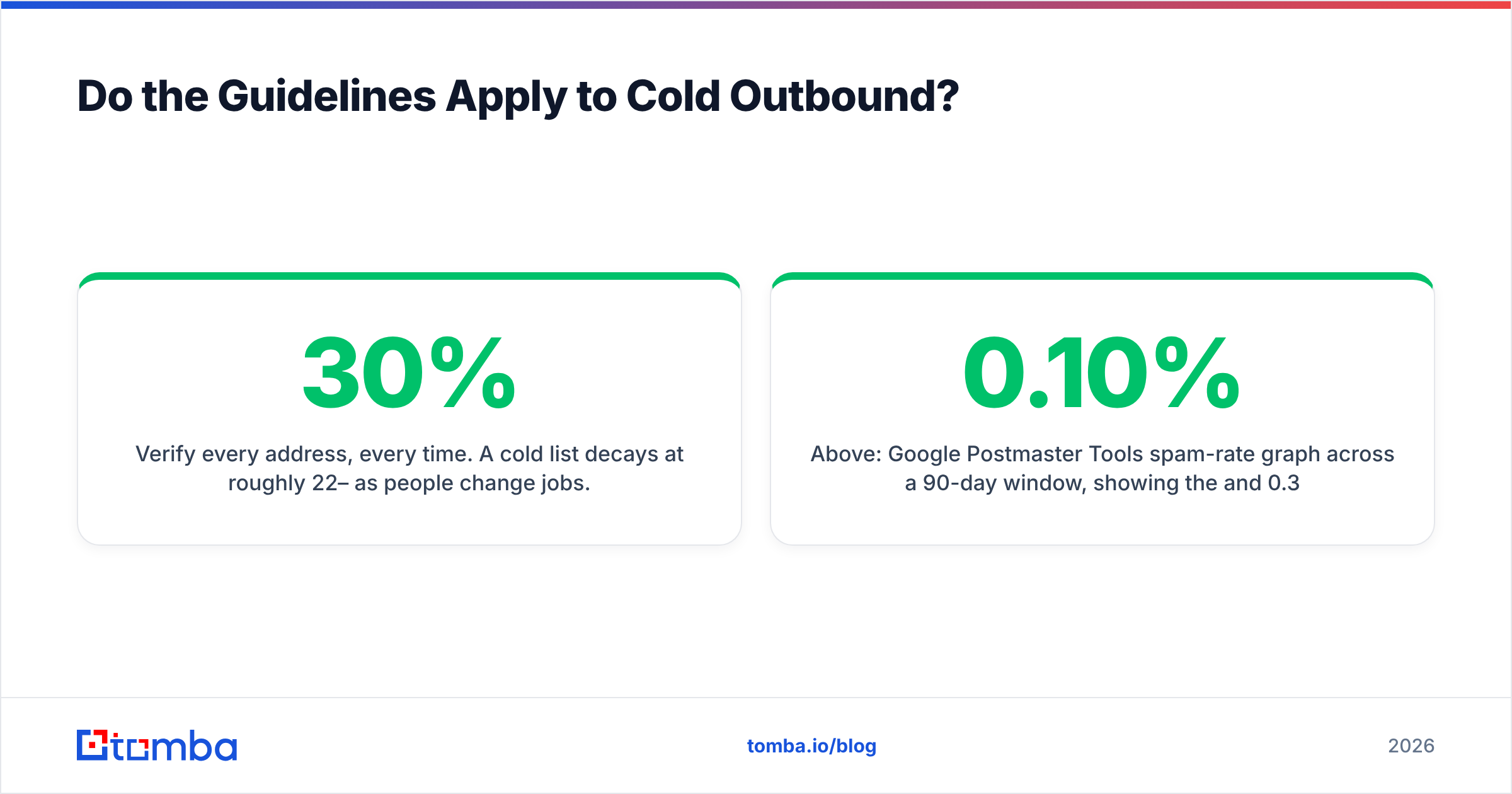
- Verify every address, every time. Cold lists decay 22–30% a year as people change jobs. Last quarter's clean list is not this quarter's clean list.

Above: Google Postmaster Tools spam-rate graph across a 90-day window, showing the 0.10% and 0.30% reference lines.
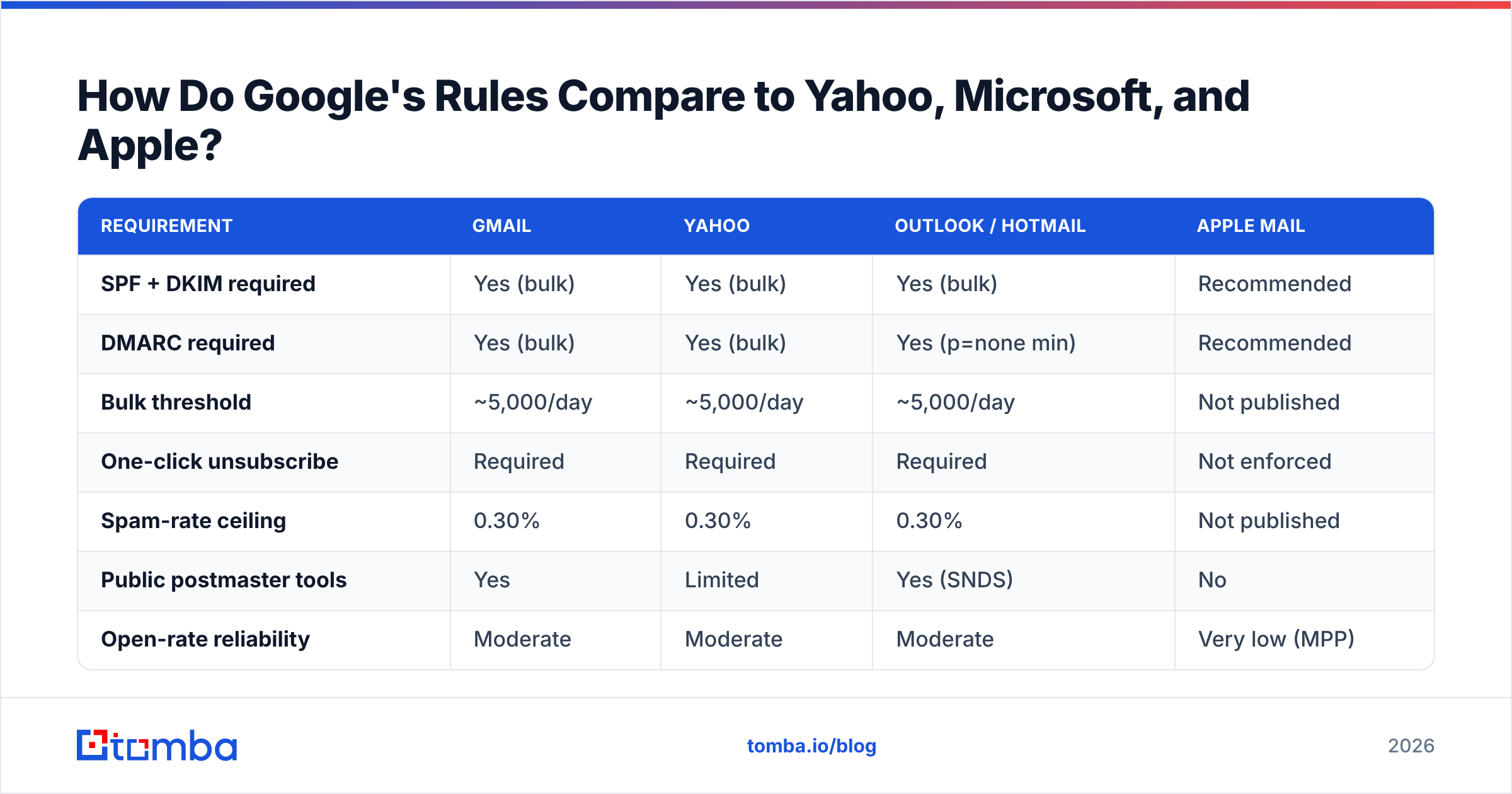
How Do Google's Rules Compare to Yahoo, Microsoft, and Apple?#
Google published first, but it is not alone now. Yahoo announced near-identical rules on the same timeline. Microsoft followed for Outlook and Hotmail in 2025. Apple changed how you measure results rather than how you get in.
| Requirement | Gmail | Yahoo | Outlook / Hotmail | Apple Mail |
|---|---|---|---|---|
| SPF + DKIM required | Yes (bulk) | Yes (bulk) | Yes (bulk) | Recommended |
| DMARC required | Yes (bulk) | Yes (bulk) | Yes (p=none min) | Recommended |
| Bulk threshold | ~5,000/day | ~5,000/day | ~5,000/day | Not published |
| One-click unsubscribe | Required | Required | Required | Not enforced |
| Spam-rate ceiling | 0.30% | 0.30% | 0.30% | Not published |
| Public postmaster tools | Yes | Limited | Yes (SNDS) | No |
| Open-rate reliability | Moderate | Moderate | Moderate | Very low (MPP) |
The real story is convergence. There is no longer a "tune for Gmail" plan separate from a "tune for Outlook" plan. One clean setup satisfies every major consumer provider. Build once, watch everywhere. Meeting the Google email sender guidelines gets you most of the way with the rest.
One note on measurement. Apple's Mail Privacy Protection loads images ahead of time, so open rates on any list with many Apple users run high and cannot be trusted. Use replies, clicks, and conversions instead. Litmus and other deliverability researchers have shown how far opens inflate, which makes them useless for segmenting.
What Should You Do in the First 30 Days?#
Work in order. Some steps depend on earlier ones.
Week 1 — Audit. Add every sending domain to Gmail Postmaster Tools. Pull your current SPF, DKIM, and DMARC records. Run a blacklist checker on your sending IPs. Write down what exists before you change anything.
Week 2 — Authenticate. Publish or repair SPF. Stay under ten lookups and end with ~all. Turn on 2048-bit DKIM signing at your ESP and publish the key. Add DMARC at p=none with a rua address. Then send a test to a Gmail account and open "Show original". You want PASS on SPF, DKIM, and DMARC.
Week 3 — Clean. Export every list and verify it. Drop hard bounces, role accounts, and anything you cannot confirm. Past a few thousand records, a bulk verify run beats piecemeal cleanup. Suppress contacts with no activity in 180 days.
Week 4 — Instrument. Add the List-Unsubscribe and List-Unsubscribe-Post headers with a working endpoint. Test that an opt-out takes effect within 24 hours. Book a weekly Postmaster Tools review. Move DMARC to p=quarantine once reports show clean alignment across every sending source.
Then hold the line. The Google email sender guidelines are not a project you finish. They are a number you watch. Domain reputation in Postmaster Tools sums up everything above, and it moves slowly both ways. Recovery from a bad stretch takes months, not days.
What Does This Mean for Your Prospecting Data?#
Every rule above traces back to one thing: the quality of the addresses you let in.
You cannot authenticate your way out of a bad list. A perfect setup — SPF, DKIM, DMARC at p=reject, clean TLS — still gets throttled if 8% of sends bounce and 0.4% of readers hit "report spam". Signing proves you are who you claim to be. It says nothing about whether the reader wants your email, or even exists.
So the best deliverability work happens before the first send, when contacts enter your list. Finding a real, deliverable address costs far less than repairing a burned domain six months later.
Start upstream. Tomba's Email Finder returns work addresses with a confidence score and built-in verification, so bounces and complaints never reach your sequences. The free tier covers 25 searches a month. Paid plans start at $49/mo — see Tomba pricing for the full list. Clean data in, sending that meets the Google email sender guidelines, inbox placement that holds.
Related guides#
Ready to find emails that actually work?
Join 150,000+ professionals who stopped guessing and started sending. Free credits on signup — no credit card required.
Get the Tomba newsletter
Practical outbound tactics and product updates — once every two weeks.
About the author