Google Maps Email Extractor Alternatives: 7 Better Tools
Google Maps scrapers hand you generic info@ inboxes and a compliance headache. Here are seven alternatives that return named contacts, verified emails, and data you can actually put in a sequence.
TL;DR
- Google Maps email extractors are good at one thing: harvesting business listings. They are bad at the thing you actually need — a named decision-maker with a deliverable inbox.
- Typical Maps-scraped lists are 60-80% generic
info@,contact@, andhello@addresses, which land in shared inboxes nobody reads and hurt your reply rate. - Better approach: use Maps (or a local-business database) for company discovery, then run a domain-level email finder to get named contacts, then verify before sending.
- The seven alternatives below split into three buckets — local-business databases, domain-first email finders, and hybrid scraper + enrichment stacks.
- Cheapest credible starting point: a free tier from a domain-first finder plus a Maps export you already own. You do not need a $200/mo scraper subscription to test the motion.
Why do people look for Google Maps email extractor alternatives?#
Because the output disappoints once it hits a sequence.
A Google Maps email extractor works by crawling business listings — name, address, phone, category, website — then following the website link and regex-matching any mailto: or plain-text email on the page. That pipeline is mechanically simple, which is why there are two dozen Chrome extensions doing it for $19/mo. It also explains the failure mode: the only emails published on a small-business homepage are the ones the business wants strangers to use. That means info@, bookings@, sales@, and a contact form.
Three practical problems follow.
1. Generic inboxes convert badly. A named recipient can reply. A shared info@ box gets triaged by whoever opens it, and cold vendor pitches are the first thing deleted. Across most B2B outbound benchmarks, role-based addresses underperform named contacts by a wide margin on reply rate — and they inflate your spam-complaint rate, which is the metric that actually gets your domain throttled.
2. Scraped data goes stale fast. Google Maps listings drift. Businesses close, rebrand, or change domains, and the listing lags. If your extractor also caches results, you can end up mailing a domain that stopped resolving eight months ago. Hard bounces above roughly 2-3% are enough to trip sender-reputation penalties at most mailbox providers.
3. The compliance surface is real. Scraping public listings is not automatically illegal, but Google's own Terms of Service prohibit automated extraction from Maps, and under GDPR a business email tied to an identifiable person is personal data. That means you need a lawful basis and a working opt-out — not just a CSV. Plenty of teams discover this after their first complaint, not before.
None of this means you should stop targeting local businesses. It means the extractor is the wrong tool for the second half of the job.
What are the actual categories of alternatives?#
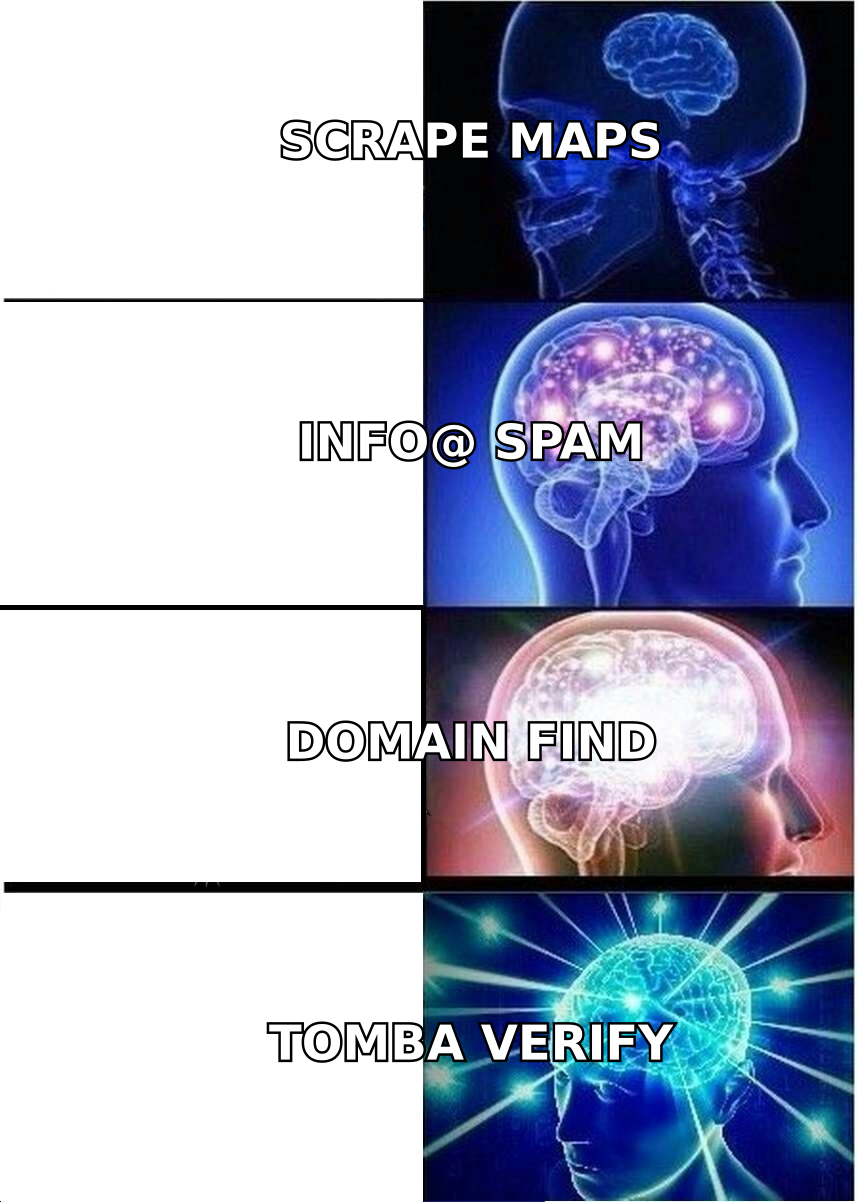
There are three, and mixing them up is why people buy the wrong tool.
- Local-business databases. Pre-built, licensed datasets of local and SMB companies with firmographics attached. You filter instead of scrape. Faster, cleaner, usually more expensive per record.
- Domain-first email finders. You feed them a company domain (which Maps gives you for free) and a person's name or a job title, and they return the individual's work email plus a confidence score. This is where generic-to-named conversion happens.
- Hybrid scraper + enrichment stacks. A scraping layer (Apify actor, Outscraper, PhantomBuster) that pulls Maps listings, wired into an enrichment API that turns each domain into named contacts. Most flexible, most engineering work.
The right answer for most teams is a two-step stack: pull or buy company records, then enrich to named contacts. The extractor-only path skips step two and that's exactly where the value is.
Which Google Maps email extractor alternatives are worth using in 2026?#
Here's the honest comparison. Prices are list prices at time of writing — verify on each vendor's page before you commit, since credit definitions differ enough to change effective cost by 2-3x.
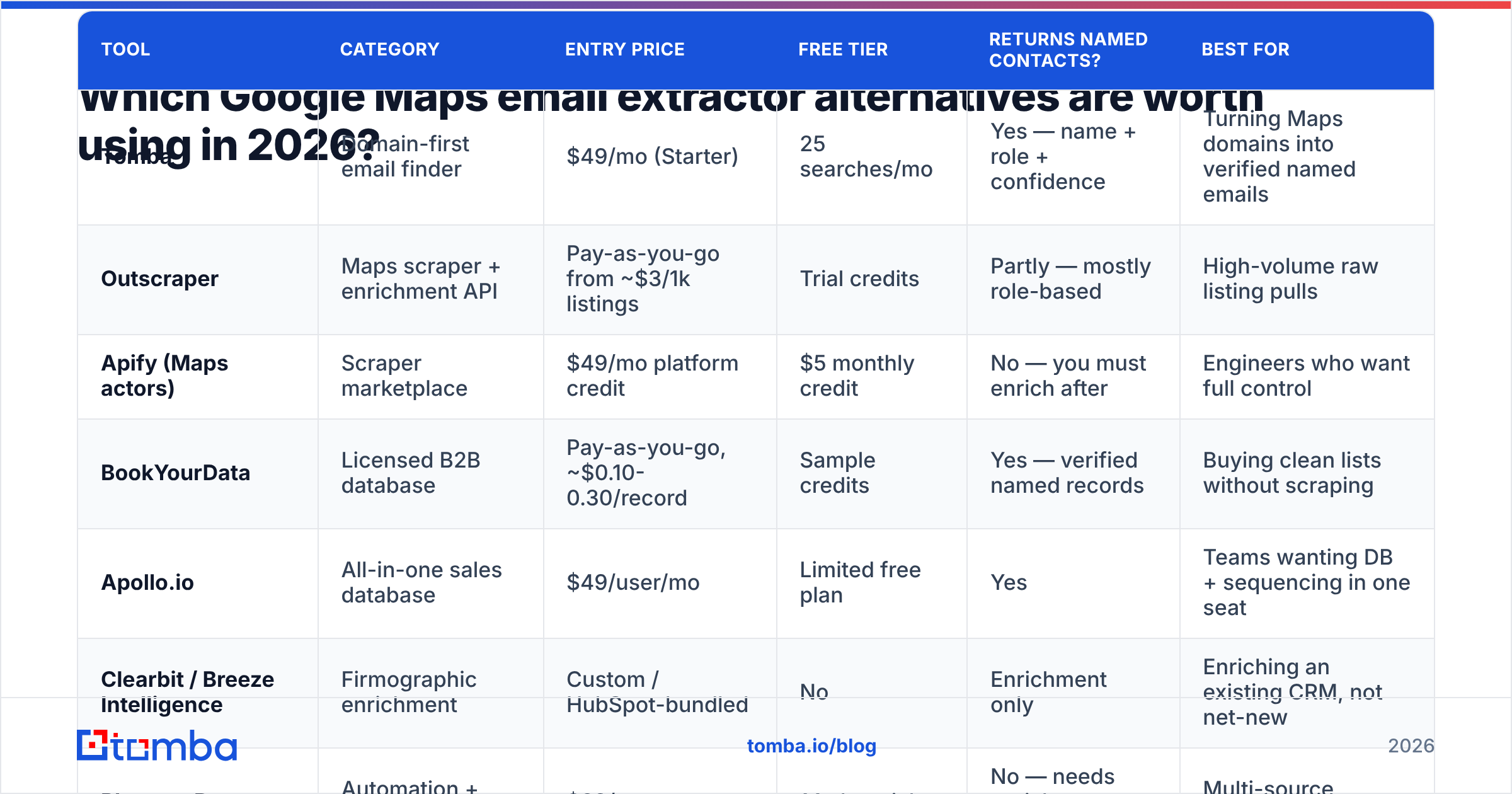
| Tool | Category | Entry price | Free tier | Returns named contacts? | Best for |
|---|---|---|---|---|---|
| Tomba | Domain-first email finder | $49/mo (Starter) | 25 searches/mo | Yes — name + role + confidence | Turning Maps domains into verified named emails |
| Outscraper | Maps scraper + enrichment API | Pay-as-you-go from ~$3/1k listings | Trial credits | Partly — mostly role-based | High-volume raw listing pulls |
| Apify (Maps actors) | Scraper marketplace | $49/mo platform credit | $5 monthly credit | No — you must enrich after | Engineers who want full control |
| BookYourData | Licensed B2B database | Pay-as-you-go, ~$0.10-0.30/record | Sample credits | Yes — verified named records | Buying clean lists without scraping |
| Apollo.io | All-in-one sales database | $49/user/mo | Limited free plan | Yes | Teams wanting DB + sequencing in one seat |
| Clearbit / Breeze Intelligence | Firmographic enrichment | Custom / HubSpot-bundled | No | Enrichment only | Enriching an existing CRM, not net-new |
| PhantomBuster | Automation + scraping | $69/mo | 14-day trial | No — needs enrichment step | Multi-source scraping workflows |
A few notes that don't fit in a table.
Tomba is a domain-first finder, not a Maps scraper — that's the point. You take the website column your Maps export already contains, run a domain search, and get back the named people at that company with their email pattern and a confidence score. Its email verifier then removes anything that won't deliver. Free tier is 25 searches/mo, Starter is $49/mo, Growth $99/mo, Pro $249/mo. For local-business outbound this is usually the cheapest path from "list of 2,000 restaurants" to "list of 600 owners and GMs you can actually email."
Outscraper is the most direct like-for-like replacement if you genuinely want Maps data at volume. It's pay-as-you-go, it handles pagination and rate limits for you, and it has an email-enrichment add-on. Just be clear-eyed: its email enrichment is still largely website-scraped, so the role-based ratio stays high.
Apify (apify.com) is a marketplace of scraping actors, several of which do Google Maps well. It's the right pick if you have an engineer and want to own the pipeline. It returns no emails on its own — you pipe results into an enrichment API. Tomba has an Apify integration for exactly this handoff.
BookYourData takes the opposite approach: instead of scraping, you filter a licensed B2B database by industry, geography, company size, and seniority, then buy only the records you want. Records come pre-verified with named contacts, which sidesteps the entire info@ problem. Pay-as-you-go pricing means no subscription commitment, which is genuinely useful for one-off campaigns. If your ICP is well-defined and you'd rather buy clean than clean dirty, this is a strong option — and often faster to first-send than any scraper.
Apollo.io (apollo.io) bundles a contact database with sequencing. Coverage skews toward tech and mid-market rather than local SMBs, so for "plumbers in Ohio" it's weaker than a Maps pull. For "SaaS companies in Ohio" it's stronger. If you're evaluating it, the Apollo alternative breakdown covers where the credit system bites.
Clearbit (now Breeze Intelligence inside HubSpot) is enrichment-only. It makes records you already have richer; it does not find you new local businesses. Don't buy it expecting a Maps replacement.
PhantomBuster is a general automation platform with Maps phantoms among many others. Solid if you're already scraping LinkedIn, Instagram, and Maps and want one tool. Same caveat as Apify: it hands you domains, not people.
How do you turn a Google Maps export into named, deliverable contacts?#
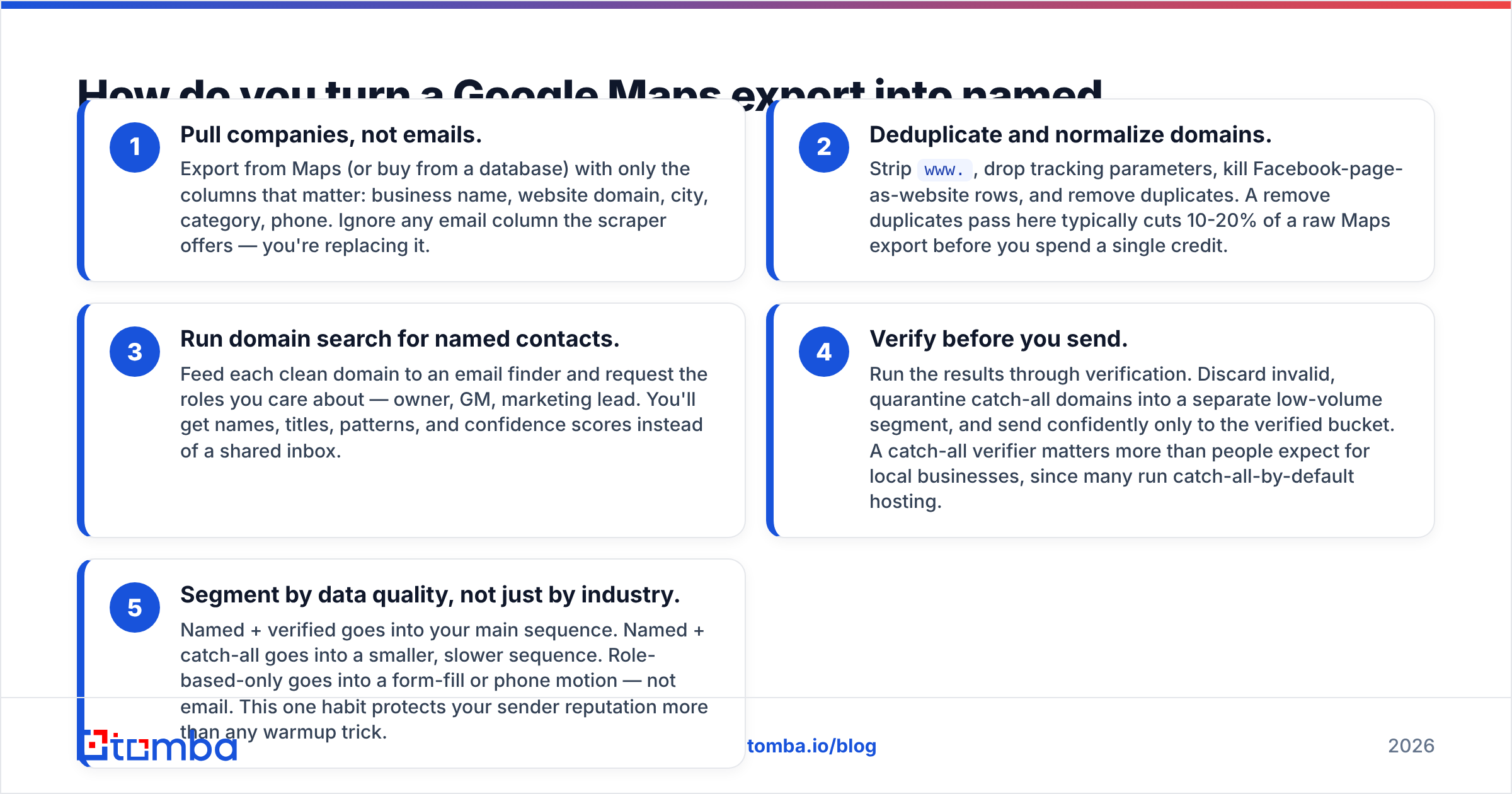
This is the workflow that actually beats an extractor. Five steps, and you can run it on a free tier before paying anyone.
- Pull companies, not emails. Export from Maps (or buy from a database) with only the columns that matter: business name, website domain, city, category, phone. Ignore any email column the scraper offers — you're replacing it.
- Deduplicate and normalize domains. Strip
www., drop tracking parameters, kill Facebook-page-as-website rows, and remove duplicates. A remove duplicates pass here typically cuts 10-20% of a raw Maps export before you spend a single credit. - Run domain search for named contacts. Feed each clean domain to an email finder and request the roles you care about — owner, GM, marketing lead. You'll get names, titles, patterns, and confidence scores instead of a shared inbox.
- Verify before you send. Run the results through verification. Discard invalid, quarantine catch-all domains into a separate low-volume segment, and send confidently only to the verified bucket. A catch-all verifier matters more than people expect for local businesses, since many run catch-all-by-default hosting.
- Segment by data quality, not just by industry. Named + verified goes into your main sequence. Named + catch-all goes into a smaller, slower sequence. Role-based-only goes into a form-fill or phone motion — not email. This one habit protects your sender reputation more than any warmup trick.
Step 5 is the one teams skip. Blending unverified and verified contacts into one sequence means your bounce rate is set by your worst data, and mailbox providers judge the whole domain, not the segment.
What does the accuracy difference actually look like?#
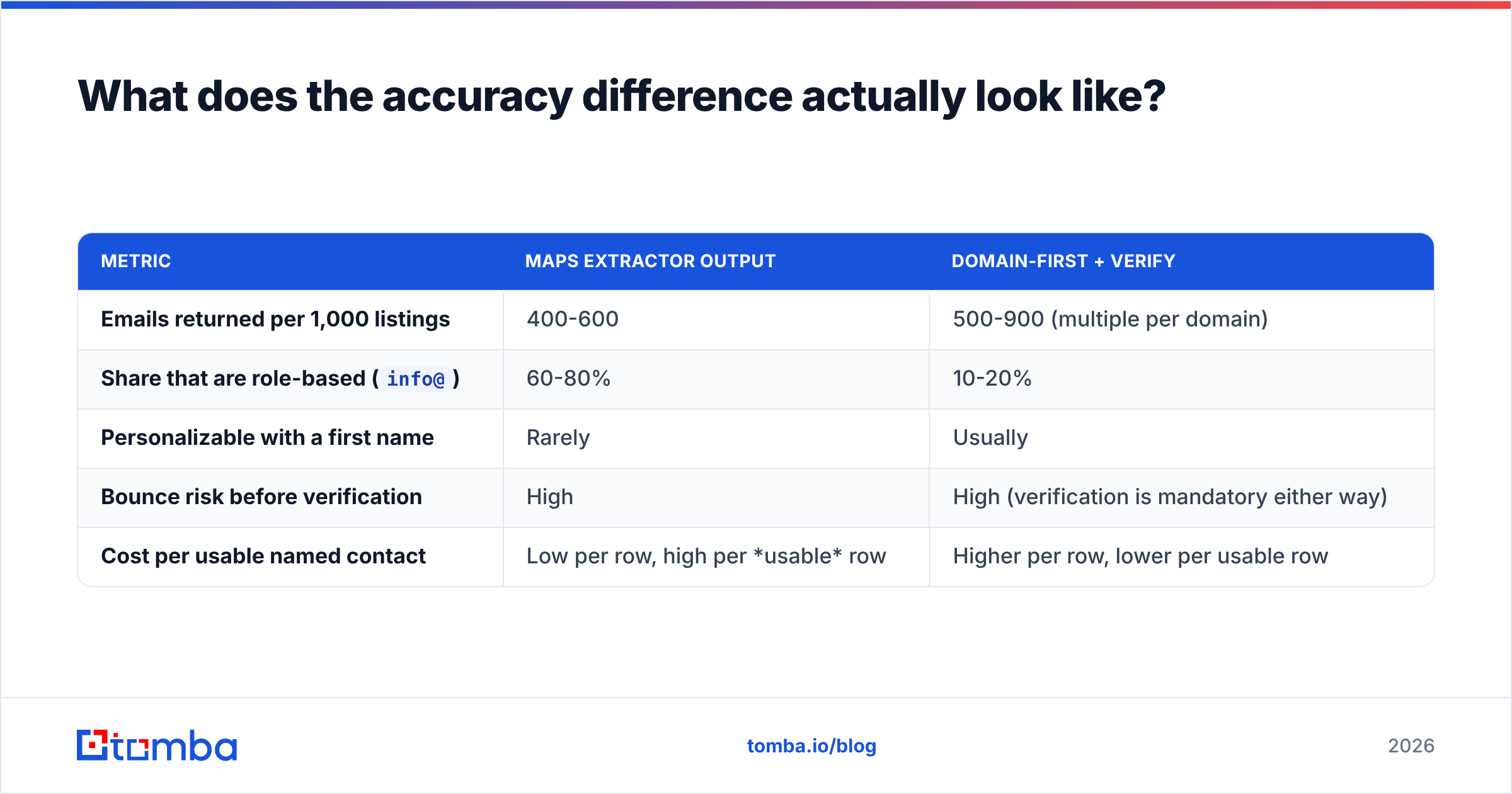
Run the same 1,000 Google Maps listings through both paths and the shapes diverge fast.
The extractor path yields roughly 400-600 emails from 1,000 listings (many small businesses publish no email at all, only a contact form). Of those, the large majority are role-based. After verification you might keep 350-500 sendable addresses, nearly all of them shared inboxes.
The domain-first path yields fewer rows but far more people. Roughly 50-70% of small-business domains return at least one named contact, often two or three. After verification you land in a similar total volume — but with an individual's name in the To: field, which changes both the open rate and the tone of the first line you can write.
Same input list. Different second step. That's the whole argument.
| Metric | Maps extractor output | Domain-first + verify |
|---|---|---|
| Emails returned per 1,000 listings | 400-600 | 500-900 (multiple per domain) |
Share that are role-based (info@) |
60-80% | 10-20% |
| Personalizable with a first name | Rarely | Usually |
| Bounce risk before verification | High | High (verification is mandatory either way) |
| Cost per usable named contact | Low per row, high per usable row | Higher per row, lower per usable row |
Is scraping Google Maps legal, and does it matter for outbound?#
Short answer: the scraping is a gray area, the sending is where you get hurt.
Google's Terms of Service prohibit automated extraction from its products, so any Maps extractor operates against those terms regardless of how the vendor markets it. That's a contract issue between you and Google, not usually a criminal one — but it does mean tools get blocked, break, and disappear without notice, which is a real operational risk if your pipeline depends on one.
The bigger exposure is downstream. Under GDPR, firstname.lastname@company.com is personal data even in a B2B context, so you need a lawful basis (usually legitimate interest), a documented balancing test, clear identification of yourself in every message, and a functioning opt-out. Under CAN-SPAM in the US the bar is lower but the opt-out and accurate-header requirements still apply. The practical takeaway: keep a record of where each contact came from and honor unsubscribes at the contact level, not the campaign level.
Buying from a licensed database shifts some of that burden onto a vendor who has already done the sourcing paperwork. That's a legitimate reason to pay more per record, and it's why BookYourData and similar licensed providers keep winning enterprise deals against $19/mo extensions. If you'd rather scrape, at minimum document your process — where your data comes from is a question your prospects' legal teams occasionally ask.
Which alternative should you pick?#
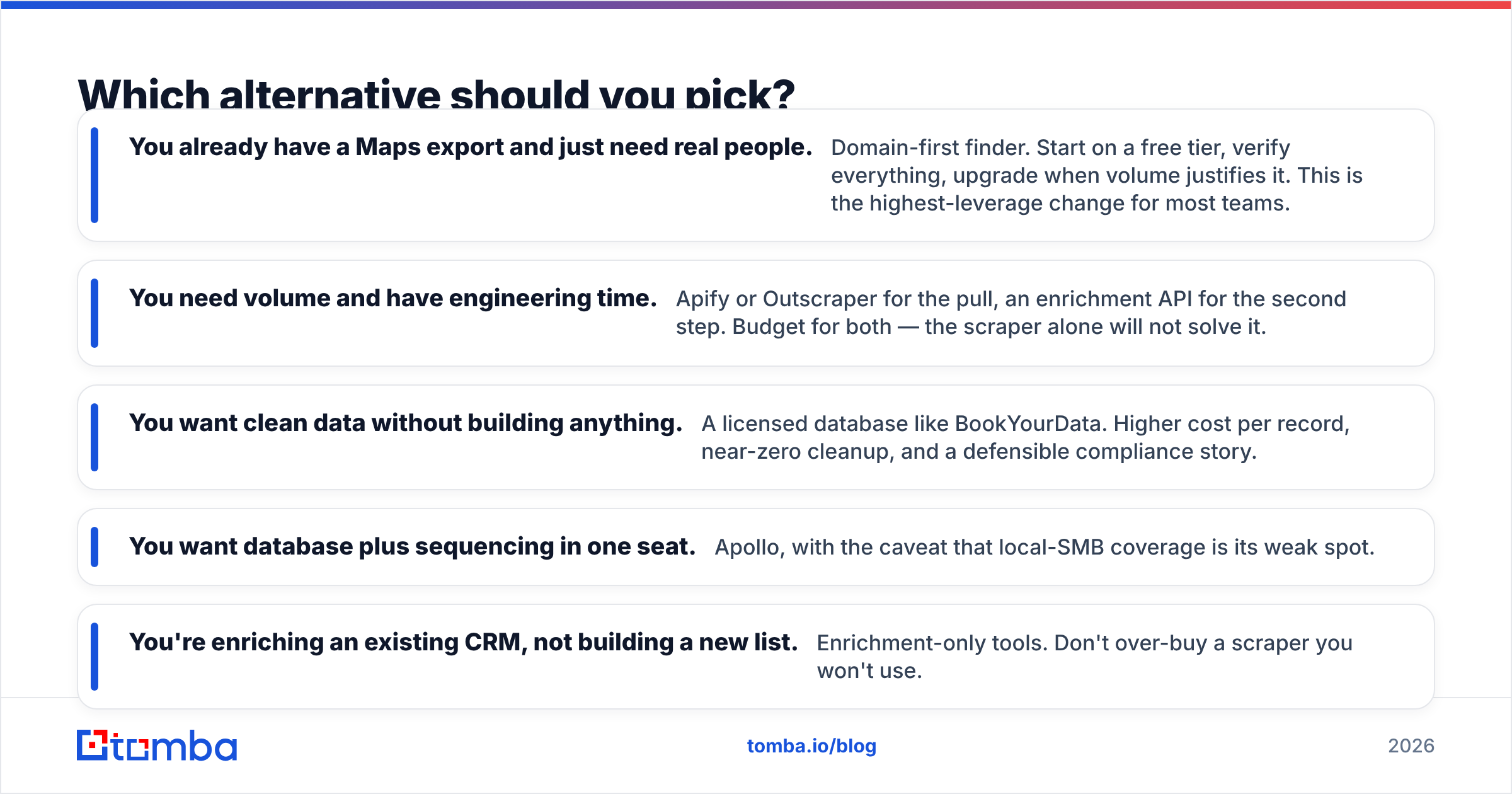
Match the tool to the constraint you actually have.
- You already have a Maps export and just need real people. Domain-first finder. Start on a free tier, verify everything, upgrade when volume justifies it. This is the highest-leverage change for most teams.
- You need volume and have engineering time. Apify or Outscraper for the pull, an enrichment API for the second step. Budget for both — the scraper alone will not solve it.
- You want clean data without building anything. A licensed database like BookYourData. Higher cost per record, near-zero cleanup, and a defensible compliance story.
- You want database plus sequencing in one seat. Apollo, with the caveat that local-SMB coverage is its weak spot.
- You're enriching an existing CRM, not building a new list. Enrichment-only tools. Don't over-buy a scraper you won't use.
One thing all five paths share: verification is not optional. Whichever source you pick, the last step before your sending tool should be a validity check. Skipping it is how good lists produce bad domains.
Where should you start?#
If your goal is turning local-business listings into contacts a human will actually reply to, start with the enrichment step, not the scraping step. You almost certainly already have — or can easily get — a list of company domains. What you don't have is the person.
The Tomba Email Finder does exactly that conversion: give it a domain and a name, or just a domain and a role, and it returns the named work email with a confidence score and the sources behind it. Verification is built in, catch-all domains are flagged rather than silently passed through, and the free tier gives you 25 searches per month to test the workflow on your own Maps export before spending anything. If it works, Tomba pricing starts at $49/mo for Starter with 5x that on Growth.
Run 25 of your scraped domains through it. Compare the output to the info@ column your extractor gave you. That comparison will make the decision for you faster than any review post.
Related guides#
Ready to find emails that actually work?
Join 150,000+ professionals who stopped guessing and started sending. Free credits on signup — no credit card required.
Get the Tomba newsletter
Practical outbound tactics and product updates — once every two weeks.
About the author