Google Workspace Email Deliverability: The 2026 Playbook
Google Workspace does not guarantee the inbox. Here is how Gmail actually judges your domain in 2026 — spam rate thresholds, authentication, warmup pacing, and the sending limits nobody reads.
TL;DR
- Google Workspace gives you a mailbox, not a reputation. Gmail judges your domain, and its published complaint threshold is 0.3% — with 0.1% as the real working ceiling.
- The three-part auth stack (SPF, DKIM, DMARC) is table stakes since Google's February 2024 bulk-sender rules. Passing it earns you nothing; failing it kills you.
- Practical per-mailbox ceilings for cold outreach are 30–50 sends/day, not the 2,000/day Workspace limit. The limit is an abuse cap, not a deliverability target.
- Postmaster Tools is the only free source of truth on your Gmail reputation. If you are not watching spam rate and domain reputation weekly, you are flying blind.
- List hygiene beats every other lever. A 4% bounce rate on a fresh domain does more damage than a bad subject line ever will.
What does Google Workspace actually control in deliverability?#
Google Workspace controls the sending infrastructure. It does not control whether Gmail, Outlook, or Yahoo puts your message in the inbox.
Think of it like a driver's license versus your driving record. Workspace issues the license — authenticated SMTP relays, a mailbox, DKIM key generation, and Google's shared outbound IP pool. Your driving record is separate: how many people mark you as spam, how many addresses bounce, how consistently you send, and whether your domain has history. Google's own filters read the record, not the license.
That distinction matters because most teams buy Workspace, connect it to a sequencer, and assume Google's IP reputation carries them. It does the opposite in one specific way: because you share outbound IPs with millions of legitimate senders, Gmail's filters lean harder on domain-level signals to tell you apart. Your domain is the variable. Google's IPs are the constant.
What Workspace does give you:
- Automatic DKIM signing — but only after you generate and publish the key in the Admin console. It is not on by default for custom domains.
- A defined SPF include (
_spf.google.com) that authorizes Google's relays. - Sending limits — 2,000 external recipients per day per user on paid plans, 500 on trials, and a rolling 24-hour window rather than a midnight reset.
- Postmaster Tools access for any domain you can verify via DNS.
- Nothing about content, list quality, or engagement — those are entirely yours.
Which authentication records does Gmail require in 2026?#
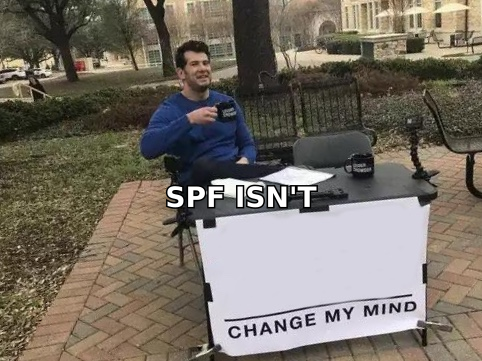
All three: SPF, DKIM, and DMARC. This stopped being optional in February 2024 when Google and Yahoo rolled out their bulk sender requirements, and enforcement has only tightened since.
The threshold that trips people up: Google defines a "bulk sender" as anyone sending 5,000+ messages to Gmail addresses in a single day. But the practical reality in 2026 is that unauthenticated mail from any volume gets throttled or foldered. Treat the bulk-sender rules as the baseline for everyone.
| Record | What it proves | Minimum config | Common failure |
|---|---|---|---|
| SPF | The sending IP is authorized for your domain | v=spf1 include:_spf.google.com ~all |
More than 10 DNS lookups → permerror, silent fail |
| DKIM | The message body was not altered in transit | 2048-bit key generated in Admin console, published as TXT | Key generated but never switched to "Start authentication" |
| DMARC | SPF or DKIM aligns with the visible From domain | v=DMARC1; p=none; rua=mailto:you@domain.com |
Left at p=none forever, no reports ever read |
| One-click unsubscribe | Recipients can leave in one action | List-Unsubscribe + List-Unsubscribe-Post headers |
Missing on sequencer-sent mail; required for bulk senders |
| PTR / reverse DNS | The IP resolves back to a hostname | Handled by Google on shared IPs | Only your problem on dedicated IPs or self-hosted relays |
Start DMARC at p=none and read the aggregate reports for two to four weeks before moving to p=quarantine. Jumping straight to p=reject with an unmapped sending stack is the fastest way to blackhole your own invoices, your CRM notifications, and your marketing platform in one afternoon. Run a quick SPF checker before and after every DNS change — a single stray include: can push you past the lookup limit and invalidate the whole record.
Why does Gmail send your Workspace mail to spam anyway?#
Because authentication answers "who sent this," and Gmail's filter is asking "does anyone want this."
Google's spam-rate threshold is published at 0.3% — three complaints per thousand delivered messages. That number is the ceiling where Google says problems begin. In practice, sustained rates above 0.1% correlate with visible placement decay, and anything above 0.3% for more than a couple of days tends to produce a step-change in foldering that takes weeks to recover from.
The signals Gmail weighs, roughly in order of impact:
- Spam complaints — the strongest negative signal by a wide margin. One complaint costs you what several hundred opens earn.
- Bounce rate and invalid recipients — high unknown-user rates read as list purchasing or scraping. Above 3% on a young domain, expect throttling.
- Engagement asymmetry — sends with near-zero replies and near-zero opens across many recipients look like a blast, not correspondence.
- Volume shape — sudden ramps (0 to 400/day) are the classic compromised-account pattern. Gmail's filters were built to catch that.
- Domain age and history — a domain registered three weeks ago has no positive history to weigh against a negative event.
- Content and link reputation — shortened URLs, tracking domains sharing an IP with spammers, and heavy HTML in what claims to be a personal one-to-one email.
That fifth point is why "just buy more domains" backfires. Every new domain resets your history to zero and starts the ramp over.
[Suggested visual: Google Postmaster Tools dashboard showing the Spam Rate and Domain Reputation charts side by side over a 30-day window]
What are the real Google Workspace sending limits?#
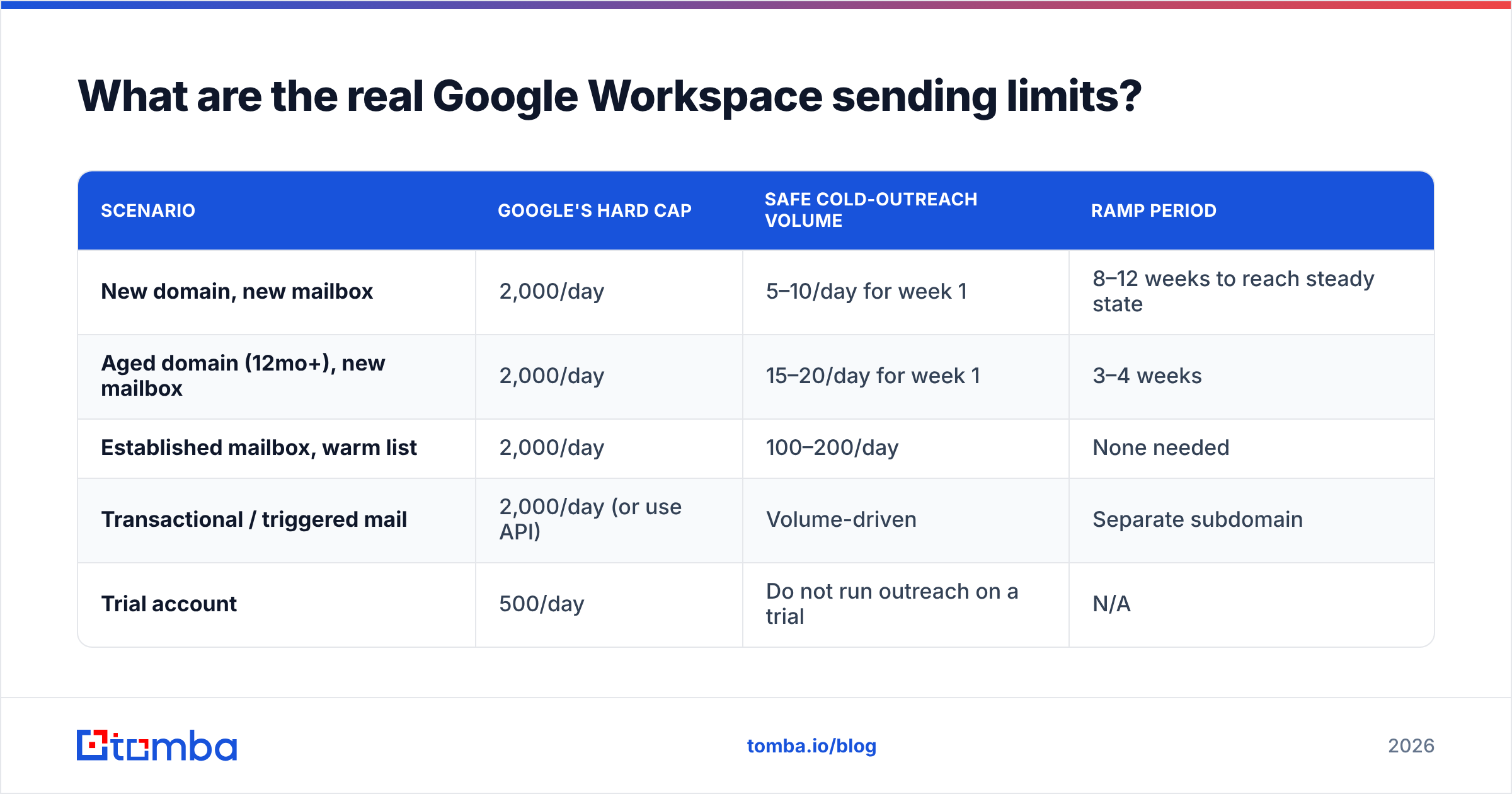
Officially, 2,000 external recipients per user per day on Business Standard and above. Realistically, for cold outreach, plan for 30–50 per mailbox per day.
Those are not contradictory numbers. The 2,000 figure is an abuse cap — the point at which Google suspends the account for policy violation. It says nothing about placement. A mailbox sending 400 cold emails a day will hit inbox placement problems long before it hits a suspension.
| Scenario | Google's hard cap | Safe cold-outreach volume | Ramp period |
|---|---|---|---|
| New domain, new mailbox | 2,000/day | 5–10/day for week 1 | 8–12 weeks to reach steady state |
| Aged domain (12mo+), new mailbox | 2,000/day | 15–20/day for week 1 | 3–4 weeks |
| Established mailbox, warm list | 2,000/day | 100–200/day | None needed |
| Transactional / triggered mail | 2,000/day (or use API) | Volume-driven | Separate subdomain |
| Trial account | 500/day | Do not run outreach on a trial | N/A |
Two structural rules that save more accounts than any warmup tool:
Separate your sending streams by subdomain. Marketing on go.yourdomain.com, cold outreach on a distinct domain entirely, transactional on mail.yourdomain.com, and your actual human email on the root. A burned outreach domain then costs you a domain, not your company's invoice delivery.
Never run outreach from your primary domain. If yourcompany.com gets foldered, every password reset, contract, and customer reply goes with it. Use a lookalike (get-yourcompany.com, yourcompany.co) with its own auth stack and its own reputation.
How do you warm up a Google Workspace domain properly?#
Slowly, with real engagement, over 8–12 weeks on a new domain. There is no shortcut, and the tools that promise one are mostly generating synthetic engagement Gmail has been discounting for years.
A workable ramp:
- Weeks 1–2: 5–10 sends/day per mailbox, entirely to people who will reply. Colleagues, existing customers, your own seed accounts on other providers. Reply to every one from the receiving side.
- Weeks 3–4: 15–25/day. Introduce your first real prospect segment — your highest-fit, most likely-to-engage list. Not your biggest list. Your best one.
- Weeks 5–8: 30–50/day. Watch Postmaster Tools weekly. If domain reputation drops from High to Medium, hold volume flat for two weeks rather than continuing the ramp.
- Weeks 9–12: Push toward your steady state. For most cold-outreach teams that is 40–60/day per mailbox, scaled horizontally by adding mailboxes rather than vertically by raising per-mailbox volume.
Automated warmup networks (mailbox-to-mailbox pods that send and reply to each other) still exist, and they still produce a measurable early bump. But Gmail's filters have gotten good at spotting reciprocal-graph patterns, and several major providers have publicly deprecated the feature. Use them as a supplement to real engagement, never as a replacement. You can model the ramp with a warmup calculator before you commit to a schedule.

How much does list quality affect Workspace deliverability?#
More than everything else combined. This is the least glamorous lever and the highest-leverage one.
Run the math. Send 1,000 emails to a list with a 12% invalid rate and you generate 120 hard bounces. Gmail reads that as a sender who does not know who they are mailing — the exact signature of a scraped or purchased list. Now send the same 1,000 to a list verified down to a sub-2% bounce rate and the negative signal essentially disappears. Same copy, same domain, same sending schedule, radically different outcome.
The workflow that holds up:
- Source deliberately. Pattern-guessed addresses (
firstname.lastname@) bounce at rates north of 25% on many domains. A real email finder that validates against actual mail servers before returning a result cuts that to single digits. - Verify before every send, not once at import. B2B data decays at roughly 22–30% per year. A list verified in January is meaningfully stale by June. Run it through an email verifier at the point of send.
- Handle catch-all domains explicitly. They accept everything at SMTP time and reject silently later. Either segment them into a lower-volume stream or run them through catch-all verification, which uses signals beyond a simple SMTP handshake.
- Deduplicate across sequences. The same person hit by three campaigns from three of your mailboxes complains once, and that complaint counts.
- Suppress aggressively. Anyone who has not opened in four sequences is not a lead; they are a complaint waiting to happen. Cut them.
- Watch bounces as a leading indicator. A bounce spike shows up 24–48 hours before a spam-rate spike. It is your early warning system.
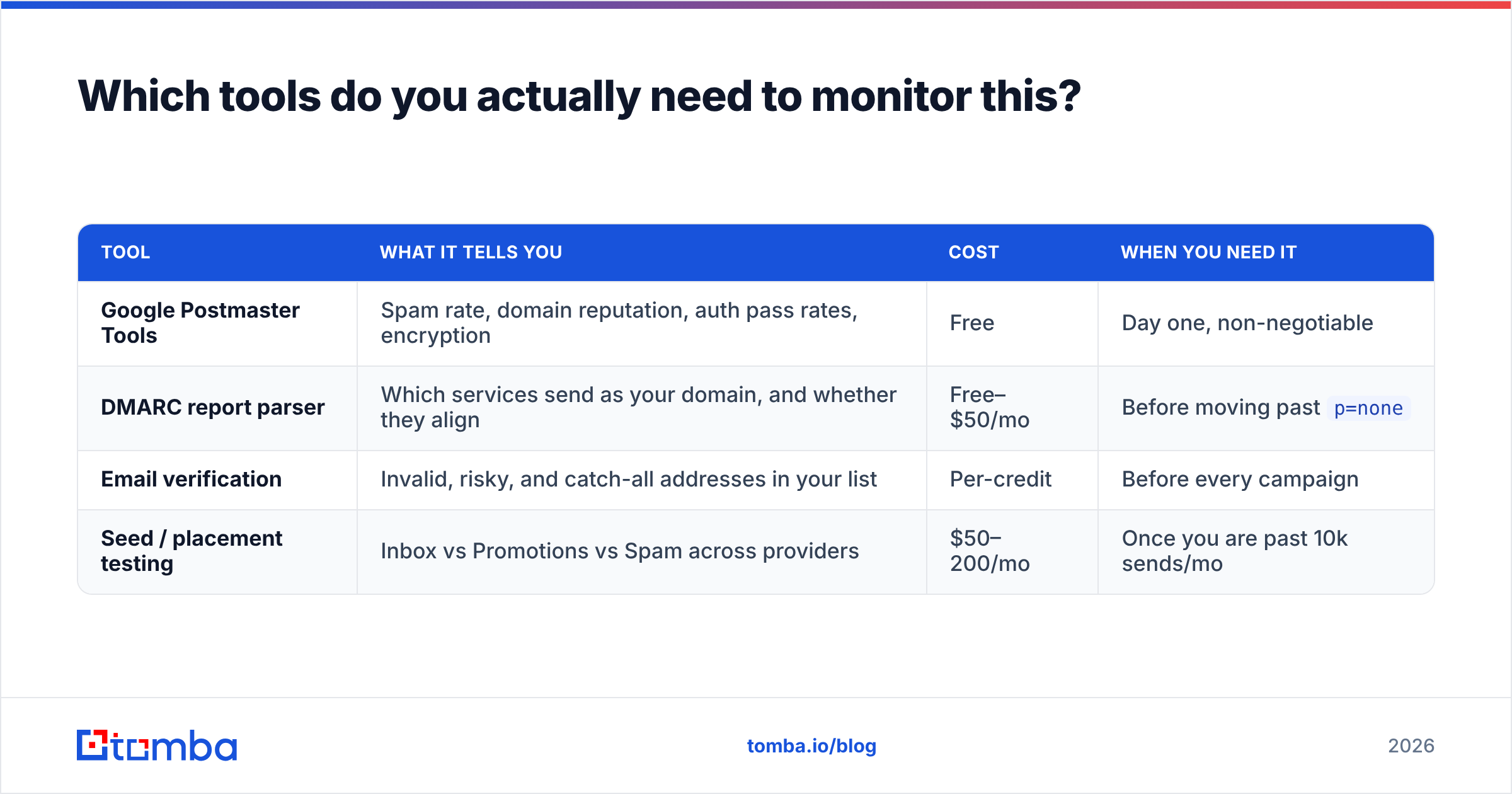
Which tools do you actually need to monitor this?#
Four categories, and only one of them costs money at small scale.
| Tool | What it tells you | Cost | When you need it |
|---|---|---|---|
| Google Postmaster Tools | Spam rate, domain reputation, auth pass rates, encryption | Free | Day one, non-negotiable |
| DMARC report parser | Which services send as your domain, and whether they align | Free–$50/mo | Before moving past p=none |
| Email verification | Invalid, risky, and catch-all addresses in your list | Per-credit | Before every campaign |
| Seed / placement testing | Inbox vs Promotions vs Spam across providers | $50–200/mo | Once you are past 10k sends/mo |
Postmaster Tools has one hard limitation worth knowing: it only reports domain reputation once you exceed roughly a few hundred daily messages to Gmail addresses. Below that, the dashboard shows gaps. If you are running low-volume outreach across many domains, you will be reading bounce and reply rates instead — which is fine, but know that you are reading proxies.
For DMARC, Google's own aggregate report format is XML and unreadable by hand. Any parser will do; the important part is that someone actually opens the report monthly and asks "what is this unfamiliar service sending as us?"
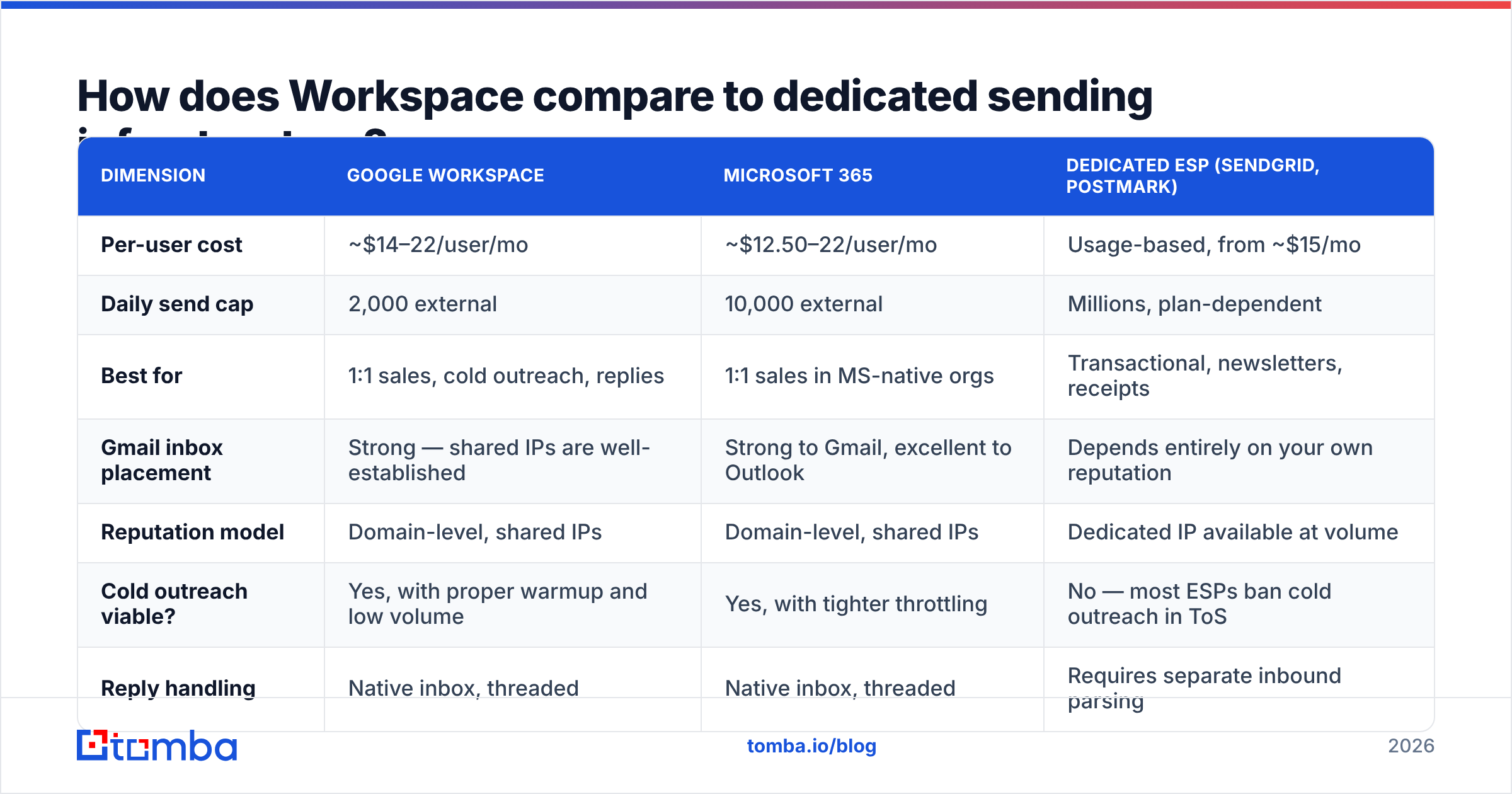
How does Workspace compare to dedicated sending infrastructure?#
Workspace wins for anything that looks like human correspondence. It loses badly for volume.
| Dimension | Google Workspace | Microsoft 365 | Dedicated ESP (SendGrid, Postmark) |
|---|---|---|---|
| Per-user cost | ~$14–22/user/mo | ~$12.50–22/user/mo | Usage-based, from ~$15/mo |
| Daily send cap | 2,000 external | 10,000 external | Millions, plan-dependent |
| Best for | 1:1 sales, cold outreach, replies | 1:1 sales in MS-native orgs | Transactional, newsletters, receipts |
| Gmail inbox placement | Strong — shared IPs are well-established | Strong to Gmail, excellent to Outlook | Depends entirely on your own reputation |
| Reputation model | Domain-level, shared IPs | Domain-level, shared IPs | Dedicated IP available at volume |
| Cold outreach viable? | Yes, with proper warmup and low volume | Yes, with tighter throttling | No — most ESPs ban cold outreach in ToS |
| Reply handling | Native inbox, threaded | Native inbox, threaded | Requires separate inbound parsing |
The recurring mistake is routing cold outreach through a transactional ESP because the sending limits look generous. Almost every transactional provider prohibits unsolicited mail in its terms of service, and enforcement means account termination with your data locked inside. Workspace mailboxes, at human-scale volume, are the correct tool for outreach — you just have to respect that "human scale" means dozens per day, not thousands.
If you are comparing outreach platforms that sit on top of Workspace, G2's email deliverability category is a reasonable starting point for narrowing the field, though treat aggregate scores as directional rather than definitive.
What should you fix first?#
In this order, because each step's value depends on the one before it:
- Verify SPF, DKIM, and DMARC are all passing on a real sent message. Check the raw headers in Gmail ("Show original") — every line should read
PASS. - Enrol every sending domain in Postmaster Tools. Takes ten minutes. Gives you the only objective read on your reputation you will ever get for free.
- Split your sending streams. Outreach off your primary domain, today.
- Verify your list. Get bounce rate under 2% before you touch anything else.
- Cut per-mailbox volume to 40/day and scale horizontally with more mailboxes if you need more sends.
- Fix the offer, then the copy. Nothing in the deliverability stack saves a message nobody wants. Spam complaints are, at root, a relevance problem.
Steps 1 through 5 are engineering. Step 6 is the one that actually moves reply rates — and the one most teams skip while they buy another warmup subscription.
Where does list accuracy fit into all of this?#
At the front. Everything downstream inherits the quality of what you put in.
The uncomfortable arithmetic: a deliverability stack that is perfect on paper — DMARC at p=reject, twelve weeks of warmup, High domain reputation — still degrades within days if you feed it a list where one address in eight does not exist. Gmail does not distinguish between "malicious spammer" and "well-intentioned team with a stale CSV." It sees the same bounce pattern and applies the same penalty.
Which means the highest-ROI deliverability work usually happens before a single email is queued: sourcing addresses that are verified at the point of discovery, re-checking them before each send, and being honest about catch-all domains rather than hoping they resolve. That is unglamorous, and it is where the wins are.
Start at the source. Tomba's Email Finder validates each address against the receiving mail server before it hands it back, so your Workspace mailboxes send to addresses that actually exist — the single biggest lever on Gmail spam rate. The free tier includes 25 searches a month; paid Tomba plans start at $49/mo for Starter and $99/mo for Growth, with bulk verification and the API included. Protect the domain reputation you spent twelve weeks building.
Related guides#
Ready to find emails that actually work?
Join 150,000+ professionals who stopped guessing and started sending. Free credits on signup — no credit card required.
Get the Tomba newsletter
Practical outbound tactics and product updates — once every two weeks.
About the author