9 Best Gumbamail Alternatives for 2026 (Free and Paid)
Gumbamail is a solid Google Workspace-friendly email marketing tool, but it is not the right fit for every sender. Here are nine alternatives compared on price, free-plan limits, automation depth, and deliverability control.

TL;DR
- Gumbamail is a solid, Google Workspace-friendly email tool. It has a Gmail add-on, a drag-and-drop editor, and SMS. Most people who shop for Gumbamail alternatives want deeper automation, a better API, or clearer pricing at scale.
- Send newsletters to a list you own? MailerLite, Brevo, and Sender give you more free room and more automation for the same money.
- Sell online? Omnisend and Klaviyo are the honest upgrades. Gumbamail was never built for product-feed personalisation.
- If the real problem is list quality, no new tool will fix your bounce rate. Verify and clean your contacts first.
- Every price in this Gumbamail alternatives guide is list pricing at the time of writing. Vendors change tiers often. Check the vendor's own pricing page first.
What is Gumbamail, and why do people look for alternatives?#
Gumbamail is a Madrid-based email marketing platform. It is known for two things. First, a Google Workspace add-on that lets you send campaigns from inside Gmail. Second, pricing based on how many subscribers you keep, not how many emails you send. You also get a drag-and-drop editor, templates, simple autoresponders, SMS, and landing pages. For a small business with a monthly newsletter, that is plenty.
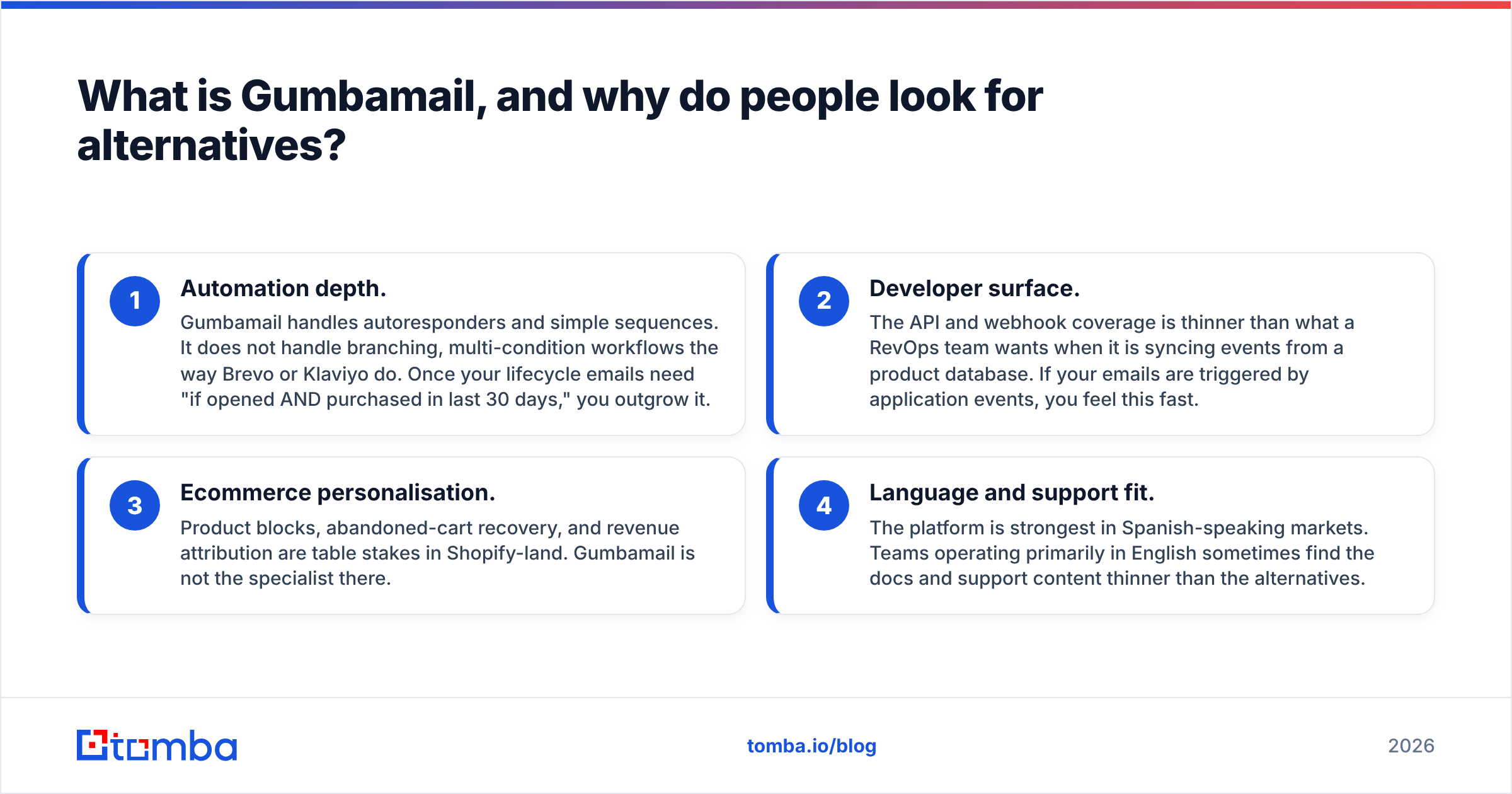
Searches for Gumbamail alternatives cluster around four complaints. Each one points to a different fix.
- Automation depth. Gumbamail handles autoresponders and simple sequences. It does not branch the way Brevo or Klaviyo do. Once you need "if opened AND bought in the last 30 days," you have outgrown it.
- Developer surface. The API and webhooks are thinner than a RevOps team wants. If your emails are fired by product events, you notice fast.
- Ecommerce features. Product blocks, cart recovery, and revenue reporting are table stakes in Shopify-land. Gumbamail is not the specialist there.
- Language and support fit. The platform is strongest in Spanish-speaking markets. English-first teams often find the docs thin.
None of this makes Gumbamail a bad tool. It makes it a specific tool. That is the real reason people shop for Gumbamail alternatives: fit, not quality. So ask what fits the way you actually send.

How did we compare these Gumbamail alternatives?#
We ranked the Gumbamail alternatives below on five things. The weighting favours B2B and small teams, not enterprise marketing groups.
- Real free-tier ceiling — not the "free forever" copy, but how many subscribers and sends you get before the wall.
- Entry price at 2,500 contacts — the most common upgrade point, and where pricing models split apart.
- Automation depth — branching, conditions, and event triggers. Not just a welcome email.
- Deliverability control — dedicated IPs, custom SPF/DKIM/DMARC, suppression lists, and list hygiene rules.
- API and integrations — REST coverage, webhooks, CRM connectors, and whether you can script bulk jobs.
One note on deliverability. The platform matters less than people think. Your sender reputation comes from your setup, your list, and how people engage. A better tool gives you better levers. It cannot clean a bad list for you.
What are the best Gumbamail alternatives in 2026?#
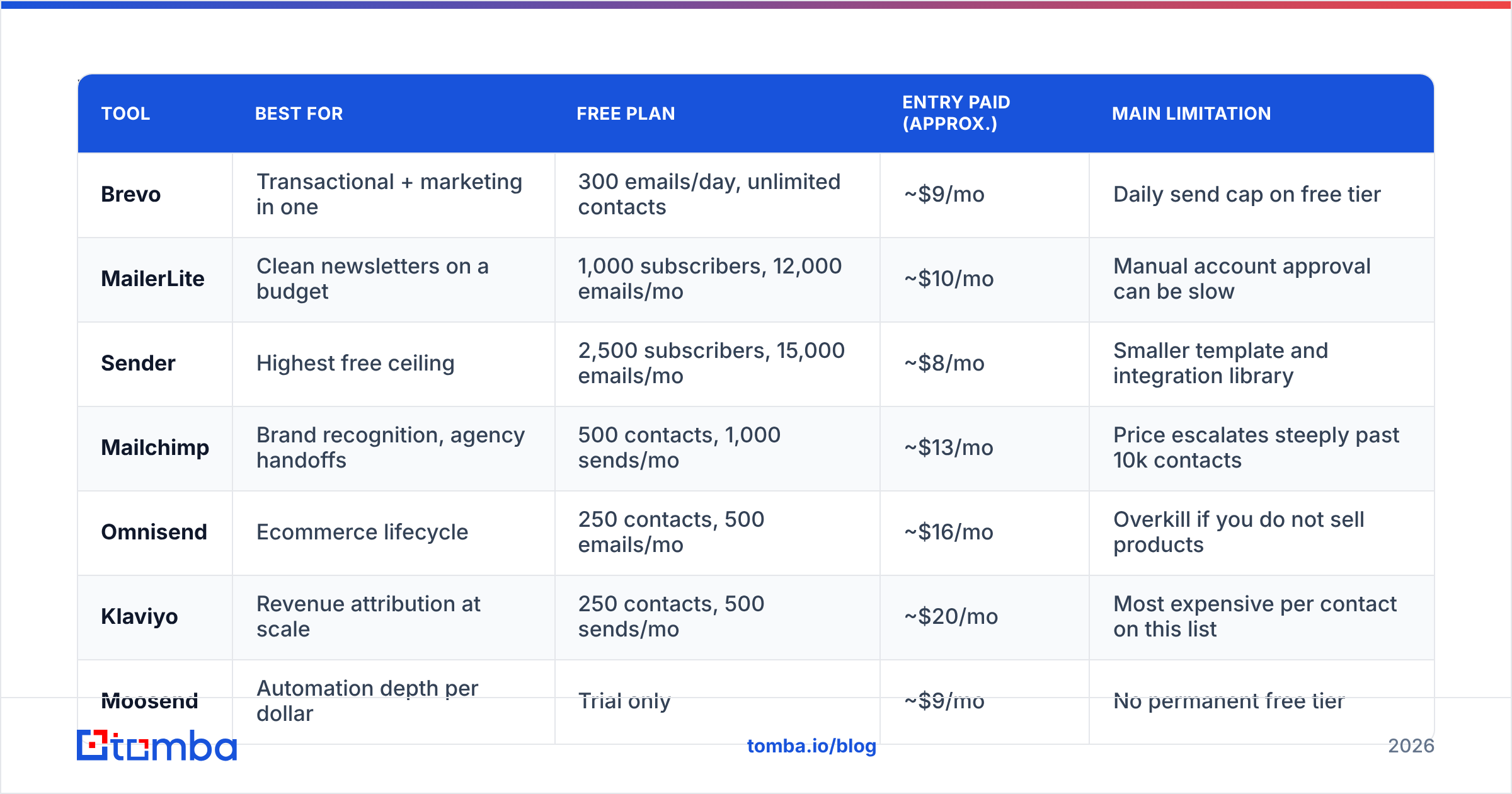
| Tool | Best for | Free plan | Entry paid (approx.) | Main limitation |
|---|---|---|---|---|
| Brevo | Transactional + marketing in one | 300 emails/day, unlimited contacts | ~$9/mo | Daily send cap on free tier |
| MailerLite | Clean newsletters on a budget | 1,000 subscribers, 12,000 emails/mo | ~$10/mo | Manual account approval can be slow |
| Sender | Highest free ceiling | 2,500 subscribers, 15,000 emails/mo | ~$8/mo | Smaller template and integration library |
| Mailchimp | Brand recognition, agency handoffs | 500 contacts, 1,000 sends/mo | ~$13/mo | Price escalates steeply past 10k contacts |
| Omnisend | Ecommerce lifecycle | 250 contacts, 500 emails/mo | ~$16/mo | Overkill if you do not sell products |
| Klaviyo | Revenue attribution at scale | 250 contacts, 500 sends/mo | ~$20/mo | Most expensive per contact on this list |
| Moosend | Automation depth per dollar | Trial only | ~$9/mo | No permanent free tier |
| Constant Contact | Events, local business, phone support | Trial only | ~$12/mo | Weakest automation builder here |
| Acumbamail | Direct Spanish-market swap | 2,000 emails/mo | ~$20/mo | Similar ceiling to Gumbamail itself |
Two things stand out across these Gumbamail alternatives. First, the pricing models do not line up. Brevo bills on sends and lets contacts run free. Mailchimp and Klaviyo bill on stored contacts. A 40,000-contact list you email twice a year is cheap on Brevo and dear on Klaviyo. A 2,000-contact list you email daily flips that. Second, free tiers are marketing. Sender's 2,500-subscriber ceiling really is the most generous. You pay for it in a smaller app catalogue.
Which one is the closest like-for-like swap?#
Brevo, for most teams. It runs marketing and transactional email in one account. The automation builder branches properly. The API docs are good. Contacts are unlimited, so a fast-growing list does not spike your bill. If you chose Gumbamail for simple pricing, Brevo keeps that and raises the ceiling.
MailerLite, if the newsletter is the product. The editor is the best here for text-first writing. Delivery is steady. Prices stay gentle up to about 25,000 subscribers. The catch is a manual review at signup, which sometimes turns list-heavy accounts away.
Sender, if budget is the hard limit. Fifteen thousand free emails a month is far above the rest. The automation builder also punches above its price.
Which one should ecommerce teams pick?#
Omnisend or Klaviyo. The choice comes down to catalogue size and reporting needs. Omnisend is quicker to set up and cheaper below about 5,000 contacts. Klaviyo wins when you need revenue per campaign, predictive segments, and product events treated as first-class data. Check G2 before you sign. Both vendors ship changes every quarter, so recent reviews beat star ratings.
Is Mailchimp still worth a look?#
Yes, with one caveat. Its edge is the ecosystem. Every agency knows it and every app connects to it, so handoffs are easy. Its problem is price. Past 10,000 contacts, the cost grows faster than the value. On some plans, contacts who unsubscribed still counted toward your bill. If you are leaving Gumbamail to save money, Mailchimp is the wrong way to go.
Does switching platforms actually fix your deliverability?#
Mostly no. This is the costliest wrong diagnosis in email marketing. Most Gumbamail alternatives will not fix it either, because the cause sits outside the tool.
If opens fell and bounces crept past 3%, the cause is usually one of four things.
- Stale data. B2B contact data goes off at roughly 22-30% a year, from job moves alone. A list built 18 months ago is not the list you think you have.
- Broken authentication. Missing or wrong SPF, DKIM, or DMARC records. Google and Yahoo made this a must. Run an SPF checker before you blame the tool.
- Engagement collapse. Mailbox providers weigh recent activity heavily. Mailing people who have not opened anything in a year drags down your whole domain.
- Content triggers. Spammy phrasing, image-only templates, link shorteners. A spam checker run takes two minutes.
Move those problems to Brevo and you get the same bounce rate on a nicer screen. Clean the list first. Then migrate.

Where should the contacts come from in the first place?#
Here is the blunt part. Email platforms are senders, not sources. Gumbamail, Brevo, MailerLite, and the rest all assume you already have a list. None of them build one.
For B2B, you have three fair ways to source contacts.
- Opt-in you own — forms, gated content, event signups. Best quality, slowest to grow, and the only clean route for bulk newsletters under GDPR-style consent rules.
- Bought or licensed data — vendors like BookYourData sell checked B2B records with bounce guarantees. A fair choice when you need scale in one industry or country fast.
- Targeted search and enrichment — pick the accounts and roles you want, then find and verify each contact. Slower per record than buying a file, far more precise, and the reply rate shows it.
Route three is where an email finder fits. Give it a domain and a name. It returns the work address, a confidence score, and the sources behind the pattern. Run a domain search on a target account and you get the email format for the whole company, which beats one lookup.
Whatever the source, run it through an email verifier before the first send. Syntax, MX records, SMTP handshake, catch-all detection, role addresses. A 2% bounce rate is survivable. An 8% bounce rate gets your domain throttled, and no move to a new tool undoes that.
How do you migrate off Gumbamail without breaking things?#
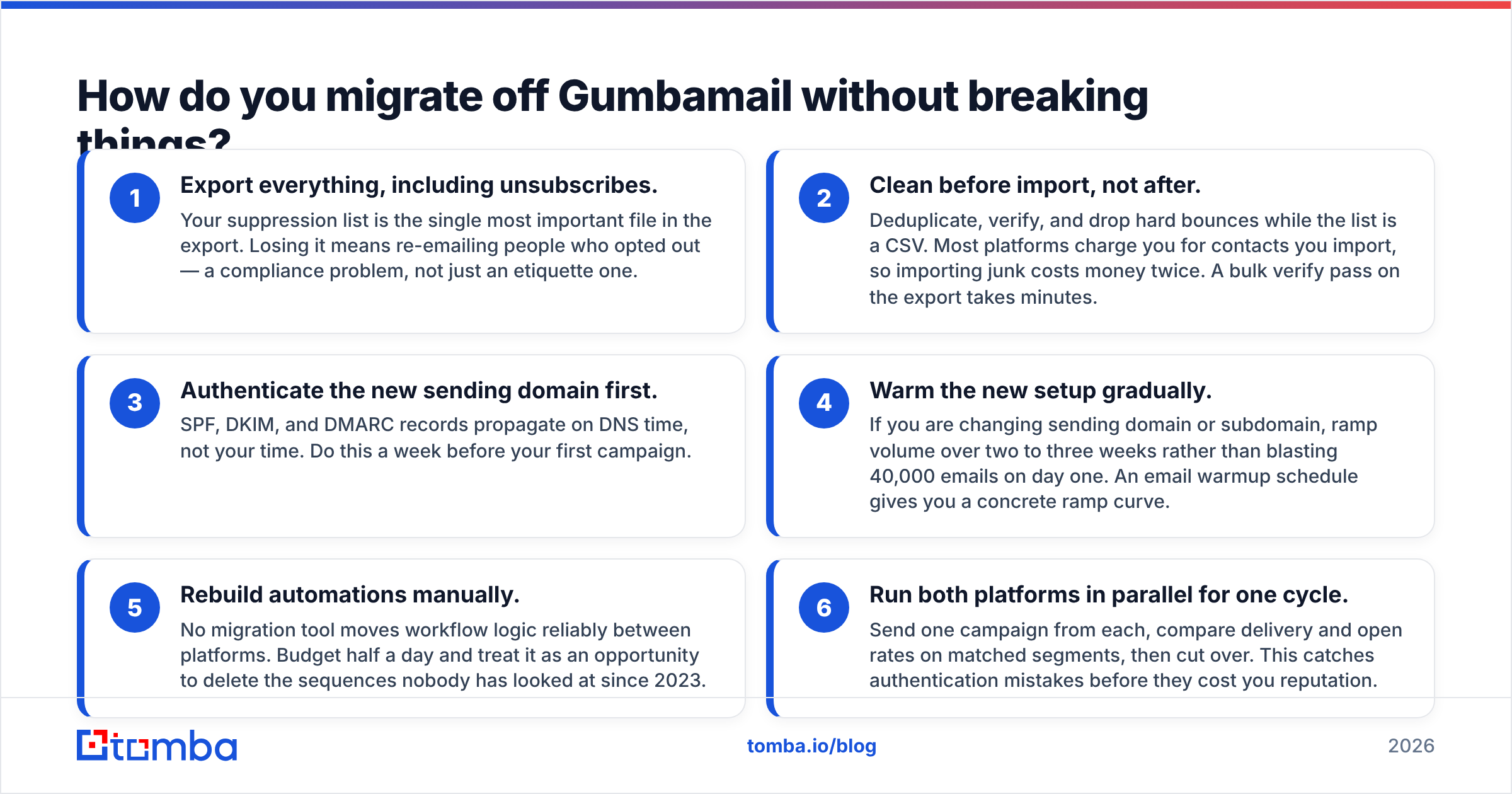
Split the move into two halves. Do these three steps before you send anything.
- Export everything, including unsubscribes. Your suppression list is the most important file in the export. Lose it and you email people who opted out. That is a legal problem, not a manners problem.
- Clean before you import, not after. Dedupe, verify, and drop hard bounces while the list is still a CSV. Most tools charge by contact, so junk costs you twice. A bulk verify pass takes minutes.
- Authenticate the new domain first. SPF, DKIM, and DMARC spread on DNS time, not yours. Do it a week before your first campaign.
The last three steps cover the switch itself.
- Warm up slowly. Changing domain or subdomain? Ramp volume over two or three weeks. Do not blast 40,000 emails on day one. An email warmup schedule gives you a ramp curve.
- Rebuild automations by hand. No tool moves workflow logic well between platforms. Budget half a day. Use it to delete the sequences nobody has read since 2023.
- Run both tools for one cycle. Send one campaign from each. Compare delivery and opens on matched segments, then cut over. This catches setup mistakes before they cost you.
Which of these Gumbamail alternatives is right for you?#
Here are the decision rules.
- Newsletter-first, small list, tight budget → Sender or MailerLite.
- Marketing plus transactional email in one account → Brevo.
- Ecommerce with a real catalogue → Omnisend under 5,000 contacts, Klaviyo above it.
- Agency or client handoffs → Mailchimp, price curve and all.
- Spanish-market focus, similar product family → Acumbamail.
- Automation depth above all else → Moosend, if you can live without a free tier.
- Your real problem is bounce rate → fix the list before you touch the tool.
One caveat on all of it. Prices in this category change several times a year, and free plans get reworked with little notice. Use the table to build a shortlist. Then check each vendor's own pricing page before you sign an annual deal.
Build a list worth sending to#
Switching email tools takes an afternoon. Building contact data that lands in inboxes is the part that decides whether the switch paid off. The best Gumbamail alternatives all assume one thing: you bring a good list.
Tomba Email Finder finds verified work email addresses by domain, name, or company. Every result carries a confidence score and its sources, so you can see why a pattern was picked. The free tier gives you 25 searches a month, enough to test coverage on your own target accounts. Paid plans start at $49/mo for Starter, $99/mo for Growth, and $249/mo for Pro. Full Tomba pricing is published up front. Find the contacts, verify them, then let your new tool do the one job it is good at.
Related guides#
Ready to find emails that actually work?
Join 150,000+ professionals who stopped guessing and started sending. Free credits on signup — no credit card required.
Get the Tomba newsletter
Practical outbound tactics and product updates — once every two weeks.
About the author