Hard Bounce Rate in Email Marketing: The 2026 Fix Guide
Hard bounces cost you more than a failed send — they quietly wreck sender reputation and cap inbox placement. Here's what counts as a hard bounce, the real benchmarks, and how to get under 2%.
TL;DR
- A hard bounce is a permanent delivery failure — the mailbox does not exist, the domain is dead, or the server refuses you outright. It never resolves on retry.
- Keep your hard bounce rate under 2%. Google and Microsoft start throttling well before that, and most ESPs suspend accounts between 2% and 5%.
- Hard bounces are a symptom. The cause is almost always list hygiene: scraped contacts, stale CRM records, typo'd form fills, and departed employees.
- Verification before send is the single highest-leverage fix. A pre-send verification pass typically drops hard bounces from 6–10% down to under 1%.
- Soft bounces need a retry policy. Hard bounces need immediate, permanent suppression — treating them the same is how domains get blacklisted.
What is a hard bounce rate in email marketing?#
Your hard bounce rate is the percentage of sent emails that were permanently rejected by the receiving mail server. The formula is unglamorous:
Hard bounce rate = (hard bounces ÷ emails sent) × 100Send 10,000 emails, get 340 permanent rejections, and you have a 3.4% hard bounce rate — high enough that Gmail has already started deprioritizing your domain.
The word doing the heavy lifting here is permanent. When a receiving server issues a 5xx SMTP response, it is telling you: do not try again, this address will never work. Compare that to a 4xx response — a soft bounce — which means "not right now, try later." The mailbox might be full, the server might be under load, or greylisting might be in play.
Think of it like mail returned by the post office. A soft bounce is "recipient not home, we'll redeliver tomorrow." A hard bounce is "no such street address exists." Keep sending to that address and the postal service stops trusting your mail entirely.
The five things that actually cause hard bounces:
- Nonexistent mailboxes — the local part never existed, or was deleted. This is the majority of hard bounces on B2B lists, driven by employee turnover.
- Dead or misconfigured domains — the company folded, rebranded, or the MX records are gone. Common on lists older than 18 months.
- Typos at capture —
gmial.com,yahoo.con, a missing character in the local part. Form fields without inline validation generate a steady 1–3% of these. - Blocked senders — the receiving server rejects your IP or domain outright, often due to a blacklist listing or a failed SPF/DKIM/DMARC check.
- Role and disabled accounts — some servers hard-reject
noreply@,postmaster@, or accounts that were disabled rather than deleted.
That fifth category is where people get caught. A rejection that looks like a spam-filter issue is often an authentication issue. Run a SPF checker against your sending domain before you blame the list.
What is a good hard bounce rate benchmark in 2026?#
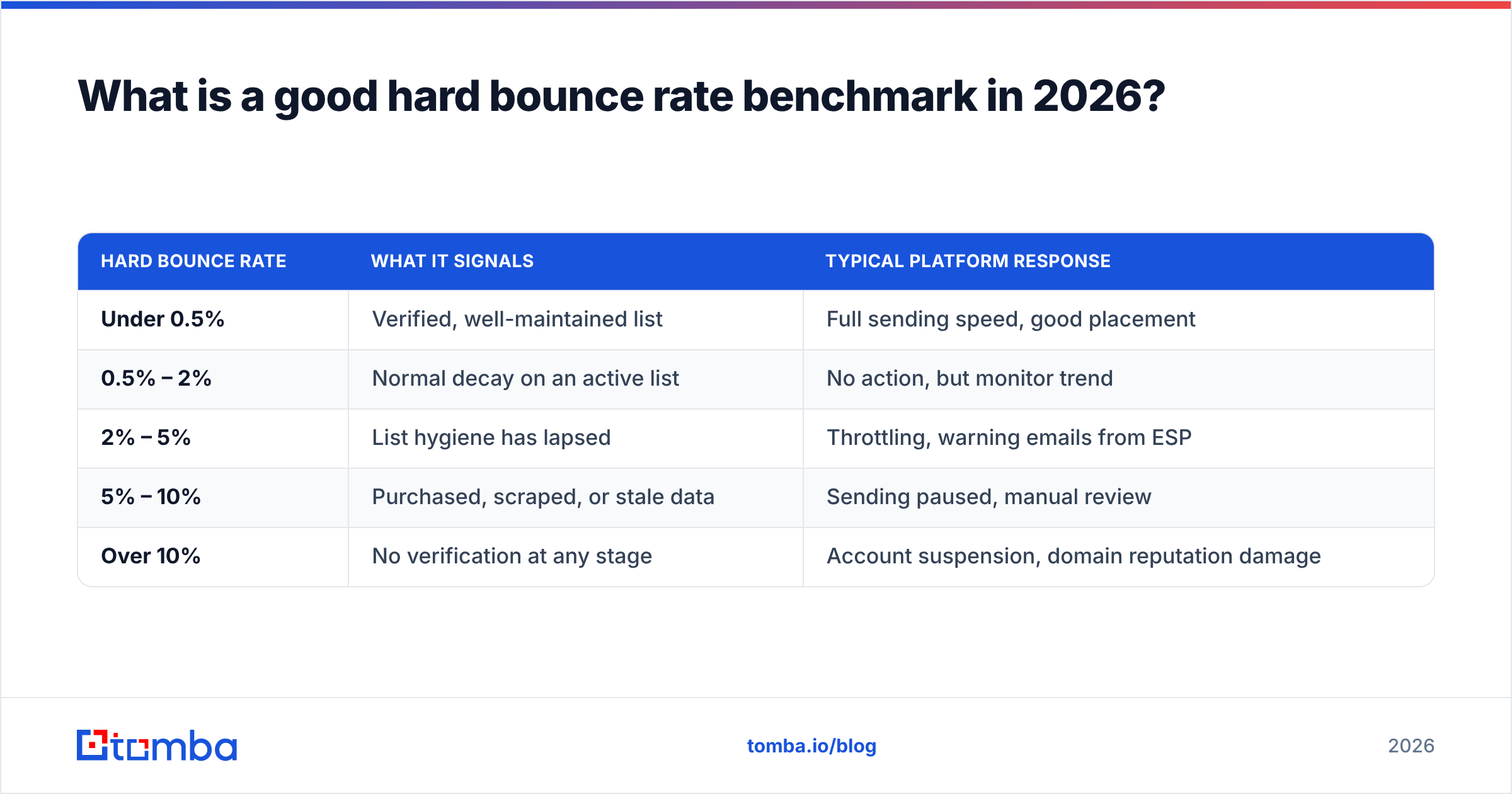
Under 2% total bounce rate, with hard bounces specifically under 1%. That is the working target for anyone sending B2B email at volume in 2026.
The ceiling moved down over the last few years. When Google and Yahoo tightened bulk sender requirements, they made spam complaint rates and delivery hygiene enforceable rather than advisory. Microsoft followed with stricter throttling on Outlook and Office 365 domains in 2025. The practical result: the bounce rate that got you a warning in 2022 gets you throttled in 2026.
| Hard bounce rate | What it signals | Typical platform response |
|---|---|---|
| Under 0.5% | Verified, well-maintained list | Full sending speed, good placement |
| 0.5% – 2% | Normal decay on an active list | No action, but monitor trend |
| 2% – 5% | List hygiene has lapsed | Throttling, warning emails from ESP |
| 5% – 10% | Purchased, scraped, or stale data | Sending paused, manual review |
| Over 10% | No verification at any stage | Account suspension, domain reputation damage |
Two nuances worth internalizing.
First, rate matters less than trend. A one-off 3% on a re-engagement campaign to a dormant segment is explainable. A steady climb from 0.8% to 2.4% across four campaigns means your acquisition source has degraded and nobody noticed.
First-party B2B lists decay at roughly 22–30% per year, driven almost entirely by job changes. That is not a failure of your process — it is the natural half-life of professional contact data. Your process only fails when you don't re-verify against it.
Second, the denominator can lie. If your ESP retries soft bounces and eventually reclassifies them as hard, your reported rate lags reality by days. Look at bounce classification in the raw SMTP logs when the number looks suspiciously clean.
Why does a high hard bounce rate destroy deliverability?#
Because mailbox providers read bounce rate as a proxy for consent. A sender who knows their recipients does not repeatedly mail addresses that do not exist.
Here is the chain reaction. High hard bounces damage sender reputation. Damaged reputation means more of your mail lands in spam, which lowers open rates, which lowers engagement signals, which further damages reputation. Within two or three campaigns, you are in a spiral that takes weeks of careful warming to exit.
The specific mechanics:
- Spam trap exposure. Recycled spam traps are abandoned real addresses that providers reactivate as bait. They usually hard-bounce for months before going live as a trap. A high hard bounce rate strongly correlates with trap hits, and one pristine trap hit can blacklist a sending domain outright.
- Feedback loop escalation. Providers like Microsoft weigh invalid-recipient attempts heavily in their filtering decisions. Repeat offenses move you from "throttled" to "blocked."
- Shared IP contamination. On a shared sending pool, your bounce problem becomes everyone's placement problem — which is exactly why ESPs suspend accounts fast rather than negotiate.
- Blacklist listings. Spamhaus and similar operators watch invalid-recipient patterns. Run a blacklist checker monthly whether or not you think you have a problem.
For a fuller picture of how these signals interact, the email deliverability primer covers authentication, engagement, and content scoring together.
How do hard bounces differ from soft bounces?#
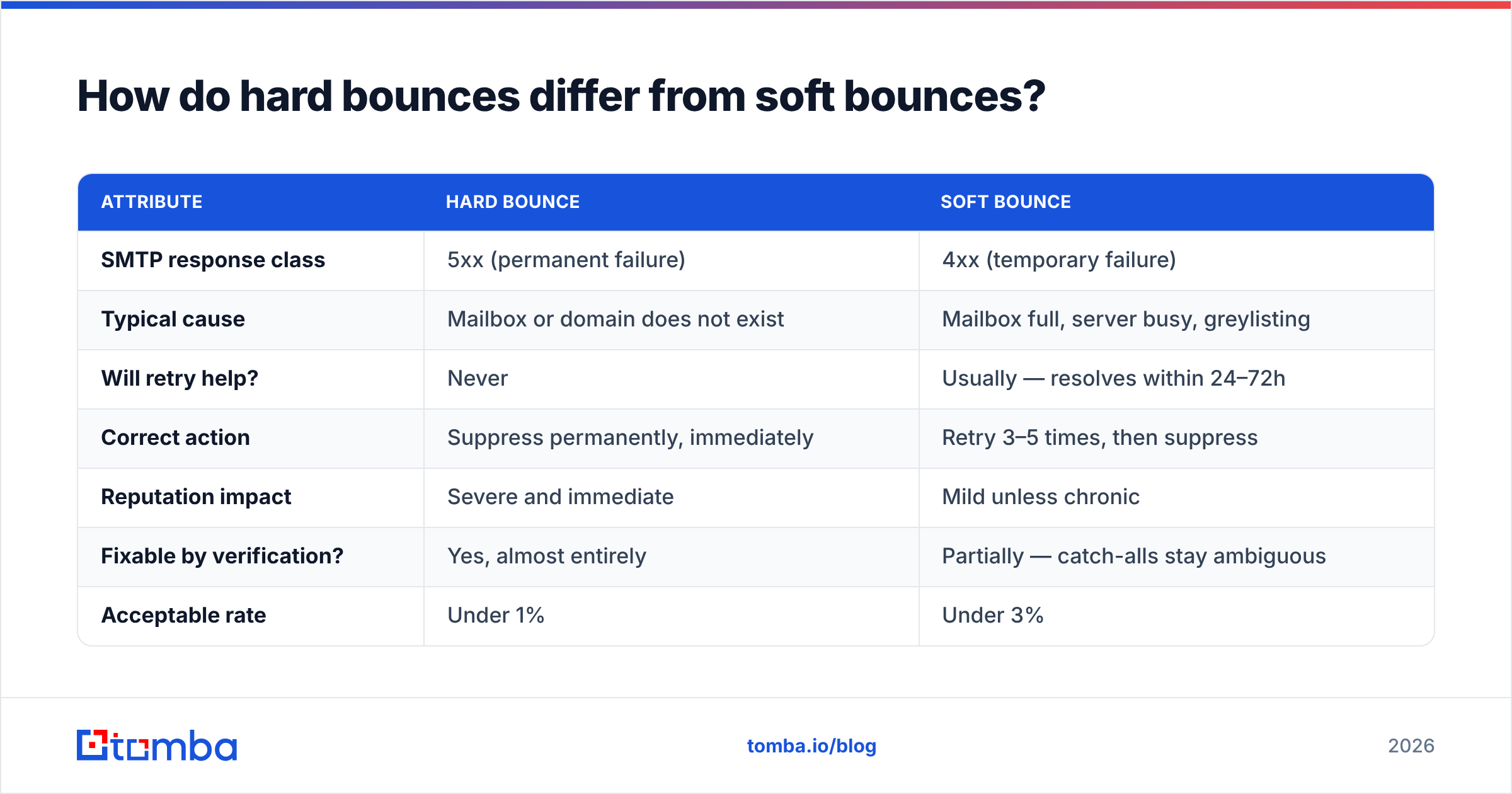
Different failure classes require different handling. Conflating them is one of the most common — and most expensive — mistakes in email operations.
| Attribute | Hard bounce | Soft bounce |
|---|---|---|
| SMTP response class | 5xx (permanent failure) | 4xx (temporary failure) |
| Typical cause | Mailbox or domain does not exist | Mailbox full, server busy, greylisting |
| Will retry help? | Never | Usually — resolves within 24–72h |
| Correct action | Suppress permanently, immediately | Retry 3–5 times, then suppress |
| Reputation impact | Severe and immediate | Mild unless chronic |
| Fixable by verification? | Yes, almost entirely | Partially — catch-alls stay ambiguous |
| Acceptable rate | Under 1% | Under 3% |
The operational rule: hard bounce equals instant, permanent suppression. No second attempts, no "maybe it was a glitch," no re-import three months later from a stale CSV. Most ESPs suppress automatically, but if you push contacts through an API or sync from a CRM, verify that suppression actually propagates back to the source system. Plenty of teams suppress in the ESP and then re-upload the same dead addresses next quarter from Salesforce.
Catch-all domains sit awkwardly between the two. A catch-all server accepts mail for any address at the domain, so SMTP verification returns "accept" whether or not the mailbox exists. You find out it was invalid only after the send — and sometimes as a hard bounce days later. That's why a dedicated catch-all verifier matters for B2B lists, where catch-all configurations are far more common than in consumer email.
How do you reduce your hard bounce rate?#
Verify before you send, and fix the intake process that fed you bad addresses in the first place. Everything else is downstream of those two moves.
1. Verify the entire list before every major send. Not once at import — before each campaign. A list verified in January is meaningfully stale by June. An email verifier runs syntax, domain, MX, and mailbox checks and returns a deliverability verdict per address. Suppress anything marked invalid; treat "risky" and "catch-all" as a separate lower-priority segment rather than a hard delete.
2. Stop generating invalid addresses at capture. Add real-time validation to every form. Use a double opt-in for newsletter signups. If you build addresses from patterns — first.last@, f.last@ — do not send to guesses. Confirm them. A company email pattern lookup narrows the format, but a pattern is a hypothesis, not a verified contact.
3. Source contacts from verified data rather than scrapes. Scraped and purchased lists are the single largest driver of catastrophic bounce rates. When you source through an email finder that verifies at lookup time, invalid addresses never enter your CRM. Prevention beats cleanup by an order of magnitude in cost and reputation risk.
4. Segment by engagement and prune the dead weight. Contacts with zero opens across 12 months are bounce risk and spam-trap risk at once. Run one re-engagement campaign, then remove non-responders. A smaller list with clean engagement outperforms a large decayed one on every metric that matters.
5. Authenticate properly and warm up new domains. SPF, DKIM, and DMARC are table stakes; without them, some servers hard-reject regardless of list quality. New sending domains need a gradual volume ramp — an email warmup schedule prevents the volume spike that reads as spam behavior to filters.
6. Monitor and act weekly. Track hard bounce rate per campaign, per source, and per segment. When one lead source shows 4% while everything else sits at 0.7%, you've found the problem in a single glance. That kind of source-level attribution is worth more than any list-wide average.

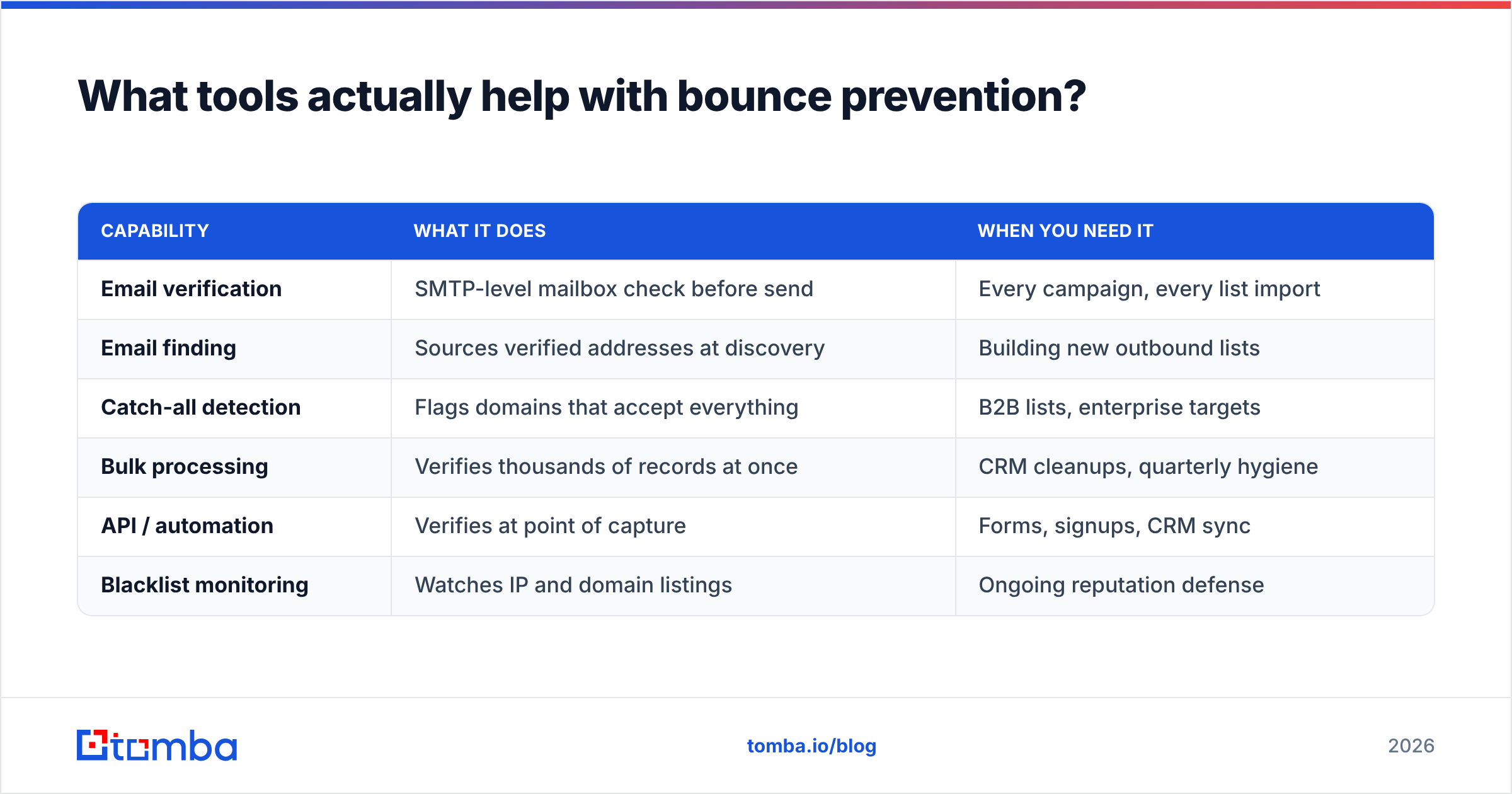
What tools actually help with bounce prevention?#
Split the job into two categories — finding valid addresses, and validating addresses you already have. Most teams need both, and the boundary blurs.
| Capability | What it does | When you need it |
|---|---|---|
| Email verification | SMTP-level mailbox check before send | Every campaign, every list import |
| Email finding | Sources verified addresses at discovery | Building new outbound lists |
| Catch-all detection | Flags domains that accept everything | B2B lists, enterprise targets |
| Bulk processing | Verifies thousands of records at once | CRM cleanups, quarterly hygiene |
| API / automation | Verifies at point of capture | Forms, signups, CRM sync |
| Blacklist monitoring | Watches IP and domain listings | Ongoing reputation defense |
On the verification side, ZeroBounce and NeverBounce are the established names, and both do the core job well. Tomba bundles verification with discovery, which matters if you'd rather not stitch two vendors together — its free tier covers 25 searches a month, Starter runs $49/mo, Growth $99/mo, and Pro $249/mo. Full Tomba pricing is public, which is more than can be said for parts of this category.
If your problem is that you need clean B2B contacts rather than cleanup of existing ones, prebuilt verified databases are a legitimate alternative path. BookYourData sells pay-as-you-go B2B lists with a stated accuracy guarantee, which suits teams that want data without running discovery workflows themselves. Different shape of solution, same underlying goal: do not send to addresses that don't exist.
For the operational side, G2's email deliverability category is a reasonable place to compare monitoring tools on real reviews, and HubSpot's deliverability documentation explains how bounce handling works inside a marketing suite if that's where you send from.
For bulk work, a bulk verify run before a quarterly CRM cleanup is the highest-ROI hour in email operations. Upload the list, get back a verdict per record, suppress the invalids, and watch the next campaign's bounce rate drop by whatever your decay rate had quietly accumulated.
What should you do this week?#
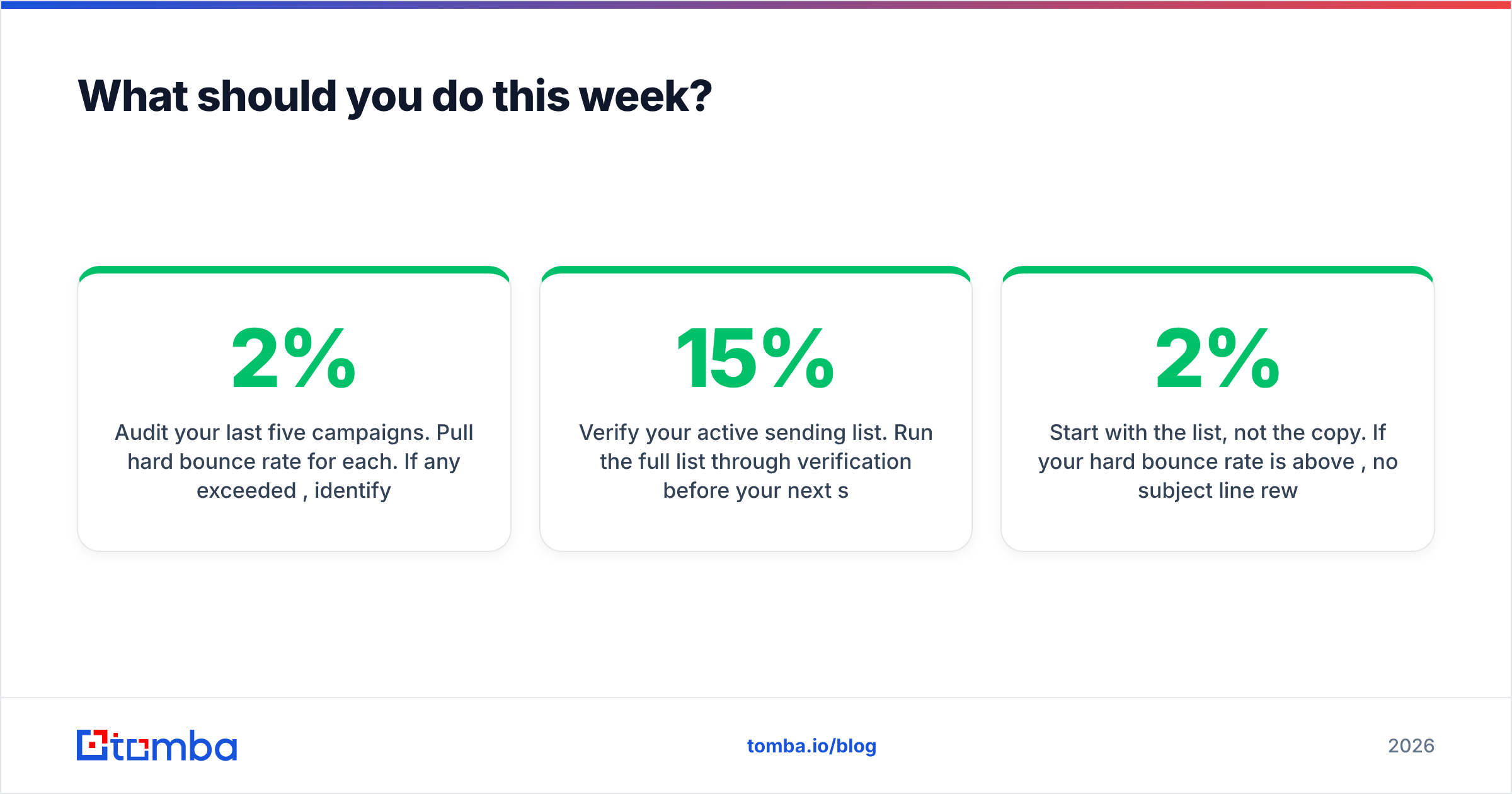
Three concrete steps, in order:
Audit your last five campaigns. Pull hard bounce rate for each. If any exceeded 2%, identify the lead source behind those specific contacts. The problem is rarely evenly distributed — it usually traces to one import, one form, or one purchased file.
Verify your active sending list. Run the full list through verification before your next send. Expect to remove 5–15% if you haven't done this in six months. That removal feels like losing reach; it is actually recovering inbox placement for everyone who remains.
Fix the intake. Add validation to forms, enable double opt-in where it fits, and route new CRM contacts through a verification API before they become sendable. Most teams clean once, feel good, and let the same broken intake refill the list within two quarters.
Bounce rate is one of the few deliverability metrics you have near-total control over. Spam complaints depend on how recipients feel. Engagement depends on your offer. But whether an address exists is a factual question with a checkable answer — and checking it costs a fraction of a cent.
Start with the list, not the copy. If your hard bounce rate is above 2%, no subject line rewrite will fix it. Tomba's Email Finder sources professional email addresses by domain, name, or company and verifies them at discovery, so invalid contacts never reach your CRM in the first place. Start on the free tier with 25 searches a month, or move to Starter at $49/mo when you're ready to build at volume — and stop paying reputation costs for addresses that were never real.
Related guides#
Ready to find emails that actually work?
Join 150,000+ professionals who stopped guessing and started sending. Free credits on signup — no credit card required.
Get the Tomba newsletter
Practical outbound tactics and product updates — once every two weeks.
About the author