How Can I Check If an Email Address Exists? 5 Proven Ways
Five ways to confirm an email address is real before you hit send — from free manual SMTP checks to bulk verification APIs — plus the catch-all trap that fools most tools.

TL;DR
- "Does this email exist?" has three different answers: the domain accepts mail, the mailbox is real, and a human actually reads it. Most tools only prove the first two.
- Free methods (syntax check, MX lookup, manual SMTP handshake) cost nothing and catch roughly 60-70% of bad addresses. They fail hard on catch-all domains and Microsoft 365 tenants.
- Paid verifiers layer SMTP probing with historical engagement data, honeypot lists, and role-account detection — that's where accuracy jumps from "guess" to 95%+.
- Never verify one email at a time from your own mail server. You'll burn your sending IP's reputation before you send a single campaign.
- The practical workflow: find the address, verify it, then segment by confidence score — send to "valid", drip-test "risky", drop "invalid".
What does it actually mean for an email address to "exist"?#
Think of an email address like a street address on an apartment building. You can confirm the street exists (the domain), confirm the building takes deliveries (the MX records), and confirm apartment 4B is on the mailbox panel (the SMTP response). None of that proves anyone lives in 4B.
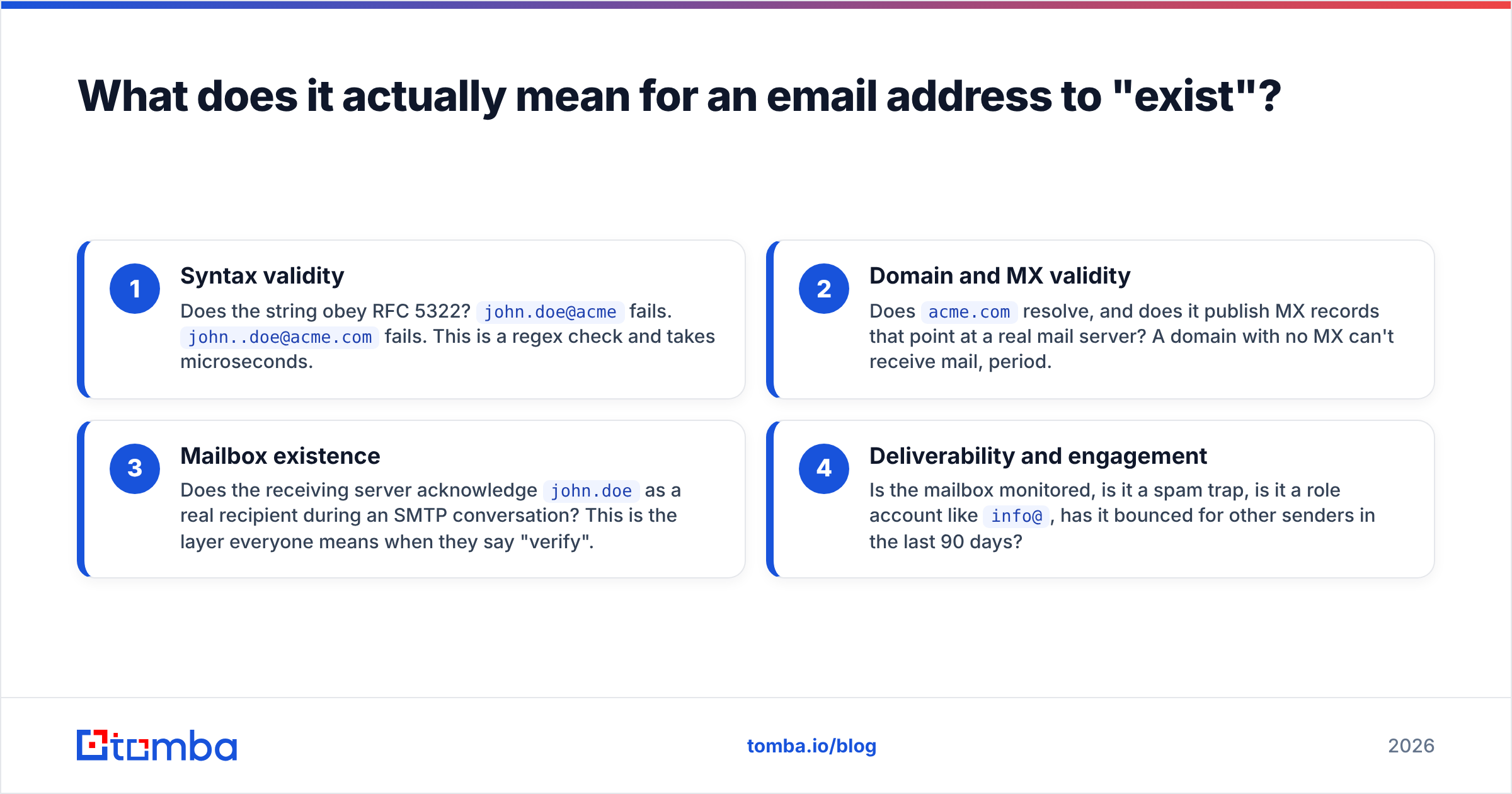
That's why "how can i check if an email address exists" doesn't have one answer. It has four layers, and each one you clear cuts your bounce rate further:
- Syntax validity — Does the string obey RFC 5322?
john.doe@acmefails.john..doe@acme.comfails. This is a regex check and takes microseconds. - Domain and MX validity — Does
acme.comresolve, and does it publish MX records that point at a real mail server? A domain with no MX can't receive mail, period. - Mailbox existence — Does the receiving server acknowledge
john.doeas a real recipient during an SMTP conversation? This is the layer everyone means when they say "verify". - Deliverability and engagement — Is the mailbox monitored, is it a spam trap, is it a role account like
info@, has it bounced for other senders in the last 90 days?
Layers 1 and 2 are free and deterministic. Layer 3 is free but unreliable. Layer 4 is only available if you're buying access to someone's aggregated bounce data.
How can I check if an email address exists for free?#
There are three no-cost methods, and each has a specific failure mode you need to know about before you trust the result.
Method 1 — Syntax and MX lookup. Run the address through a validator, then query the domain's MX records with dig MX acme.com or nslookup -type=mx acme.com. If no MX record comes back, the address is dead on arrival. This catches typo'd domains (gmial.com), parked domains, and dead companies. It will not tell you whether the specific mailbox exists. A free email checker does both steps in one click.
Method 2 — The manual SMTP handshake. Connect to the recipient's mail server on port 25 and pretend you're about to deliver a message, then hang up before you actually do:
telnet mail.acme.com 25
HELO example.com
MAIL FROM: <you@yourdomain.com>
RCPT TO: <john.doe@acme.com>
A 250 OK response after RCPT TO means the server accepts that recipient. A 550 means it doesn't. Then send QUIT — never DATA.
This works, but three things go wrong in practice. Most residential and cloud ISPs block outbound port 25 entirely. Major providers rate-limit or blacklist IPs that probe without sending. And an increasing number of servers answer 250 OK to everything, which brings us to the catch-all problem below.
Method 3 — Send a real test email. The only method with zero ambiguity: send a plain, one-line message and watch for a bounce. It's also the slowest, and every bounce is a small deposit into the "this sender doesn't clean their list" ledger that mailbox providers keep on you. Use it to spot-check five addresses, never five thousand.

Why do catch-all domains break most email checkers?#
A catch-all domain is configured to accept mail sent to any address at that domain — ceo@, asdfgh@, notarealperson@ all return 250 OK. The mail either lands in a shared inbox or gets silently dropped after acceptance.
This matters more every year. A large share of Microsoft 365 tenants and most agency or holding-company domains are configured this way, either deliberately or by inheriting a default. When you SMTP-probe a catch-all domain, the server tells you every address is valid, so a naive verifier reports 100% valid and you learn nothing.
Serious verification tools handle this in one of three ways:
- Flag and separate. The address is returned as
catch-alloraccept-all, notvalid. Honest, and the correct default. - Pattern confidence. Cross-reference the address against the domain's known email format and against real contacts already confirmed at that company. If
first.last@is the established pattern and the person is verifiable elsewhere, confidence rises. A catch-all verifier does exactly this. - Historical bounce data. If the same address was sent to by other users and never bounced, that's strong evidence the mailbox is real and monitored.
If a vendor's marketing claims "99.9% accuracy" without mentioning catch-alls at all, they are almost certainly counting catch-all acceptances as valid. Ask for the catch-all rate in your test file before you buy anything.
Which email verification tools are most accurate in 2026?#
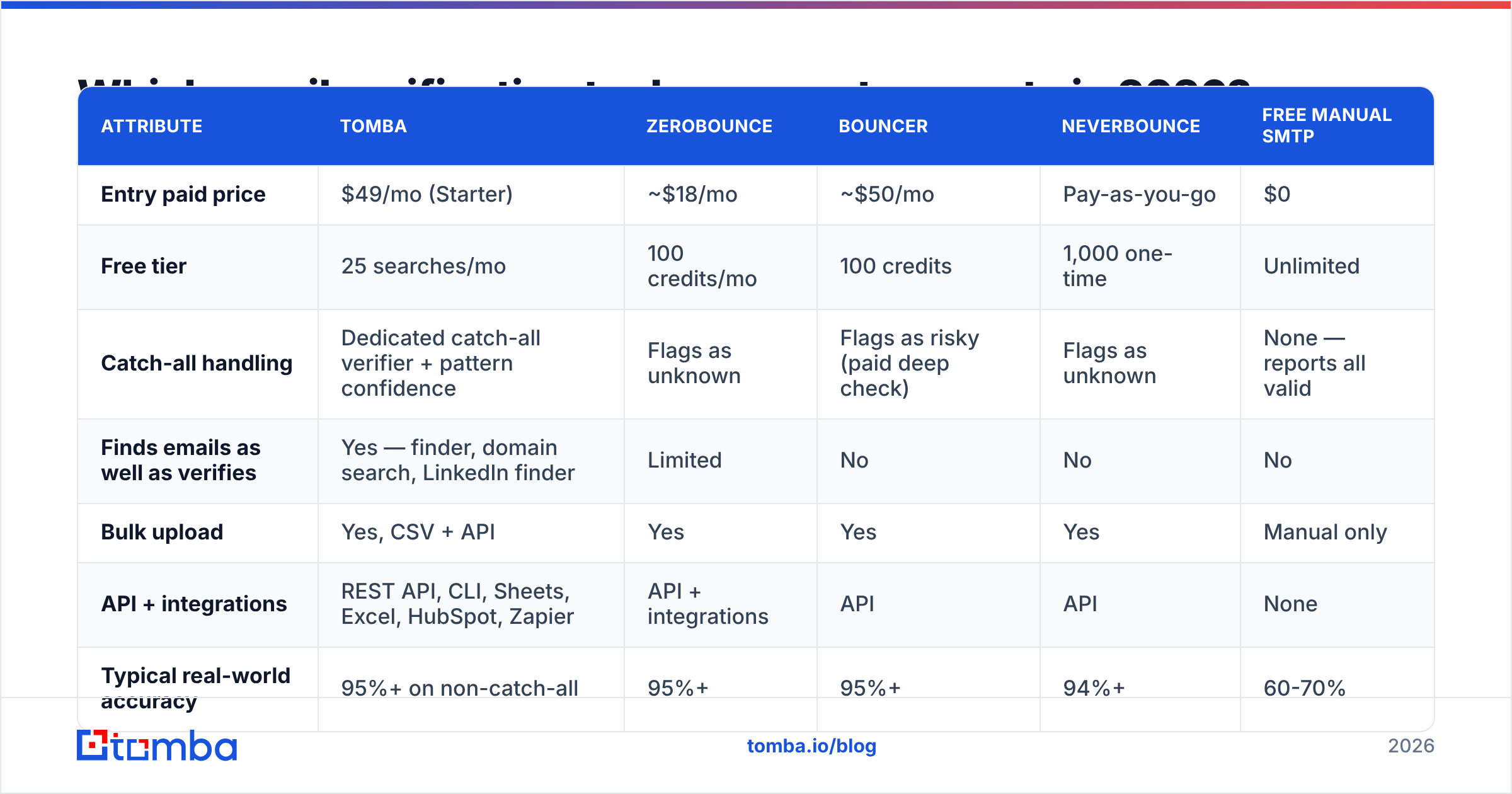
Here's how the main options compare on the attributes that actually change your bounce rate. Prices are entry paid tiers as published by each vendor.
| Attribute | Tomba | ZeroBounce | Bouncer | NeverBounce | Free manual SMTP |
|---|---|---|---|---|---|
| Entry paid price | $49/mo (Starter) | ~$18/mo | ~$50/mo | Pay-as-you-go | $0 |
| Free tier | 25 searches/mo | 100 credits/mo | 100 credits | 1,000 one-time | Unlimited |
| Catch-all handling | Dedicated catch-all verifier + pattern confidence | Flags as unknown | Flags as risky (paid deep check) | Flags as unknown | None — reports all valid |
| Finds emails as well as verifies | Yes — finder, domain search, LinkedIn finder | Limited | No | No | No |
| Bulk upload | Yes, CSV + API | Yes | Yes | Yes | Manual only |
| API + integrations | REST API, CLI, Sheets, Excel, HubSpot, Zapier | API + integrations | API | API | None |
| Typical real-world accuracy | 95%+ on non-catch-all | 95%+ | 95%+ | 94%+ | 60-70% |
Two honest caveats on that table. First, accuracy figures are vendor-reported and vary wildly by list composition — a list full of @gmail.com addresses will verify beautifully everywhere, and a list of enterprise @fortune500.com addresses will not. Second, if you only ever need to verify a list someone else built, a pure verifier is cheaper. If you need to find addresses and then verify them, a combined platform saves you a second subscription and a CSV round-trip. Check current Tomba pricing against the credit volume you actually consume, not the headline number.
For teams that want pre-verified contacts rather than a verification step, a licensed database like BookYourData takes a different approach entirely — you buy records that have already been checked, which suits ICP-based list building better than one-off lookups. Different tool for a different job; both are legitimate paths. Independent user reviews across all of these sit on G2's email verification category if you want unfiltered opinions before committing.
How do I check thousands of email addresses at once?#
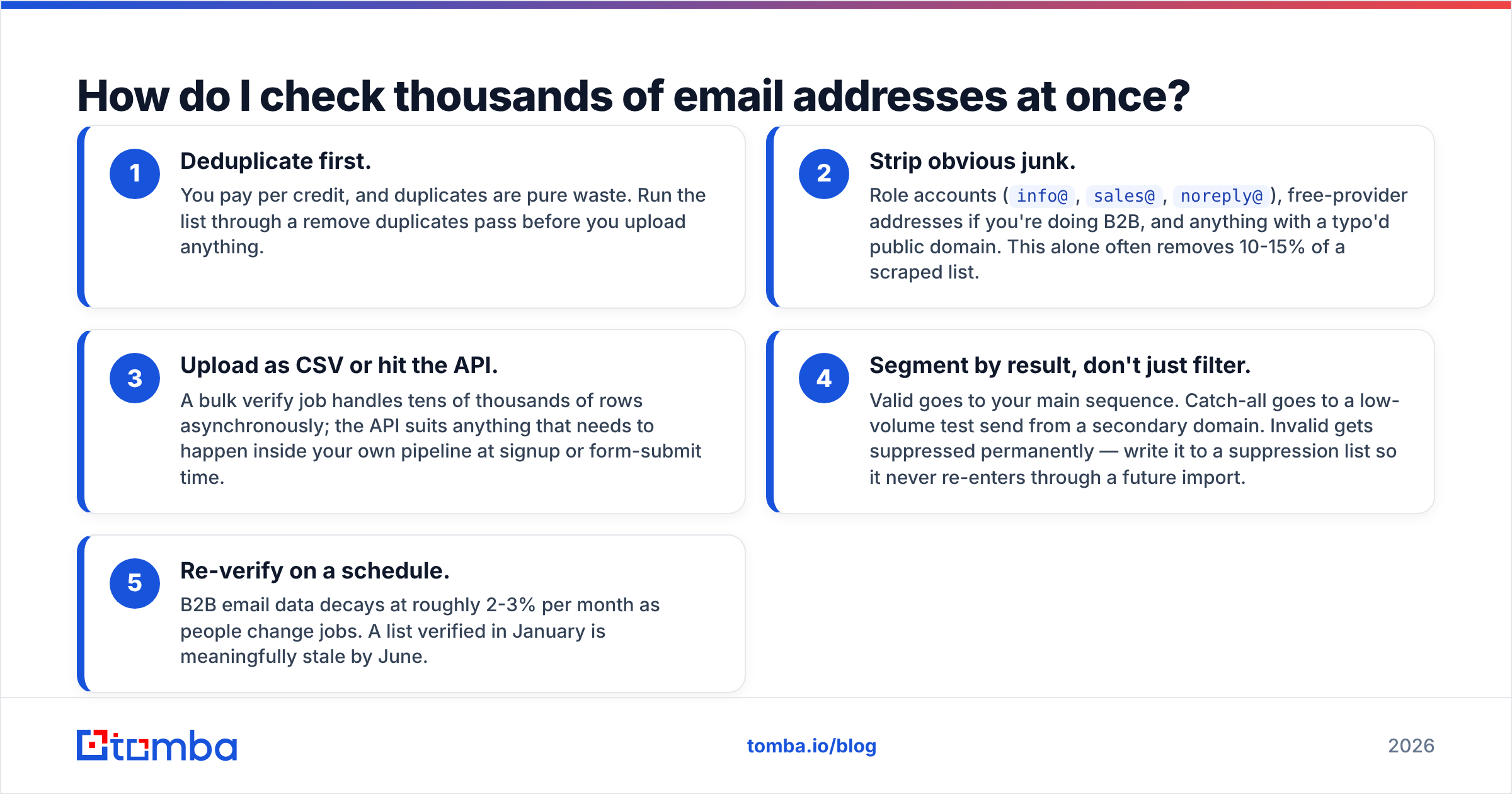
Manual methods collapse past about 20 addresses. For anything larger, the workflow looks like this:
- Deduplicate first. You pay per credit, and duplicates are pure waste. Run the list through a remove duplicates pass before you upload anything.
- Strip obvious junk. Role accounts (
info@,sales@,noreply@), free-provider addresses if you're doing B2B, and anything with a typo'd public domain. This alone often removes 10-15% of a scraped list. - Upload as CSV or hit the API. A bulk verify job handles tens of thousands of rows asynchronously; the API suits anything that needs to happen inside your own pipeline at signup or form-submit time.
- Segment by result, don't just filter. Valid goes to your main sequence. Catch-all goes to a low-volume test send from a secondary domain. Invalid gets suppressed permanently — write it to a suppression list so it never re-enters through a future import.
- Re-verify on a schedule. B2B email data decays at roughly 2-3% per month as people change jobs. A list verified in January is meaningfully stale by June.

Can I check if an email exists without sending anything?#
Yes — and you should. Every method above except the test-send is passive from the recipient's perspective. The RCPT TO probe opens a connection and closes it without transmitting a message, so nothing lands in anyone's inbox and nothing shows up in their mail client.
What it does leave is a trace in the receiving server's logs, and that's the real cost. Providers correlate connection patterns. An IP that opens hundreds of connections and never sends a message looks exactly like a list-validation harvester, because it is one. That's why you route verification through a service with a large, warmed, distributed IP pool rather than through your own domain — the same reason you don't run email warmup from the IP you're about to blast a campaign from.
If you want to monitor how your own domain is perceived after all this, Google Postmaster Tools shows your reputation, spam rate, and delivery errors for Gmail recipients. It's free and it's the only direct signal you'll get from the largest mailbox provider on earth.
What accuracy should you realistically expect?#
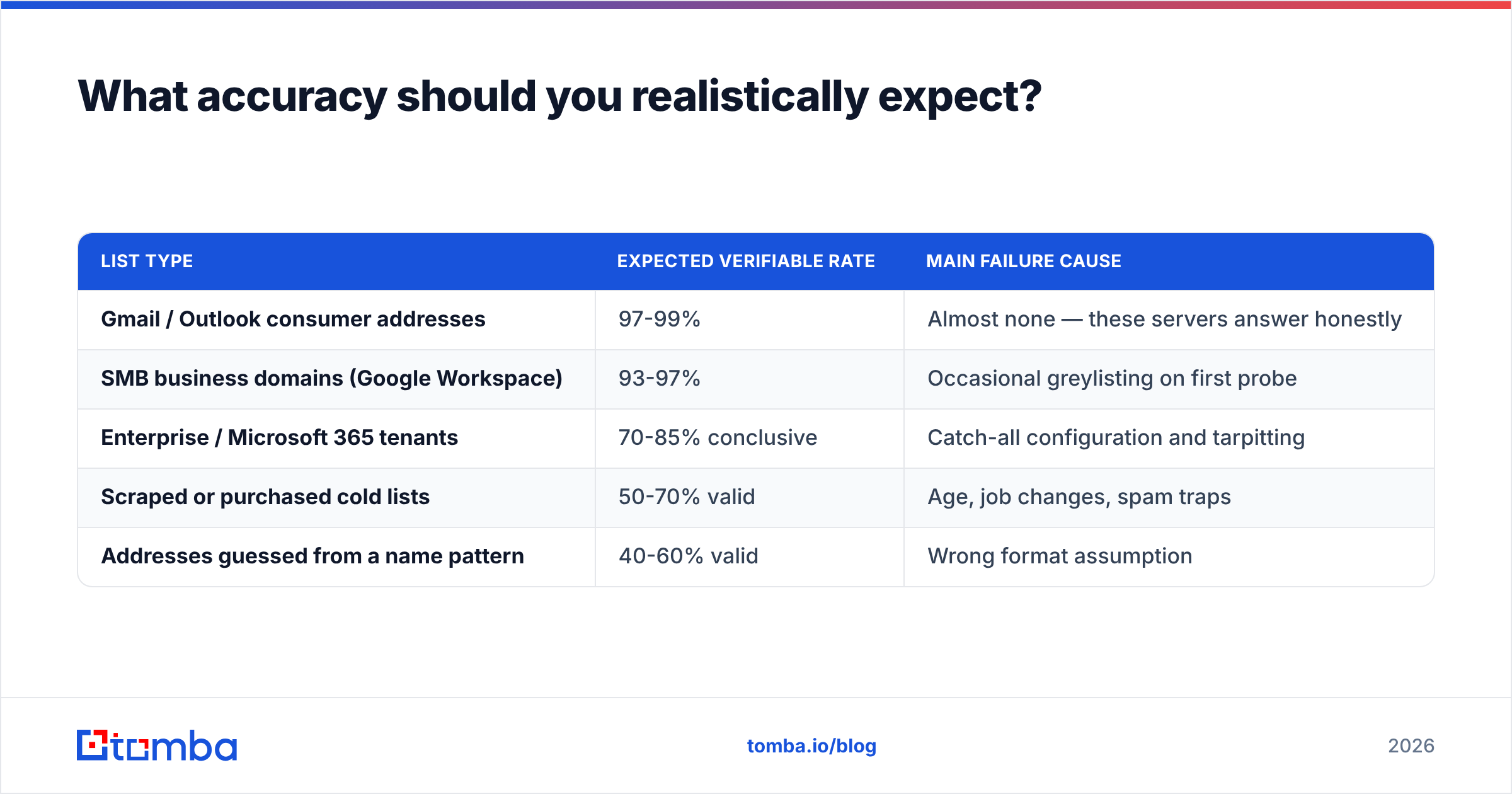
Set expectations honestly, because vendors won't:
| List type | Expected verifiable rate | Main failure cause |
|---|---|---|
| Gmail / Outlook consumer addresses | 97-99% | Almost none — these servers answer honestly |
| SMB business domains (Google Workspace) | 93-97% | Occasional greylisting on first probe |
| Enterprise / Microsoft 365 tenants | 70-85% conclusive | Catch-all configuration and tarpitting |
| Scraped or purchased cold lists | 50-70% valid | Age, job changes, spam traps |
| Addresses guessed from a name pattern | 40-60% valid | Wrong format assumption |
The gap between "verified valid" and "actually delivered" is normal and doesn't mean the verifier lied. Deliverability depends on your content, authentication (SPF record, DKIM, DMARC), sending volume, and domain age — none of which a verifier controls. A clean list is necessary for good email deliverability, not sufficient for it.
What's the fastest workflow that actually works?#
If you're starting from a name and a company rather than an existing list, the order matters. Guessing an address and then verifying it wastes credits on the 40-60% you guess wrong. Instead:
- Find, don't guess. Pull the address from a source that already knows the company's email pattern and has confirmed contacts on that domain.
- Verify at the point of capture, not the night before you send. Signup forms, lead-gen forms, and CSV imports should all hit a verification API inline.
- Keep the verification result on the record. Store the status and the check date in your CRM so you know when to re-run it.
- Suppress, don't delete. Invalid addresses that get deleted come back on the next import. Suppressed ones don't.
That's the whole system. Everything else is tuning.
If you want to skip the guess-and-check loop entirely, start with the Tomba Email Finder — it returns the address along with a confidence score and a verification status in one call, so "does this email exist?" is answered before it ever enters your sequence. The free tier gives you 25 searches a month to test it against contacts you can already confirm, which is the only benchmark that means anything.
Related guides#
Ready to find emails that actually work?
Join 150,000+ professionals who stopped guessing and started sending. Free credits on signup — no credit card required.
Get the Tomba newsletter
Practical outbound tactics and product updates — once every two weeks.
About the author