How Long To Wait For A Follow Up Email: 2026 Timing Guide
Waiting three days is not a strategy. Here is what the reply data actually says about follow-up timing, how many touches to send, and when to stop chasing.
TL;DR
- For cold outbound, wait 3 business days before follow-up one, then widen the gap: 3 → 5 → 7 → 14 days. Same-day and next-day bumps read as desperate and get flagged.
- For a warm thread where the person already replied once, 2 business days is the ceiling. Momentum decays fast.
- After a demo, proposal, or interview, 24–48 hours for the thank-you, then 5–7 days for the status check.
- Most replies to cold sequences land on touches 2–4. Sending more than 5 total touches produces diminishing returns and rising spam complaints.
- Timing only matters if the address is real. A bounced follow-up sequence torches your sender reputation faster than any cadence mistake.
Why does follow-up timing decide whether you get a reply?#
Because the first email is almost never the one that converts. Reply-rate data published by vendors like HubSpot and analyzed across millions of sequences consistently shows the same shape: touch one gets a modest reply rate, touches two and three often match or beat it, and everything past touch five falls off a cliff.
The mistake is not "following up too little" or "following up too much." It is following up on the wrong clock. A cold prospect who has never heard of you needs a different gap than a hiring manager who just interviewed you, who needs a different gap than a buyer who ghosted after a pricing call.
Think of it like knocking on a neighbor's door. Knock, wait, knock again a minute later — that is fine, they might be in the kitchen. Ring the bell eleven times in ninety seconds and you are no longer a neighbor, you are a problem. Email works identically, except the door has a memory and a spam button.
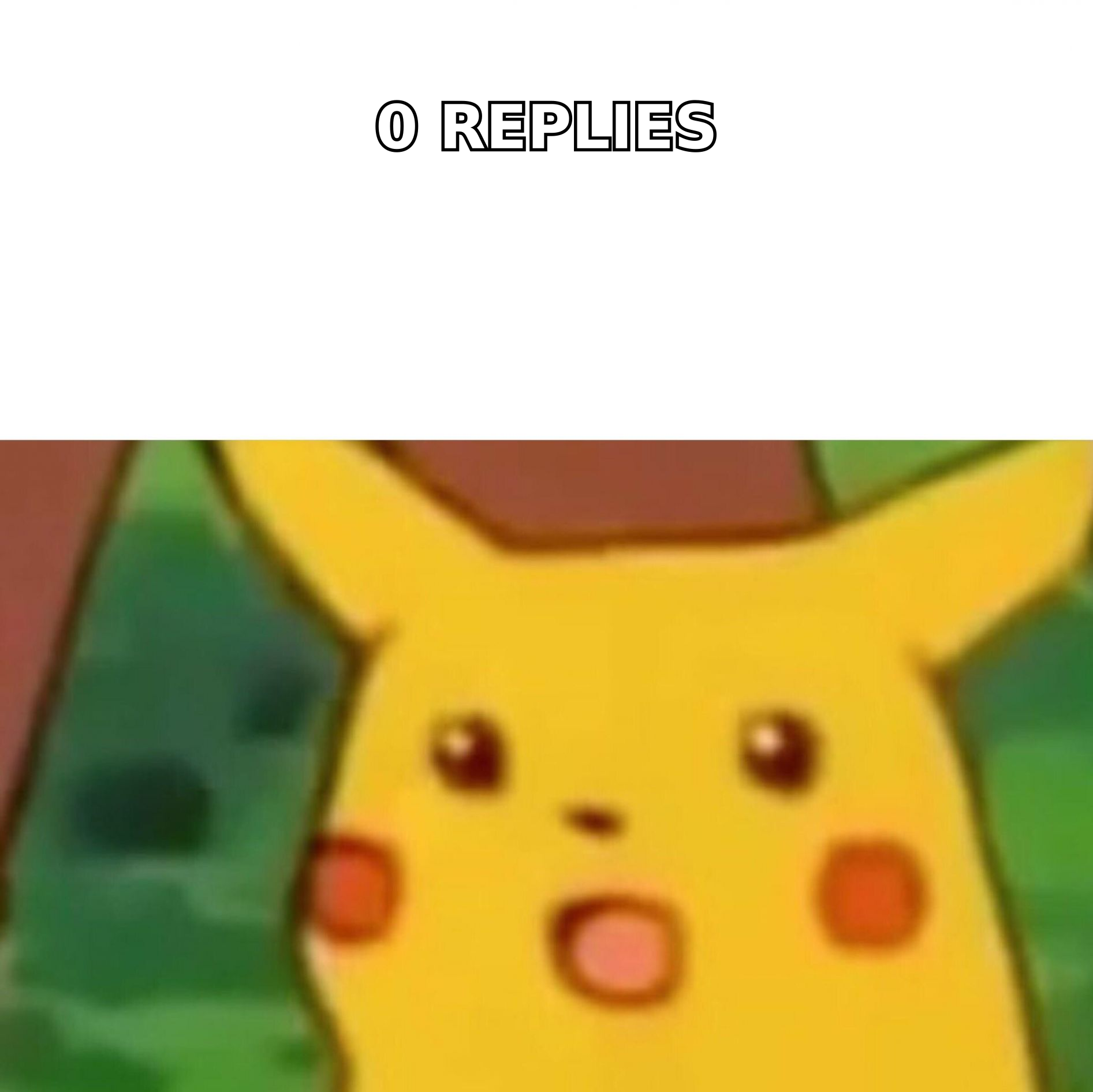
How long should you wait for a follow up email in each scenario?#
Different threads have different half-lives. Here is the working table most experienced outbound teams converge on.
| Scenario | Wait before 1st follow-up | Total touches | Stop after |
|---|---|---|---|
| Cold outbound (no prior contact) | 3 business days | 4–5 | 21–28 days |
| Warm reply thread (they answered once) | 2 business days | 3 | 10 days |
| Post-demo / post-meeting | 24 hours (recap), 5–7 days (nudge) | 3 | 21 days |
| Proposal or quote sent | 3 business days | 3–4 | 30 days |
| Job application / interview | 24–48 hours (thank-you), 7 days (status) | 2 | 14 days |
| Networking or referral intro | 5–7 days | 2 | 14 days |
| Inbound lead (filled a form) | 5 minutes, then 1 day, then 3 days | 5–6 | 14 days |
Two things to notice. First, the inbound row is the outlier — speed-to-lead research from vendors and analysts has held steady for years: contacting a fresh inbound lead within five minutes dramatically outperforms an hour-later reply. Cold outbound has no such urgency window because nobody is waiting on you.
Second, every row has a stop column. Sequences without an exit are how domains get burned.
What is the right spacing between each follow-up?#
Escalating gaps beat fixed gaps. If you send every three days on the dot, you look like software. If you widen the interval, you look like a person who is busy but persistent.
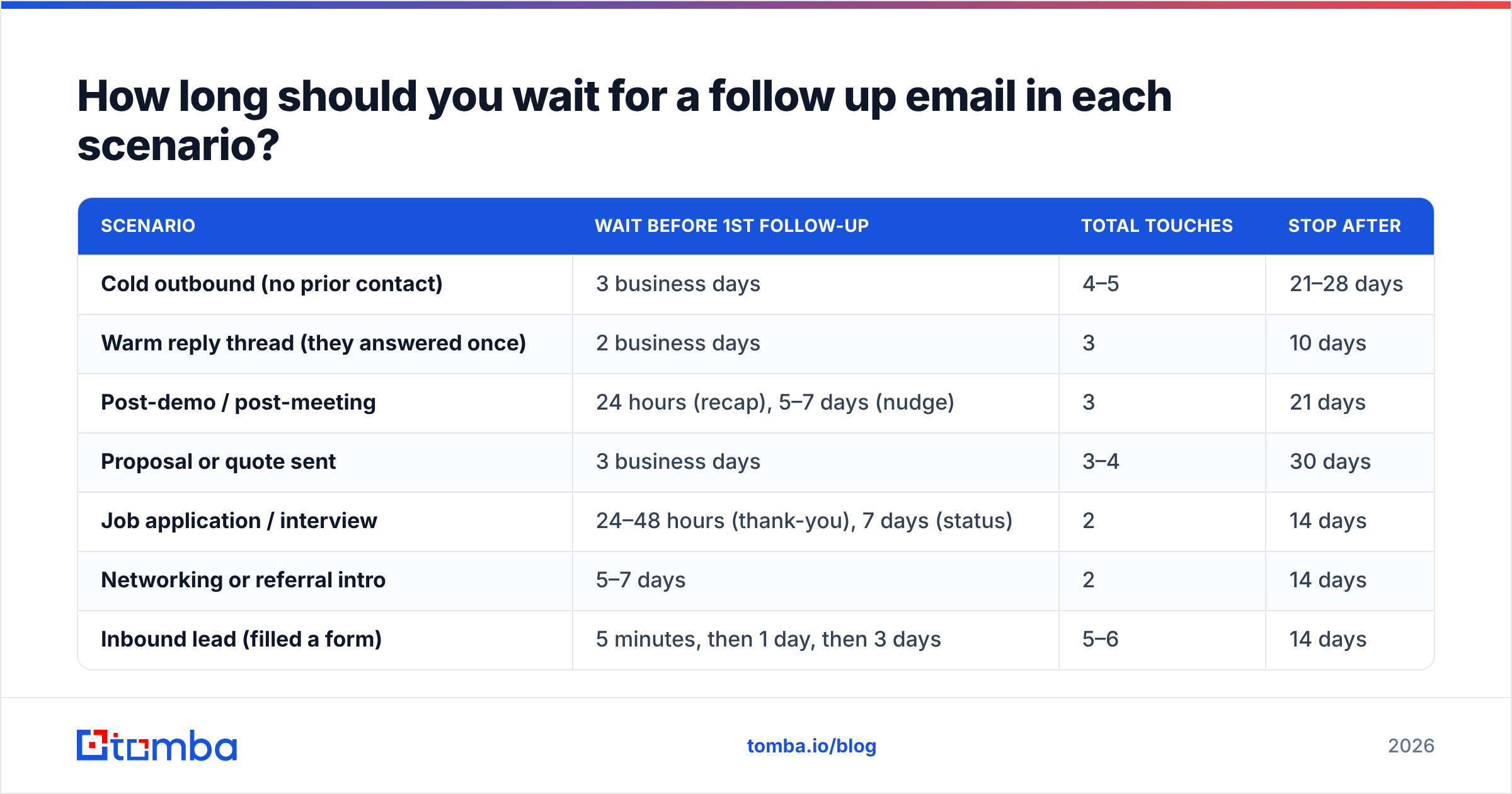
A cadence that holds up across industries:
- Day 0 — Initial email. Short, specific, one ask. No attachments, no calendar link yet.
- Day 3 — Follow-up one. Reply in the same thread. Add one new piece of value (a stat, a customer example, a relevant note about their company). Do not write "just bumping this."
- Day 8 — Follow-up two. Change the angle entirely. If touch one led with cost savings, lead with speed or risk instead. This is where most replies arrive.
- Day 15 — Follow-up three. Short and low-friction. A one-line question that can be answered with yes or no.
- Day 29 — Break-up email. State that you are closing the loop and will stop reaching out. Leave a door open. Break-up emails reliably produce replies precisely because they remove pressure.
Notice the gaps: 3, 5, 7, 14. The widening pattern signals that you are moving on, which paradoxically raises the odds of a response. Compressed cadences (day 1, day 2, day 3) do the opposite — they compress your credibility along with the calendar.
One rule that overrides all of the above: reply in the same thread for touches 1 through 3. New threads for every follow-up split the conversation, make the recipient re-read context, and increase the chance that one of the messages lands in a different folder than the rest.
Does the day and hour you send actually change reply rates?#
Yes, but less than people believe, and the effect is smaller than the effect of relevance.
What holds up in practice:
- Tuesday through Thursday outperform Monday and Friday for B2B follow-ups. Monday inboxes are triage mode; Friday afternoon is a black hole.
- Early morning in the recipient's timezone (roughly 7–9am) beats mid-afternoon for first touches, because your email sits near the top of the pile when they open the app.
- Avoid the exact top of the hour. Automated tools cluster sends at :00, so your message competes with everything else scheduled the same way. Sending at :17 or :43 is a free marginal gain.
- Never send a follow-up within 60 minutes of the original. It reads as a mistake or a bot.
Where day-of-week optimization stops mattering: if your message is not relevant, no Tuesday 8:14am send will save it. Treat timing as a multiplier on a good email, not a substitute for one.
How many follow-ups is too many?#
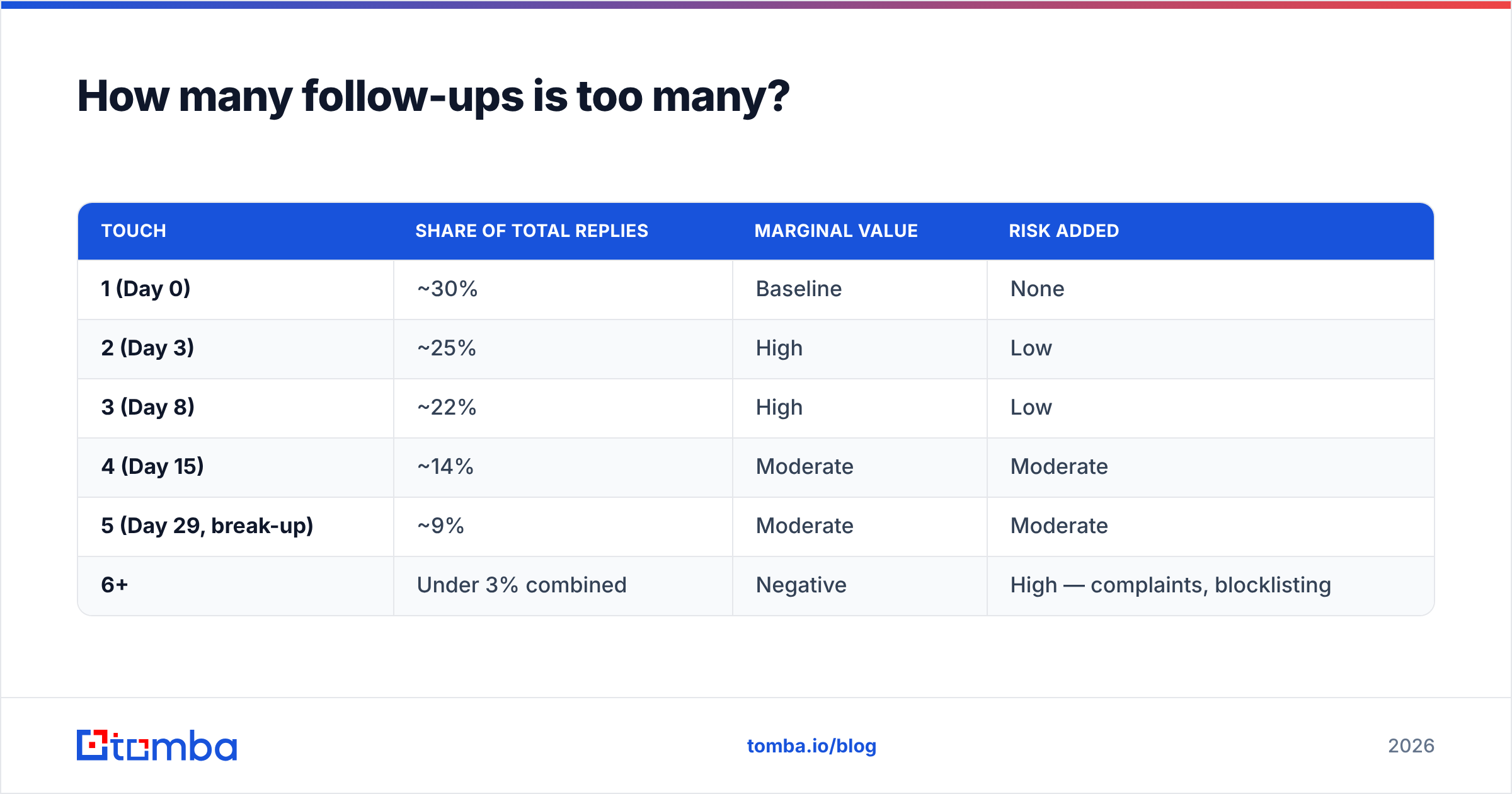
Five total touches (one initial + four follow-ups) is the practical ceiling for cold outbound. Past that, three things happen at once: reply rate flattens, unsubscribe rate climbs, and spam complaints start dragging your domain reputation down.
Here is how a typical cold sequence distributes across touches:
| Touch | Share of total replies | Marginal value | Risk added |
|---|---|---|---|
| 1 (Day 0) | ~30% | Baseline | None |
| 2 (Day 3) | ~25% | High | Low |
| 3 (Day 8) | ~22% | High | Low |
| 4 (Day 15) | ~14% | Moderate | Moderate |
| 5 (Day 29, break-up) | ~9% | Moderate | Moderate |
| 6+ | Under 3% combined | Negative | High — complaints, blocklisting |
The break-up email earns its slot. Everything after it does not.
There is also a per-account limit worth respecting: if you are emailing four people at the same company, do not run four independent five-touch sequences into the same domain in the same month. That is twenty emails hitting one mail server from one sender. Their IT team will notice before their sales team does.
What should each follow-up actually say?#
The cadence is the skeleton; the content is what makes it work. Four rules that survive contact with real inboxes:
- Never write "just following up." It adds zero information and signals that you had nothing new to say. If you have nothing new, wait until you do.
- Add one new asset per touch. A benchmark, a case study line, a competitor observation, a short question about their stack. One per email, not three.
- Shorten as you go. Touch one can be 90 words. Touch three should be under 40. Touch five is two sentences.
- Change the ask, not just the wording. If touch one asked for a 30-minute call, touch three should ask for a yes/no or a redirect ("Is this someone else's call?").
- Make the redirect explicit. "If this isn't your area, who should I be talking to?" converts surprisingly well, because answering it costs the recipient almost nothing.
- End every sequence cleanly. The break-up email should genuinely be the last one. If you send a "final email" and then send three more, you have taught them that nothing you write is true.
If you want a starting structure rather than a blank page, the cold email templates library covers the standard follow-up shapes, and the subject line generator is useful for the touch-three angle change where a fresh subject sometimes helps.
How does deliverability change the timing math?#
This is the part most cadence advice skips. Your follow-up schedule is irrelevant if the messages are not being delivered.
Three failure modes, in order of how often they bite:
Bad addresses. If 12% of your list bounces, your first send tanks your reputation, and every carefully-timed follow-up after that lands in spam for the valid addresses too. Verify before you send, not after. An email verifier pass on a list takes minutes and prevents weeks of damage.
Volume spikes. Sending 30 emails a day for a month, then 400 in one afternoon because you added follow-ups, looks exactly like a compromised account to mail providers. Ramp gradually. The email warmup calculator helps you plan the ramp instead of guessing.
Authentication gaps. Missing or broken SPF, DKIM, and DMARC records mean your follow-ups may never reach the inbox regardless of cadence. Run an SPF checker on your sending domain before you blame your timing. Google and Yahoo both tightened bulk-sender requirements in recent years, and Google's own sender guidelines remain the reference document.
A follow-up sequence sitting on top of unverified data is not a sequence — it is a reputation bonfire with a calendar attached.
What tools help you run follow-up timing at scale?#
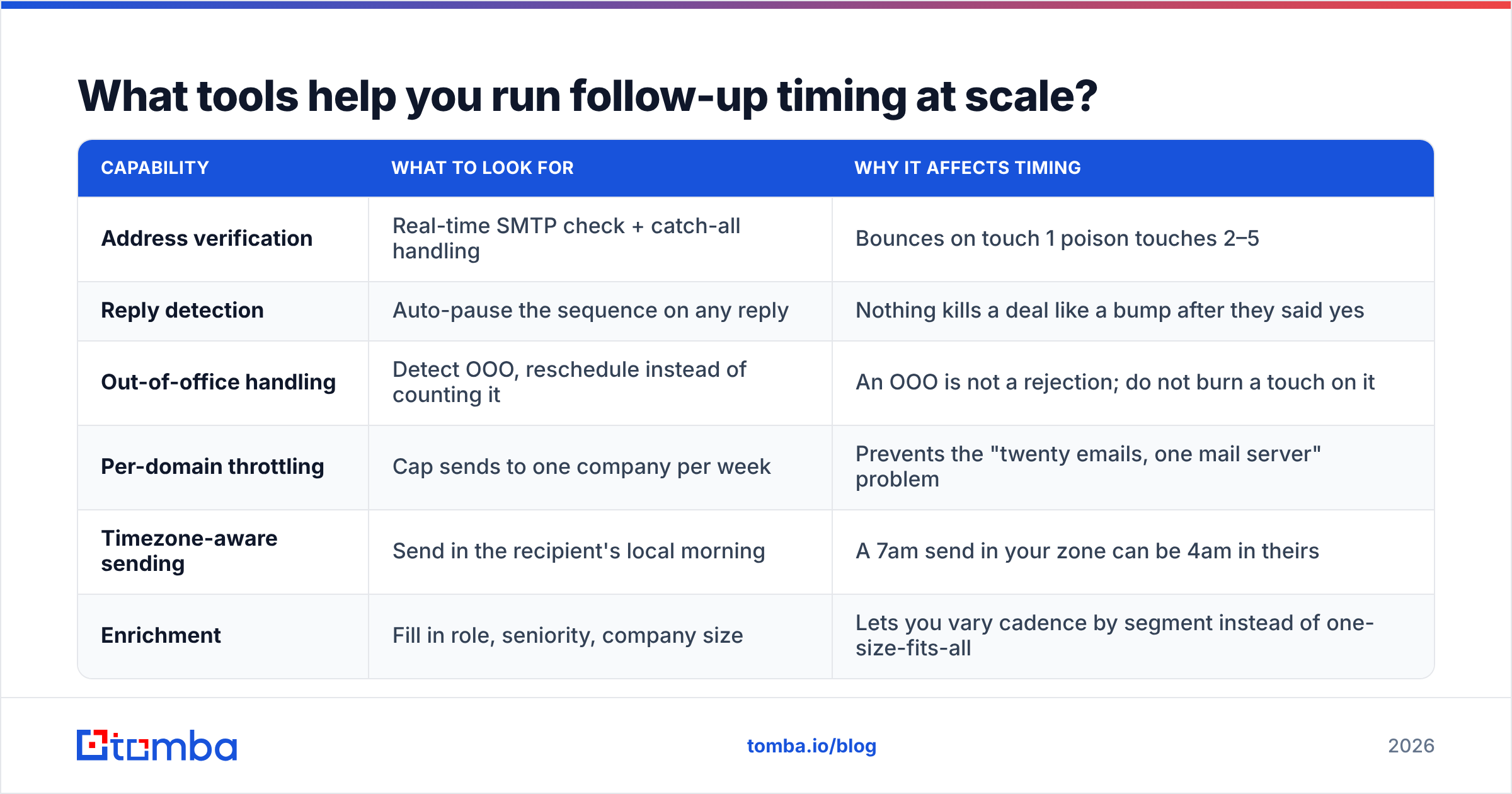
Any modern sequencer will schedule the gaps for you. The differentiator is what happens upstream: whether the contacts in the sequence are real and correctly matched to the person you think you are emailing.
| Capability | What to look for | Why it affects timing |
|---|---|---|
| Address verification | Real-time SMTP check + catch-all handling | Bounces on touch 1 poison touches 2–5 |
| Reply detection | Auto-pause the sequence on any reply | Nothing kills a deal like a bump after they said yes |
| Out-of-office handling | Detect OOO, reschedule instead of counting it | An OOO is not a rejection; do not burn a touch on it |
| Per-domain throttling | Cap sends to one company per week | Prevents the "twenty emails, one mail server" problem |
| Timezone-aware sending | Send in the recipient's local morning | A 7am send in your zone can be 4am in theirs |
| Enrichment | Fill in role, seniority, company size | Lets you vary cadence by segment instead of one-size-fits-all |
On sourcing, most teams end up combining a finder tool with a verified database. Tomba and peers like BookYourData approach that from different angles — Tomba builds the address from public signals and verifies it live, while BookYourData ships pre-verified records from a curated database. Both are legitimate paths; which fits depends on whether you are prospecting into a defined account list or buying coverage in bulk. Independent user reviews on G2 are a reasonable sanity check on either.
If you want to compare cost before committing, the Tomba pricing page runs a free tier at 25 searches/month, Starter at $49/mo, Growth at $99/mo, and Pro at $249/mo — enough at the Starter level to source and verify a few hundred contacts before you start scheduling anything.
What is the single most common follow-up timing mistake?#
Treating the sequence as a countdown instead of a conversation.
The teams with the worst reply rates are usually the ones running the tightest, most automated cadence — every prospect gets the same five emails, three days apart, regardless of whether they opened, clicked, visited the site, or changed jobs last week. The teams with the best reply rates use the cadence as a default and break it constantly: they send touch two the same day if the prospect opened five times, they pause entirely if the company just announced layoffs, and they restart at day zero with a new angle when someone changes roles.
Your cadence should be the floor, not the ceiling. Set the 3-5-7-14 gaps as the default so nothing falls through, then override them whenever you have a real reason to.
And one closing test: before you hit send on follow-up number four, read it as if you were the recipient who has ignored three emails already. If your reaction is "why is this person still emailing me," rewrite it or stop. That instinct is almost always correct.
Ready to build follow-up sequences on data that actually delivers?#
Cadence math is easy. Getting the address right is the part that decides whether any of it matters. Start with Tomba Email Finder to source verified professional addresses by name, company, or domain — every result comes back with a confidence score and verification status, so your day-3, day-8, and day-15 follow-ups land in an inbox instead of a bounce log. The free tier gives you 25 searches a month to test your list quality before you commit to a sequence, and the Starter plan at $49/mo covers most small outbound teams. Verify first, then worry about the calendar.
Related guides#
Ready to find emails that actually work?
Join 150,000+ professionals who stopped guessing and started sending. Free credits on signup — no credit card required.
Get the Tomba newsletter
Practical outbound tactics and product updates — once every two weeks.
About the author