How Many Emails Can You Send At Once In Gmail? 2026 Limits
Gmail's send limits are not one number. They shift with account type, sending method, and reputation. Here are the real 2026 caps, what actually triggers a block, and how to send more without burning your domain.
TL;DR
- A free @gmail.com account can send to roughly 500 recipients per day, and no more than 500 recipients per message from the web (100 per message if you send through an SMTP client).
- A paid Google Workspace account raises that to about 2,000 messages per day, with a maximum of 2,000 recipients per message and 500 external recipients per message.
- Those are technical ceilings. The practical ceiling for cold or semi-cold email is far lower — usually 30 to 50 sends per inbox per day before spam complaints and bounces start damaging your domain.
- Hitting the cap gets you a temporary block ("You have reached a limit for sending mail") that typically clears in 1 to 24 hours. It is not a ban, but repeat offenses attract worse treatment.
- If you need volume, the fix is never "find a bigger Gmail number." It is list hygiene, authentication, warmup, and moving bulk traffic to a tool built for it.
So how many emails can you send at once in Gmail?#
Short answer: 500 recipients per message on a free Gmail account, 2,000 on Google Workspace — but only about 500 of those can be external addresses. The question "how many emails can you send at once in Gmail" has two different answers depending on whether you mean per message or per day, and Google enforces both counters at the same time.
Here is the distinction that trips people up. Gmail does not count "emails sent." It counts recipients. One message addressed to 400 people burns 400 units of your daily quota, not one. So a single BCC blast can eat your entire day in one click, and a 500-recipient message on a free account leaves you with nothing left until the counter rolls over.
The counters also reset on a rolling 24-hour window, not at midnight. If you sent 480 recipients at 3pm yesterday, you do not get a clean slate at 9am today — you get capacity back gradually as those older sends age out of the window.
What are the exact Gmail sending limits in 2026?#
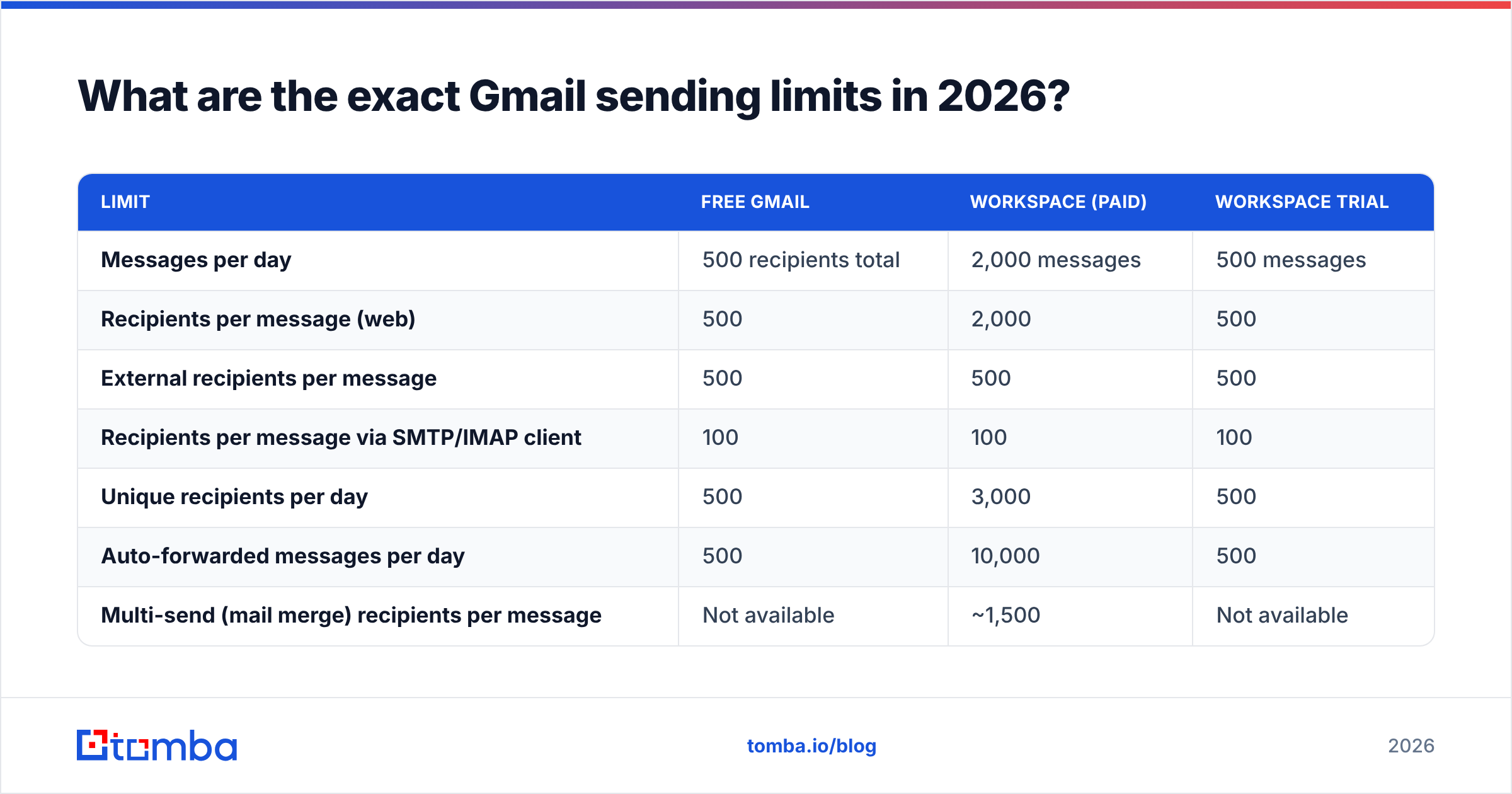
Google publishes these in the Workspace Admin Help sending limits doc and the consumer Gmail limits page. They change occasionally, so treat this table as a working reference and confirm against Google before you build a process on it.
| Limit | Free Gmail | Workspace (paid) | Workspace trial |
|---|---|---|---|
| Messages per day | 500 recipients total | 2,000 messages | 500 messages |
| Recipients per message (web) | 500 | 2,000 | 500 |
| External recipients per message | 500 | 500 | 500 |
| Recipients per message via SMTP/IMAP client | 100 | 100 | 100 |
| Unique recipients per day | 500 | 3,000 | 500 |
| Auto-forwarded messages per day | 500 | 10,000 | 500 |
| Multi-send (mail merge) recipients per message | Not available | ~1,500 | Not available |
| Reset window | Rolling 24h | Rolling 24h | Rolling 24h |
Three details worth pinning down:
- SMTP is the strictest path. If you connect Gmail to Outlook, Apple Mail, a CRM, or a sequencer over SMTP, your per-message ceiling drops to 100 recipients regardless of plan. Most sending tools hit this limit, not the 500/2,000 one.
- A Google Group counts as one recipient when the sender is a Workspace user in the same domain. That is the only legitimate multiplier Google gives you, and it only works for internal distribution — not for prospecting.
- Trial accounts are throttled to free-tier numbers. Buying Workspace does not unlock 2,000/day on day one. The higher limits apply once the account is out of trial and in good standing.
Why does Gmail count recipients instead of messages?#
Because Gmail's limits exist to stop spam, not to ration your typing. From Google's side, a message to 500 people is 500 delivery attempts, 500 chances for a spam complaint, and 500 signals about your sender reputation. Counting messages would let anyone send unlimited volume by stuffing addresses into one BCC field.
Think of it like a toll bridge that charges per passenger, not per car. Cramming forty people into a van does not make the trip cheaper — it just makes the crash worse if something goes wrong.
That framing explains most of Gmail's other behaviour. A bounce costs you more than a delivery. A spam complaint costs you far more than a bounce. And because sender reputation is scored per domain and per IP, one careless 500-recipient send can quietly degrade delivery for every message your company sends afterward, including invoices and password resets.
What actually happens when you hit the limit?#
You get a bounce-back or an inline error, and Gmail stops accepting outbound mail from that account. The common failure states:
- "You have reached a limit for sending mail." Temporary block on the account. Usually clears within 1 to 24 hours. Nothing is deleted; queued messages just fail.
- SMTP 550-5.4.5 "Daily user sending limit exceeded." Same thing, surfaced through a client or API instead of the web UI.
- 421-4.7.0 "Try again later, closing connection." Rate limiting rather than a daily cap. You are sending too fast, not too much.
- Account suspension. Rare, and reserved for accounts Google's filters classify as abusive — high complaint rates, spammy content, or bulk sends from a brand-new account with no SPF record, DKIM, or DMARC in place.
The first three are inconvenient. The fourth is expensive, because a suspended Workspace account can drag the domain's reputation down with it. That is the real risk, and it is why "how do I bypass Gmail's limit" is the wrong question.
Is BCC a safe way to send bulk email in Gmail?#
No — and it is worth being blunt about why, because BCC is the default workaround people reach for.
- It burns quota at full rate. 300 BCC recipients equals 300 units.
- It has zero personalization, which drives spam complaints up and replies down.
- It has no unsubscribe handling, which puts you offside with Google's bulk sender requirements and with CAN-SPAM/GDPR depending on your market.
- One misplaced address in the CC field exposes your entire list. This happens more often than anyone admits.
- You get no per-recipient data — no opens, no bounces isolated by address, no way to know which contacts are dead weight.
Since February 2024, Google has enforced bulk sender requirements on anyone sending more than 5,000 messages a day to Gmail addresses: authenticated mail (SPF, DKIM, and DMARC), one-click unsubscribe on promotional mail, and a spam complaint rate kept under 0.3%. BCC blasts fail at least two of those three by design. Even below the 5,000 threshold, the same signals feed Gmail's filtering.
What is Gmail's multi-send limit, and is it enough?#
Google Workspace includes a native mail merge feature (multi-send mode) on Business Standard and above. It handles roughly 1,500 recipients per message, adds an automatic unsubscribe footer, and personalizes with merge tags pulled from Google Contacts or Sheets.
It is genuinely useful for newsletters to an opted-in list, event invites, and internal announcements. It is not a prospecting tool. There is no sequencing, no reply detection, no bounce management beyond what lands in your inbox, no sending-window control, and no throttling logic. You get one big send and whatever fallout comes with it.
If your use case is "email 800 customers about a pricing change," multi-send is fine. If it is "reach 800 prospects who have never heard of us," it is the wrong instrument.
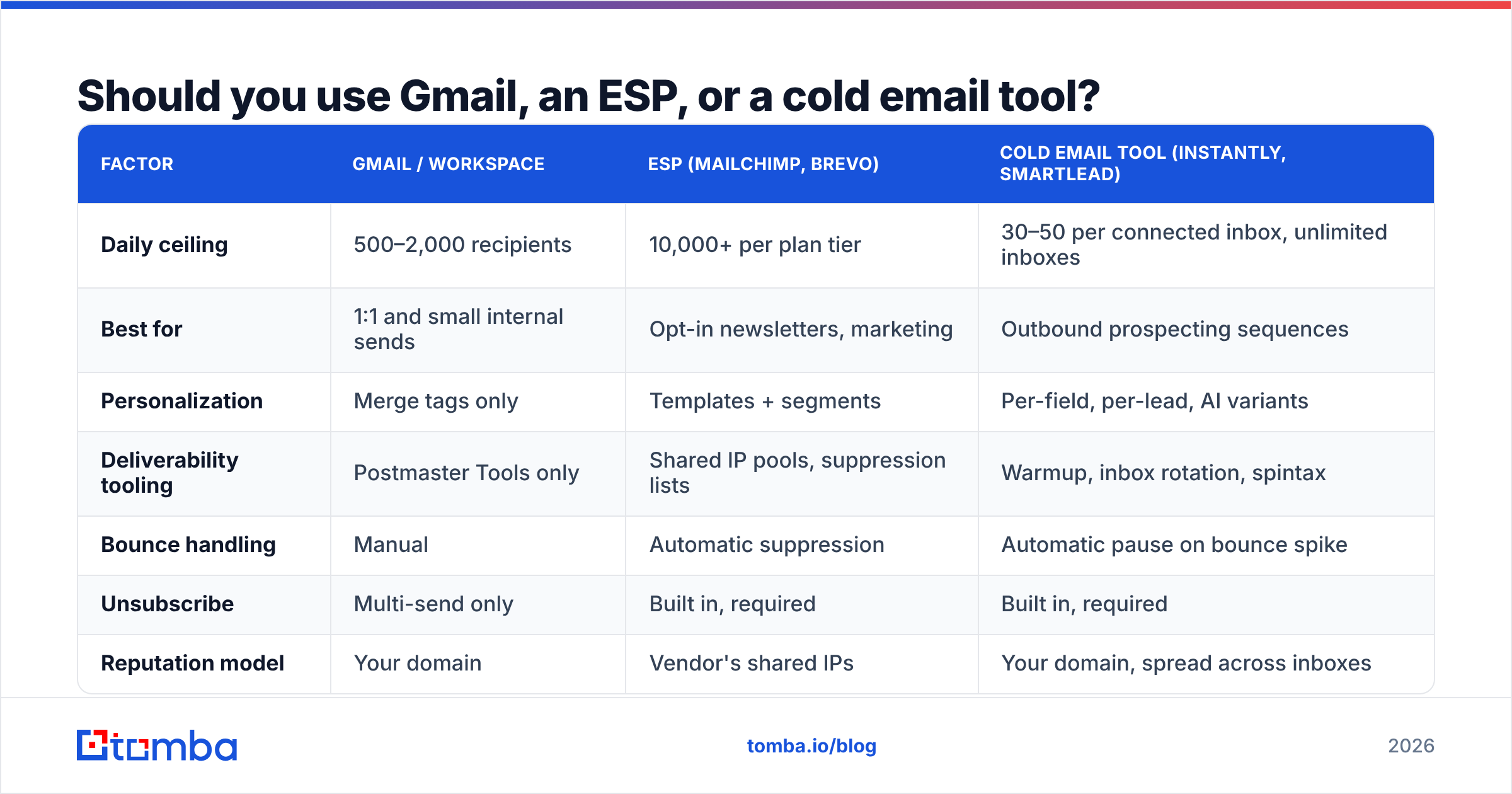
Should you use Gmail, an ESP, or a cold email tool?#
This is the decision that actually matters. Gmail's limit is only a problem when you are using Gmail for a job it was never built for.
| Factor | Gmail / Workspace | ESP (Mailchimp, Brevo) | Cold email tool (Instantly, Smartlead) |
|---|---|---|---|
| Daily ceiling | 500–2,000 recipients | 10,000+ per plan tier | 30–50 per connected inbox, unlimited inboxes |
| Best for | 1:1 and small internal sends | Opt-in newsletters, marketing | Outbound prospecting sequences |
| Personalization | Merge tags only | Templates + segments | Per-field, per-lead, AI variants |
| Deliverability tooling | Postmaster Tools only | Shared IP pools, suppression lists | Warmup, inbox rotation, spintax |
| Bounce handling | Manual | Automatic suppression | Automatic pause on bounce spike |
| Unsubscribe | Multi-send only | Built in, required | Built in, required |
| Reputation model | Your domain | Vendor's shared IPs | Your domain, spread across inboxes |
| Typical cost | Included in Workspace seat | $20–$300/mo | $37–$100/mo |
Notice the third column's daily ceiling. Cold email platforms deliberately cap you lower than Gmail does, because 30 to 50 sends per inbox per day is what survives Gmail's spam filters long-term. They solve volume horizontally — more inboxes, more domains — not by pushing a single mailbox harder.
How do you send more email without getting blocked?#
Five levers, in the order they matter:
- Authenticate the domain first. SPF, DKIM, and DMARC on every sending domain, no exceptions. This is table stakes in 2026, and unauthenticated mail gets filtered before your content is even evaluated. Run a quick check with an SPF checker before you scale anything.
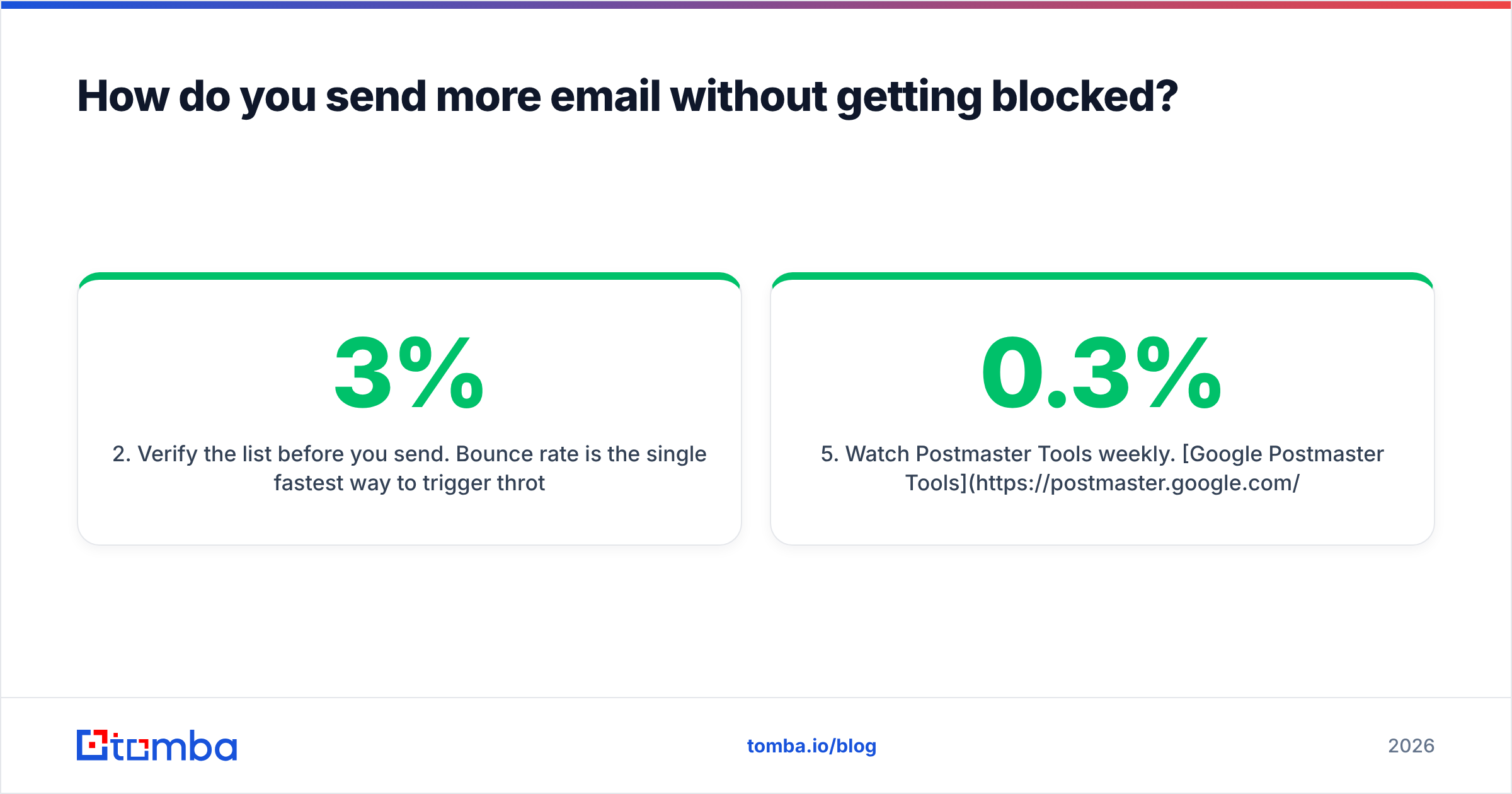
- Verify the list before you send. Bounce rate is the single fastest way to trigger throttling. Anything above 3% puts you in dangerous territory; above 5% and Gmail starts treating your domain as a spam source. Running addresses through an email verifier removes dead addresses, role accounts, and spam traps before they cost you.
- Warm the inbox before you scale it. A brand-new mailbox sending 200 messages on day one looks exactly like a compromised account. Ramp over two to four weeks — 10 to 15 per day, climbing gradually. The email warmup calculator gives you a realistic ramp schedule instead of a guess.
- Split across inboxes and domains. Three secondary domains with two mailboxes each gives you six sending identities at a safe 40/day, which is 240 daily sends without any single mailbox approaching a limit. Keep your primary domain out of cold outbound entirely.
- Watch Postmaster Tools weekly. Google Postmaster Tools shows your domain reputation, spam rate, and authentication pass rate straight from Gmail. If spam rate crosses 0.3%, stop sending and fix the list before you touch volume again.
How do list quality and verification change your effective limit?#
Dramatically — because your real limit is not the number Google publishes, it is the point at which Gmail's filters decide you are a problem.
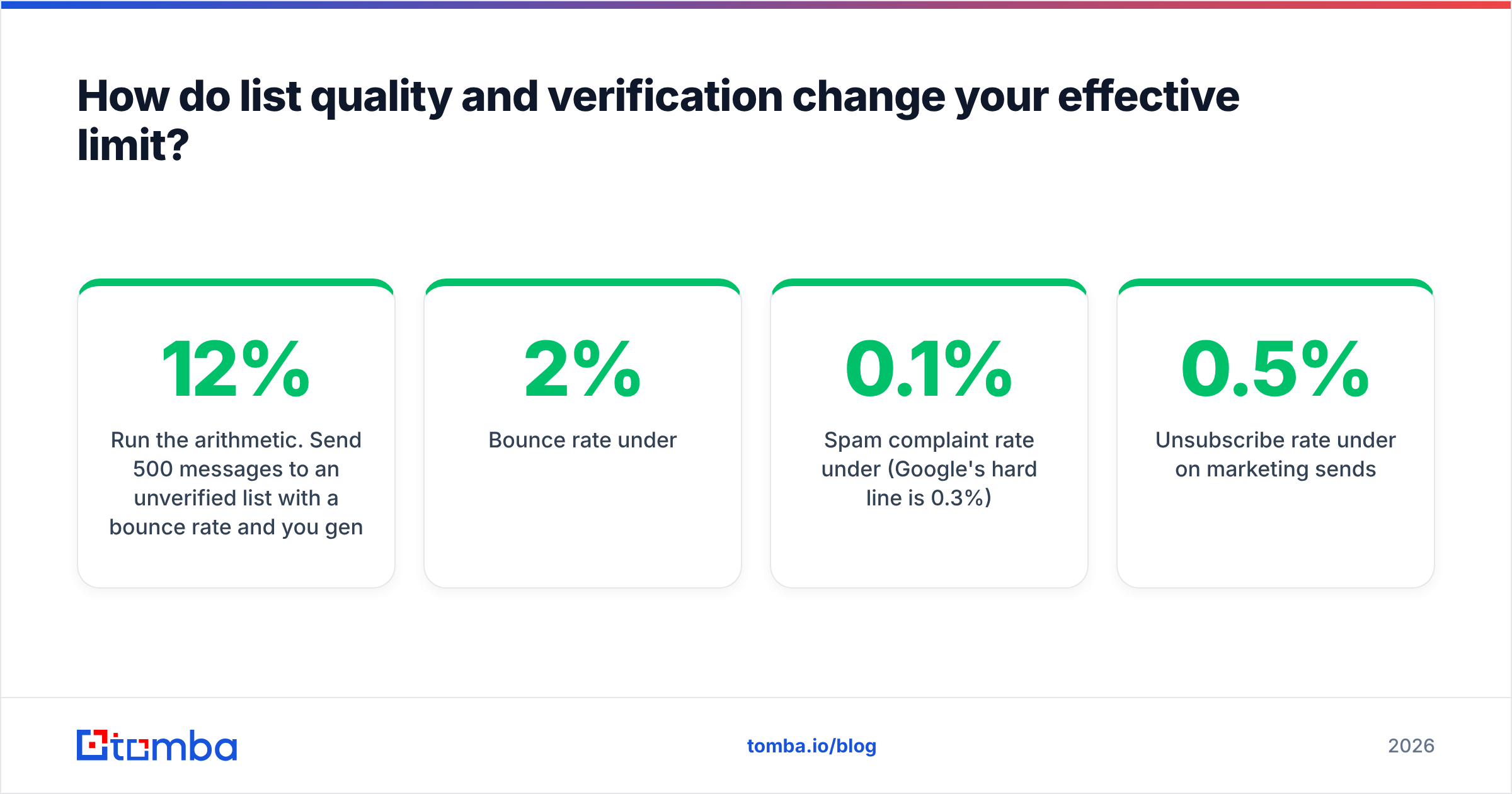
Run the arithmetic. Send 500 messages to an unverified list with a 12% bounce rate and you generate 60 hard bounces in one afternoon. That ratio alone is enough to get throttled, and the reputation hit lingers for weeks. Send those same 500 to a verified list with a 1% bounce rate and Gmail sees a normal sender doing normal things.
The same logic applies to how you sourced the addresses. Guessed patterns from a permutator produce a lot of invalid mail; addresses confirmed against real sources do not. If you are building lists by company, a proper domain search returns verified addresses with confidence scores attached, which is a very different input than a spreadsheet of firstname.lastname@ guesses.
Practical benchmarks to hold yourself to:
- Bounce rate under 2%
- Spam complaint rate under 0.1% (Google's hard line is 0.3%)
- Unsubscribe rate under 0.5% on marketing sends
- Reply rate above 3% on cold outbound, or your targeting is off
Hit those and Gmail's ceiling stops being the binding constraint. Miss them and you will get blocked at 200 sends a day, never mind 2,000.
What are the fastest workarounds when you are blocked right now?#
If you are staring at a limit error today:
- Wait it out. Most temporary blocks clear in a few hours. Do not keep retrying — repeated failed attempts extend the block.
- Check the SMTP path. If you are sending through a client, you are capped at 100 recipients per message. Switching to the Gmail web interface or the Gmail API raises that ceiling immediately.
- Use Google Groups for internal distribution. A group address counts as one recipient for same-domain Workspace senders.
- Move the campaign, not the mailbox. If the send is genuinely bulk and genuinely opted-in, it belongs in an ESP. If it is prospecting, it belongs in a sequencer with multiple inboxes. Neither problem is solved by squeezing Gmail.
- Split by segment and spread over days. Sending 200/day for four days almost always outperforms 800 in one go, because engagement signals accumulate in your favour instead of arriving as one suspicious spike.
Find and verify the addresses before you worry about volume#
The number of emails you can send at once in Gmail matters far less than the quality of what you are sending to. A verified list of 200 decision-makers will out-earn an unverified list of 2,000 every time — and it will never trip a sending limit.
Start at the source. Tomba Email Finder locates professional addresses by name, domain, or company and returns them with confidence scores and source citations, so you are not sending into the dark. Pair it with the built-in verifier to strip bounces before they touch your domain reputation, and check Tomba pricing to size a plan — the free tier gives you 25 searches a month to test the data quality, and paid plans start at $49/mo.
Get the list right, and Gmail's limits stop being a ceiling. They become irrelevant.
Related guides#
Ready to find emails that actually work?
Join 150,000+ professionals who stopped guessing and started sending. Free credits on signup — no credit card required.
Get the Tomba newsletter
Practical outbound tactics and product updates — once every two weeks.
About the author