How to Avoid Spam Folder Placement in 2026: A Practical Guide
Your cold emails are landing in spam because of authentication gaps, list hygiene, and sending patterns — not word choice. Here's the fix, in order of impact.
Most advice on how to avoid spam folder placement starts with subject lines. That is the wrong end of the problem. Where your cold email lands is decided by DNS records, list quality, and sending patterns. Fix those in order, and the copy stops mattering much.
TL;DR
- Spam placement is decided mostly by authentication, list quality, and engagement — not by the word "free" in your subject line.
- Fix in this order: SPF/DKIM/DMARC → domain separation → list verification → volume ramp → content. Anything else is rearranging deck chairs.
- Keep hard bounces under 2% and spam complaints under 0.10%. Google and Yahoo enforce a 0.30% complaint ceiling for bulk senders. 0.10% is the safe operating band.
- A verified list is the highest-ROI lever you have. Unverified B2B lists routinely bounce 15–30%. That alone can tank a domain in a week.
- Warm a new sending domain for 3–4 weeks before real volume. Sending 500 cold emails from a 6-day-old domain is the fastest way to a permanent spam label.
Why do good emails end up in the spam folder?#
Because mailbox providers score the sender, not the message. Think of it like airport security. Your bag's contents matter, but if your passport is fake, nobody is reading your packing list.
Gmail, Outlook, and Yahoo run every inbound message through a chain of checks. Roughly in order of weight:
- Authentication — does SPF, DKIM, and DMARC pass, and does the domain in the From header align with what actually signed the message?
- Sender reputation — historical complaint rate, bounce rate, spam-trap hits, and whether people open, reply, or delete-without-reading your mail.
- List quality signals — how many of your recipients don't exist, how many are role accounts (info@, sales@), how many are recycled spam traps.
- Volume and velocity — sudden jumps, unnatural sending patterns, identical payloads at scale.
- Content — links, images, HTML weight, spammy phrasing, URL shorteners, and whether your tracking domain is shared with 8,000 other senders.
Most guides start at #5 and stop there. That's backwards. Content is the smallest lever in the stack in 2026. If you're stuck in spam and you've been rewriting subject lines for two weeks, you're optimizing the last 10%.
What are the mandatory authentication records in 2026?#
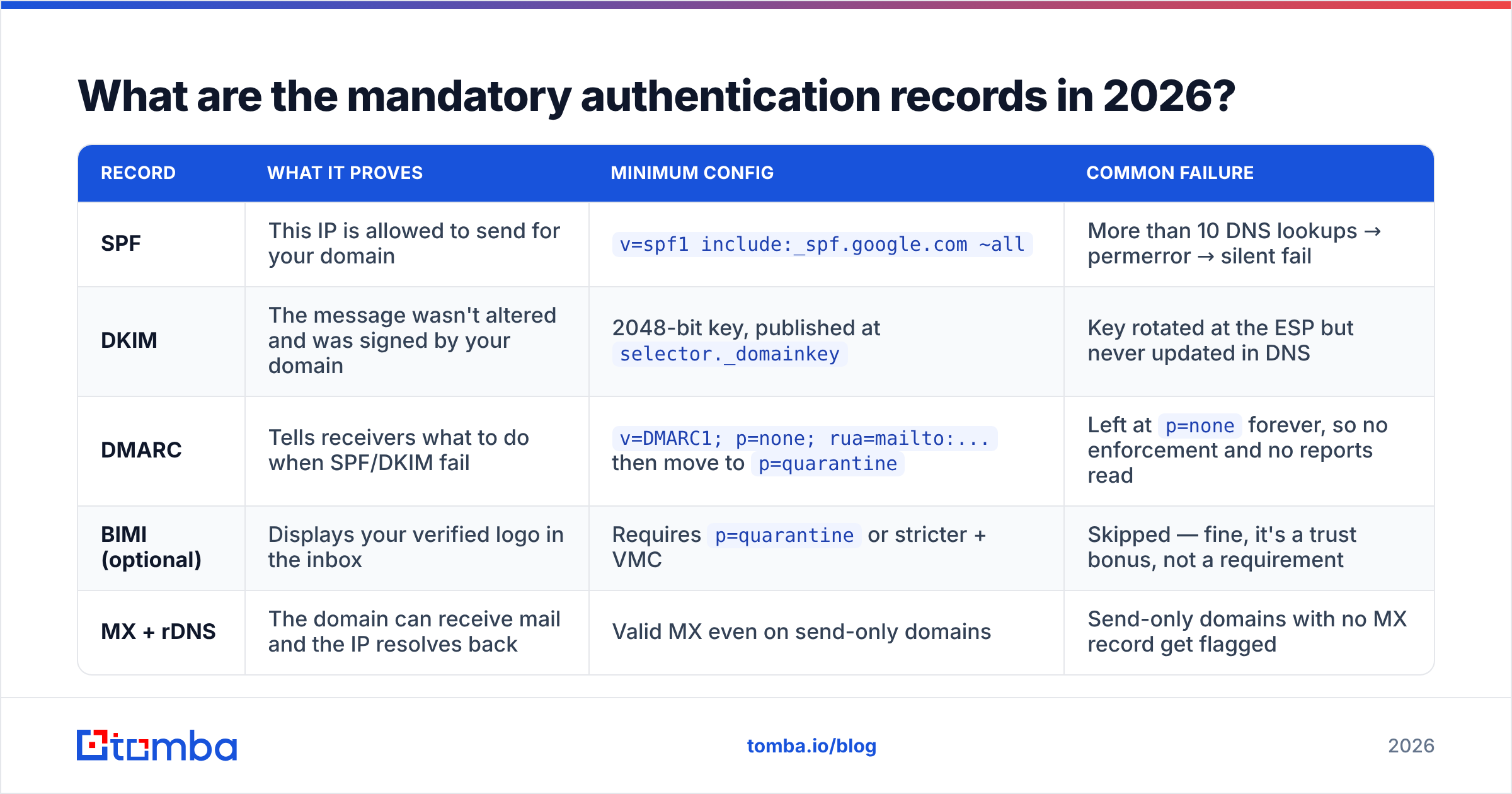
Three DNS records. Non-negotiable since Google and Yahoo's bulk-sender rules landed, and now effectively table stakes for any sender.
| Record | What it proves | Minimum config | Common failure |
|---|---|---|---|
| SPF | This IP is allowed to send for your domain | v=spf1 include:_spf.google.com ~all |
More than 10 DNS lookups → permerror → silent fail |
| DKIM | The message wasn't altered and was signed by your domain | 2048-bit key, published at selector._domainkey |
Key rotated at the ESP but never updated in DNS |
| DMARC | Tells receivers what to do when SPF/DKIM fail | v=DMARC1; p=none; rua=mailto:... then move to p=quarantine |
Left at p=none forever, so no enforcement and no reports read |
| BIMI (optional) | Displays your verified logo in the inbox | Requires p=quarantine or stricter + VMC |
Skipped — fine, it's a trust bonus, not a requirement |
| MX + rDNS | The domain can receive mail and the IP resolves back | Valid MX even on send-only domains | Send-only domains with no MX record get flagged |
Two details that trip up most senders:
Alignment matters more than passing. SPF can pass while DMARC still fails. DMARC requires the domain in your visible From header to align with the domain that passed SPF or DKIM. If you send from you@yourcompany.com but your ESP's return-path is bounces@sendingtool.net, SPF passes for the tool and fails alignment for you. DKIM signing with your own domain fixes this.
p=none is not DMARC. It's a monitoring mode. Plenty of senders publish p=none, tick the box, and never advance. Read your aggregate reports for two weeks, confirm every legitimate stream authenticates, then move to p=quarantine; pct=100.
You can sanity-check your setup in under a minute with a free SPF checker. Then confirm you're not already listed anywhere with a blacklist checker.
How do you separate your sending domains?#
Never send cold outbound from your primary domain. If yourcompany.com gets burned, your invoices, password resets, and support replies burn with it.
The standard architecture:
- Primary domain (
yourcompany.com) — transactional mail, support, internal. Never used for cold outreach. - Sending domains (
getyourcompany.com,yourcompany.co,try-yourcompany.com) — registered separately, each fully authenticated, each pointed at your real site with a redirect so they don't look abandoned. - 2–3 mailboxes per sending domain, each capped well under provider limits.
- A dedicated tracking domain per sending domain — shared tracking CNAMEs from open-link platforms are a documented reputation liability.
Buy the sending domains at least 30 days before you need them. Domain age is a weak signal on its own. But a domain registered yesterday sending 300 cold emails today is a strong negative one.
What sending volume is actually safe?#
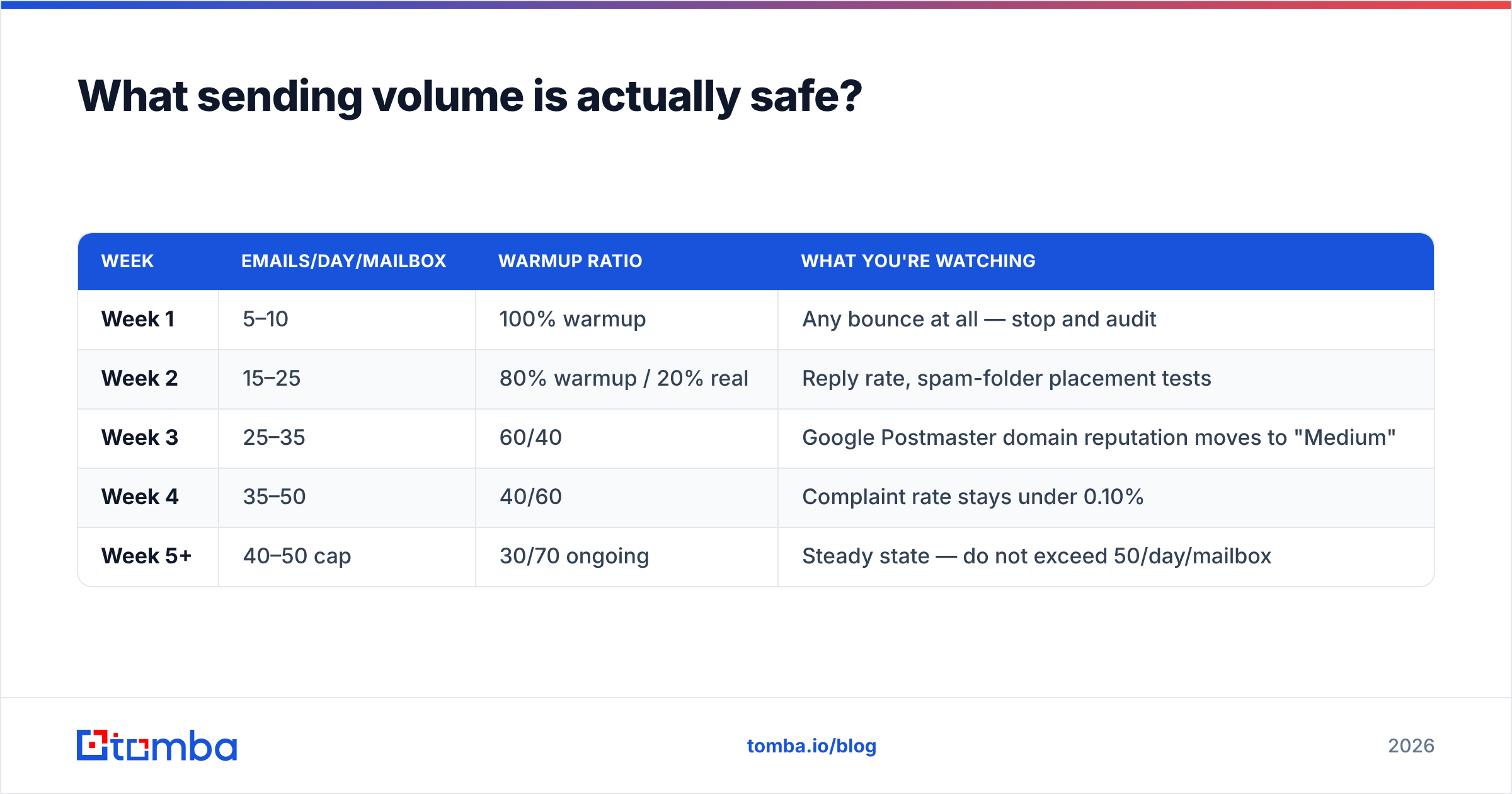
Here's the ramp that survives contact with Gmail. Per mailbox, not per domain:
| Week | Emails/day/mailbox | Warmup ratio | What you're watching |
|---|---|---|---|
| Week 1 | 5–10 | 100% warmup | Any bounce at all — stop and audit |
| Week 2 | 15–25 | 80% warmup / 20% real | Reply rate, spam-folder placement tests |
| Week 3 | 25–35 | 60/40 | Google Postmaster domain reputation moves to "Medium" |
| Week 4 | 35–50 | 40/60 | Complaint rate stays under 0.10% |
| Week 5+ | 40–50 cap | 30/70 ongoing | Steady state — do not exceed 50/day/mailbox |
Two hard rules people ignore:
- 50/day/mailbox is the practical ceiling for cold outbound, regardless of what your provider allows. Google Workspace permits 2,000/day. That limit exists for newsletters to opted-in lists, not cold sequences. Scale with more mailboxes, not higher per-mailbox volume.
- Keep warmup running forever. People switch it off at week 5 and watch placement decay over the next month. Warmup traffic is the positive-engagement counterweight to cold traffic that mostly gets ignored.
Run the numbers for your own target with a warmup calculator before you commit to a mailbox count.
Does list quality matter more than copy?#
Yes, and it isn't close. Bounce rate is the fastest reputation killer available to you.
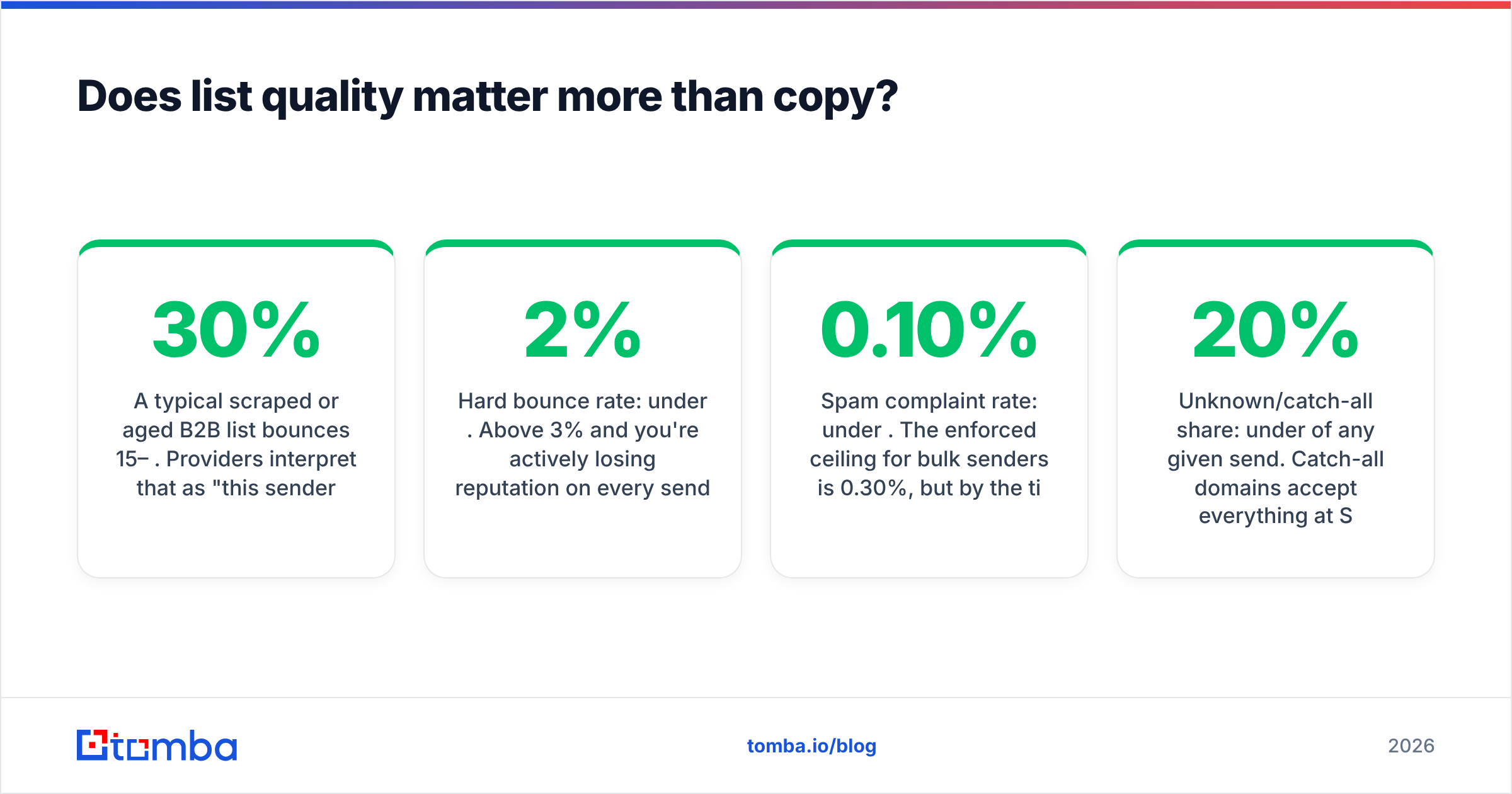
A typical scraped or aged B2B list bounces 15–30%. Providers read that as "this sender doesn't know who they're mailing," which is exactly what spammers look like. Mailbox providers also seed recycled spam traps. These are real addresses that were abandoned, left to hard-bounce for months, then switched back on as traps. Hitting one is a direct signal that your list is old and unpermissioned.
Target thresholds:
- Hard bounce rate: under 2%. Above 3% and you're actively losing reputation on every send.
- Spam complaint rate: under 0.10%. The enforced ceiling for bulk senders is 0.30%, but by the time you're near it, damage is already done.
- Unknown/catch-all share: under 20% of any given send. Catch-all domains accept everything at SMTP time and bounce later, or never — they hide bad addresses.
- Role accounts: exclude by default.
info@,admin@,contact@correlate with complaints and rarely convert in outbound.
This is where verification pays for itself. Running a list through an email verifier before a campaign turns a 22% bounce disaster into a sub-2% send. For the ambiguous middle — domains that accept everything — a dedicated catch-all verifier resolves whether the mailbox actually exists instead of forcing you to guess.
Better still: don't acquire bad data in the first place. Source contacts through an email finder that returns a confidence score and verifies at discovery time. Then the hygiene work is already done before the address hits your sequence.
What content patterns still trigger filters?#
Content is the last 10%, but the last 10% still matters when everything else is borderline. What actually correlates with filtering in 2026:
- URL shorteners (bit.ly, tinyurl) — heavily abused, treated as evasion. Use full URLs on your own domain.
- Link count — one link in a cold email. Two if you must. Five looks like a newsletter blast.
- Image-heavy or template-heavy HTML — cold email should be plain-text or near-plain-text. A 40 KB HTML template with a tracking pixel, a logo, and a footer of social icons reads as bulk marketing.
- Open tracking pixels — increasingly a net negative. Apple Mail Privacy Protection has made open data mostly fiction anyway. Turning pixels off removes a filter signal and costs you a metric you shouldn't have trusted.
- Identical body copy at scale — vary more than
{{first_name}}. Providers cluster near-duplicate messages across recipients. - Missing unsubscribe path — bulk senders need one-click unsubscribe. For 1:1 cold outreach, a plain "reply STOP and I'll remove you" line reduces complaints measurably.
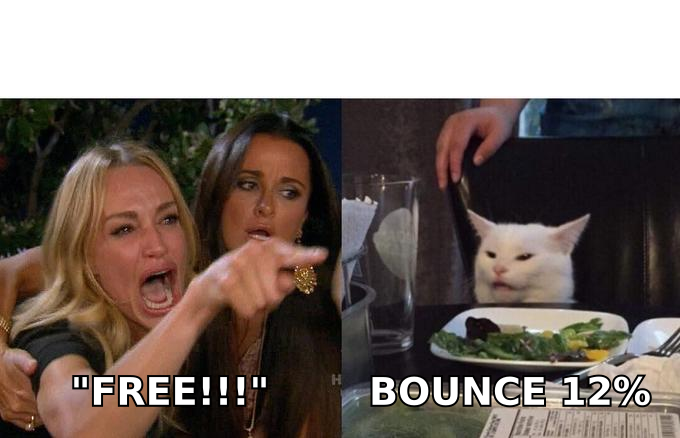
Spam-word lists are largely obsolete. "Free" in a well-authenticated, low-complaint, plain-text email from an established domain is fine. "Free" from a two-week-old domain with 18% bounces is not — and the word was never the problem.
You can pressure-test a draft with a spam checker to catch obvious structural issues — but treat the score as a hygiene check, not a strategy.
How do you monitor placement instead of guessing?#
Three instruments, all of which you should have running before you scale:
Google Postmaster Tools. Free, and the only first-party view of how Gmail sees your domain. Watch Domain Reputation, IP Reputation, and Spam Rate. If Domain Reputation drops to "Low," stop sending immediately and audit — recovery takes weeks, not days. Set it up at postmaster.google.com.
Seed list placement tests. Send to a controlled set of Gmail, Outlook, and Yahoo accounts before each campaign wave. Record whether you landed in Primary, Promotions, or Spam. This is the only way to know placement — your ESP reports "delivered" for spam-foldered mail too.
Reply-rate as a proxy. Replies are the strongest positive engagement signal available. A sudden reply-rate drop with stable copy usually means placement moved, not that your message got worse.
For the underlying concepts, the email deliverability and sender reputation entries are a useful reference. Google's own bulk-sender guidelines remain the authoritative source for the thresholds themselves.
What does a recovery plan look like if you're already in spam?#
Assume 3–6 weeks. There is no reset button.
- Stop all cold sending on the affected domain. Immediately. Continuing to send while flagged deepens the hole.
- Audit authentication. Confirm SPF passes with under 10 lookups, DKIM is signing with your domain, and DMARC alignment is real. Fix before anything else.
- Purge the list. Re-verify every address. Delete hard bounces, role accounts, and anything unverified. Do not "just try again."
- Run warmup only for 14 days minimum at low volume. No campaigns.
- Restart at 5 emails/day and follow the ramp table above. Yes, from the beginning.
- Split the risk. Bring up fresh sending domains in parallel so a single burned domain never gates your pipeline again.
If the domain's reputation is "Bad" in Postmaster Tools and hasn't moved after a month of clean sending, retire it. A $12 domain is cheaper than another six weeks of guessing.
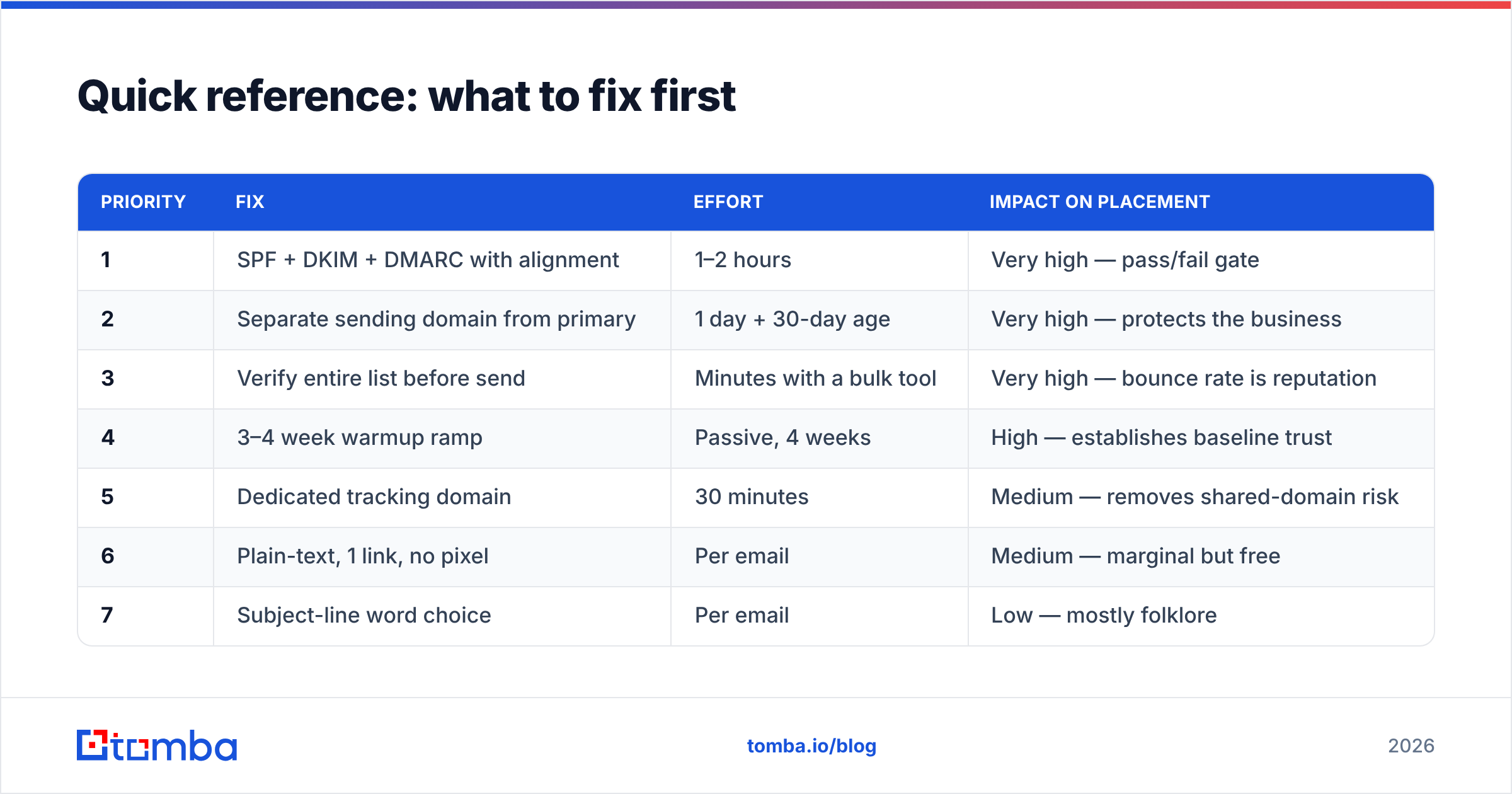
How to avoid spam folder placement: what to fix first#
| Priority | Fix | Effort | Impact on placement |
|---|---|---|---|
| 1 | SPF + DKIM + DMARC with alignment | 1–2 hours | Very high — pass/fail gate |
| 2 | Separate sending domain from primary | 1 day + 30-day age | Very high — protects the business |
| 3 | Verify entire list before send | Minutes with a bulk tool | Very high — bounce rate is reputation |
| 4 | 3–4 week warmup ramp | Passive, 4 weeks | High — establishes baseline trust |
| 5 | Dedicated tracking domain | 30 minutes | Medium — removes shared-domain risk |
| 6 | Plain-text, 1 link, no pixel | Per email | Medium — marginal but free |
| 7 | Subject-line word choice | Per email | Low — mostly folklore |
Work top-down. Skipping to row 7 is what most people do, and it's why most people stay in spam.
Where does data quality fit into all of this?#
At the top of the funnel, which is why it's easy to overlook. Every deliverability problem downstream of a bad list is a symptom, not a cause. You cannot warm your way out of a 20% bounce rate. And no amount of copy editing fixes a list full of guessed permutations.
The practical fix is to verify at acquisition rather than at send. Source contacts with a tool that runs SMTP-level checks and returns a confidence score at the moment of discovery. Your list then arrives clean — no separate cleanup step, no surprise bounce spike on send day. Tomba's Email Finder does exactly that: verified professional addresses by name, domain, or company, with the Email Verifier and catch-all verifier handling the edge cases that break most cold campaigns.
Start free with 25 searches a month. Move to Starter at $49/mo when you're running real volume — full Tomba pricing is public. The same verification runs through the Tomba API if you'd rather bake it into your own pipeline. That is how to avoid spam folder placement without guesswork: fix the list, fix the DNS, and ramp slowly.
Related guides#
Ready to find emails that actually work?
Join 150,000+ professionals who stopped guessing and started sending. Free credits on signup — no credit card required.
Get the Tomba newsletter
Practical outbound tactics and product updates — once every two weeks.
About the author