How To Compile An Email List That Actually Converts in 2026
Most B2B email lists are compiled backwards — scrape first, think later. Here is the 6-step method that produces a list your sending domain can survive, plus the tool costs at each stage.
TL;DR
- Compiling an email list is four jobs, not one: define the ICP, source the companies, find the people, verify the addresses. Skipping step four is what kills domains.
- A 500-contact list built from a tight ICP outperforms a 50,000-row scrape on every metric that matters — reply rate, deliverability, and cost per meeting.
- Budget roughly $50–$150/month in tooling for a solo founder or small SDR team. Tomba's Starter plan is $49/mo; enrichment-heavy stacks run higher.
- Verify every address before it enters your sequencer, and re-verify anything older than 90 days. B2B data decays about 2-2.5% per month.
- Purchased lists are legal in most B2B contexts but almost always underperform a list you compile yourself, because you control the targeting criteria.
What does "compile an email list" actually mean?#
Compiling an email list means assembling a set of contactable business email addresses that match a defined buyer profile — and proving each address is real before you send to it.
That definition rules a lot of things out. It rules out downloading a 200,000-row CSV from a data broker and calling it a list. It rules out exporting every LinkedIn connection you've ever made. It rules out the "we'll clean it later" plan, which nobody ever executes.
Think of it like stocking a restaurant kitchen. You don't buy every ingredient in the market because it's cheap. You buy what your menu needs, you check the produce before it goes in the walk-in, and you throw out what's spoiled. A list is the same: targeted intake, quality check at the door, regular purges.
Here's the four-job breakdown that every good list build follows:
- Define the ICP — industry, headcount band, geography, tech stack, and the job titles that own the problem you solve. Written down, not vibes.
- Source the accounts — build a company list first. Companies are stable; people move.
- Find the people — locate the specific humans at those companies and resolve their work email addresses.
- Verify and segment — confirm deliverability, strip risky addresses, then split the list by the angle you'll use.
Do them in that order. Teams that start at step three end up with a list of contacts they can't explain the logic behind, which makes every downstream decision — copy, sequencing, offer — guesswork.
Why do most compiled lists fail before the first send?#
Because volume gets optimized instead of fit. Someone gets asked for "10,000 leads by Friday," and the fastest path to 10,000 rows is to loosen every filter until the number comes out right.
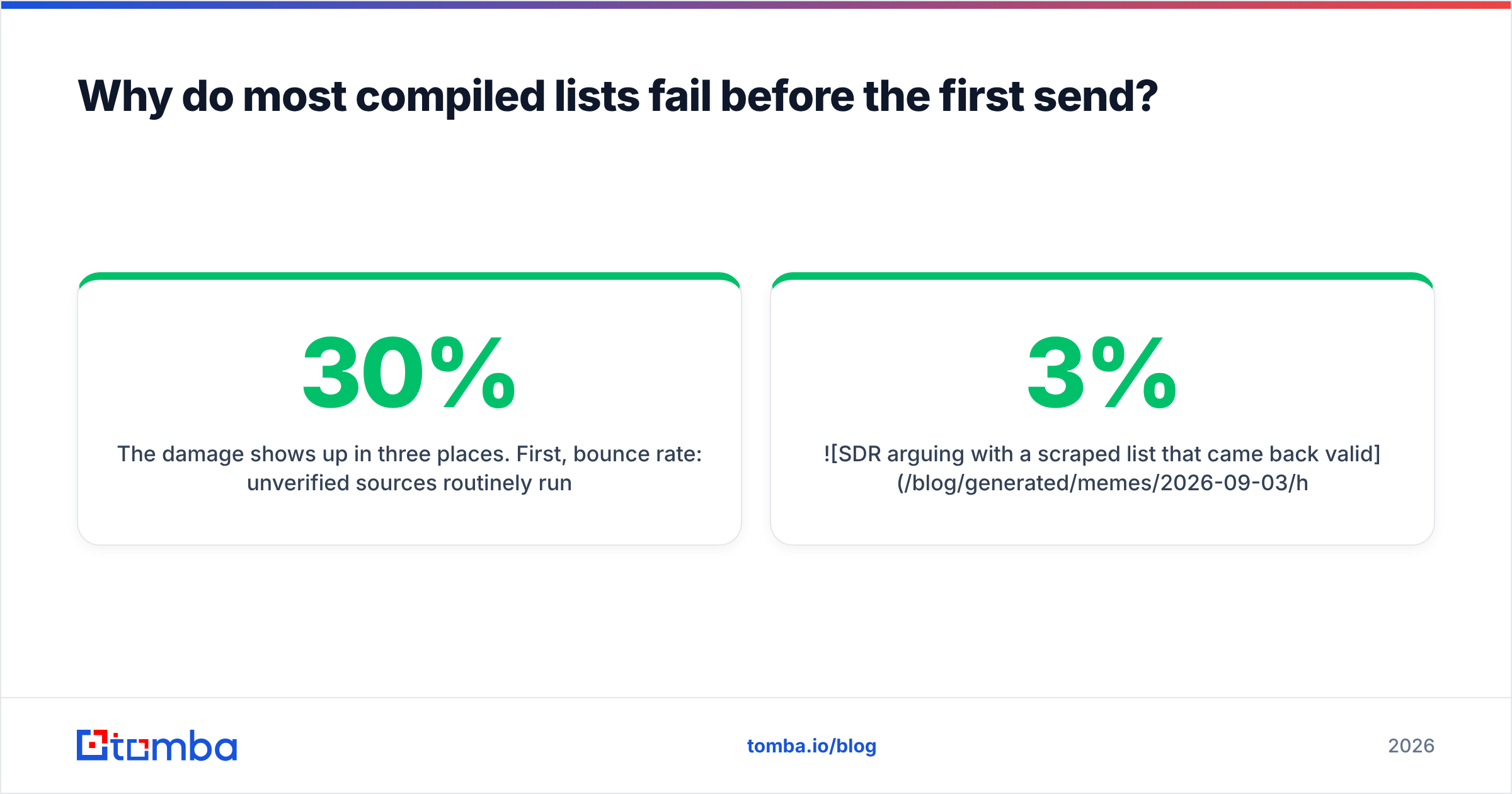
The damage shows up in three places. First, bounce rate: unverified sources routinely run 15–30% invalid, and mailbox providers start throttling you above roughly 2–3%. Second, spam complaints: contacts who don't fit your ICP have no reason to see your email as anything but noise. Third, your own sales team's morale, which is harder to rebuild than a sending domain.

There's also a quieter failure mode: list drift. You compile a good list in January, use it in March, and by September a third of those people have changed jobs. Nothing about the file looks wrong. The addresses just quietly stop resolving to real humans, and your reply rate slides without an obvious cause.
What are the main ways to compile an email list?#
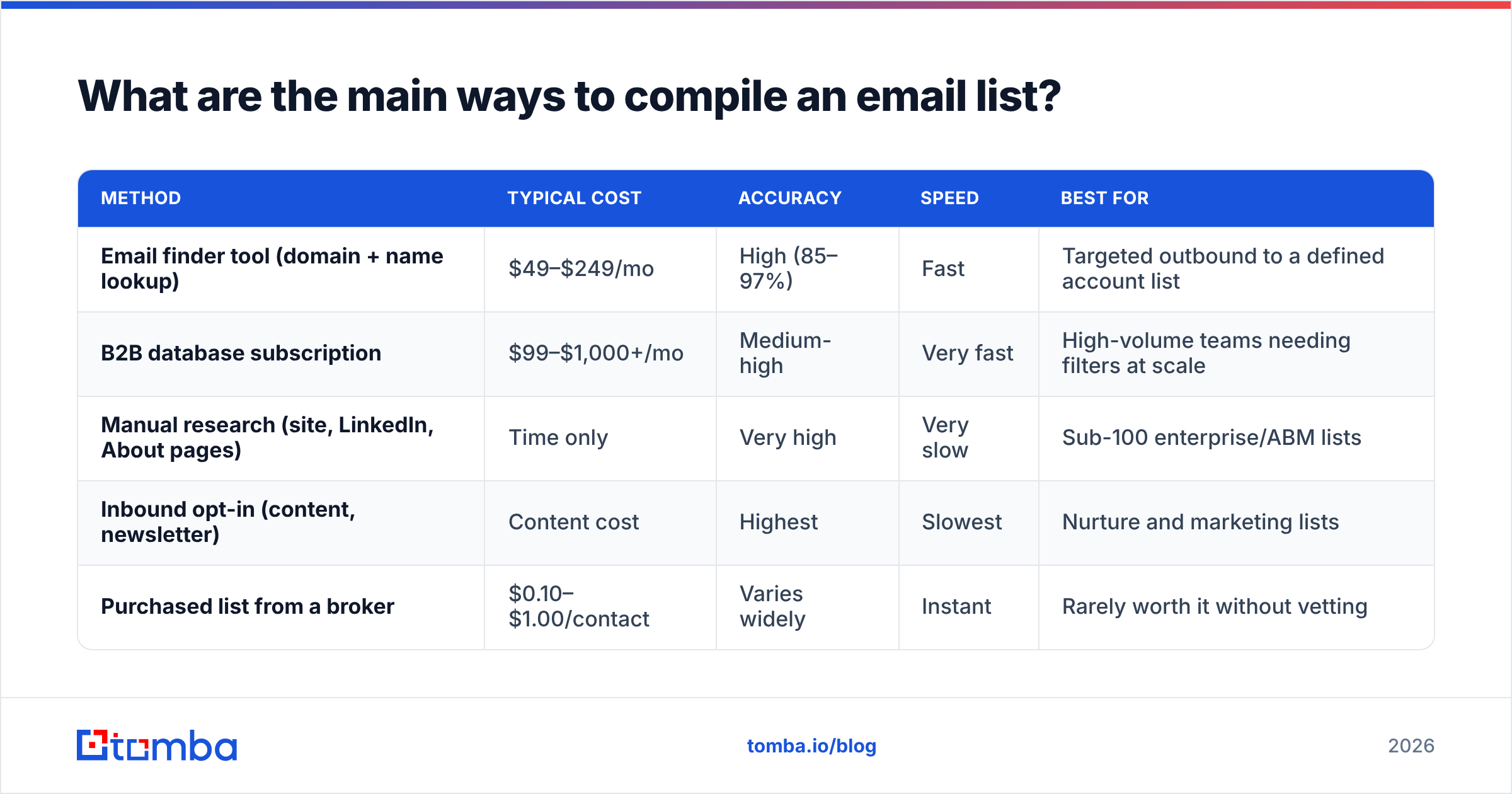
There are five realistic sourcing methods, and most good lists use two or three in combination. Here's how they compare on the things you actually care about.
| Method | Typical cost | Accuracy | Speed | Best for |
|---|---|---|---|---|
| Email finder tool (domain + name lookup) | $49–$249/mo | High (85–97%) | Fast | Targeted outbound to a defined account list |
| B2B database subscription | $99–$1,000+/mo | Medium-high | Very fast | High-volume teams needing filters at scale |
| Manual research (site, LinkedIn, About pages) | Time only | Very high | Very slow | Sub-100 enterprise/ABM lists |
| Inbound opt-in (content, newsletter) | Content cost | Highest | Slowest | Nurture and marketing lists |
| Purchased list from a broker | $0.10–$1.00/contact | Varies widely | Instant | Rarely worth it without vetting |
A few notes on reading that table honestly.
Email finder tools are the workhorse for outbound. You feed in a company domain and a person's name, and the tool returns the likely work address plus a confidence score. Tools like Tomba's email finder, Hunter, and Findymail all operate in this shape. The differentiator is coverage on smaller domains and how conservative the confidence scoring is.
B2B databases flip the model: you filter a pre-built index by firmographics and export. BookYourData is a solid example here — it sells verified B2B contacts with pay-as-you-go pricing and a bounce guarantee, which is a genuinely different commercial model from monthly credits and worth pricing out if your volume is lumpy rather than steady. Apollo and ZoomInfo play in the same lane at very different price points.
Manual research is undervalued. For a 40-account ABM push, an SDR reading the actual About page and the actual LinkedIn profile will out-target any filter you can write.
Purchased lists are legal for B2B in the US under CAN-SPAM and defensible under GDPR's legitimate-interest basis when you're contacting business roles about relevant business matters — but see the FTC's CAN-SPAM compliance guide before you assume that's a blanket permission. The practical problem isn't legality. It's that you didn't choose the criteria, so you can't explain why any given person is on it.
How do you build the account list first?#
Start with companies because company attributes are far more stable than contact attributes. A company's headcount band, industry, and tech stack change slowly. A contact's title and employer change constantly.
Three ways to build the account layer:
- Mine your closed-won CRM data. Export every account you've won in the last 18 months. Look for the shared attributes — not the ones you assumed, the ones actually present. This is the highest-signal input you have and it costs nothing.
- Use technographic filters. If your product integrates with Shopify, Snowflake, or HubSpot, the presence of that technology is a qualification signal. A website tech stack checker confirms it per-domain.
- Work adjacency lists. G2 category pages, conference exhibitor lists, funding announcements, and industry association directories all produce clean company sets. G2's category browser is particularly good for this because the companies self-selected into the category.
Once you have domains, run domain search against each one to see who's actually reachable there and what email pattern the company uses. That pattern matters — a company on first.last@ is predictable, one on f.last@ or randomized aliases is not, and you should know which before you commit budget to finding 40 contacts there.
How do you find and verify the actual addresses?#
Two separate operations, and conflating them is the most common technical mistake in list building.
Finding is pattern resolution: given a name and a domain, produce the most likely address. Good finders combine crawled public sources, historical pattern data, and SMTP-level signals.
Verifying is proving the mailbox exists: MX record check, syntax check, disposable-domain check, role-account detection, and an SMTP handshake that asks the receiving server whether the mailbox accepts mail. Address found ≠ address deliverable.
Run finding at scale with a bulk email finder — upload the name-plus-domain CSV, get results back with confidence scores. Then push everything through an email verifier before anything touches your sequencer.

Three verification results need special handling:
- Catch-all domains. The server accepts mail to any address, so SMTP can't confirm the mailbox exists. These aren't automatically bad — plenty of large enterprises run catch-all — but they need a separate risk bucket. A dedicated catch-all verifier applies additional signals beyond the handshake.
- Role accounts.
info@,sales@,support@. Low reply rates, higher complaint risk. Segment them out of cold sequences. - Accept-all-but-low-confidence. Treat these as a secondary tier. Send to them after your primary tier has established sending reputation, never in the first batch off a new domain.
The rule of thumb: your list should be under 2% bounce before you send. If you can't get there, the list isn't ready, and no amount of clever copy compensates.
What should this cost?#
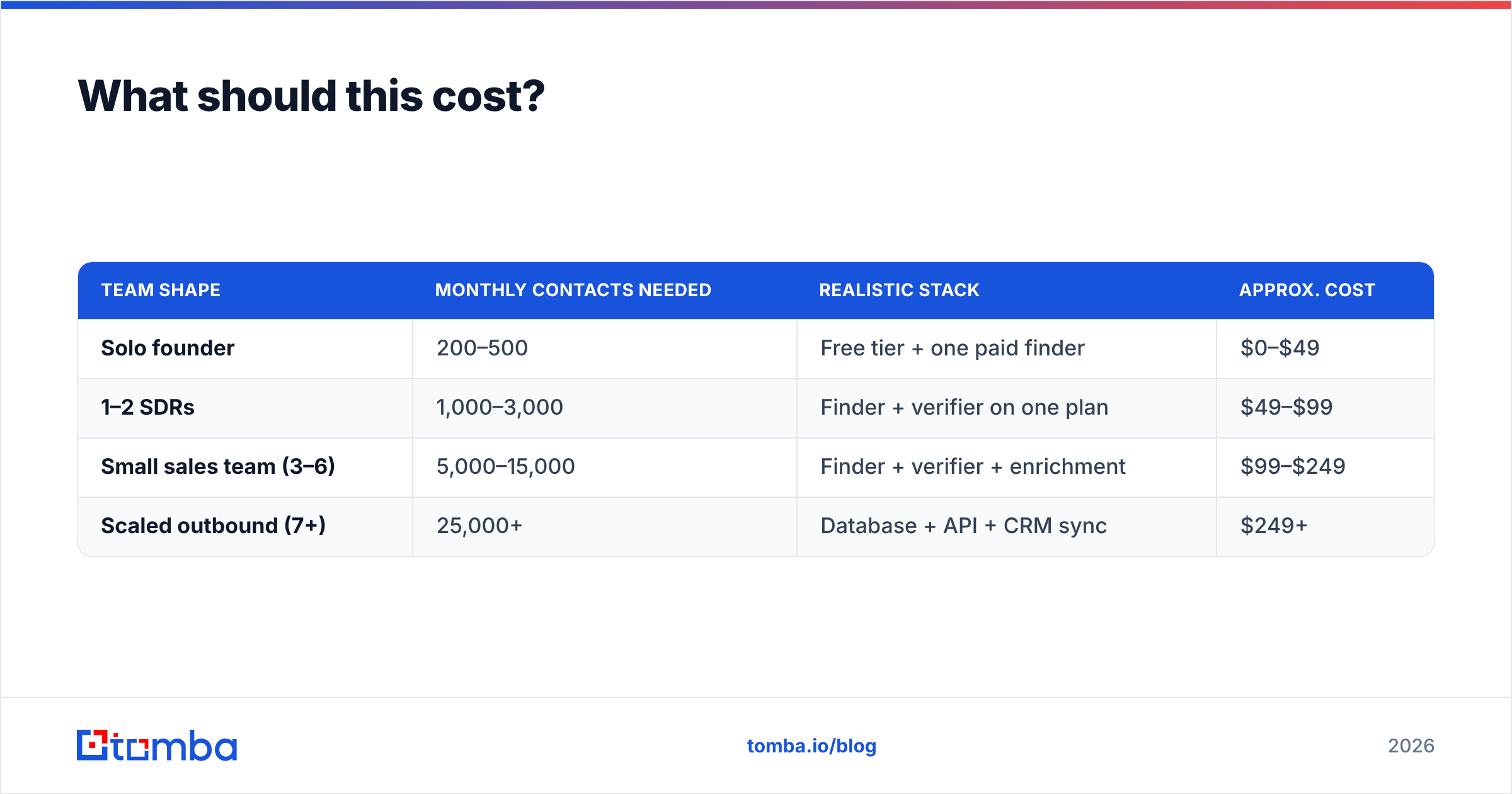
Depends entirely on volume and whether you need enrichment beyond the email address. Rough monthly numbers for the common team shapes:
| Team shape | Monthly contacts needed | Realistic stack | Approx. cost |
|---|---|---|---|
| Solo founder | 200–500 | Free tier + one paid finder | $0–$49 |
| 1–2 SDRs | 1,000–3,000 | Finder + verifier on one plan | $49–$99 |
| Small sales team (3–6) | 5,000–15,000 | Finder + verifier + enrichment | $99–$249 |
| Scaled outbound (7+) | 25,000+ | Database + API + CRM sync | $249+ |
Tomba's pricing maps to that shape: a free tier at 25 searches/month for testing, Starter at $49/mo, Growth at $99/mo, Pro at $249/mo, and custom Enterprise. The reason to check the free tier first is boring but important — coverage varies by geography and company size, and the only way to know whether a tool covers your market is to run 25 of your actual target accounts through it.

Where budgets get wasted: buying a database subscription for filters you never use, and paying for enrichment fields (funding, tech stack, headcount) that never make it into a single email. Buy for the fields your copy actually references.
How do you keep the list from rotting?#
Set a maintenance cadence and treat it as non-negotiable. B2B contact data decays somewhere around 2–2.5% per month — job changes, company closures, domain migrations, mailbox retirements. Over a year that's roughly a quarter of your list.
A workable cadence:
- Weekly — remove hard bounces and unsubscribes immediately. Not "at the end of the sprint." Immediately.
- Monthly — re-verify any segment you're about to send to that hasn't been checked in 60+ days.
- Quarterly — full re-verification pass, plus a deduplication run across sources. Multi-source lists always accumulate duplicates.
- Twice yearly — re-check the ICP itself against closed-won data. Your best-fit customer in H2 is rarely identical to H1.
- Continuously — enrich on job change. When a contact leaves, that's two opportunities: the replacement in the seat, and your champion at their new company.
Job-change tracking is the highest-ROI maintenance activity most teams skip. A data enrichment pass that flags moved contacts turns list decay from a loss into a lead source.
Which sequencing mistakes undo a good list?#
You can compile a technically perfect list and still torch it in week one.
- Sending 2,000 emails from a domain that sent 40 last month. Ramp volume gradually. Check the email warmup calculator for a sane schedule.
- No SPF/DKIM/DMARC alignment. Google and Yahoo's bulk-sender requirements made authentication mandatory, not optional. Run an SPF checker before the first send, and read Google's bulk sender guidelines directly rather than a blog summary of them.
- One message for the whole list. If you segmented properly during compilation, use the segments. A list split into four angles with four different first lines beats a single blast every time.
- No suppression list. Existing customers, open opportunities, competitors, and past unsubscribes all need to be excluded before export. Build the suppression file once and apply it on every send.
What does a good compiled list look like?#
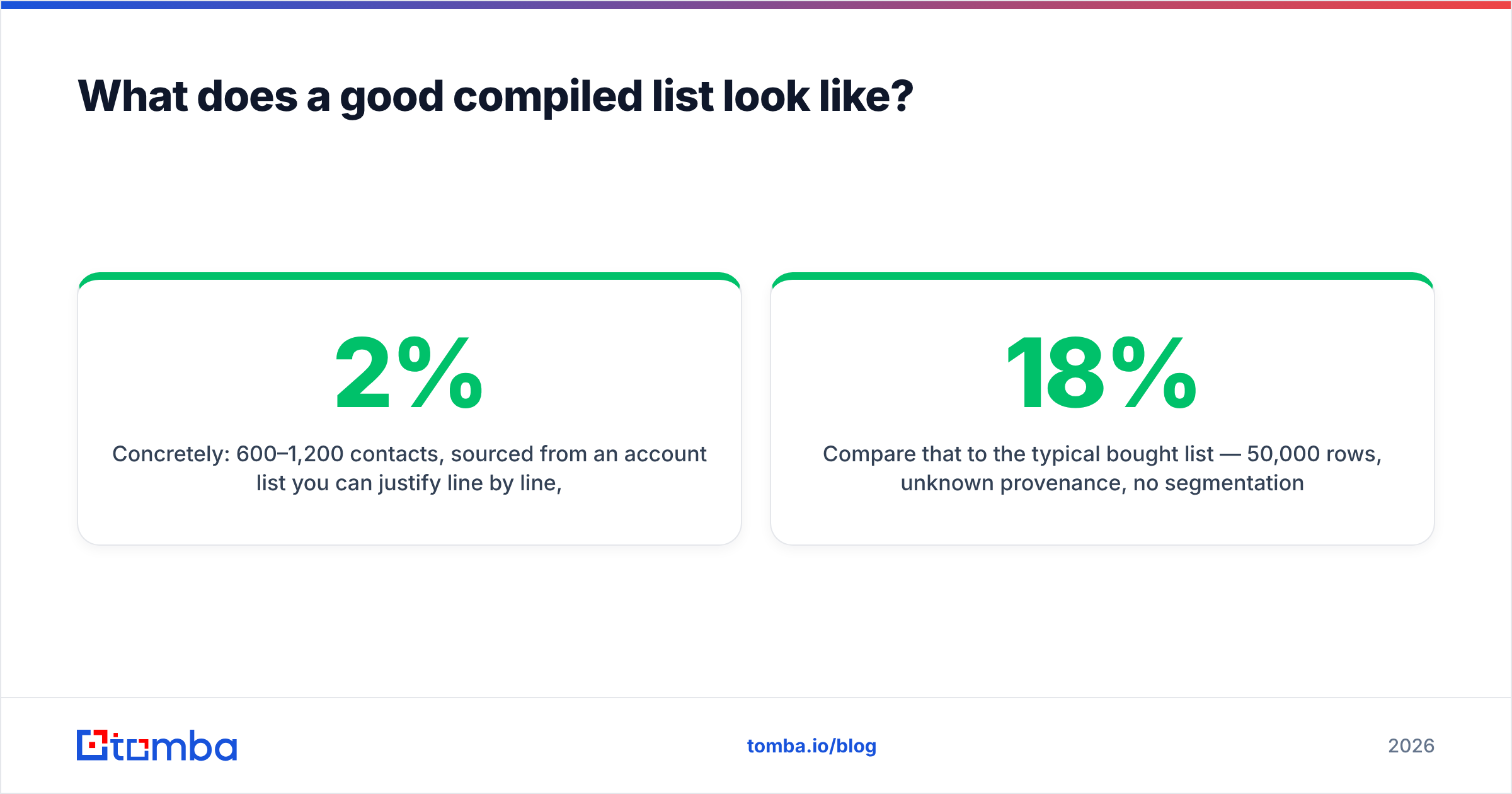
Concretely: 600–1,200 contacts, sourced from an account list you can justify line by line, with a verified email, a confidence tier, a segment tag, and a reason-they're-here field on every row. Bounce rate under 2%. Reply rate above 4% on a decent offer.
Compare that to the typical bought list — 50,000 rows, unknown provenance, no segmentation, 18% bounce, 0.4% reply. The small list produces more meetings, costs less, and doesn't put your domain at risk. It just takes a week of actual thinking to build.
That week is the whole job. The tooling is the easy part.
Start with the account list, then resolve the people. Tomba Email Finder turns a company domain and a contact name into a verified work address with a confidence score, and the free tier gives you 25 searches to test coverage against your own target accounts before you spend anything. Run your ten best-fit accounts through it, check the hit rate on the companies you actually care about, and decide from there.
Related guides#
// get started
Find, verify and enrich your first contacts today
Start on the free plan with 25 searches a month, then scale when your team is ready.
Free plan · No credit card required · GDPR & CCPA
// about the author