How To Do Outbound Sales in 2026: A Step-by-Step Playbook
Most outbound programs fail on list quality and sequencing, not on copy. Here is the 7-step playbook that actually books meetings in 2026, with the numbers you need to hit at each stage.
TL;DR
- Outbound sales works in 2026, but the margin for sloppiness is gone. Bad lists now cost you the whole domain, not just the reply rate.
- The sequence that works: define a narrow ICP, build a verified list, pick one trigger per segment, write a 4-touch multichannel sequence, and measure at the meeting-booked level — not opens.
- Budget roughly 60% of your outbound effort on list and targeting, 30% on messaging, 10% on tooling. Most teams invert this and wonder why nothing lands.
- Benchmarks to hold yourself to: under 2% bounce rate, 40-60% open rate, 4-8% reply rate, 1-2% meeting-booked rate on a cold list.
- Start small. One segment, 100 contacts, 4 touches, two weeks. Fix what breaks before you scale to 1,000.
What is outbound sales, and how is it different from inbound?#
Outbound sales is you initiating contact with a buyer who has not raised a hand. Inbound is the reverse — they found you, filled a form, downloaded something, and you follow up.
The practical difference is who owns the timing. With inbound, the buyer has already decided they have a problem. With outbound, you are betting you can identify a problem the buyer has before they have started shopping for solutions. That bet is only good when your targeting is precise. Spraying a generic pitch across 10,000 contacts is not outbound sales; it's spam with a CRM attached.
Outbound still works because it is the only channel where you control volume. Inbound scales with your content and brand, which take quarters to move. Outbound scales the week you decide to run it — which is why every B2B company with an aggressive number attached to it runs some version of it.
What has changed since 2023 is the enforcement layer. Google and Yahoo's bulk sender requirements now mandate authenticated domains, one-click unsubscribe, and a spam complaint rate under 0.3%. Cross that threshold and your mail goes to spam across the board. That single change killed the volume-first approach and made list quality a survival requirement rather than an optimization.
How do you build an ICP that actually narrows your list?#
Most ICPs are useless because they are written as marketing positioning ("mid-market SaaS companies who value efficiency") rather than as a filter you can apply to a database.
A usable ICP is a set of queryable attributes. Write it as a filter:
- Firmographics — headcount range, revenue band, industry code, geography. Be specific: "50-250 employees, B2B SaaS, US and Canada" beats "growing tech companies."
- Technographics — what they already run. If your product plugs into Salesforce, targeting HubSpot shops wastes credits. A website tech stack check turns this into a hard filter.
- Trigger events — funding rounds, new hires in the buying role, job posts, pricing page changes, expansion into a new market. Triggers are what make a cold email feel timed rather than random.
- Buying committee roles — name the two or three titles who actually sign versus who evaluates. In most B2B deals you are writing to the evaluator and CC-ing nobody.
- Disqualifiers — this list matters as much as the includes. Companies under 20 employees, agencies, or anyone in a regulated vertical you can't service. Write them down and enforce them at the list stage.
If your ICP filter does not cut your total addressable list by at least 80%, it is not a filter. It is a description.
Test it before you scale: pull 50 accounts that match, and ask whether you'd be genuinely disappointed to lose any of them as a customer. If more than a handful feel like filler, tighten the criteria.
How do you build a clean outbound list?#
This is where outbound programs are won or lost, and it is the step most teams rush.
You have three sourcing routes, and they are not equivalent:
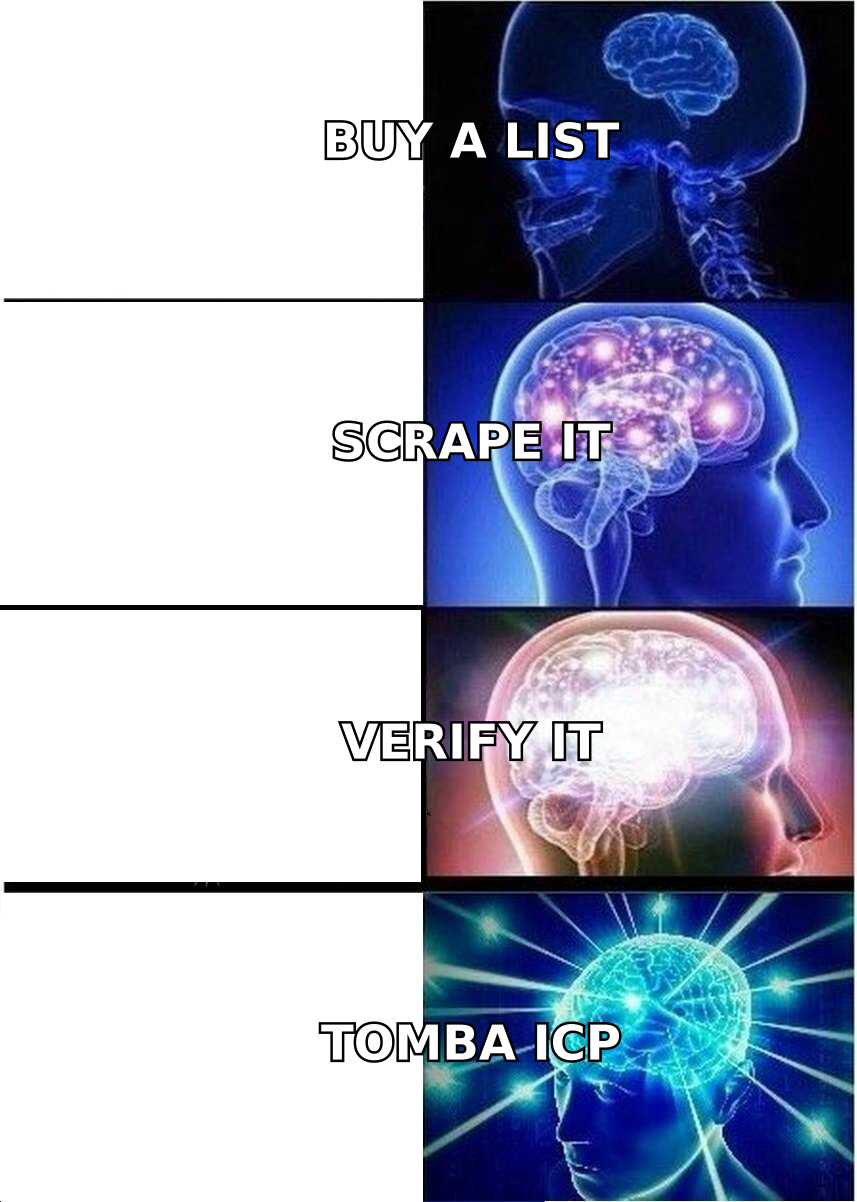
Route 1 — Pre-built database. You pull contacts from a vendor's existing index by filter. Fast, broad, and the quality varies enormously by vendor and by region. Good for volume, weak for niche verticals.
Route 2 — Targeted discovery. You start from a list of target accounts (built from your ICP filter, a conference attendee list, a funding announcement, a customer's competitor set) and find the specific people at those companies. Slower per contact, dramatically higher relevance. A domain search run against 200 target domains gets you named contacts by role rather than a generic pull.
Route 3 — Manual research. Reserved for named enterprise accounts. Expensive, but for a $200k ACV you can justify 30 minutes per contact.
Most teams should run Route 2 as the default and use Route 1 to fill volume gaps.
Whichever route you pick, verification is not optional. Run the list through an email verifier before it touches your sending tool. A list that looks fine in a spreadsheet can carry a 15% invalid rate, and that alone will tank your domain reputation inside two weeks.

Catch-all domains deserve a specific mention. Roughly 20-25% of B2B domains accept mail to any address, which means standard SMTP verification returns "unknown" rather than valid or invalid. Sending blind into catch-alls is how careful teams still end up with a 9% bounce rate. Either route them through a catch-all verifier or segment them into a separate, lower-volume send.
How do the main list-building approaches compare?#
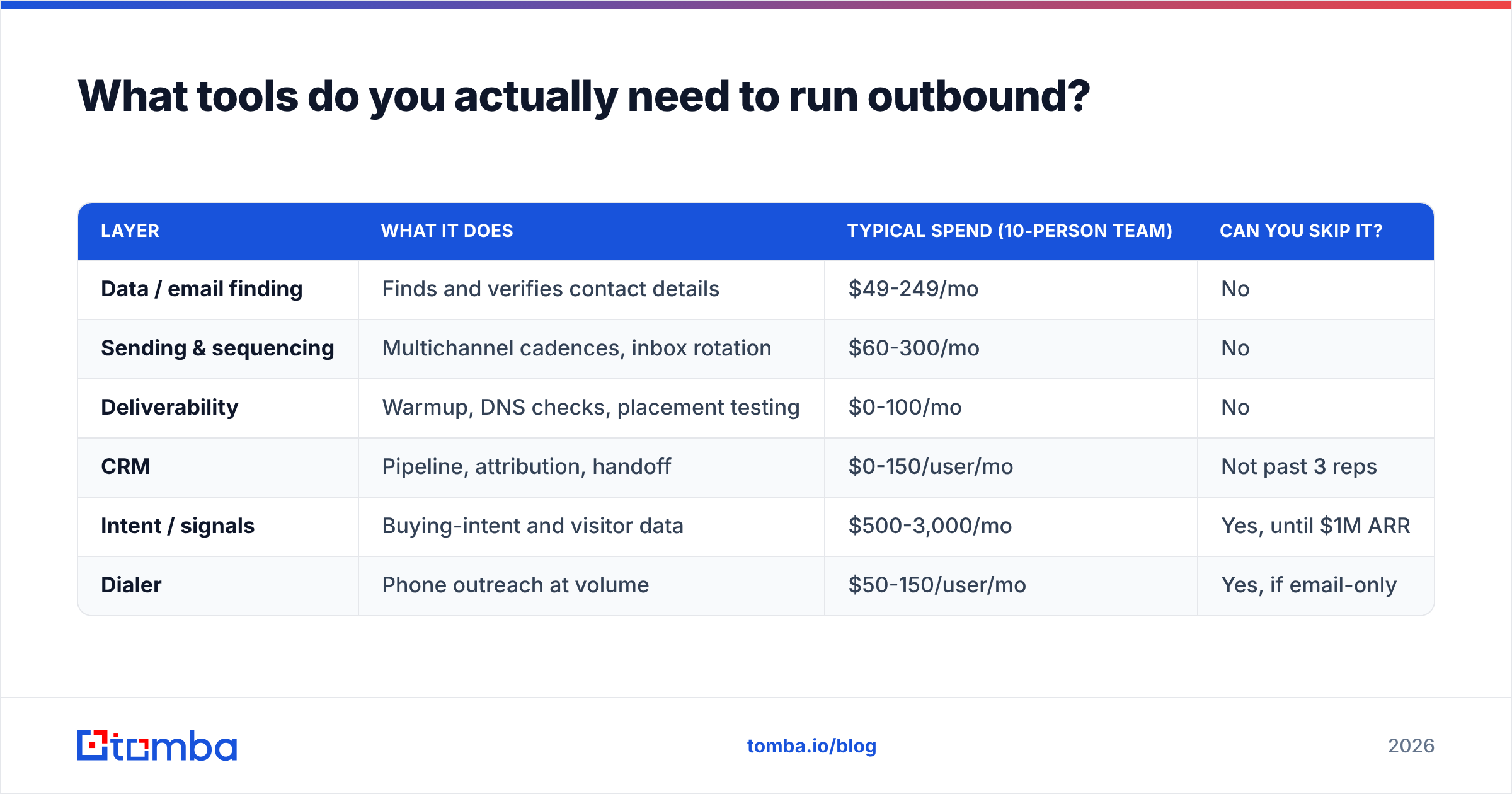
| Factor | Pre-built database | Targeted discovery | Manual research |
|---|---|---|---|
| Speed per 1,000 contacts | Minutes | 1-2 hours | 40+ hours |
| Typical bounce rate | 6-12% unverified | 1-3% verified | Under 1% |
| Relevance to ICP | Medium | High | Very high |
| Cost per contact | $0.02-0.10 | $0.05-0.15 | $3-10 (labor) |
| Best for | Broad SMB motion | Mid-market, defined ICP | Enterprise named accounts |
| Trigger data included | Rarely | Often | Always |
| Scales past 10k/mo | Yes | Yes, with API | No |
For most teams running a defined ICP, targeted discovery is the right default — it's the only route where cost and accuracy both stay reasonable at scale.
What tools do you actually need to run outbound?#
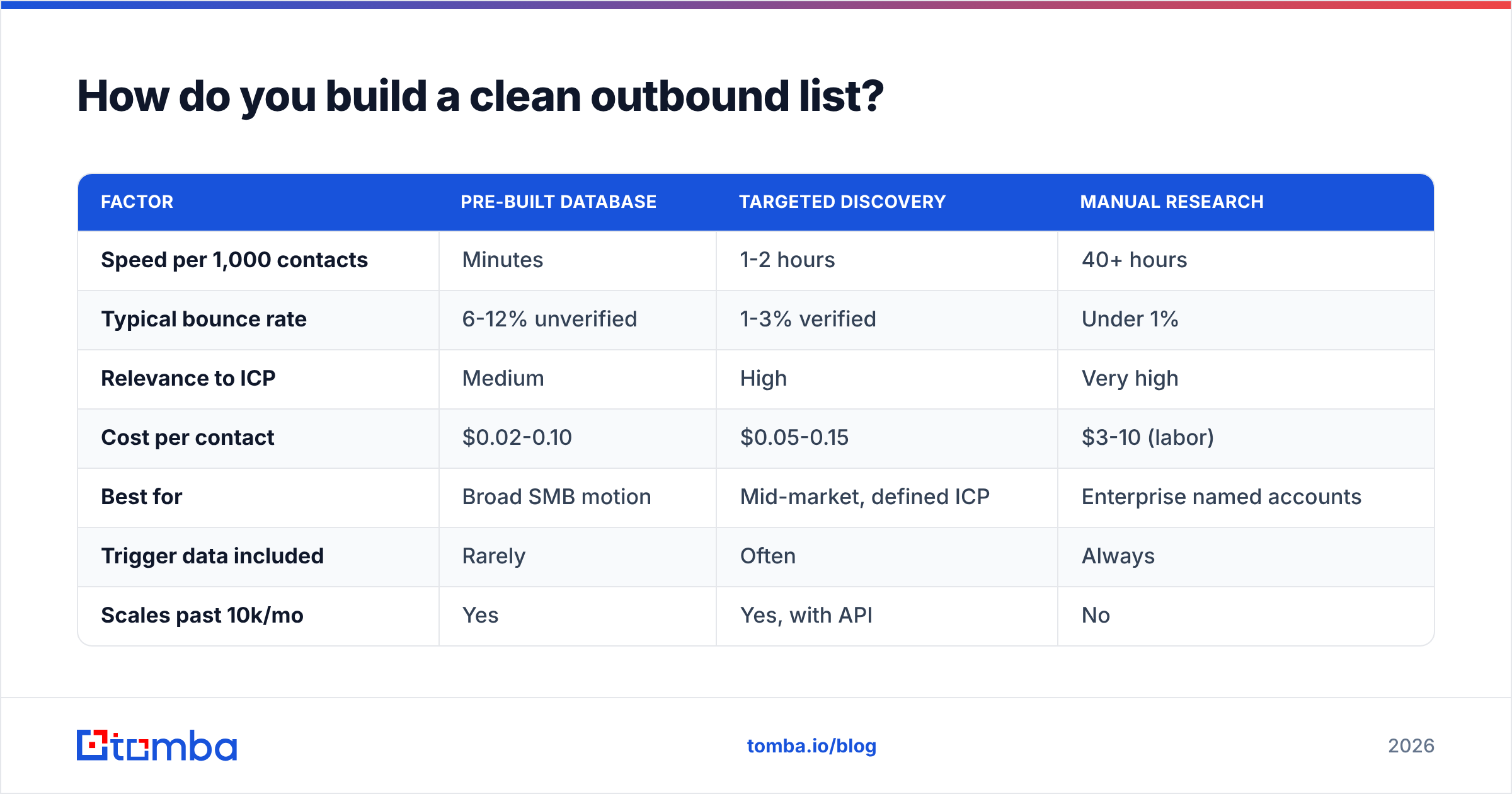
Fewer than vendors would like you to believe. The stack has four required layers and everything else is optional.
| Layer | What it does | Typical spend (10-person team) | Can you skip it? |
|---|---|---|---|
| Data / email finding | Finds and verifies contact details | $49-249/mo | No |
| Sending & sequencing | Multichannel cadences, inbox rotation | $60-300/mo | No |
| Deliverability | Warmup, DNS checks, placement testing | $0-100/mo | No |
| CRM | Pipeline, attribution, handoff | $0-150/user/mo | Not past 3 reps |
| Intent / signals | Buying-intent and visitor data | $500-3,000/mo | Yes, until $1M ARR |
| Dialer | Phone outreach at volume | $50-150/user/mo | Yes, if email-only |
On the data layer, pricing spreads widely. Tomba pricing starts free at 25 searches per month, with Starter at $49/mo, Growth at $99/mo, and Pro at $249/mo. BookYourData takes a different approach with pay-as-you-go credits and a bounce guarantee, which suits teams doing occasional bulk pulls rather than continuous discovery. Broader platforms like Apollo bundle data with sequencing, which is convenient but means you're locked into their data quality for both jobs. If you already run a sequencer you like, an Apollo alternative focused purely on data usually costs less and finds more.
Do not buy an intent-data platform in your first year of outbound. It is a scaling tool, not a starting tool, and it produces noise you don't yet have the process to filter.

How do you set up deliverability before your first send?#
Do this before you write a single email. Reputation damage takes weeks to repair and minutes to cause.
- Use a separate sending domain. Never send cold outbound from your primary domain. Register a lookalike (yourcompany-mail.com, getyourcompany.com), point it at your main site, and send from there. If it burns, your corporate mail is untouched.
- Authenticate fully. SPF, DKIM, and DMARC on the sending domain, no exceptions. Google and Yahoo both require this for bulk senders now. Verify with an SPF checker rather than trusting your DNS provider's UI.
- Warm up for 3-4 weeks. Start at 5 emails per day per mailbox, add roughly 5 per day. Do not skip to 50. A warmup calculator gives you the ramp schedule.
- Cap at 30-50 cold sends per mailbox per day. More mailboxes, not more volume per mailbox. Three mailboxes at 40/day beats one at 120/day every time.
- Monitor blacklists weekly. A blacklist checker run takes 30 seconds and catches problems while they're still fixable.
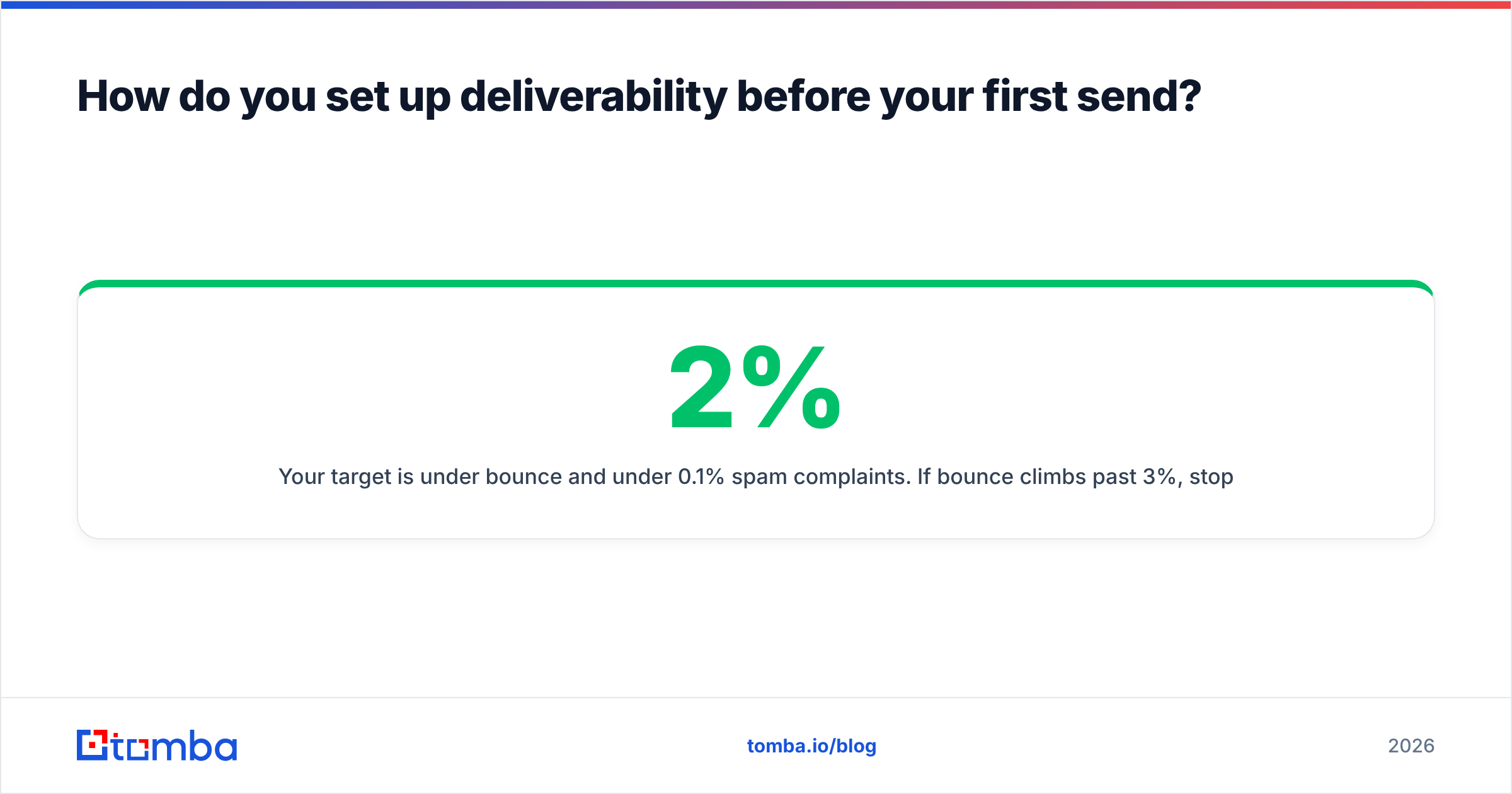
Your target is under 2% bounce and under 0.1% spam complaints. If bounce climbs past 3%, stop sending and re-verify the list — do not push through it.
How do you structure a sequence that gets replies?#
Four to six touches over 14-18 days, across at least two channels. Not 12 touches over 60 days, which is where most sequences drift into harassment.
A working structure:
- Day 1 — Email 1. One specific observation about their company, one sentence on the problem it implies, one low-friction ask. Under 90 words. No attachments, no images, one link at most.
- Day 3 — LinkedIn view + connection request. No pitch in the note. You are creating name recognition before touch 3.
- Day 5 — Email 2. Different angle, not a "just bumping this." Reference a peer company outcome with a real number.
- Day 9 — Phone call. Two attempts at different times of day. Leave a voicemail on the second that references the emails.
- Day 14 — Email 3. The short one. Three sentences, direct ask, explicit permission to say no.
- Day 18 — Break-up or nurture move. Either close the loop or move them to a quarterly touch list.
The thing that moves reply rate most is not the copy — it's whether touch 1 proves you looked at their specific situation. A generic email at perfect cadence loses to a rough email that names a real detail about their business.
Personalization at scale means picking one variable that is cheap to research across your whole segment: recent funding, a specific job posting, a technology they added, a competitor they lost a deal to. One variable applied consistently beats deep research on 10% of your list.
Keep subject lines to 3-5 words, lowercase, and boring. "quick question re: onboarding" outperforms anything clever. If you're stuck, a subject line tester will at least catch the spam-trigger words.

What numbers tell you whether outbound is working?#
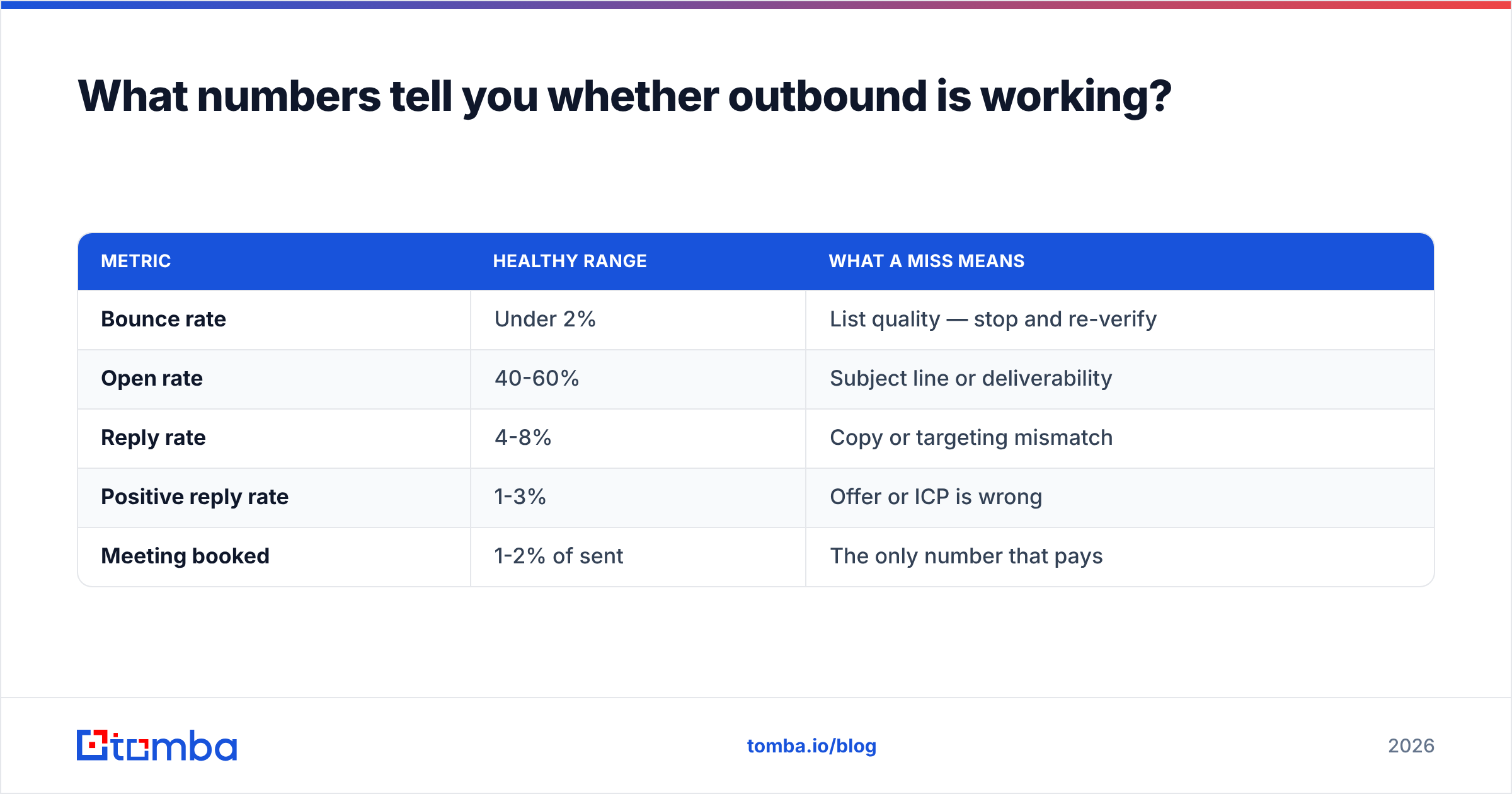
Track four, ignore the rest.
| Metric | Healthy range | What a miss means |
|---|---|---|
| Bounce rate | Under 2% | List quality — stop and re-verify |
| Open rate | 40-60% | Subject line or deliverability |
| Reply rate | 4-8% | Copy or targeting mismatch |
| Positive reply rate | 1-3% | Offer or ICP is wrong |
| Meeting booked | 1-2% of sent | The only number that pays |
Open rate has become unreliable since Apple Mail Privacy Protection inflates it, so treat it as directional only. Reply rate and meetings booked are the honest numbers.
Diagnose in order. Bad bounce is a data problem. Good bounce plus bad open is a deliverability problem. Good open plus bad reply is a message problem. Good reply plus bad meetings is an offer or ICP problem. Fixing them out of order wastes weeks — you cannot A/B test copy on a list that isn't landing in the inbox.
Track response rate per segment, not in aggregate. A 5% overall reply rate might be one segment at 12% and three at 1%. The aggregate hides the signal you need.
Run one variable at a time and give each test at least 200 sends per variant before you call it. Below that, you're reading noise.
What are the most common outbound mistakes?#
- Scaling before the pilot works. Running 5,000 sends on an untested sequence turns a fixable problem into a burned domain and a poisoned list.
- Confusing activity metrics with outcomes. 400 emails sent per rep per day is a vanity number if it produces two meetings a month.
- Skipping verification to save money. The credits you save on verification cost 10x in domain reputation and rep time chasing dead addresses.
- Writing to the wrong seniority. VPs delegate evaluation. Directors and senior managers reply more and often carry the internal case for you.
- Abandoning after four touches. Roughly half of meetings come from touch 3 or later. Teams that quit at touch 2 leave most of the pipeline unclaimed.
- No handoff process. A booked meeting that no one prepped for converts worse than a cold call. Define what happens between "yes" and the call.
The pattern across all six: teams optimize the visible part (copy, volume) and neglect the invisible parts (list quality, follow-through, handoff), because the invisible parts don't produce a dashboard number on day one.
How do you scale outbound past the first 1,000 contacts?#
Only after your pilot hits benchmark. Then scale on three axes, one at a time.
Axis 1 — More segments. Take the sequence that worked for segment A and rebuild it for segment B with new triggers. Do not copy-paste the copy; copy the structure.
Axis 2 — More mailboxes. Add sending capacity in domain-and-mailbox blocks, warmed up on the same 3-4 week schedule. Never raise per-mailbox volume as a shortcut.
Axis 3 — Automation. Once your list-building steps are stable, move them to the Tomba API or a bulk email finder run so enrichment happens on a schedule rather than a rep's Tuesday afternoon. This is also the point where CRM sync stops being optional — push verified contacts straight into your pipeline instead of maintaining a parallel spreadsheet.
Add a headcount only when your existing reps are hitting the meeting benchmark and are capacity-constrained, not when the number is missing. Adding people to a broken process scales the breakage.
Where should you start this week?#
Pick one segment. Build a list of 100 contacts using your ICP filter. Verify every address. Write four touches. Send over two weeks. Read the four numbers above and fix whatever the diagnosis order points to.
That's the entire loop. Everything else in outbound is repetition of it at higher volume.
The step that determines whether the loop is worth running is the list. Verified, role-accurate contacts turn a mediocre sequence into a working one; a bad list makes a great sequence invisible. Start with the Tomba Email Finder — the free tier gives you 25 searches a month, enough to build and verify a genuine pilot list before you commit to a plan. Run it against your first 100 target accounts, check the bounce rate after your first send, and scale from there.
Related guides#
// get started
Find, verify and enrich your first contacts today
Start on the free plan with 25 searches a month, then scale when your team is ready.
Free plan · No credit card required · GDPR & CCPA
// about the author