How to Find Out if an Email Address Is Active in 2026
Six ways to check whether an email address is still active — from free MX and SMTP checks to catch-all handling — plus which methods actually hold up in 2026 and which quietly burn your sender reputation.
TL;DR
- The only reliable signal that an email address is active is a mailbox-level response — MX records and syntax checks tell you the domain works, not that the person exists.
- Free manual methods (MX lookup, Gmail/Outlook password-recovery probes, LinkedIn cross-checks) work for one-off lookups but do not scale and can look like abuse at volume.
- Catch-all domains — roughly one in five B2B domains — accept everything at SMTP, so a "valid" result there is meaningless without a specialized catch-all check.
- Never send a "test email" from your production sending domain to check whether an address exists. That is the single fastest way to raise your bounce rate and damage sender reputation.
- For anything above ~50 addresses, an API-based verifier is cheaper and safer than manual probing. Tomba's free tier gives you 25 checks a month to test the workflow before paying.
Why Does Knowing if an Email Address Is Active Even Matter?#
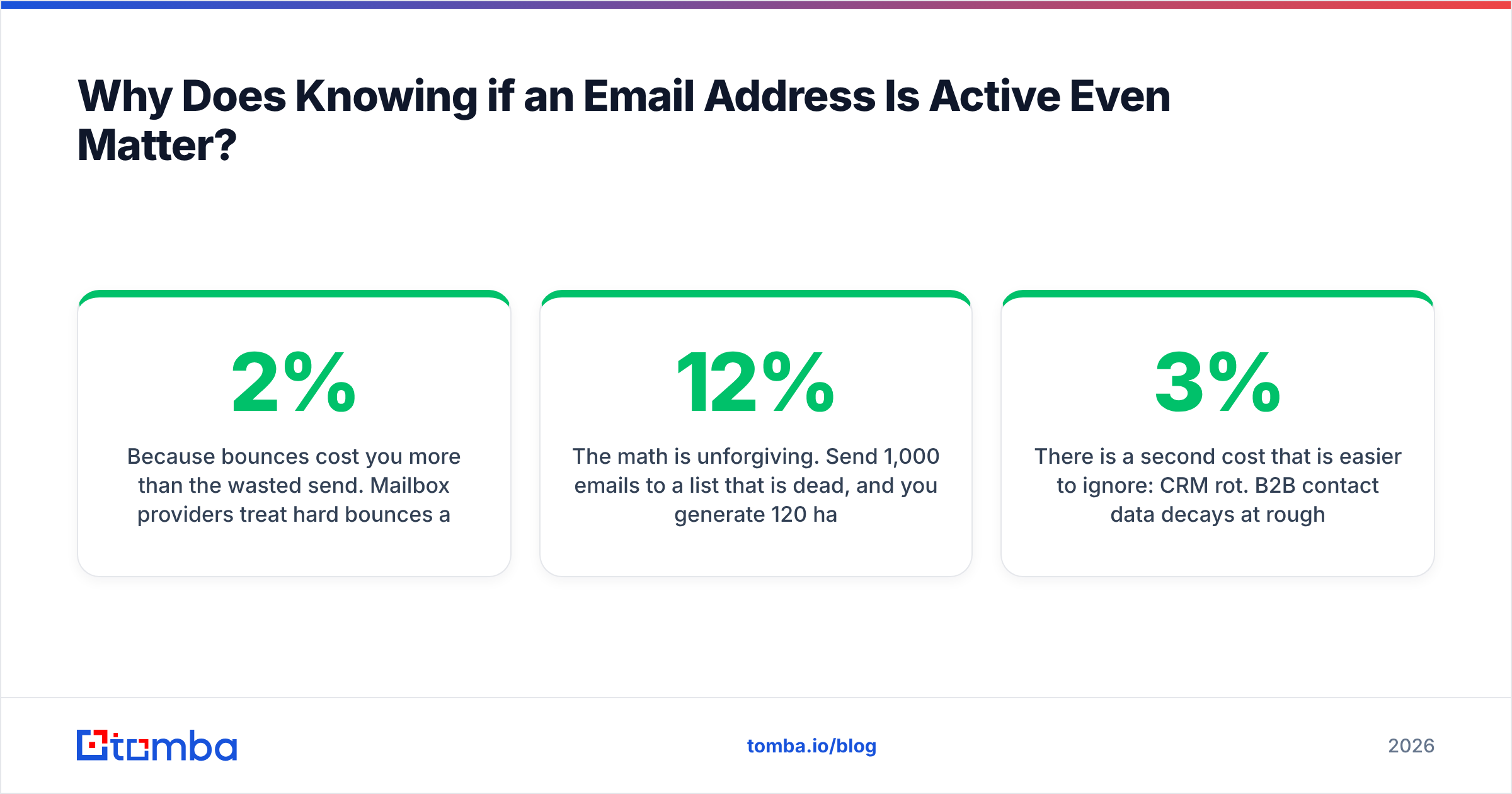
Because bounces cost you more than the wasted send. Mailbox providers treat hard bounces as a signal that you do not know who you are emailing. Push your bounce rate past roughly 2% and Gmail and Outlook start throttling, foldering, and eventually blocking your domain — regardless of how good the copy is.
The math is unforgiving. Send 1,000 emails to a list that is 12% dead, and you generate 120 hard bounces in a single batch. That one send can undo months of careful email deliverability work. Google's own Email sender guidelines spell out the spam-rate and authentication thresholds bulk senders must stay under, and invalid recipients feed directly into that judgment.
There is a second cost that is easier to ignore: CRM rot. B2B contact data decays at roughly 2-3% per month as people change jobs. A list you scraped 18 months ago is now, statistically, close to half junk. Every dead address in your CRM inflates your pipeline math, skews your response rate reporting, and wastes rep hours on sequences nobody will read.
What Actually Makes an Email Address "Active"?#
An address is active when a real mailbox exists at that domain and is accepting mail. That sounds obvious, but it splits into four separate layers, and most free tools only check the first two.
- Syntax validity — Does the string follow RFC 5322 rules?
john@@acmefails.john.doe+sales@acme.compasses. This filters typos and nothing else. - Domain and MX records — Does
acme.comresolve, and does it publish mail-exchange records? No MX means no mailbox, full stop. This is a hard disqualifier, cheap to run. - Mailbox existence (SMTP) — Does the receiving server acknowledge
RCPT TO: john@acme.comwith a 250, or reject with a 550? This is the layer that separates guesses from facts. - Deliverability context — Is the mailbox a role account (
info@,sales@), a known spam trap, a disposable address, or sitting behind a catch-all that accepts everything? A technically valid address can still be a terrible thing to email.
The gap between layer 2 and layer 4 is where most people get burned. A domain that resolves with clean MX records tells you a company runs email. It says nothing about whether Sarah in procurement still works there.

How Do You Find Out if an Email Address Is Active — 6 Methods Compared?#
Here is every practical method, ranked by how much you can trust the answer.
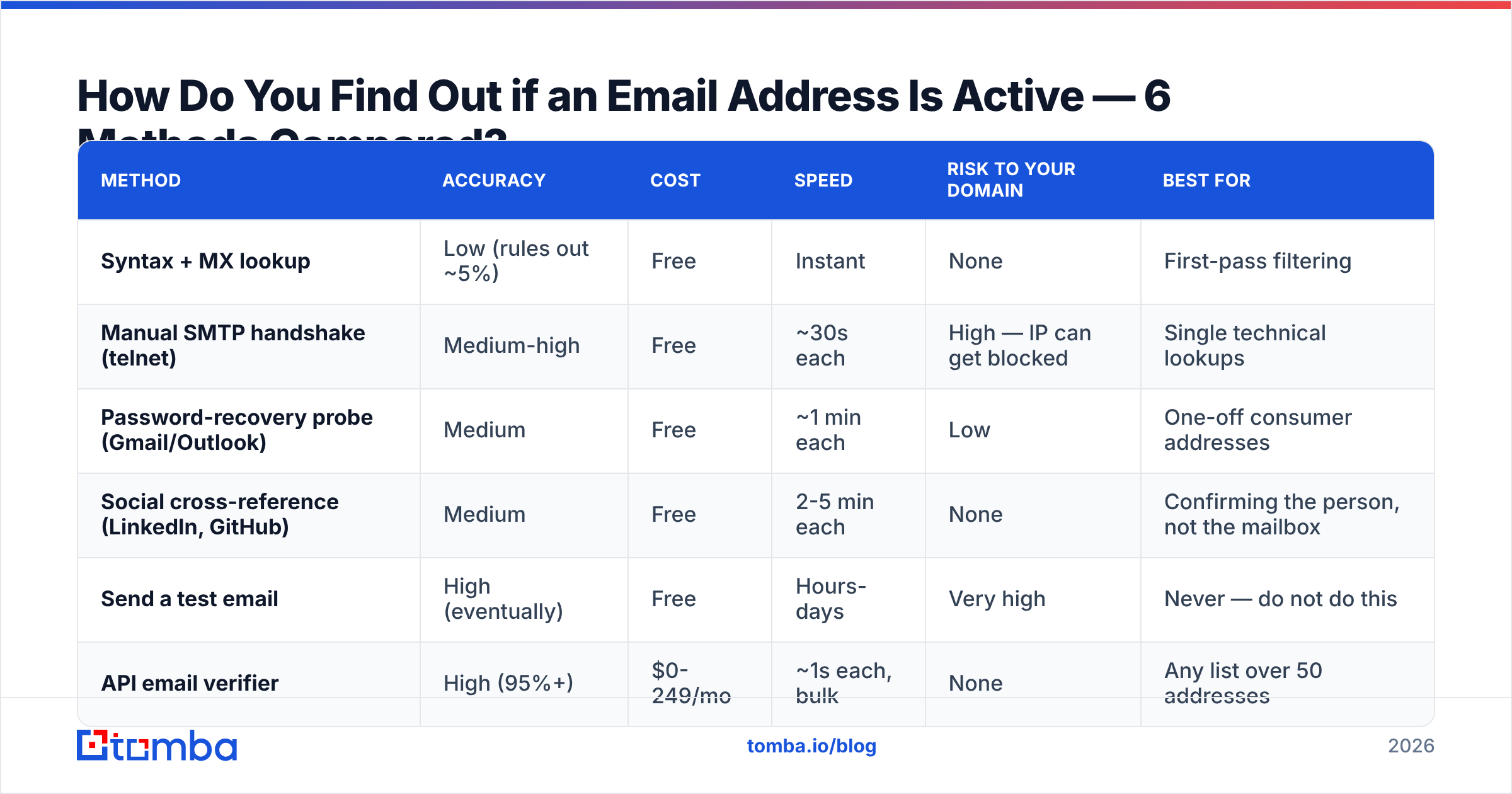
| Method | Accuracy | Cost | Speed | Risk to your domain | Best for |
|---|---|---|---|---|---|
| Syntax + MX lookup | Low (rules out ~5%) | Free | Instant | None | First-pass filtering |
| Manual SMTP handshake (telnet) | Medium-high | Free | ~30s each | High — IP can get blocked | Single technical lookups |
| Password-recovery probe (Gmail/Outlook) | Medium | Free | ~1 min each | Low | One-off consumer addresses |
| Social cross-reference (LinkedIn, GitHub) | Medium | Free | 2-5 min each | None | Confirming the person, not the mailbox |
| Send a test email | High (eventually) | Free | Hours-days | Very high | Never — do not do this |
| API email verifier | High (95%+) | $0-249/mo | ~1s each, bulk | None | Any list over 50 addresses |
Method 1: Check MX records first#
Run dig MX acme.com +short or use any online MX lookup. If nothing comes back, no address at that domain is active and you can delete the whole segment. This takes seconds and typically removes 3-8% of a stale list — dead startups, parked domains, and companies that got acquired and shut down the old domain.
Method 2: The manual SMTP handshake#
You open a connection to the recipient's mail server on port 25 and walk through HELO, MAIL FROM, and RCPT TO. A 250 OK on the RCPT TO line means the server accepts mail for that address. A 550 means it does not.
This is exactly what commercial verifiers do under the hood — the difference is infrastructure. Doing it from your office IP or a single VPS gets you rate-limited within a few dozen attempts and greylisted shortly after. Microsoft 365 in particular returns deliberately ambiguous responses to unknown senders, so a bare telnet result is often wrong even when it looks clean.
Method 3: The password-recovery probe#
For consumer providers, go to the Gmail or Outlook password-reset flow and enter the address. If the account does not exist, the provider tells you so directly. If it does exist, you usually get a masked recovery hint.
This is genuinely useful for verifying a personal address. It is useless at scale, it does not work on corporate domains, and providers have been steadily reducing how much they leak through this flow. Treat it as a fallback, not a workflow.
Method 4: Cross-reference the human#
Check whether the person still works where you think they do. A current LinkedIn role, a recent GitHub commit under a company email, a byline on the company blog, or a conference speaker page all suggest the address is live. Our author finder automates the blog-byline version of this, pulling the email behind a published article.
This confirms employment, not mailbox status. Someone can be very much employed while their old firstname@ alias has been retired in favor of f.lastname@. Use it as corroboration alongside a technical check.
Method 5: Guess the pattern, then verify#
If you know a company uses first.last@domain.com, you can construct candidate addresses with an email permutator and test each one. This is how a lot of manual prospecting works, and it is fine — as long as you verify the permutations rather than blasting all eight variants and letting the bounces sort it out.
Method 6: Run it through a verification API#
For any list larger than a handful, this is the only sane option. A verifier runs syntax, domain, MX, SMTP, role-account, disposable, and catch-all detection in one pass and returns a status plus a confidence score. Bulk uploads handle thousands of rows; the API handles real-time checks at form-submit or CRM-import time.
How Do You Handle Catch-All Domains?#
Catch-all domains are the reason "SMTP said 250" is not the end of the story. A catch-all server accepts mail for every address at the domain — ceo@, asdfgh@, all of it — and sorts or discards it after acceptance. Standard SMTP verification returns "valid" for all of them.
Roughly 15-25% of B2B domains run catch-all configurations, and they skew toward exactly the mid-market and enterprise accounts you want. Ignoring them means throwing away real prospects; trusting them blindly means emailing addresses that quietly vanish.
Three ways to deal with them:
- Discard everything catch-all. Safe, simple, and you lose a fifth of your addressable market.
- Send anyway and monitor. Catch-all domains do not hard bounce, so you get no bounce signal — but you also get zero engagement from fake addresses, which looks like poor list quality to filters.
- Use pattern confidence plus a catch-all-specific check. This is the right answer. A catch-all verifier combines the domain's known email pattern, historical sighting data for that specific address, and secondary signals to produce a confidence score rather than a binary yes/no. Send to the high-confidence ones, hold the rest.
The practical rule: on a catch-all domain, only send to addresses that match the company's dominant pattern and have been observed in the wild. A permutated guess on a catch-all domain is a coin flip you are paying for with reputation.
Which Email Verification Tools Are Worth Paying For?#
The verification market splits into three groups — pure verifiers, finder-plus-verifier platforms, and full sales-intelligence suites that bundle verification. What you should buy depends on whether you already have the addresses.
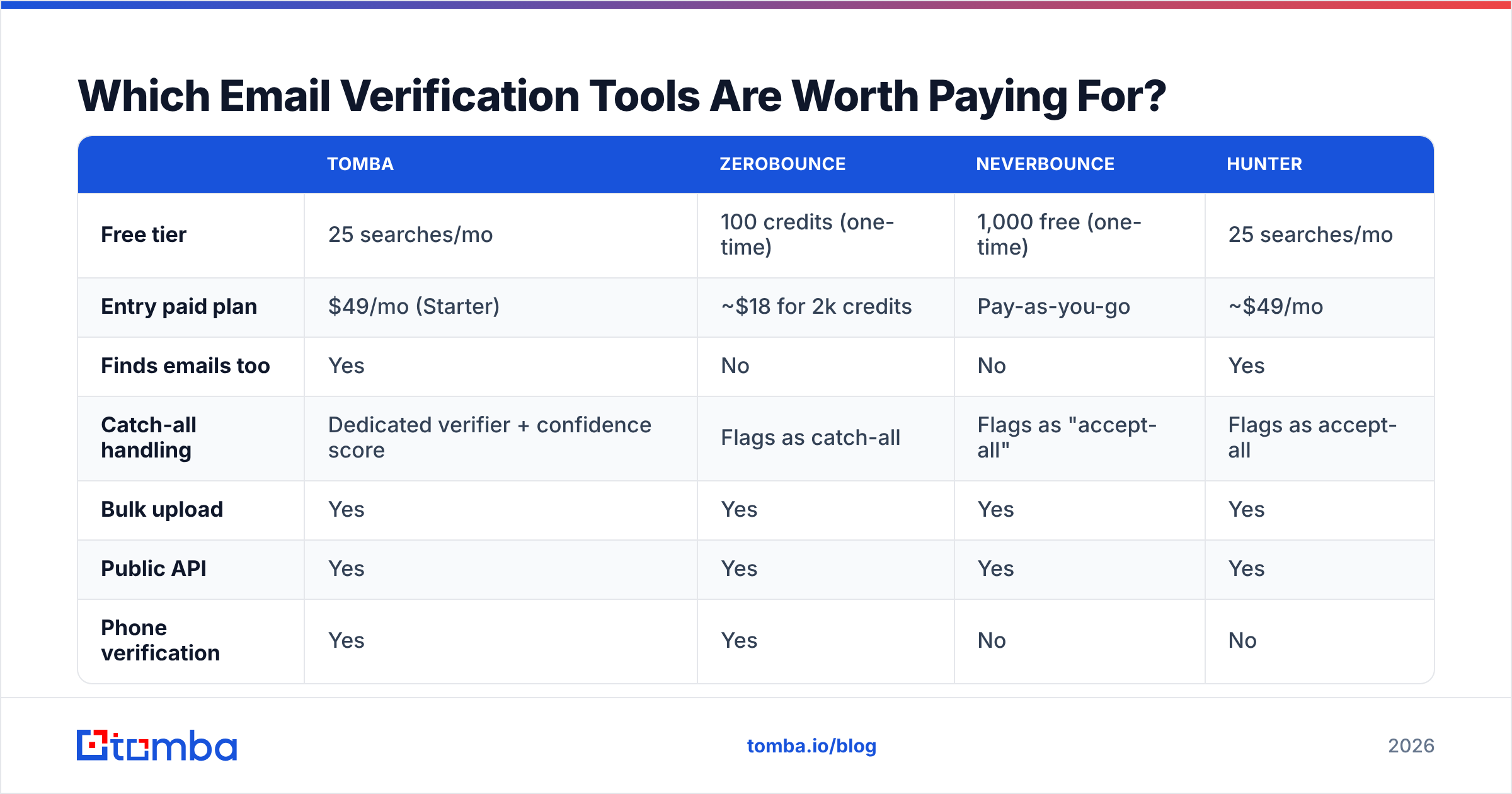
| Tomba | ZeroBounce | NeverBounce | Hunter | |
|---|---|---|---|---|
| Free tier | 25 searches/mo | 100 credits (one-time) | 1,000 free (one-time) | 25 searches/mo |
| Entry paid plan | $49/mo (Starter) | ~$18 for 2k credits | Pay-as-you-go | ~$49/mo |
| Finds emails too | Yes | No | No | Yes |
| Catch-all handling | Dedicated verifier + confidence score | Flags as catch-all | Flags as "accept-all" | Flags as accept-all |
| Bulk upload | Yes | Yes | Yes | Yes |
| Public API | Yes | Yes | Yes | Yes |
| Phone verification | Yes | Yes | No | No |
| Best for | Find + verify in one workflow | List hygiene at volume | One-off large cleans | Domain-first prospecting |
If your problem is "I have a 40,000-row list of unknown quality," a pure verifier priced per credit is the cheapest fix. If your problem is "I have 500 target companies and no contacts," you need a finder that verifies as it goes — otherwise you pay twice, once to find and once to check.
That second workflow is where combined platforms earn their price. Tomba's email finder returns an address with a verification status attached, so you are not exporting a CSV into a second vendor. Check current Tomba pricing — Free at 25 searches/mo, Starter $49/mo, Growth $99/mo, Pro $249/mo — against your monthly volume before committing to an annual contract anywhere.
For an independent read on any of these, G2's email verification category has volume-weighted reviews that are more useful than vendor case studies.

What Does a Practical Verification Workflow Look Like?#
Here is the sequence that survives contact with a real list.
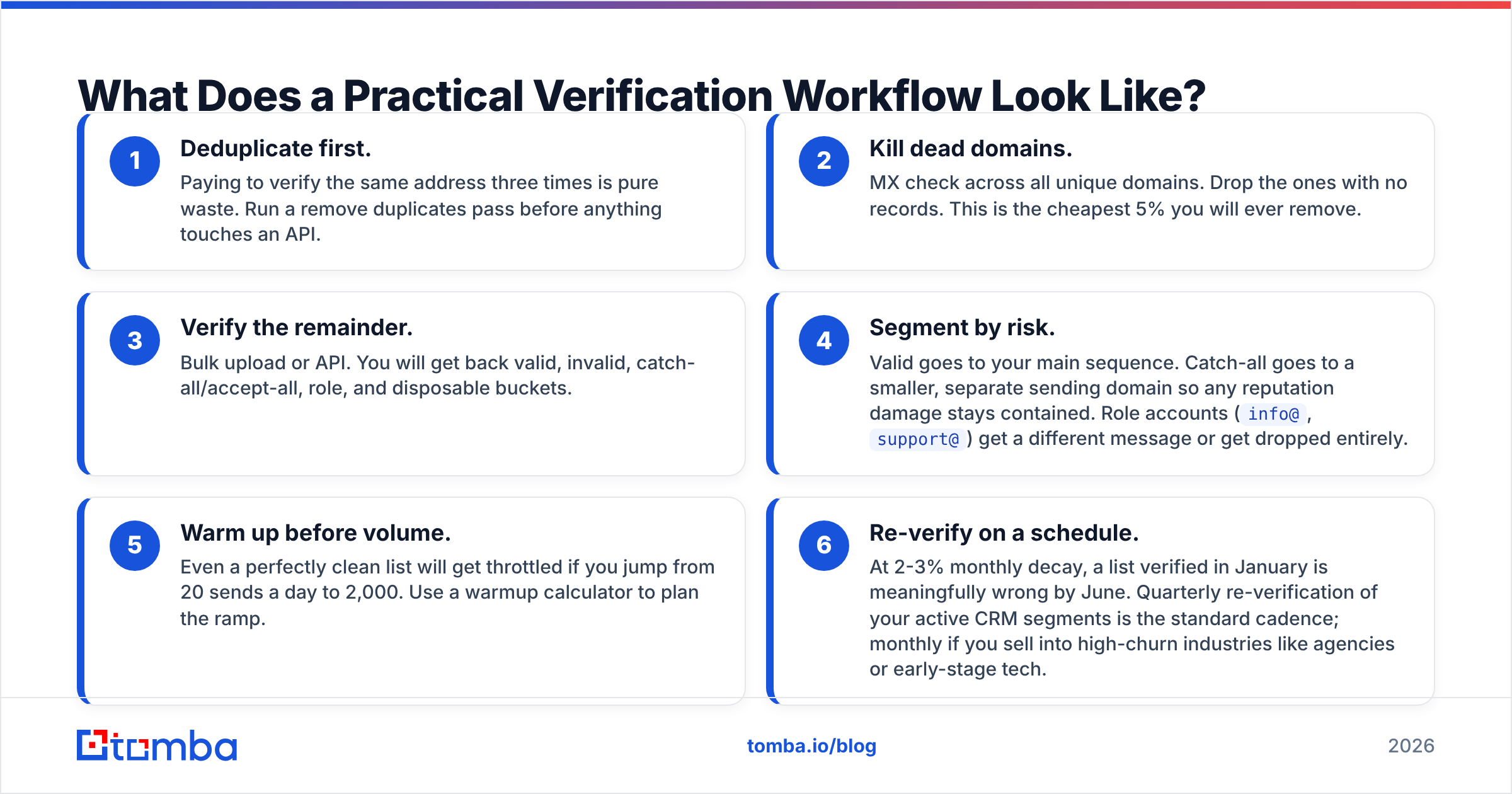
- Deduplicate first. Paying to verify the same address three times is pure waste. Run a remove duplicates pass before anything touches an API.
- Kill dead domains. MX check across all unique domains. Drop the ones with no records. This is the cheapest 5% you will ever remove.
- Verify the remainder. Bulk upload or API. You will get back valid, invalid, catch-all/accept-all, role, and disposable buckets.
- Segment by risk. Valid goes to your main sequence. Catch-all goes to a smaller, separate sending domain so any reputation damage stays contained. Role accounts (
info@,support@) get a different message or get dropped entirely. - Warm up before volume. Even a perfectly clean list will get throttled if you jump from 20 sends a day to 2,000. Use a warmup calculator to plan the ramp.
- Re-verify on a schedule. At 2-3% monthly decay, a list verified in January is meaningfully wrong by June. Quarterly re-verification of your active CRM segments is the standard cadence; monthly if you sell into high-churn industries like agencies or early-stage tech.
Step 4 is where most teams under-invest. Treating catch-all addresses identically to confirmed-valid ones is the most common way a technically correct verification pass still ends in a deliverability problem.
What Should You Never Do?#
Do not send a test email from your primary domain. It works — you will learn whether the address bounced — but you learn it by generating the exact signal you are trying to avoid. Every hard bounce is logged against your sending reputation by every provider involved.
Do not run mass SMTP probes from your own IP. Beyond the technical failure rate, some jurisdictions and most acceptable-use policies treat high-volume recipient enumeration as abuse. Commercial verifiers distribute this across rotating infrastructure for a reason.
Do not trust a 6-month-old verification result. Verification is a snapshot, not a permanent attribute. Storing a verified_at timestamp alongside the status in your CRM costs one column and saves you from acting on stale data.
Do not skip authentication. Clean list plus broken SPF equals spam folder anyway. Run an SPF checker and confirm DKIM and DMARC are aligned before you scale any sending program. Microsoft's Exchange Online anti-spam documentation is a good reference for how these signals get weighted on the receiving end.
Frequently Asked Questions#
Can you check if an email is active without sending anything?
Yes. SMTP verification opens a connection and asks the receiving server about the recipient without ever transmitting a message body — the connection closes before DATA. That is how every commercial verifier operates, and it is why a good verifier produces no bounce and no inbox noise.
How accurate is email verification, really? Well-built verifiers land in the 95-98% range on non-catch-all domains. The residual error comes from servers that deliberately obscure recipient status, greylisting delays, and mailboxes deactivated between the check and your send. Anyone advertising 100% accuracy is describing syntax validation, not mailbox verification.
Is it legal to verify email addresses? Verification itself is a technical query and is broadly legal. What you do next is governed by GDPR, CAN-SPAM, CASL, and similar frameworks — legitimate interest for B2B outreach in the EU, clear opt-out everywhere, and accurate sender identification. Verifying does not create a right to send.
What does "accept-all" mean in my results? It is the same thing as catch-all: the server accepts every recipient, so the verifier cannot isolate a real mailbox. Treat these as unknown-but-possible, not as valid, and route them through a confidence-scored catch-all finder before sending.
How often should I clean my list? Quarterly for active outbound segments, monthly if your ICP is in a high-turnover sector, and always before a large campaign. Re-verify any address that has not been emailed in 90 days.
Where Should You Start?#
Start with the address you already doubt. Run one MX lookup, then one verification, and compare the answer to whatever your CRM currently claims. The gap between those two numbers is usually the most persuasive argument for fixing the process.
If you are finding addresses as well as checking them, do both in one step rather than stitching two vendors together. The Tomba Email Finder returns a verified address from a name and domain, flags catch-all domains with a confidence score instead of a useless "valid," and runs on a free tier of 25 searches per month so you can test it against contacts whose status you already know. Verify ten addresses you are certain about, see whether the results match reality, and scale from there.
Related guides#
// get started
Find, verify and enrich your first contacts today
Start on the free plan with 25 searches a month, then scale when your team is ready.
Free plan · No credit card required · GDPR & CCPA
// about the author