How to Increase Email Open Rate in 2026: 11 Fixes
Open rates stall for three reasons: bad data, bad reputation, bad subject lines — in that order. Here is the diagnostic sequence that fixes each one, with benchmarks and a tool comparison.
TL;DR
- Open rate is a symptom, not a lever. If your list is dirty or your domain reputation is damaged, no subject line rewrite will save you.
- Fix in this order: data quality → authentication → sending behaviour → subject line → send time. Most teams start at step four and wonder why nothing moves.
- A 5% bounce rate is enough for Google and Microsoft to start silently routing you to spam, which shows up as a collapsed open rate weeks later.
- Realistic 2026 B2B cold email benchmarks: 35-55% open rate on a verified, warmed, well-authenticated list. Anything above 70% usually means your tracking pixel is being inflated by security scanners.
- Apple Mail Privacy Protection and enterprise link-scanners make raw open rate unreliable. Track it as a trend, and pair it with reply rate before you make decisions.
Why is your email open rate dropping?#
Because something upstream broke, and open rate is where you noticed it.
Think of open rate like the check-engine light on a car. It tells you something is wrong; it does not tell you the fuel pump is failing. Teams that treat the light itself as the problem end up writing forty subject line variants while the actual issue — a list where one in eight addresses no longer exists — keeps degrading their sender reputation every single send.
There are exactly five upstream causes, and they cascade:
- Invalid addresses in your list. Every hard bounce is a negative signal to the receiving mailbox provider. Bounce past ~3-5% and filtering tightens across your whole domain, not just that campaign.
- Missing or broken authentication. No SPF, DKIM, or DMARC means Gmail and Yahoo now reject or spam-folder bulk mail outright under rules that tightened through 2024-2026.
- Sending behaviour that looks automated. A brand-new domain firing 400 emails on day one reads as a burner domain, because that is exactly what burner domains do.
- Subject lines that trigger filters or boredom. Real, but fourth in line.
- Send timing and cadence. The smallest lever of the five. Worth tuning, never worth starting with.
What is a good email open rate in 2026?#
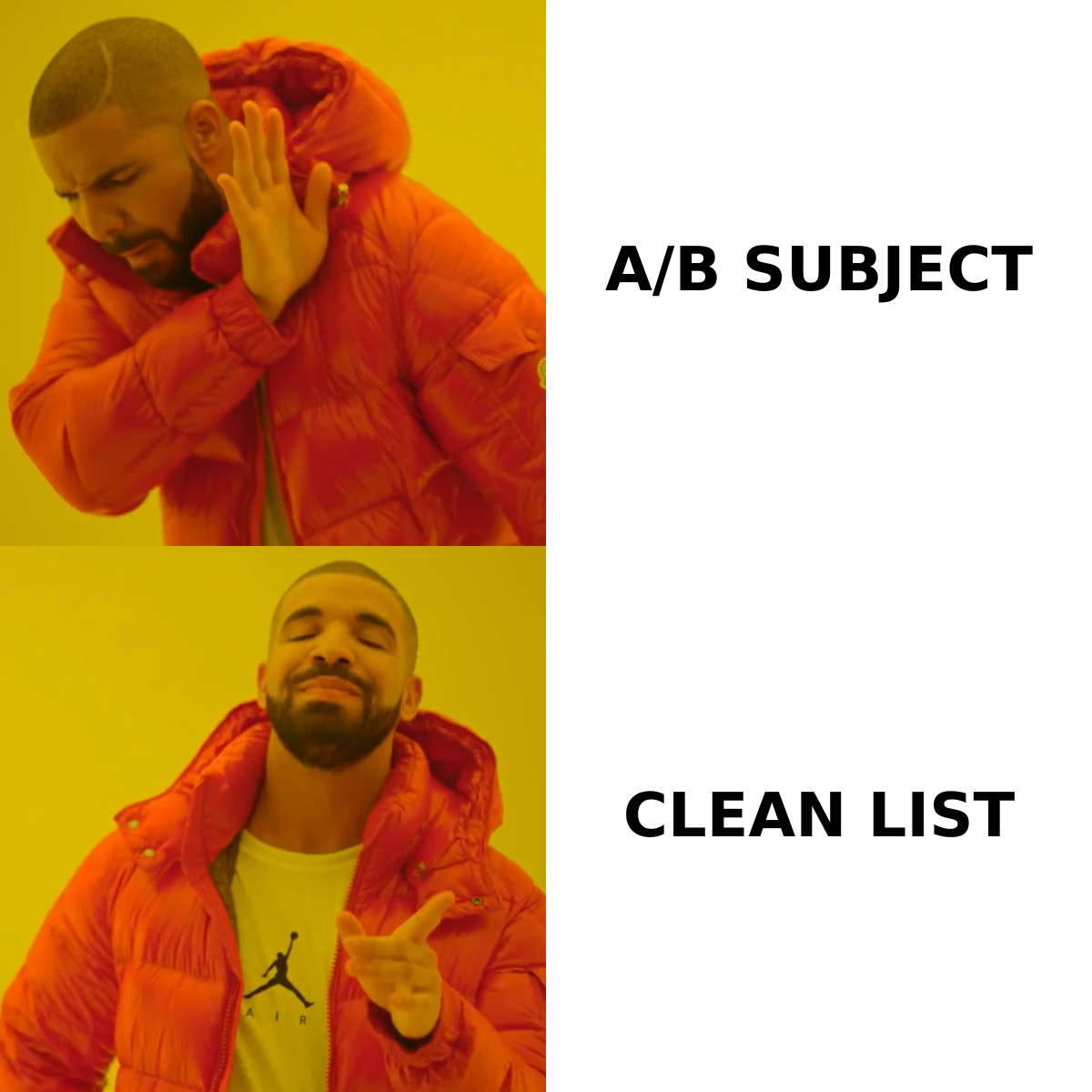
It depends on the channel, and the honest ranges are narrower than most vendor blogs claim.
| Channel | Typical open rate | Good open rate | What kills it |
|---|---|---|---|
| B2B cold outreach (verified list) | 25-40% | 45-55% | Unverified addresses, cold domain |
| B2B cold outreach (scraped list) | 8-18% | 25% | Bounces, spam traps, catch-all guessing |
| Opt-in newsletter | 20-35% | 40%+ | List decay, no re-engagement flow |
| Product / transactional | 45-70% | 80%+ | Rare — usually deliverability config |
| Re-engagement to dormant list | 5-12% | 20% | Ignoring 12+ months of inactivity |
Two caveats that matter more than the numbers. First, Apple Mail Privacy Protection pre-fetches images for a large share of consumer inboxes, which inflates opens. Second, corporate security gateways click and load everything before the human sees it, which inflates both opens and clicks. If your reported open rate jumped 20 points overnight without a change on your side, you are reading scanner noise.
Use open rate as a directional metric on a stable list. Use reply rate and positive-reply rate as the ones you actually optimise revenue against.
How do you clean a list before you send?#
Verify every address, then segment by risk. This single step moves open rate more than any other item on this page.
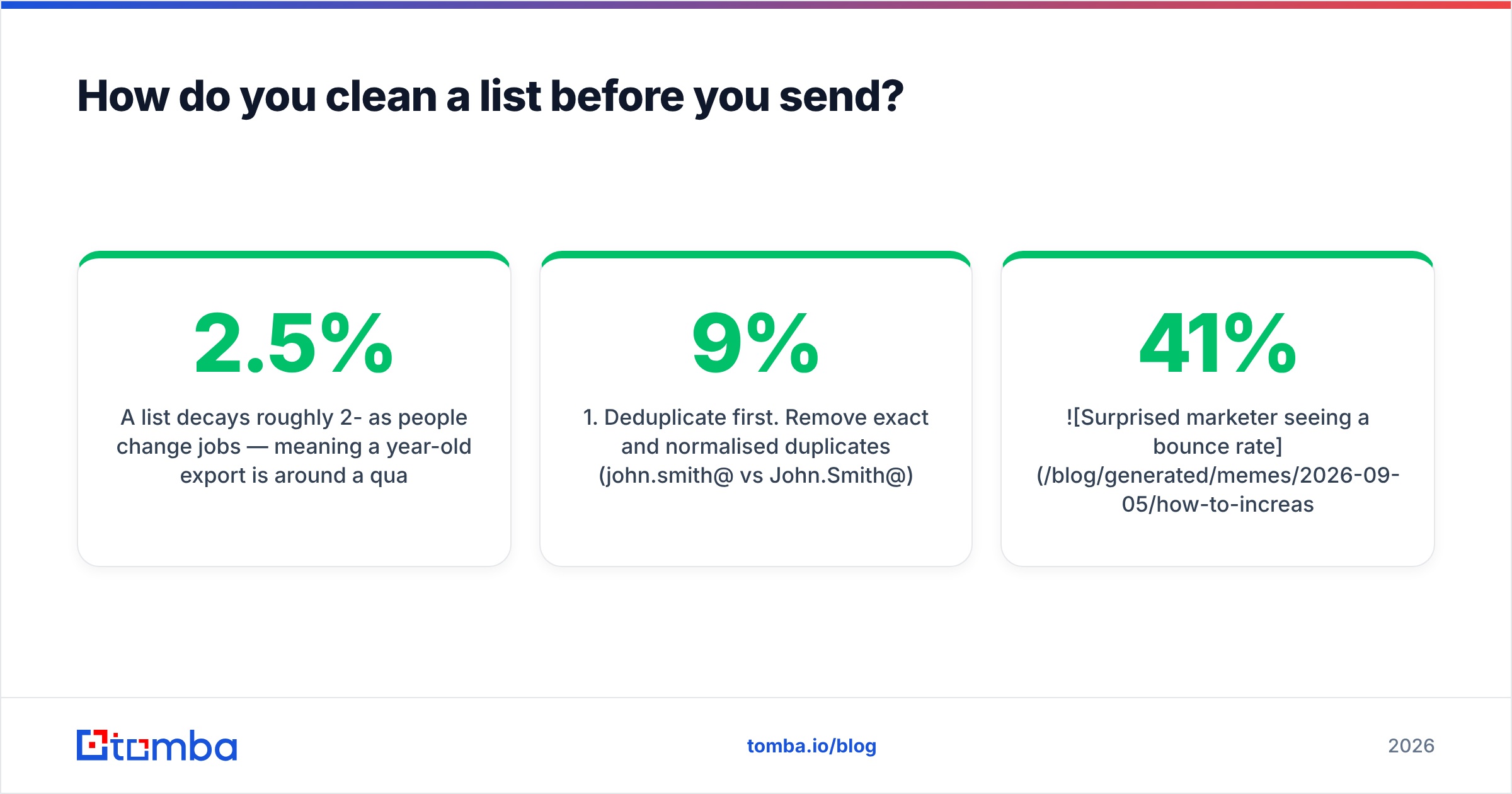
A list decays roughly 2-2.5% per month as people change jobs — meaning a year-old export is around a quarter dead. Sending to it is not neutral; it actively damages the domain you will need next quarter.
The working sequence:
- Deduplicate first. Remove exact and normalised duplicates (
john.smith@vsJohn.Smith@) before you spend verification credits. A remove duplicates pass on a 40k list routinely strips 6-9%. - Syntax and domain check. Kill malformed addresses, dead MX records, and disposable domains. This is free and instant.
- SMTP-level verification. Confirm the mailbox actually accepts mail. Run the list through an email verifier and drop everything that returns invalid.
- Handle catch-all domains deliberately. Catch-all servers accept everything, so standard verification returns "unknown". Do not treat unknown as valid. Use a catch-all verifier to score them, then send to catch-alls in a separate, smaller segment so a bad batch cannot poison your main sending domain.
- Suppress role accounts and known complainers.
info@,support@,sales@convert poorly and complain more. Segment them out, or exclude entirely. - Re-verify anything older than 60 days. Verification is a snapshot, not a permanent property.

Accuracy at the finding stage compounds through everything downstream. If your source data is guessed rather than verified — a permutation engine producing firstname.lastname@domain.com and hoping — you inherit a bounce problem no cleaning pass fully repairs. Sourcing from a provider that verifies at discovery, like Tomba's email finder or a licensed B2B database, means the list arrives cleaner than a scraped one ever gets.
Does sender authentication really change open rates?#
Yes, and it is now binary rather than a nice-to-have.
Google and Yahoo's bulk sender requirements — enforced since 2024 and tightened since — mean mail without valid SPF, DKIM, and DMARC alignment gets rejected or filtered at the gateway. A filtered email cannot be opened. Your open rate reflects that as a mystery decline.
Run this checklist against every sending domain:
- SPF record published and under 10 DNS lookups. Verify with an SPF checker — exceeding the lookup limit invalidates the whole record silently.
- DKIM signing enabled on every sending service, including your CRM and marketing platform, not just your cold email tool.
- DMARC published, starting at
p=nonefor monitoring, moving top=quarantineonce reports are clean. - Custom tracking domain on your own subdomain. Shared tracking domains carry other senders' reputation.
- One-click unsubscribe header (RFC 8058) on bulk mail. Its absence is now a filtering signal.
- Domain not blacklisted. Check with a blacklist checker before you diagnose anything else.
Google's own Postmaster Tools is the only place you see your Gmail-side reputation and spam-complaint rate as Google measures it. Keep complaints under 0.1%; at 0.3% you are effectively throttled.
[Suggested visual: Google Postmaster Tools domain reputation graph showing a drop from High to Medium after an unverified send, annotated with the send date.]
How should you warm up a domain and mailbox?#
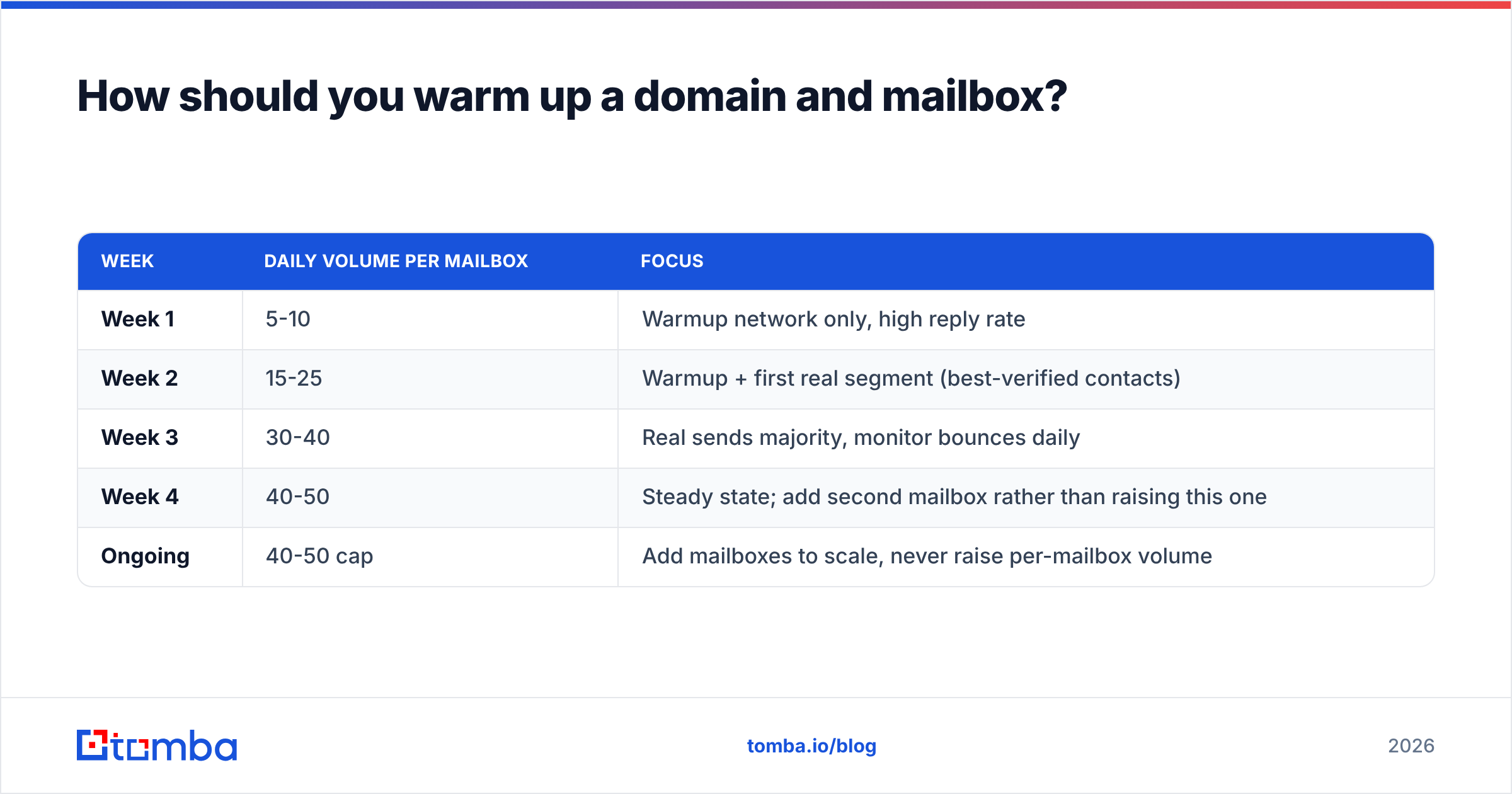
Slowly, and with real reply traffic, not just volume ramping.
A new domain has no history. Mailbox providers treat "no history" as "assume risk". Warmup is how you build the history deliberately instead of letting a 500-email blast build it badly.
| Week | Daily volume per mailbox | Focus |
|---|---|---|
| Week 1 | 5-10 | Warmup network only, high reply rate |
| Week 2 | 15-25 | Warmup + first real segment (best-verified contacts) |
| Week 3 | 30-40 | Real sends majority, monitor bounces daily |
| Week 4 | 40-50 | Steady state; add second mailbox rather than raising this one |
| Ongoing | 40-50 cap | Add mailboxes to scale, never raise per-mailbox volume |
Three rules that people break:
- Never exceed ~50 sends/day per mailbox on cold outreach, regardless of what your tool permits. Scale horizontally with more mailboxes on more subdomains.
- Keep warmup running at low volume permanently. Stopping it removes the positive-engagement signal that offsets cold sends.
- Send your best-verified segment first. Your earliest real sends set the reputation baseline. Use a warmup calculator to model the ramp before you commit.
Your sender reputation is the compounding asset here. It takes six weeks to build and one bad send to damage.
[Suggested visual: Instantly or Smartlead warmup dashboard showing daily volume ramp alongside inbox-placement percentage across weeks 1-4.]
What actually makes a subject line get opened?#
Specificity plus low commitment. Not cleverness.
Now that the plumbing is fixed, the subject line is worth real effort. What holds up in B2B testing:
- Length: 3-7 words. Roughly 60% of B2B email is read on mobile, where anything past ~35 characters is truncated. Long subject lines are not penalised — they are simply not seen.
- Lowercase or sentence case beats Title Case. Title Case reads like a campaign. Sentence case reads like a colleague.
- Reference something specific and verifiable. "your Q3 hiring page" outperforms "quick question" because it proves a human looked.
- No brackets, no emojis, no ALL CAPS, no "Re:" fakery. The last one converts once and burns the relationship.
- Ask, do not pitch. "worth a look?" outperforms "10x your pipeline" in nearly every B2B test.
- Match the subject to the first line. The preview text is a second subject line. Wasting it on "Hi {{first_name}}," throws away half your real estate.
Patterns that consistently underperform in cold B2B: anything with a number promising a multiple, anything containing "free", anything longer than nine words, and personalisation tokens that fire visibly in the subject.
Test with a subject line tester before you send, and run new copy through a spam checker to catch phrasing that trips content filters.
Which tools do you actually need for each step?#
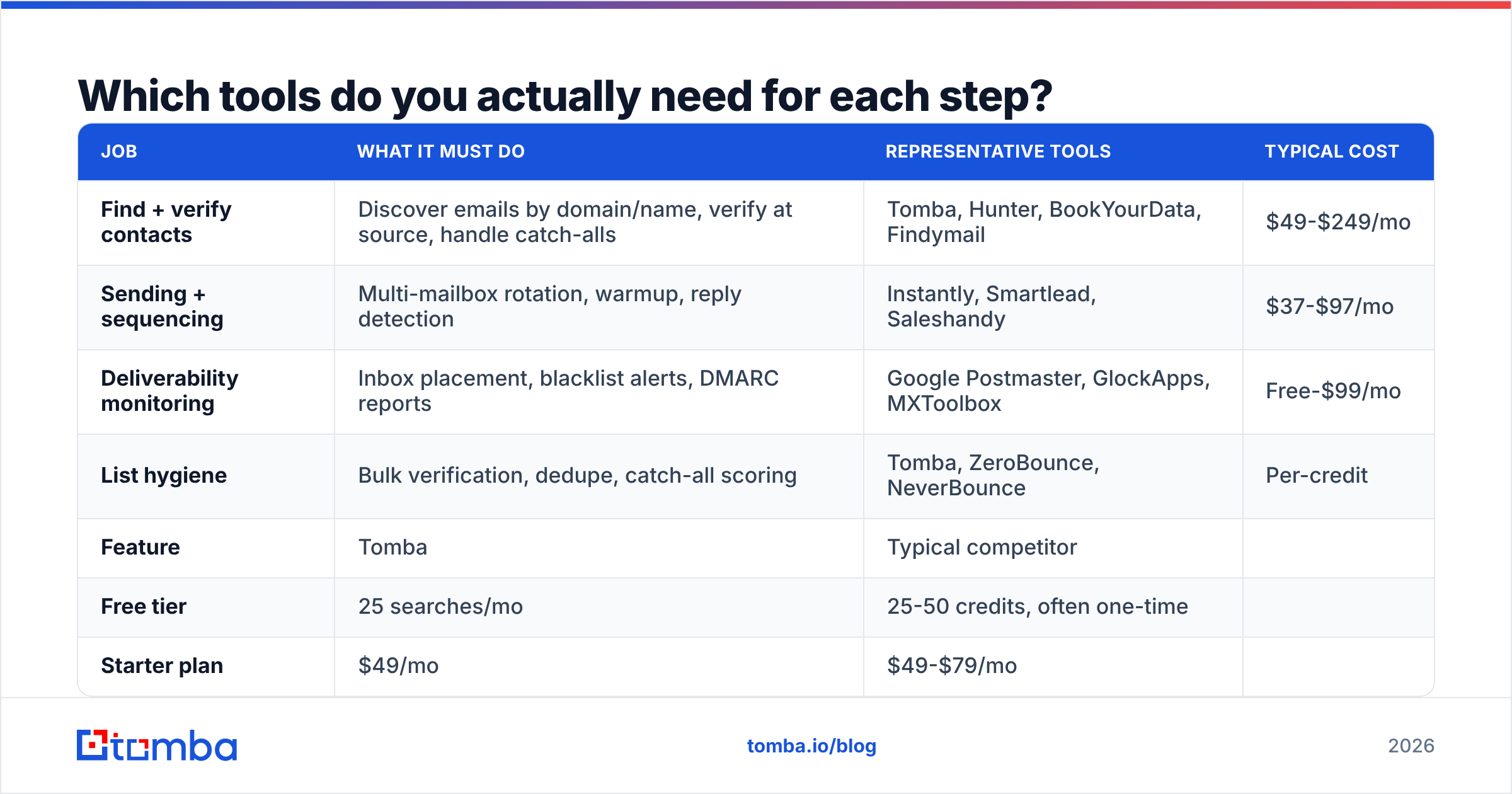
You need coverage across four jobs. Most teams over-buy on sending and under-buy on data.
| Job | What it must do | Representative tools | Typical cost |
|---|---|---|---|
| Find + verify contacts | Discover emails by domain/name, verify at source, handle catch-alls | Tomba, Hunter, BookYourData, Findymail | $49-$249/mo |
| Sending + sequencing | Multi-mailbox rotation, warmup, reply detection | Instantly, Smartlead, Saleshandy | $37-$97/mo |
| Deliverability monitoring | Inbox placement, blacklist alerts, DMARC reports | Google Postmaster, GlockApps, MXToolbox | Free-$99/mo |
| List hygiene | Bulk verification, dedupe, catch-all scoring | Tomba, ZeroBounce, NeverBounce | Per-credit |
On the data side specifically, the meaningful differences are verification depth and pricing model:
| Feature | Tomba | Typical competitor |
|---|---|---|
| Free tier | 25 searches/mo | 25-50 credits, often one-time |
| Starter plan | $49/mo | $49-$79/mo |
| Growth plan | $99/mo | $99-$149/mo |
| Pro plan | $249/mo | $199-$399/mo |
| Verification included | Yes, at discovery | Often billed separately |
| Catch-all handling | Dedicated verifier | Frequently returns "unknown" only |
| API + CLI + MCP | Yes | API usually; CLI/MCP rare |
| Bulk processing | Yes | Yes, credit-metered |

BookYourData is worth a look if you want purchased, pre-verified lists by industry rather than self-serve discovery — a genuinely different buying model that suits teams without a research function. Compare structures on the Tomba pricing page against whatever you are running today, and check independent user reviews on G2 rather than vendor case studies.
When should you send, and how often?#
Tuesday through Thursday, 7-9am in the recipient's timezone, is still the default that beats random scheduling — but the effect size is small, maybe 3-5 points of open rate. Do not spend a month here.
What matters more than the hour:
- Timezone accuracy. Sending at 8am your time to a list spread across three continents means most of it lands at 2am. Segment by timezone before you optimise the hour.
- Follow-up spacing. Three to four touches, 3-4 days apart, on the same thread. Each follow-up lifts cumulative open rate because it resurfaces the thread.
- Frequency ceiling. More than one campaign per contact per month reads as pressure and drives unsubscribes, which drives filtering.
- Avoid Monday morning and Friday afternoon. Not for mystical reasons — those are the highest-volume inbox windows, so you compete against more mail.
Measure your response rate alongside opens. A send window that lifts opens but flattens replies is optimising the wrong number.
What should you do first, this week?#
A concrete order of operations, highest impact first:
- Run your active list through verification. Delete invalids, quarantine catch-alls, suppress role accounts. Expect to lose 10-25% of a list you have not cleaned in six months.
- Audit SPF, DKIM, DMARC on every sending domain. Fix anything failing before your next send.
- Check Google Postmaster Tools for domain reputation and spam rate. If reputation is Low or Bad, pause and warm up for three weeks.
- Cap per-mailbox volume at 50/day. Add mailboxes instead of raising the cap.
- Rewrite subject lines to 3-7 words, sentence case, referencing something specific to the recipient.
- Re-measure after two full weeks. Open rate moves on a lag, because reputation moves on a lag.
Nothing here is exotic. The reason it works is that most senders skip straight to step five, and step five is worth maybe 15% of the total available improvement.
Where does the data come from?#
The uncomfortable answer for most teams: from exports nobody has re-verified, from scraping runs that guessed patterns, or from a list bought two years ago.
Fix the source and the downstream fixes get easier. Pull contacts by company with domain search, enrich existing records with data enrichment so job-change decay gets caught before it bounces, and push verification into your workflow via the Tomba API or the HubSpot integration rather than treating it as a quarterly cleanup chore.
Start where the leverage is. If your open rate is under 25% on B2B outreach, the problem is almost certainly your list, not your copy. Run your next campaign's contacts through the Tomba Email Finder — it verifies addresses at the point of discovery, so you are not paying to find contacts and then paying again to find out half of them are dead. The free tier gives you 25 searches a month to test the accuracy against a list you already have; if the overlap is worse than you expected, you have found your open rate problem.
Related guides#
// get started
Find, verify and enrich your first contacts today
Start on the free plan with 25 searches a month, then scale when your team is ready.
Free plan · No credit card required · GDPR & CCPA
// about the author