How To Send Bulk Emails Without Spamming: 2026 Playbook
Bulk email fails for boring, fixable reasons: bad lists, missing auth records, and volume ramps that outrun your reputation. Here is the 9-step system that keeps large sends in the inbox in 2026.
TL;DR
- Bulk email gets flagged for three reasons: unverified lists, missing or broken authentication, and volume that jumps faster than your sending reputation can absorb.
- Google and Yahoo's bulk-sender rules (5,000+ messages/day) now require SPF, DKIM, DMARC, one-click unsubscribe, and a spam-complaint rate under 0.3%. These are enforced, not advisory.
- Clean the list before you send. A 3% bounce rate is the ceiling; above 5% mailbox providers start throttling you.
- Ramp new domains and IPs over 4-6 weeks. Sending 10,000 emails on day one from a fresh domain is the single fastest way to get filtered.
- Segment and personalize at the data layer, not the merge-tag layer. Relevance drives engagement, engagement drives placement.
You can send 50,000 emails a month and never touch a spam folder. You can also send 500 and land in junk every time. The difference is almost never the email copy — it is the plumbing underneath it: who you send to, how you prove you are who you claim to be, and how fast you scale.
This is the operational checklist. No theory, no "provide value" platitudes.
What Actually Makes Bulk Email Get Marked As Spam?#
Spam filtering in 2026 is mostly reputation math. Mailbox providers score your sending domain and IP on a rolling window of signals, then decide placement before a human ever reads the subject line.
The signals that move the needle, ranked by weight:
- Complaint rate — the percentage of recipients hitting "report spam." Google's threshold is 0.3%; sustained rates above that trigger filtering across your whole domain. Three complaints per thousand is the entire budget.
- Bounce rate — hard bounces tell providers you bought or scraped a list you never validated. Under 2% is healthy, 3% is the warning line, 5%+ gets you throttled.
- Authentication — SPF, DKIM, and DMARC alignment. Missing any of the three on a bulk send is now a hard fail at Gmail and Yahoo, not a soft penalty.
- Engagement — opens are noisy post-MPP, but replies, forwards, moving messages out of spam, and adding to contacts are strong positive signals. Deletions without opens are negative.
- Volume consistency — a domain that sends 200/day for six weeks then jumps to 8,000 looks compromised. Filters treat sudden spikes as hijacked-account behavior.
- Content and infrastructure hygiene — link shorteners, mismatched link domains, image-only emails, and blacklisted sending IPs all add friction.
Notice that four of the six have nothing to do with what you wrote. Most "my cold email doesn't work" problems are actually email deliverability problems wearing a copywriting costume.

How Do You Clean A List Before A Bulk Send?#
Verification is the highest-ROI step in the entire process, and it takes minutes.
Run every address through an email verifier before it enters your sending tool. A good verifier does four checks: syntax validation, domain and MX record lookup, SMTP mailbox probe, and role/disposable detection. What you want back is a clean four-bucket split.
| Verification result | What it means | What to do |
|---|---|---|
| Valid | Mailbox exists and accepts mail | Send |
| Invalid | Mailbox rejected or domain dead | Delete permanently |
| Catch-all / accept-all | Domain accepts everything, can't confirm | Send sparingly, isolate in its own segment |
| Risky (role, disposable, spam trap) | info@, temp domains, known traps | Suppress entirely |
| Unknown | Timeout or greylisting | Retry once, then suppress |
Catch-all domains are where most people lose money. They come back "unverifiable" and marketers either delete them (throwing away real prospects, since many enterprise domains are catch-all) or blast them (inflating bounce rate). The right move is a catch-all verifier that uses pattern confidence and historical data to grade them, then a separate low-volume segment so any bounce damage stays contained.
Two more hygiene rules:
- Dedupe before you import. The same person on three lists means three copies of your email, which is the fastest path to a complaint. Run a remove duplicates pass on the merged file.
- Suppress non-engagers. Anyone who hasn't opened, clicked, or replied in 180 days is dead weight dragging your engagement average down. Move them to a re-permission campaign or drop them.
If you are building the list rather than importing one, source it correctly from the start. Pulling verified contacts via domain search gives you addresses with a confidence score attached, which is a very different starting position from a scraped CSV of unknown provenance.
What Authentication Records Do You Need In 2026?#
Three records, all mandatory for bulk senders. Set them once, verify them quarterly.
SPF (Sender Policy Framework) — a DNS TXT record listing which servers may send mail for your domain. Keep it under 10 DNS lookups or it fails silently. Check yours with an SPF checker after any change to your sending stack.
DKIM (DomainKeys Identified Mail) — a cryptographic signature proving the message wasn't altered in transit. Use a 2048-bit key. Your ESP generates it; you publish the public half in DNS.
DMARC (Domain-based Message Authentication) — the policy layer that tells receivers what to do when SPF or DKIM fails, plus where to send reports. Start at p=none with reporting on for two weeks, read the aggregate reports, fix any legitimate mail failing alignment, then move to p=quarantine and eventually p=reject.
Google's official sender guidelines spell out the bulk-sender requirements in full — worth reading directly rather than through a blog summary, because the thresholds get updated.
Two additions that are no longer optional:
- One-click unsubscribe via the
List-UnsubscribeandList-Unsubscribe-Postheaders. Recipients must be able to opt out in one action without a landing page. - A dedicated sending domain. Never bulk-send from your primary corporate domain. Use
mail.yourcompany.comor a lookalike likeyourcompany-mail.comso a reputation hit doesn't take down your transactional and internal mail.
Before you scale, check whether your IP or domain is already on a blocklist — an inherited bad IP on a shared pool will sink an otherwise perfect setup. A blacklist checker takes thirty seconds.
How Should You Warm Up A New Domain?#
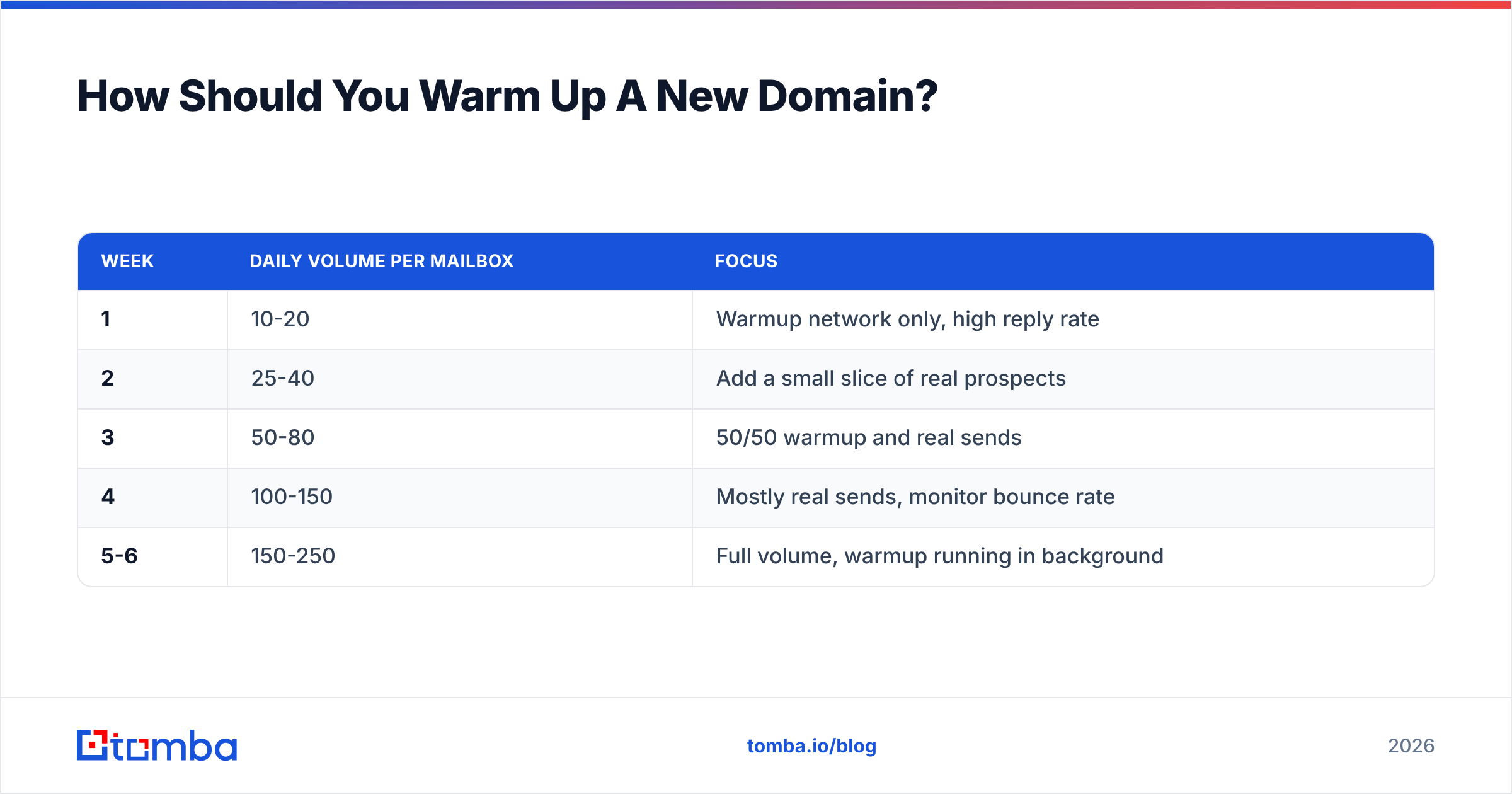
Slowly, and with real engagement mixed in. A new domain has zero reputation, which filters treat as closer to "suspicious" than "neutral."
The standard ramp for a single mailbox:
| Week | Daily volume per mailbox | Focus |
|---|---|---|
| 1 | 10-20 | Warmup network only, high reply rate |
| 2 | 25-40 | Add a small slice of real prospects |
| 3 | 50-80 | 50/50 warmup and real sends |
| 4 | 100-150 | Mostly real sends, monitor bounce rate |
| 5-6 | 150-250 | Full volume, warmup running in background |
Never exceed roughly 250-300 cold emails per day per mailbox on Google Workspace or Microsoft 365, regardless of how warm the domain is. If you need 3,000 sends a day, that is 12 mailboxes, not one mailbox working harder. Distributing volume across mailboxes and domains is what makes bulk sending survivable; the email warmup calculator will size the ramp for your target volume.
Keep warmup running permanently at a low level even after ramping. Reputation decays when engagement stops.

Which Sending Platform Should You Use For Bulk Email?#
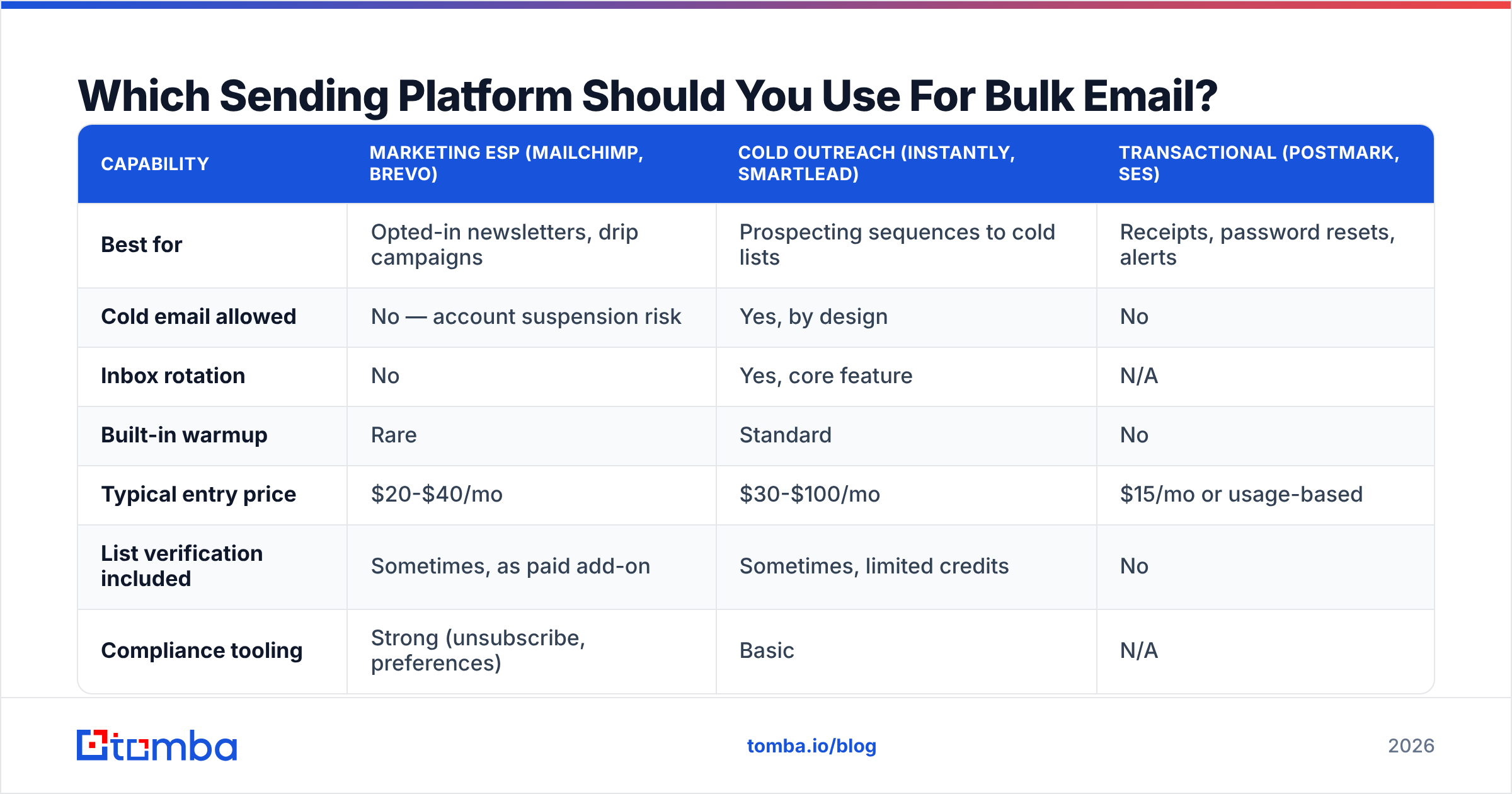
The platform choice depends on whether you're doing marketing broadcasts to an opted-in list or one-to-one cold outreach at volume. Using the wrong category is a common and expensive mistake — marketing ESPs will suspend you for cold sending, and cold-outreach tools have no template builder or compliance tooling for newsletters.
| Capability | Marketing ESP (Mailchimp, Brevo) | Cold outreach (Instantly, Smartlead) | Transactional (Postmark, SES) |
|---|---|---|---|
| Best for | Opted-in newsletters, drip campaigns | Prospecting sequences to cold lists | Receipts, password resets, alerts |
| Cold email allowed | No — account suspension risk | Yes, by design | No |
| Inbox rotation | No | Yes, core feature | N/A |
| Built-in warmup | Rare | Standard | No |
| Typical entry price | $20-$40/mo | $30-$100/mo | $15/mo or usage-based |
| List verification included | Sometimes, as paid add-on | Sometimes, limited credits | No |
| Compliance tooling | Strong (unsubscribe, preferences) | Basic | N/A |
Whichever category you land in, the verification layer sits upstream and stays constant. Most teams run a dedicated verification and enrichment step before pushing contacts into the sending platform, because bundled verification credits tend to be thin and the underlying data quality varies. Peer-reviewed comparisons on G2 are a reasonable place to sanity-check vendor claims against actual user reports.
How Do You Structure The Send Itself?#
Once the infrastructure is right, the send mechanics still matter.
- Segment before you personalize. A single message to 10,000 people will underperform ten messages to 1,000 segmented people, every time. Segment by industry, role seniority, company size, or trigger event — not by first name availability.
- Personalize with real data, not merge tags. "Hi {{FirstName}}" is table stakes and nobody is impressed. A line referencing their recent funding round, tech stack, or job posting is what earns replies. This is where data enrichment pays off: enrich the contact record first, then write conditional copy against real fields.
- Throttle your send. Don't dump 20,000 messages into the queue at once. Spread the send over 4-8 hours with randomized intervals. Most sending platforms support this; turn it on.
- Keep the HTML light. Under 102KB total, a text-to-image ratio favoring text, and no more than three links. Heavy templates with tracking pixels and eight CTAs read as commercial bulk mail to filters. Run the draft through a spam checker before launch.
- Match your link domains. If you send from
mail.company.com, don't link to a bit.ly redirect. Domain mismatch between sender and links is a classic phishing signal. - Send from a real person.
sarah@company.comoutperformsnoreply@company.comandmarketing@company.comon both engagement and placement.
How Do You Monitor Deliverability After Launch?#
Watch four numbers, daily, for the first two weeks of any new campaign:
- Hard bounce rate — target under 2%. If it crosses 3%, pause the campaign and re-verify the remaining list. Do not "push through."
- Complaint rate — target under 0.1%, hard ceiling 0.3%. Register with Google Postmaster Tools and Microsoft SNDS so you can actually see this number instead of guessing.
- Reply rate — the honest engagement metric now that opens are inflated by privacy proxies. Under 1% on a cold campaign usually means a targeting problem, not a deliverability one.
- Inbox placement — use seed testing to check whether you're landing in Primary, Promotions, or Spam across Gmail, Outlook, and Yahoo. Open rate alone won't tell you.
Set a rule and enforce it: any campaign that crosses 3% bounces or 0.3% complaints stops immediately, and the list gets re-verified before the next send. Reputation damage takes weeks to repair and hours to cause.
Also re-verify your standing list on a schedule. B2B contact data decays at roughly 22-30% per year as people change jobs — a list that was clean in January is measurably dirty by September. Running your database through bulk verify quarterly costs a fraction of what a reputation rebuild costs.
What Are The Legal Requirements For Bulk Email?#
Compliance is not optional, and the rules differ by recipient location, not sender location.
- CAN-SPAM (US) — accurate From and Subject lines, a physical mailing address in every message, a working unsubscribe honored within 10 business days. Opt-in is not required, but deception is penalized at up to $53,000+ per message.
- GDPR (EU/UK) — requires a lawful basis. For B2B cold email, legitimate interest can apply if the message is relevant to the recipient's professional role, but you must document the assessment and honor objections immediately.
- CASL (Canada) — the strictest of the three. Express or implied consent is generally required; penalties reach into the millions.
Practical baseline that satisfies all three: real physical address in the footer, one-click unsubscribe honored instantly, accurate sender identity, and a documented reason each contact is on your list. Keep suppression lists forever — re-mailing someone who unsubscribed is both illegal and the fastest route to a complaint.
The Short Version#
Sending bulk email without spamming comes down to sequence: verify the list, authenticate the domain, ramp the volume, segment the audience, monitor the numbers, and stop when the thresholds trip. Skip any one of those and the rest stops mattering.
The step most teams skip is the first one, because it feels like overhead. It isn't — a list with 8% invalid addresses will torch your domain reputation before your copy gets a chance to succeed.
Start there. Use the Tomba Email Finder to source verified professional addresses with confidence scores attached, then verify and enrich before anything hits your sending platform. The free tier gives you 25 searches a month to test the workflow; Starter runs $49/mo and Growth $99/mo when you're ready to scale — full Tomba pricing is public. Clean data in, inbox placement out.
Related guides#
// get started
Find, verify and enrich your first contacts today
Start on the free plan with 25 searches a month, then scale when your team is ready.
Free plan · No credit card required · GDPR & CCPA
// about the author