How to Send Bulk Marketing Emails Without Killing Your Domain
Bulk email is easy to send and easy to get wrong. Here's the exact sequence — list hygiene, authentication, warmup, sending caps, and platform choice — that keeps mass sends out of spam in 2026.
TL;DR
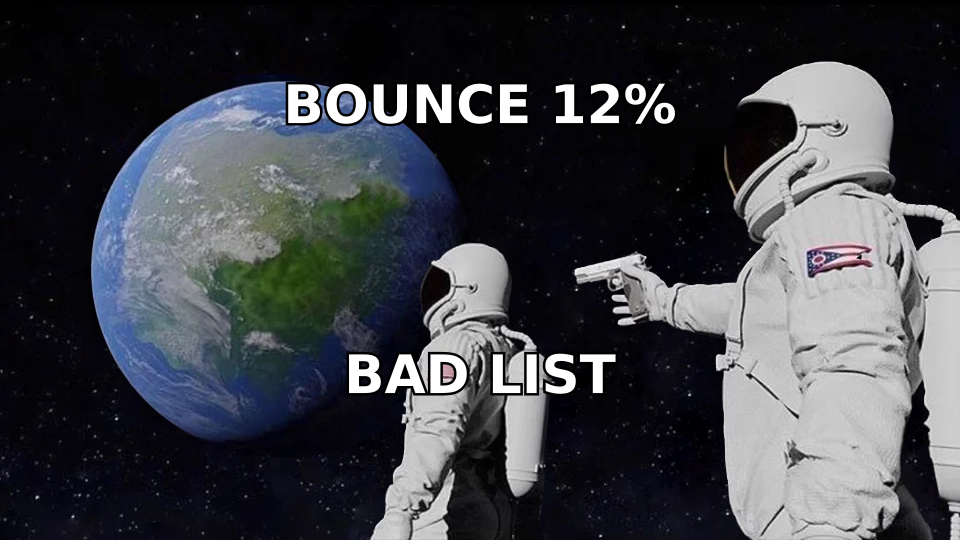
- Bulk marketing email fails at the list, not the copy. Clean and verify before you write a single subject line — a 12% bounce rate will tank a domain faster than any bad offer.
- Authenticate first: SPF, DKIM, and DMARC are non-negotiable at Gmail and Yahoo since 2024, and enforcement got stricter through 2025.
- Use the right tool for the job. Marketing platforms (Mailchimp, Brevo, Klaviyo) for opted-in newsletters; cold-email platforms (Instantly, Smartlead) for outbound. Mixing them is how you get suspended.
- Ramp volume over 3–5 weeks. New domains that jump straight to 5,000 sends/day get filtered, not delivered.
- Keep complaint rate under 0.10% and bounce rate under 2%. Those two numbers decide whether your next campaign reaches the inbox.
What does "sending bulk marketing emails" actually mean?#
Bulk marketing email means sending one message to a large list — hundreds to hundreds of thousands of recipients — in a single coordinated campaign. That sounds simple, and mechanically it is. The hard part is that mailbox providers treat volume as a risk signal. A message that would sail through when sent to 10 people gets scrutinized when sent to 10,000.
There are two distinct flavors, and conflating them is the single most common mistake:
- Opt-in bulk marketing — newsletters, product announcements, promotions to people who subscribed. High volume, HTML-heavy, tracked, sent through ESPs like Mailchimp or Klaviyo.
- Cold outbound — targeted business emails to people who did not subscribe. Lower volume per mailbox, plain-text, sent through dedicated cold-email infrastructure on separate domains.
They use different tools, different domains, different volume ceilings, and different legal footing. An ESP's terms of service will get you shut down for uploading a purchased or scraped list. A cold-email platform expects exactly that use case and builds inbox rotation around it.
Why do most bulk email campaigns land in spam?#
Because the sender optimized for the message and ignored the infrastructure. Mailbox providers score you on behavior over time, not on how clever your subject line is.
Here's what actually drives placement, roughly in order of weight:
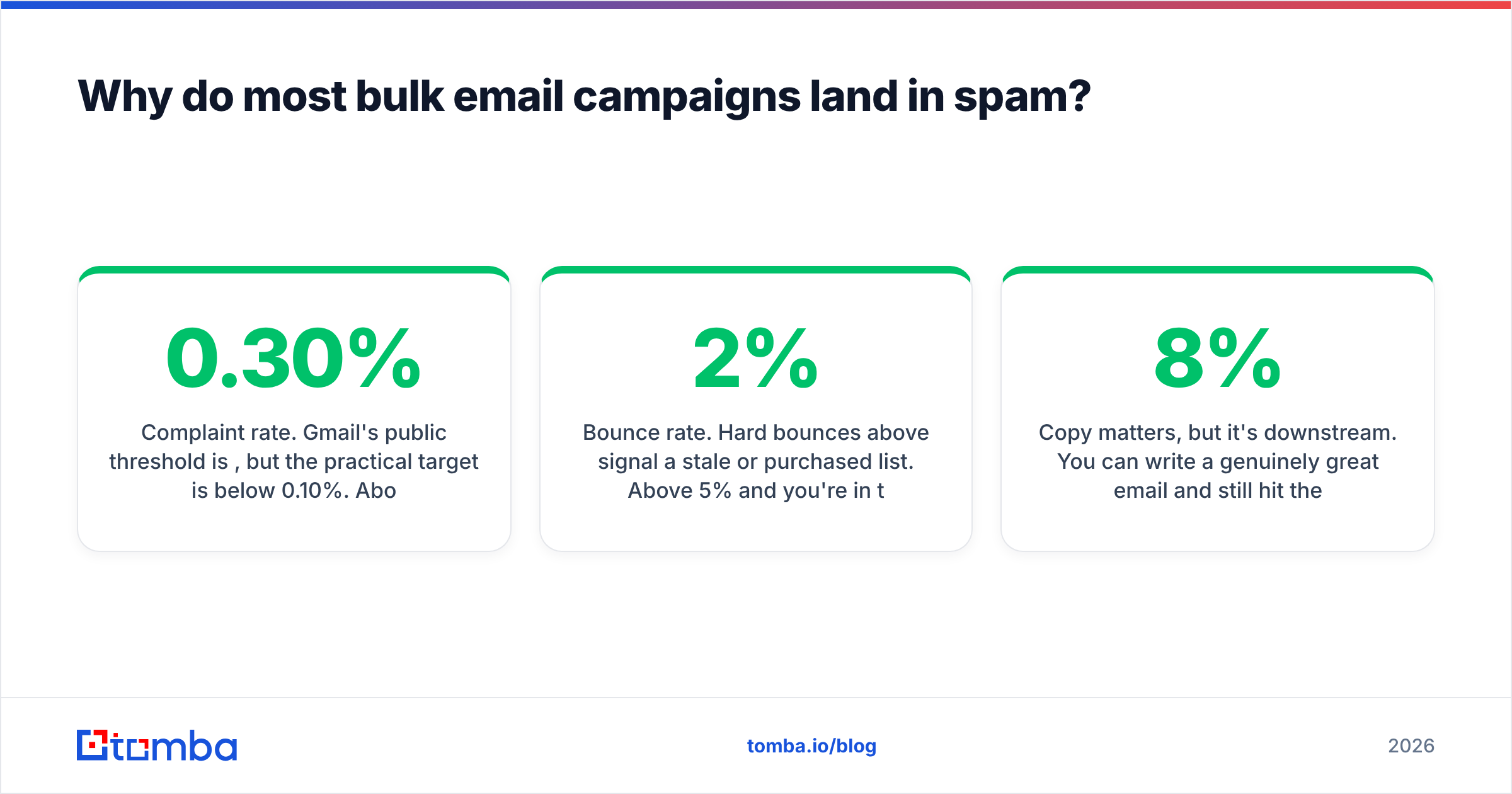
- Complaint rate. Gmail's public threshold is 0.30%, but the practical target is below 0.10%. Above that, your mail starts routing to spam even for engaged recipients.
- Bounce rate. Hard bounces above 2% signal a stale or purchased list. Above 5% and you're in trouble with most ESPs' abuse teams.
- Authentication. Missing SPF, DKIM, or DMARC means bulk senders get rejected outright at Gmail and Yahoo. This became mandatory for senders above 5,000 messages/day in February 2024 and has only tightened since.
- Engagement signals. Opens are noisy after Apple Mail Privacy Protection, but replies, forwards, moves-to-folder, and "not spam" clicks carry real weight.
- Sending consistency. A domain that sends 200/day for six weeks then blasts 20,000 looks compromised.
Copy matters, but it's downstream. You can write a genuinely great email and still hit the spam folder if 8% of your addresses don't exist.
How do you clean a list before a bulk send?#
Verify first, segment second, send third. This step returns more deliverability per hour invested than anything else on this list.
Run every address through an email verifier before it enters a campaign. A verifier does SMTP-level checks, syntax validation, MX record lookups, disposable-domain detection, and role-account flagging. What you want out the other side is a list where the invalid addresses have been removed, not just marked.
A practical pre-send checklist:
- Deduplicate. Same person on three lists means three copies and three chances at a complaint. A remove duplicates pass takes seconds.
- Strip role accounts.
info@,sales@,support@,admin@— these have low engagement and high complaint likelihood. Remove them from marketing sends; keep them only for specific outbound plays where they're the right target. - Verify in bulk. Upload the CSV, verify, and export only the valid and safe-to-send results. Bulk verify handles lists of tens of thousands in one pass.
- Handle catch-all domains separately. Catch-all servers accept everything, so standard verification returns "unknown." A catch-all verifier applies pattern confidence and secondary signals to score them instead of guessing.
- Suppress the obvious. Past unsubscribes, past complainers, past hard bounces. If your platform doesn't do this automatically, do it manually — an accidental re-send to someone who unsubscribed is both a deliverability hit and a compliance problem.
- Age-check the list. B2B contact data decays roughly 22–30% per year as people change jobs. A list you bought or built 18 months ago is mostly noise now.
If your list is under-built rather than dirty, that's a different problem. Building from scratch — finding verified contacts at companies that match your ICP — is what an email finder and domain search are for. Start with real, verified addresses and you skip most of the cleanup.
What authentication records do you need?#
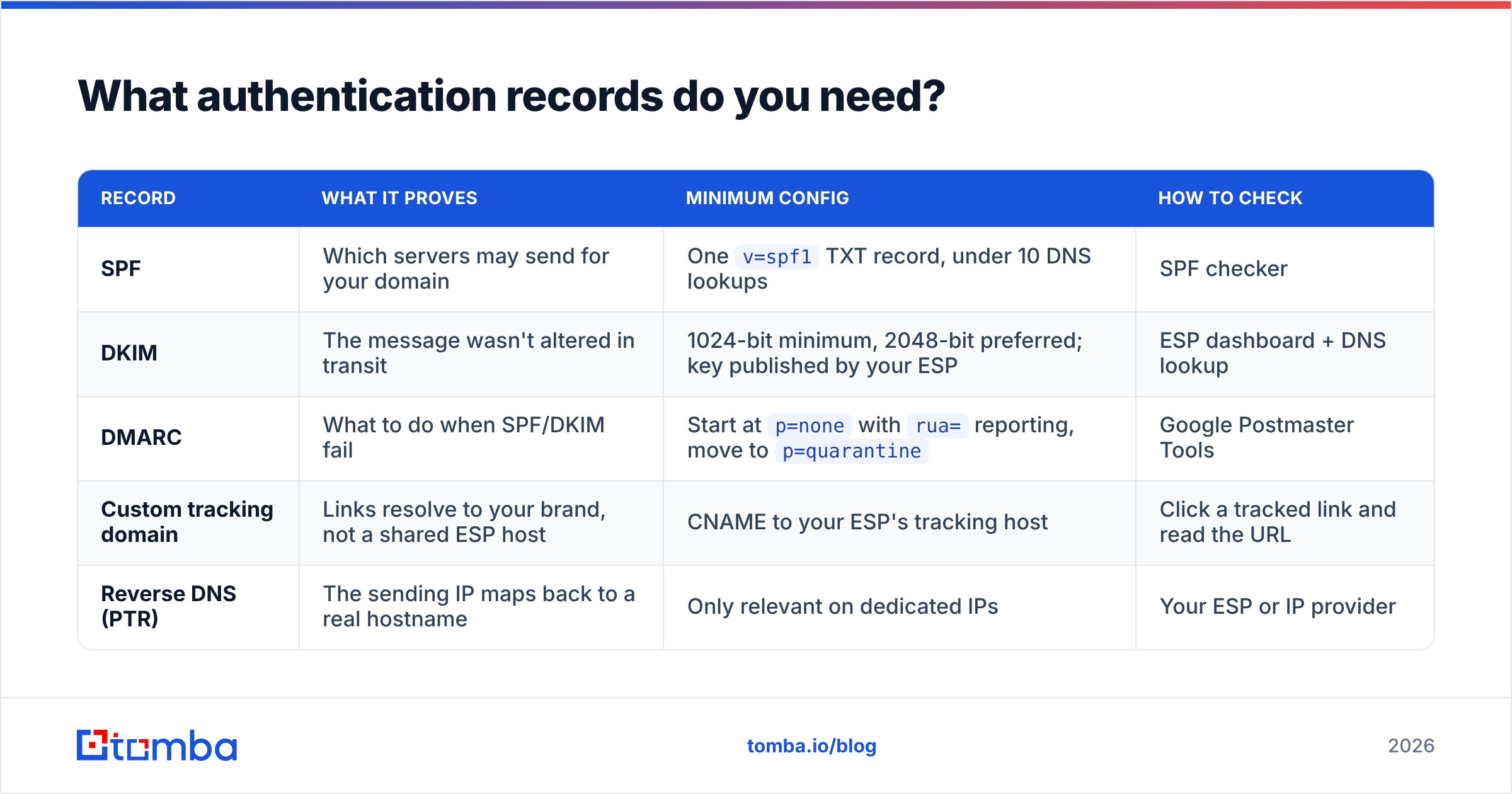
Three DNS records, all mandatory for bulk senders. Skip any one and Gmail and Yahoo will reject or junk your mail regardless of content quality.
| Record | What it proves | Minimum config | How to check |
|---|---|---|---|
| SPF | Which servers may send for your domain | One v=spf1 TXT record, under 10 DNS lookups |
SPF checker |
| DKIM | The message wasn't altered in transit | 1024-bit minimum, 2048-bit preferred; key published by your ESP | ESP dashboard + DNS lookup |
| DMARC | What to do when SPF/DKIM fail | Start at p=none with rua= reporting, move to p=quarantine |
Google Postmaster Tools |
| Custom tracking domain | Links resolve to your brand, not a shared ESP host | CNAME to your ESP's tracking host | Click a tracked link and read the URL |
| Reverse DNS (PTR) | The sending IP maps back to a real hostname | Only relevant on dedicated IPs | Your ESP or IP provider |
Two things people get wrong here. First, DMARC at p=none does nothing protective — it only reports. You need to actually read those reports and progress to p=quarantine. Second, a shared tracking domain drags your click-through links into whatever reputation the other tenants have earned. Set up a custom tracking subdomain; every serious ESP supports it.
Google's own sender guidelines are the authoritative reference and they update them. Read them directly rather than trusting a blog summary — including this one.
Which platform should you use for bulk marketing emails?#
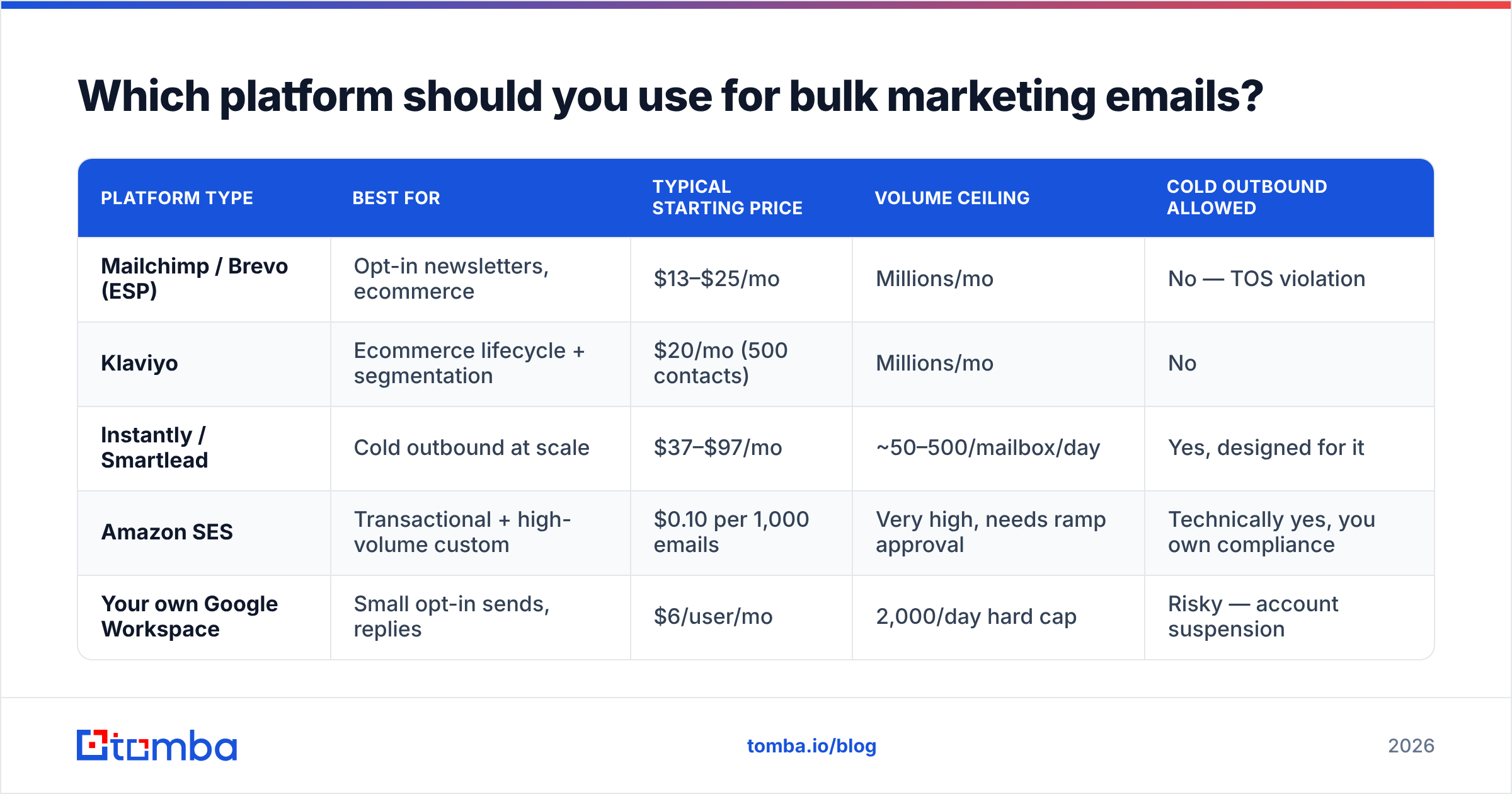
Match the tool to the list. Sending opted-in newsletters through cold-email infrastructure wastes money; sending cold outbound through Mailchimp gets your account terminated.
| Platform type | Best for | Typical starting price | Volume ceiling | Cold outbound allowed |
|---|---|---|---|---|
| Mailchimp / Brevo (ESP) | Opt-in newsletters, ecommerce | $13–$25/mo | Millions/mo | No — TOS violation |
| Klaviyo | Ecommerce lifecycle + segmentation | $20/mo (500 contacts) | Millions/mo | No |
| Instantly / Smartlead | Cold outbound at scale | $37–$97/mo | ~50–500/mailbox/day | Yes, designed for it |
| Amazon SES | Transactional + high-volume custom | $0.10 per 1,000 emails | Very high, needs ramp approval | Technically yes, you own compliance |
| Your own Google Workspace | Small opt-in sends, replies | $6/user/mo | 2,000/day hard cap | Risky — account suspension |
Amazon SES is the cheapest per message by an order of magnitude, but it hands you all the responsibility: bounce handling, suppression lists, complaint feedback loops, and warmup are yours to build. It makes sense at 500k+/month with an engineer to own it. Below that, an ESP's included tooling is worth the premium.
For cold outbound specifically, buy secondary domains. Never send cold email from your primary company domain — if it gets blacklisted, your sales team's replies and your invoices stop landing too. Register two or three lookalike domains (getyourcompany.com, yourcompany.co), point them at your main site, and treat them as disposable infrastructure.

How do you warm up a domain before a large send?#
Ramp gradually and keep the curve smooth. A new domain has no reputation, and mailbox providers treat "no reputation" as "assume the worst until proven otherwise."
A workable 5-week ramp for a fresh sending domain:
- Week 1: 10–20 emails/day per mailbox, all to engaged contacts or a warmup network. Target replies, not opens.
- Week 2: 30–50/day. Introduce your first real segment — your most engaged subscribers.
- Week 3: 75–120/day. Watch Google Postmaster Tools for the first reputation readings.
- Week 4: 150–250/day. If spam rate stays under 0.10%, keep climbing.
- Week 5+: 300–500/day per mailbox for cold outbound; ESPs on shared pools scale faster because the pool already has reputation.
Two rules that break the ramp if ignored. First, don't send on a schedule that looks robotic — real humans don't send exactly 47 emails at exactly 9:00:00 every morning, and every decent platform offers randomized intervals. Second, if any metric degrades, drop back one week's volume and hold, don't push through it.
Run the numbers for your own timeline with an email warmup calculator before committing to a launch date. Most teams underestimate the ramp by half.
Before the first send, check that your domain and IP aren't already on a blocklist — a blacklist checker takes thirty seconds and occasionally saves a campaign. Used domains bought on the aftermarket frequently arrive pre-poisoned.
What should the email itself look like?#
Plain enough to feel personal, structured enough to convert. The design rules differ by campaign type.
For opt-in marketing email:
- Keep the HTML under 102 KB. Gmail clips longer messages, which hides your unsubscribe link and hurts engagement metrics.
- Maintain a text-to-image ratio that isn't image-only. Image-only emails are a classic spam signature and break for anyone with images disabled.
- One primary call to action. Secondary links are fine; competing CTAs are not.
- A visible, one-click unsubscribe plus the
List-Unsubscribeheader. Required for bulk senders at Gmail and Yahoo, and it reduces complaints — people who can't find the unsubscribe hit "report spam" instead. - Include a physical mailing address. CAN-SPAM requires it; GDPR-adjacent regimes expect it.
For cold outbound:
- Plain text or near-plain text. No header images, no template chrome, no tracking pixel if you can live without opens.
- Under 120 words. Longer emails from strangers get archived.
- One question at the end, not a demo request. Replies are the strongest positive signal you can generate.
- Personalization that couldn't have been merged from a spreadsheet by anyone else — a specific line about their product, their hiring, their recent announcement.
Run a spam-filter pass before launch. A spam checker will flag trigger phrases, broken authentication, and link-reputation problems while you can still fix them. If subject lines are the bottleneck, a subject line tester gives you a faster read than guessing.
How do you measure whether a bulk campaign worked?#
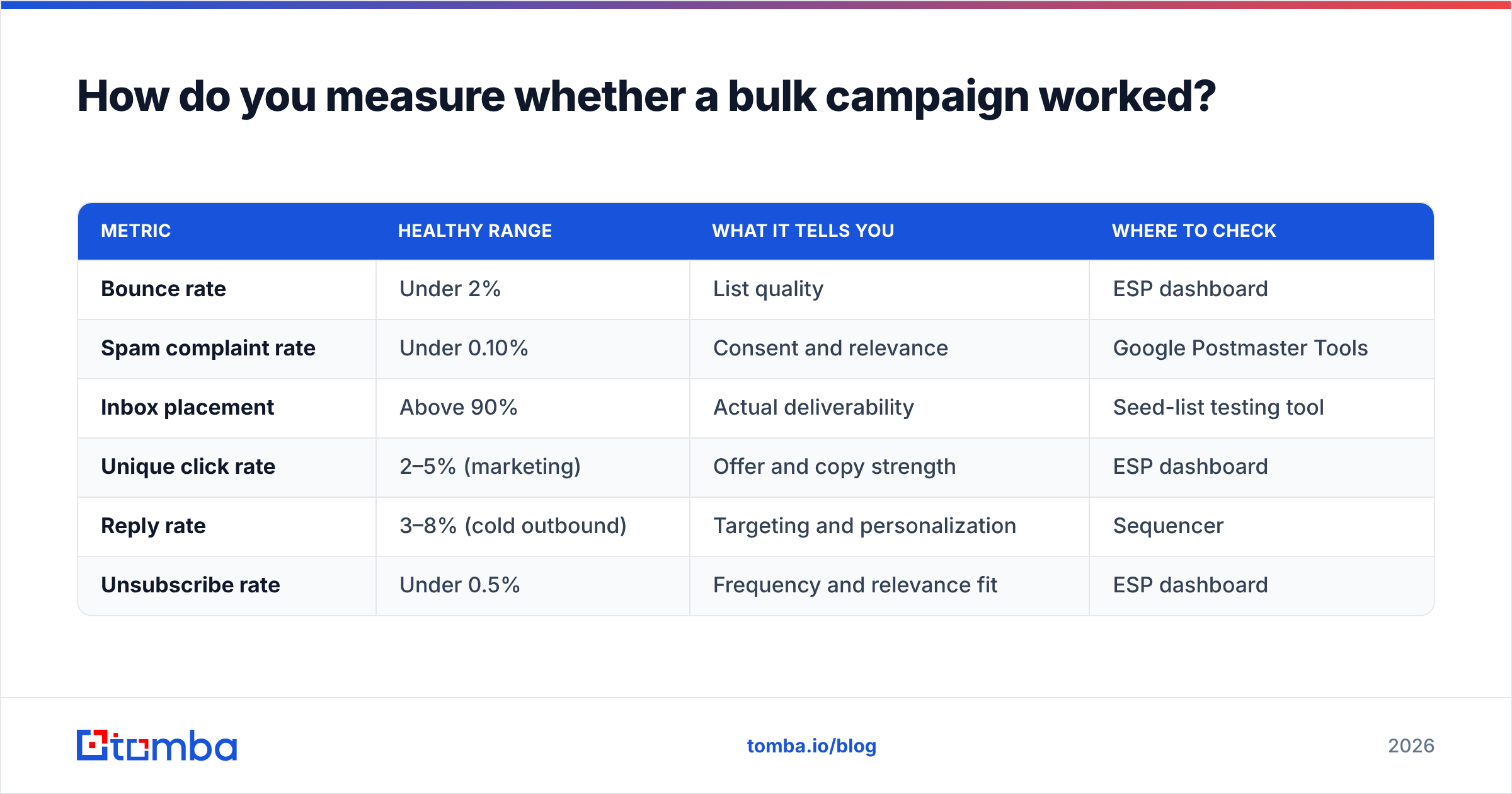
Track deliverability metrics separately from marketing metrics. They answer different questions, and a great click rate on 40% inbox placement is a mirage.
| Metric | Healthy range | What it tells you | Where to check |
|---|---|---|---|
| Bounce rate | Under 2% | List quality | ESP dashboard |
| Spam complaint rate | Under 0.10% | Consent and relevance | Google Postmaster Tools |
| Inbox placement | Above 90% | Actual deliverability | Seed-list testing tool |
| Unique click rate | 2–5% (marketing) | Offer and copy strength | ESP dashboard |
| Reply rate | 3–8% (cold outbound) | Targeting and personalization | Sequencer |
| Unsubscribe rate | Under 0.5% | Frequency and relevance fit | ESP dashboard |
Open rate deserves a note: since Apple Mail Privacy Protection began pre-fetching images in 2021, open rates are inflated and unreliable for Apple Mail recipients — which is a large share of consumer inboxes. Use opens for relative comparison between two sends on the same list, never as an absolute measure.
Google Postmaster Tools is free and gives you domain reputation, spam rate, and authentication pass rates straight from Gmail. If you're sending bulk and not looking at it weekly, you're flying blind. G2's email marketing category is a reasonable place to compare platform-level reporting depth if your current ESP's dashboard isn't enough.
What legal rules apply to bulk marketing email?#
Consent requirements vary sharply by region, and the penalties are real.
- CAN-SPAM (US) — opt-out regime. You may email without prior consent, but you must include a valid physical address, honor unsubscribes within 10 business days, and never use deceptive headers or subject lines. Penalties run into five figures per message.
- GDPR (EU/UK) — opt-in regime for consumers. B2B has a narrow legitimate-interest path in some member states, but it requires documented reasoning, easy opt-out, and data-source transparency.
- CASL (Canada) — the strictest of the three. Express or implied consent required, with implied consent expiring after a set window. Fines reach CAD $10M.
- PECR / ePrivacy (UK) — layered on top of GDPR, with its own rules on marketing to corporate subscribers versus individuals.
Practical takeaway: keep records of where every contact came from and when. If you're building lists from public professional data rather than buying them, note the source per record. When a data-subject request arrives, "we sourced this from the company's public website on this date" is an answer; "we bought a list" is not.
Bulk send checklist#
Work top to bottom before every large campaign:
- Verify the list — remove invalids, dedupe, strip role accounts, score catch-alls
- Check DNS — SPF resolves, DKIM signs, DMARC published and monitored
- Confirm warmup status — domain age and send history support today's volume
- Test render — Gmail, Outlook, Apple Mail, mobile; check the clip threshold
- Run a spam scan — content, links, authentication all clear
- Send a seed batch — 5% of the list, wait two hours, read the metrics, then release the rest
That last step is the one people skip. A 5% canary send costs you two hours and catches the mistakes that would otherwise burn an entire domain.
Start with a list that doesn't bounce#
Every deliverability problem in bulk email traces back to data quality. Authentication, warmup, and copy all matter — but they're optimizations on top of a list, and no amount of DKIM tuning saves you from a file where one address in eight doesn't exist.
Build the list right the first time. Tomba Email Finder finds verified professional addresses by domain, name, or company, with verification built into the same workflow so what lands in your CSV is already checked. The free tier gives you 25 searches a month to test the data quality against contacts you already know; paid plans start at $49/mo on Starter and $99/mo on Growth, with full Tomba pricing published up front. If you'd rather work in bulk, upload a CSV and get verified results back in one pass.
Clean list first. Then send.
Related guides#
// get started
Find, verify and enrich your first contacts today
Start on the free plan with 25 searches a month, then scale when your team is ready.
Free plan · No credit card required · GDPR & CCPA
// about the author