How To Send Many Emails At Once Without Landing in Spam
Sending 500 emails in one click is easy. Getting them delivered is not. Here are the five methods that actually work in 2026, the volume limits nobody tells you about, and the setup that keeps you out of spam.
TL;DR
- The bottleneck is never the send button. It's your mailbox provider's daily cap, your domain reputation, and the quality of the list you're blasting.
- Gmail personal accounts cap at 500 recipients/day; Google Workspace at 2,000; Outlook 365 at 10,000/day with a 1,000-recipient-per-message ceiling. Blowing past these gets you rate-limited, not delivered.
- Five practical methods: mail merge, ESP broadcast, cold-email sequencer, transactional API, and CRM bulk send. Each has a different legal and reputation profile.
- Clean the list before you send. A 5% bounce rate is where Google and Microsoft start throttling you, and bad addresses are the fastest way to get there.
- The safe pattern for cold outreach: multiple sending domains, 30–50 emails per inbox per day, verified addresses only, and 2–3 weeks of warmup before volume.
What does "send many emails at once" actually mean?#
It means three very different things, and picking the wrong one is why most bulk sends fail.
Method type one — one message, many recipients. You paste 400 addresses into BCC and hit send. Fast, free, and the worst option available. Providers treat large BCC blocks as a spam signal, recipients see a generic message, and one complaint drags the whole batch down.
Method type two — many personalized messages, sent programmatically. Each recipient gets their own message with their own name, company, and context. This is mail merge, cold-email sequencing, or an API loop. Slower per send, dramatically better results.
Method type three — a broadcast to an opted-in list. Newsletter to subscribers, product update, event invite. Goes through an ESP like Mailchimp or Klaviyo, includes an unsubscribe link, and is governed by consent rules.
Most people asking how to send many emails at once actually want type two or three but reach for type one because it takes ten seconds. The rest of this post is about doing it properly.
What are the real sending limits in 2026?#
Every method sits on top of a mailbox provider, and the provider's limit is the hard ceiling. Nothing you buy raises it.
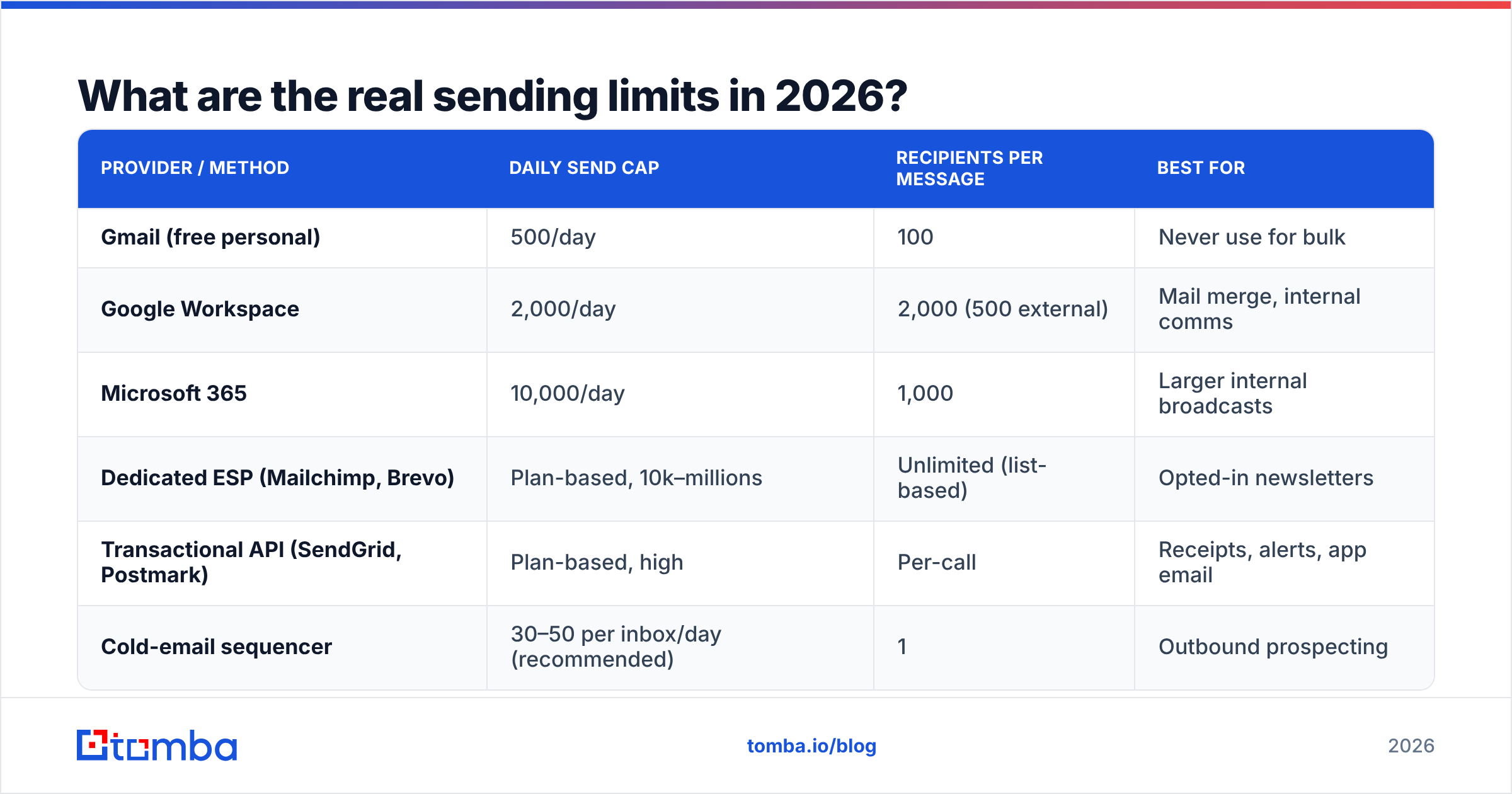
| Provider / method | Daily send cap | Recipients per message | Best for |
|---|---|---|---|
| Gmail (free personal) | 500/day | 100 | Never use for bulk |
| Google Workspace | 2,000/day | 2,000 (500 external) | Mail merge, internal comms |
| Microsoft 365 | 10,000/day | 1,000 | Larger internal broadcasts |
| Dedicated ESP (Mailchimp, Brevo) | Plan-based, 10k–millions | Unlimited (list-based) | Opted-in newsletters |
| Transactional API (SendGrid, Postmark) | Plan-based, high | Per-call | Receipts, alerts, app email |
| Cold-email sequencer | 30–50 per inbox/day (recommended) | 1 | Outbound prospecting |
Two numbers matter more than the caps. Google's bulk sender requirements put the spam-complaint threshold at 0.3%, with 0.1% as the target. Microsoft enforces similar thresholds. Cross them and your mail goes to spam across the entire provider — not just for that campaign, for everything you send from that domain.
The other number is bounce rate. Above 5% and throttling starts. Above 10% and you are functionally blacklisted at that provider. Both numbers are downstream of list quality, which is why verification is not optional.
How do you choose the right method?#
Match the method to intent, not to volume.
- Mail merge (Google Sheets, Word, GMass, YAMM) — Best when you have 50–500 recipients, a warm-ish relationship, and want personalization without new software. Runs on your own mailbox, so your own daily cap applies. Cheap and low-risk.
- ESP broadcast (Mailchimp, Brevo, Klaviyo) — Best for opted-in subscribers at any volume. Handles unsubscribes, list hygiene, and authentication for you. Legally required territory for marketing email in most jurisdictions.
- Cold-email sequencer (Instantly, Smartlead, Saleshandy, Lemlist) — Best for outbound prospecting. Rotates across multiple inboxes and domains, throttles per-inbox volume, handles reply detection and follow-ups. This is what you want when "many emails" means "a few hundred prospects a week."
- Transactional API (Postmark, SendGrid, Amazon SES) — Best for app-generated mail: receipts, password resets, alerts. High volume, high deliverability, wrong tool for marketing or outreach.
- CRM bulk send (HubSpot, Salesforce, Pipedrive) — Best when the list already lives in your CRM and you want activity logged against records automatically. Volume caps are usually tied to your seat tier.
If you are doing cold outreach, options 1 and 2 will hurt you. Mail merge from your primary domain puts your company's main mailbox at risk; an ESP will suspend you for sending unsolicited mail to a purchased list. Use a sequencer with dedicated domains.
How do you prepare the list before sending?#
This is the step that decides whether the send works. Do it in this order.
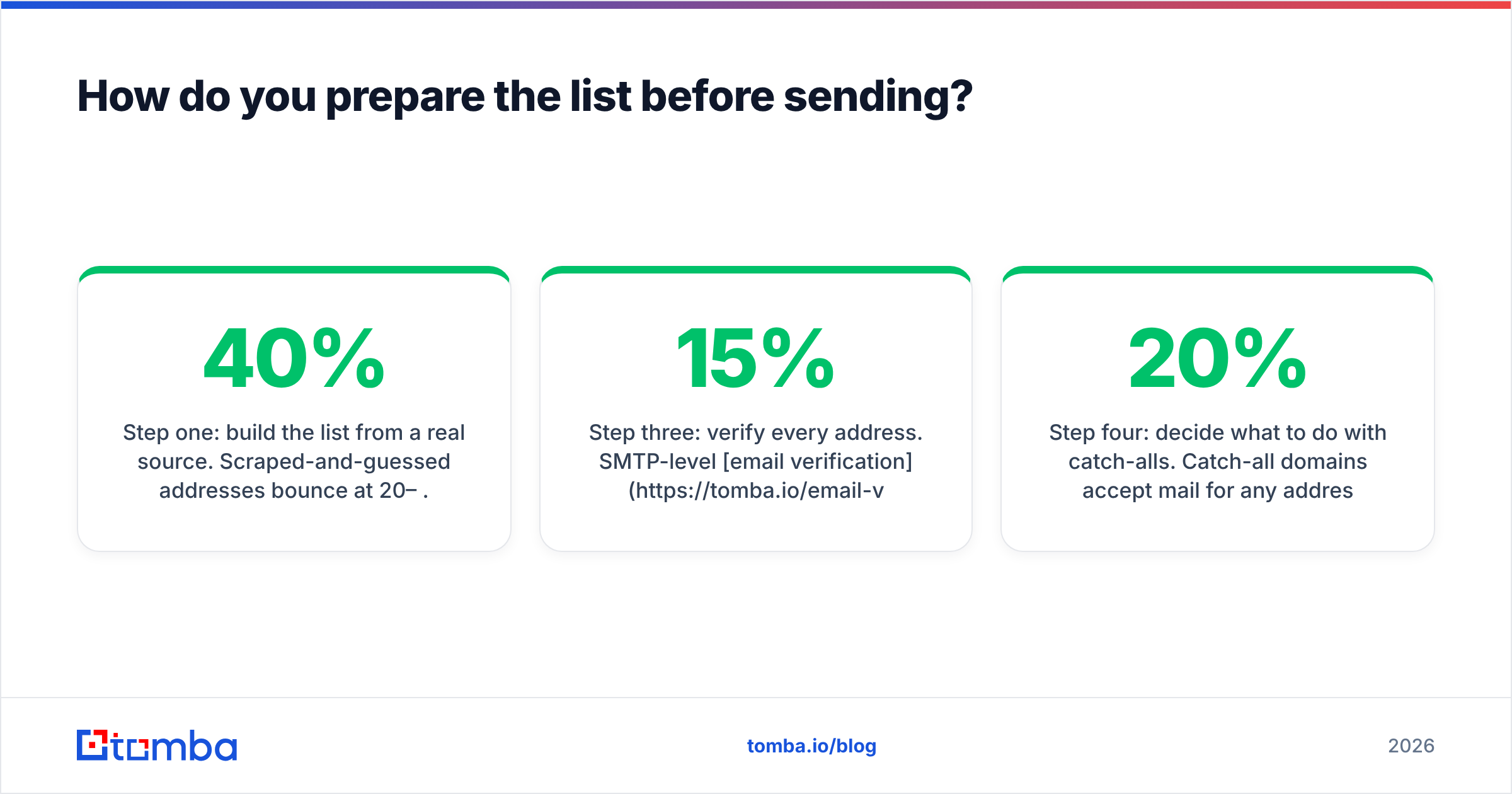
Step one: build the list from a real source. Scraped-and-guessed addresses bounce at 20–40%. Sourcing from a maintained provider or an email finder that returns a confidence score for each address gets you to single-digit bounce rates before you've verified anything. If you're building from company domains rather than individual names, domain search returns every known address on a domain plus the pattern it uses.
Step two: deduplicate. The same person appears three times with three email formats more often than you'd expect, especially after merging exports. Duplicates inflate your complaint rate and make you look careless when the same person gets three copies. Run a remove duplicates pass before anything else.
Step three: verify every address. SMTP-level email verification checks that the mailbox exists and accepts mail before you send to it. This is the single highest-ROI step in the entire process — it converts a 15% bounce rate into a 2% one, which is the difference between throttled and delivered.
Step four: decide what to do with catch-alls. Catch-all domains accept mail for any address, so standard verification returns "unknown." They're typically 10–20% of a B2B list. Dropping them all costs you real prospects; sending to all of them costs you reputation. A catch-all verifier resolves most of them properly. For the rest, isolate them into a separate low-volume campaign so the risk stays contained.
Step five: segment. One message to 800 people converts worse than four messages to 200 people. Segment by role, industry, or trigger, then write to each segment.
What technical setup do you need before a bulk send?#
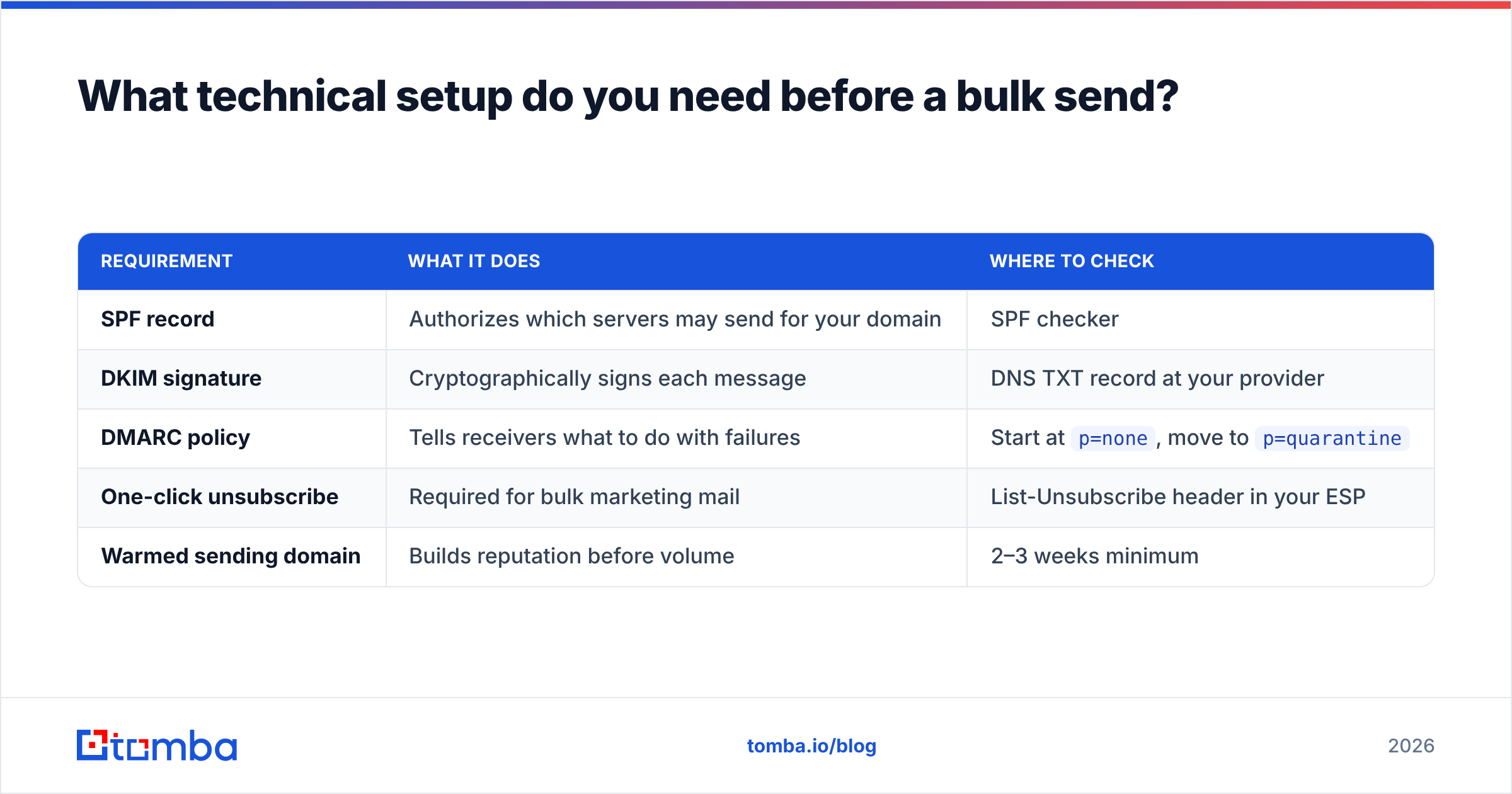
Authentication is a prerequisite in 2026, not a nice-to-have. Google and Yahoo both require it for bulk senders, and Microsoft's 2025 rollout brought the same enforcement to Outlook.
| Requirement | What it does | Where to check |
|---|---|---|
| SPF record | Authorizes which servers may send for your domain | SPF checker |
| DKIM signature | Cryptographically signs each message | DNS TXT record at your provider |
| DMARC policy | Tells receivers what to do with failures | Start at p=none, move to p=quarantine |
| One-click unsubscribe | Required for bulk marketing mail | List-Unsubscribe header in your ESP |
| Warmed sending domain | Builds reputation before volume | 2–3 weeks minimum |
Beyond the DNS records, three practices separate senders who scale from senders who get burned:
- Use a secondary domain for outbound. Buy
getcompany.comalongsidecompany.com. If reputation tanks, your primary domain — the one your invoices and support mail go from — is untouched. - Warm up gradually. Start at 5–10 sends per inbox per day, add roughly 5 per day, plateau at 30–50. Rushing this is the most common cause of a dead domain. An email warmup calculator will map the ramp against your target volume.
- Spread volume across inboxes. Three inboxes at 40/day beats one inbox at 120/day every time. Sequencers rotate this automatically.
How many emails can you actually send per day, safely?#
Work backwards from your target, not forwards from your ambition.
If you want 1,000 cold emails sent per week, that's 200 per business day. At a safe 40 per inbox per day, you need five warmed inboxes. Across two or three sending domains, that's two inboxes per domain — a normal-looking footprint. Domain cost is trivial; mailbox cost runs $6–7 each on Google Workspace or roughly $2 each on providers built for outbound. Budget three weeks of warmup before day one of the campaign.
For opted-in broadcast, the math is different. A single verified ESP account on a warmed domain handles 50,000+ sends without trouble, because subscribers asked for it and complaint rates stay low. The constraint there is list hygiene, not volume: re-verify any list older than six months, and sunset subscribers who haven't opened in a year.
For transactional mail, volume is essentially unbounded as long as recipients are your own users. Keep it on a subdomain (mail.company.com) separate from marketing so a bad campaign can't take down your password resets.
One rule cuts across all three: never send to an unverified list at volume, ever. A 2,000-address blast to a list you haven't cleaned will burn a domain in a single afternoon, and domain reputation takes months to rebuild — often longer than just buying a new domain and starting over.
What's the fastest workflow end to end?#
Here's the sequence that takes you from zero to a live send in about three weeks, most of which is waiting for warmup.
Week 1 — infrastructure. Buy two secondary domains. Create two to three mailboxes on each. Configure SPF, DKIM, and DMARC on all of them. Start warmup on every inbox the day it's created.
Week 1–2 — list build. Define the segment. Pull companies matching it. Find contacts by name and domain, or run bulk email finding against a company list. Enrich with title and company size so you can personalize. Verify everything. Drop the invalids, isolate the catch-alls.
Week 2 — copy. Write three to five variants per segment. Short, one ask, no attachments, no images, minimal links — every link is a deliverability tax. Run the copy through a spam checker before you load it.
Week 3 — send. Load segments into the sequencer. Cap each inbox at its warmed volume. Enable reply detection so anyone who responds drops out of the sequence immediately. Two follow-ups maximum, spaced four and eight days out.
Ongoing — monitor. Watch bounce rate (target under 3%), spam complaints (target under 0.1%), and reply rate. If bounces climb, your list went stale — re-verify. If complaints climb, your targeting is wrong, not your copy. Check sender reputation weekly through Google Postmaster Tools.
Two things worth knowing about the market: if you'd rather buy a list than build one, vendors like BookYourData sell pre-verified B2B contacts with bounce guarantees, which is a reasonable shortcut when you need volume quickly and your ICP is broad. And if you're comparing sequencers, both G2 and Capterra publish current review volumes that are more useful than any vendor's own comparison page.
What mistakes kill bulk sends most often?#
- BCC blasts. Instantly flagged, zero personalization, no unsubscribe. Never worth the ten seconds saved.
- Sending from the primary domain. One bad campaign and your invoices land in spam.
- Skipping verification to save $30. The cheapest possible way to lose a domain worth thousands.
- Attachments and image-heavy HTML in cold email. Both are spam signals. Plain text outperforms.
- No unsubscribe path in marketing email. Illegal under CAN-SPAM and GDPR, and it converts complaints into legal risk.
- Ramping volume too fast after warmup. Doubling week over week reads as compromise-account behavior to filters.
- Ignoring the reply. Sending 500 emails and taking three days to answer the four people who replied wastes the entire campaign.
Start with a list that won't bounce#
The technical setup is the easy part — SPF, DKIM, warmup, and inbox rotation are all solved problems with documented steps. What separates a send that lands from one that burns a domain is whether the addresses on your list are real.
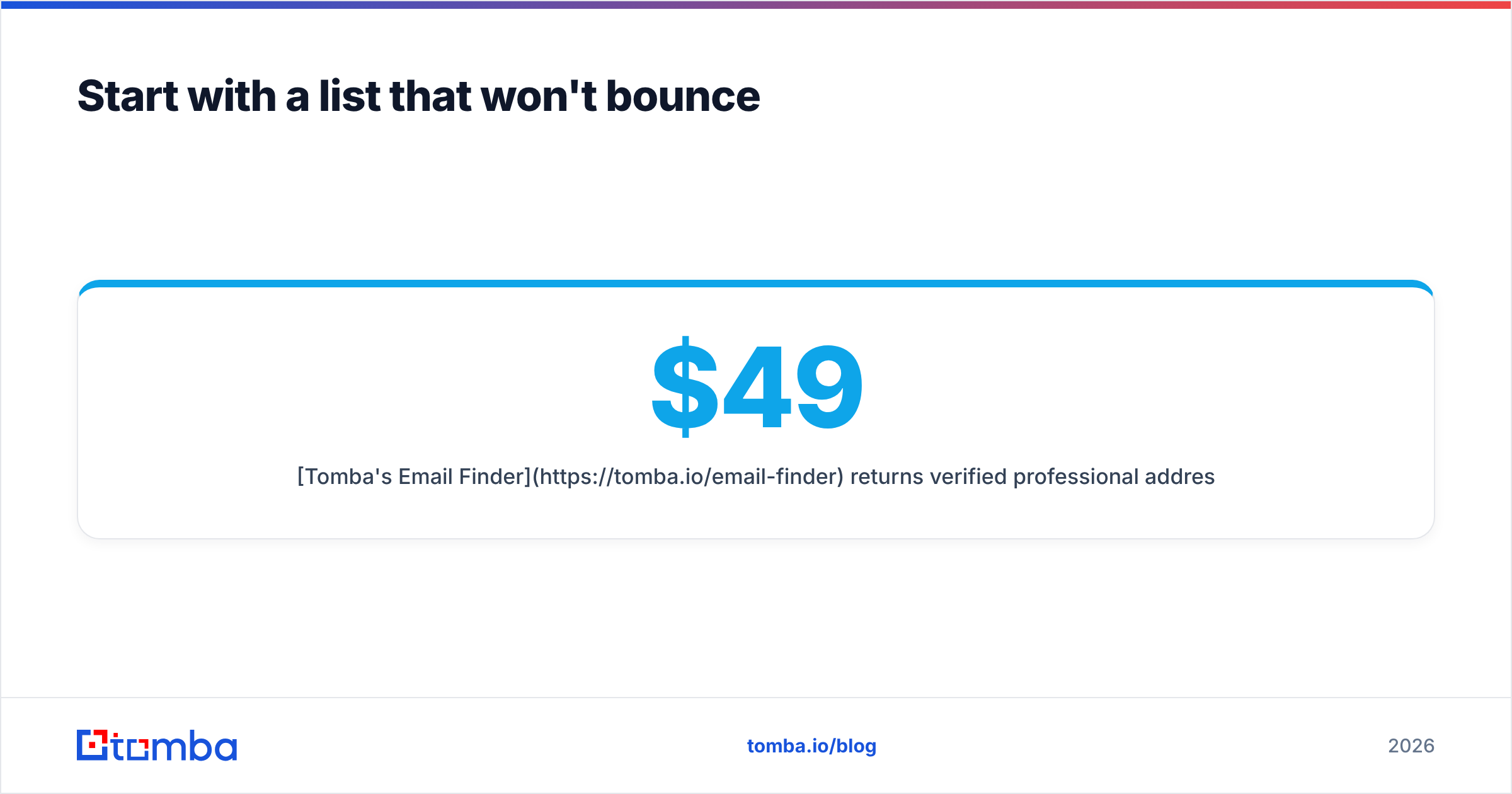
Tomba's Email Finder returns verified professional addresses with a confidence score on each one, so you know your bounce exposure before you press send rather than after. It finds emails by name and domain, pulls every known contact on a company domain, and runs in bulk against a spreadsheet of targets. The free tier gives you 25 searches a month to test list quality against your own ICP; paid plans start at $49/month on Starter, $99/month on Growth, and $249/month on Pro — see Tomba pricing for full credit allocations. Clean the list first, then worry about the send button.
Related guides#
// get started
Find, verify and enrich your first contacts today
Start on the free plan with 25 searches a month, then scale when your team is ready.
Free plan · No credit card required · GDPR & CCPA
// about the author