How to Send Mass Emails in 2026 Without Landing in Spam
Mass email is easy to send and easy to get wrong. Here is the exact stack, sending limits, list-hygiene steps, and warmup math that keep bulk campaigns in the inbox in 2026.
Bulk email is easy to send and easy to get wrong. This guide covers how to send mass emails without burning your domain: the setup, the sending limits, the list work, and the tools that hold up.
TL;DR
- "Mass email" splits into two very different jobs: bulk marketing (opt-in lists, ESPs like Mailchimp or Brevo) and cold outreach (unknown contacts, sending tools like Instantly or Smartlead). Using the wrong one is the fastest way to get blocked.
- Never send bulk mail from your primary domain. Buy sending domains, authenticate them with SPF, DKIM, and DMARC, and warm them for 3-4 weeks before volume.
- Google and Yahoo's bulk-sender rules (5,000+ messages/day) require one-click unsubscribe and a spam-complaint rate under 0.30%. Treat 0.10% as your real ceiling.
- Verify every address before you send. A list with 8% invalids will bounce you out of the inbox before your copy ever gets read.
- Cap cold sends at 30-50 per mailbox per day. Scale with more mailboxes, not a bigger daily number.
What does "sending mass emails" actually mean in 2026?#
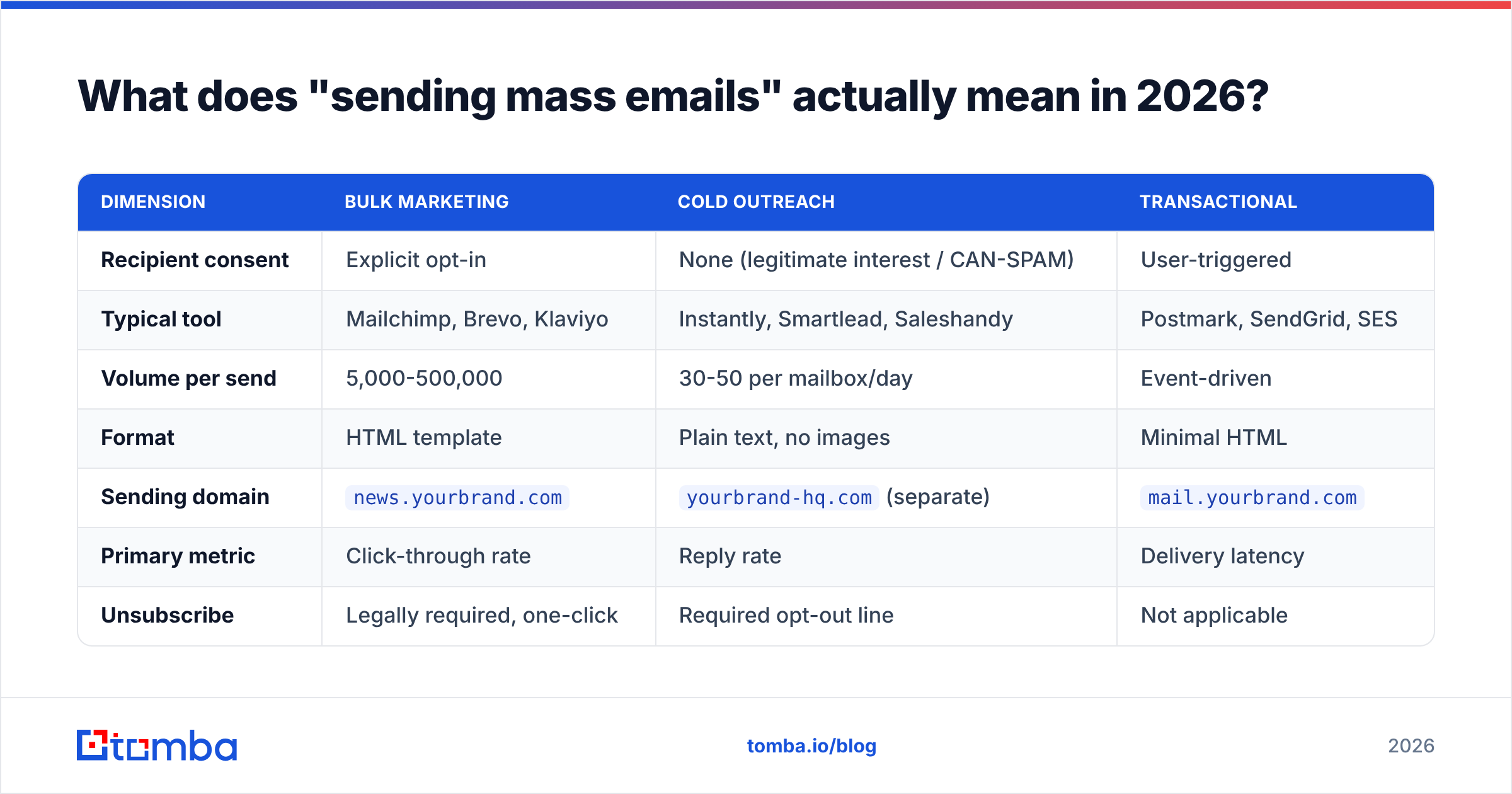
The phrase covers three jobs. Mailbox providers treat each one as different traffic.
Bulk marketing email goes to people who opted in — newsletter subscribers, customers, webinar registrants. It is template-heavy and image-heavy. It ships from a shared or dedicated IP at an ESP, and you judge it on open and click rate.
Cold outreach email goes to people who never asked to hear from you. It is plain text, low volume per mailbox, and sent from dedicated sending domains. You judge it on reply rate. Gmail's filters score it against a different bar.
Transactional email — receipts, password resets, alerts — is triggered by user action. It should never share a domain with either of the above.
Mixing these is where most senders die. Sending a cold campaign through Mailchimp breaks their terms and can end your account. Push a 40,000-person newsletter through a cold-email tool and you melt your domain reputation in a week.
| Dimension | Bulk marketing | Cold outreach | Transactional |
|---|---|---|---|
| Recipient consent | Explicit opt-in | None (legitimate interest / CAN-SPAM) | User-triggered |
| Typical tool | Mailchimp, Brevo, Klaviyo | Instantly, Smartlead, Saleshandy | Postmark, SendGrid, SES |
| Volume per send | 5,000-500,000 | 30-50 per mailbox/day | Event-driven |
| Format | HTML template | Plain text, no images | Minimal HTML |
| Sending domain | news.yourbrand.com |
yourbrand-hq.com (separate) |
mail.yourbrand.com |
| Primary metric | Click-through rate | Reply rate | Delivery latency |
| Unsubscribe | Legally required, one-click | Required opt-out line | Not applicable |
Pick your lane before you pick your tool. Everything downstream depends on it.
How do you set up the sending infrastructure?#
Start with domains, not software. Most people skip this step, then spend six months trying to recover. So the real answer to how to send mass emails at scale starts in DNS.
- Buy separate sending domains. If your company is
acme.com, registeracme-hq.com,getacme.com, andtry-acme.com. Your primary domain carries your website, your invoices, and your reputation with existing customers. Do not gamble it on outbound. Redirect each sending domain to your main site so it doesn't look abandoned. - Authenticate all three records. SPF tells receivers which servers may send for your domain. DKIM signs each message. DMARC tells receivers what to do when one of those fails. Google requires all three from bulk senders, and Yahoo matched the policy. Run a free SPF checker after every DNS change. A single typo kills authentication silently.
- Set DMARC to
p=nonefirst, then tighten. Publishv=DMARC1; p=none; rua=mailto:dmarc@yourdomain.comand read reports for two weeks. Once all legitimate mail passes, move top=quarantineand thenp=reject.
With DNS clean, move on to mailboxes and warmup.
- Create 2-3 mailboxes per domain. Google Workspace or Microsoft 365, real names, real profile photos, real signatures. Three domains × three mailboxes × 40 sends/day = 360 emails/day, which covers most outbound teams.
- Warm every mailbox for 21-28 days. Warmup tools trade real replies between managed inboxes. Providers then see two-way engagement before you send anything cold. Start at 5 sends/day and add 3-5 daily. Our warmup calculator gives you the ramp schedule for a target volume and date.
- Test before the first real send. Run a message through an email spam checker and confirm your IP and domain aren't on public blocklists with a blacklist checker.
For bulk marketing on an ESP, steps 1 and 5 change. You use a subdomain like news.acme.com instead of a separate root domain, and the ESP warms the IP for you on shared pools. Dedicated IPs still need the ramp.
Which tool should you use to send mass emails?#
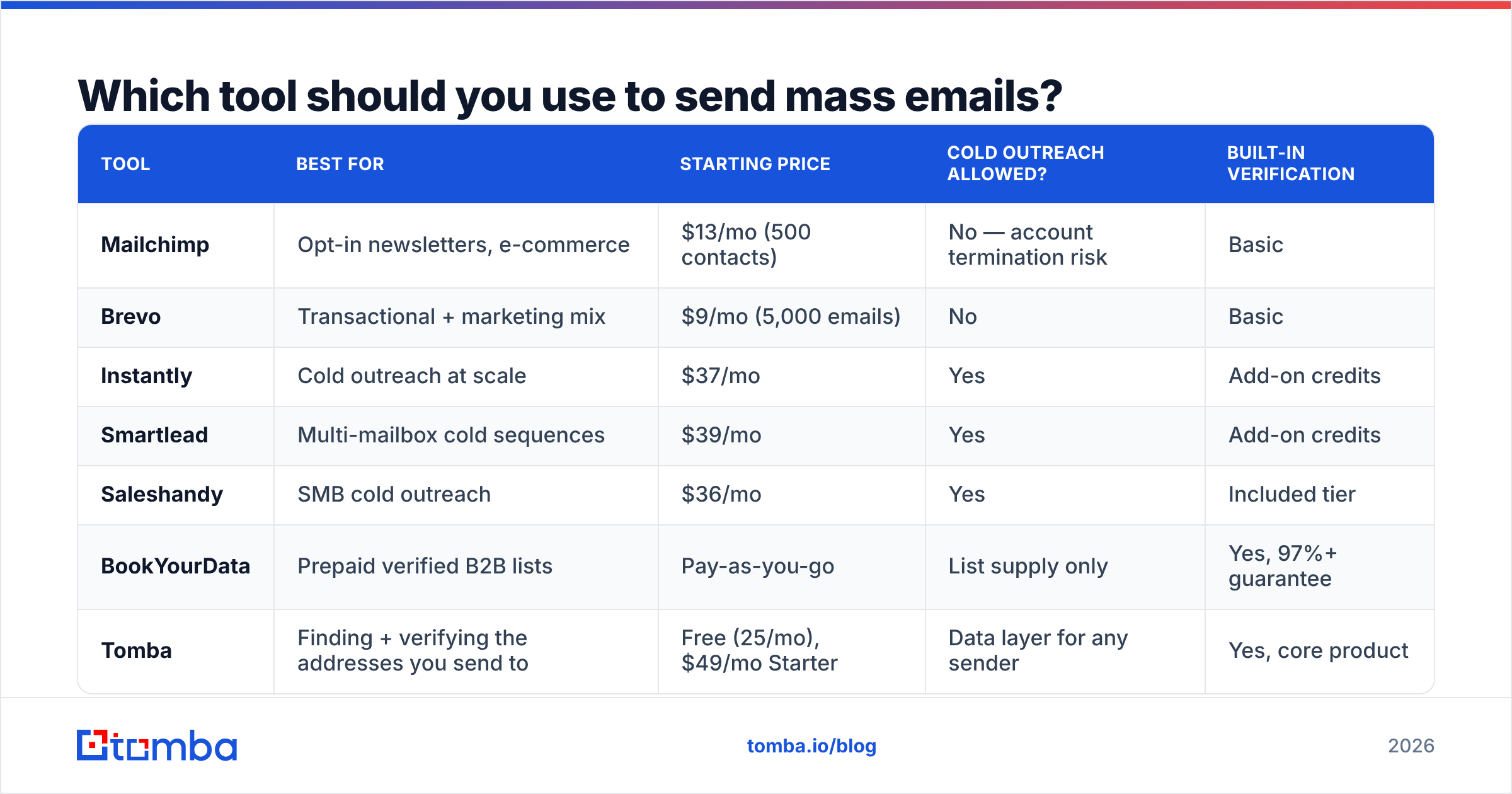
Your choice depends almost entirely on consent status and volume. Here's the honest breakdown of the categories.
| Tool | Best for | Starting price | Cold outreach allowed? | Built-in verification |
|---|---|---|---|---|
| Mailchimp | Opt-in newsletters, e-commerce | $13/mo (500 contacts) | No — account termination risk | Basic |
| Brevo | Transactional + marketing mix | $9/mo (5,000 emails) | No | Basic |
| Instantly | Cold outreach at scale | $37/mo | Yes | Add-on credits |
| Smartlead | Multi-mailbox cold sequences | $39/mo | Yes | Add-on credits |
| Saleshandy | SMB cold outreach | $36/mo | Yes | Included tier |
| BookYourData | Prepaid verified B2B lists | Pay-as-you-go | List supply only | Yes, 97%+ guarantee |
| Tomba | Finding + verifying the addresses you send to | Free (25/mo), $49/mo Starter | Data layer for any sender | Yes, core product |
A few notes worth internalizing before you swipe a card.
ESPs are not cold-email tools. Mailchimp, Brevo, Klaviyo, and Constant Contact all ban sending to purchased or scraped lists. Their shared IP pools depend on every sender keeping complaint rates low, so they enforce hard. If your list wasn't opted in, do not use them.
Cold-email platforms are not ESPs. They rotate across many mailboxes at low volume by design. Push a 50,000-recipient newsletter through one and you burn every connected inbox at once.
Data and sending are separate purchases. Sending platforms move messages. They don't tell you which addresses exist. That's a different problem, solved by an email finder and an email verifier upstream of whatever sends the mail. BookYourData attacks it from the other side with prepaid, pre-verified lists — a fair fit if you'd rather buy a clean list than build one.
How do you build and clean the list?#
Garbage list, garbage deliverability. No subject line rescues a 12% bounce rate.
Building it. For opt-in marketing, that's your signup forms, gated content, and purchase records. Nothing exotic. For outbound, you build the list from a defined ICP: pull target companies, pick the right roles, then find contact details. A domain search returns every known email at a company plus the pattern it uses, which beats guessing one person at a time. For volume work, bulk lead generation runs thousands of lookups from a CSV, and the Tomba API drops the same lookups into your own pipeline.
Cleaning it. Run every address through verification before it touches a sequence. Verification does an MX lookup, an SMTP handshake, and syntax and disposable-domain checks. It returns valid, invalid, catch-all, or unknown. Suppress the invalids. Catch-all domains accept everything at the SMTP layer and tell you nothing, so a catch-all verifier uses pattern confidence and secondary signals to separate real mailboxes from black holes.
Then deduplicate. Two copies of the same person in a sequence is the most avoidable unsubscribe there is. Strip exact duplicates and Gmail dot-and-plus aliases before import. A duplicate remover handles it in one pass.
And re-clean quarterly. B2B email data decays roughly 22-30% per year as people change jobs. A list you verified in January is measurably worse by June.
What sending limits and volume rules actually apply?#
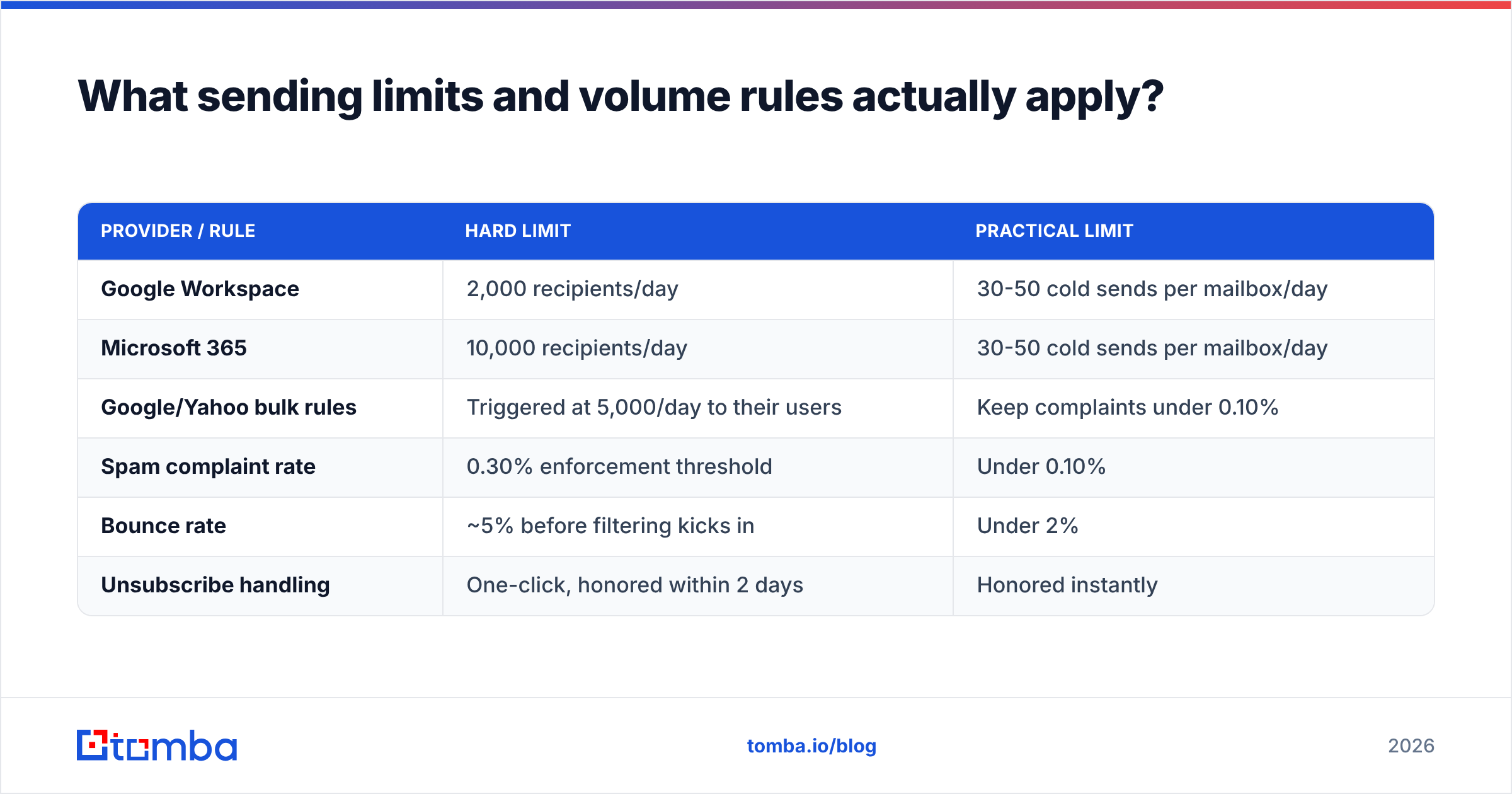
Providers publish hard caps and enforce soft ones. Both matter.
| Provider / rule | Hard limit | Practical limit |
|---|---|---|
| Google Workspace | 2,000 recipients/day | 30-50 cold sends per mailbox/day |
| Microsoft 365 | 10,000 recipients/day | 30-50 cold sends per mailbox/day |
| Google/Yahoo bulk rules | Triggered at 5,000/day to their users | Keep complaints under 0.10% |
| Spam complaint rate | 0.30% enforcement threshold | Under 0.10% |
| Bounce rate | ~5% before filtering kicks in | Under 2% |
| Unsubscribe handling | One-click, honored within 2 days | Honored instantly |
The gap between column two and column three is where reputation lives. Google Workspace lets you send 2,000 recipients a day. Send 2,000 cold emails from one mailbox and that mailbox gets filtered inside a week. The published number is an anti-abuse ceiling, not a target.
Google and Yahoo's bulk sender requirements kick in at 5,000 messages per day to their users. They require SPF, DKIM, DMARC, one-click unsubscribe via the List-Unsubscribe header, and a spam rate below 0.30%. Once you cross 0.30%, filtering is automatic and recovery takes weeks.
Scale horizontally. Ten mailboxes at 40 sends a day beats one mailbox at 400, every time. Per-mailbox risk stays low, and one flagged domain doesn't take the whole program down.

How do you write mass email that doesn't read like mass email?#
Three levers move reply rate more than anything else: relevance, brevity, and a single clear ask.
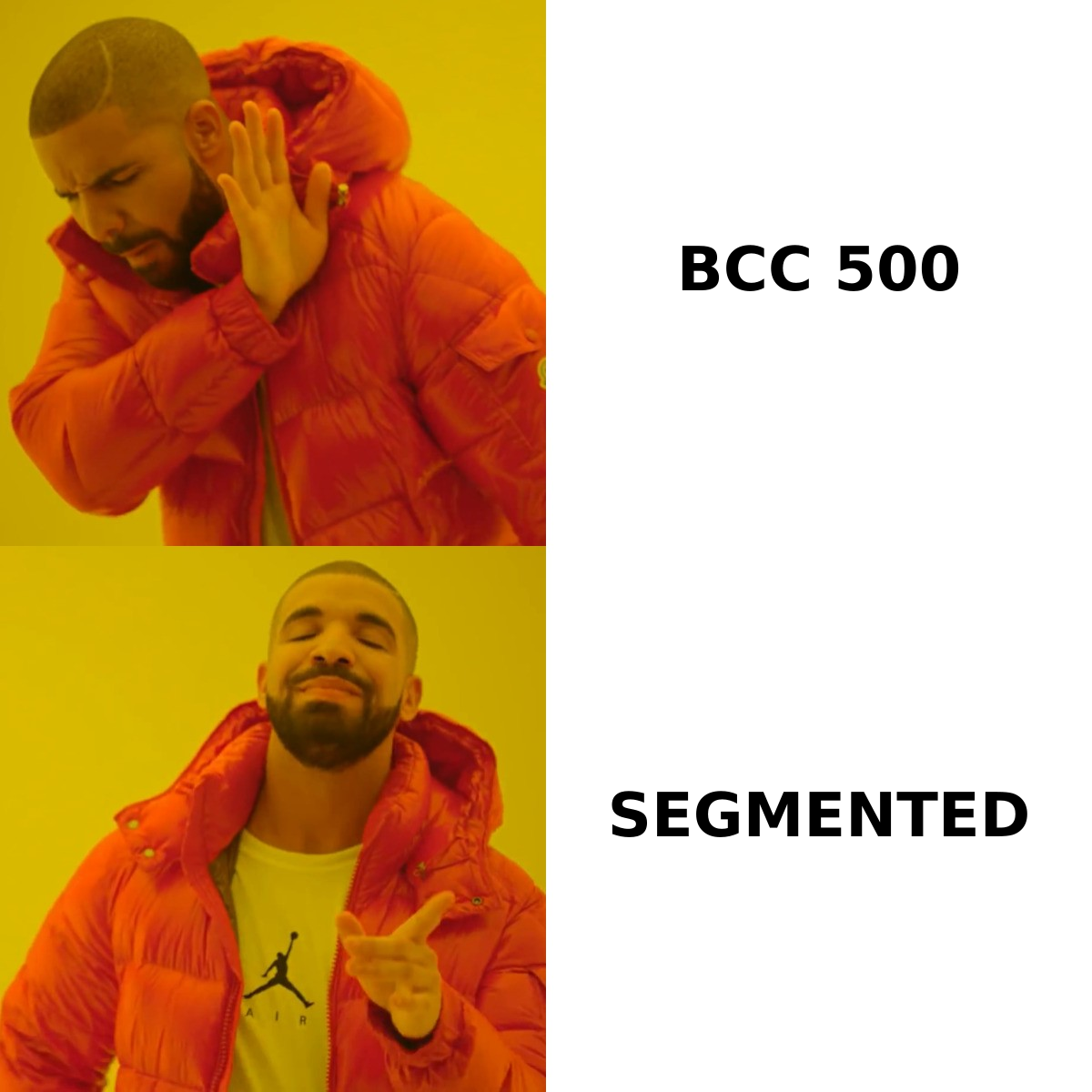
Segment before you write. One message to 5,000 people underperforms five messages to 1,000. Split by industry, company size, role, or trigger event, then write to that segment's real problem. This is the highest-ROI hour in the whole process.
Personalize on a real variable. {{first_name}} is table stakes and fools nobody. A specific reference works better — a recent hire, a product launch, or a stack choice you can check with a website tech checker. That's what separates a reply from a delete.
Keep it under 125 words. Most cold email is read on a phone. If your message needs scrolling, it needs cutting.
One CTA, low friction. "Worth a quick look?" beats "book a 30-minute demo" because the cost of saying yes is lower. Ask for interest first, calendar time second.
Strip the deliverability liabilities. No images in the first touch. At most one link. No tracking pixel on cold sends: open tracking needs an image load, which is itself a spam signal. No attachments. Plain text, from a real person.
Follow up 3-4 times, spaced 3-5 days apart. Most replies arrive on touch two through four. Each follow-up should add something — a case study, a different angle — not just "bumping this."
If you want structure to start from, our library of cold email templates covers the standard plays, and the subject line tester flags spam-trigger phrasing before you send.
What legal rules apply to mass email?#
Compliance is jurisdictional, and the gap between CAN-SPAM and GDPR is wide.
United States (CAN-SPAM): no opt-in required. But you must not use false headers or subject lines. You must label the message as an ad where that applies, include a valid physical postal address, and honor opt-outs within 10 business days. Penalties run over $50,000 per violating email.
EU/UK (GDPR + PECR): B2B cold email to work addresses is usually allowed under legitimate interest. You still need a documented lawful basis. You must name your data source on request, offer opt-out in every message, and honor deletion requests. Role addresses like info@ and sales@ sit in a grayer area than named people, so many teams exclude them entirely.
Canada (CASL): the strictest of the three. Express or implied consent is required before sending, and implied consent expires. Fines reach CAD $10 million.
Here's a baseline that keeps you safe nearly everywhere. Send only to business addresses. Write only about things that matter to the recipient's job. Always include a one-line opt-out and honor it right away. Keep a record of where each contact came from. Tomba documents its data sources for exactly this reason: "where did you get my email?" is a question you should be able to answer in one sentence.
How do you measure whether it's working?#
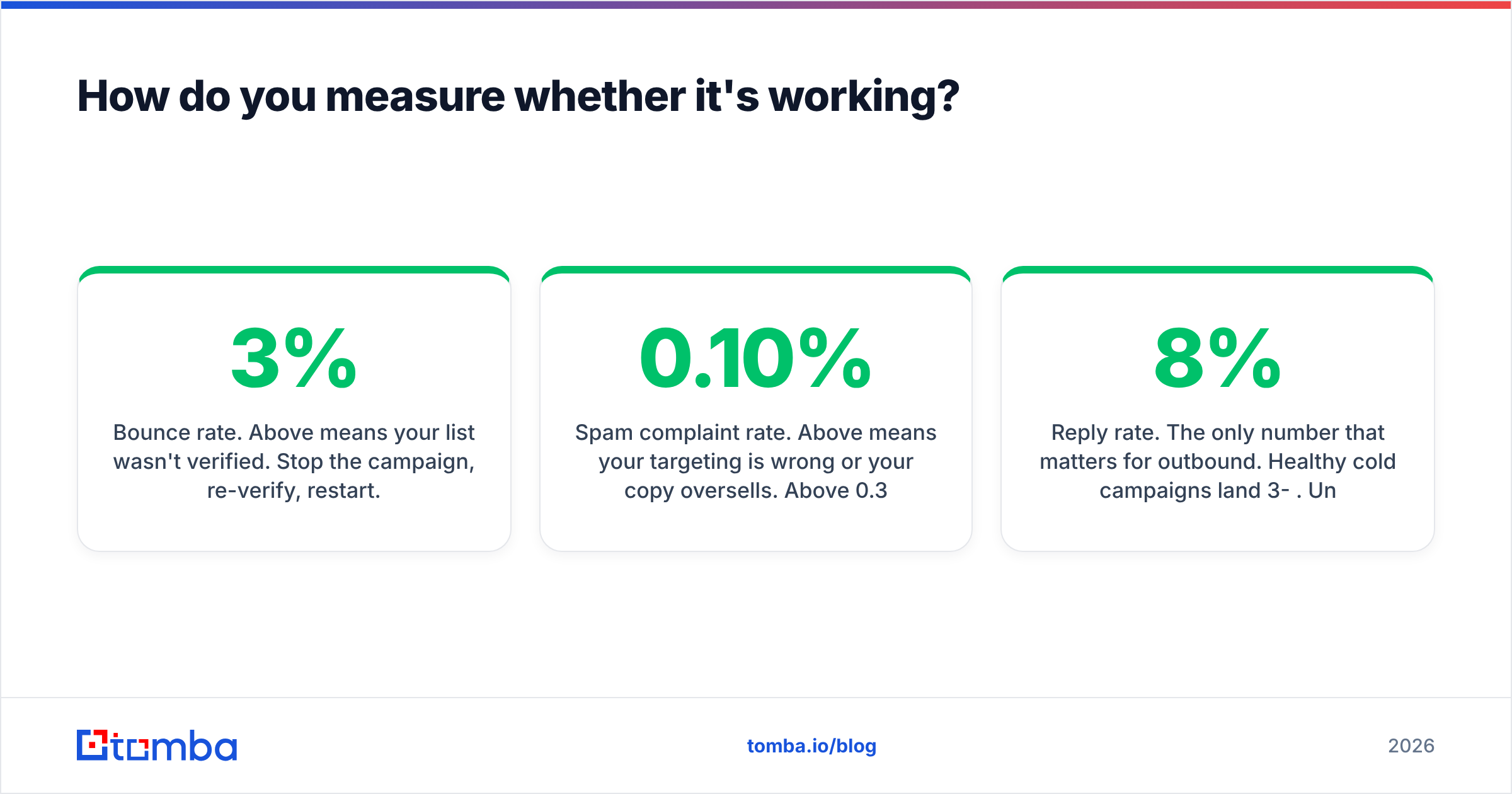
Track four numbers weekly and act on them.
- Bounce rate. Above 3% means your list wasn't verified. Stop the campaign, re-verify, restart. This is a deliverability emergency, not a metric.
- Spam complaint rate. Above 0.10% means your targeting is wrong or your copy oversells. Above 0.30% and providers act for you. Track it in Google Postmaster Tools.
- Reply rate. The only number that matters for outbound. Healthy cold campaigns land 3-8%. Under 1% means the offer or the targeting is broken — usually the targeting.
- Inbox placement. Not the same as delivery rate. A message can be "delivered" to spam. Use seed-list testing across Gmail, Outlook, and Yahoo monthly.
Ignore open rate on cold campaigns. Apple Mail Privacy Protection pre-loads images and turns it into noise. Track replies.
Check two things when numbers slide: your sender reputation trend, and whether bounce rate moved first. Bounces almost always come before a placement drop. That means list hygiene, not copy, is your first fix. If you're auditing an inherited list, G2's email deliverability category is a reasonable place to compare monitoring tools.
How to send mass emails: the fastest path from zero to first campaign#
If you're starting today with nothing, here's the sequence and realistic timing.
- Day 1: Buy two sending domains, create three mailboxes each, configure SPF/DKIM/DMARC.
- Day 1-28: Start warmup at 5 sends/day and ramp to 40. Don't shortcut this. It's the single most common cause of a dead program.
- Day 2-7: Define your ICP, build the target account list, resolve contacts with find email addresses by domain and name.
- Day 7-8: Verify everything. Suppress invalids, run catch-alls through pattern confidence, deduplicate.
- Day 8-14: Write three segment-specific sequences, four touches each. Test subject lines. Strip images and tracking.
- Day 29: First real send — 20 emails per mailbox. Watch bounces and replies for 72 hours.
- Day 32+: Scale to 40 per mailbox. Add domains, not volume per mailbox.
Four weeks from zero to sending. Every attempt to compress that timeline shows up later as a spam-folder problem.
Start with a list that's actually deliverable#
Mass email fails at the list far more often than at the copy. If you remember one thing about how to send mass emails, make it that. Infrastructure and warmup buy you the right to be seen. Verified, accurate contact data decides whether that right turns into replies.
Tomba Email Finder resolves professional email addresses by domain, name, or company, with verification built into the same workflow, so you're not sending to addresses that bounce. The free tier gives you 25 searches a month to test accuracy against contacts you can confirm yourself. Starter is $49/mo and Growth is $99/mo when you scale. Full Tomba pricing is public, and there's no contract to sign before you find out whether the data holds up.
Verify first. Send second. Your domain reputation is the only asset in this stack you can't buy back.
Related guides#
// get started
Find, verify and enrich your first contacts today
Start on the free plan with 25 searches a month, then scale when your team is ready.
Free plan · No credit card required · GDPR & CCPA
// about the author