How to Send Personalized Mass Emails That Actually Get Replies
Mass email and personalization are not opposites — they are a data problem. Here is the exact stack, workflow, and variable structure that lets you send 1,000 emails a week that each read like they were written by hand.
TL;DR
- Personalized mass email is a data problem before it's a copywriting problem. If your list has no clean company, role, or trigger data, no template will save it.
- The sending stack matters less than the list quality. Bad addresses drive bounces, bounces wreck sender reputation, and a burned domain kills the whole campaign.
- Use three layers of personalization: static merge fields, dynamic snippets tied to a research trigger, and a hand-written first line for your top 20% of accounts.
- Cap sends at roughly 30–50 per inbox per day, spread across multiple sending domains, and warm every mailbox for at least two weeks.
- The realistic target for a well-built campaign in 2026 is a 5–12% reply rate, not 40%. Anyone promising more is selling something.
What Does "Personalized Mass Email" Actually Mean?#
It means every recipient gets a message that is factually specific to them, delivered by an automated system that sends hundreds or thousands of those messages without you retyping anything.
The confusion comes from treating "mass" and "personalized" as opposites. They aren't. Think of it like a coffee shop that knows 400 regulars by name: the barista isn't remembering everything, the POS system is. The personalization lives in the data layer, not in the human's memory. Your job is to build that data layer, then let software do the typing.
There are three tiers of personalization, and most people only ever build the first:
- Static merge fields — first name, company name, job title. These come straight from your list. They cost nothing and prove nothing. Everyone does them, so they no longer read as personal.
- Dynamic snippets — a sentence that changes based on a data attribute you enriched: their tech stack, headcount band, recent funding, an open job posting, the CMS their site runs on. These are the workhorse. They scale, and they read as researched.
- Hand-written first lines — an actual human reading an actual post or press release and writing two sentences. Reserve these for your top accounts, because they cost 3–5 minutes each.
A good campaign uses all three, weighted by account value. Your 50 dream accounts get tier three. Your 500 mid-market accounts get tier two. Your 3,000 long-tail contacts get tier one and a very short email.

Why Do Most Mass Email Campaigns Fail Before the First Send?#
Because the list is broken and nobody checked. Here is the failure order, most common first:
- Bounces from stale data. B2B contact data decays at roughly 25–30% per year as people change jobs. A list you scraped 14 months ago is a quarter garbage.
- No verification step. Sending to unverified addresses at volume is the single fastest way to get a domain blocklisted. Run every address through an email verifier before it enters a sequence, and keep hard bounces under 2%.
- Cold domain, hot volume. A brand-new sending domain that fires 400 emails on day one looks exactly like a spam operation, because it behaves exactly like one.
- Personalization that isn't.
Hi {{first_name}}, I saw {{company}} is doing great thingsis worse than no personalization — it announces the automation. - No spam-trigger check. Attachments, link-heavy bodies, and tracking pixels on every send all push you toward the promotions tab or worse. A spam checker run on your template takes 30 seconds.
Fix the list first. A mediocre email to a clean, well-segmented list beats a brilliant email to a rotten one every single time.
How Do You Build the List and Enrich It?#
Work backwards from the personalization variable you want to use. Decide the snippet first, then go find the data that fills it. If your dynamic line is "noticed you're hiring two more SDRs," your enrichment job is job-posting data — not firmographics in general.
The practical workflow:
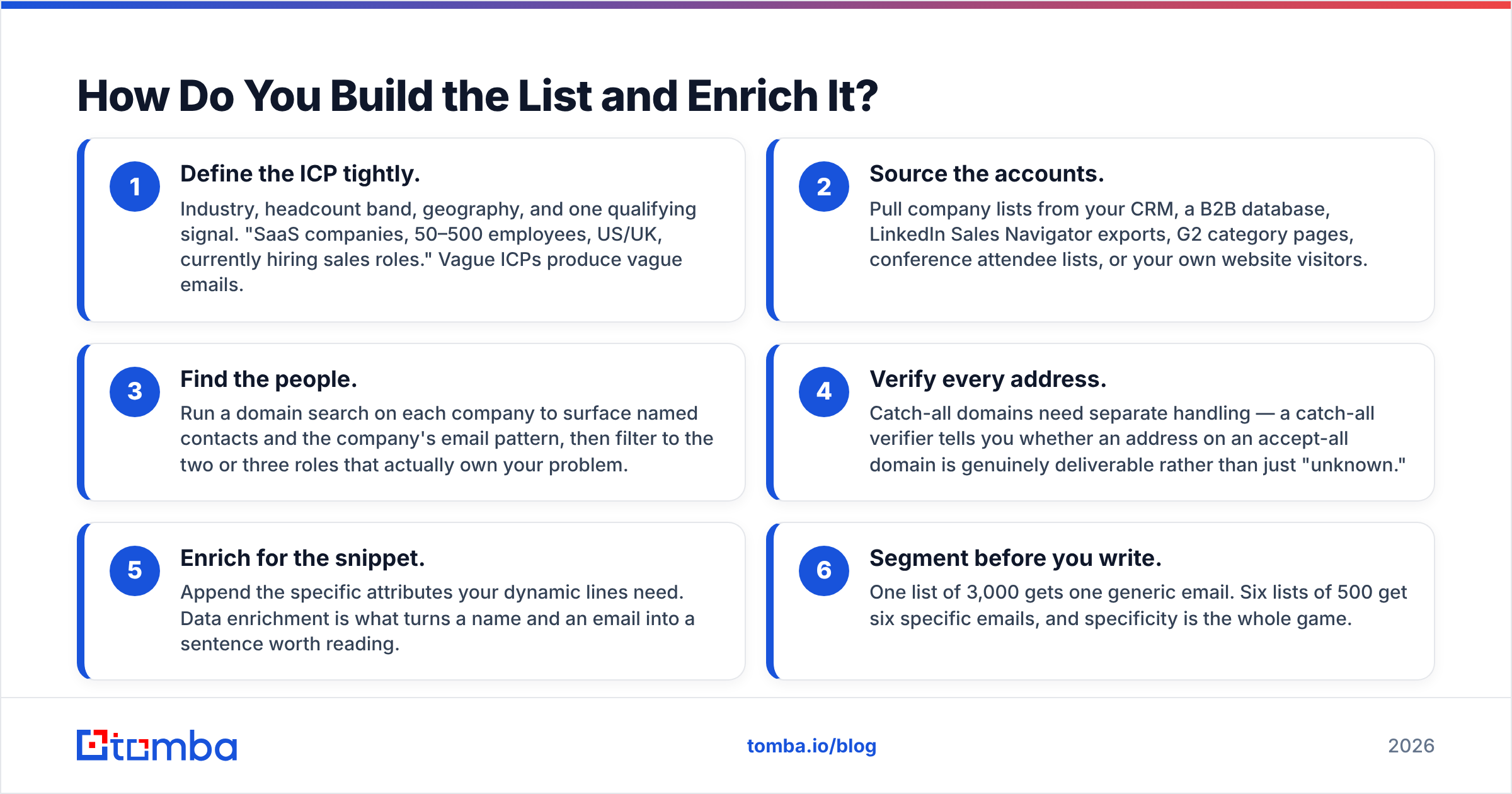
- Define the ICP tightly. Industry, headcount band, geography, and one qualifying signal. "SaaS companies, 50–500 employees, US/UK, currently hiring sales roles." Vague ICPs produce vague emails.
- Source the accounts. Pull company lists from your CRM, a B2B database, LinkedIn Sales Navigator exports, G2 category pages, conference attendee lists, or your own website visitors.
- Find the people. Run a domain search on each company to surface named contacts and the company's email pattern, then filter to the two or three roles that actually own your problem.
- Verify every address. Catch-all domains need separate handling — a catch-all verifier tells you whether an address on an accept-all domain is genuinely deliverable rather than just "unknown."
- Enrich for the snippet. Append the specific attributes your dynamic lines need. Data enrichment is what turns a name and an email into a sentence worth reading.
- Segment before you write. One list of 3,000 gets one generic email. Six lists of 500 get six specific emails, and specificity is the whole game.
That step 5 is where most teams under-invest. You do not need forty attributes. You need the two or three that make one sentence in your email undeniably about them.
Which Tools Do You Need, and What Do They Cost?#
You need three distinct jobs covered: find and verify contacts, warm and manage inboxes, and send sequences. Some platforms bundle two of the three. Very few do all three well.
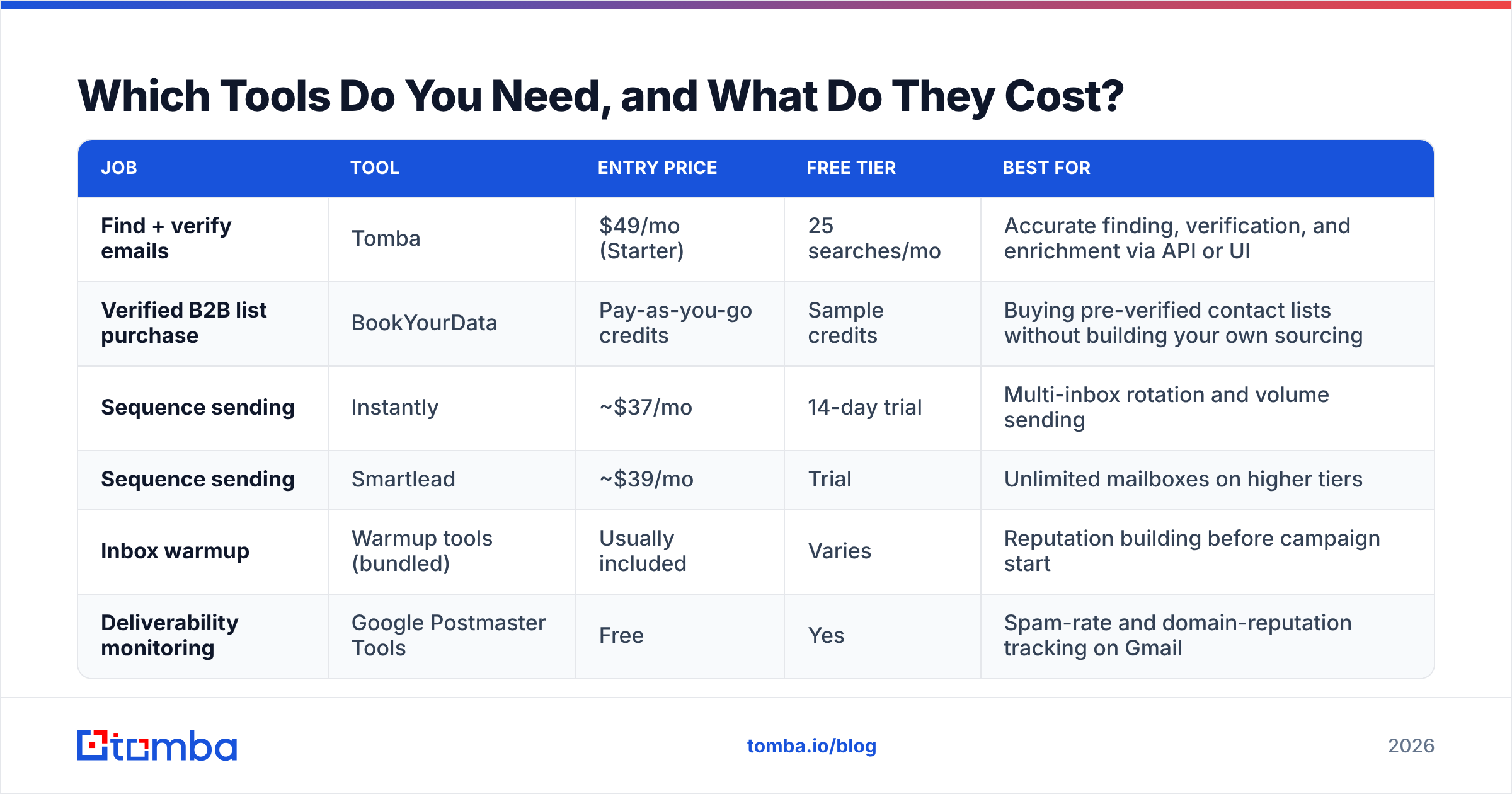
| Job | Tool | Entry price | Free tier | Best for |
|---|---|---|---|---|
| Find + verify emails | Tomba | $49/mo (Starter) | 25 searches/mo | Accurate finding, verification, and enrichment via API or UI |
| Verified B2B list purchase | BookYourData | Pay-as-you-go credits | Sample credits | Buying pre-verified contact lists without building your own sourcing |
| Sequence sending | Instantly | ~$37/mo | 14-day trial | Multi-inbox rotation and volume sending |
| Sequence sending | Smartlead | ~$39/mo | Trial | Unlimited mailboxes on higher tiers |
| Inbox warmup | Warmup tools (bundled) | Usually included | Varies | Reputation building before campaign start |
| Deliverability monitoring | Google Postmaster Tools | Free | Yes | Spam-rate and domain-reputation tracking on Gmail |
Screenshot placeholder: Instantly campaign dashboard showing multi-inbox rotation and per-inbox daily send caps.
A note on stacking: Tomba pricing runs Free (25 searches/mo), Starter $49/mo, Growth $99/mo, Pro $249/mo, and Enterprise custom. Pair the data layer with a sending platform rather than expecting one vendor to be excellent at both. All-in-one suites like Apollo bundle data and sending, which is convenient, but you inherit whichever half is weaker. If you're evaluating that trade-off, the Apollo alternative breakdown covers where bundled data tends to fall short on verification depth.
BookYourData deserves a mention for a different use case: if you don't want to run your own sourcing and enrichment pipeline at all, buying a pre-verified list is a legitimate shortcut, particularly for one-off campaigns into a market you haven't touched before.
How Do You Set Up the Sending Infrastructure?#
Never send cold volume from your primary domain. Buy two or three lookalike domains (yourcompany.co, getyourcompany.com, yourcompany-hq.com), point them at the same brand, and put 2–3 mailboxes on each.
Then, in order:
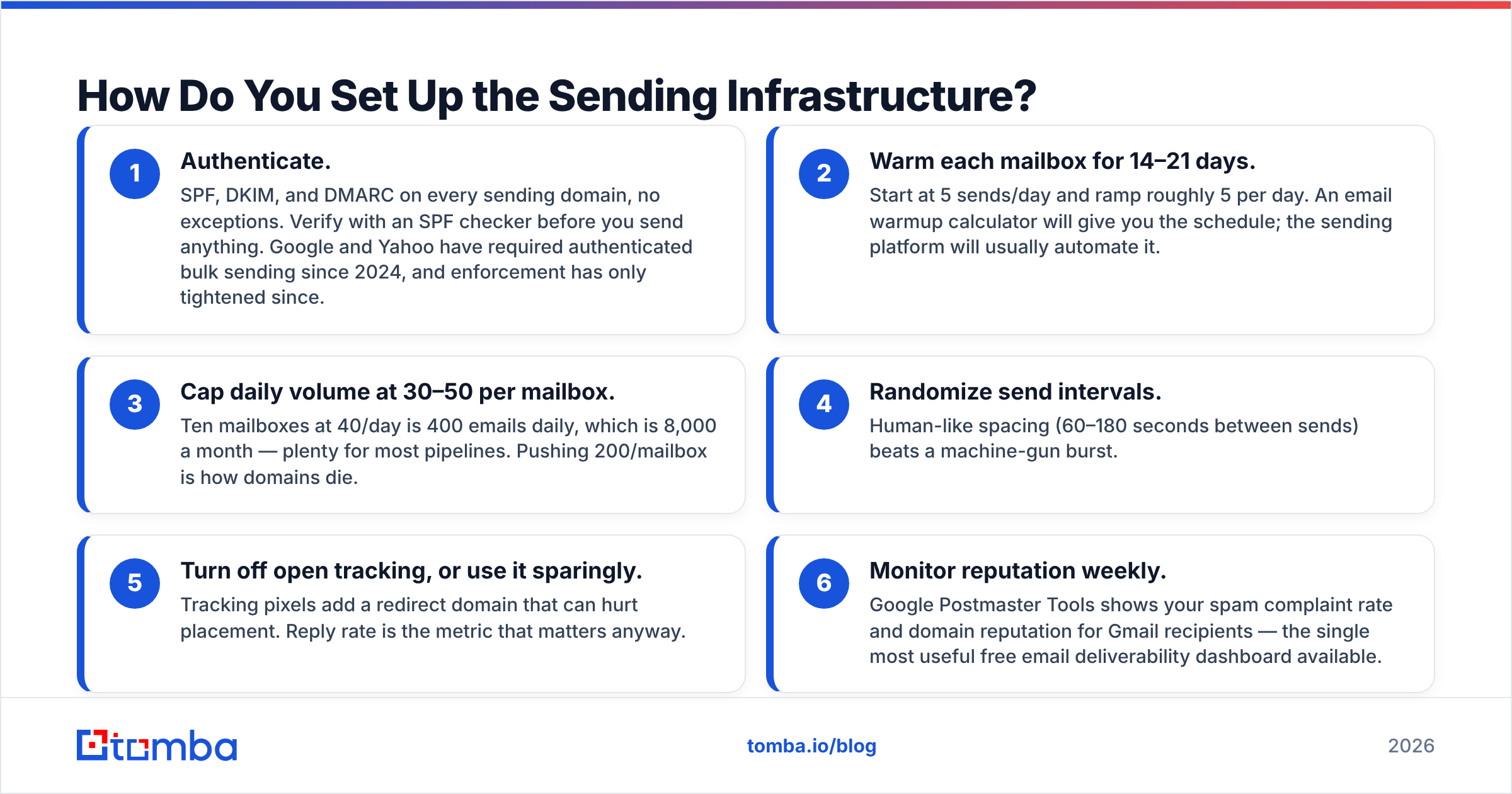
- Authenticate. SPF, DKIM, and DMARC on every sending domain, no exceptions. Verify with an SPF checker before you send anything. Google and Yahoo have required authenticated bulk sending since 2024, and enforcement has only tightened since.
- Warm each mailbox for 14–21 days. Start at 5 sends/day and ramp roughly 5 per day. An email warmup calculator will give you the schedule; the sending platform will usually automate it.
- Cap daily volume at 30–50 per mailbox. Ten mailboxes at 40/day is 400 emails daily, which is 8,000 a month — plenty for most pipelines. Pushing 200/mailbox is how domains die.
- Randomize send intervals. Human-like spacing (60–180 seconds between sends) beats a machine-gun burst.
- Turn off open tracking, or use it sparingly. Tracking pixels add a redirect domain that can hurt placement. Reply rate is the metric that matters anyway.
- Monitor reputation weekly. Google Postmaster Tools shows your spam complaint rate and domain reputation for Gmail recipients — the single most useful free email deliverability dashboard available.
Screenshot placeholder: Google Postmaster Tools domain reputation graph showing a "High" reputation trend line over 30 days.
What Does a Genuinely Personalized Template Look Like?#
Short, one idea, one ask, and one line that couldn't have been sent to anyone else. Here's the structure:
Subject: {{trigger_shorthand}}

Hi {{first_name}},

{{dynamic_snippet — the researched line}}

{{one sentence: the problem that snippet implies}}

{{one sentence: how you solve it, with a number}}

Worth a 15-minute look next week?

— {{sender_first_name}}
Filled in:
Subject: your two open SDR roles
Hi Dana,
Saw Northbeam posted two SDR openings this month — usually that means the current team is capped on list-building rather than calls.
We cut sourcing time for a 6-rep team at Loop from ~9 hours a week to under 2 by handling the find-and-verify step upstream.
Worth a 15-minute look next week?
— Sam
Note what's doing the work. The job posting is the snippet. Everything else is a fixed template. That one variable is what makes 500 emails feel individual, and it comes entirely from your enrichment step — not from creative writing.
Two rules that consistently lift response rate:
- Keep it under 90 words. Long cold emails get skimmed and archived.
- Ask for a low-commitment yes. "Worth a look?" outperforms "Can we book 30 minutes Tuesday at 2pm?" by a wide margin, because it doesn't ask the reader to open a calendar.
If you want starting points, the cold email templates library and the subject line tester are both free and will keep you from writing something that trips a filter.

How Do You Measure Whether It Worked?#
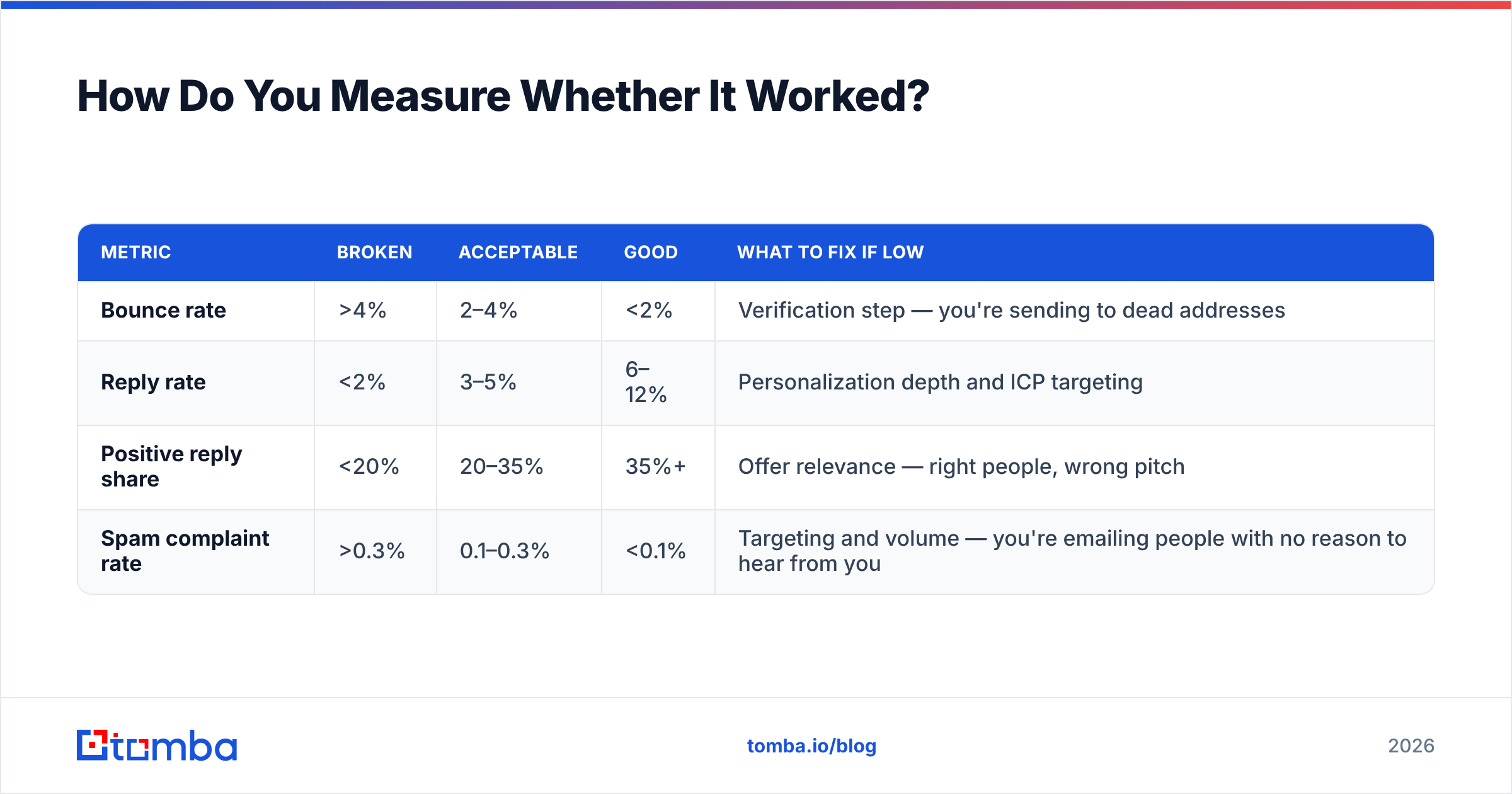
Track four numbers, and ignore the rest until these are healthy.
| Metric | Broken | Acceptable | Good | What to fix if low |
|---|---|---|---|---|
| Bounce rate | >4% | 2–4% | <2% | Verification step — you're sending to dead addresses |
| Reply rate | <2% | 3–5% | 6–12% | Personalization depth and ICP targeting |
| Positive reply share | <20% | 20–35% | 35%+ | Offer relevance — right people, wrong pitch |
| Spam complaint rate | >0.3% | 0.1–0.3% | <0.1% | Targeting and volume — you're emailing people with no reason to hear from you |
Diagnose in that order. A 1% reply rate with a 6% bounce rate is a data problem, not a copy problem, and rewriting the email will waste a week. Fix bounces first, then targeting, then copy. Most teams do it backwards.
Also watch the delta between segments. If your "hiring SDRs" segment replies at 9% and your generic firmographic segment replies at 2%, you've just learned which trigger to build the next 2,000-contact campaign around. That's the compounding return on doing enrichment properly — every campaign teaches you which variable is worth the credits.
What Are the Legal and Ethical Guardrails?#
Cold B2B email is legal in most markets, but "legal" has conditions attached.
- CAN-SPAM (US): accurate headers and subject line, a physical mailing address in the footer, and a working opt-out honored within 10 business days. No prior consent required for B2B.
- GDPR (EU/UK): you need a lawful basis, usually legitimate interest, which means the message must be genuinely relevant to the recipient's professional role and you must document why. Blast-everyone campaigns fail this test.
- CASL (Canada): stricter — generally requires express or implied consent. Existing business relationships create implied consent for a limited window.
Practical version: only email people whose job makes your product plausibly relevant, keep an honest one-click unsubscribe, suppress opt-outs across every sending domain you own, and don't email the same person from three lookalike domains. HubSpot maintains a readable overview of email compliance requirements if you want the longer form, and the Wikipedia entry on CAN-SPAM covers the statutory detail. For vendor comparisons and verified user reviews, G2's sales engagement category is the least-biased public source available.
What's the Fastest Path From Zero to First Campaign?#
Five working days, if you're disciplined:
- Day 1: Define the ICP and the one trigger you'll personalize on. Buy and authenticate two sending domains.
- Day 2: Source 500 accounts. Run domain search, pull contacts, verify everything, drop anything unverified.
- Day 3: Enrich for your trigger variable. Segment into three lists by how strong the trigger is.
- Days 3–17: Warm the mailboxes in the background while you write. Do not skip this.
- Day 4: Write one template per segment. Run each through a spam checker and a subject line tester.
- Day 5: Load the sequence, set caps at 30/mailbox/day, schedule two follow-ups at +3 and +7 days, and launch when warmup finishes.
The follow-ups matter more than people expect. A meaningful share of replies to cold campaigns arrive on the second or third touch, and a follow-up that adds one new piece of information beats "just bumping this to the top of your inbox."
Start With the Data Layer#
Every good personalized mass email traces back to one verified address and one true fact about the recipient. Everything downstream — the sequencer, the warmup, the copy — only amplifies what your data already is.
Tomba Email Finder handles the part that determines whether the rest of your stack works: finding real, current, deliverable addresses at the companies you actually want, with verification and enrichment built into the same workflow. Start on the free tier at 25 searches a month to test your ICP hypothesis, then move to Starter at $49/mo when you're ready to build the first thousand-contact campaign. Get the list right, and the emails write themselves.
Related guides#
// get started
Find, verify and enrich your first contacts today
Start on the free plan with 25 searches a month, then scale when your team is ready.
Free plan · No credit card required · GDPR & CCPA
// about the author