How to Warm Up an Email Address: A 2026 Step-by-Step Plan
Most cold email accounts get burned in week one because the sender skipped warmup. Here is the exact 6-week ramp, the daily volume table, and the metrics that tell you when the inbox is ready.
TL;DR
- Warming up an email address means gradually increasing send volume and earning positive engagement signals so mailbox providers learn your sender identity is safe. Plan on 4-6 weeks before real cold volume.
- Buy the domain, set up SPF/DKIM/DMARC, and let it age 2-4 weeks before the first send. A brand-new domain sending 200 cold emails on day one is the fastest way to a spam folder.
- Ramp roughly: 5-10 emails/day in week 1, doubling every 3-5 days, capping around 30-50/day per inbox. More inboxes beats more volume per inbox.
- Warmup tools (Instantly, Warmup Inbox, Mailreach, Lemwarm) automate the reciprocal replies, but they do not fix a bad list. Verification is the other half of the job.
- Your exit criteria are numbers, not vibes: spam-placement under 5%, bounce rate under 2%, and a Google Postmaster reputation of High before you scale.
What does it actually mean to warm up an email address?#
Warming up an email address is the process of building a positive sending history for a new mailbox and domain so that Gmail, Outlook, and corporate filters route your messages to the inbox instead of spam.
Think of it like moving into a new neighborhood. If you show up on day one and knock on 300 doors handing out flyers, someone calls the police. If you say hello to five neighbors a week, get invited to a barbecue, and slowly become a familiar face, nobody blinks when you eventually host a block party. Mailbox providers work the same way — they are watching for a pattern of behavior, and sudden volume from an unknown identity is the pattern they punish.
Technically, what you are building is sender reputation: a per-domain and per-IP score that providers calculate from bounce rate, spam complaints, opens, replies, deletions-without-reading, and the ratio of sends to engagement. Gmail does not publish the formula, but its Postmaster Tools exposes enough of the outputs (domain reputation, spam rate, authentication pass rate) that you can steer by them.
Two things get warmed simultaneously and people confuse them constantly:
- The domain — reputation attaches to the sending domain, so
outreach.yourcompany.combuilds its own history separate fromyourcompany.com. - The mailbox — each individual address (
sara@outreach.yourcompany.com) accrues its own engagement signals within that domain.
Kill one inbox with complaints and you can rotate it out. Kill the domain and every inbox on it goes with it. That asymmetry is why serious outbound teams put cold sending on a separate domain from their transactional and marketing mail.

What do you need to set up before the first email?#
Do the plumbing first. Warmup on an unauthenticated domain is wasted effort — providers will discount every positive signal you generate.
- Buy the sending domain early. Domain age is a real, if minor, trust input. Register the alternate domain (
getyourcompany.com,yourcompany-hq.com) 2-4 weeks before you plan to send. Point it at your main site with a 301 so it is not a dead shell. - Publish SPF, DKIM, and DMARC. All three, on the sending domain, before any mail leaves. Start DMARC at
p=nonewith an rua address so you can read reports, then tighten top=quarantineonce you confirm alignment. Check your record with a SPF checker before you trust it. - Set up custom tracking domains. Shared tracking domains from sequencing tools carry other people's reputation. Use a subdomain of your sending domain instead.
- Fill in the profile. Real name, real photo, complete signature with a physical address and unsubscribe path. Use an email signature generator if you want something consistent across the team.
- Check you are not already blacklisted. New domains occasionally inherit a burned history. Run a blacklist checker against the domain and IP before you start.
- Verify your list before you need it. The warmup ramp is worthless if week five hands your inbox a list with a 15% bounce rate. Run every address through an email verifier and route catch-all domains through a catch-all verifier separately.
Skipping step 6 is the single most common failure. Warmup builds credit; a dirty list spends it in one afternoon.
How long does it take to warm up an email address?#
Four to six weeks for a new domain and mailbox to reach cold-outreach volume safely. Two to three weeks if the domain already has an established history and you are only warming a new mailbox on it.
Here is the ramp that most deliverability practitioners converge on. Treat it as a ceiling, not a target — if metrics wobble, hold at the current step for another three days instead of advancing.
| Week | Warmup emails/day | Real cold emails/day | Reply rate to maintain | What to watch |
|---|---|---|---|---|
| Week 1 | 5-10 | 0 | 30%+ | Authentication pass rate at 100% |
| Week 2 | 15-20 | 0-5 | 30%+ | First spam-folder placements |
| Week 3 | 25-30 | 5-15 | 25%+ | Bounce rate under 2% |
| Week 4 | 30-40 | 15-25 | 20%+ | Postmaster domain reputation rising |
| Week 5 | 40 | 25-35 | 15%+ | Spam complaint rate under 0.1% |
| Week 6+ | 40 (ongoing) | 30-50 | 10%+ | Steady state; never remove warmup |
Two notes that matter more than the table itself:
Never turn warmup off. The mistake teams make at week six is stopping the reciprocal warmup traffic and replacing it 1:1 with cold volume. Warmup mail is the engagement ballast that keeps your positive-signal ratio healthy when 90% of your cold sends get ignored. Leave it running at 20-40/day permanently.
Cap at 30-50 per inbox, then add inboxes. A single mailbox pushing 200/day looks like a machine no matter how nicely you ramped. Five mailboxes at 40/day looks like a sales team. If you need 500 sends/day, that is roughly 10-12 inboxes across 3-4 domains, not one heroic inbox.
Which warmup method should you use?#
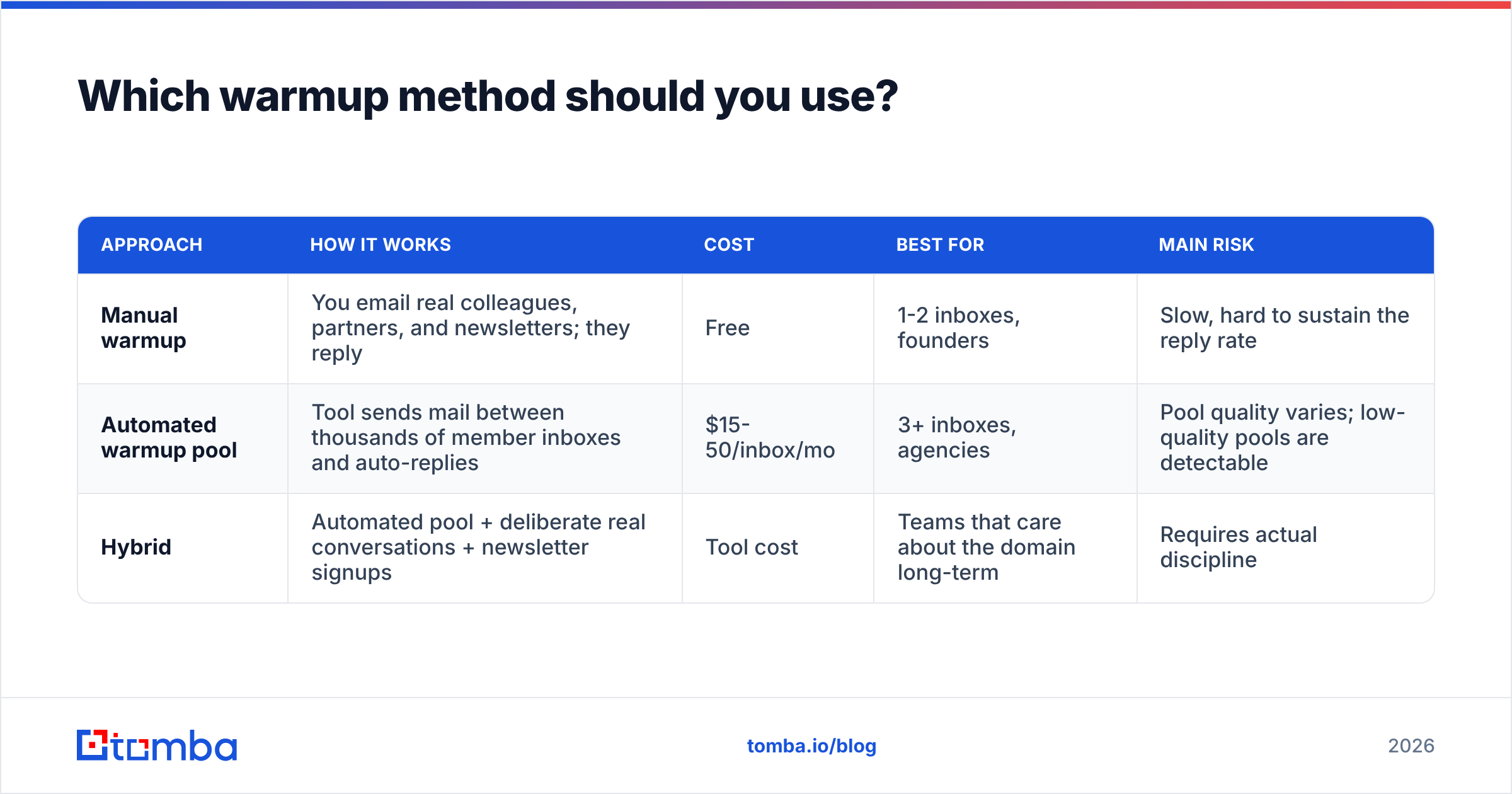
You have three realistic options, and the right one depends on volume and budget.
| Approach | How it works | Cost | Best for | Main risk |
|---|---|---|---|---|
| Manual warmup | You email real colleagues, partners, and newsletters; they reply | Free | 1-2 inboxes, founders | Slow, hard to sustain the reply rate |
| Automated warmup pool | Tool sends mail between thousands of member inboxes and auto-replies | $15-50/inbox/mo | 3+ inboxes, agencies | Pool quality varies; low-quality pools are detectable |
| Hybrid | Automated pool + deliberate real conversations + newsletter signups | Tool cost | Teams that care about the domain long-term | Requires actual discipline |
The hybrid is what actually works. Automated pools generate volume and reply ratios; real human conversation generates the signals pools cannot fake — varied subject lines, threads with different message lengths, mail that gets forwarded, replies that arrive hours later instead of on a schedule.
Practical hybrid checklist for weeks 1-3:
- Subscribe to 10-15 industry newsletters from the new address. Inbound mail that you open and click is a positive signal.
- Start 5 real threads per week with colleagues, asking questions that require multi-message answers.
- Send from the address manually, not through the sequencer, for the first two weeks. Sequencer headers on a cold domain with zero history are a bad combination.
- Move mail out of spam and mark as important on the receiving side when you control both accounts.
- Vary everything: send times, message length, whether there is a link, whether there is a signature image.
If you want to model the ramp against your own target volume before committing, the email warmup calculator will map daily increments to a launch date.
How do you know the warmup worked?#
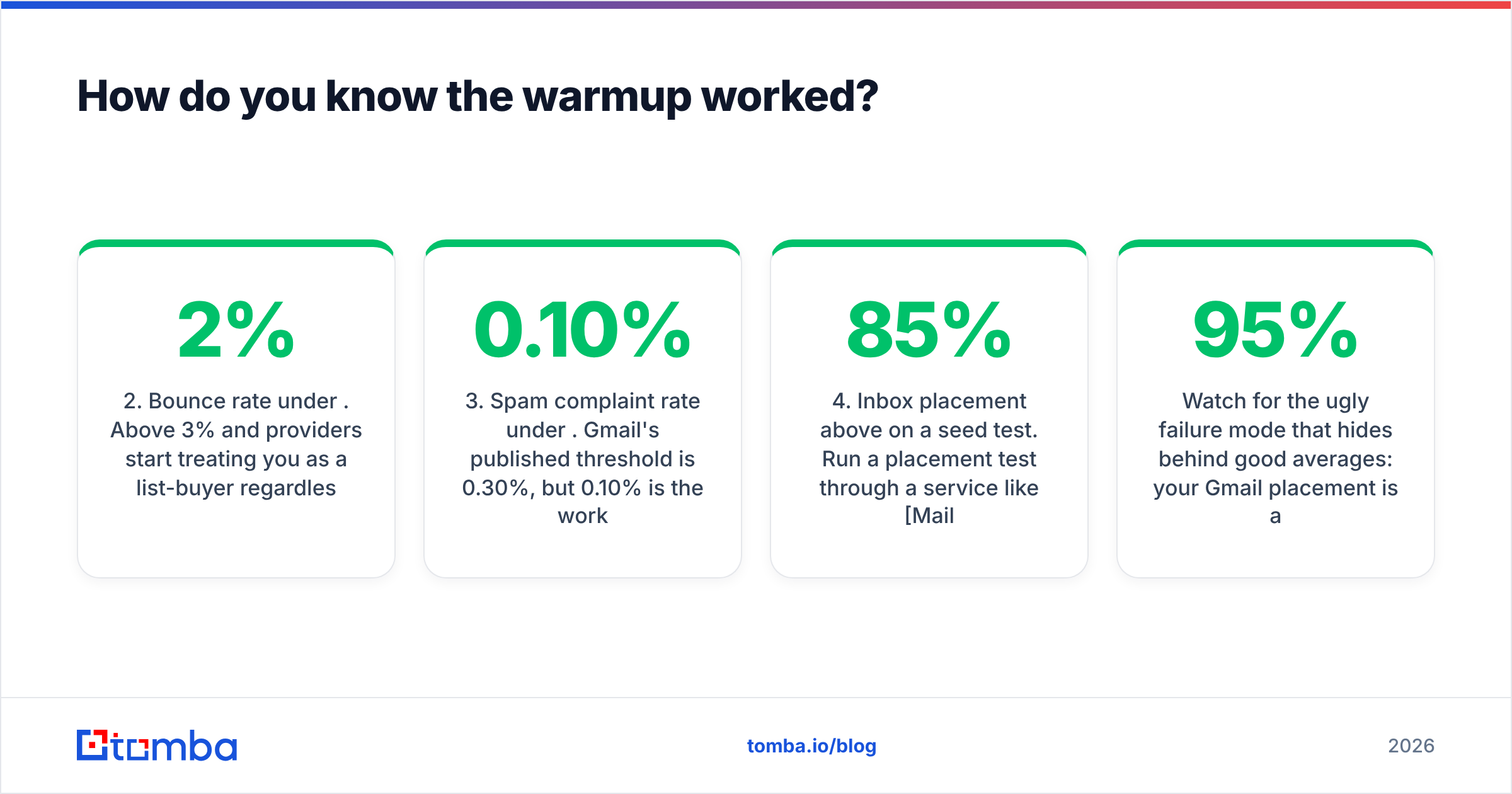
You do not "feel ready." You hit four numbers.
- Google Postmaster domain reputation: High. Medium is workable, Low means stop and diagnose. This requires DKIM alignment on your sending domain and enough volume to Gmail addresses to register — usually 100+/day, which is why Postmaster data lags for small senders.
- Bounce rate under 2%. Above 3% and providers start treating you as a list-buyer regardless of what your warmup history says. This is a list-hygiene number, not a warmup number, which is exactly why verification and warmup have to run in parallel.
- Spam complaint rate under 0.10%. Gmail's published threshold is 0.30%, but 0.10% is the working ceiling for outbound. One complaint per thousand sends.
- Inbox placement above 85% on a seed test. Run a placement test through a service like Mail-Tester or your warmup tool's built-in test. Test Gmail, Outlook, and at least one corporate Microsoft 365 tenant — Microsoft filtering behaves nothing like Gmail's.
Watch for the ugly failure mode that hides behind good averages: your Gmail placement is 95% and your Outlook placement is 20%. Blended, that looks like 60% and you scale anyway. Segment your placement testing by provider before you make the scaling decision.
What are the mistakes that burn a domain fastest?#
Ranked by how often they show up in post-mortems:
- Sending to unverified addresses. A 12% bounce rate erases six weeks of warmup in a single campaign. Verify at the source with an email finder that returns a confidence score, then re-verify anything older than 90 days — B2B data decays at roughly 2-3% per month as people change jobs.
- Warming up on your primary domain. If
yourcompany.comsends invoices, password resets, and your CEO's board emails, do not also run cold outbound from it. Use a separate domain. Always. - Jumping the ramp because a campaign is urgent. The provider does not care that your quarter ends Friday.
- Identical templates at volume. Filters cluster near-identical messages across recipients. Rotate openers, vary sentence structure, and drop the tracking pixel on the first touch.
- Links in the first email. A cold first touch with three links and a calendar embed from a five-week-old domain reads as spam to a classifier. Earn the link on message two.
- Ignoring Microsoft. Roughly half of B2B inboxes are Microsoft 365, and Microsoft's filtering weighs domain age and sending patterns more heavily than Gmail's. If your entire test set is Gmail, you are flying blind on half your market.
- Stopping warmup after launch. Covered above, but it belongs on this list because it is so common.
One more, less obvious: do not warm up an inbox you will not use. Warmup traffic on an idle account creates a reputation profile built entirely on synthetic engagement, and when you finally switch on real cold sends the behavior change itself is a signal. Warm the inboxes you are about to send from, on the schedule you are about to send on.
How does warmup fit into the wider outbound stack?#
Warmup is one of four legs. Get any one wrong and the table falls over.
- Infrastructure — domains, DNS records, inbox provisioning, tracking domains. This is warmup's home.
- Data — accurate, verified, recently-refreshed contact records. Determines your bounce rate, which determines whether warmup survives contact with reality.
- Copy — relevance and brevity. Determines complaint rate and reply rate, which are the strongest positive and negative signals you generate.
- Cadence — how many touches, how far apart, across which channels. Determines whether you burn a prospect list in two weeks.
The data leg is where warmup efforts most often die, and it is the least glamorous. If you are sourcing contacts manually, a domain search that returns every known address at a company plus its email pattern will get you cleaner input than scraping. For list-level work, run a bulk verify pass before every campaign, not once per quarter.
For a broader primer on the signals providers weigh, the email deliverability and sender reputation entries in the glossary cover the mechanics without the vendor spin. Vendor-side, HubSpot's deliverability documentation is a decent neutral reference for the authentication side.
What does a realistic 6-week warmup schedule look like?#
Here is the plan condensed into something you can paste into a doc and actually execute.
Weeks -2 to 0 (before sending): Register domain. Configure SPF, DKIM, DMARC at p=none. Set up custom tracking subdomain. Create 2-3 mailboxes with real names and complete profiles. Run blacklist check. Build and verify the first 500-contact list.
Week 1: Warmup tool on, 5-10/day. Subscribe to 12 newsletters. Start 5 manual threads. Zero cold sends. Confirm authentication passes on every message via a test send to a Gmail account and check the raw headers.
Week 2: Warmup to 15-20/day. Begin 3-5 cold sends/day, entirely manual, to your highest-confidence contacts — the ones most likely to reply. Reply rate here matters more than volume.
Week 3: Warmup to 25-30/day. Cold to 10-15/day through the sequencer. First seed placement test. Tighten DMARC to p=quarantine if alignment reports are clean.
Week 4: Warmup to 30-40/day. Cold to 20-25/day. Check Postmaster Tools — you should now have enough volume for a reputation reading. Second placement test, segmented by provider.
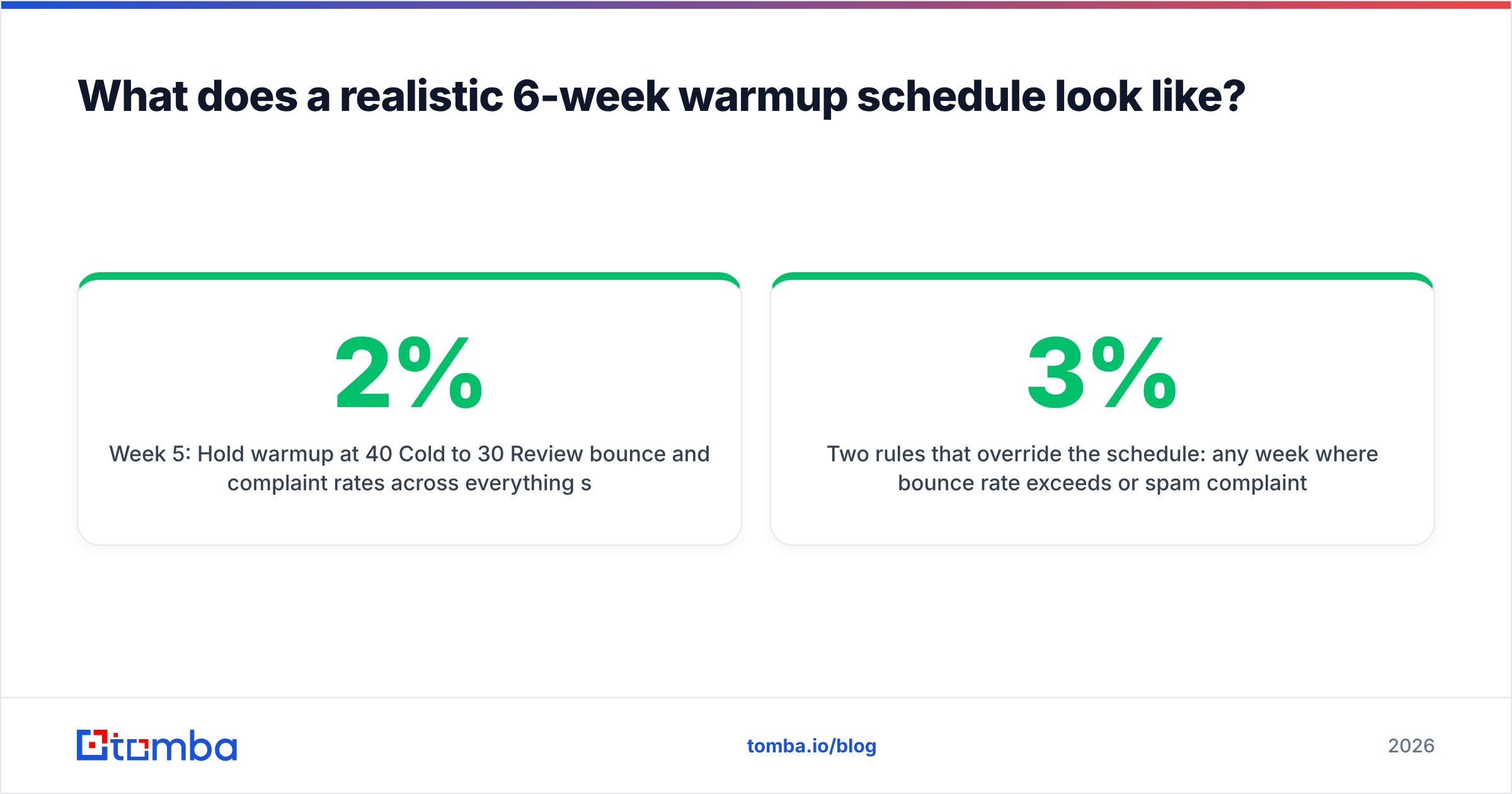
Week 5: Hold warmup at 40/day. Cold to 30/day. Review bounce and complaint rates across everything sent so far. If bounce is above 2%, stop scaling and fix the list before touching volume again.
Week 6: Cold to 40-50/day per inbox, warmup steady at 40/day permanently. Add the next batch of inboxes and start their ramp at week 1 while these run at steady state.
Two rules that override the schedule: any week where bounce rate exceeds 3% or spam complaints exceed 0.15%, you drop back two steps and hold. And any week where placement testing shows a specific provider blocking you, you pause sends to that provider's domains entirely while you diagnose — do not keep pounding a filter that has already decided about you.
Start with data that will not bounce#
Warmup protects a reputation. Verified data is what keeps it protected. The ramp above is straightforward to execute; the part that quietly kills domains is a list full of addresses that stopped existing eight months ago.
Tomba's Email Finder returns professional addresses with a confidence score and an SMTP-level check attached, so the contacts entering your sequence on week three are ones that will actually land. The free tier gives you 25 searches a month to test the accuracy against your own known-good contacts; paid plans start at $49/mo on the Starter tier, and full Tomba pricing scales to Growth at $99/mo and Pro at $249/mo when your inbox count grows. Verify first, then warm up, then send — in that order.
Related guides#
// get started
Find, verify and enrich your first contacts today
Start on the free plan with 25 searches a month, then scale when your team is ready.
Free plan · No credit card required · GDPR & CCPA
// about the author