How to Write Cold Emails That Get Responses in 2026
Most cold emails fail before the first line is read. Here is the exact structure, timing, and data hygiene behind emails that earn replies instead of deletions.
TL;DR
- Reply rate is a data problem before it is a copy problem. A brilliant email sent to a stale, unverified list still gets 0.4% replies.
- The highest-performing cold emails in 2026 run 50–125 words, ask one low-friction question, and reference something the recipient actually did.
- Subject lines that read like internal notes ("quick question about your Q3 hiring") beat marketing-speak by a wide margin.
- Personalization at the segment level outperforms fake first-line personalization ("Love what you're doing at {{company}}!") — buyers spot the template.
- Follow-ups produce the majority of replies. A 4-touch sequence typically triples the reply count of a single send.
You do not have a writing problem. You have a compounding problem: a mediocre list, a subject line that signals "sales," a first sentence about yourself, and an ask that requires 30 minutes of a stranger's calendar. Each stage cuts your funnel by half. Fix all four and the same offer produces 8–12% replies instead of 1%.
This is the mechanical version of how to write cold emails that get responses — structure, word counts, sequencing, and the data hygiene that makes it all work.
Why do most cold emails get ignored?#
Three failure modes account for nearly every dead campaign.
1. The email never arrives. If 18% of your addresses bounce, mailbox providers throttle you and the rest of your sends land in spam. Google and Yahoo's bulk-sender requirements (in force since 2024 and tightened since) put a hard ceiling on spam complaints and require authenticated sending. A list with dead addresses is not a minor inefficiency — it is a deliverability tax on every future campaign. Check your setup with an SPF checker before you scale volume.
2. The email arrives and looks like every other pitch. Your prospect gets 40 of these a week. Their pattern-matching is fast and unforgiving: logo in the signature, three paragraphs, "I wanted to reach out," a calendar link. Deleted in under two seconds.
3. The email is good but asks for too much. "Do you have 30 minutes Thursday?" is an enormous request from a stranger. "Is this even on your roadmap this quarter?" costs the reader four seconds to answer.

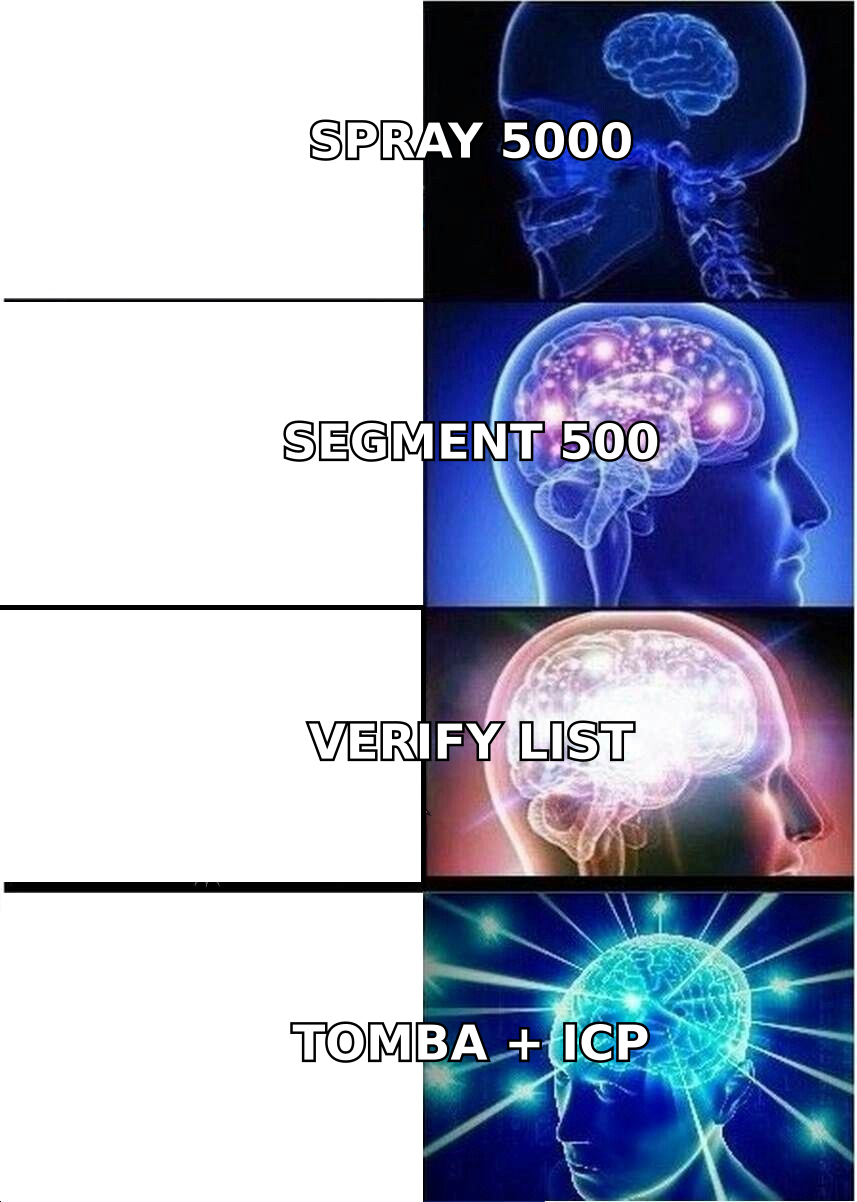
The uncomfortable truth is that copy is the third lever, not the first. Sending to 5,000 loosely-matched contacts with perfect prose loses to 400 tightly-matched contacts with adequate prose. Segment first, verify second, write third.
What is the structure of a cold email that gets replies?#
Every high-performing cold email contains the same six components in roughly the same order. Deviating is fine; skipping is not.
- Subject line (3–6 words) — Lowercase, specific, no pitch. It should read like a note from a colleague. "question re: your SDR onboarding" outperforms "Transform Your Sales Process Today."
- Trigger line (1 sentence) — Why them, why now. A funding round, a job posting, a podcast appearance, a tech-stack change, a new office. This is the only sentence that proves you are not blasting.
- Observation or problem (1–2 sentences) — Connect the trigger to a cost they recognize. Not your product. Their problem, stated in their words.
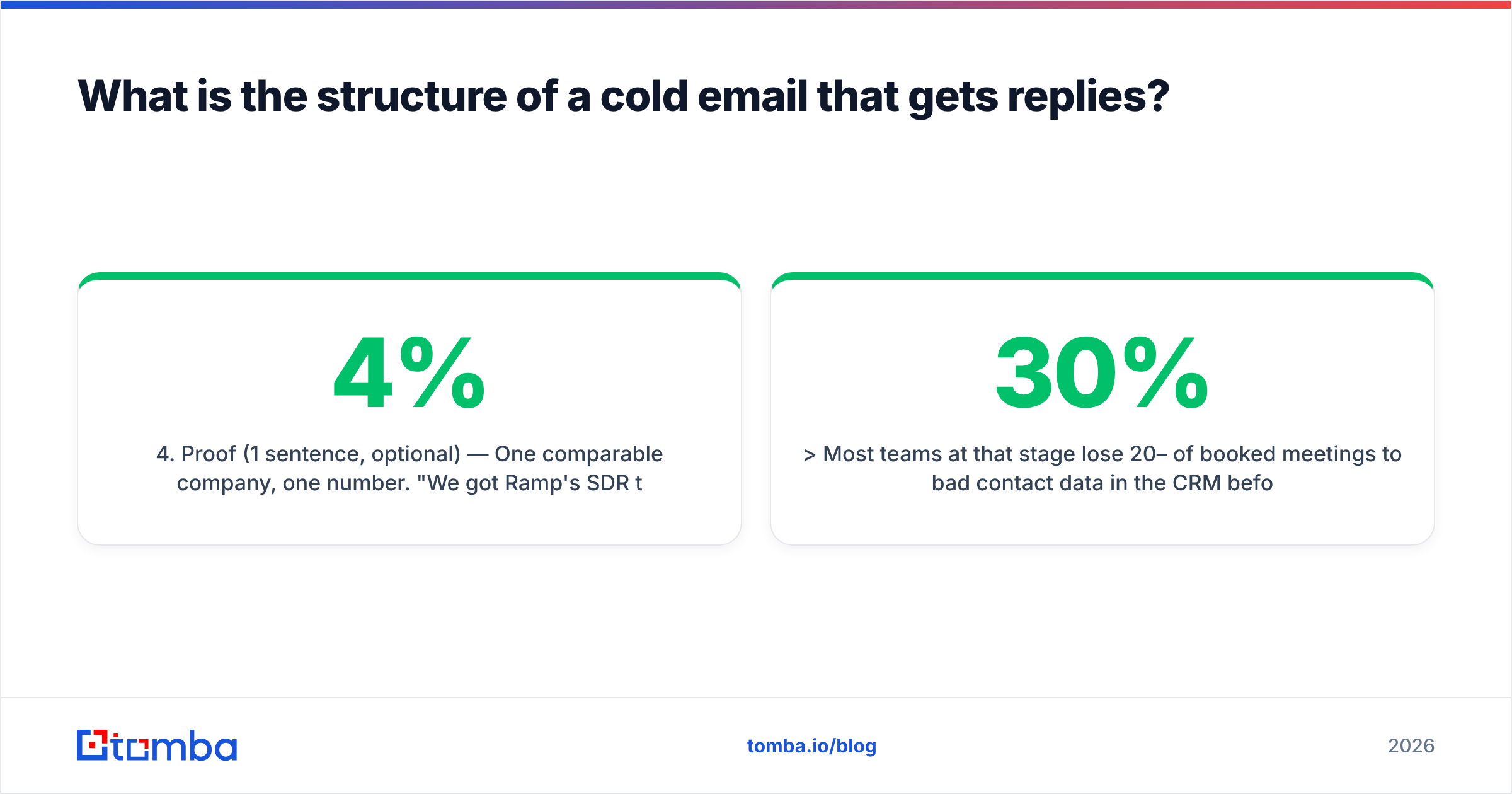
- Proof (1 sentence, optional) — One comparable company, one number. "We got Ramp's SDR team from 4% to 11% reply rate." Skip it if you can't be specific.
- The ask (1 sentence) — A single yes/no question or a request for a redirect. Never a calendar link in email #1.
- Signature (2 lines) — Name, company, one link. No banner images, no six-line legal footer, no "Sent from my iPhone" theater. Use an email signature generator if yours has grown a marketing department.
Total: 50–125 words. If your draft is 200 words, you have written a landing page, not an email.
Here is what that looks like assembled:
Subject: question re: your 3 new AEs
Saw you posted three AE roles in Berlin last month — usually that means the SDR-to-AE handoff is about to get noisy.
Most teams at that stage lose 20–30% of booked meetings to bad contact data in the CRM before the AE ever dials.
Worth a look, or is data hygiene already handled on your side?
— Sam, Tomba
Notice what is absent: no "Hope this finds you well," no company boilerplate, no calendar link, no adjectives about the product.
How do you personalize without sounding like a template?#
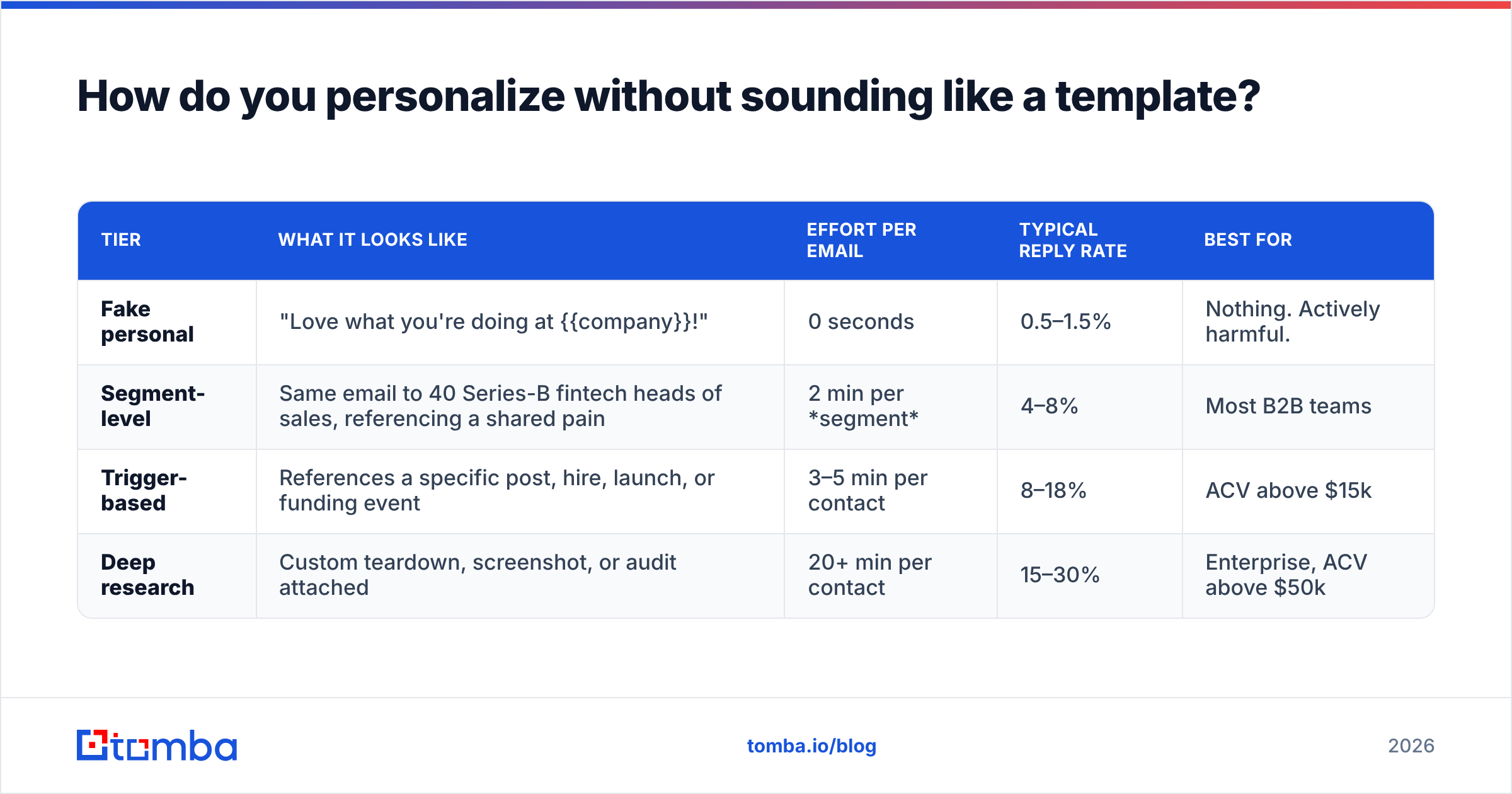
There are three tiers of personalization, and most teams pick the worst one.
| Tier | What it looks like | Effort per email | Typical reply rate | Best for |
|---|---|---|---|---|
| Fake personal | "Love what you're doing at {{company}}!" | 0 seconds | 0.5–1.5% | Nothing. Actively harmful. |
| Segment-level | Same email to 40 Series-B fintech heads of sales, referencing a shared pain | 2 min per segment | 4–8% | Most B2B teams |
| Trigger-based | References a specific post, hire, launch, or funding event | 3–5 min per contact | 8–18% | ACV above $15k |
| Deep research | Custom teardown, screenshot, or audit attached | 20+ min per contact | 15–30% | Enterprise, ACV above $50k |
Segment-level personalization is where most teams should live. It scales, it is honest, and it produces the "how did you know that" reaction without a research analyst on payroll. The mechanic: pick a segment narrow enough that one sentence about their world is true for every recipient and false for everyone else.
Bad segment: "SaaS companies." Good segment: "Series A HR-tech companies who hired their first sales leader in the last 90 days."
Trigger-based personalization is worth the extra minutes above roughly $15k ACV. Job postings, funding announcements, and executive moves are the three most reliable triggers because each one implies a budget cycle. Tools that map a person to a company and back — like a reverse email lookup when all you have is an address from a webinar list — turn a partial record into a targetable contact.
Which subject lines actually get opened?#
Subject lines do one job: survive the two-second scan of a preview pane. That is it. They do not sell, they do not summarize, they do not intrigue with mystery.
Patterns that hold up across industries:
- The colleague note. "question about {specific thing}" — lowercase, under 5 words.
- The referral shape. "{Name} mentioned you" — only if true. Lying here destroys the relationship permanently.
- The specific noun. "your Shopify migration" — names something concrete they own.
- The redirect. "wrong person?" — high open rate, works best on follow-up #3.
Patterns that reliably underperform: anything with an exclamation mark, anything with the word "Free," anything over 7 words, all-caps words, emojis in a B2B context, and "Re:" faked on a first send. That last one gets replies and destroys trust in the same motion.
Test subject lines before sending — a subject line tester will flag spam-trigger words and length problems in seconds, which matters more now that filters weigh engagement history heavily.
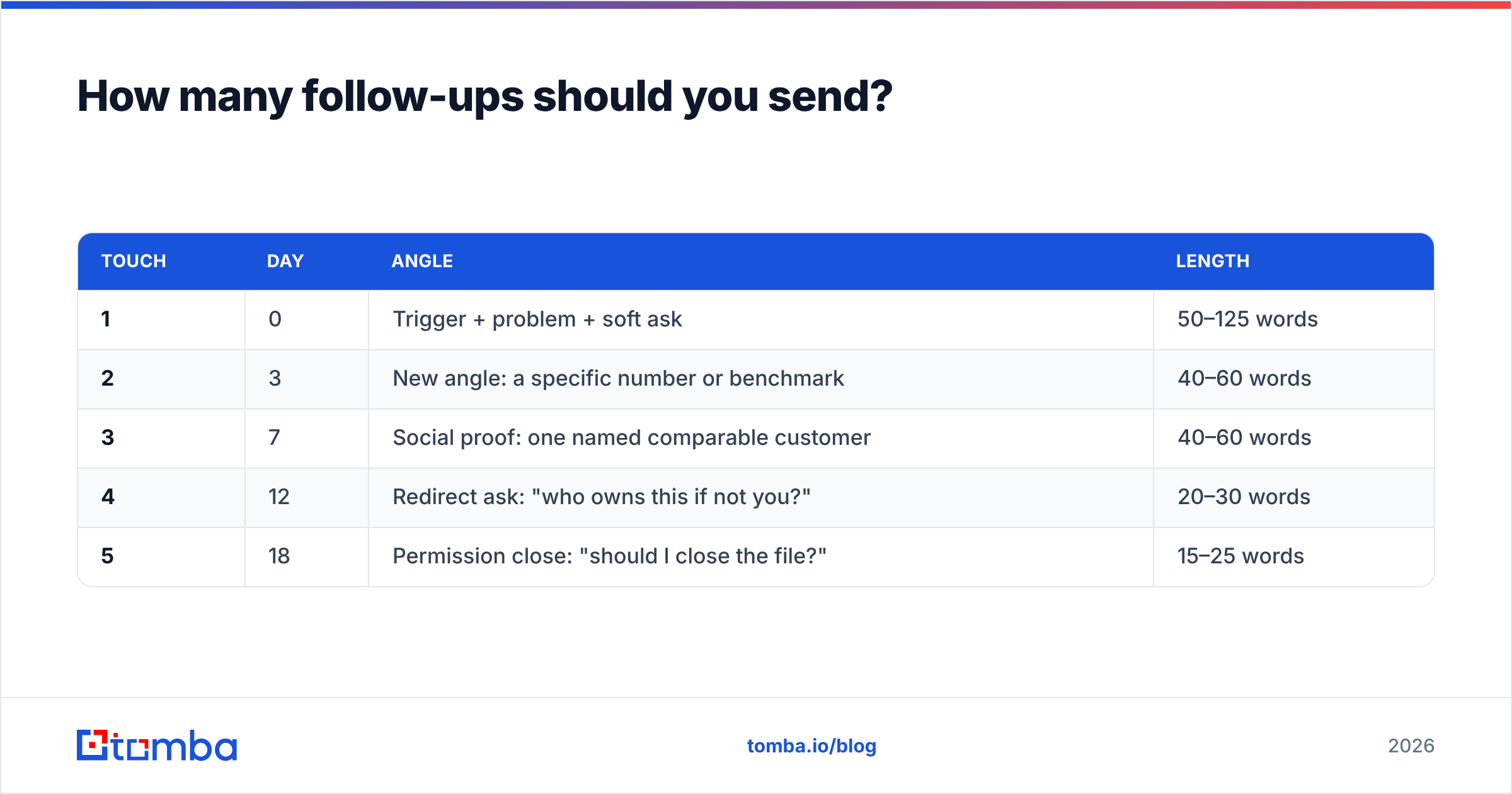
How many follow-ups should you send?#
Four to five touches, spaced across 12–18 days, with each one adding something new.
The single most common mistake is the "just bumping this up" follow-up. It adds zero information and signals that your first email wasn't worth reading either. Every follow-up needs a new reason to exist.
| Touch | Day | Angle | Length |
|---|---|---|---|
| 1 | 0 | Trigger + problem + soft ask | 50–125 words |
| 2 | 3 | New angle: a specific number or benchmark | 40–60 words |
| 3 | 7 | Social proof: one named comparable customer | 40–60 words |
| 4 | 12 | Redirect ask: "who owns this if not you?" | 20–30 words |
| 5 | 18 | Permission close: "should I close the file?" | 15–25 words |
The fourth and fifth touches produce a disproportionate share of replies, and the redirect touch often produces the best replies — a warm internal forward beats a cold first contact every time.
Reply-to-the-same-thread for touches 2–5. It keeps context in one place and mailbox providers treat threaded conversations more favorably than five separate cold sends to the same address.
Volume caps matter here. Roughly 30–50 cold sends per mailbox per day is the sustainable ceiling in 2026, which means scaling means more mailboxes and more domains, not more sends per inbox. Run the numbers with an email warmup calculator before you commit to a quota you can't deliver.
Does your list quality matter more than your copy?#
Yes, and it is not close.
Run the arithmetic. Take a 1,000-contact campaign:
- Scenario A — unverified list: 20% bounce rate. 800 delivered, but the bounce rate pushes 30% of the remainder to spam. ~560 land in an inbox. At a 3% reply rate on delivered-and-seen: 17 replies.
- Scenario B — verified list: 1.5% bounce rate. 985 delivered, inbox placement holds at ~92%. ~906 land in an inbox. Same copy, same 3% reply rate: 27 replies.
Same email. 59% more replies. And the second scenario compounds — good sender reputation makes next month's campaign better, while the first scenario degrades until the domain is unusable.
That is the argument for verification as a standing process rather than a one-time cleanup. Every list ages: people change jobs at roughly 20–25% per year in B2B, so a contact file goes stale fast. Running addresses through an email verifier before each campaign is a five-minute step that protects the asset you send from.
Two data problems deserve specific attention:
- Catch-all domains. These accept every address at the SMTP layer, so a standard verifier returns "unknown." They are common at enterprises. A dedicated catch-all verifier resolves a meaningful share of them instead of forcing you to guess or discard.
- Role addresses. info@, sales@, support@ — these route to shared inboxes and almost never reply to cold outreach. Strip them.
For building the list in the first place, domain search pulls every discoverable address at a target company along with the pattern, which lets you infer addresses for people who aren't indexed yet.
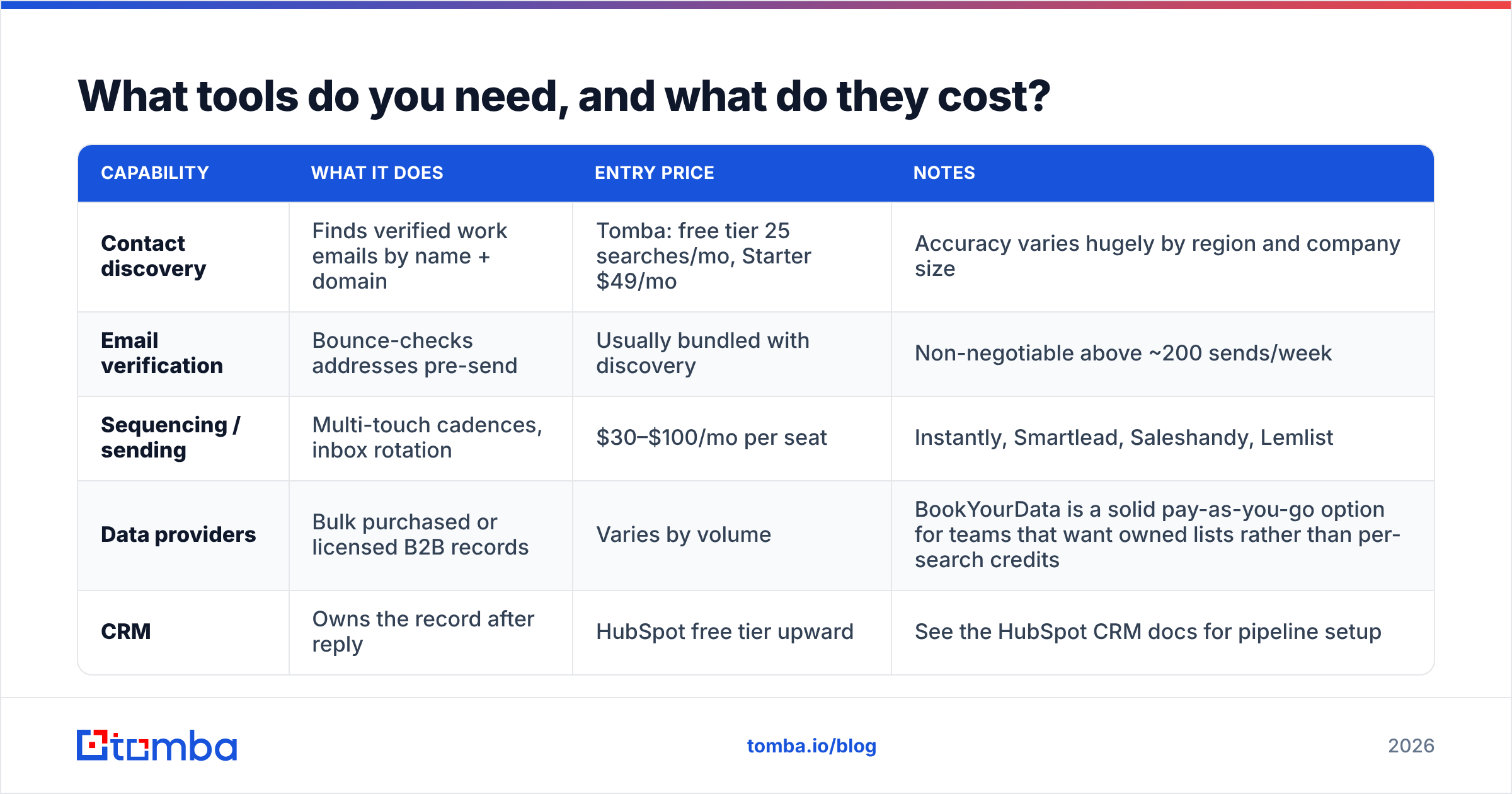
What tools do you need, and what do they cost?#
You need three things: a way to find contacts, a way to verify them, and a way to send sequences. Some tools bundle all three; most teams do better with a dedicated data source plus a dedicated sender.
| Capability | What it does | Entry price | Notes |
|---|---|---|---|
| Contact discovery | Finds verified work emails by name + domain | Tomba: free tier 25 searches/mo, Starter $49/mo | Accuracy varies hugely by region and company size |
| Email verification | Bounce-checks addresses pre-send | Usually bundled with discovery | Non-negotiable above ~200 sends/week |
| Sequencing / sending | Multi-touch cadences, inbox rotation | $30–$100/mo per seat | Instantly, Smartlead, Saleshandy, Lemlist |
| Data providers | Bulk purchased or licensed B2B records | Varies by volume | BookYourData is a solid pay-as-you-go option for teams that want owned lists rather than per-search credits |
| CRM | Owns the record after reply | HubSpot free tier upward | See the HubSpot CRM docs for pipeline setup |
The realistic monthly floor for a one-person outbound motion in 2026 is around $80–$150: a data source, a sending tool, and a couple of secondary domains. Scaling to a three-person SDR team roughly triples the sending cost but not the data cost, since credits pool.
If you work in spreadsheets, the Google Sheets add-on approach avoids CSV round-trips entirely — you paste a list of names and domains and the addresses populate in place. Teams with engineering resources tend to skip the UI and hit the email finder API directly from their enrichment pipeline.
What are the mistakes that quietly kill reply rates?#
A checklist you can run against any draft before it ships:
- You wrote about yourself first. If the word "we" appears before the word "you," rewrite the opening.
- You attached a deck or PDF. Attachments in cold email hurt deliverability and get opened by nobody.
- You included more than one link. One link maximum in touch #1. Zero is often better.
- You used merge tags visibly. A single broken
{{first_name}}in a 500-send batch is a reputation event. - Your ask requires a decision. "Book a demo" is a decision. "Is this a priority this quarter?" is an opinion. Ask for the opinion.
- You sent from your primary domain. Use a secondary sending domain so a bad campaign cannot damage your main one.
- You ignored the reply that said "not now." "Not now" is the second-best outcome available. Tag it, wait 90 days, come back with something new.
- Your image-to-text ratio is off. No images, no tracking pixels if you can avoid them. Open tracking is increasingly unreliable anyway and adds a redirect domain that filters dislike.
One more that deserves its own line: sending on Monday morning. Every automation platform's default is Tuesday–Thursday, 8–10am local, which means that window is the most crowded real estate in the inbox. Sending Tuesday at 1:40pm or Thursday at 4pm often lands you in a quieter queue.
If you want a starting point rather than a blank page, the cold email templates library covers the standard trigger types — and reviews on G2's sales engagement category are useful for pressure-testing which sending platform actually fits your volume.
How do you measure whether it's working?#
Track four numbers, weekly, per segment:
- Bounce rate — target under 2%. Above 4%, stop sending and clean the list.
- Reply rate — target 5%+ for segment-level personalization, 8%+ for trigger-based. Measured on delivered, not sent.
- Positive reply rate — the subset that isn't "unsubscribe" or "wrong person." Target 30–40% of total replies.
- Meeting rate — the number the business actually cares about. 1–3% of delivered is healthy outbound in most B2B categories.
Diagnose by which number is broken. Low open rate is a subject line or deliverability problem. Good opens with a low reply rate is a copy or targeting problem. Good replies with few meetings is an offer problem. Don't rewrite copy when the issue is your list, and don't buy more contacts when the issue is your ask.
Track response rate by segment rather than in aggregate — the aggregate hides the fact that one segment is at 12% and three are at 0.4%. Kill the three, double down on the one.
Where should you start?#
Pick one narrow segment — 200 contacts maximum. Write one email using the six-part structure. Verify every address before you send. Run the four-touch sequence over 12 days. Measure. Then change exactly one variable and run it again.
That loop, executed four times, will teach you more about your market than any amount of template-collecting.
Start with the data, because everything downstream depends on it. The Tomba Email Finder gives you verified work addresses by name and domain with a free tier of 25 searches a month — enough to build and test your first segment before you commit budget to a sending platform. Get the list right, and the copy has a chance to do its job.
Related guides#
// get started
Find, verify and enrich your first contacts today
Start on the free plan with 25 searches a month, then scale when your team is ready.
Free plan · No credit card required · GDPR & CCPA
// about the author