Influno vs Leadsforge (2026): Which Outreach Tool Wins?
Influno sends the email. Leadsforge builds the list. Here is how the two actually compare on data quality, deliverability controls, and cost — and when you are better off splitting the job across two tools.
TL;DR
- They are not the same category. Influno is an outbound sending platform (mailboxes, sequences, warmup, replies). Leadsforge is an AI-assisted list building platform (find companies, find people, get contact data). Comparing them head-to-head only makes sense if you are trying to decide which half of the problem to solve with software first.
- Pick Influno if you already have a clean list and your bottleneck is sending volume, inbox rotation, and sequence management.
- Pick Leadsforge if your bottleneck is "who do I email," and you want a conversational way to describe an ICP and get contacts back without learning a filter-heavy database UI.
- Neither replaces a dedicated verification layer. Both ship contact data or send to contact data; neither is primarily an accuracy company. Bounces are where most teams actually lose the quarter.
- The realistic 2026 stack is three parts: a data/verification source, a sending platform, and a CRM. Buying one tool that claims all three usually means paying full price for the weakest component.
What are Influno and Leadsforge, exactly?#
Start with the category, because the marketing pages blur it.
Influno positions itself as a cold email outreach platform. The job it does: connect your sending mailboxes, warm them up, build multi-step sequences, personalize at scale, rotate inboxes so no single domain gets hammered, and track opens, clicks, and replies. If you have used Instantly, Smartlead, or Lemlist, you already understand the shape of the product. The unit of value is a sent and delivered email.
Leadsforge sits one step earlier in the funnel. Its pitch is AI-assisted list building — you describe the kind of company and role you want in something close to plain language, and it returns a list of matching contacts with work emails attached. The unit of value is a usable row in a CSV.
So the honest framing of "Influno vs Leadsforge" is not "which tool is better." It is: which gap in your outbound machine is currently costing you more money? If you are sending 400 emails a week to a list you scraped by hand and getting a 9% bounce rate, a better sending platform will not save you. If you have 40,000 verified contacts sitting in a spreadsheet and no way to sequence them, a better list builder will not save you either.

How do Influno and Leadsforge compare feature by feature?#
Here is the practical breakdown. Note that both vendors iterate quickly and change packaging; treat the pricing row as directional and confirm current tiers on the vendor pages before you buy.
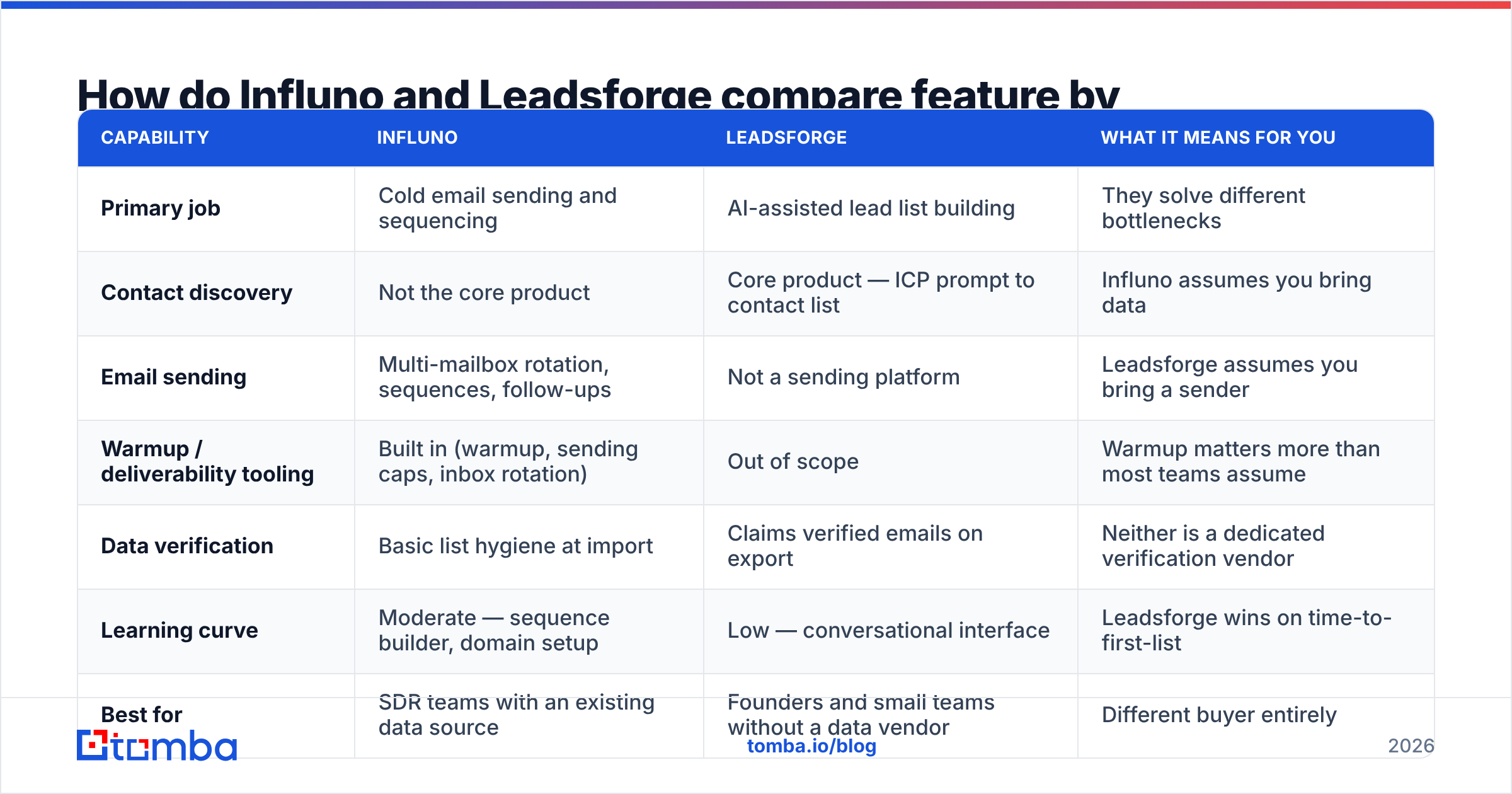
| Capability | Influno | Leadsforge | What it means for you |
|---|---|---|---|
| Primary job | Cold email sending and sequencing | AI-assisted lead list building | They solve different bottlenecks |
| Contact discovery | Not the core product | Core product — ICP prompt to contact list | Influno assumes you bring data |
| Email sending | Multi-mailbox rotation, sequences, follow-ups | Not a sending platform | Leadsforge assumes you bring a sender |
| Warmup / deliverability tooling | Built in (warmup, sending caps, inbox rotation) | Out of scope | Warmup matters more than most teams assume |
| Data verification | Basic list hygiene at import | Claims verified emails on export | Neither is a dedicated verification vendor |
| Learning curve | Moderate — sequence builder, domain setup | Low — conversational interface | Leadsforge wins on time-to-first-list |
| Best for | SDR teams with an existing data source | Founders and small teams without a data vendor | Different buyer entirely |
| API / programmatic access | Limited to sending workflows | List generation focused | Check current docs if you are building internal tooling |
| Replaces a CRM? | No | No | Budget for HubSpot, Pipedrive, or similar |
The table makes the key point visible: there is almost no feature overlap. Any review that declares one the "winner" outright is comparing a hammer to a drill.
Which one is better for building a lead list?#
Leadsforge, obviously — it is the only one of the two that does it. But the more useful question is whether an AI list builder is the right way to source data at all. Here is how the sourcing options actually stack up:
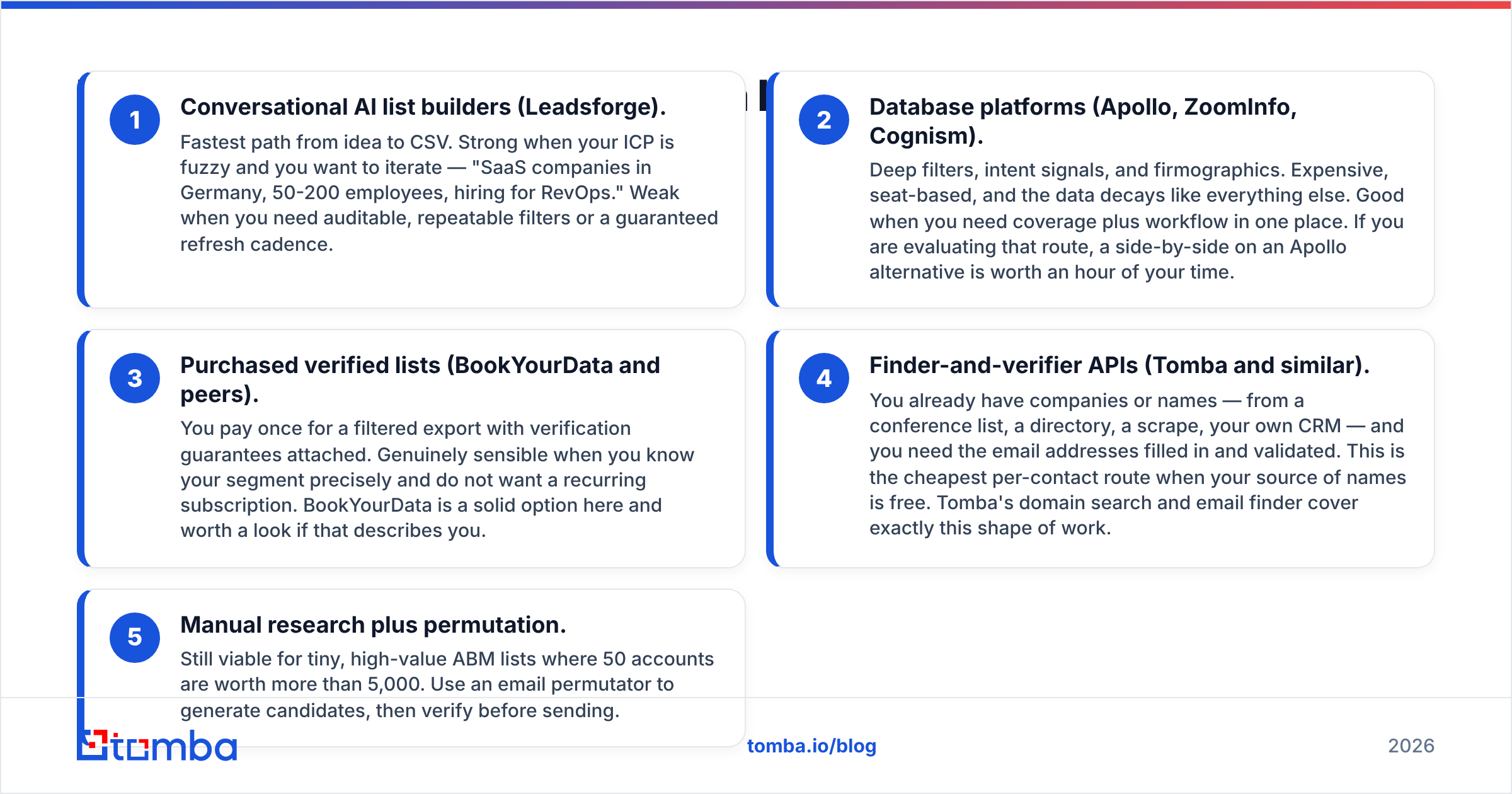
- Conversational AI list builders (Leadsforge). Fastest path from idea to CSV. Strong when your ICP is fuzzy and you want to iterate — "SaaS companies in Germany, 50-200 employees, hiring for RevOps." Weak when you need auditable, repeatable filters or a guaranteed refresh cadence.
- Database platforms (Apollo, ZoomInfo, Cognism). Deep filters, intent signals, and firmographics. Expensive, seat-based, and the data decays like everything else. Good when you need coverage plus workflow in one place. If you are evaluating that route, a side-by-side on an Apollo alternative is worth an hour of your time.
- Purchased verified lists (BookYourData and peers). You pay once for a filtered export with verification guarantees attached. Genuinely sensible when you know your segment precisely and do not want a recurring subscription. BookYourData is a solid option here and worth a look if that describes you.
- Finder-and-verifier APIs (Tomba and similar). You already have companies or names — from a conference list, a directory, a scrape, your own CRM — and you need the email addresses filled in and validated. This is the cheapest per-contact route when your source of names is free. Tomba's domain search and email finder cover exactly this shape of work.
- Manual research plus permutation. Still viable for tiny, high-value ABM lists where 50 accounts are worth more than 5,000. Use an email permutator to generate candidates, then verify before sending.
Most teams end up on a blend of 3, 4, and 5 rather than a single source. The mistake is assuming one vendor's database covers your niche. It rarely does, especially outside US mid-market tech.
Which one is better for sending cold email at scale?#
Influno, and it is not close — Leadsforge does not compete here.
What matters when you evaluate a sending platform in 2026 is narrower than the feature list suggests. After Google and Yahoo tightened bulk-sender requirements, the platform choice matters less than your authentication and your list quality. Check these four things:
- Does it enforce sane per-mailbox caps? A platform that lets you blast 500/day per inbox is selling you a way to burn domains. Influno's inbox rotation plus caps is the right architectural answer.
- Does it handle SPF, DKIM, and DMARC setup clearly? If you are unsure whether your records are right, run a quick SPF checker before you send a single campaign. Misconfigured auth is the single most common cause of "our deliverability suddenly collapsed."
- Does warmup actually ramp, or just simulate? Warmup that spikes volume in week one is theater. Model your ramp with a warmup calculator and hold the platform to it.
- Does it stop you from sending to invalid addresses? This is where most sending platforms, Influno included, are permissive by design. They will deliver whatever you upload. That is your job, not theirs.
That last point is the real story of this comparison.
Is data accuracy the deciding factor here?#
Yes, and it is the factor neither product page leads with.
A cold email program has three multiplicative inputs: list accuracy, sender reputation, and message relevance. Accuracy is upstream of the other two. A 10% invalid rate does not just waste 10% of your sends — it degrades sender reputation, which suppresses inbox placement for the 90% that were valid. Mailbox providers read hard bounces as a signal that you do not know who you are emailing.
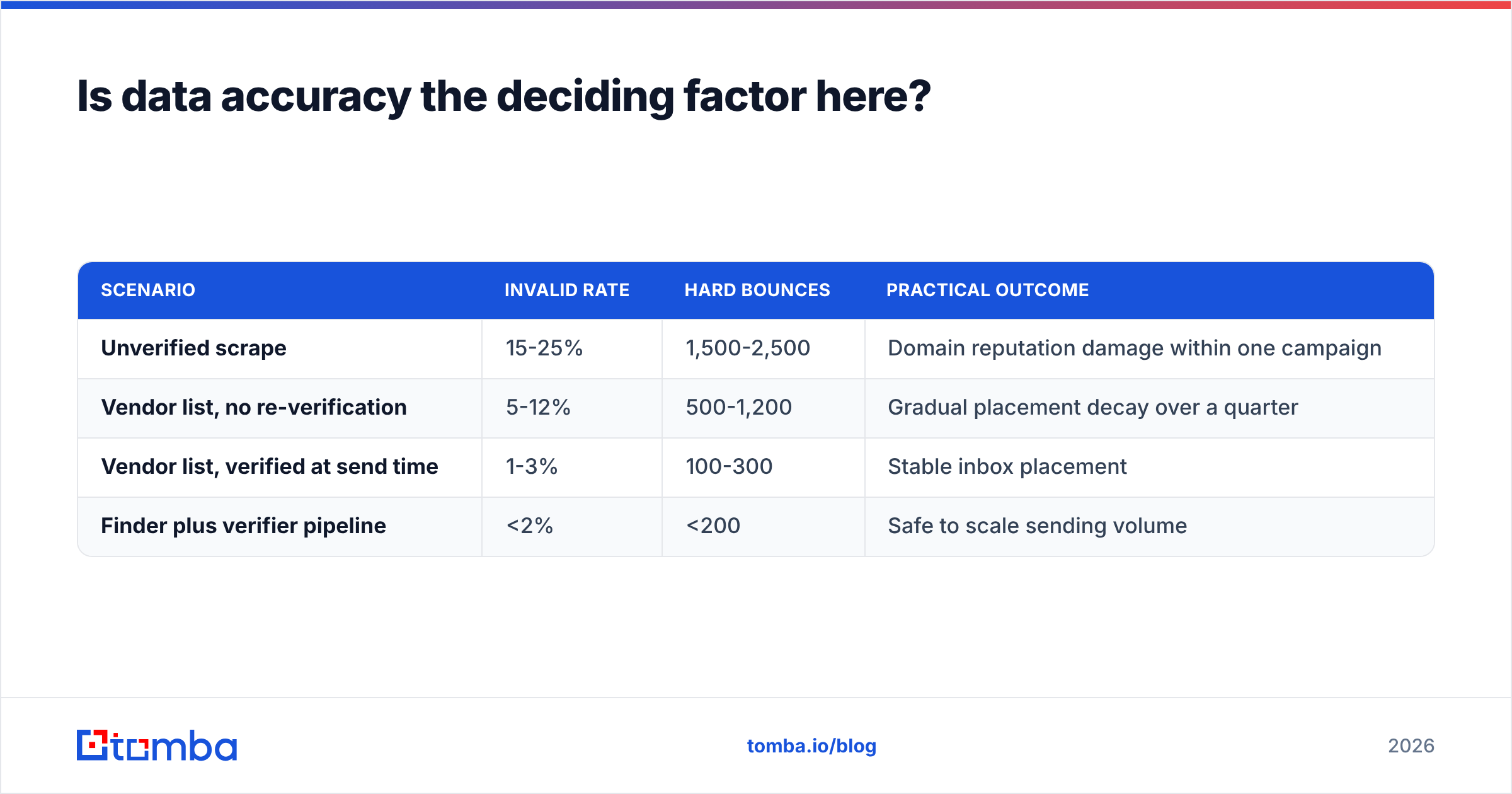
Rough math on a 10,000-contact campaign:
| Scenario | Invalid rate | Hard bounces | Practical outcome |
|---|---|---|---|
| Unverified scrape | 15-25% | 1,500-2,500 | Domain reputation damage within one campaign |
| Vendor list, no re-verification | 5-12% | 500-1,200 | Gradual placement decay over a quarter |
| Vendor list, verified at send time | 1-3% | 100-300 | Stable inbox placement |
| Finder plus verifier pipeline | <2% | <200 | Safe to scale sending volume |
Note row two. Data decays roughly 2-3% per month as people change jobs, so a list that was 97% accurate when it was exported is meaningfully worse ninety days later. This is why "verified at source" is a weaker claim than it sounds, regardless of vendor. The fix is cheap: run a bulk verify pass immediately before each campaign, not once at import.
Catch-all domains deserve a separate note. A large share of B2B domains accept all mail at the SMTP layer, so a standard verifier returns "unknown" rather than valid or invalid. Dropping them wastes real prospects; sending to them blind wastes reputation. A dedicated catch-all verifier is the difference between discarding 20% of your enterprise list and mailing it safely.
What do Influno and Leadsforge cost?#
Both vendors publish self-serve pricing and both revise it — check the live pages before you commit. The structural difference matters more than the sticker:
- Influno prices around sending capacity — mailboxes connected, emails sent, contacts in the system. Cost scales with volume, which is fair but means a growing team's bill grows automatically.
- Leadsforge prices around credits — contacts revealed or exported. Cost scales with list building, and unused credits are the usual source of buyer's remorse.
- Credits are not comparable across vendors. One vendor's "credit" may cover an email plus a phone number plus enrichment; another charges separately for each. Always normalize to cost-per-usable contact, which means dividing by your accuracy rate, not the raw count.
For reference, Tomba pricing runs a free tier at 25 searches/month, Starter at $49/mo, Growth at $99/mo, Pro at $249/mo, and custom Enterprise — priced on finds and verifications rather than seats, which is usually the cheaper shape for a small team doing high volume.
Before signing anything, check independent reviews on G2 for both products. Pay attention to recent reviews specifically; outbound tooling changes fast and a two-year-old five-star review tells you almost nothing about the current product.
So which should you actually buy?#
Match the tool to the gap, not the hype:
- You have data, you cannot send at volume → Influno. Add a verification pass before each campaign so you are not spending sending capacity on dead addresses.
- You can send, you have no list → Leadsforge, or a purchased verified list if your segment is well defined and stable.
- You have neither → Do not buy an all-in-one. Buy a data source and a sending platform separately. All-in-one suites are priced on their strongest module and judged on their weakest.
- You have both but results are flat → Your problem is message relevance, not tooling. Nothing in this comparison fixes that.
- You are building internal automation → Go API-first. A email finder API that you call from your own pipeline beats any UI when volume gets real.
One more practical note: whichever you choose, keep your data layer separate from your sending layer. If the vendor that stores your contacts is the same one that sends your mail, switching sending platforms means migrating your entire database. Teams that decouple those two things move faster, and they negotiate better at renewal.
Where does Tomba fit in this stack?#
As the layer underneath both. Influno needs accurate addresses to send to. Leadsforge output ages the moment it is exported. In both cases the same fix applies: find the missing addresses, then validate every row immediately before it enters a campaign.
Start with the Tomba Email Finder — give it a domain, a name, or a company and get the verified professional email back, with the free tier covering 25 searches a month so you can test accuracy on your own list before paying anything. Pair it with the email verifier as a pre-send gate, and your bounce rate stops being the thing that decides whether your outbound quarter works.
Related guides#
// get started
Find, verify and enrich your first contacts today
Start on the free plan with 25 searches a month, then scale when your team is ready.
Free plan · No credit card required · GDPR & CCPA
// about the author