Lead Generation by Email: The 2026 Playbook That Works
Email still outperforms every other outbound channel on cost per meeting — but only when the list, the infrastructure, and the offer line up. Here's the full 2026 system, with benchmarks.
TL;DR
- Lead generation by email still produces the cheapest qualified meeting in B2B outbound — roughly $80-$250 per meeting versus $400+ for paid search in most SaaS categories — but only when list quality comes first.
- Bounce rate is the single variable that decides everything downstream. Above 3%, mailbox providers throttle you and your reply rate collapses regardless of how good the copy is.
- The 2026 stack is five layers: data sourcing, verification, infrastructure (SPF/DKIM/DMARC + warmup), sequencing, and routing to the CRM. Skipping any one of them breaks the other four.
- Google and Microsoft both tightened bulk-sender enforcement in 2024-2025. One-click unsubscribe and authenticated domains are now table stakes, not optimizations.
- Realistic 2026 benchmarks: 45-60% open rate on a verified list, 4-9% reply rate on a well-targeted segment, 1-3% meeting-booked rate. Anyone promising 30% reply rates is selling something.
What is lead generation by email, really?#
Lead generation by email is the practice of turning a defined audience into a pipeline of interested buyers using email as the first-touch channel. That covers two distinct motions that get confused constantly:
Outbound email lead generation — you build a target list, find verified business email addresses, and send cold sequences to people who have never heard of you. You control volume and timing. You carry all the deliverability risk.
Inbound email lead generation — you capture addresses through content, demos, webinars, or a newsletter, then nurture them toward a sales conversation. Lower risk, slower ramp, and entirely dependent on traffic you already have.
Most teams need both. The mistake is running them from the same domain and the same sending reputation. Cold outbound belongs on a separate sending domain so that a bad week of bounces never touches your transactional or marketing mail.
Think of it like a restaurant kitchen. Your primary domain is the dining room — it serves paying customers and must never smell like smoke. Cold outbound is the prep line out back, where things occasionally burn. You keep a wall between them.
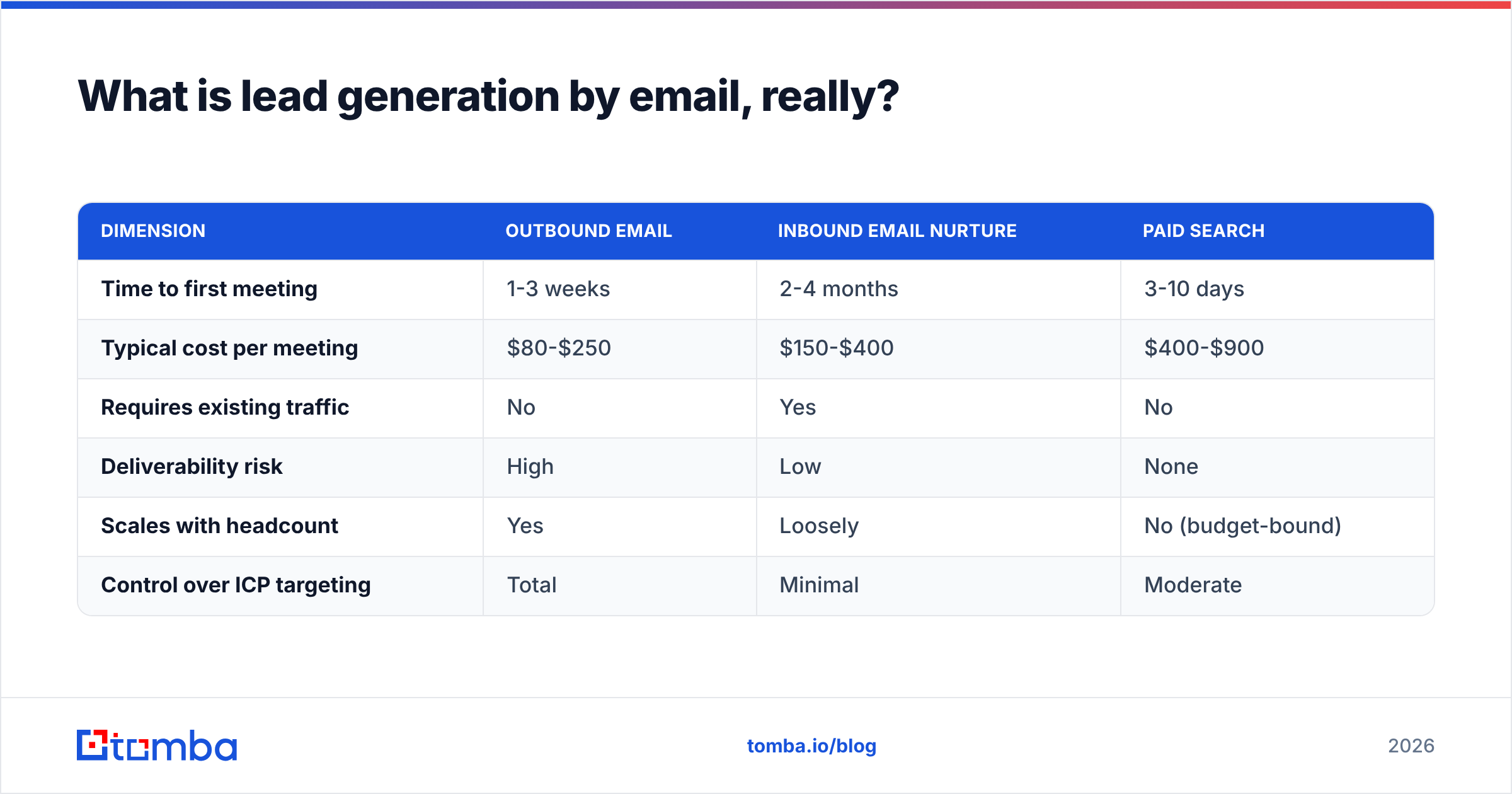
Here's how the two motions actually compare when you're deciding where to put next quarter's budget:
| Dimension | Outbound email | Inbound email nurture | Paid search |
|---|---|---|---|
| Time to first meeting | 1-3 weeks | 2-4 months | 3-10 days |
| Typical cost per meeting | $80-$250 | $150-$400 | $400-$900 |
| Requires existing traffic | No | Yes | No |
| Deliverability risk | High | Low | None |
| Scales with headcount | Yes | Loosely | No (budget-bound) |
| Control over ICP targeting | Total | Minimal | Moderate |
Outbound wins on speed and targeting control. It loses on risk. That risk is almost entirely manageable, and the rest of this guide is about how.
Why does most email lead generation fail before the first send?#
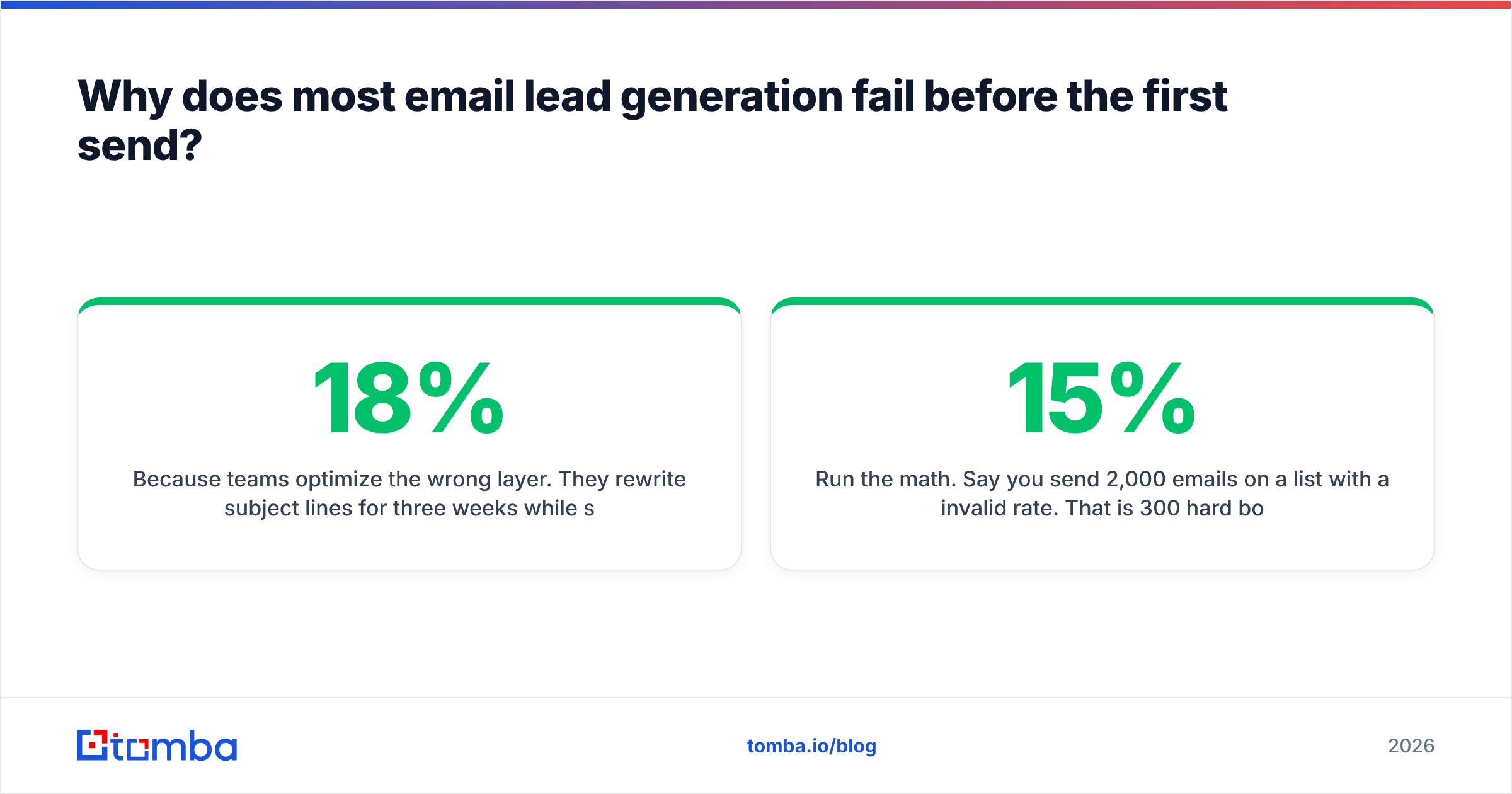
Because teams optimize the wrong layer. They rewrite subject lines for three weeks while sending to a list where 18% of the addresses do not exist.
Run the math. Say you send 2,000 emails on a list with a 15% invalid rate. That is 300 hard bounces. Gmail and Outlook read that as a signal that you are not managing your list, and your subsequent mail gets routed to spam or deferred outright. The 1,700 valid addresses now see a fraction of what you sent. Your reply rate reads as 0.8%, you blame the copy, and you rewrite the copy.
The failure order is almost always:
- List quality — invalid, stale, or role-based addresses (info@, sales@, admin@) inflate bounces and depress engagement.
- Authentication — missing or misconfigured SPF, DKIM, and DMARC records. Google's bulk sender requirements made all three effectively mandatory for anyone sending at volume.
- Warmup and volume ramp — a brand-new domain sending 500 emails on day one is a textbook spam signal.
- Targeting — right message, wrong person. A CFO does not care about your API rate limits.
- Copy — the thing everyone fixes first, and the last thing that actually matters.
Fix them in that order. Copy improvements applied to a broken list produce nothing; copy improvements applied to a clean, authenticated, well-warmed setup compound immediately.

How do you build a list worth emailing?#
Start from the account, not the person. Define 30-80 accounts that match your best existing customers on firmographics — industry, headcount, funding stage, tech stack — before you look up a single contact. A list of 5,000 random VP titles will underperform a list of 400 people at accounts that look exactly like your last three closed-won deals.
Once you have accounts, there are four practical ways to get contacts:
- Domain-first discovery. You have the company domain and need the people. A domain search returns known addresses at that domain plus the company's email pattern (first.last@, flast@, etc.), which lets you extrapolate for contacts the database hasn't indexed.
- Name-and-domain lookup. You have a name from LinkedIn, a conference list, or a podcast guest page, and you need the address. This is the core job of an email finder, and it's where accuracy differences between vendors show up hardest.
- Enrichment of existing records. You already have 4,000 half-complete CRM rows. Data enrichment fills in title, company size, and missing contact fields so you can segment properly instead of blasting everyone with one message.
- Inbound signal capture. Website visitors, content downloads, and newsletter signups. Slower, but these convert at multiples of cold.
Whichever route you use, the output goes through verification before it goes into a sequencer. Not after. An email verifier checks syntax, domain MX records, and mailbox existence via SMTP probing, and flags catch-all domains that can't be definitively confirmed.
Catch-all domains deserve their own note. Roughly 15-20% of B2B domains accept mail to any address, which makes standard verification return "unknown." You have three options: exclude them (safest, costs you coverage), send to them anyway (raises risk), or run a catch-all verifier that uses additional signals to separate real mailboxes from black holes. For accounts you genuinely care about, the third option is worth the extra step.

A note on accuracy claims: every vendor advertises 95%+ accuracy, and every vendor measures it differently. Some exclude catch-alls from the denominator. Some count "risky" as valid. The only number that matters is the bounce rate you observe in your own sequencer on your own segment. Run a 200-contact pilot through two providers before committing budget, and compare observed bounces, not marketing pages.
Which email lead generation tools should you actually pay for?#
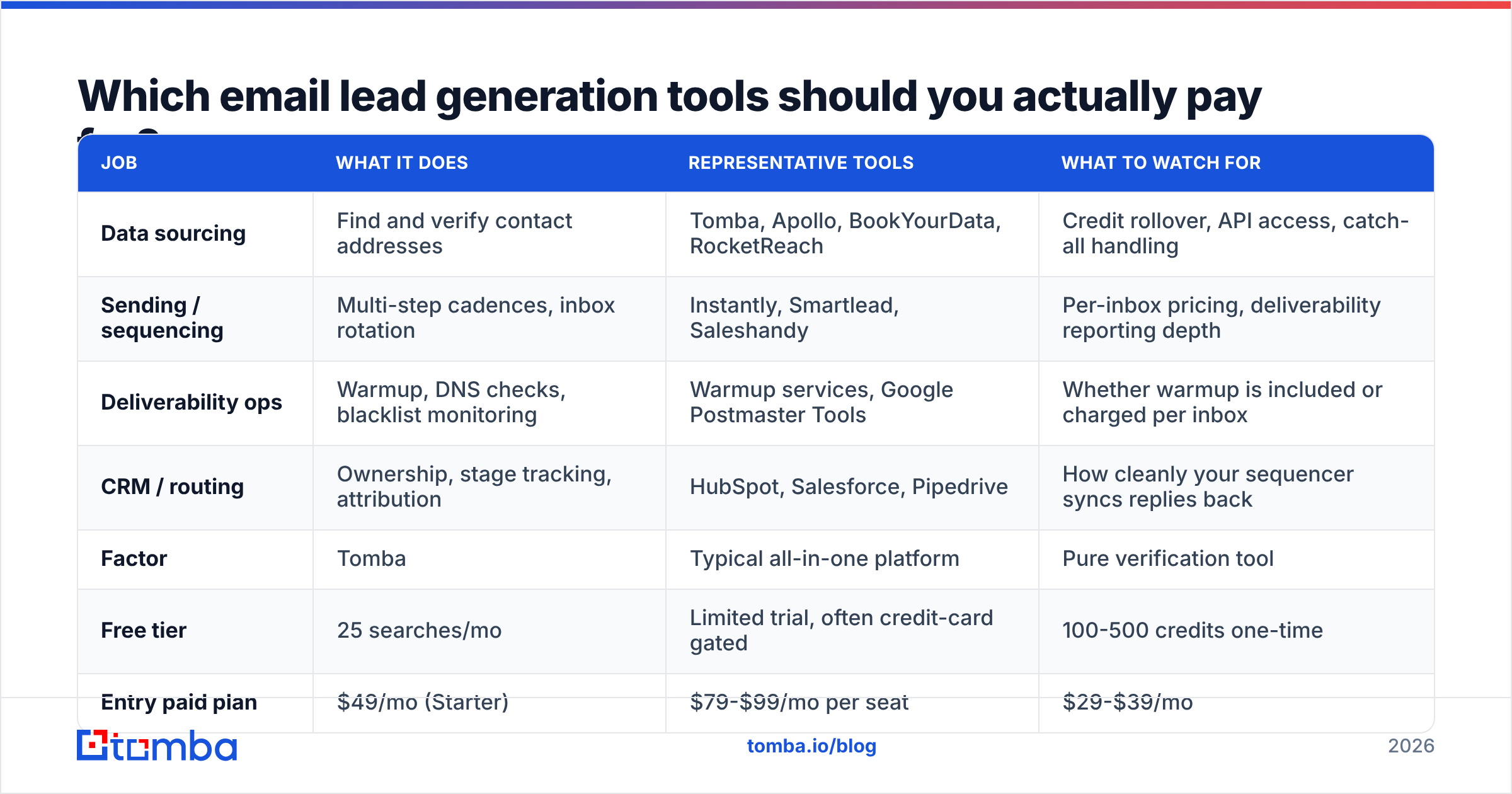
The category splits into four jobs, and very few products do more than two of them well. Buying one "all-in-one" that does everything at 60% quality usually costs more in wasted sends than buying two focused tools.
| Job | What it does | Representative tools | What to watch for |
|---|---|---|---|
| Data sourcing | Find and verify contact addresses | Tomba, Apollo, BookYourData, RocketReach | Credit rollover, API access, catch-all handling |
| Sending / sequencing | Multi-step cadences, inbox rotation | Instantly, Smartlead, Saleshandy | Per-inbox pricing, deliverability reporting depth |
| Deliverability ops | Warmup, DNS checks, blacklist monitoring | Warmup services, Google Postmaster Tools | Whether warmup is included or charged per inbox |
| CRM / routing | Ownership, stage tracking, attribution | HubSpot, Salesforce, Pipedrive | How cleanly your sequencer syncs replies back |
On the data layer specifically, pricing models diverge more than feature sets. Here's how the common structures compare:
| Factor | Tomba | Typical all-in-one platform | Pure verification tool |
|---|---|---|---|
| Free tier | 25 searches/mo | Limited trial, often credit-card gated | 100-500 credits one-time |
| Entry paid plan | $49/mo (Starter) | $79-$99/mo per seat | $29-$39/mo |
| Mid tier | $99/mo (Growth) | $149-$199/mo per seat | $79/mo |
| Upper tier | $249/mo (Pro) | $299+/mo per seat | $149/mo |
| Finder + verifier bundled | Yes | Usually yes | No — verify only |
| API included on paid plans | Yes | Often higher tiers only | Yes |
| Seat-based pricing | No | Yes (cost scales with team) | No |
The seat question is the one that bites growing teams. A per-seat platform that looks reasonable for two SDRs becomes the largest line item in your stack at eight. Credit-based tools scale with usage instead of headcount. Check full Tomba pricing and whatever your incumbent charges at the team size you expect in twelve months, not the one you have today.
If you're evaluating specific swaps, the comparison pages for an Apollo alternative and a RocketReach alternative lay out the feature-by-feature differences. BookYourData is a solid choice when you want purchased, pre-built lists by industry rather than building your own — different model, legitimately good at what it does, and worth a look if your team doesn't want to run sourcing in-house.

What does the technical setup require in 2026?#
Non-negotiable checklist, in the order you should do it:
- Buy a separate sending domain. Something close to your primary (
getacme.comif you'reacme.com). Never send cold from your primary domain. - Configure SPF, DKIM, and DMARC. All three, on the sending domain. Start DMARC at
p=noneto collect reports, then move top=quarantineonce you confirm alignment. Run an SPF checker before your first send. - Warm up every mailbox for 3-4 weeks. Ramp from ~10 sends/day to your target. Use a warmup calculator to plan the curve rather than guessing.
- Cap each mailbox at 30-50 cold sends per day. More mailboxes, not more volume per mailbox. Two inboxes at 40/day beats one at 80/day every time.
- Enable one-click unsubscribe (RFC 8058 List-Unsubscribe headers). Required by Gmail and Yahoo for bulk senders, and it reduces spam complaints, which is the metric that actually kills domains.
- Monitor Google Postmaster Tools weekly. Spam complaint rate above 0.3% is a red alert. Above 0.1% is worth investigating.
- Check blacklists monthly with a blacklist checker, especially after any volume increase.
This setup takes about a day of work and four weeks of waiting. Teams that skip the waiting part account for the large majority of "cold email doesn't work anymore" posts.
What should the actual emails say?#
Short answer: one idea, one ask, under 90 words, no attachments, no images in the first touch.
The structural pattern that still works in 2026:
- Opening line that proves you looked. Reference a specific trigger — a hire, a funding round, a product launch, a job posting that implies a problem you solve. "I saw you're hiring three RevOps analysts" beats "I hope this finds you well."
- One sentence on the problem, framed in their language, not your feature names.
- One sentence of proof — a named customer in their segment, or a specific number. Not "leading companies trust us."
- A low-friction ask. "Worth a look?" or "Should I send the two-minute version?" converts better than "Do you have 30 minutes Thursday?" on a first touch.
- Plain-text signature. No tracking pixels on cold sends if you can avoid them — open tracking has become unreliable since Apple Mail Privacy Protection, and tracking domains are themselves a deliverability liability.
Sequence structure: 4-5 touches over 14-18 days. Touch one is the pitch. Touches two and three add a new angle or a piece of proof — never "just bumping this to the top of your inbox." Touch four is a short, genuinely final breakup message, which reliably produces the second-highest reply rate in most sequences.
If you're starting from zero, working cold email templates are a faster starting point than a blank page, as long as you rewrite the opening line per segment. A template you send verbatim to 500 people reads like a template to all 500.
For subject lines, keep them lowercase, 2-5 words, and descriptive rather than clever. "quick question re: onboarding" outperforms "🚀 Transform Your Pipeline." Test with a subject line tester if you want a sanity check before launch, but don't spend a week there — subject lines move opens a few points; list quality moves everything.
What benchmarks should you hold yourself to?#
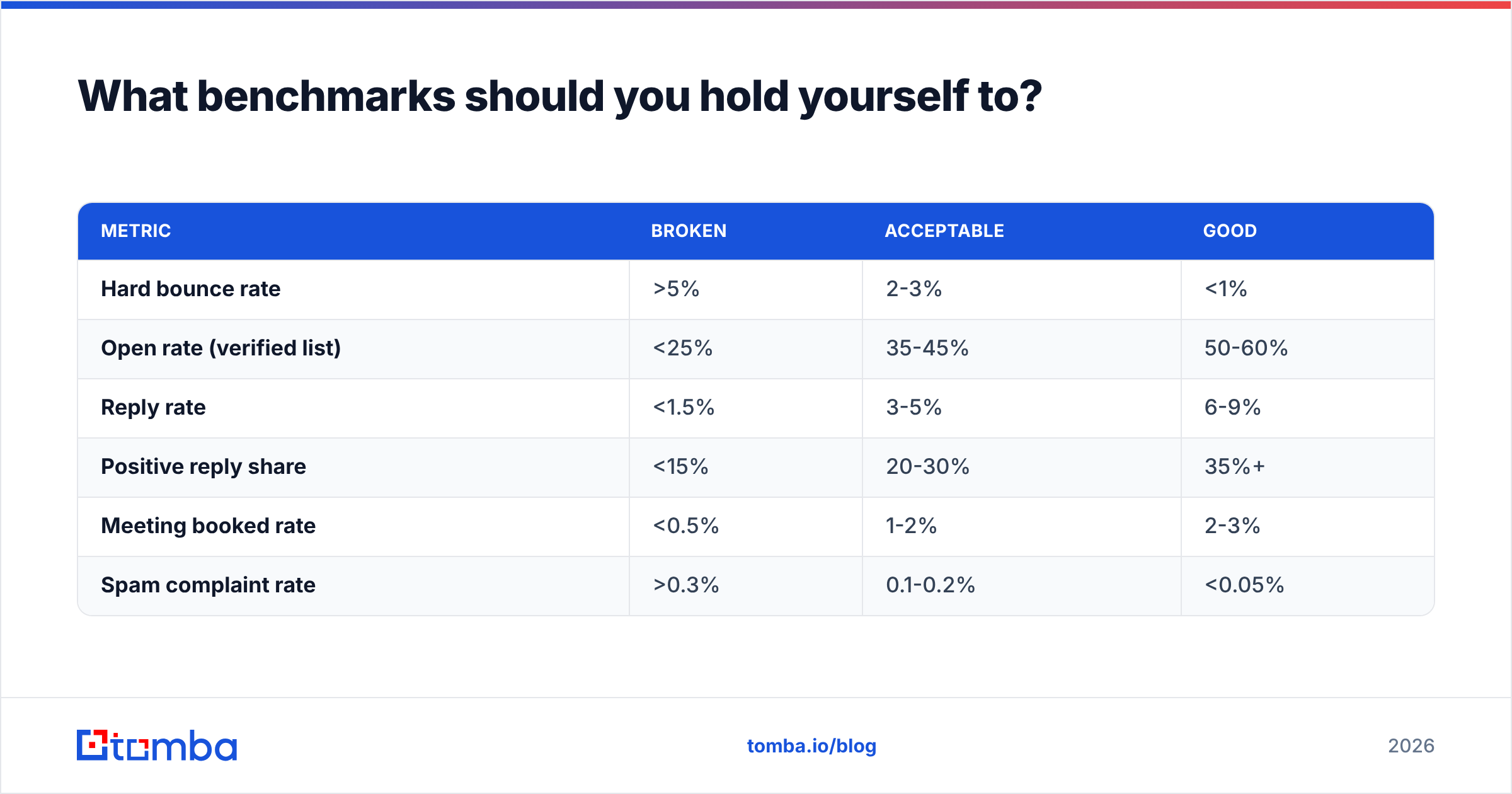
Numbers vary by industry, list size, and ACV, but these ranges hold across most B2B SaaS and services outbound in 2026:
| Metric | Broken | Acceptable | Good |
|---|---|---|---|
| Hard bounce rate | >5% | 2-3% | <1% |
| Open rate (verified list) | <25% | 35-45% | 50-60% |
| Reply rate | <1.5% | 3-5% | 6-9% |
| Positive reply share | <15% | 20-30% | 35%+ |
| Meeting booked rate | <0.5% | 1-2% | 2-3% |
| Spam complaint rate | >0.3% | 0.1-0.2% | <0.05% |
Treat open rate with suspicion. Privacy protections inflate it and pixel-blocking deflates it, so it's directionally useful at best. Reply rate and meeting rate are the honest metrics. Track response rate per segment, not in aggregate — a 4% blended rate often hides one segment at 9% and three at 1%, and that's the single most actionable thing in your data.
Independent review data on G2 is useful for sanity-checking vendor claims about deliverability and data freshness, since the reviews come from teams reporting real bounce numbers rather than vendor test sets.
How do you scale without burning the domain?#
Scale horizontally. The instinct when a sequence works is to triple the daily volume from the same mailboxes — which is exactly the pattern spam filters are built to catch.
Instead:
- Add mailboxes and domains rather than per-mailbox volume. Ten mailboxes at 40/day is 400 sends with a fraction of the risk of two at 200/day.
- Re-verify your list every 60-90 days. B2B contact data decays at roughly 22-30% per year as people change jobs. A list that bounced at 1% in January can bounce at 6% by August untouched.
- Automate the sourcing-to-sequencer handoff through the Tomba API or a HubSpot integration so that verification happens as a gate in the pipeline, not as a manual step someone forgets under quota pressure.
- Segment before you scale. Duplicating a working sequence into a new vertical without rewriting the problem statement is the most common way a 7% reply rate becomes a 1.5% one.
- Watch complaint rate as your ceiling signal. When it starts climbing, you've saturated the segment — move to a new one rather than sending touch six.
The teams that run email lead generation for years without a deliverability crisis all do the same boring thing: they treat list hygiene as infrastructure, not as a task. Verification runs automatically. Bounces trigger suppression. Nobody uploads a CSV directly into a sequencer.
Get the list layer right first#
Every part of this system sits on top of contact data that is either accurate or isn't. If it isn't, nothing above it can be fixed with better copy or a smarter cadence.
Start with the Tomba Email Finder — find and verify addresses by name, domain, or company, with real-time verification built into the same workflow so bad addresses never reach your sequencer. The free tier gives you 25 searches a month to test accuracy against your own segment before you spend anything, and Starter runs $49/mo when you're ready to scale. Run your next 200 prospects through it, compare the bounce rate against whatever you're using now, and let the numbers decide.
Related guides#
// get started
Find, verify and enrich your first contacts today
Start on the free plan with 25 searches a month, then scale when your team is ready.
Free plan · No credit card required · GDPR & CCPA
// about the author