Email Deliverability Guide 2026: Fix Inbox Placement Fast
Most cold email fails before anyone reads it. This guide breaks down the authentication, sending, and list-hygiene mechanics that decide whether your mail lands in the inbox or the spam folder.

TL;DR
- Deliverability is decided by three things in order: authentication (SPF, DKIM, DMARC), sender reputation (complaints, bounces, engagement), and content. Most people obsess over the third and ignore the first two.
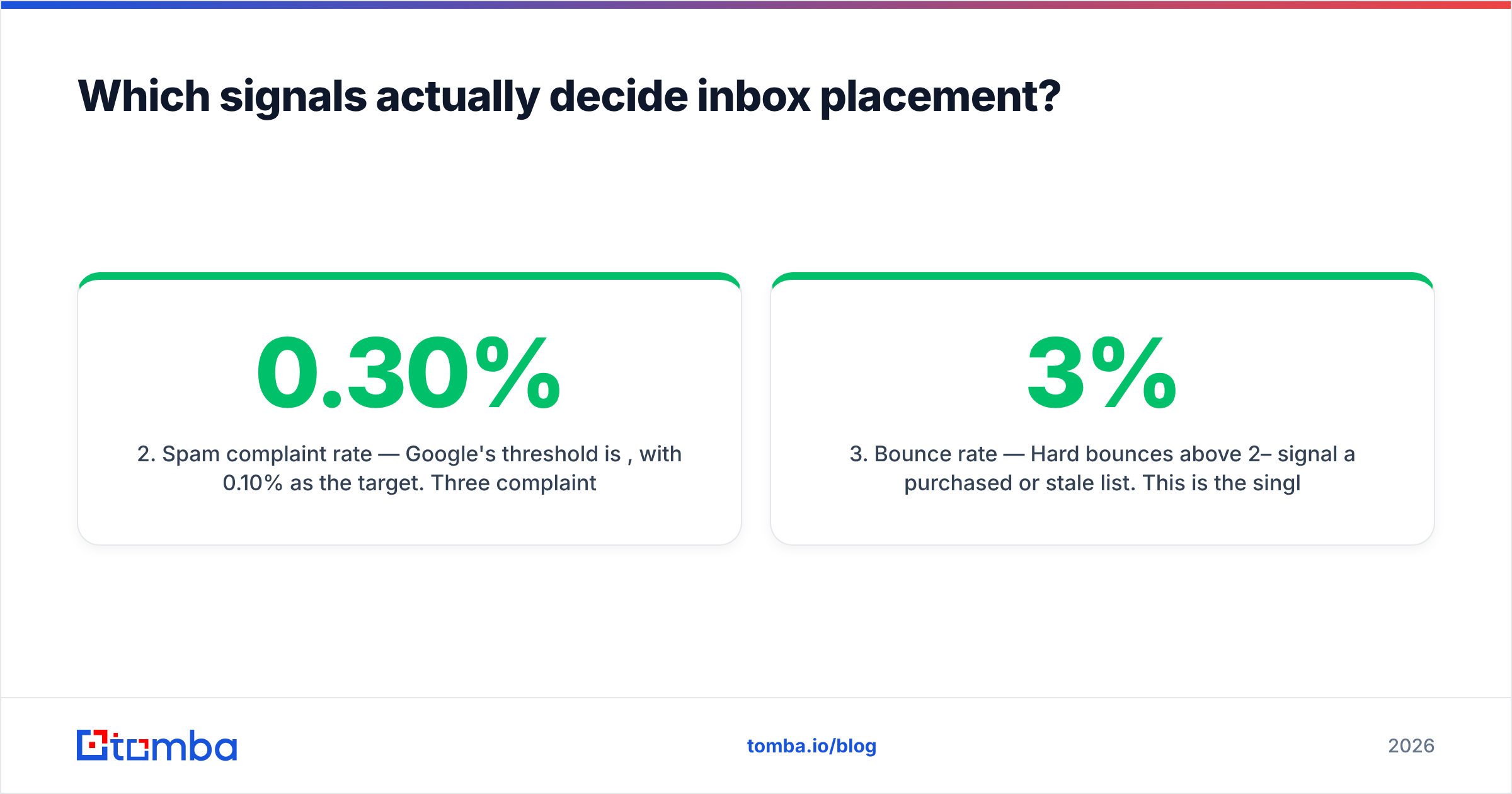
- Google and Yahoo's bulk-sender rules — 5,000+ messages/day to their users — now require DMARC alignment, one-click unsubscribe, and a spam complaint rate under 0.30%. That floor is not optional anymore.
- Bounce rate above 3% is the fastest way to torch a new domain. Verify every list before it touches your sending infrastructure.
- Warm up new domains over 3–5 weeks, not 3–5 days. Volume ramps beat clever copy every time.
- Deliverability is a maintenance job, not a setup job. Audit your DNS, complaint rate, and list hygiene monthly.
What is email deliverability, actually?#
Email deliverability is the percentage of your sent mail that reaches the recipient's inbox — not the percentage that gets accepted by their mail server. That distinction is where most teams lose money.
Your ESP will happily report a 98% "delivery rate." That number counts every message the receiving server accepted, including the ones routed straight to spam. Actual inbox placement across cold outreach typically lands between 60% and 80% for well-configured senders, and under 40% for everyone else. The gap between "delivered" and "read" is invisible in your dashboard.
Think of it like a mailroom in a large office building. Your letter arrives at the building (delivery). A clerk then decides whether it goes to the executive's desk, the general pile, or the shredder (placement). Authentication is your ID badge. Reputation is whether the clerk recognizes you. Content is what's written on the envelope. You need all three, and the badge comes first.
Which signals actually decide inbox placement?#
Mailbox providers score you on a weighted set of signals. Here's the practical ranking, based on what moves placement when you change it:
- Authentication alignment — SPF, DKIM, and DMARC all passing and aligned to your From domain. A failure here is binary: you're filtered before content is even scanned.
- Spam complaint rate — Google's threshold is 0.30%, with 0.10% as the target. Three complaints per thousand sends is enough to trigger throttling.
- Bounce rate — Hard bounces above 2–3% signal a purchased or stale list. This is the single most controllable metric on the list.
- Engagement signals — Opens, replies, forwards, and "move to inbox" actions raise you. Deletes-without-reading and no-engagement-over-90-days lower you.
- Sending consistency — 200 emails on Monday and zero for a week reads as a compromised account. Steady daily volume reads as a real business.
- Content and link reputation — Blacklisted link domains, spam-trigger phrasing, image-heavy HTML, and unshortened tracking redirects. Real, but far less weighted than people assume.
Most "deliverability problems" are actually list problems dressed up as content problems. If you're rewriting subject lines while sending to a list you never verified, you're sanding the deck of a boat with a hole in it.

How do SPF, DKIM, and DMARC work together?#
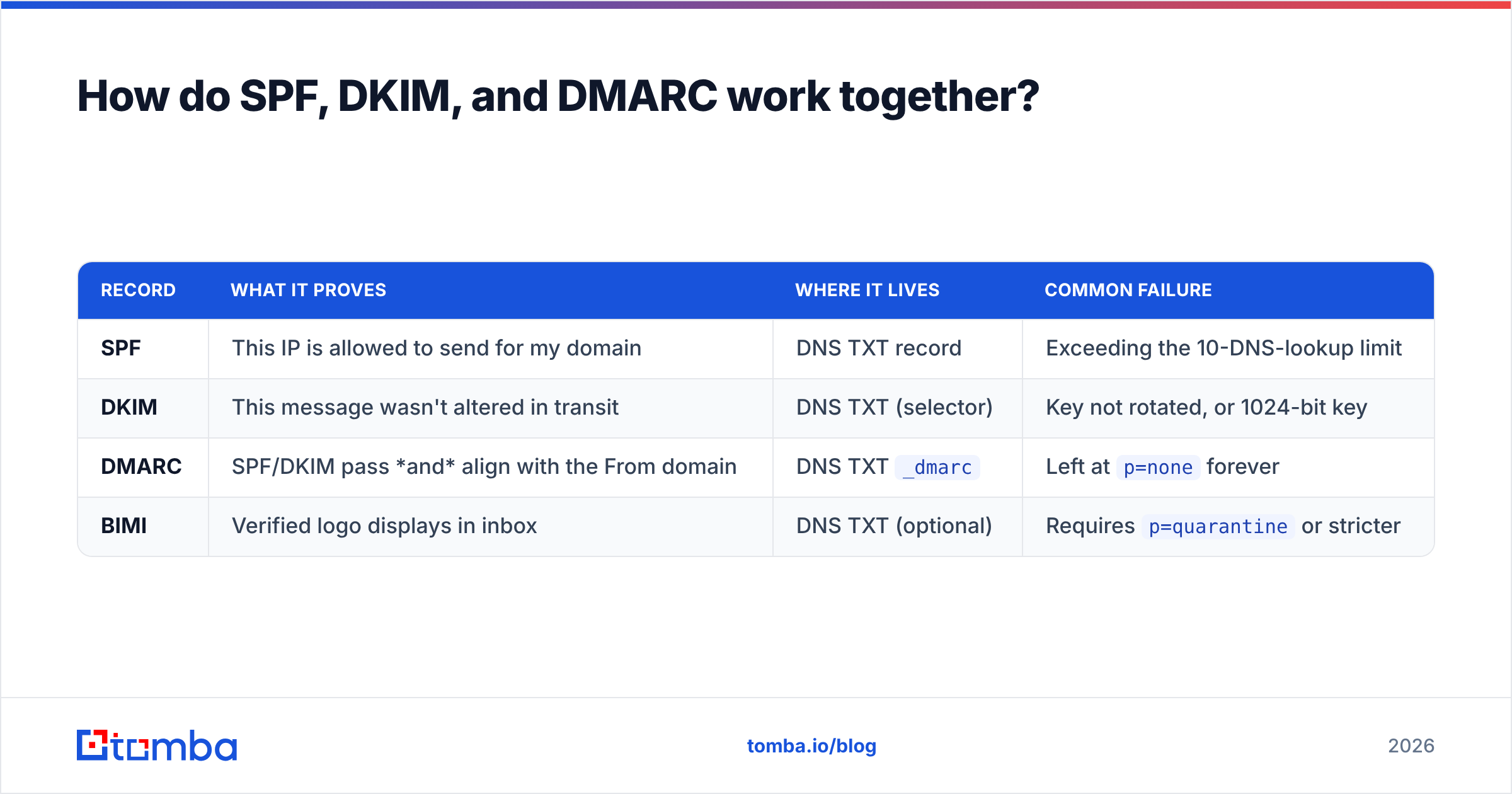
These three records are your authentication stack. Each answers a different question, and DMARC is the one that ties them together.
| Record | What it proves | Where it lives | Common failure |
|---|---|---|---|
| SPF | This IP is allowed to send for my domain | DNS TXT record | Exceeding the 10-DNS-lookup limit |
| DKIM | This message wasn't altered in transit | DNS TXT (selector) | Key not rotated, or 1024-bit key |
| DMARC | SPF/DKIM pass and align with the From domain | DNS TXT _dmarc |
Left at p=none forever |
| BIMI | Verified logo displays in inbox | DNS TXT (optional) | Requires p=quarantine or stricter |
SPF publishes which servers may send on your behalf. The classic trap is the 10-lookup limit — every include: in your record costs a lookup, and chaining Google Workspace, your ESP, your CRM, and a support tool blows past it silently. Your record then returns permerror and effectively stops working. Run an SPF checker against your live domain rather than trusting the record you pasted six months ago.
DKIM signs each message cryptographically. If your ESP offers 2048-bit keys, use them. Rotate annually.
DMARC is the policy layer, and it's where most teams stall. Publishing v=DMARC1; p=none; rua=mailto:you@yourdomain.com gives you reporting without enforcement — a fine starting point, but leaving it there for two years means you get all the reports and none of the protection. Move to p=quarantine after 30 days of clean reports, then p=reject. Google and Yahoo's bulk-sender requirements, documented in Google's sender guidelines, now expect DMARC for anyone sending 5,000+ daily messages to their users.
One more thing that gets skipped: use a subdomain for cold outreach. Send prospecting from mail.yourcompany.com or a separate domain entirely. If reputation tanks, your transactional and corporate mail stays clean. This is the cheapest insurance in the entire stack.
How long should you warm up a new domain?#
Three to five weeks. Not days.
A brand-new domain has no reputation, which mailbox providers treat as suspicious rather than neutral. Ramping too fast is the most common self-inflicted wound in cold outreach — a fresh domain sending 200 cold emails on day three will be filtered by week two, and domain reputation recovers slowly.
A workable ramp for a single inbox:
- Week 1: 5–10 emails/day, mostly to engaged contacts or warmup network accounts
- Week 2: 15–25/day, introduce a small percentage of cold sends
- Week 3: 30–40/day
- Week 4: 50/day
- Steady state: 40–50 cold emails per inbox per day, maximum
Two rules that matter more than the exact numbers. First, buy the domain and set up DNS at least two weeks before you send anything — domain age is a real signal. Second, never exceed ~50 cold sends per inbox per day at steady state. If you need 500 sends daily, you need ten inboxes, not one inbox working harder. Run the numbers with a warmup calculator before you commit to a volume target.
Warmup tools that generate artificial reply traffic help, but their effect is smaller than vendors claim, and providers have gotten better at spotting synthetic engagement loops. Treat warmup automation as a supplement to real ramping, not a substitute.
Why does list quality matter more than copy?#
Because a bad list poisons every other signal simultaneously.
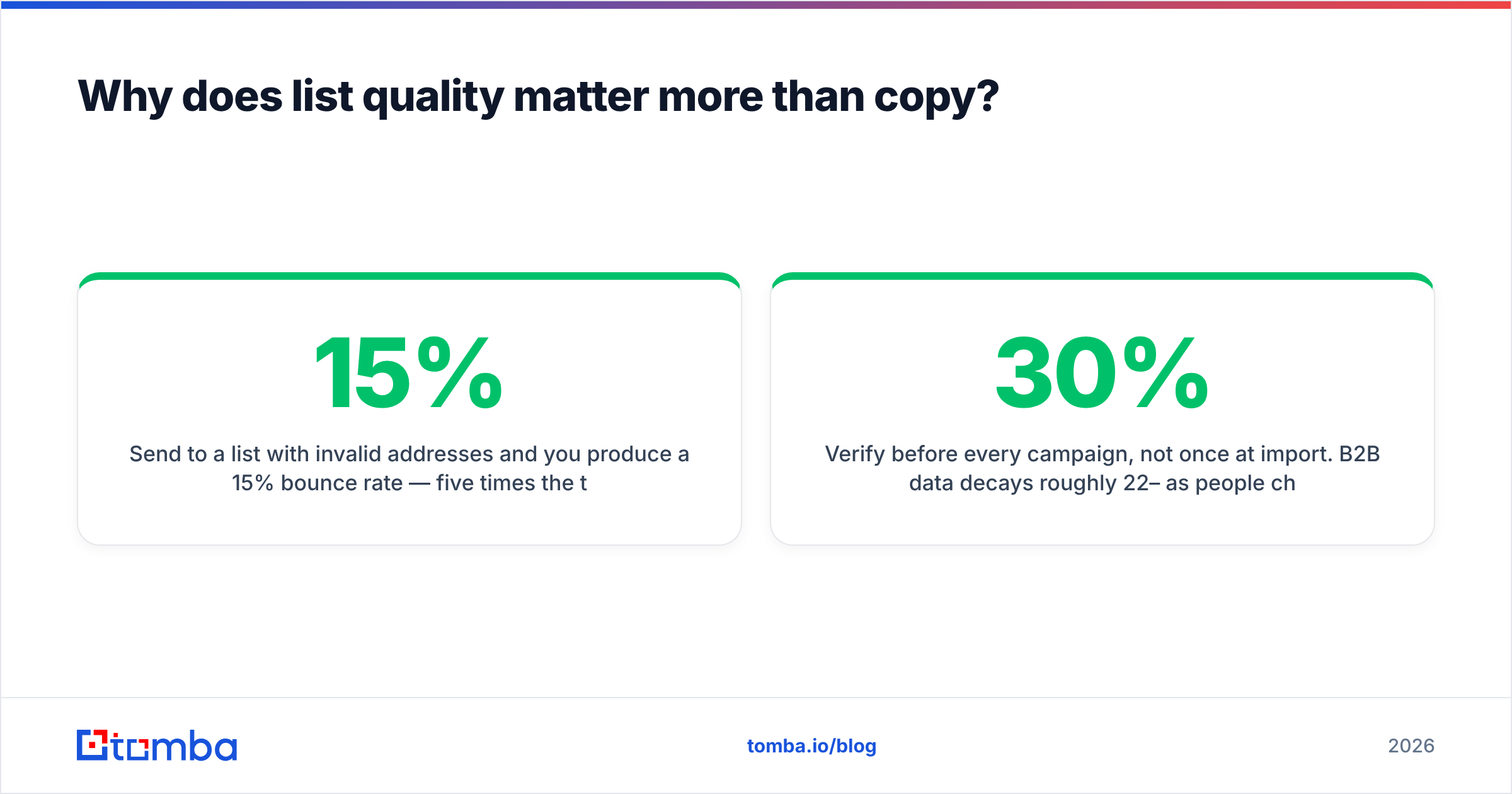
Send to a list with 15% invalid addresses and you produce a 15% bounce rate — five times the threshold that flags you. Those bounces don't just fail; they tell the provider you're sending to addresses you didn't earn. Add the spam traps that accumulate in any list older than a year, and you're now on a blocklist you'll spend six weeks appealing.
The fix is unglamorous and it works:
- Verify before every campaign, not once at import. B2B data decays roughly 22–30% per year as people change jobs. A list verified in January is measurably worse in July.
- Handle catch-all domains separately. Catch-all servers accept everything, so standard verification returns "unknown." A dedicated catch-all verifier uses pattern confidence and historical data to sort real mailboxes from black holes — send blind to catch-alls and your bounce rate becomes a guess.
- Suppress role accounts.
info@,sales@,support@— high complaint risk, low reply rate. Strip them unless you have a specific reason. - Deduplicate across campaigns. The same person hit by three sequences from three reps is a complaint waiting to happen. Remove duplicates at the list level.
- Sunset non-engagers. If someone hasn't opened anything in 180 days, stop sending. Dead weight drags your engagement average down for everyone else.
Sourcing matters as much as cleaning. Addresses found and validated at the source — through a email finder that checks deliverability at lookup time — start clean instead of needing rescue later.
How do the major deliverability approaches compare?#
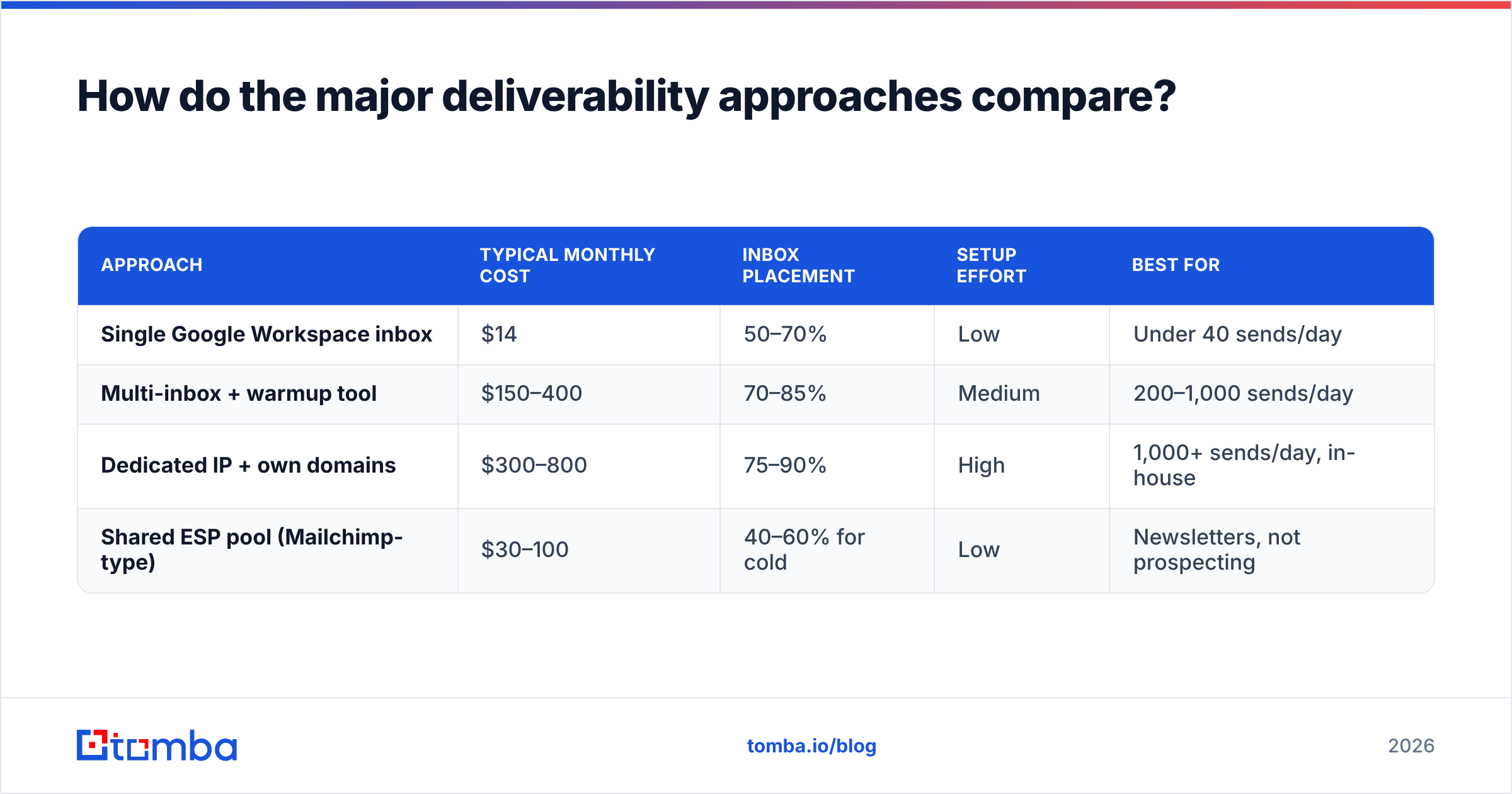
Teams generally pick one of four setups. Here's what each actually costs and delivers:
| Approach | Typical monthly cost | Inbox placement | Setup effort | Best for |
|---|---|---|---|---|
| Single Google Workspace inbox | $14 | 50–70% | Low | Under 40 sends/day |
| Multi-inbox + warmup tool | $150–400 | 70–85% | Medium | 200–1,000 sends/day |
| Dedicated IP + own domains | $300–800 | 75–90% | High | 1,000+ sends/day, in-house |
| Shared ESP pool (Mailchimp-type) | $30–100 | 40–60% for cold | Low | Newsletters, not prospecting |
Two notes on this table. Dedicated IPs are actively harmful below roughly 100,000 messages per month — you won't generate enough volume to build reputation, and an unwarmed dedicated IP performs worse than a well-managed shared pool. And shared marketing ESPs are the wrong tool for cold outreach entirely; their terms usually prohibit it, and their pools are already carrying other senders' reputation damage.
Whatever tier you're on, the verification layer sits underneath all of it. Providers like Tomba, ZeroBounce, and BookYourData each approach data quality differently — Tomba's email verifier runs syntax, MX, SMTP, and catch-all checks in one pass, with Tomba pricing starting free at 25 searches/month and $49/mo on Starter. Compare the accuracy claims on G2 rather than taking any vendor's homepage number at face value, including ours.

What should you monitor after setup?#
Deliverability degrades quietly. You find out three weeks late, when reply rates have already halved. Build a monitoring habit instead:
Weekly:
- Spam complaint rate in Google Postmaster Tools (target under 0.10%)
- Bounce rate per campaign (flag anything over 2%)
- Reply rate by inbox — a single inbox cratering usually means that inbox got filtered
Monthly:
- Domain and IP blocklist status — check against Spamhaus, Barracuda, and SORBS with a blacklist checker
- DNS record audit: SPF lookup count, DKIM key validity, DMARC report review
- Seed-list inbox placement test across Gmail, Outlook, and one corporate Exchange target
- List re-verification for anything you'll mail again
Quarterly:
- Sunset non-engagers
- Review DMARC policy — tighten from
nonetowardreject - Rotate DKIM keys
Google Postmaster Tools is free and non-negotiable for anyone sending meaningful Gmail volume. It's the only direct window into how Google scores your domain reputation, and it will show you a reputation drop weeks before it shows up in your reply rate.
What breaks deliverability that nobody warns you about?#
A handful of failure modes cause a disproportionate share of real-world problems:
Link shorteners. bit.ly and similar services carry aggregate reputation from everyone using them. One phishing campaign on a shared shortener domain and your links inherit the damage. Use your own tracking domain or plain URLs.
Tracking pixels on cold email. Open tracking requires an image beacon, which triggers image-based filtering heuristics and increasingly shows as a privacy flag. For cold outreach specifically, the open-rate data you gain is worth less than the placement you lose. Track replies instead.
Reusing sequences that already burned. A template that generated complaints keeps generating them. Content fingerprints persist across sends.
Ignoring one-click unsubscribe. The List-Unsubscribe header with List-Unsubscribe-Post is now required for bulk senders to Gmail and Yahoo. Missing it is a hard compliance failure, not a soft signal. It also cuts complaints, because people who want out will hit "spam" if unsubscribing takes three clicks.
Auto-generated addresses. Permutating first.last@domain.com and sending blind is how you hit spam traps. Pattern guessing is fine as a research step; sending to unverified guesses is not. If you generate candidates, validate them before they enter a sequence.
Sudden volume spikes. Doubling volume in a day looks like account compromise. Ramp increases by 20–30% per week, maximum.
Frequently asked questions#
Does email content still affect deliverability? Yes, but less than authentication and reputation. Spam-word filters are largely obsolete — modern filtering weights sender reputation far more heavily. Content matters most at the margins: link reputation, HTML-to-text ratio, and attachment types.
Is a dedicated IP worth it? Only above roughly 100,000 messages/month with consistent volume. Below that, you can't generate enough traffic to establish reputation and you'll perform worse than on a well-managed shared pool.
How many domains do I need? One sending domain per 3–5 inboxes, kept separate from your primary corporate domain. At 500 daily sends, that's roughly 10 inboxes across 2–3 domains.
Can I recover a burned domain? Sometimes, over 4–8 weeks: stop all cold sending, fix authentication, delist from blocklists, and slowly rebuild with engaged recipients only. Often it's cheaper to buy a new domain and start the warmup correctly.
Do verification tools guarantee inbox placement? No. Verification prevents bounces, which protects reputation, which protects placement. It's a necessary condition, not a sufficient one.
Where to start this week#
Pick the highest-leverage fix first. Run your DNS through an authentication check — if SPF is over the lookup limit or DMARC is still at p=none, fix that before touching anything else. Then verify your active list. Those two steps resolve the majority of deliverability problems teams bring to consultants.
For the list side, Tomba's Email Finder sources and validates addresses in the same step, so contacts enter your sequences already checked against syntax, MX, SMTP, and catch-all logic instead of arriving as guesses you'll pay for in bounces. The free tier gives you 25 searches a month to test the data quality against a list you already know, and Starter runs $49/mo when you're ready to scale. Clean input is the cheapest deliverability improvement available — everything else in this guide is maintenance on top of it.
Related guides#
Ready to find emails that actually work?
Join 150,000+ professionals who stopped guessing and started sending. Free credits on signup — no credit card required.
Get the Tomba newsletter
Practical outbound tactics and product updates — once every two weeks.
About the author