Email Domain Spam Check: How to Test Any Domain in 2026
Your domain can be blocklisted, misaligned, or silently filtered without a single bounce. Here is how to run a full email domain spam check in under 20 minutes — and what to fix first.
TL;DR
- An email domain spam check has four layers: blocklist status, authentication records (SPF, DKIM, DMARC), content and infrastructure signals, and actual inbox placement. Skipping any one of them gives you a false green light.
- Blocklist checkers are the loudest but least important layer. In 2026, most filtering happens on reputation signals you cannot query directly — Google and Microsoft do not publish a "you are blocked" API.
- Authentication is the layer you fully control and the one most teams get wrong: 40%+ of domains we see have SPF records that exceed the 10-DNS-lookup limit or a DMARC policy stuck on
p=noneforever. - List hygiene is a domain-reputation problem, not a "nice to have." Sending to dead addresses is the fastest way to earn a spam-folder placement that no DNS fix will undo.
- Run the full check before a campaign, after any ESP or DNS change, and monthly as a baseline. It takes about 20 minutes once you know the order.
Your cold email campaign is getting 0.4% reply rates and you assume the copy is bad. It might be. But before you rewrite a single subject line, you need to know whether your messages are reaching an inbox at all. An email domain spam check tells you that — and it is a very different exercise from running your domain through one free blocklist lookup and calling it clean.
This guide walks the whole stack: what actually gets checked, what the free tools miss, how the major checkers compare, and the fix order that gets a damaged domain back to inbox placement fastest.
What is an email domain spam check?#
An email domain spam check is a diagnostic sweep that answers one question: when this domain sends mail, where does that mail land?
Think of it like a pre-flight inspection. A pilot does not just check whether the engine starts — they walk the airframe, verify the paperwork, confirm fuel, and check the weather at the destination. A domain check works the same way. Four independent systems have to be healthy, and any one of them can ground you.
- Blocklist status (DNSBL/RBL). Public and semi-public lists — Spamhaus, SURBL, SORBS, Barracuda — that receiving servers query. A listing is a hard, visible failure.
- Authentication records. SPF, DKIM, and DMARC published in your DNS. These prove you are who you say you are. Broken auth is the single most common cause of "my email goes to spam" that has nothing to do with content.
- Infrastructure and content signals. Reverse DNS, MX configuration, TLS support, link domains, image-to-text ratio, spam-trigger phrasing, and whether your tracking domain is shared with 4,000 other senders.
- Reputation and placement. The layer that actually decides your fate at Gmail and Outlook — engagement history, complaint rate, bounce rate, sending volume consistency. You cannot query it; you can only observe it through seed tests and postmaster tools.
Most free "spam checkers" cover layer 1 and part of layer 2, then show you a green checkmark. That checkmark means "not publicly blocklisted." It does not mean "your mail reaches the inbox."
Which layer is actually causing your problem?#
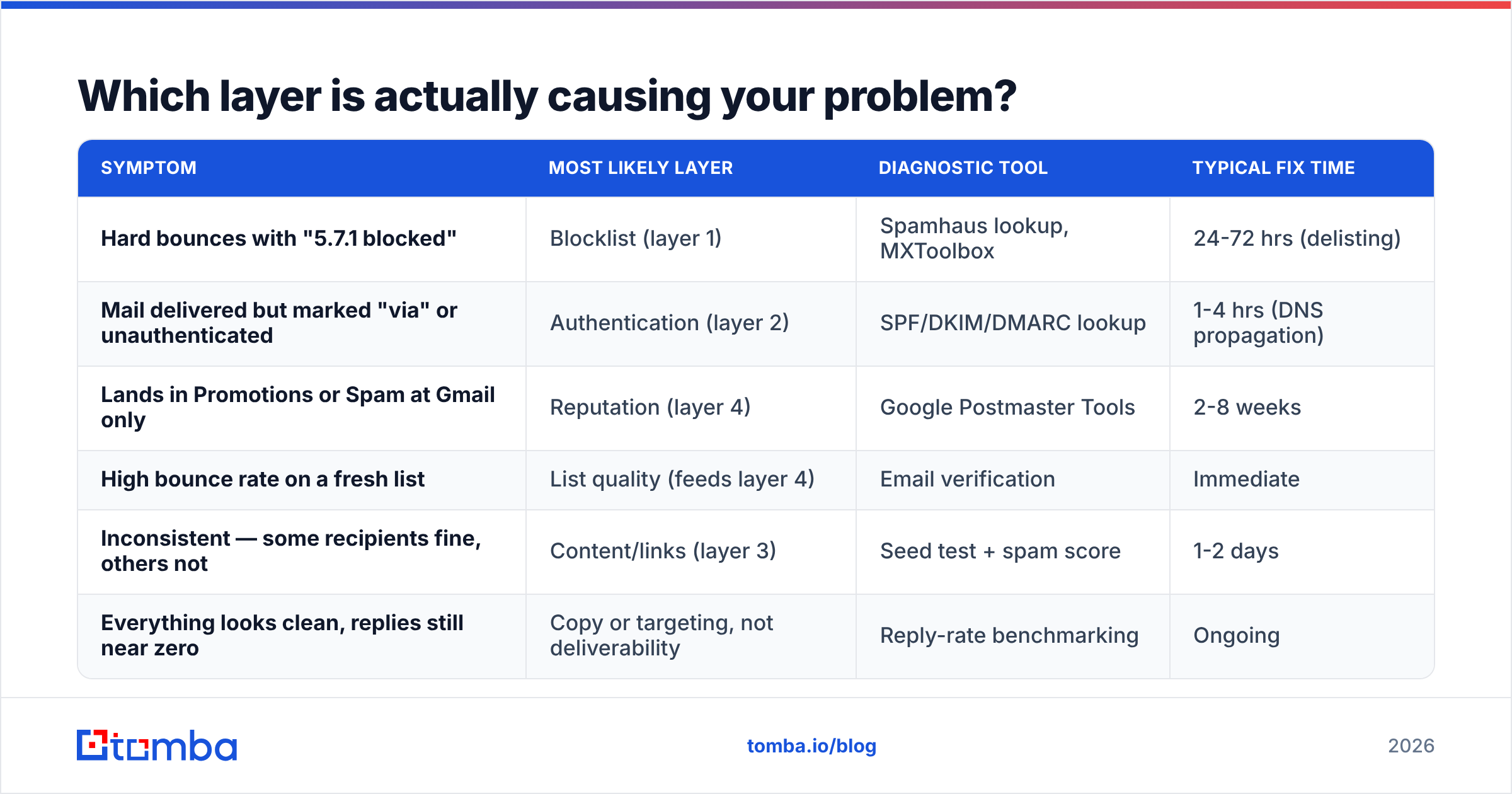
Here is the diagnostic table. Match your symptom to the layer before you start fixing things at random.
| Symptom | Most likely layer | Diagnostic tool | Typical fix time |
|---|---|---|---|
| Hard bounces with "5.7.1 blocked" | Blocklist (layer 1) | Spamhaus lookup, MXToolbox | 24-72 hrs (delisting) |
| Mail delivered but marked "via" or unauthenticated | Authentication (layer 2) | SPF/DKIM/DMARC lookup | 1-4 hrs (DNS propagation) |
| Lands in Promotions or Spam at Gmail only | Reputation (layer 4) | Google Postmaster Tools | 2-8 weeks |
| High bounce rate on a fresh list | List quality (feeds layer 4) | Email verification | Immediate |
| Inconsistent — some recipients fine, others not | Content/links (layer 3) | Seed test + spam score | 1-2 days |
| Everything looks clean, replies still near zero | Copy or targeting, not deliverability | Reply-rate benchmarking | Ongoing |
Notice that only two of six rows are fixed by DNS edits. That ratio is why domain checks that stop at layer 1 waste so much time.
How do you run a complete email domain spam check?#
Work in this order. Each step feeds the next, and doing them out of order means re-testing.
1. Check blocklist status first (5 minutes). Query the major DNSBLs for both your sending domain and your sending IP. If you are on a shared ESP IP, the IP result tells you about your neighbors, not you. Focus on domain-level listings: Spamhaus DBL, SURBL, and URIBL. A Spamhaus DBL listing is serious and should stop everything else until resolved.
2. Validate your authentication records (10 minutes). Pull your SPF, DKIM, and DMARC records and inspect them, not just their pass/fail status.
- SPF: must resolve in 10 or fewer DNS lookups. Every
include:counts, and nested includes count recursively. Exceed it and receivers returnpermerror, which many treat as a fail. Run your record through an SPF checker that counts lookups, not just one that says "record found." - DKIM: confirm the selector actually resolves and the key is 2048-bit. 1024-bit keys still work but are increasingly downgraded in reputation scoring.
- DMARC: if your policy is
p=noneand has been for over 90 days, you are publishing a record that does nothing. Both Google and Yahoo now expect enforcement for bulk senders. Move top=quarantinewithpct=25and step up.
3. Audit infrastructure signals (5 minutes). Confirm reverse DNS matches your sending hostname, MX records are sane, and TLS is offered. Then look at your tracking domain — if you are using your ESP's shared click-tracking domain, you inherit its reputation. Set up a custom tracking subdomain.
4. Score the message itself. Run your actual campaign HTML through a spam checker to catch trigger phrases, broken links, missing plaintext parts, and image-heavy layouts. This is layer 3, and it is worth doing per-campaign rather than per-domain.
5. Clean the list before you send. This is the step people skip and then blame DNS. If 12% of your list is dead, your bounce rate tells Gmail you bought a list. Use an email verifier to strip invalid addresses, and handle catch-all domains explicitly with a catch-all verifier rather than guessing.
6. Seed-test and measure placement. Send to a seed list across Gmail, Outlook, Yahoo, and a corporate Microsoft 365 tenant. Record folder placement. This is the only step that tests reality; everything before it tests configuration.
7. Monitor with postmaster tools. Enroll your domain in Google Postmaster Tools and Microsoft SNDS. Google's domain reputation graph is the closest thing to a public scoreboard you will get.
How do the main spam-check tools compare?#
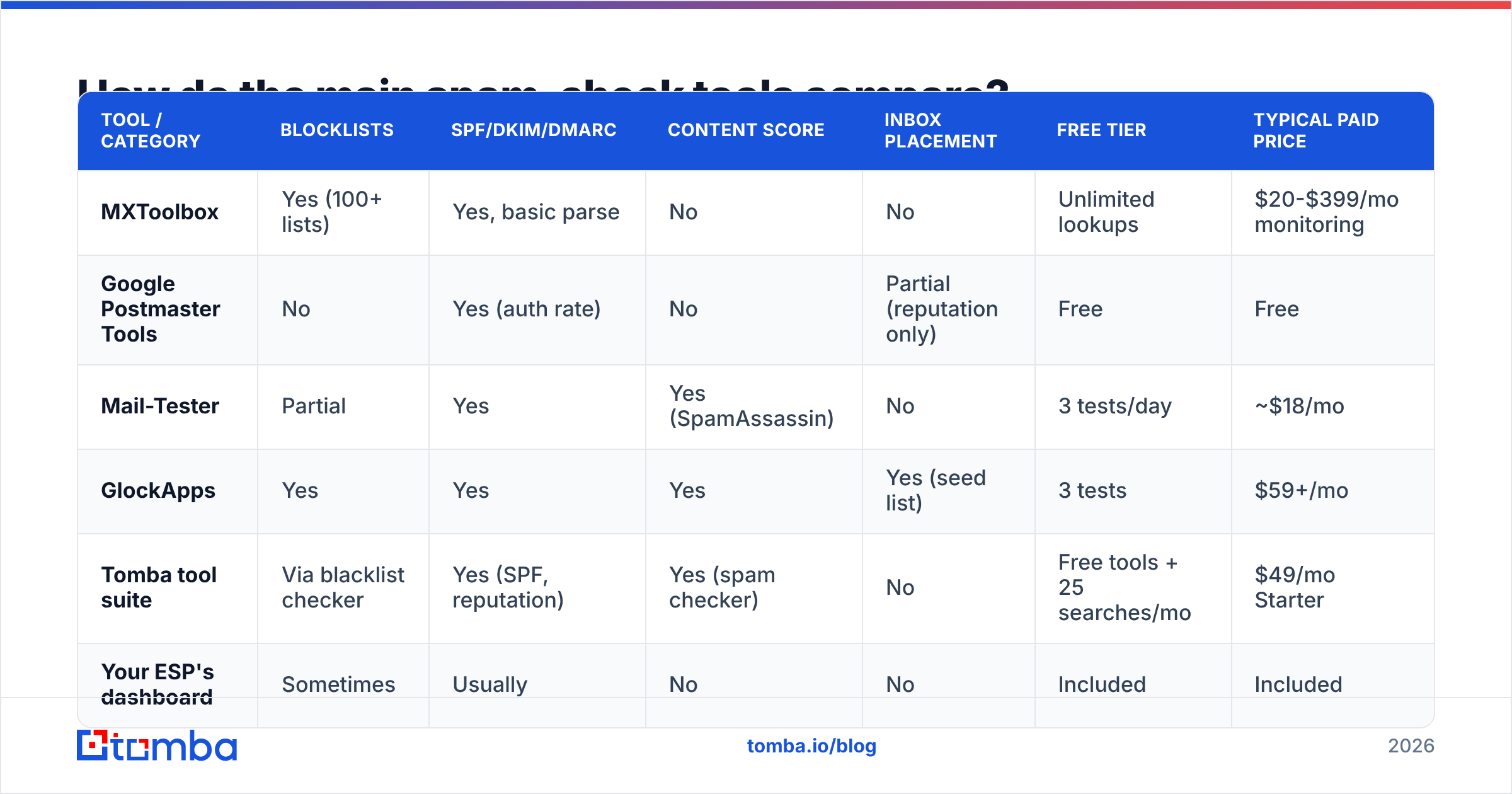
No single tool covers all four layers. Here is what each category actually does, and where the gaps sit.
| Tool / category | Blocklists | SPF/DKIM/DMARC | Content score | Inbox placement | Free tier | Typical paid price |
|---|---|---|---|---|---|---|
| MXToolbox | Yes (100+ lists) | Yes, basic parse | No | No | Unlimited lookups | $20-$399/mo monitoring |
| Google Postmaster Tools | No | Yes (auth rate) | No | Partial (reputation only) | Free | Free |
| Mail-Tester | Partial | Yes | Yes (SpamAssassin) | No | 3 tests/day | ~$18/mo |
| GlockApps | Yes | Yes | Yes | Yes (seed list) | 3 tests | $59+/mo |
| Tomba tool suite | Via blacklist checker | Yes (SPF, reputation) | Yes (spam checker) | No | Free tools + 25 searches/mo | $49/mo Starter |
| Your ESP's dashboard | Sometimes | Usually | No | No | Included | Included |
The honest read: MXToolbox is the best free blocklist monitor and you should have it bookmarked. Google Postmaster Tools is non-negotiable and free. For inbox placement testing, you need a seed-list product like GlockApps — nothing free replicates it well. Tomba's free utilities cover the DNS, reputation, and content-scoring layers without a paid tier, which makes them a reasonable default first pass, but Tomba is a data and verification platform, not a placement-testing suite. Use the right tool per layer instead of hunting for one that does everything.
For blocklist status specifically, run your domain through a blacklist checker and your sending address through an email reputation checker to see how third-party scorers currently rate you.
Why do clean domains still land in spam?#
Because layers 1 through 3 are necessary but not sufficient. You can have a perfect DNS configuration, zero blocklist entries, and a SpamAssassin score of 0.1 — and still get filtered.
Three reasons dominate:
- Engagement is the real ranking signal. Gmail weighs opens, replies, "not spam" clicks, and deletions-without-reading. A domain that sends 5,000 emails a week with a 2% open rate is telling Google exactly what it is. No DNS record overrides that.
- Volume ramps trigger scrutiny. A domain that sent 40 emails/day for six months and jumps to 2,000 looks compromised. Warm up gradually — an email warmup calculator will give you a defensible ramp schedule instead of a guess.
- Complaint rate is a cliff, not a slope. Google's threshold for bulk senders is 0.3% and enforcement is abrupt. One badly targeted campaign to a scraped list can undo months of good behavior.
This is where email deliverability work stops being a checklist and becomes an ongoing discipline. Your sender reputation is a rolling average, and it recovers slowly.

What should you fix first when a domain is already damaged?#
Triage in this order. Each item is roughly ordered by impact-per-hour.
- Stop sending. Continuing to send into a bad reputation deepens the hole. Pause campaigns from the affected domain entirely for 5-7 days.
- Resolve any blocklist listing. Spamhaus and Barracuda both have self-service delisting for first offenses. Fix the root cause before requesting delisting or you will be relisted within days.
- Fix authentication completely. SPF under 10 lookups, DKIM 2048-bit and resolving, DMARC at
p=quarantineminimum. This is fast and fully within your control. - Purge the list. Remove every unverified address, every role account (
info@,sales@,admin@) you cannot justify, and everyone who has not engaged in 180 days. Deduplicate with a remove duplicates pass so you are not double-sending. - Re-warm slowly. Restart at roughly 10% of prior volume, targeting only your most engaged segment, and increase 20-30% per week while watching Postmaster Tools.
- Consider a secondary domain for cold outbound. Never run cold campaigns from your primary corporate domain. A dedicated sending domain contains the blast radius.
Recovery timelines are honest but unglamorous: a blocklist delisting resolves in days, an authentication fix in hours, and a reputation repair in four to eight weeks of consistent, well-targeted sending.
How often should you run the check?#
| Trigger | What to re-check | Frequency |
|---|---|---|
| Before any new campaign | Content score, list verification | Every campaign |
| After ESP or DNS change | Full SPF/DKIM/DMARC + seed test | Immediately |
| Routine baseline | Blocklists, Postmaster reputation | Monthly |
| New sending domain | Everything, then warmup | Before first send |
| Reply rate drops >30% | Seed test + Postmaster + bounce log | Within 48 hrs |
Set a calendar reminder for the monthly baseline. Domains get listed for reasons that have nothing to do with your behavior — a shared IP neighbor, a compromised form, a forwarded newsletter. Finding out from a monthly check beats finding out from a client.
What does a healthy sending domain look like?#
Use this as your target profile:
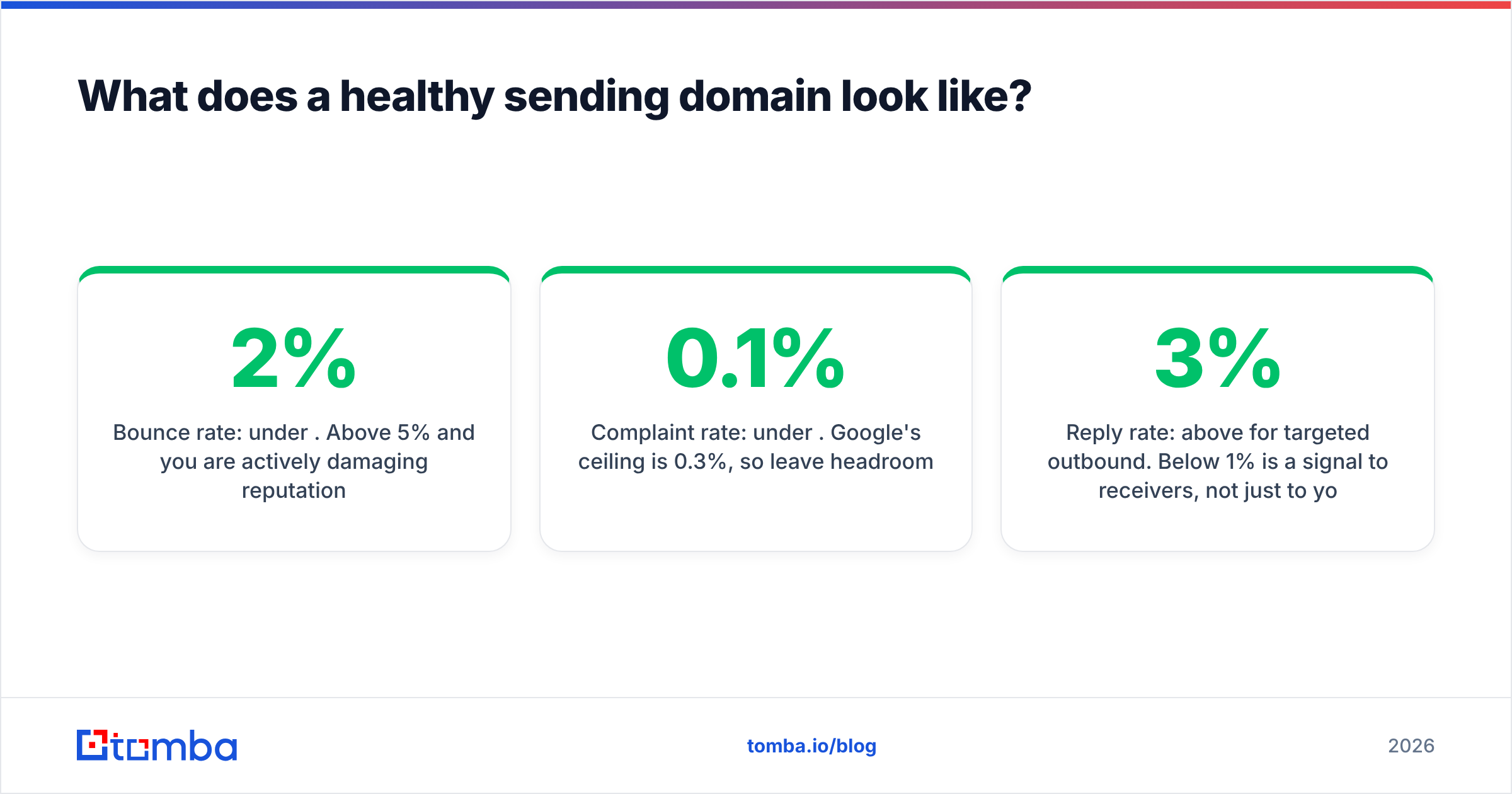
- Bounce rate: under 2%. Above 5% and you are actively damaging reputation.
- Complaint rate: under 0.1%. Google's ceiling is 0.3%, so leave headroom.
- SPF lookups: 10 or fewer, ideally 6-7 to allow for vendor changes.
- DMARC policy:
p=quarantineorp=reject, withruareporting enabled and actually monitored. - Domain age: 90+ days before meaningful cold volume. New domains are treated with suspicion regardless of configuration.
- Reply rate: above 3% for targeted outbound. Below 1% is a signal to receivers, not just to you.
If you are hitting those numbers, your infrastructure is not the constraint — your targeting and copy are. That is a better problem to have.
Where does data quality fit into all of this?#
Directly at the center. Every deliverability metric that matters — bounce rate, complaint rate, engagement — is downstream of whether you emailed a real person who plausibly wanted to hear from you.
You can spend a week perfecting DMARC alignment and still tank a domain by sending to a list you scraped last year. The inverse is also true: a well-targeted campaign to 200 verified, correctly-matched contacts will outperform 5,000 unverified addresses on every metric a mailbox provider measures, including the ones that determine your future placement.
That means the highest-leverage deliverability work often happens before the send: sourcing contacts from a source that maintains accuracy, verifying them at the point of collection rather than in bulk after the fact, and checking the company email pattern so your guesses are informed rather than random. Vendors in this space vary — BookYourData, Apollo, and Tomba all approach sourcing differently, and the right pick depends on whether you need breadth, verification depth, or API access. Compare them on verified-record rate rather than headline database size, since a 700M-record database with a 60% valid rate is worse for your domain than a 50M-record one at 95%.
If you want an outside read on any vendor before committing, G2's email verification category has enough recent reviews to spot patterns.
Run the check, then fix the inputs#
An email domain spam check is not a one-time cleanup — it is a repeatable diagnostic that tells you which of four layers is failing so you stop guessing. Blocklists and DNS are the fast fixes. Reputation is the slow one. List quality is the input that quietly determines both.
Start with the free layer-by-layer sweep above. Then close the loop upstream: if you are building outbound lists, use the Tomba Email Finder to source addresses that resolve against real, verified company domains instead of permutation guesses, and verify before every send. Free tier gives you 25 searches a month to test the accuracy yourself; paid plans start at $49/mo on Tomba pricing if the data holds up for your use case. A clean domain sending to clean data is the entire game.
Related guides#
Ready to find emails that actually work?
Join 150,000+ professionals who stopped guessing and started sending. Free credits on signup — no credit card required.
Get the Tomba newsletter
Practical outbound tactics and product updates — once every two weeks.
About the author