Email List Warm Up: A 30-Day Plan to Protect Deliverability
Most warm-up advice stops at "send slowly." Here's the actual 30-day ramp schedule, the bounce and reply thresholds that matter, and the list-hygiene work that decides whether warming up works at all.
TL;DR
- Email list warm up is two jobs, not one: warming the sending infrastructure (domain, IP, mailbox) and warming the list (proving the addresses are real and the recipients respond). Skip either and you land in spam.
- A cold domain needs roughly 30 days and a ramp from ~10 sends/day to 40–50 sends/day per mailbox. Faster ramps work only if your bounce rate stays under 2% and your reply rate stays above 3%.
- List hygiene does more for deliverability than any warm-up tool. Verifying before you send removes the invalid addresses that generate hard bounces — the single fastest way to burn a new domain.
- Automated warm-up networks help build a baseline reputation, but Gmail and Microsoft have gotten better at discounting synthetic engagement. Treat warm-up tools as a floor, not a strategy.
- Budget: warm-up tools run $20–$50/mailbox/month; verification runs a fraction of a cent per address. Verification is the cheaper insurance.
What is email list warm up?#
Email list warm up is the process of gradually increasing sending volume from a new domain, IP, or mailbox while proving to mailbox providers that the addresses you're contacting are real and that recipients actually want your mail.
Think of it like a new tenant building credit. A bank doesn't hand a $50,000 line to someone with no history — it starts small, watches whether you pay, and raises the limit as trust accumulates. Gmail, Outlook, and Yahoo do exactly this with your sending domain. Blast 2,000 emails on day one from a domain registered last week and the filters have no history to weigh against the anomaly. The default assumption is spam.
Technically, mailbox providers score your domain on a rolling set of signals: bounce rate, spam complaint rate, engagement (opens, replies, moves-to-folder), authentication (SPF, DKIM, DMARC alignment), and volume consistency. Warm-up is the deliberate process of feeding those signals good data before you scale.
Two things get warmed, and people conflate them constantly:
- Infrastructure warm-up — the domain, the sending IP, and each individual mailbox. This is about volume ramping and time.
- List warm-up — proving the recipient list is clean and responsive. This is about data quality, segmentation, and who you contact first.
You can execute a textbook 30-day infrastructure ramp and still torch your domain if the list underneath it is 30% invalid. The reverse is also true: a pristine list sent at 500/day from a two-week-old domain will get throttled.
Why does list quality matter more than the ramp schedule?#
Because bounces are the loudest negative signal you can send, and they're entirely preventable.
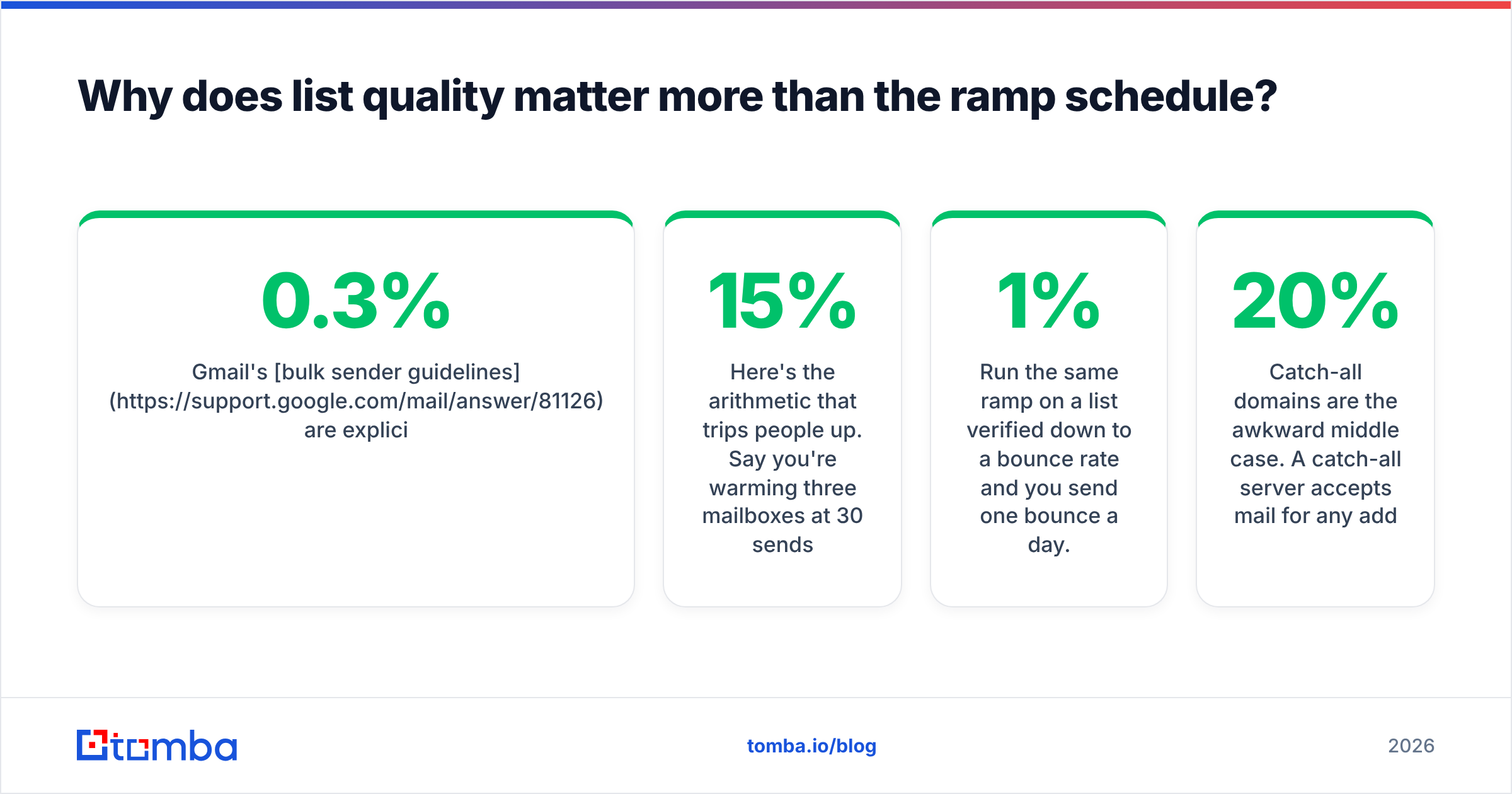
Gmail's bulk sender guidelines are explicit about keeping spam complaint rates below 0.3% and maintaining valid recipient lists. Microsoft's SNDS program exposes similar data for IP reputation. Both treat a spike in unknown-user bounces as a strong spam indicator — it's the classic fingerprint of a purchased or scraped list.
Here's the arithmetic that trips people up. Say you're warming three mailboxes at 30 sends/day each — 90 emails daily. If your list is 15% invalid (normal for a scraped list older than six months), you generate roughly 13 hard bounces a day. That's a 15% bounce rate during the exact window when the mailbox provider has the least data about you and weights each signal most heavily.
Run the same ramp on a list verified down to a 1% bounce rate and you send one bounce a day. Same schedule, same volume, opposite outcome.
This is why running your list through an email verifier before the warm-up starts isn't an optional polish step — it's the precondition. For lists over a few thousand rows, bulk verify the whole file in one pass rather than checking addresses ad hoc as you send.
Catch-all domains are the awkward middle case. A catch-all server accepts mail for any address at the domain, so standard SMTP verification returns "unknown" rather than valid or invalid. Roughly 15–20% of B2B domains are catch-all. You have three options: exclude them entirely during warm-up (safest), run them through a catch-all verifier that uses pattern confidence and secondary signals, or hold them until week four when your domain has history to absorb the risk.
What does a real 30-day warm up schedule look like?#
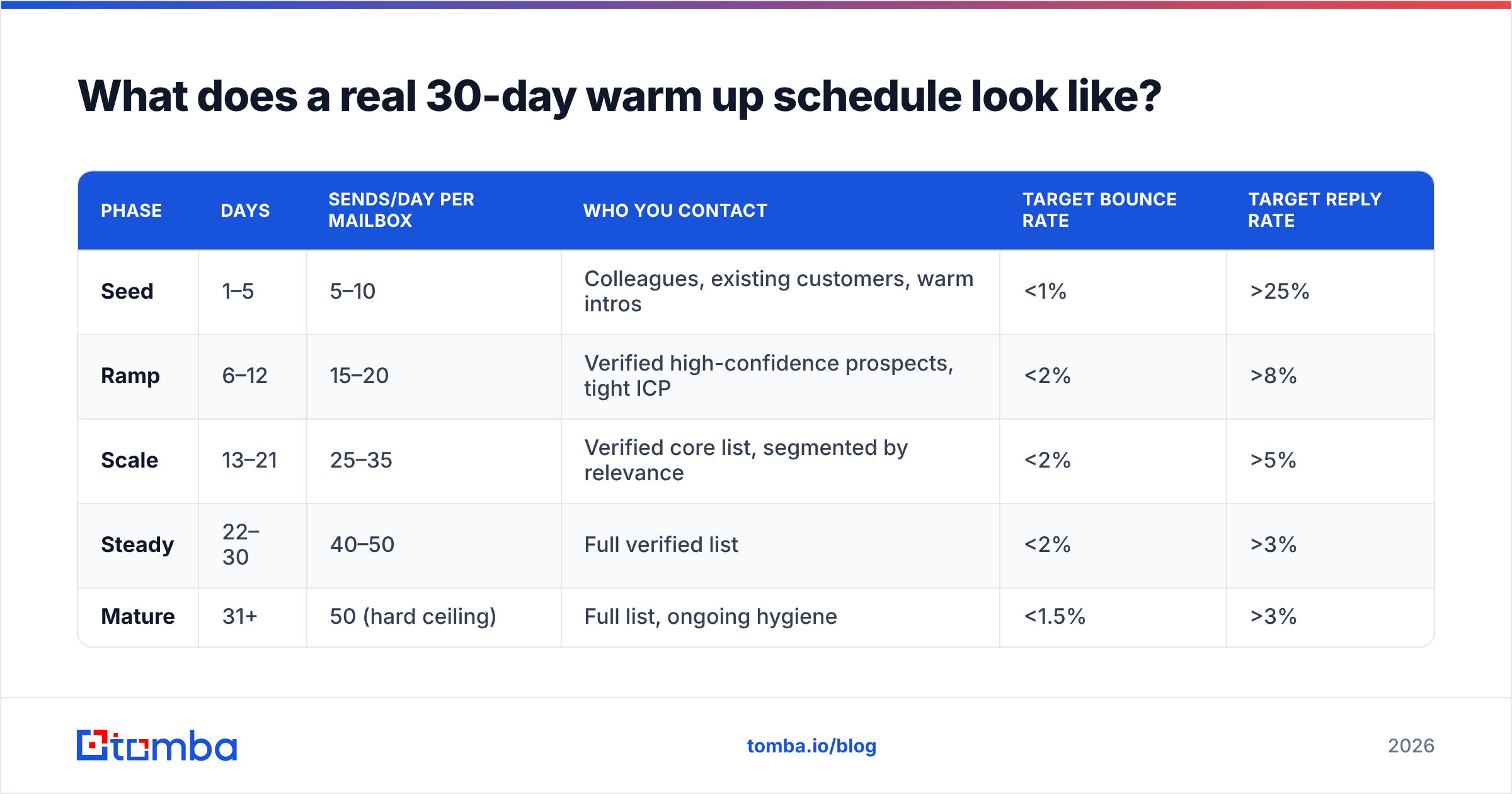
Below is a conservative ramp for a new domain with three mailboxes. Per-mailbox numbers, not totals.
| Phase | Days | Sends/day per mailbox | Who you contact | Target bounce rate | Target reply rate |
|---|---|---|---|---|---|
| Seed | 1–5 | 5–10 | Colleagues, existing customers, warm intros | <1% | >25% |
| Ramp | 6–12 | 15–20 | Verified high-confidence prospects, tight ICP | <2% | >8% |
| Scale | 13–21 | 25–35 | Verified core list, segmented by relevance | <2% | >5% |
| Steady | 22–30 | 40–50 | Full verified list | <2% | >3% |
| Mature | 31+ | 50 (hard ceiling) | Full list, ongoing hygiene | <1.5% | >3% |
Three rules that govern the table:
- 50/day per mailbox is the practical ceiling for cold outbound, regardless of how long you've been warming. Want 500 sends/day? Run 10 mailboxes, not one mailbox at 500. Volume-per-mailbox is a stronger spam signal than total volume.
- The thresholds are gates, not goals. If bounce rate crosses 3% or replies fall below the target on any day, stop ramping and hold the current volume until the numbers recover. Ramping through bad signal is how domains die.
- Send on a human schedule. Business hours in the recipient's timezone, weekdays, randomized intervals of 60–180 seconds between sends. A perfectly even 90-second cadence across 12 hours looks exactly like what it is.
Run the numbers for your own mailbox count and target volume with a warmup calculator before committing to a schedule — the math on how many mailboxes you actually need surprises most teams.
What has to be in place before day one?#
Warm-up doesn't fix a broken foundation. Get these done before you send anything:
- Buy a separate sending domain. Never warm up on your primary company domain. Use a lookalike (
getacme.comforacme.com) so a reputation problem stays quarantined. Register it at least 30 days before you plan to send — domain age is itself a signal. - Configure SPF, DKIM, and DMARC. All three, aligned. DMARC starts at
p=nonefor monitoring, then moves top=quarantineonce you've confirmed alignment. Verify the record actually resolves with an SPF checker rather than trusting your DNS panel. - Set up custom tracking domains. A shared tracking domain from your sequencer means you inherit every other user's reputation on it. Point a subdomain (
link.getacme.com) at your sending tool instead. - Write a real signature and a real unsubscribe. Physical address, working opt-out link, a name that matches a findable human. Generate one with an email signature generator if you don't have brand assets ready.
- Verify the entire list. Before day one, not during week three. Segment the output into valid / catch-all / risky / invalid and only touch the "valid" bucket for the first 21 days.
- Check your domain isn't already blacklisted. Expired domains carry history. Run a blacklist checker on the domain and its IP before you invest a month into warming it.
That list takes an afternoon. Skipping it costs a month.
Are automated warm-up tools worth it?#
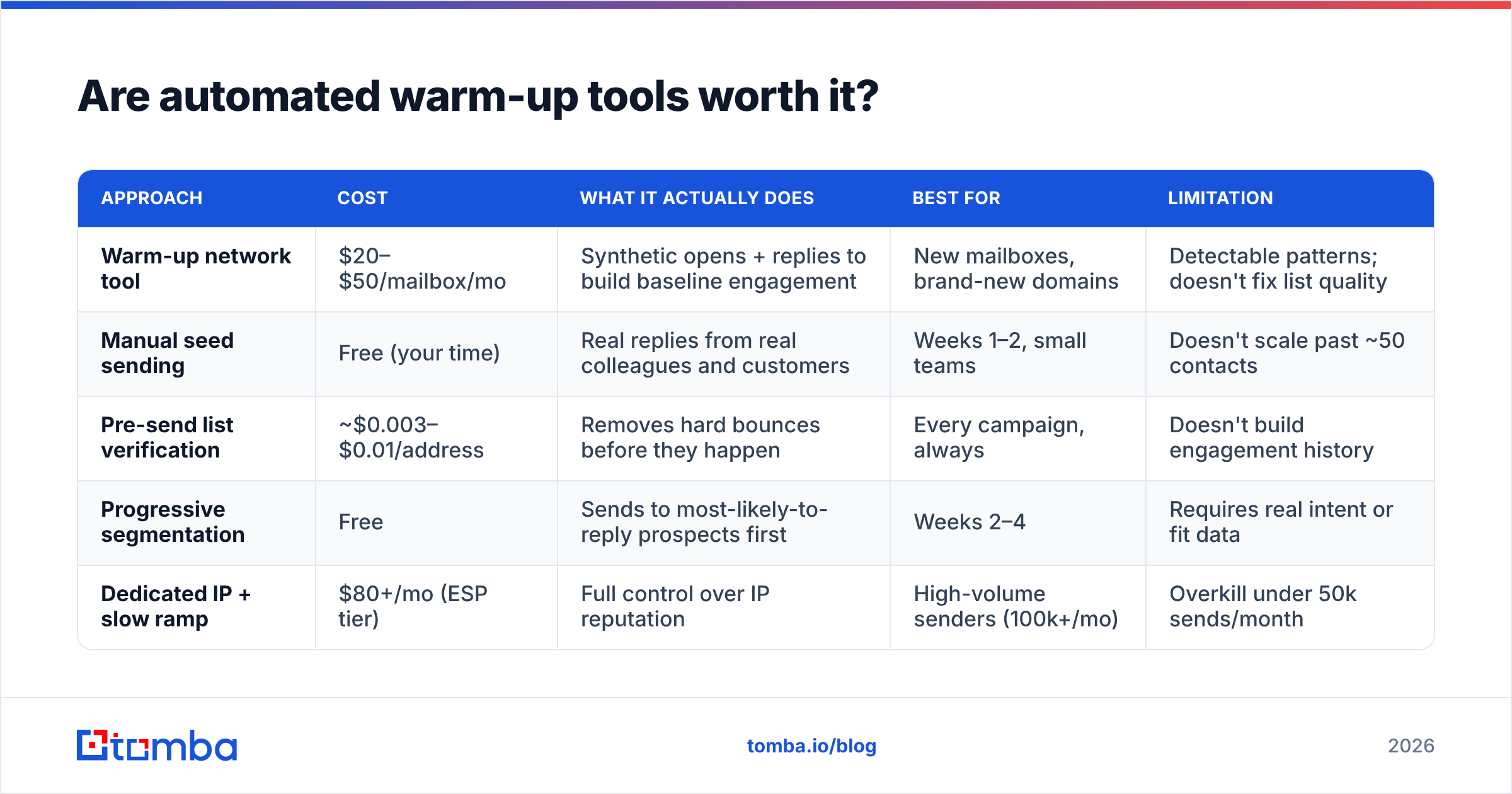
They're useful for infrastructure warm-up and close to useless for list warm-up. Know which problem you're solving.
Warm-up tools work by enrolling your mailbox in a peer network. Your mailbox sends messages to other network members, they open and reply, and mail lands in the primary inbox rather than spam — building a positive engagement history. Instantly, Warmbox, Mailreach, Lemwarm, and Folderly all operate on this model.
The problem: Gmail and Microsoft have spent the last three years learning to identify these networks. Uniform reply patterns, identical timing distributions, recycled message bodies, and mailboxes that only ever talk to each other are all detectable. The consensus among deliverability practitioners in 2026 is that warm-up networks establish a baseline but no longer paper over genuine engagement problems — and a few providers now appear to discount network traffic entirely when computing reputation.
| Approach | Cost | What it actually does | Best for | Limitation |
|---|---|---|---|---|
| Warm-up network tool | $20–$50/mailbox/mo | Synthetic opens + replies to build baseline engagement | New mailboxes, brand-new domains | Detectable patterns; doesn't fix list quality |
| Manual seed sending | Free (your time) | Real replies from real colleagues and customers | Weeks 1–2, small teams | Doesn't scale past ~50 contacts |
| Pre-send list verification | ~$0.003–$0.01/address | Removes hard bounces before they happen | Every campaign, always | Doesn't build engagement history |
| Progressive segmentation | Free | Sends to most-likely-to-reply prospects first | Weeks 2–4 | Requires real intent or fit data |
| Dedicated IP + slow ramp | $80+/mo (ESP tier) | Full control over IP reputation | High-volume senders (100k+/mo) | Overkill under 50k sends/month |
The efficient combination for most B2B teams: a warm-up tool running continuously in the background at $30/mailbox, a verified list, and manual seed sends during week one. The warm-up tool handles the floor. Verification handles the ceiling.
If you're evaluating vendors, G2's email deliverability category has enough recent reviews to separate the tools that maintained their networks from the ones coasting on 2022 reputations.
What are the mistakes that quietly kill a warm up?#
Sending to your whole list in week one. The most common failure. People finish the technical setup, feel ready, and upload 5,000 rows. The bounce spike alone ends it.
Treating open rate as the health metric. Apple Mail Privacy Protection pre-fetches images, which inflates opens to meaninglessness. Reply rate is the number mailbox providers weigh and the only one you can trust. If replies are flat while opens look great, you're in the Promotions tab or worse.
Warming up and then jumping straight to volume. A domain that goes from 40/day to 400/day on day 31 gets flagged for the volume anomaly, not the absolute number. Increase by no more than 30% week over week even after the ramp is complete.
Ignoring the list after the initial verification. B2B email data decays at roughly 22–30% per year — people change jobs, companies restructure, domains get retired. A list verified in January is measurably worse in July. Re-verify quarterly at minimum.
Running heavy HTML during warm-up. Plain text, one link maximum, no images, no tracking pixels in the first two weeks. Every element you add gives the filter something to score. Run drafts through a spam checker before the sequence goes live.
Using the same copy across all mailboxes. Identical message bodies fanning out from multiple mailboxes on the same domain is a bulk-mail fingerprint. Vary the opener and the CTA per mailbox.
Never checking the actual inbox placement. Opens and replies tell you something, but seed testing — sending to real accounts across Gmail, Outlook, and Yahoo and checking which folder the mail lands in — tells you the truth. Do it weekly during warm-up.
How do you know the warm up worked?#
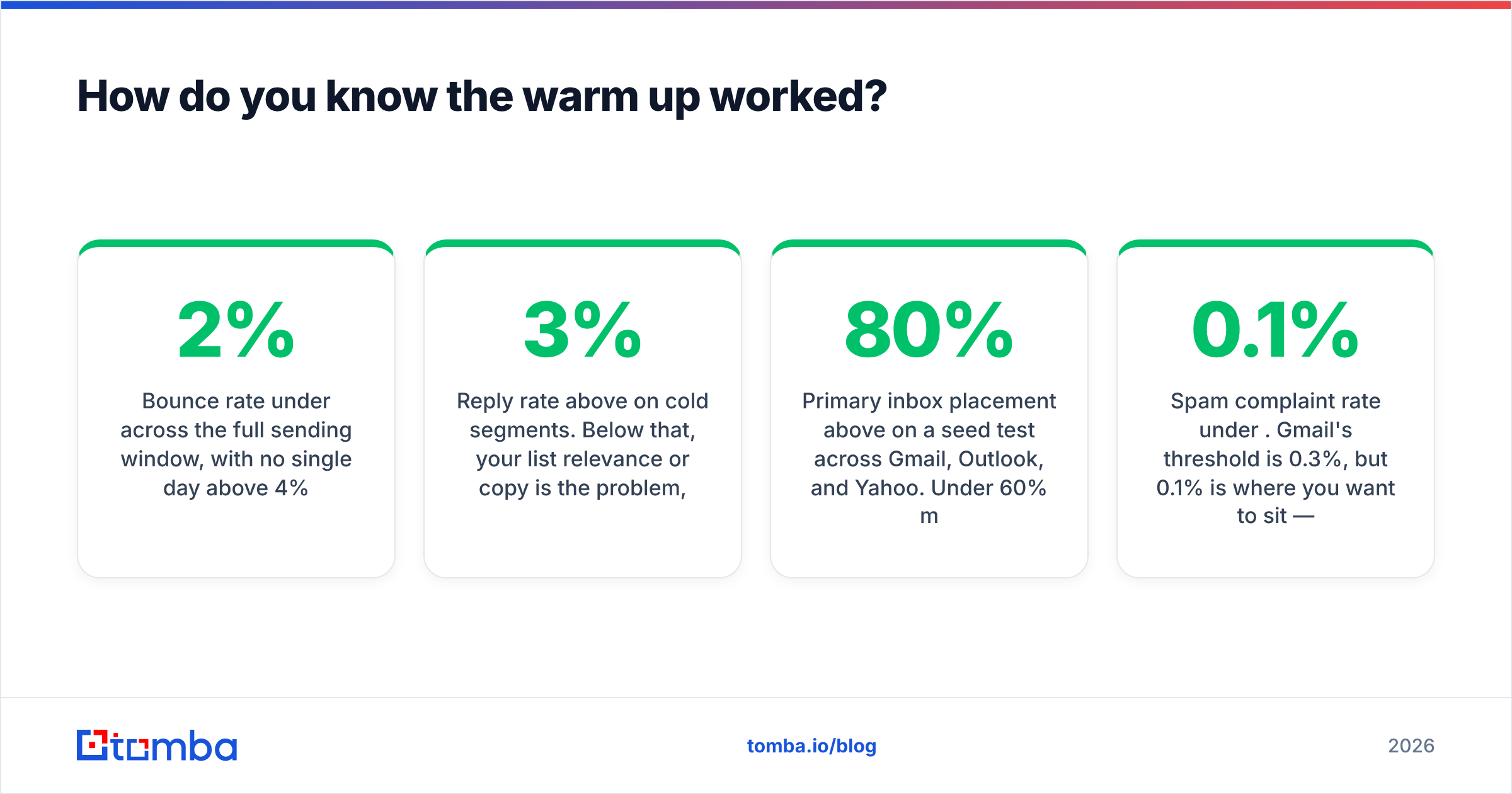
Four checks, run at day 30:
- Bounce rate under 2% across the full sending window, with no single day above 4%.
- Reply rate above 3% on cold segments. Below that, your list relevance or copy is the problem, and more warm-up time won't fix either.
- Primary inbox placement above 80% on a seed test across Gmail, Outlook, and Yahoo. Under 60% means you're in Promotions or spam and should hold volume.
- Spam complaint rate under 0.1%. Gmail's threshold is 0.3%, but 0.1% is where you want to sit — the gap is your margin for a bad campaign.
If all four are green, ramp 30% and re-check in a week. If any is red, hold volume, re-verify the list, and rewrite the sequence before adding a single send.
Where does list building fit into all this?#
Upstream, and it decides everything downstream.
The reason most warm-ups fail isn't the ramp schedule — it's that the list was assembled from a scrape, an export from a tool that guesses at patterns, or a database last refreshed two years ago. You cannot warm your way out of a list where a fifth of the addresses don't exist.
Sourcing addresses from a system that verifies at the point of discovery removes the entire problem class. When each address is validated against live SMTP and pattern confidence as it's found, your bounce rate during warm-up is a rounding error instead of a reputation event. Pulling contacts by company with domain search and verifying in the same pass is faster than building a raw list and cleaning it later — and it costs less than the warm-up tools you'd otherwise be leaning on to compensate.
Start your warm-up with a list that doesn't need rescuing. The Tomba Email Finder returns verified professional addresses with a confidence score attached, so the file you load into your sequencer on day one is already the "valid" segment. The free tier covers 25 searches a month to test the data quality against your own known-good contacts, and paid plans start at $49/mo on Tomba pricing when you're ready to build the full list. Verify first, ramp second — that order is the whole game.
Related guides#
Ready to find emails that actually work?
Join 150,000+ professionals who stopped guessing and started sending. Free credits on signup — no credit card required.
Get the Tomba newsletter
Practical outbound tactics and product updates — once every two weeks.
About the author