Email Marketing B2B Lead Generation: The 2026 Playbook
Most B2B email programs fail on data quality, not copy. Here's the 2026 playbook for turning email marketing into a predictable lead generation channel — with benchmarks, a channel comparison table, and the exact sequence structure that books meetings.
Email marketing B2B lead generation still works in 2026 — but only when the data layer is clean. This playbook covers the real benchmarks, the list build, the deliverability setup, and the sequence that books meetings.
TL;DR
- Email marketing B2B lead generation fails on data quality far more often than on copy. A 12% bounce rate kills your domain reputation before anyone reads your offer.
- Realistic 2026 benchmarks for cold B2B email: 35–50% open rate, 3–8% reply rate, 0.5–2% meeting-booked rate. Anyone promising 40% replies is selling you something.
- Split your program into two motions — demand capture (nurture, newsletter, lifecycle) and demand creation (cold outbound). They need different lists, different domains, and different metrics.
- Verify every address before send. Sub-2% bounce is the price of entry with Google and Microsoft's 2024+ bulk sender rules still in force.
- The winning sequence is 4–6 touches over 18–21 days, one idea per email, with the last touch being a genuine breakup — not a fifth "just bumping this up."
Why does email marketing B2B lead generation still work in 2026?#
Because you own the list. You control the timing. And you can reach a named decision-maker without an algorithm deciding who sees the message.
Think of your channel mix as a restaurant. Paid ads are a billboard on the highway — expensive, and you pay every time someone glances. SEO is the sign on the building — slow to build, free once it's up. Email is the phone number of every person who has ever walked past. You can call them directly, and nobody charges you per dial.
The economics hold up. Cost per qualified lead sits well below paid search for the same ICP. Each send costs a fraction of a cent. The real cost is data and labor. That is why good outbound teams focus on data accuracy instead of send volume.
But the channel has gotten harder. Google and Yahoo now require SPF, DKIM, DMARC, one-click unsubscribe, and a spam complaint rate under 0.3%. Microsoft added similar rules for high-volume senders. Deliverability is now a hard gate. In 2026, a sloppy list does not just underperform. It gets your domain filtered out.

What's the difference between demand capture and demand creation email?#
They're two completely different machines that happen to use the same protocol. Running them from one domain with one list is the most common structural mistake in B2B email programs.
Demand capture email talks to people who already raised a hand — newsletter subscribers, webinar registrants, trial signups, content downloaders. They know you. You're nurturing, educating, and timing the ask.
Demand creation email (cold outbound) talks to people who have never heard of you. No prior consent, no brand familiarity, and much harsher spam filtering. This motion needs its own sending domains, its own warmup, and its own accepted failure rate.
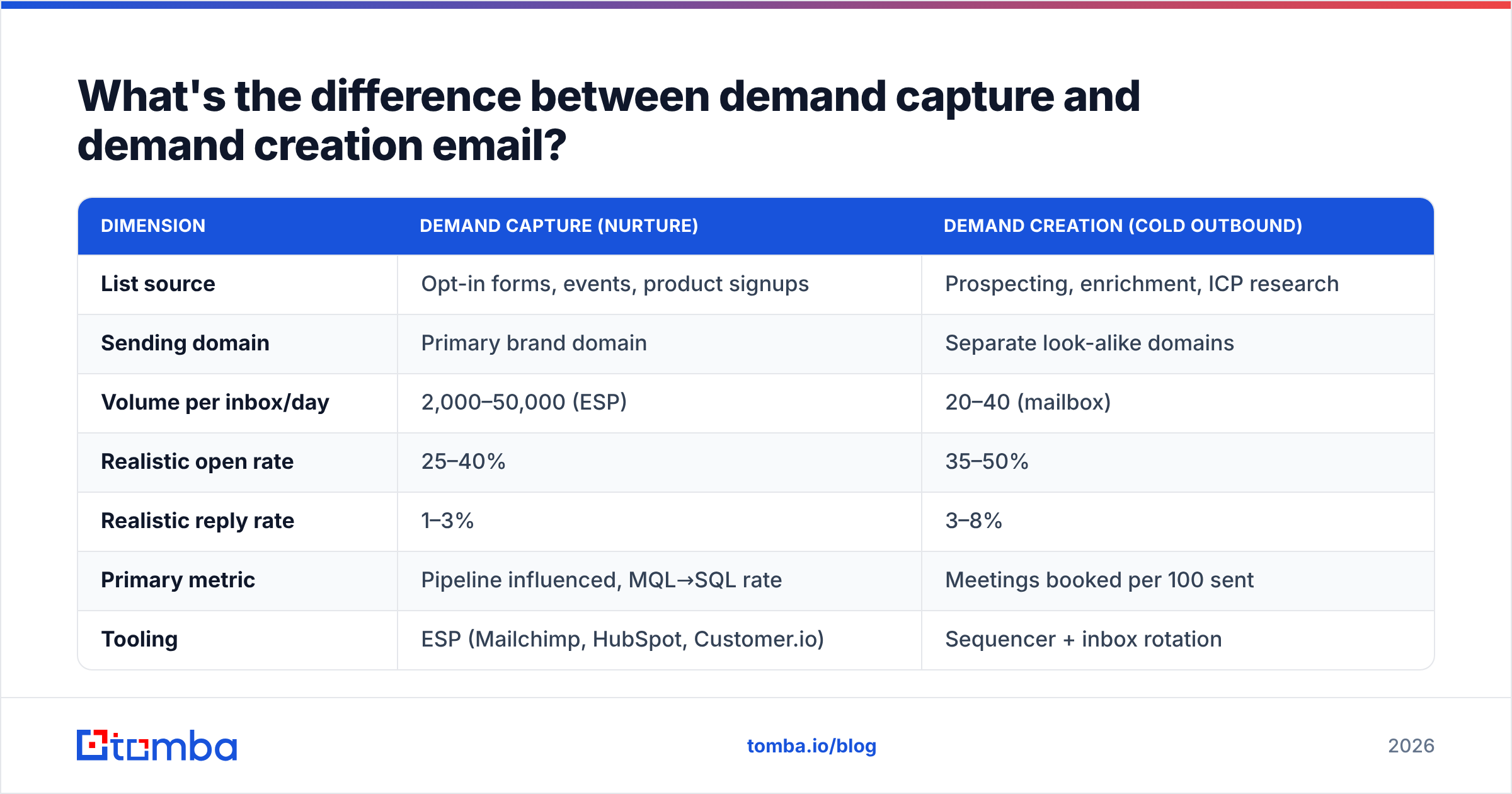
Here's how the two motions actually differ in practice:
| Dimension | Demand capture (nurture) | Demand creation (cold outbound) |
|---|---|---|
| List source | Opt-in forms, events, product signups | Prospecting, enrichment, ICP research |
| Sending domain | Primary brand domain | Separate look-alike domains |
| Volume per inbox/day | 2,000–50,000 (ESP) | 20–40 (mailbox) |
| Realistic open rate | 25–40% | 35–50% |
| Realistic reply rate | 1–3% | 3–8% |
| Primary metric | Pipeline influenced, MQL→SQL rate | Meetings booked per 100 sent |
| Tooling | ESP (Mailchimp, HubSpot, Customer.io) | Sequencer + inbox rotation |
| Unsubscribe handling | One-click list-unsubscribe header | Plain-text opt-out line, honored manually |
The reason to separate them is blast radius. If your cold outbound domain gets burned, your invoices, support replies, and newsletter still land. Send cold mail from your primary domain and one flag can break email for the whole company.
How do you build a B2B list that doesn't burn your domain?#
You build it in four layers, and you never skip layer three.
- Define the ICP tightly first. Not "SaaS companies." Instead: "Series A–B B2B SaaS, 50–250 employees, US/UK, using HubSpot, hiring for RevOps." Every extra filter lifts reply rate more than any subject-line tweak will.
- Source accounts before contacts. Build the company list from job boards, funding announcements, tech-stack signals, review-site categories, and event attendee lists. Accounts first means your contact search has a purpose.
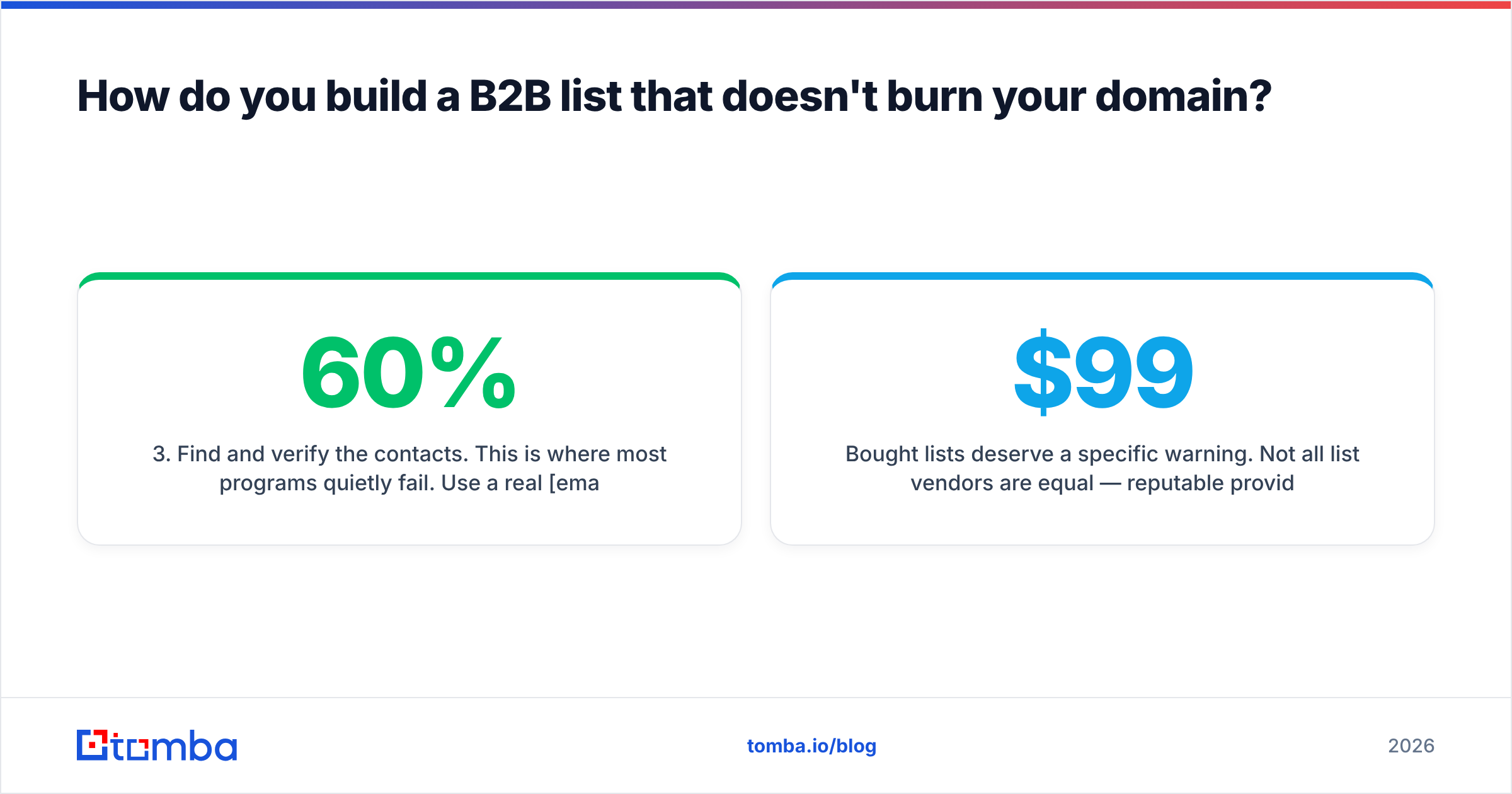
- Find and verify the contacts. This is where most programs quietly fail. Use a real email finder rather than a pattern guesser. Then run every address through an email verifier before it enters a sequence. Guessed addresses like
firstname.lastname@are right maybe 60% of the time. That is a 40% bounce rate.
Those three layers build the list. The next three keep it from burning your domain.
- Handle catch-all domains explicitly. Roughly a third of B2B domains accept everything at the SMTP layer, so a standard verifier returns "unknown." Route those through a catch-all verifier instead of guessing. Then segment them into a lower-volume send group, so one bad batch can't sink your whole reputation.
- Enrich for personalization inputs. Title, seniority, recent role change, funding stage, and tech stack are what make the first line non-generic. Data enrichment is what separates a sequence that reads researched from one that reads templated.
- Suppress ruthlessly. Existing customers, open opportunities, past opt-outs, competitors, and anyone a colleague emailed in the last 90 days. A duplicate touch from two reps is the fastest way to lose a logo.
Bought lists need a warning. Vendors are not equal. Reputable ones like BookYourData sell verified, opt-in-compliant B2B data with bounce guarantees, and that is a fair input. The problem is the long tail of scraped, resold, years-stale lists that show up in your inbox for $99. If a vendor hides the source, the refresh cadence, or the verification method, that list will cost you a domain.
What deliverability setup do you need before the first send?#
Non-negotiables, in order:
- SPF, DKIM, and DMARC on every sending domain. Start DMARC at
p=none, then tighten toquarantineonce your reports are clean. Check yours with an SPF checker before you assume it's fine. - Custom tracking domain. Shared tracking domains from sequencers get blacklisted by association. For cold email, turn open tracking off entirely if you can. The pixel adds a spam signal, and the numbers have been unreliable since Apple Mail Privacy Protection.
- Warmup. Two to three weeks minimum for a new domain, ramping from 5 to 30–40 sends a day. Use an email warmup calculator to plan the ramp rather than eyeballing it.
Then hold these limits once you start sending:
- Bounce ceiling under 2%. Above 3% and mailbox providers start throttling. Above 5% you're in reputation-damage territory.
- Spam complaint rate under 0.1%. The Google threshold is 0.3%, but that's the point where you're already in trouble, not a target.
- Plain text, one link maximum. No images, no HTML templates, no tracked link farms in cold email. Save the design for nurture.
Run your draft through a spam checker before launch. It won't catch everything, but it will catch the obvious triggers — excessive links, spammy phrases, missing text-to-HTML balance.
Which channel mix actually produces B2B leads?#
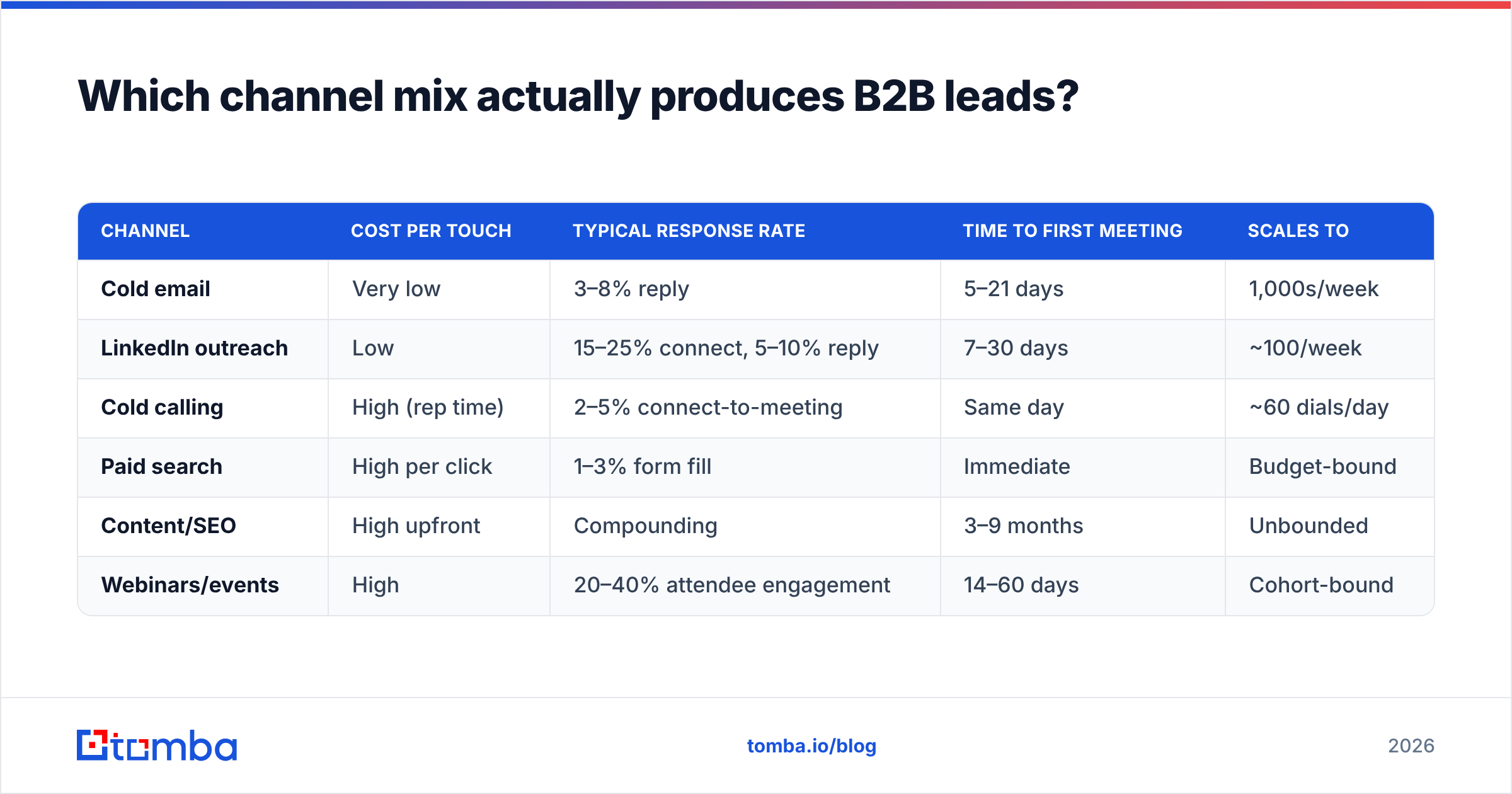
Email rarely wins alone. It wins as the spine of a multi-touch sequence. Here's how the major channels compare on the metrics that matter for lead generation:
| Channel | Cost per touch | Typical response rate | Time to first meeting | Scales to |
|---|---|---|---|---|
| Cold email | Very low | 3–8% reply | 5–21 days | 1,000s/week |
| LinkedIn outreach | Low | 15–25% connect, 5–10% reply | 7–30 days | ~100/week |
| Cold calling | High (rep time) | 2–5% connect-to-meeting | Same day | ~60 dials/day |
| Paid search | High per click | 1–3% form fill | Immediate | Budget-bound |
| Content/SEO | High upfront | Compounding | 3–9 months | Unbounded |
| Webinars/events | High | 20–40% attendee engagement | 14–60 days | Cohort-bound |
Most B2B teams land on the same mix: email for volume, LinkedIn to warm the account, phone for tier-one targets. A prospect who sees your LinkedIn view, reads a relevant email, then takes a call about that email converts far better than any single channel alone. If you dial, source numbers through a phone finder rather than a general-purpose data broker. B2B direct dials go stale fast, and generic databases rarely refresh them.

What does a sequence that actually books meetings look like?#
Four to six touches over 18–21 days. One idea per email. Under 90 words each. The structure below is boring on purpose — boring converts.
Touch 1 (Day 1) — The observation. Lead with something specific and verifiable about their company: a hire, a launch, a funding round, a stack change. One sentence of relevance, one sentence of what you do for companies in that exact position, one low-friction question. No calendar link.
Touch 2 (Day 4) — The proof. A named customer with a similar profile and a concrete number. "We did X for [similar company], moved their Y from A to B." Still no pitch deck.
Touch 3 (Day 9) — The angle change. If the first two didn't land, your framing is wrong, not your persistence. Switch the problem you're leading with. Same company, different pain.
Touch 4 (Day 14) — The resource. Send something useful with zero ask attached — a benchmark, a teardown, a short checklist. This is the touch most teams skip and the one that most often produces the "actually, this is relevant" reply.
Touch 5 (Day 21) — The genuine breakup. "Closing the loop — should I stop here?" It works because it's honest and gives an easy out. Do not follow a breakup email with another email.
Subject lines: 2–5 words, lowercase, no punctuation gymnastics. "quick question about onboarding" beats "🚀 Transform Your Onboarding in 2026" every time. Test with a subject line tester if you want a second opinion. The rule of thumb: if it looks like marketing, it gets treated as marketing.
The signature matters more than people think. Real name, real title, real company, physical address, and a working opt-out line. That's both a CAN-SPAM/GDPR requirement and a trust signal. Build a clean one with an email signature generator rather than pasting a five-image block that trips spam filters.
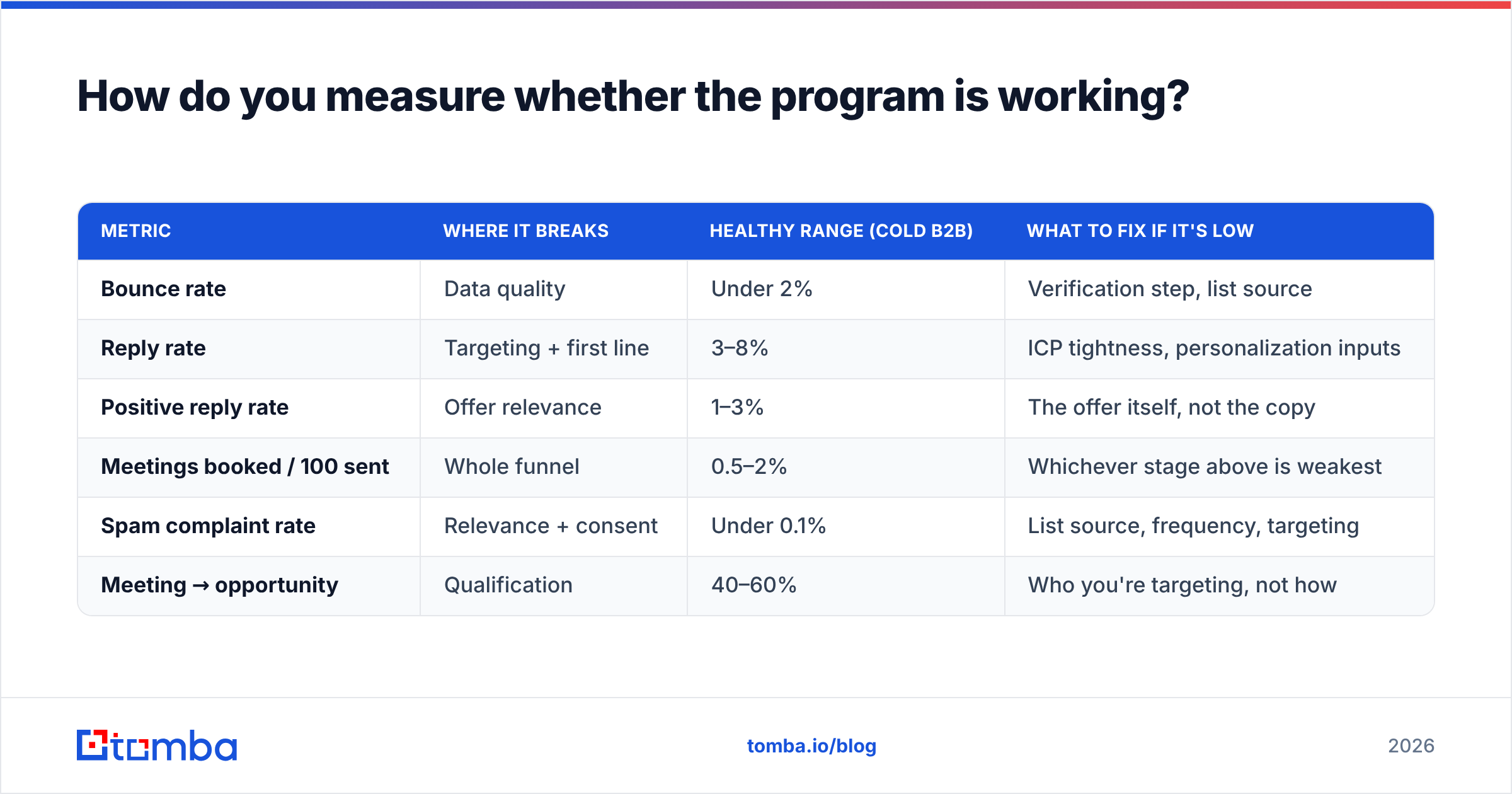
How do you measure whether the program is working?#
Stop reporting open rates as a headline metric. Apple Mail Privacy Protection inflates them, and they don't correlate with pipeline. Track this instead:
| Metric | Where it breaks | Healthy range (cold B2B) | What to fix if it's low |
|---|---|---|---|
| Bounce rate | Data quality | Under 2% | Verification step, list source |
| Reply rate | Targeting + first line | 3–8% | ICP tightness, personalization inputs |
| Positive reply rate | Offer relevance | 1–3% | The offer itself, not the copy |
| Meetings booked / 100 sent | Whole funnel | 0.5–2% | Whichever stage above is weakest |
| Spam complaint rate | Relevance + consent | Under 0.1% | List source, frequency, targeting |
| Meeting → opportunity | Qualification | 40–60% | Who you're targeting, not how |
Read that table top to bottom as a diagnostic. If bounces are high, nothing downstream means anything — fix data first. If bounces are clean but replies are dead, your ICP is too broad. If replies are healthy but positive replies aren't, your offer is wrong. If meetings book but never become opportunities, you're selling to the wrong title.
One caution on attribution. B2B journeys are multi-touch, so email often gets credit it did not earn — or none of the credit it did. G2's buyer behavior research and HubSpot's annual state-of-marketing data both point to buyers touching 8–12 sources before a first conversation. Judge the program on pipeline created within a defined window, not on last-touch attribution.
What's the biggest mistake teams make with B2B email?#
Sending more.
When results stall, the reflex is to increase volume — more domains, more inboxes, more sends. That works for about six weeks, then reputation catches up and the whole program degrades at once. The teams that compound go the other way: narrower ICP, better data, fewer sends, higher relevance per send.
The second biggest mistake is treating email as a copy problem. Copy is maybe 20% of the outcome. Data quality, list targeting, and offer relevance are the other 80%. A perfect email to the wrong verified person still fails. A mediocre email to exactly the right person, delivered to the inbox, still books meetings.
Third: no suppression discipline. If marketing nurture and sales outbound both touch the same contact in the same week with different messages, you look disorganized at best. Sync your suppression lists into your CRM and enforce them at send time, not at list-build time.
Where should you start if you're building this from scratch?#
Sequence it like this, and don't jump ahead:
- Week 1 — Define ICP, buy/register sending domains, configure SPF/DKIM/DMARC, start warmup.
- Week 2 — Build the account list (200–500 companies). Resist the urge to go bigger.
- Week 3 — Find and verify contacts. Enrich for personalization variables. Set the bounce ceiling at 2% and enforce it.
- Week 4 — Write one sequence, five touches. Launch to 50 contacts, not 500.
- Weeks 5–8 — Read the diagnostic table above weekly. Fix one layer at a time. Scale only after reply rate holds above 3%.
Most teams compress this into a week and wonder why month two is a mess. Email marketing B2B lead generation is a data project first, a copy project second. The warmup alone can't be rushed.
Start with the data layer. Every metric downstream — deliverability, reply rate, meetings — is capped by whether the addresses in your sequence are real. Tomba Email Finder finds verified professional addresses by name, domain, or company, with built-in verification and catch-all handling, so your bounce rate stays under the 2% ceiling mailbox providers enforce. The free tier gives you 25 searches a month to test accuracy on your own ICP; Tomba pricing starts at $49/mo for Starter and $99/mo for Growth when you're ready to scale. Verify first, send second — that order is the whole playbook.
Related guides#
Ready to find emails that actually work?
Join 150,000+ professionals who stopped guessing and started sending. Free credits on signup — no credit card required.
Get the Tomba newsletter
Practical outbound tactics and product updates — once every two weeks.
About the author