The Best Email Outreach Tool for Small Business in 2026
Most outreach platforms are priced for 30-seat sales teams. Here's what actually works when you're two people sending 300 emails a week — with real pricing, deliverability limits, and the data layer nobody budgets for.
TL;DR
- The sending platform is the cheap part. For a small team, the real cost driver is contact data and verification — budget for it separately or your sequences die on bounce rate.
- Per-seat pricing punishes small businesses. A 5-person team on a $99/seat platform pays $5,940/year before sending a single email; flat-rate senders like Instantly and Smartlead land closer to $450–$1,200/year.
- You need three layers: find (email finder), verify (bounce protection), send (sequencer + warmup). Buying an all-in-one that does all three badly is the most common small-business mistake.
- Deliverability limits matter more than feature lists. One domain, 2 inboxes, 40 sends/inbox/day is the safe ceiling — no tool changes that math.
- Best-fit stack for most 2–10 person teams in 2026: a flat-rate sequencer + a pay-per-credit data source. Expect $80–$150/month all-in, not $800.
What counts as an email outreach tool for a small business?#
An email outreach tool for small business is any software that lets you send personalized, sequenced cold email at volume without using your marketing ESP (Mailchimp, Brevo, etc.) or blasting from Gmail by hand. That's the honest definition — and it's broader than most vendor pages admit.
In practice, "outreach tool" gets used for four different product categories that a small team ends up needing:
- Sequencers / senders — Instantly, Smartlead, Saleshandy, Lemlist, Mailshake, Woodpecker. They rotate inboxes, throttle sends, handle follow-ups, and stop the sequence on reply.
- Data providers — where the email addresses come from. Tomba, BookYourData, Apollo's database, ZoomInfo at the enterprise end.
- Verification layers — bounce-checking before you send. Sometimes bundled, usually better bought separately.
- Warmup / deliverability tooling — inbox reputation building, DNS checks, spam-score testing.
Enterprise buyers get all four in one contract and don't think about it. You will think about it, because at your size the bundle costs more than the parts and the bundled data is usually the weakest component. Understanding the seams is how you cut the bill by 60% without losing anything that matters.
The other thing worth naming up front: your constraint is not software, it's sending capacity. A small business typically runs one or two domains and a handful of mailboxes. That caps you at roughly 80–200 cold sends per day regardless of which platform you buy. Any tool priced as if you'll send 50,000 emails a month is priced for someone else.
Why do most small teams overpay for outreach software?#
Because pricing pages are built around per-seat licensing, and per-seat licensing is a tax on headcount that has nothing to do with your usage.
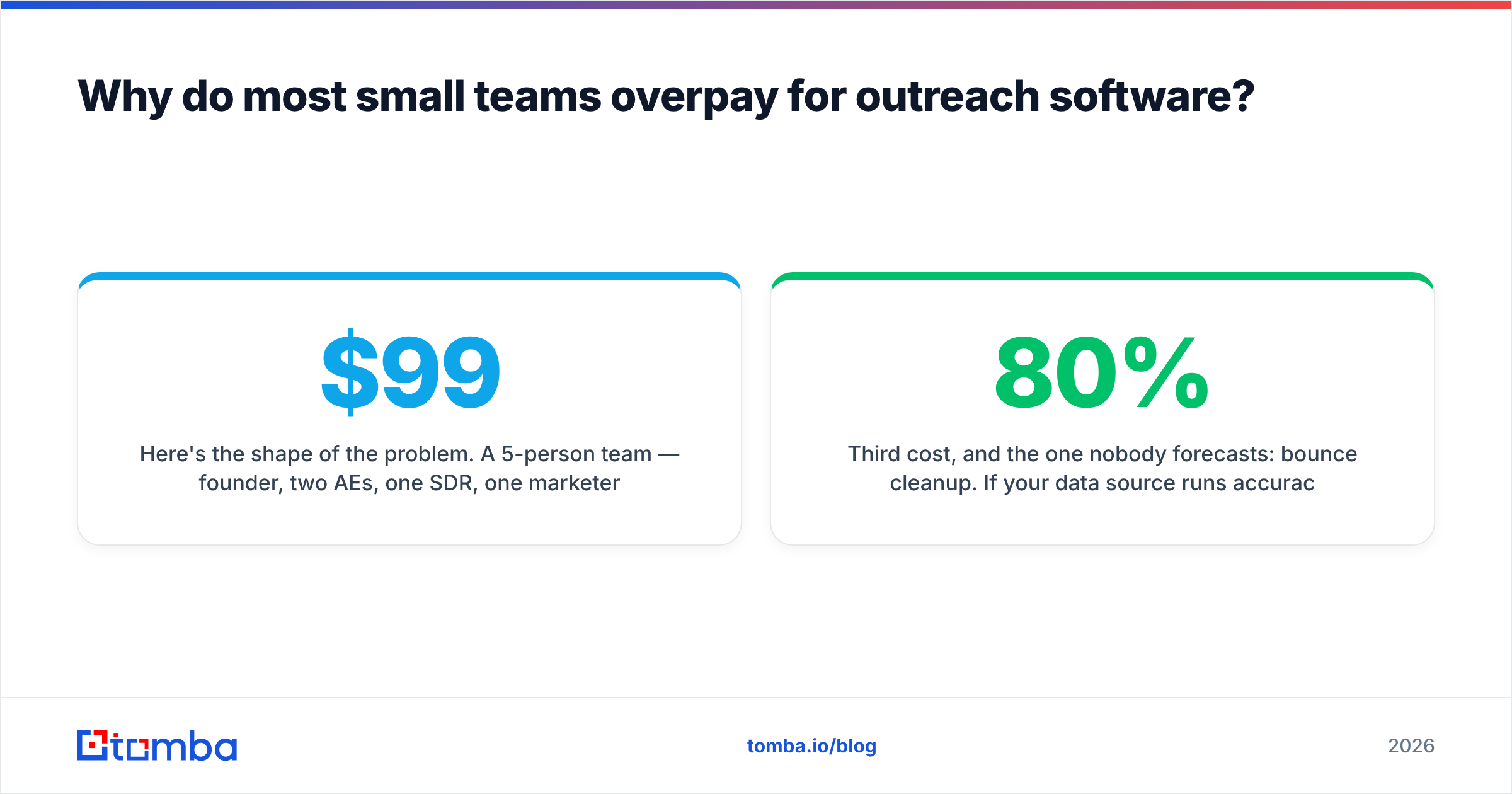
Here's the shape of the problem. A 5-person team — founder, two AEs, one SDR, one marketer — signs up for a platform at $99/user/month. Only the SDR sends daily. The other four log in weekly to check a dashboard. You are paying $396/month for read access.

Then the second bill arrives: credits. Most all-in-one platforms give you a "database" with the plan, but the export limits are tight — often 1,000–2,000 contacts a month on entry tiers, with anything beyond that sold as an add-on. Teams discover this in week three, when the list they built has 4,000 rows and the export button greys out.
Third cost, and the one nobody forecasts: bounce cleanup. If your data source runs 80% accuracy and you skip verification, a 1,000-contact campaign produces ~200 bounces. Two campaigns like that and your domain reputation is in the ditch — at which point you're buying new domains, new mailboxes, and 3 weeks of warmup, which costs more in lost pipeline than the verification would have.
The fix is not "buy cheaper software." It's unbundle. Pay flat-rate for sending, pay per-credit for data, and verify everything before it enters a sequence.
What should a small-business outreach stack actually include?#
Five components. If your setup is missing one, that's where campaigns leak.
- A domain strategy — never send cold email from your primary domain. Buy a lookalike (
getacme.comalongsideacme.com), set up SPF, DKIM, and DMARC, and keep the main domain clean for billing and support. Check your records with a free SPF checker before you send anything. - 2–3 warmed mailboxes per sending domain — Google Workspace or Microsoft 365 at ~$7/user/month each. Warm each for 14–21 days before real sends. Use a warmup calculator to set the ramp rather than guessing.
- A data source you control — a real email finder that returns addresses by name + domain, plus a company-wide domain search for when you only have the website. Credits should roll with your usage, not with your seat count.
- A verification pass — every address gets checked for syntax, MX, SMTP acceptance, and catch-all status before it enters a sequence. This is the single highest-ROI $20 you spend each month.
- A sequencer with inbox rotation and reply detection — flat-rate, unlimited-seat if possible, with per-inbox daily caps you can set manually.
Notice that "AI personalization" isn't on the list. It's nice. It is not what's stopping your campaigns from working. Bad addresses and a cold domain are.
Which email outreach tools fit a small business in 2026?#
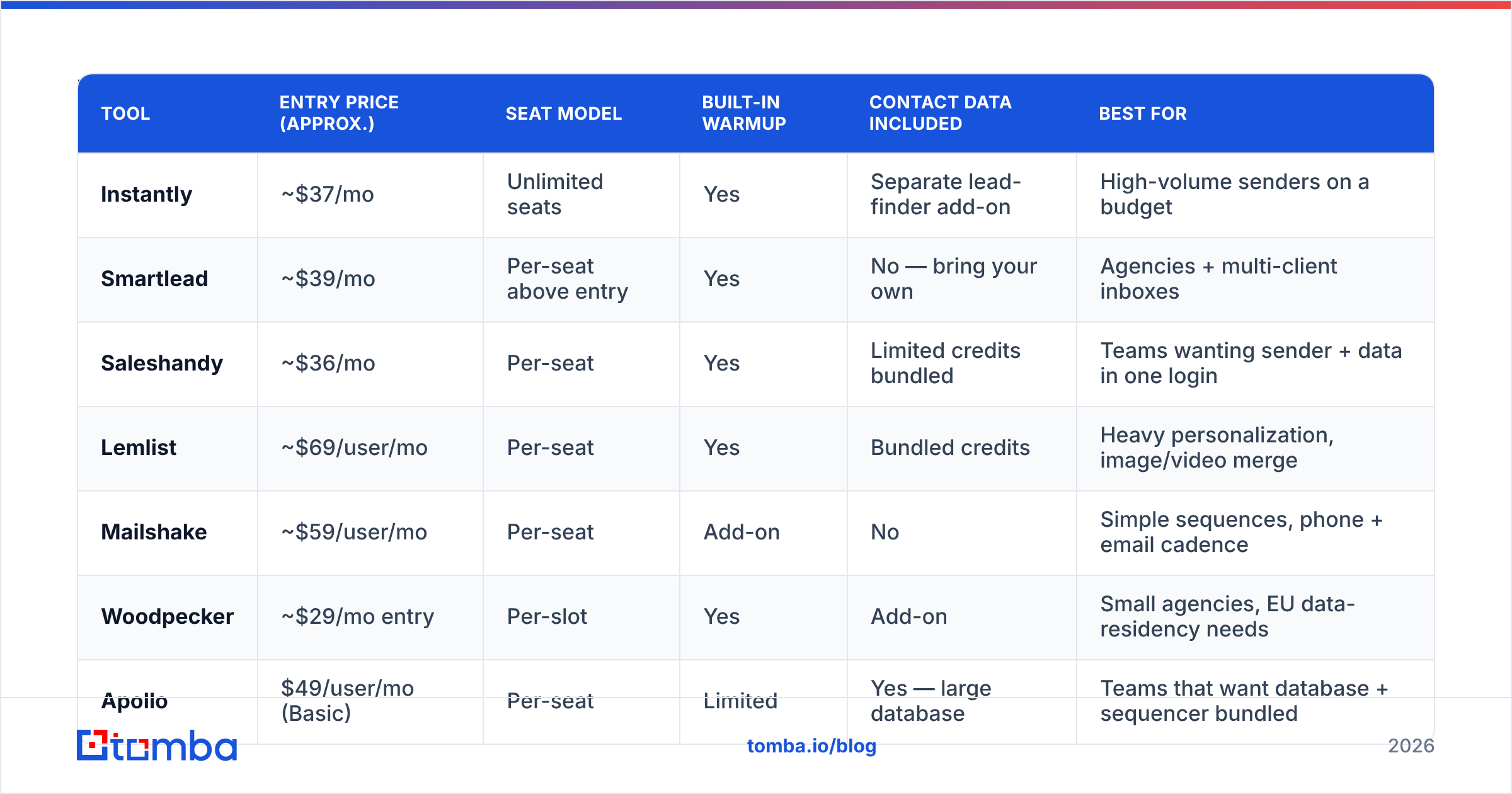
Below is the comparison that actually matters at small scale: what you pay, whether seats are free, and what you get for data. Prices are list rates at the time of writing and vendors change them — check the vendor page before you buy.
| Tool | Entry price (approx.) | Seat model | Built-in warmup | Contact data included | Best for |
|---|---|---|---|---|---|
| Instantly | ~$37/mo | Unlimited seats | Yes | Separate lead-finder add-on | High-volume senders on a budget |
| Smartlead | ~$39/mo | Per-seat above entry | Yes | No — bring your own | Agencies + multi-client inboxes |
| Saleshandy | ~$36/mo | Per-seat | Yes | Limited credits bundled | Teams wanting sender + data in one login |
| Lemlist | ~$69/user/mo | Per-seat | Yes | Bundled credits | Heavy personalization, image/video merge |
| Mailshake | ~$59/user/mo | Per-seat | Add-on | No | Simple sequences, phone + email cadence |
| Woodpecker | ~$29/mo entry | Per-slot | Yes | Add-on | Small agencies, EU data-residency needs |
| Apollo | $49/user/mo (Basic) | Per-seat | Limited | Yes — large database | Teams that want database + sequencer bundled |
And the data layer, which is a separate purchase decision:
| Data source | Entry price | Pricing model | Verification | Notable strength |
|---|---|---|---|---|
| Tomba | Free tier (25 searches/mo), Starter $49/mo | Credit-based, no seat tax | Built-in verifier + catch-all handling | Domain search, bulk finder, API/CLI access |
| BookYourData | Pay-as-you-go from small packs | Prepaid list credits | Accuracy guarantee on delivered records | Strong for prebuilt, filterable B2B lists you own outright |
| Apollo | Included in seat price | Seat + export caps | Basic | Breadth of firmographic filters |
| Manual research | $0 + your time | Time | None | Fine under ~50 contacts/month |
Two honest notes on that table. First, Apollo's bundling is genuinely convenient if you want one login and one invoice — the tradeoff is export caps and per-seat cost that scales badly past three users. If bundling is what you want but the price isn't, look at Apollo alternatives that separate the data from the seat.
Second, BookYourData and a live finder solve different problems. Prebuilt list packs are excellent when you know your ICP by industry, geography, and title and want a clean file you keep forever. A live finder is what you need when you're working from a list of company domains you sourced yourself — conference attendees, funding announcements, job boards — and need addresses for specific named people. Plenty of small teams run both.
How much does this really cost at five people?#
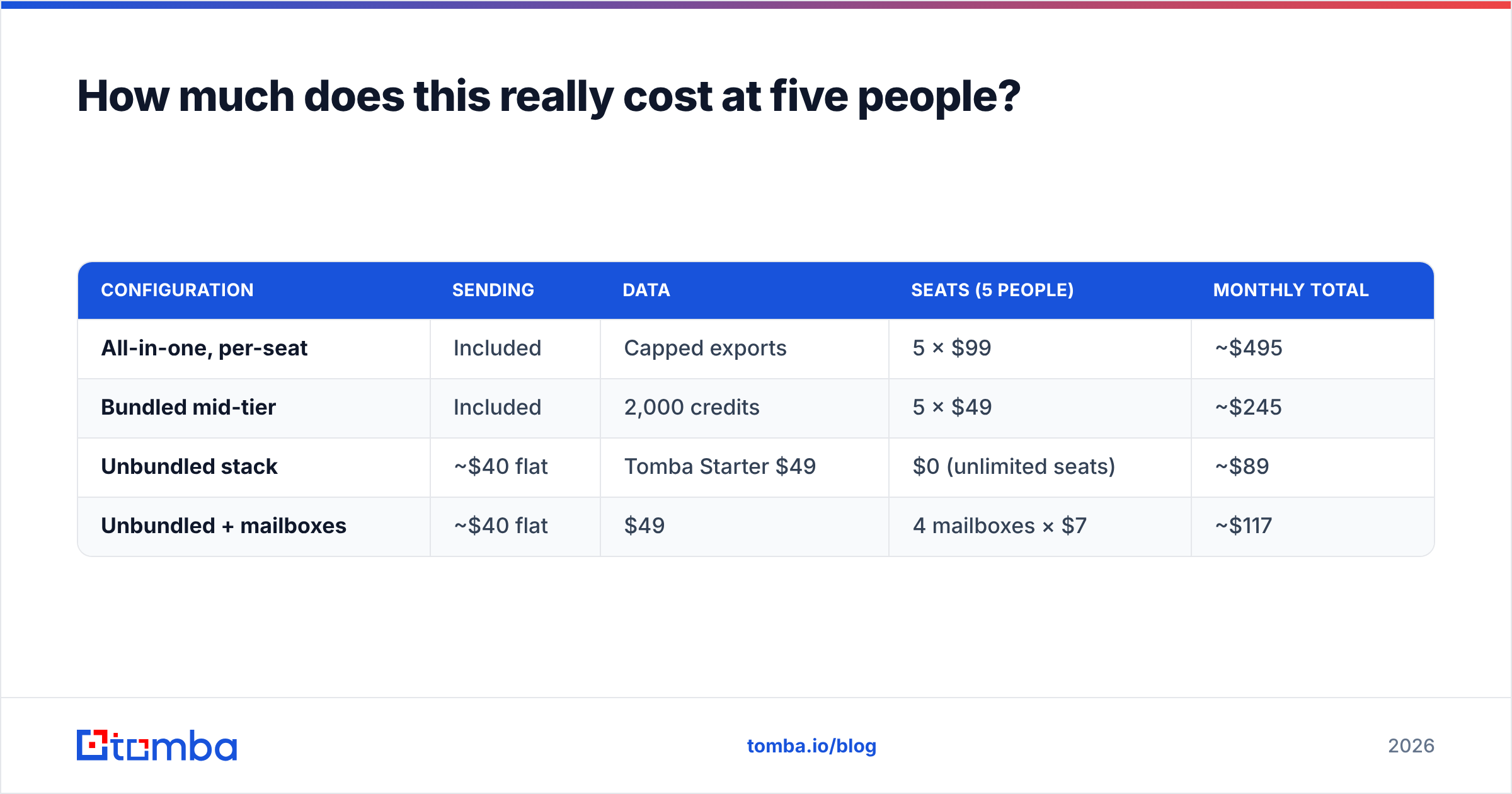
Run the same team through three configurations and the gap is uncomfortable.
| Configuration | Sending | Data | Seats (5 people) | Monthly total |
|---|---|---|---|---|
| All-in-one, per-seat | Included | Capped exports | 5 × $99 | ~$495 |
| Bundled mid-tier | Included | 2,000 credits | 5 × $49 | ~$245 |
| Unbundled stack | ~$40 flat | Tomba Starter $49 | $0 (unlimited seats) | ~$89 |
| Unbundled + mailboxes | ~$40 flat | $49 | 4 mailboxes × $7 | ~$117 |
The unbundled stack is roughly one-fifth the cost of the per-seat all-in-one and gives you more usable contact data, because credits aren't rationed against export caps. You can see the full tier structure on the Tomba pricing page — Free (25 searches/mo), Starter $49/mo, Growth $99/mo, Pro $249/mo.
The catch, and it is a real one: two vendors means two logins, two invoices, and you own the integration. If your ops capacity is genuinely zero, paying the bundling premium is a defensible choice. For most small businesses with someone who can operate a spreadsheet and a Zapier connection, it isn't.

Is an all-in-one platform better than a two-tool stack?#
It depends entirely on where your leads come from.
Choose an all-in-one if your prospecting is filter-driven — you search "SaaS companies, 50–200 employees, US, VP Marketing," export 500 rows, and sequence them. That workflow lives inside a database product and splitting it adds friction for no gain.
Choose an unbundled stack if your prospecting is signal-driven — you find companies through news, hiring pages, partner lists, podcast guests, review sites, or your own site traffic. In that world you already have the company; you need the person's address. A dedicated finder plus a domain search gets you there faster, and the credits don't expire against an export ceiling.
Signal-driven prospecting outperforms filter-driven prospecting at small scale, for a simple reason: everyone with an Apollo seat is emailing the same filtered list. Nobody else is emailing the 40 companies that just posted a job req for the exact problem you solve. If you're a 5-person business competing against companies with 50-person sales teams, generic list-buying is the one game you cannot win.
How do you keep deliverability intact on a small domain?#
You have less margin for error than a big sender does, because you have fewer domains to burn.
- Verify before you send, every time. An email verifier pass that removes 8% of a list costs pennies and saves your reputation. Aim to keep hard bounces under 2%; under 1% is where you want to live.
- Handle catch-all domains deliberately. Roughly 15–20% of B2B domains accept everything at the SMTP layer, so a standard verifier returns "unknown." Don't dump those into your main sequence — isolate them, or run them through catch-all-specific checking, and cap volume to that segment.
- Cap at 40 sends per inbox per day. Not 200. Providers score consistency, not volume, and a small domain that suddenly emits 300 emails looks exactly like a compromised account.
- Watch reply rate, not open rate. Apple Mail Privacy Protection and Gmail image proxying broke open tracking years ago. If your only health metric is opens, you're flying on an instrument that lies.
- Authenticate properly. SPF, DKIM, and a DMARC policy at minimum
p=nonewith a reporting address. Google and Yahoo's bulk sender requirements made this table stakes, and both Google's sender guidelines and your own DNS records are worth re-checking quarterly.
For a deeper primer on the underlying mechanics, the email deliverability glossary entry covers the terminology you'll hit in vendor docs.
What does a realistic 30-day rollout look like?#
- Days 1–3: Buy the sending domain. Configure SPF, DKIM, DMARC. Create 2–3 mailboxes. Do not send anything yet.
- Days 4–21: Warmup runs. Meanwhile, build the list. Define the ICP narrowly enough that you can name 100 companies, then find contacts at each. Bulk operations help here — a bulk email finder run against a CSV of domains beats manual lookup by an order of magnitude.
- Days 10–21: Verify the list. Segment into valid / catch-all / risky. Write three sequences: one per segment or one per persona, whichever split is sharper.
- Days 22–25: Send to a 50-contact pilot at 20/day. Read every reply, including the negative ones. Fix the subject line and the first sentence based on what you learn, not on what a blog said.
- Days 26–30: Scale to full daily cap. Track bounce rate daily for the first week. If it crosses 3%, stop, re-verify, and find out what your data source is doing wrong.
Anyone selling you a "launch in 48 hours" story is skipping the warmup. That's how small businesses end up on blocklists in month two.
Which tool should you actually buy?#
If you're a 2–10 person business sending under 3,000 cold emails a month:
- Sending: a flat-rate sequencer with unlimited seats. Instantly or Smartlead at the entry tier covers it. Read current pricing on their own sites — instantly.ai and smartlead.ai — and check recent user reviews on G2 rather than trusting any roundup, including this one, on features alone.
- Data: credit-based, seat-free. Free tier first, then upgrade only when you're actually consuming credits.
- Verification: non-negotiable, ideally in the same place as your finder so it's one step instead of a CSV round trip.
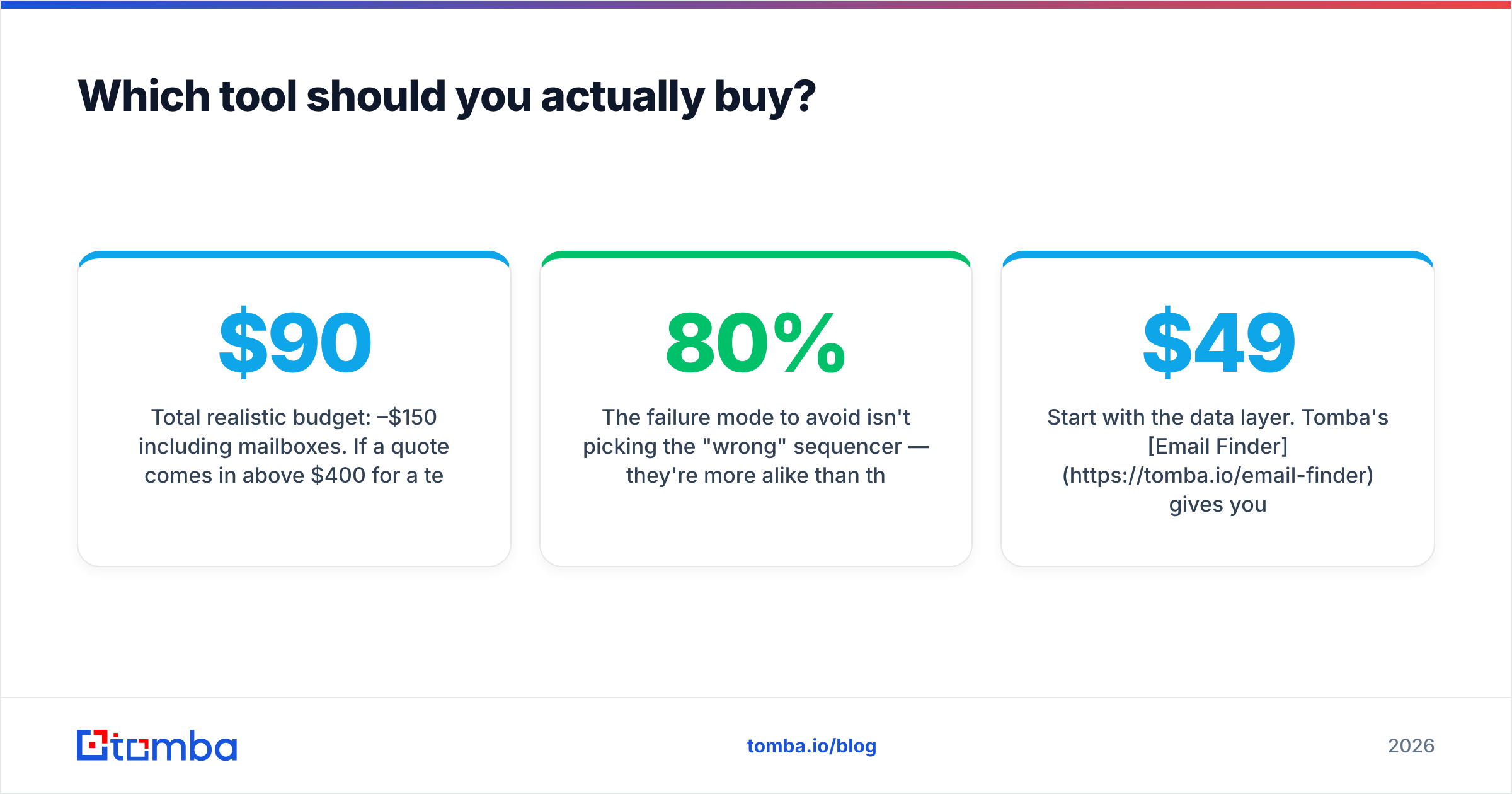
- Total realistic budget: $90–$150/month including mailboxes. If a quote comes in above $400/month for a team your size, ask exactly which line item justifies the difference.
The failure mode to avoid isn't picking the "wrong" sequencer — they're more alike than their marketing suggests. It's spending 80% of your budget on the sending layer and 20% on the data, when the data is what determines whether anyone receives the email at all.
Start with the data layer. Tomba's Email Finder gives you 25 free searches a month to test accuracy against your own target accounts before you commit to anything — no seat minimums, no export caps, and built-in verification so bad addresses never reach your sequencer. If it holds up on your list, Starter is $49/month; if it doesn't, you've lost nothing but ten minutes. Run your next 25 prospects through it and compare the bounce rate against whatever you're using now.
Related guides#
Ready to find emails that actually work?
Join 150,000+ professionals who stopped guessing and started sending. Free credits on signup — no credit card required.
Get the Tomba newsletter
Practical outbound tactics and product updates — once every two weeks.
About the author