Email Scrubbing Services in 2026: What They Actually Fix
Email scrubbing services promise clean lists and better inbox placement — but most only catch half the problem. Here's what scrubbing actually removes, what it can't, and how the major vendors price it in 2026.
TL;DR
- Email scrubbing services remove bounces, spam traps, role accounts, duplicates, and dead domains from a list you already own. They do not find new contacts and they do not fix a damaged sending domain.
- Pricing in 2026 clusters around $0.0008–$0.008 per email, but the real cost driver is how a vendor bills catch-all and unknown results — some charge full price for a verdict they can't actually give you.
- Scrubbing a list once is close to useless. Data decays roughly 2–3% per month, so a list scrubbed in January is measurably worse by April.
- The highest-leverage move is not scrubbing at all — it's collecting verified addresses at the source so the scrub becomes a formality.
- Pick a vendor on three things: catch-all handling, bounce guarantee wording, and whether the API can verify at capture time.
What are email scrubbing services?#
An email scrubbing service takes a list you already have and removes the addresses that will hurt you when you send. Think of it like a produce delivery you didn't order carefully — the box arrives, and someone has to pull out the bruised fruit before it spoils the rest.
Concretely, a scrubbing pass removes or flags:
- Hard bounces — mailboxes that no longer exist. The single biggest driver of sender reputation damage.
- Spam traps and honeypots — addresses seeded by blocklist operators specifically to catch senders using stale or purchased data. Hitting one can get your domain listed at Spamhaus or SURBL.
- Role accounts — info@, sales@, support@, billing@. These deliver fine but complain at far higher rates because nobody personally opted in.
- Duplicates and syntax errors — the same person under three casings, plus typos like
@gmial.comand trailing spaces from a bad CSV export. - Disposable and temporary domains — Mailinator-style addresses that signal a lead who never intended to hear from you.
- Dead or parked domains — the company folded, got acquired, or migrated its MX records and nobody updated your CRM.
Note what's not on that list: engagement. Scrubbing tells you an address can receive mail. It tells you nothing about whether that human wants your mail. Those are different problems with different fixes, and conflating them is the most common reason teams scrub a list, see no lift, and conclude verification is a scam.

How does email scrubbing actually work under the hood?#
Every vendor runs some version of the same four-stage funnel, and the differences between them live almost entirely in stage four.
Stage 1 — Syntax and formatting. Regex against RFC 5322, plus a typo-correction layer. Free, instant, and roughly 3% of a messy list dies here.
Stage 2 — Domain and MX lookup. Does the domain resolve? Does it have mail exchange records? A domain with no MX record cannot receive email, full stop. This also catches parked domains and expired registrations.
Stage 3 — Blocklist and disposable checks. The address or domain is matched against known disposable providers, known trap patterns, and public blocklists. Vendors differ enormously in how large and how fresh these lists are.
Stage 4 — SMTP handshake. The verifier opens a connection to the receiving mail server and issues a RCPT TO command without sending a message. A clean 250 response means the mailbox exists. A 550 means it doesn't.
Stage four is where quality separates. Major providers — Google Workspace and Microsoft 365 especially — have spent years making this handshake unreliable on purpose. They rate-limit, they return generic accept-all responses, and they greylist unknown connecting IPs. A verifier with a small, burned IP pool gets throttled and returns "unknown." A verifier with a large, well-warmed pool, retry logic, and provider-specific heuristics returns an actual verdict.
That's why two services can quote nearly identical prices and hand back wildly different unknown rates on the same file. You're not paying for the regex. You're paying for stage four.
Which email scrubbing services are worth comparing in 2026?#
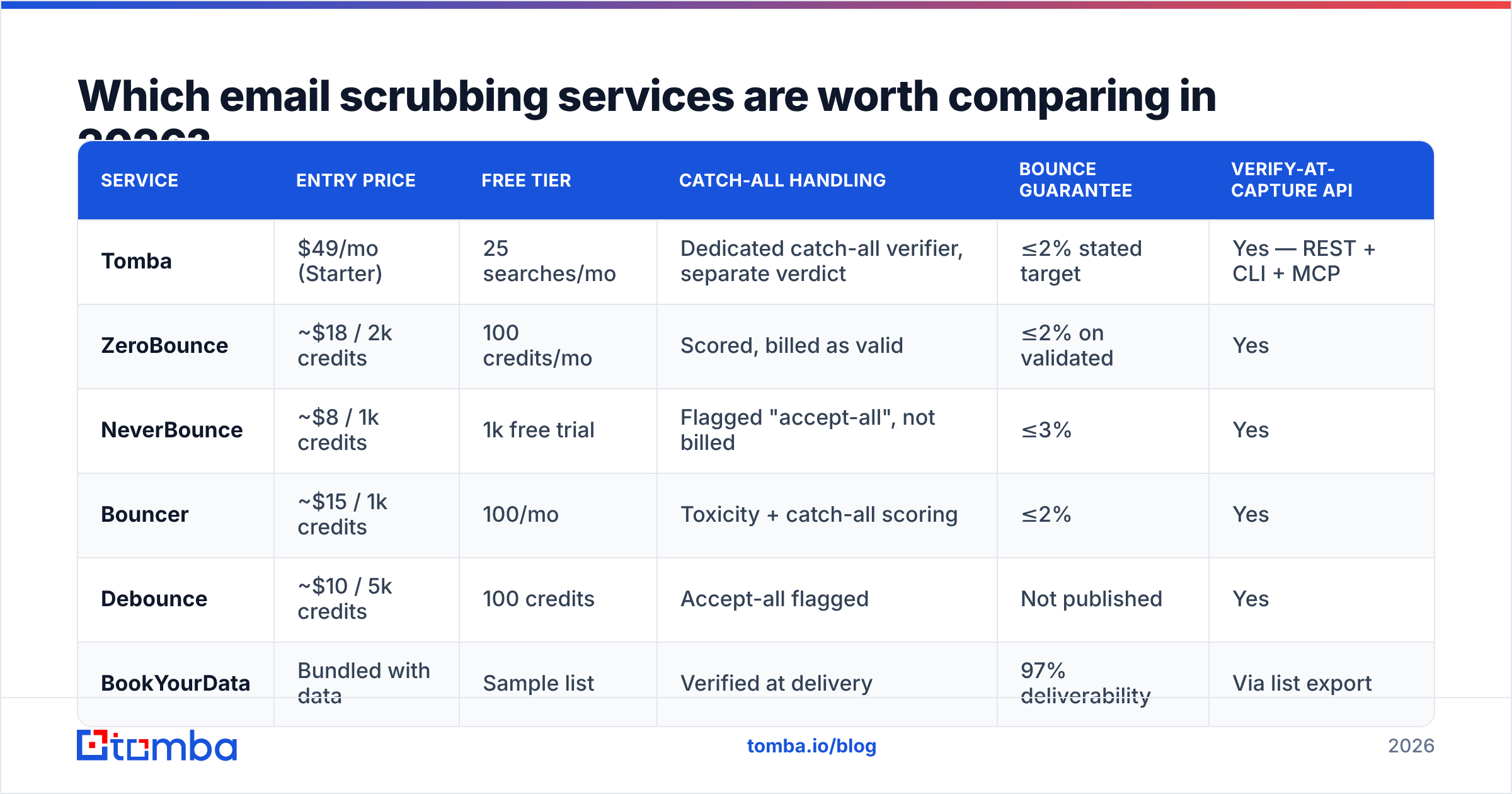
Here's how the main options line up on the attributes that actually change your outcome. Prices are entry-level published rates as of early 2026; volume tiers move all of them down.
| Service | Entry price | Free tier | Catch-all handling | Bounce guarantee | Verify-at-capture API |
|---|---|---|---|---|---|
| Tomba | $49/mo (Starter) | 25 searches/mo | Dedicated catch-all verifier, separate verdict | ≤2% stated target | Yes — REST + CLI + MCP |
| ZeroBounce | ~$18 / 2k credits | 100 credits/mo | Scored, billed as valid | ≤2% on validated | Yes |
| NeverBounce | ~$8 / 1k credits | 1k free trial | Flagged "accept-all", not billed | ≤3% | Yes |
| Bouncer | ~$15 / 1k credits | 100/mo | Toxicity + catch-all scoring | ≤2% | Yes |
| Debounce | ~$10 / 5k credits | 100 credits | Accept-all flagged | Not published | Yes |
| BookYourData | Bundled with data | Sample list | Verified at delivery | 97% deliverability | Via list export |
A few readings of that table that aren't obvious from the numbers alone.
Cheapest per credit is rarely cheapest per usable address. If Vendor A charges $0.008 and returns 91% deliverable verdicts, and Vendor B charges $0.004 but returns 22% unknown, Vendor B just billed you full price for 22% of the list and left you exactly where you started. Always compare cost-per-resolved-address, not cost-per-credit.
Bounce guarantees are marketing until you read the exclusions. Nearly every guarantee excludes catch-all domains, excludes lists older than 30 days at upload, and requires you to have sent within a set window. Read the wording before you treat it as insurance.
BookYourData sits in a different category — it sells pre-verified B2B data rather than scrubbing lists you bring. If your problem is "my list is stale," a scrubber is the right tool. If your problem is "my list is small," buying verified contacts or building them with a domain search is a better fit than scrubbing what you have.
Is scrubbing enough to fix deliverability?#
No, and this is where most of the budget gets wasted.
A scrubbed list fixes exactly one input to inbox placement: your bounce rate. It's a necessary condition, not a sufficient one. Mailbox providers weigh a bundle of signals, and list hygiene is only one:
- Authentication. SPF, DKIM, and DMARC must all pass and align. Google and Yahoo have enforced this on bulk senders since 2024, and a missing SPF record will sink you regardless of how clean the list is. Check yours with an SPF checker before blaming your data.
- Complaint rate. Google's Postmaster Tools threshold is 0.3%. A perfectly valid address that marks you as spam is worse than a bounce.
- Engagement. Opens, replies, and folder placement. Sending to 50,000 valid-but-cold addresses trains filters against you.
- Sending pattern. Volume ramps, consistency, and infrastructure warmth.
- Content and links. Shortened URLs, blocklisted domains in your footer, spam-trigger phrasing.
The mental model that helps: scrubbing is like checking that the addresses on your envelopes are real. It says nothing about whether the letter is welcome, whether the postman trusts you, or whether your return address is forged. All four have to be right.
If your bounce rate is already under 2% and placement is still bad, more scrubbing will not help. Your problem is email deliverability infrastructure or content, and you should be looking at authentication records, warmup schedule, and complaint rate instead. Google's own Postmaster Tools documentation is the free source of truth here — it shows you your actual reputation, spam rate, and authentication pass rate for Gmail recipients.

What does a catch-all domain mean and why does it wreck your numbers?#
A catch-all (or accept-all) domain is configured to accept mail for any address at that domain, existing or not. Send to asdfgh@company.com and the server says 250 OK — then silently discards it, or routes it to an admin who deletes it.
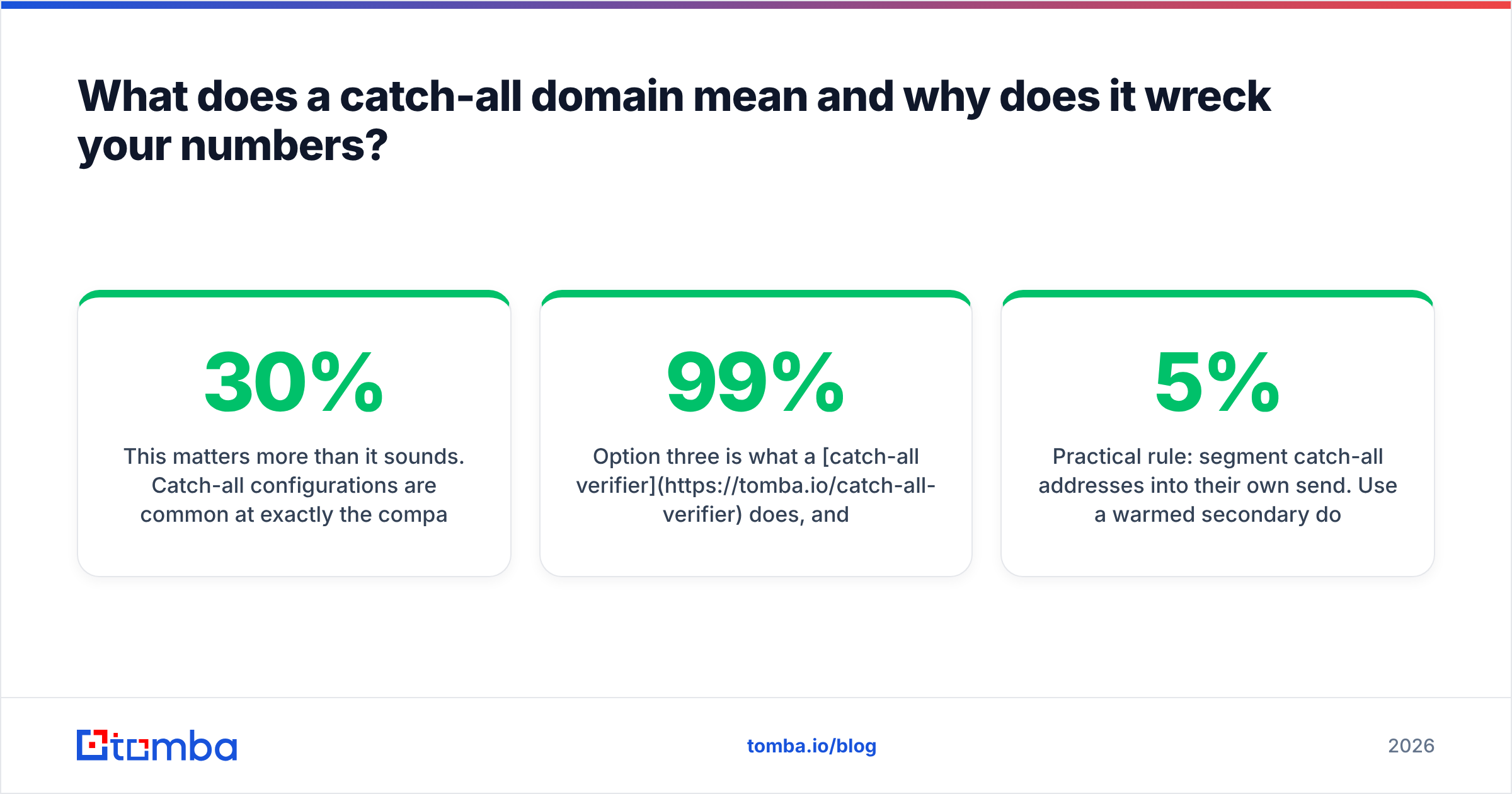
This matters more than it sounds. Catch-all configurations are common at exactly the companies B2B teams want to reach: mid-market and enterprise organizations running Microsoft 365 with a permissive gateway. Depending on your target market, 15–30% of a B2B list can sit on catch-all domains.
Vendors handle this three different ways, and it's the single biggest source of quoted-accuracy inflation:
- Mark as valid. Inflates the reported deliverable percentage. Looks great in the report, bounces later.
- Mark as unknown. Honest, but you paid for a non-answer and still have to decide.
- Score it separately. Use pattern data, historical send outcomes, and secondary signals to produce a confidence level for that specific mailbox rather than the domain.
Option three is what a catch-all verifier does, and it's the difference between discarding a quarter of your enterprise list and sending to it with a known risk level. If a vendor quotes 99% accuracy without telling you how catch-alls are counted, the number is not comparable to anyone else's.
Practical rule: segment catch-all addresses into their own send. Use a warmed secondary domain, keep volume modest, and judge the segment on its own bounce rate over two or three sends. If it bounces under 5%, fold it back into your main sending. If it bounces at 20%, you've learned that cheaply.
How often should you scrub, and does one-time cleaning work?#
Once is not enough. B2B contact data decays at roughly 2–2.5% per month — people change jobs, companies rebrand, domains migrate. Industry research on data decay consistently puts annual B2B database rot in the 20–30% range. That means a list you scrubbed to 99% clean in January is sitting around 93–95% by June without a single new import.
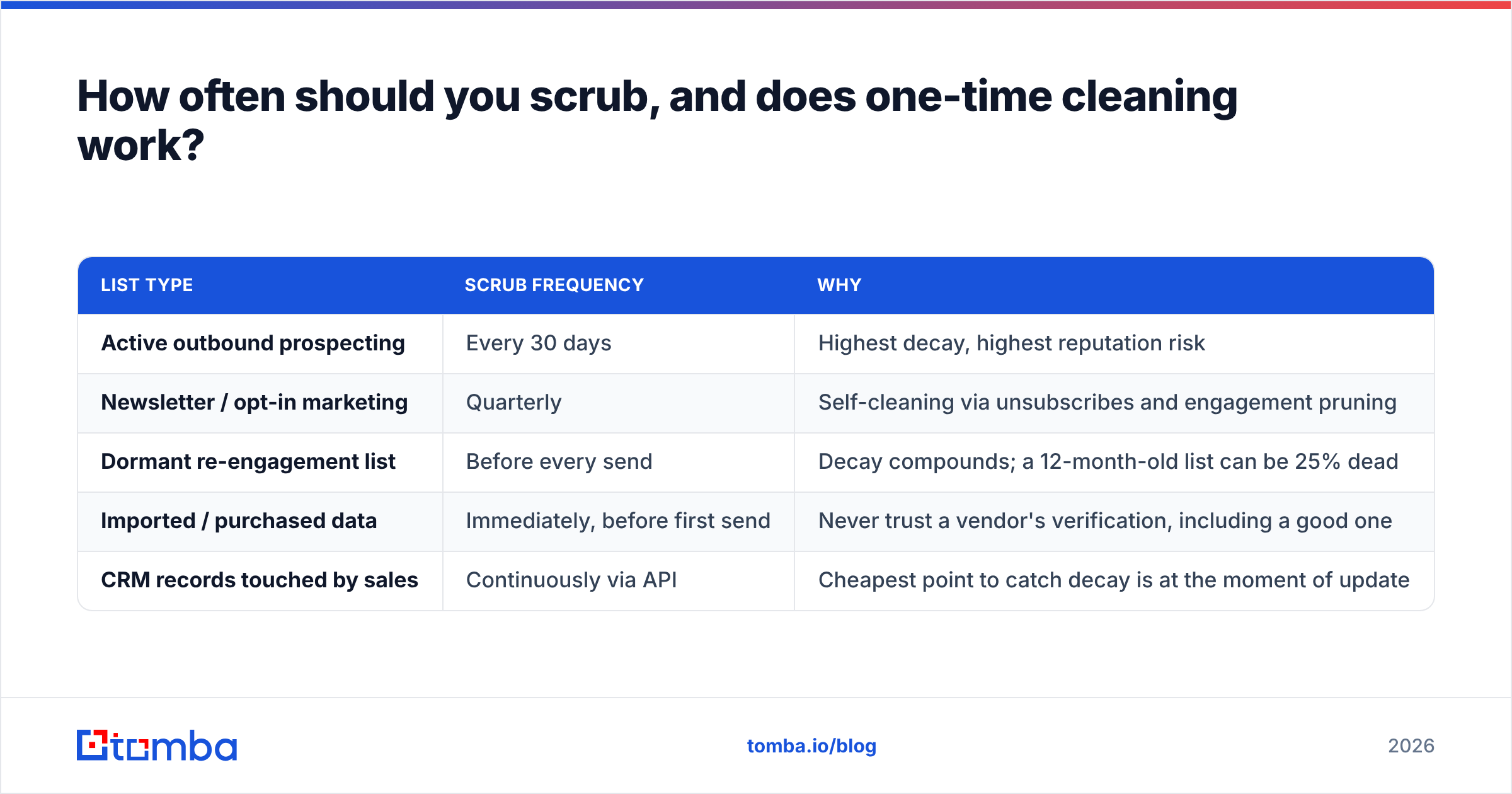
A cadence that holds up in practice:
| List type | Scrub frequency | Why |
|---|---|---|
| Active outbound prospecting | Every 30 days | Highest decay, highest reputation risk |
| Newsletter / opt-in marketing | Quarterly | Self-cleaning via unsubscribes and engagement pruning |
| Dormant re-engagement list | Before every send | Decay compounds; a 12-month-old list can be 25% dead |
| Imported / purchased data | Immediately, before first send | Never trust a vendor's verification, including a good one |
| CRM records touched by sales | Continuously via API | Cheapest point to catch decay is at the moment of update |
The last row is the one that actually changes economics. Verifying at the point of capture — form submission, CRM enrichment, list import — costs one credit per record and prevents the address from ever entering your database dirty. Scrubbing later costs the same credit plus whatever reputation damage occurred in between. Wire the email verification API into your form handler and your CRM sync, and periodic bulk scrubs become a small audit rather than a rescue mission.
How do you run a scrub without destroying your list?#
A repeatable process, in order:
1. Export and back up first. Keep the raw file. If a vendor over-aggressively kills a segment, you need the original to compare against.
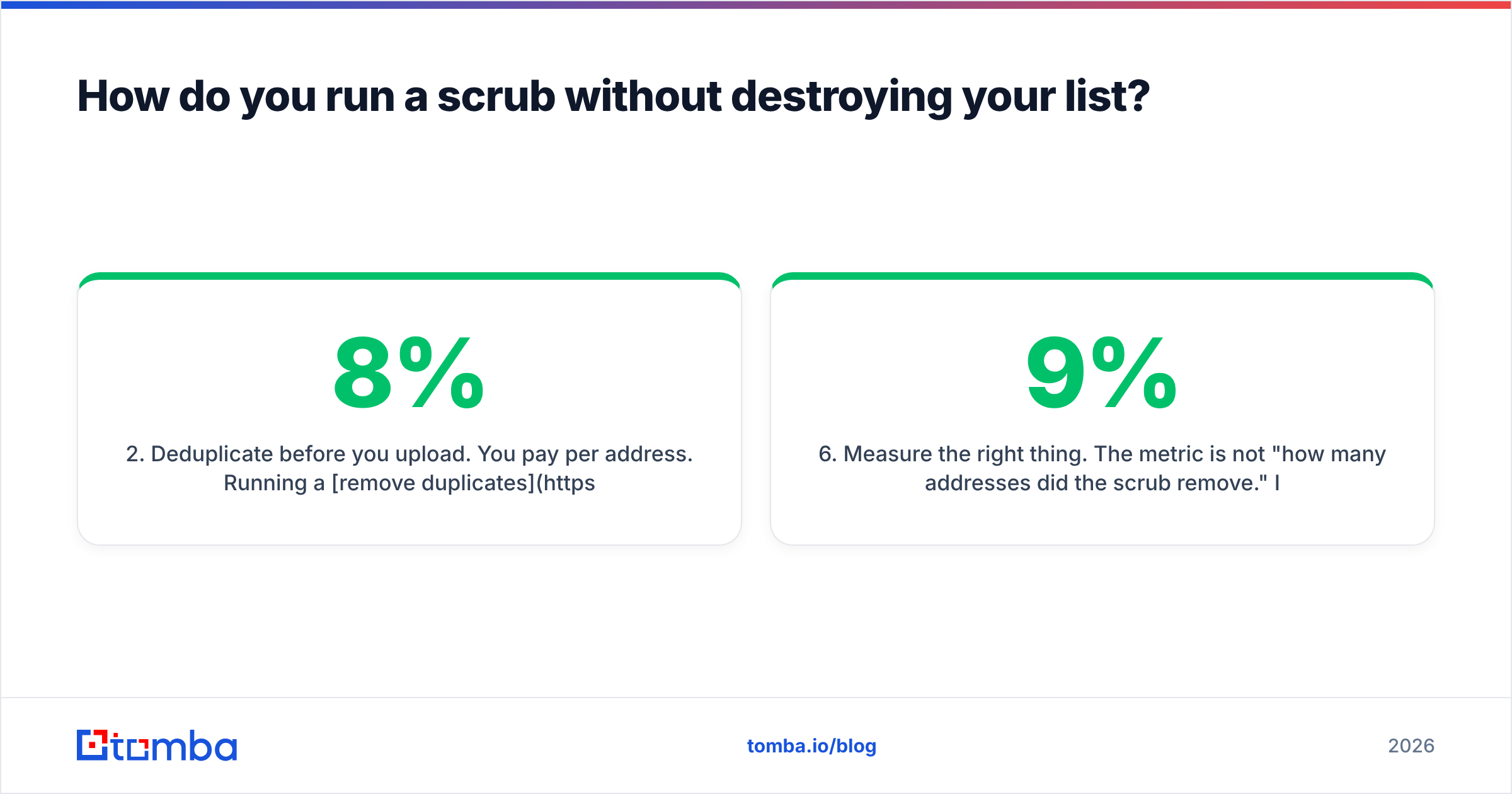
2. Deduplicate before you upload. You pay per address. Running a remove duplicates pass before upload on a 100k list with 8% dupes saves you 8,000 credits for zero effort.
3. Run a sample first. Take 1,000 addresses across your list's variety — different domains, different ages, different sources — and run them through two vendors. Compare deliverable rates, unknown rates, and catch-all handling. Do this before committing to a plan.
4. Segment the results, don't just delete. Four buckets: send confidently (valid), send carefully (catch-all, separate domain), hold (unknown, retry in 30 days), delete permanently (invalid, disposable, trap-flagged). Suppress the deleted ones rather than removing them, so a future import doesn't reintroduce the same dead addresses.
5. Re-warm before you resume volume. If you paused sending or your reputation took a hit, don't jump straight back to full volume on a freshly cleaned list. Ramp over 2–3 weeks — a warmup calculator gives you a defensible schedule.
6. Measure the right thing. The metric is not "how many addresses did the scrub remove." It's bounce rate on the next send, plus placement. If bounce rate dropped from 9% to 1.5% and reply rate didn't move, your problem was never the list quality — it was targeting or copy.
What should you actually buy?#
Match the tool to the failure mode:
- Bounce rate above 5%, list you already own → a dedicated verifier. Any of the six in the table above will get you there. Choose on catch-all handling and API quality.
- List is clean but small → stop scrubbing and start building. An email finder or domain search produces addresses that are verified at discovery, so they enter your CRM already clean.
- Placement bad, bounce rate already low → this is not a data problem. Audit SPF/DKIM/DMARC, check sender reputation, review complaint rate in Postmaster Tools.
- Buying data from a broker → verify it yourself on arrival regardless of what the seller guarantees, then set a 30-day re-verification cadence.
- High-volume, engineering resources available → skip batch scrubbing entirely. Verify at capture through the API and treat quarterly bulk runs as an audit.
One honest caveat about every vendor in this space, including Tomba: nobody can verify a mailbox that the receiving server refuses to discuss. Claimed accuracy figures above 98% are almost always computed after excluding unknowns and catch-alls from the denominator. Ask any vendor for their unknown rate on your sample file. The ones who answer straightforwardly are the ones worth paying.
Where to start#
If your immediate problem is a list that bounces, run a sample through two verifiers this week and compare unknown rates before you buy credits. If your problem is that the list is too small or too stale to be worth cleaning, the cheaper fix is building it fresh from verified sources.
The Tomba Email Finder returns addresses that are verified at discovery — including a separate catch-all verdict rather than a blanket "accept-all" — so contacts land in your CRM clean instead of needing a rescue scrub six weeks later. The free tier gives you 25 searches a month to test the data quality against your own known-good contacts, and paid plans start at $49/mo; full Tomba pricing is public. Verify your assumptions on a sample before you commit to anyone, including us.
Related guides#
Ready to find emails that actually work?
Join 150,000+ professionals who stopped guessing and started sending. Free credits on signup — no credit card required.
Get the Tomba newsletter
Practical outbound tactics and product updates — once every two weeks.
About the author