Email Text Extractor: How to Pull Clean Emails From Text
An email text extractor turns messy pasted text into a usable contact list in seconds — but raw extraction is only half the job. Here's how the tools work, where they break, and what to do before you hit send.
TL;DR
- An email text extractor scans a block of text (or a file) and pulls out every string that matches an email address pattern. That's it — it's a parser, not a data source.
- Most free extractors use a naive regex, so they miss obfuscated addresses (
john [at] acme [dot] com), choke on trailing punctuation, and return duplicates and junk likenoreply@andwixpress.com. - Extraction and validation are two different jobs. A list scraped from text typically contains 20–40% addresses that are stale, role-based, or outright invalid.
- The practical stack is: extract → deduplicate → filter role accounts → verify SMTP → enrich. Skipping the middle three steps is how you burn a sending domain.
- Browser-based extractors are fine for one-off pastes. File and API extractors matter once you're processing thousands of rows a week.
What is an email text extractor?#
An email text extractor is a utility that reads unstructured text and returns only the email addresses inside it. Paste in a conference attendee page, a CSV export with mangled columns, a scraped directory, a support thread, or a wall of copied LinkedIn comments — it hands back a clean, line-separated list.
Think of it like a metal detector on a beach. It doesn't care what the sand is made of; it only beeps for one specific shape. That narrowness is the feature: you don't have to normalize your input, split columns, or write a script. You paste, you click, you copy the output.
What it is not: a lead database. An extractor can only find addresses that already exist in the text you gave it. If the page shows names and job titles but no addresses, an extractor returns nothing. That's the job of a domain search or an email finder, which infer or look up addresses from a company domain and a person's name. People conflate the two constantly, then get frustrated when the extractor "doesn't work."
Two common shapes of the tool:
- Text extractor — you paste raw text into a box. Best for copied web pages, email threads, chat logs, and PDF text you've already selected.
- File extractor — you upload a
.csv,.txt,.xlsx,.pdf, or.docxand it walks the whole document. Best for exports, contact dumps, and anything too big to paste.

How does an email text extractor actually work?#
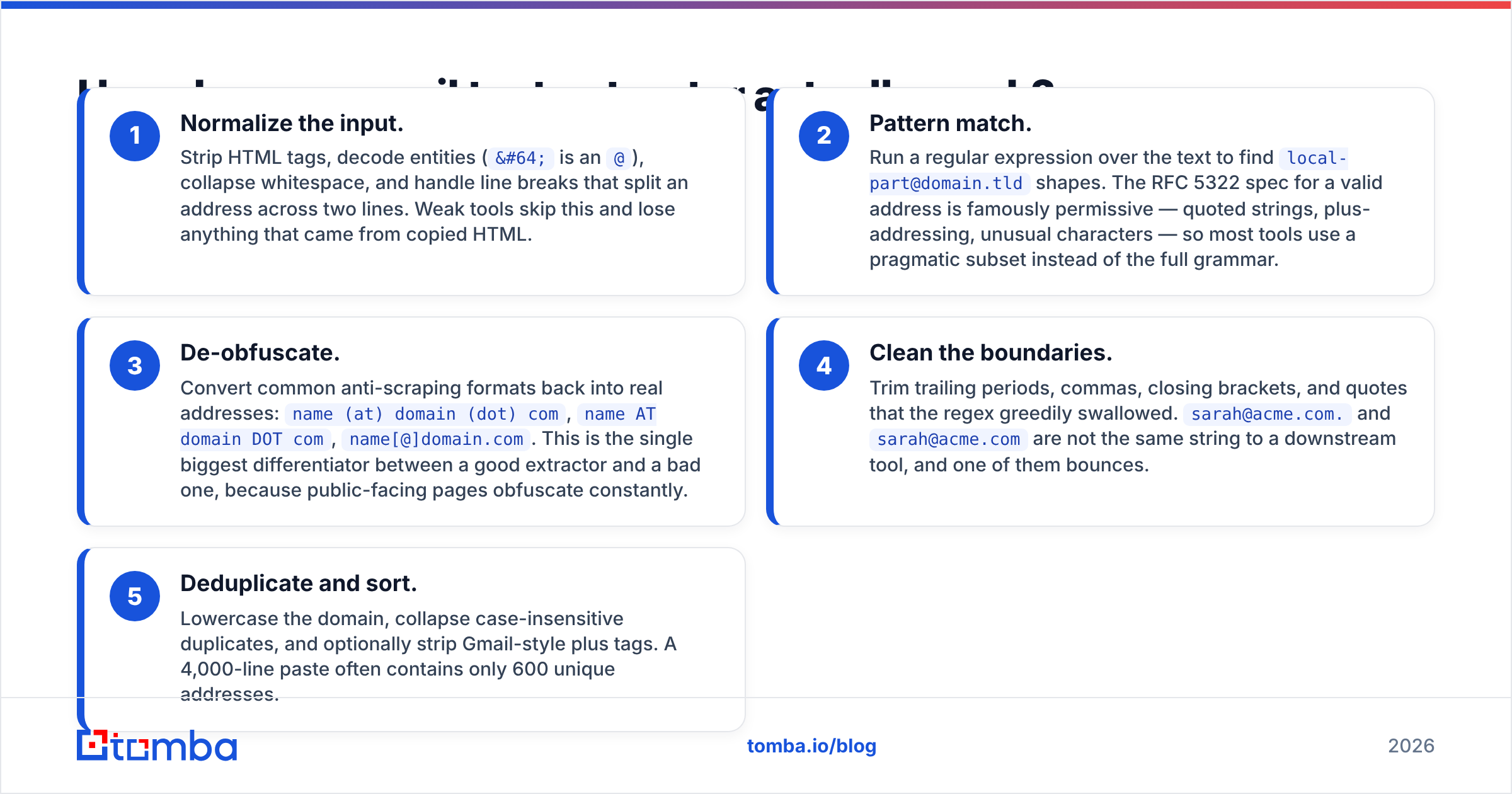
Under the hood, nearly every extractor does the same five things. The quality gap between tools is entirely in how carefully each step is implemented.
- Normalize the input. Strip HTML tags, decode entities (
@is an@), collapse whitespace, and handle line breaks that split an address across two lines. Weak tools skip this and lose anything that came from copied HTML. - Pattern match. Run a regular expression over the text to find
local-part@domain.tldshapes. The RFC 5322 spec for a valid address is famously permissive — quoted strings, plus-addressing, unusual characters — so most tools use a pragmatic subset instead of the full grammar. - De-obfuscate. Convert common anti-scraping formats back into real addresses:
name (at) domain (dot) com,name AT domain DOT com,name[@]domain.com. This is the single biggest differentiator between a good extractor and a bad one, because public-facing pages obfuscate constantly. - Clean the boundaries. Trim trailing periods, commas, closing brackets, and quotes that the regex greedily swallowed.
sarah@acme.com.andsarah@acme.comare not the same string to a downstream tool, and one of them bounces. - Deduplicate and sort. Lowercase the domain, collapse case-insensitive duplicates, and optionally strip Gmail-style plus tags. A 4,000-line paste often contains only 600 unique addresses.
Some extractors add a sixth step — filtering. That means dropping noreply@, postmaster@, abuse@, and known infrastructure domains (sentry.io, wixpress.com, example.com) that appear in page source but are never real prospects.
Where do free email extractors break?#
Free tools are genuinely fine for the simple case. They break in predictable, specific ways, and it's worth knowing which failure you're looking at.
Obfuscated addresses. If a directory writes contact [at] vendorco [dot] io, a plain regex returns nothing and you assume the page had no contacts. It had contacts. You just used a tool that couldn't see them.
Concatenated text from PDFs. PDF copy-paste frequently drops spaces, producing Head of SalesJane.doe@acme.comNew York. A naive matcher grabs SalesJane.doe@acme.comNew and hands you garbage.
Unicode and homoglyphs. Addresses copied from designed pages sometimes carry non-breaking spaces, soft hyphens, or a full-width @. They look identical to a human and are invisible to a strict regex.
No validation whatsoever. This is the important one. A regex confirms an address is shaped like an email. It says nothing about whether a mailbox exists on the other end. jsmith@acme.com and jsmith@acmee.com are equally valid to a pattern matcher, and one of them is a hard bounce.
Silent truncation. Several browser tools cap the input at a few thousand characters and quietly process only what fits. You get 40 addresses from a page that had 300 and never know.
Privacy exposure. Pasting a customer list into an anonymous web form means uploading personal data to an unknown server. If you handle EU or UK contacts, that's a processing decision your legal team should know about. Prefer tools with a published privacy policy and, ideally, client-side processing.
Extractor vs. finder vs. verifier: which do you actually need?#
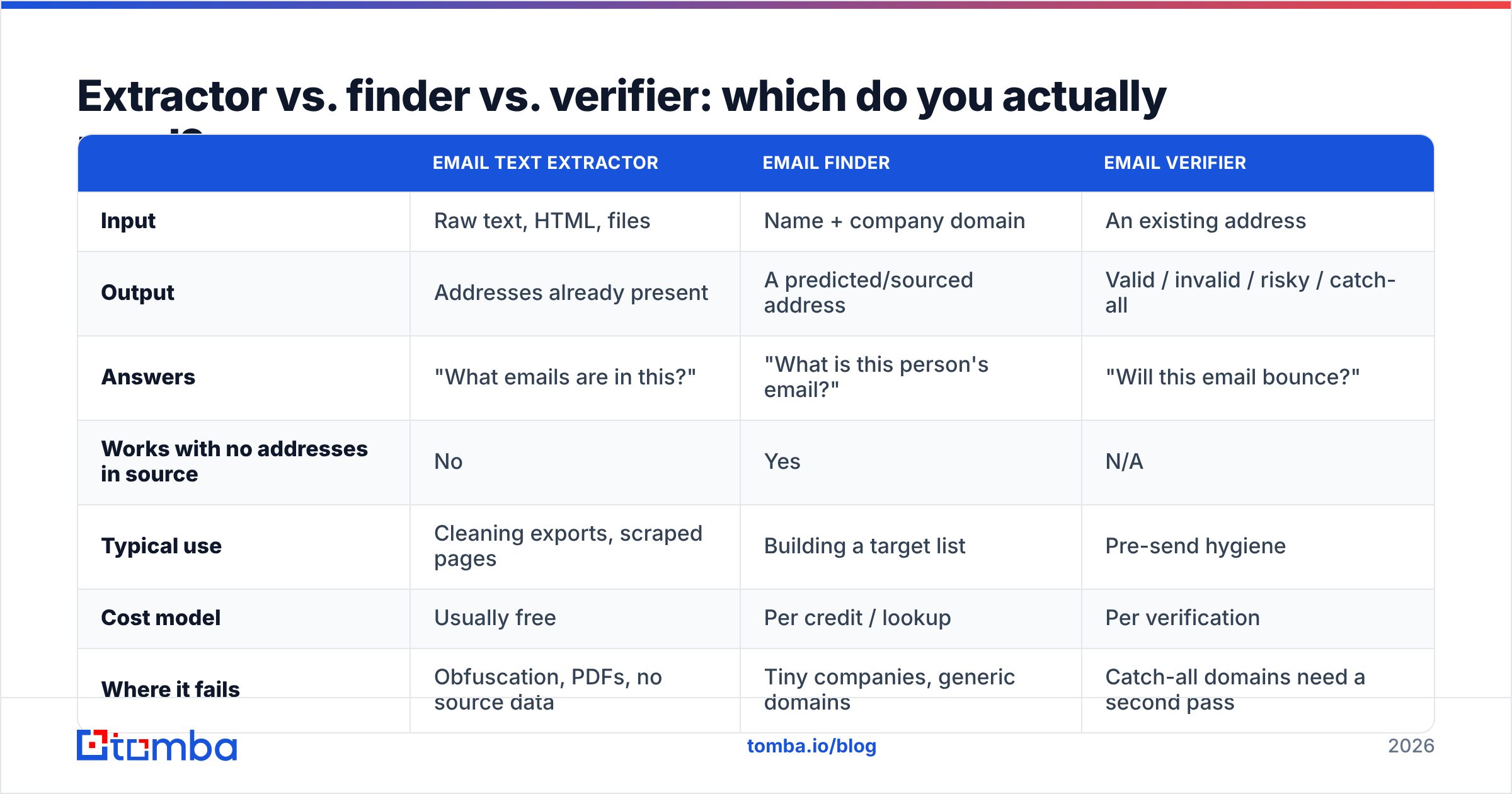
These three tools get treated as interchangeable and they solve completely different problems.
| Email text extractor | Email finder | Email verifier | |
|---|---|---|---|
| Input | Raw text, HTML, files | Name + company domain | An existing address |
| Output | Addresses already present | A predicted/sourced address | Valid / invalid / risky / catch-all |
| Answers | "What emails are in this?" | "What is this person's email?" | "Will this email bounce?" |
| Works with no addresses in source | No | Yes | N/A |
| Typical use | Cleaning exports, scraped pages | Building a target list | Pre-send hygiene |
| Cost model | Usually free | Per credit / lookup | Per verification |
| Where it fails | Obfuscation, PDFs, no source data | Tiny companies, generic domains | Catch-all domains need a second pass |
The honest workflow uses all three. Extract what exists, find what's missing, verify everything before it touches a sending tool. If you only budget for one, make it the verifier — bad data costs more than missing data.
How do the main extraction approaches compare?#
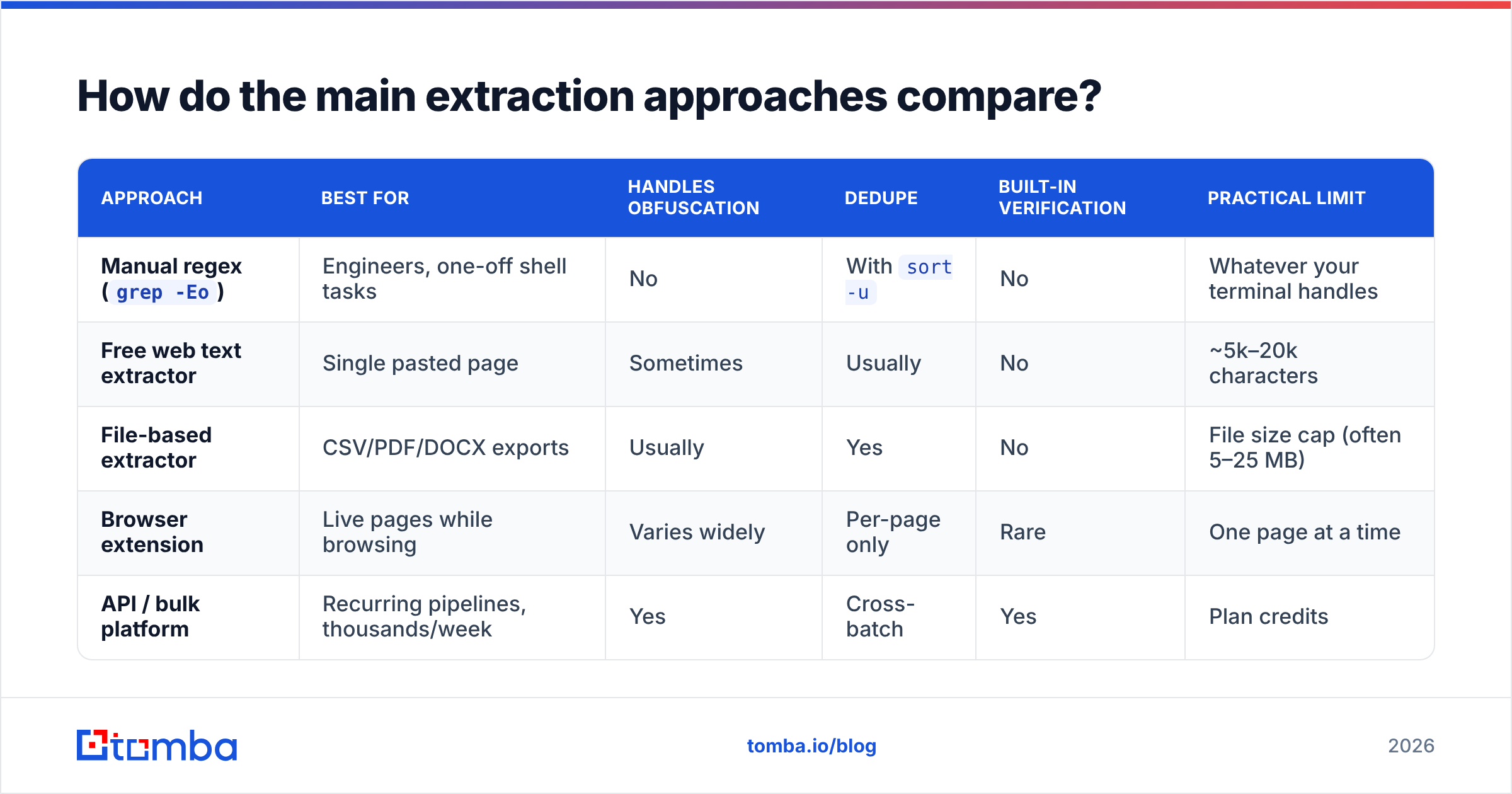
| Approach | Best for | Handles obfuscation | Dedupe | Built-in verification | Practical limit |
|---|---|---|---|---|---|
Manual regex (grep -Eo) |
Engineers, one-off shell tasks | No | With sort -u |
No | Whatever your terminal handles |
| Free web text extractor | Single pasted page | Sometimes | Usually | No | ~5k–20k characters |
| File-based extractor | CSV/PDF/DOCX exports | Usually | Yes | No | File size cap (often 5–25 MB) |
| Browser extension | Live pages while browsing | Varies widely | Per-page only | Rare | One page at a time |
| API / bulk platform | Recurring pipelines, thousands/week | Yes | Cross-batch | Yes | Plan credits |
For repeat work, the API tier is the only one that scales, because it's the only one where deduplication persists across runs. Extracting the same directory twice in a month with a browser tool gives you two overlapping lists and no memory of which addresses you already contacted.
Tomba's own utilities split along the same lines: the email extractor handles pasted text, extract emails from file handles uploads, and bulk verify picks up where both leave off. All three are usable on the free tier (25 searches/month) before you commit to anything; paid plans start at $49/month on Starter — see Tomba pricing for the full breakdown.

Why is verification the step everyone skips?#
Because extraction feels finished. You paste text, you get 800 addresses, the number looks great, and the temptation to load it straight into a sequencer is enormous.
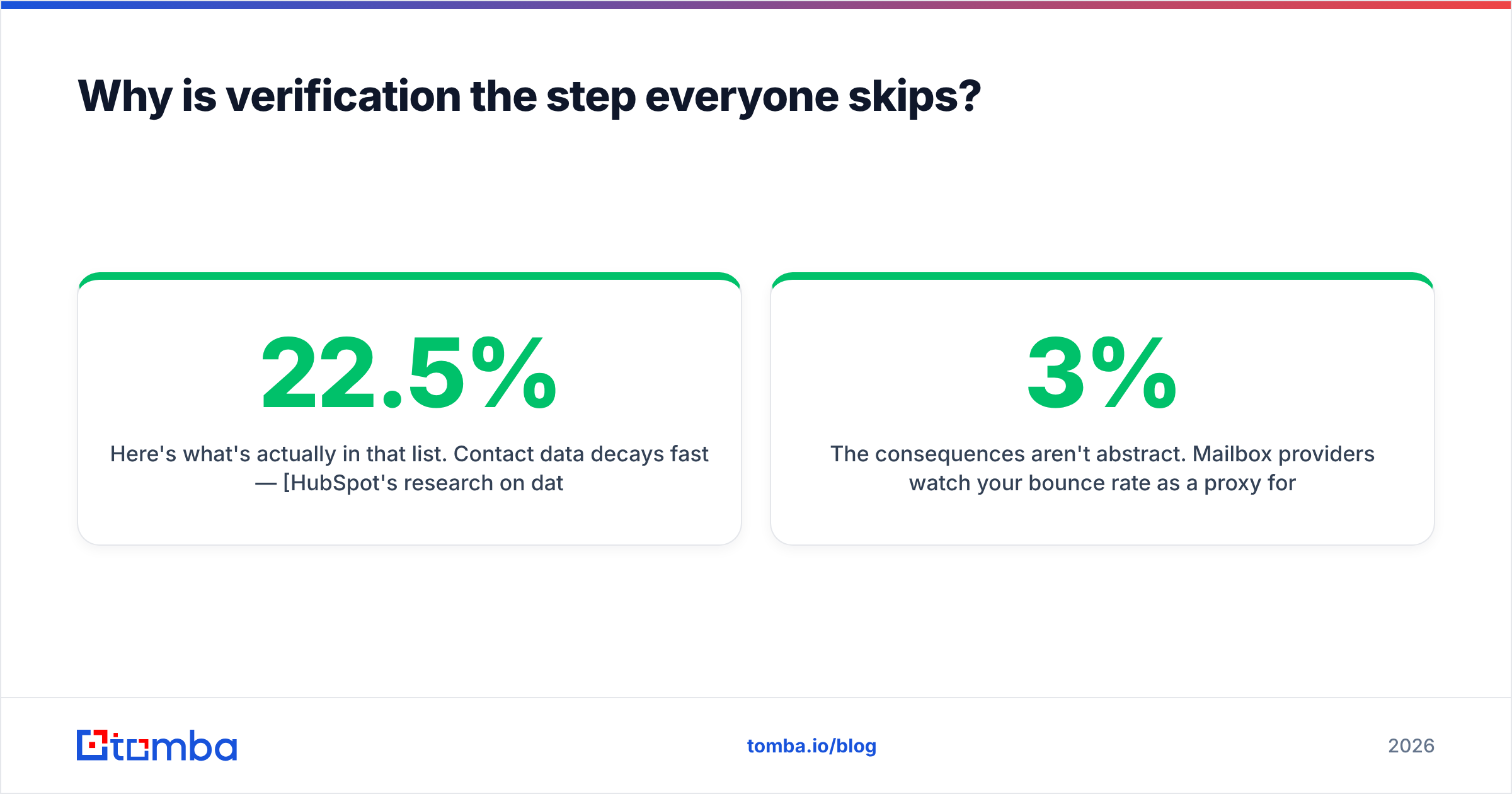
Here's what's actually in that list. Contact data decays fast — HubSpot's research on database decay puts the annual rot rate around 22.5%, driven by job changes, rebrands, and domain migrations. A page you scraped that was last updated 18 months ago is already a third dead. Add the mailbox-shaped-but-fake addresses (spam traps seeded into public pages exist precisely to catch scrapers) and the role accounts nobody reads, and a 40% junk rate on an unverified extracted list is a normal outcome, not a worst case.
The consequences aren't abstract. Mailbox providers watch your bounce rate as a proxy for whether you obtained your list legitimately. Push past roughly 2–3% hard bounces and throttling starts; push well past it and your sender reputation takes a hit that takes weeks of clean sending to repair. One unverified extraction dump can undo a quarter of careful warmup.
So run the list through an email verifier before it goes anywhere. Practically, you want four outcomes back:
- Valid — mailbox confirmed, send freely.
- Invalid — hard bounce guaranteed, delete.
- Risky / role-based —
info@,sales@,support@. Deliverable, low intent, high complaint rate. Segment them out of cold sequences. - Catch-all — the domain accepts everything, so SMTP can't confirm the specific mailbox. Route these through a catch-all verifier rather than guessing.
What does a clean extraction workflow look like end to end?#
Here's the sequence that survives contact with a real sending domain.
- Collect the source text. Copy the page, export the CSV, or grab the PDF. Keep a note of where each batch came from — provenance matters if anyone later asks why you emailed someone.
- Extract. Run it through a text or file extractor. Check the output count against a manual spot-check of the source; if the numbers are wildly off, your tool hit obfuscation or a character limit.
- Deduplicate across your whole database, not just this batch. Use a deduplication step against your existing CRM export. Emailing an active customer as a cold prospect is a worse outcome than a bounce.
- Filter role accounts and free domains. Decide deliberately whether
@gmail.comaddresses belong in a B2B sequence. Usually they don't. - Verify. Bulk-verify everything. Drop invalids, quarantine risky, handle catch-alls separately.
- Enrich. An address alone can't be personalized. Run data enrichment to attach name, title, company, and seniority so your first line isn't "Hi there."
- Suppress and log. Add unsubscribes and prior contacts to a permanent suppression list before import.
Steps 3–6 are where the actual value is. Step 2 — the extraction everyone searches for — takes about four seconds.
Is it legal to extract emails from text?#
Extraction itself is a parsing operation; the legal question is about what you do next, and it varies by jurisdiction.
Under GDPR, a business email that identifies a person (firstname.lastname@company.com) is personal data. Processing it requires a lawful basis — usually legitimate interest for B2B outreach — plus a genuine relevance test, a clear opt-out, and a privacy notice you can point to. Harvesting addresses indiscriminately from public pages and blasting them is precisely the pattern regulators treat as failing that test.
Under CAN-SPAM in the US, the rules are looser: no prior consent required, but you must not use deceptive headers or subject lines, must identify the message as an ad where applicable, must include a physical postal address, and must honor opt-outs within 10 business days. Notably, CAN-SPAM specifically calls out address harvesting as an aggravating factor that raises penalties.
Canada's CASL is stricter than both and generally requires express or implied consent up front.
Practical guardrails: extract from sources where the address was published for business contact, keep provenance records, honor unsubscribes permanently, and don't touch personal mailboxes. Peer reviews on G2's email verification category are a reasonable place to sanity-check which vendors take compliance seriously versus which sell scraped dumps. If you're operating in the EU at scale, get your own counsel — this is a summary, not legal advice.
What should you look for in an extractor in 2026?#
Six things, in priority order:
- De-obfuscation coverage. Test it on
name [at] domain [dot] combefore you trust it. If it fails, it's failing silently on every directory page you feed it. - File format support. CSV and TXT are table stakes. PDF, DOCX, and XLSX are where the real exports live.
- Cross-batch deduplication. Does it remember what you extracted last week?
- A verification path. Extraction and verification in one account beats stitching two vendors together with CSV exports.
- API access. If this becomes a weekly task, you want it in a script, not a browser tab. A documented email finder API removes the manual step entirely.
- A stated privacy posture. Where does your pasted text go, and how long is it kept?
Everything else — UI polish, export formats, integrations — is secondary. A tool that returns 300 addresses where a competitor returns 190 from the same page has already won on the only axis that matters.
Get from raw text to verified contacts in one pass#
If you're extracting addresses today and pasting the results into a spreadsheet tomorrow, you're doing the tedious 90% of the job by hand. Run your pasted text or uploaded file through Tomba's extractor, then push the output straight into the Tomba Email Finder to fill the gaps where a page listed a name but no address — and verify the whole set before a single message goes out. Start on the free tier at 25 searches a month, and move to Starter at $49/month when the volume justifies it. Your bounce rate will tell you it was worth it.
Related guides#
Ready to find emails that actually work?
Join 150,000+ professionals who stopped guessing and started sending. Free credits on signup — no credit card required.
Get the Tomba newsletter
Practical outbound tactics and product updates — once every two weeks.
About the author