Email Warm Up CSV Import: The Complete 2026 Setup Guide
A bad CSV can burn a brand-new domain in under a week. Here is the exact file format, cleaning sequence, and ramp schedule that keeps warm-up imports from turning into spam-folder problems.

TL;DR
- "Email warm up CSV import" means two different jobs: importing mailboxes you want warmed, and importing contacts you'll send to once warm-up finishes. Mixing them up is the #1 setup error.
- Warm-up tools almost never validate your file. They accept whatever you upload, and your domain absorbs the bounce damage.
- A safe import file needs 5-7 columns, UTF-8 encoding, RFC 4180 quoting, and zero duplicates across all connected mailboxes — not just within one file.
- Verify before you import, not after. A 6% invalid rate on a 5,000-row list is 300 hard bounces, which is enough to stall a fresh domain for weeks.
- Ramp volume from the CSV, not from the tool's default. Most defaults are tuned for aged domains with existing reply history.
What is an email warm up CSV import?#
An email warm up CSV import is the process of loading a spreadsheet of records into a warm-up or sending platform so it can either (a) start reputation-building traffic on the mailboxes listed, or (b) queue the contacts that mailbox will eventually email.
Think of it like stocking a new restaurant kitchen. The mailbox CSV is your list of stoves — the tool needs to know what equipment exists, who owns it, and how to log in. The contact CSV is your ingredient order — nobody checks whether the fish is fresh until it's on a plate in front of a customer. Warm-up platforms are the same: they trust the file.
Those are two separate uploads with two separate schemas, and the failure modes are nothing alike:
- Mailbox CSV (accounts to warm). Rows are inboxes. Bad data here means failed SMTP/OAuth connections, tools silently skipping accounts, and a warm-up you think is running but isn't.
- Contact CSV (prospects to email). Rows are people. Bad data here means hard bounces, spam traps, and a sender reputation hit that survives long after you delete the list.
- Blended CSV (both, in one file). Some sequencers accept a combined file with a
typecolumn. Convenient, and the fastest way to email your own warm-up pool by accident. - Re-import / append CSV. The one that creates duplicates. Most platforms deduplicate within a single upload, not across uploads.
Get the distinction right before you touch the upload button and roughly 80% of warm-up import problems disappear.
Why do email warm up CSV imports fail so often?#
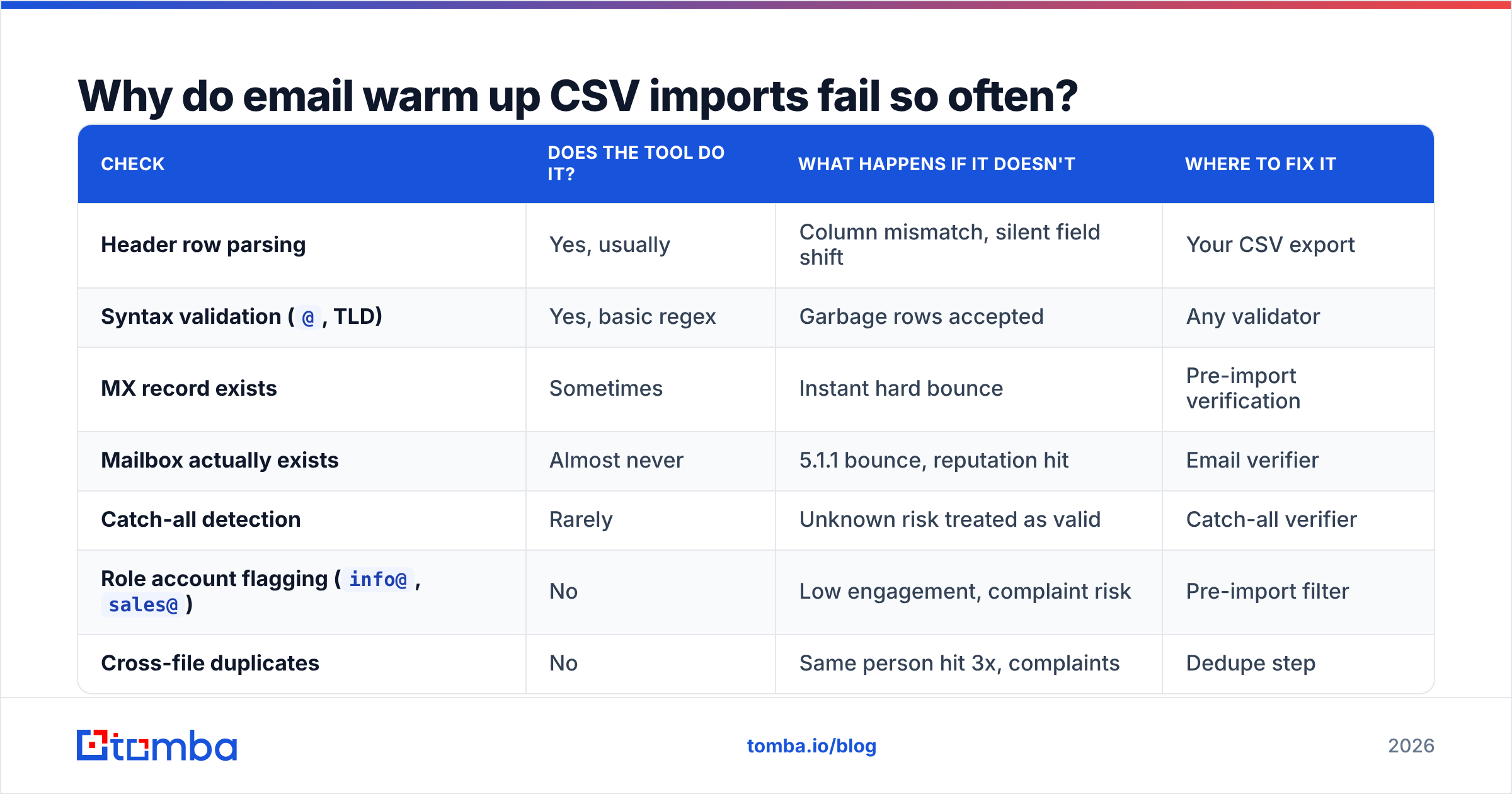
Because the validation you assume exists doesn't. Here's the honest breakdown of what warm-up tools check at import time versus what they don't.
| Check | Does the tool do it? | What happens if it doesn't | Where to fix it |
|---|---|---|---|
| Header row parsing | Yes, usually | Column mismatch, silent field shift | Your CSV export |
Syntax validation (@, TLD) |
Yes, basic regex | Garbage rows accepted | Any validator |
| MX record exists | Sometimes | Instant hard bounce | Pre-import verification |
| Mailbox actually exists | Almost never | 5.1.1 bounce, reputation hit | Email verifier |
| Catch-all detection | Rarely | Unknown risk treated as valid | Catch-all verifier |
Role account flagging (info@, sales@) |
No | Low engagement, complaint risk | Pre-import filter |
| Cross-file duplicates | No | Same person hit 3x, complaints | Dedupe step |
| Encoding / BOM handling | Inconsistent | é in every first name |
Save as UTF-8 |
That table is the whole argument for pre-import hygiene. Warm-up platforms optimise for onboarding speed, not for protecting you from your own file. Their incentive is to get you sending; your incentive is to still have a usable domain in month three.

Google's own bulk sender guidelines put the spam complaint threshold at 0.3% and explicitly call out list hygiene as a prerequisite. A CSV with 8% dead addresses will not clear that bar, no matter how good your warm-up tool is.
What columns does a warm-up CSV actually need?#
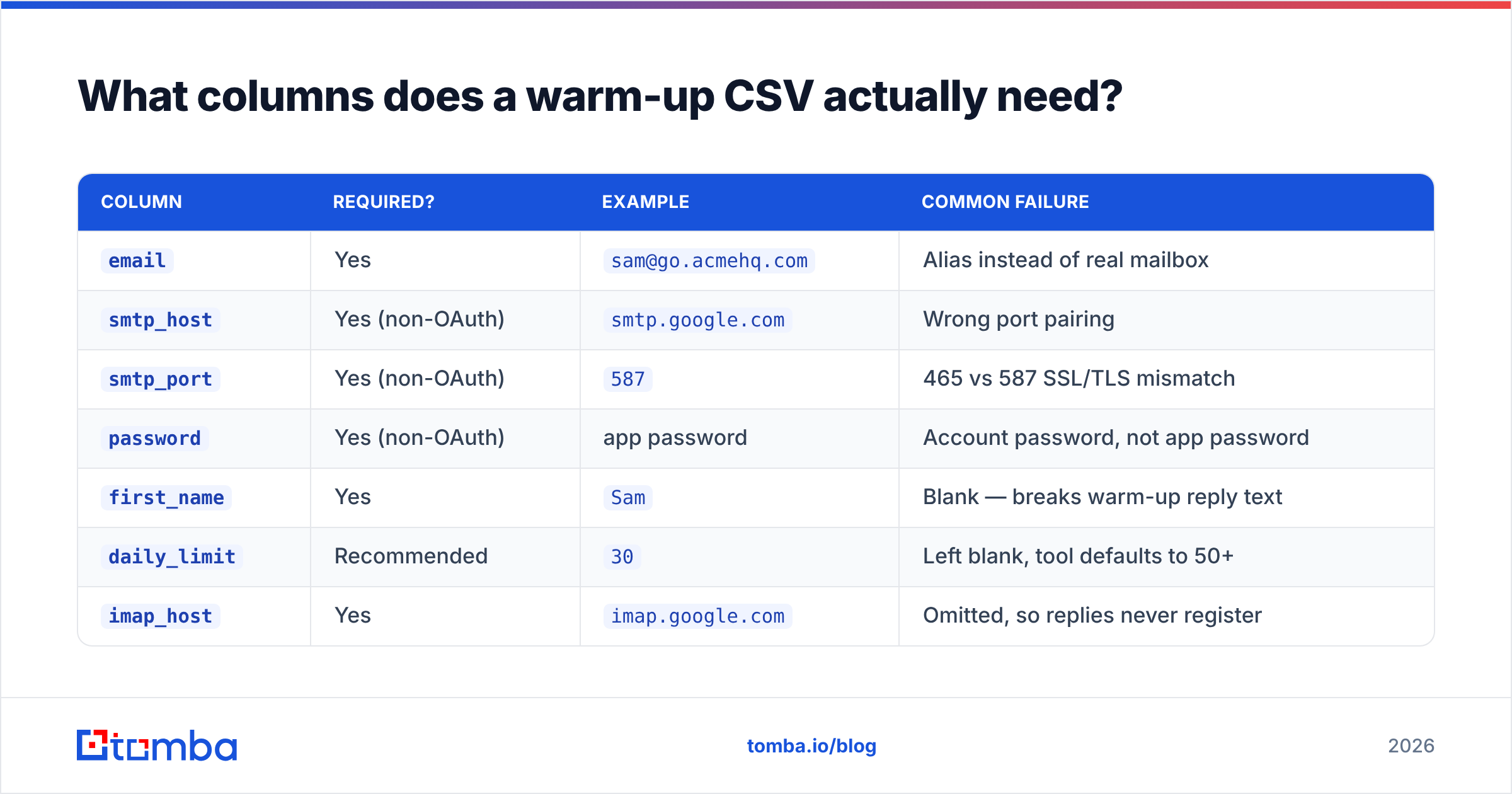
Fewer than you think for mailboxes, more than you think for contacts. Here's the minimum viable schema for each.
Mailbox CSV (accounts to warm):
| Column | Required? | Example | Common failure |
|---|---|---|---|
email |
Yes | sam@go.acmehq.com |
Alias instead of real mailbox |
smtp_host |
Yes (non-OAuth) | smtp.google.com |
Wrong port pairing |
smtp_port |
Yes (non-OAuth) | 587 |
465 vs 587 SSL/TLS mismatch |
password |
Yes (non-OAuth) | app password | Account password, not app password |
first_name |
Yes | Sam |
Blank — breaks warm-up reply text |
daily_limit |
Recommended | 30 |
Left blank, tool defaults to 50+ |
imap_host |
Yes | imap.google.com |
Omitted, so replies never register |
Contact CSV (prospects to email):
| Column | Required? | Example | Why it matters |
|---|---|---|---|
email |
Yes | dana@northwind.io |
The only non-negotiable field |
first_name |
Yes | Dana |
Personalisation token fallback |
company |
Yes | Northwind |
Second-line personalisation |
domain |
Recommended | northwind.io |
Enables domain-level throttling |
verification_status |
Recommended | valid |
Lets you filter at send time |
source |
Recommended | 2026-q1-webinar |
Traces bounce spikes to a source |
timezone |
Optional | America/Chicago |
Send-window accuracy |
Two formatting rules that break more imports than any schema mistake:
- Save as UTF-8 without BOM. Excel's default "CSV (Comma delimited)" on Windows writes a BOM that some parsers read as part of your first header name, so
emailbecomes\ufeffemailand the tool reports "no email column found." - Quote every field containing a comma. Company names like
Ramsey, Cole & Partnerswill shift every subsequent column if unquoted. The RFC 4180 rules exist for exactly this.
How do you clean a list before importing it?#
Run these six steps in order. Order matters — verifying before deduplicating means paying twice for the same address.
- Normalise casing and whitespace. Lowercase every email, trim leading/trailing spaces.
Dana@Northwind.ioanddana@northwind.ioare the same person to a mail server but two rows to your sequencer. - Deduplicate across every file you've ever imported. Not just this one. Keep a master suppression sheet. A remove duplicates pass on the combined set costs one minute and prevents the "why did this VP get three cold emails" conversation.
- Strip role and generic accounts.
info@,support@,admin@,noreply@,abuse@. These skew toward shared inboxes and complaint buttons. Filter by local-part pattern. - Verify what remains. SMTP-level checking that confirms the mailbox exists, not just that the syntax is legal. Push the results into a
verification_statuscolumn and keep onlyvalidfor the first 30 days of a new domain. - Segment catch-all domains separately. Catch-all servers accept everything, so a "valid" result there means very little. Isolate them into their own file and send to them after your domain has reply history. A catch-all finder will tag these for you.
- Cap per-domain frequency. No more than 2-3 contacts at the same company in the same week. Concentrated sends to one domain are one of the fastest ways to get filtered organisation-wide.
If your list came from a purchased or licensed source, run the same six steps regardless of what the vendor promises. Reputable providers like BookYourData publish accuracy guarantees and refresh cadences, and their data holds up well — but any list decays from the moment it's exported, and job changes don't wait for your import schedule.
How do the major warm-up tools handle CSV import?#
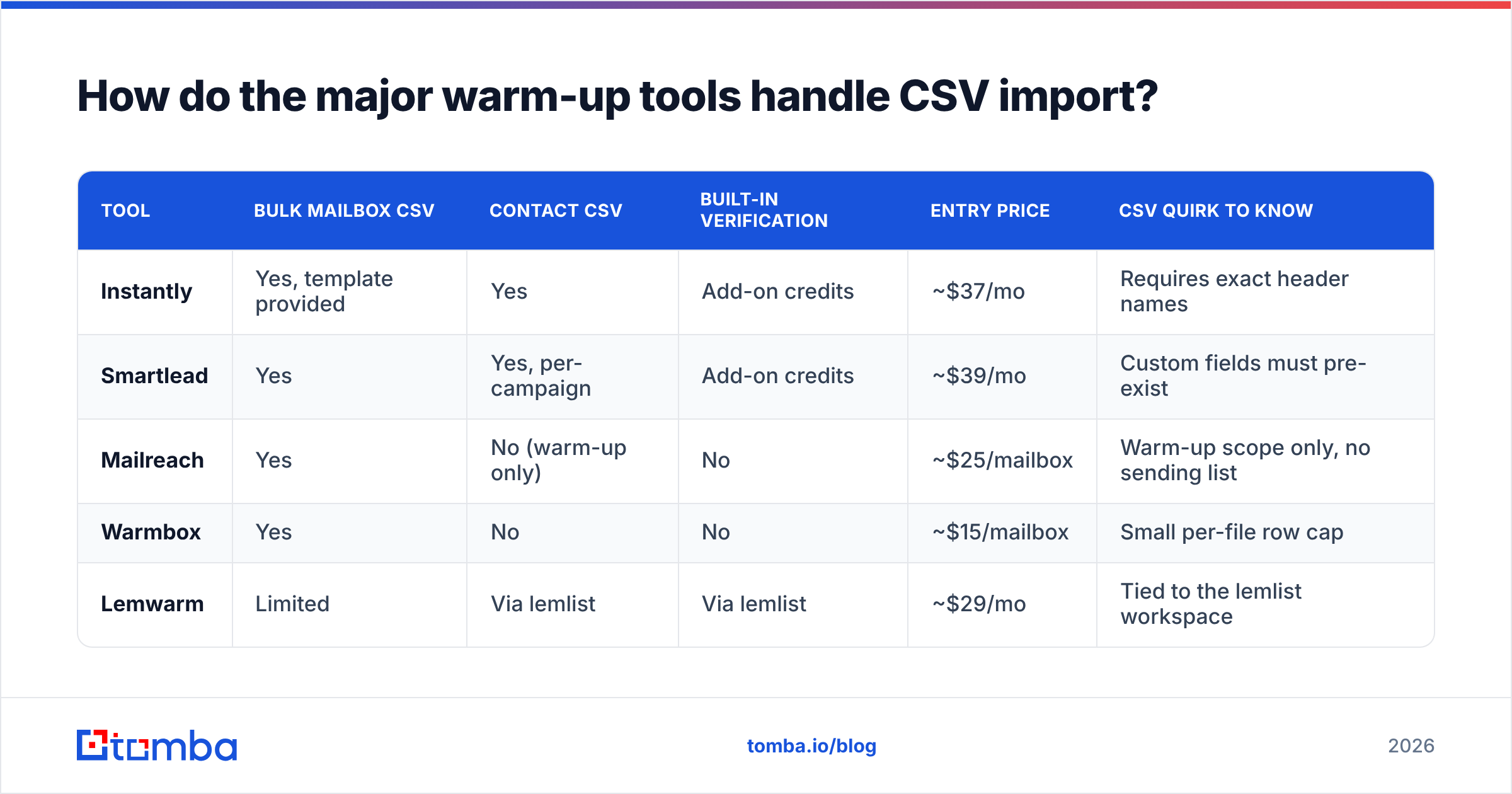
They differ more than the marketing pages suggest. This is the state of play in 2026 for the CSV-specific mechanics.
| Tool | Bulk mailbox CSV | Contact CSV | Built-in verification | Entry price | CSV quirk to know |
|---|---|---|---|---|---|
| Instantly | Yes, template provided | Yes | Add-on credits | ~$37/mo | Requires exact header names |
| Smartlead | Yes | Yes, per-campaign | Add-on credits | ~$39/mo | Custom fields must pre-exist |
| Mailreach | Yes | No (warm-up only) | No | ~$25/mailbox | Warm-up scope only, no sending list |
| Warmbox | Yes | No | No | ~$15/mailbox | Small per-file row cap |
| Lemwarm | Limited | Via lemlist | Via lemlist | ~$29/mo | Tied to the lemlist workspace |
Notice the pattern: pure warm-up tools import mailboxes and nothing else. Sequencers import both but treat verification as a paid add-on you have to remember to enable. Neither category solves the contact-quality problem for you, which is why the verification step belongs upstream in your own workflow rather than bolted onto whichever tool you happen to be using this quarter. Cross-check current feature sets on G2 before committing — this category ships changes monthly.

What ramp schedule should your CSV drive?#
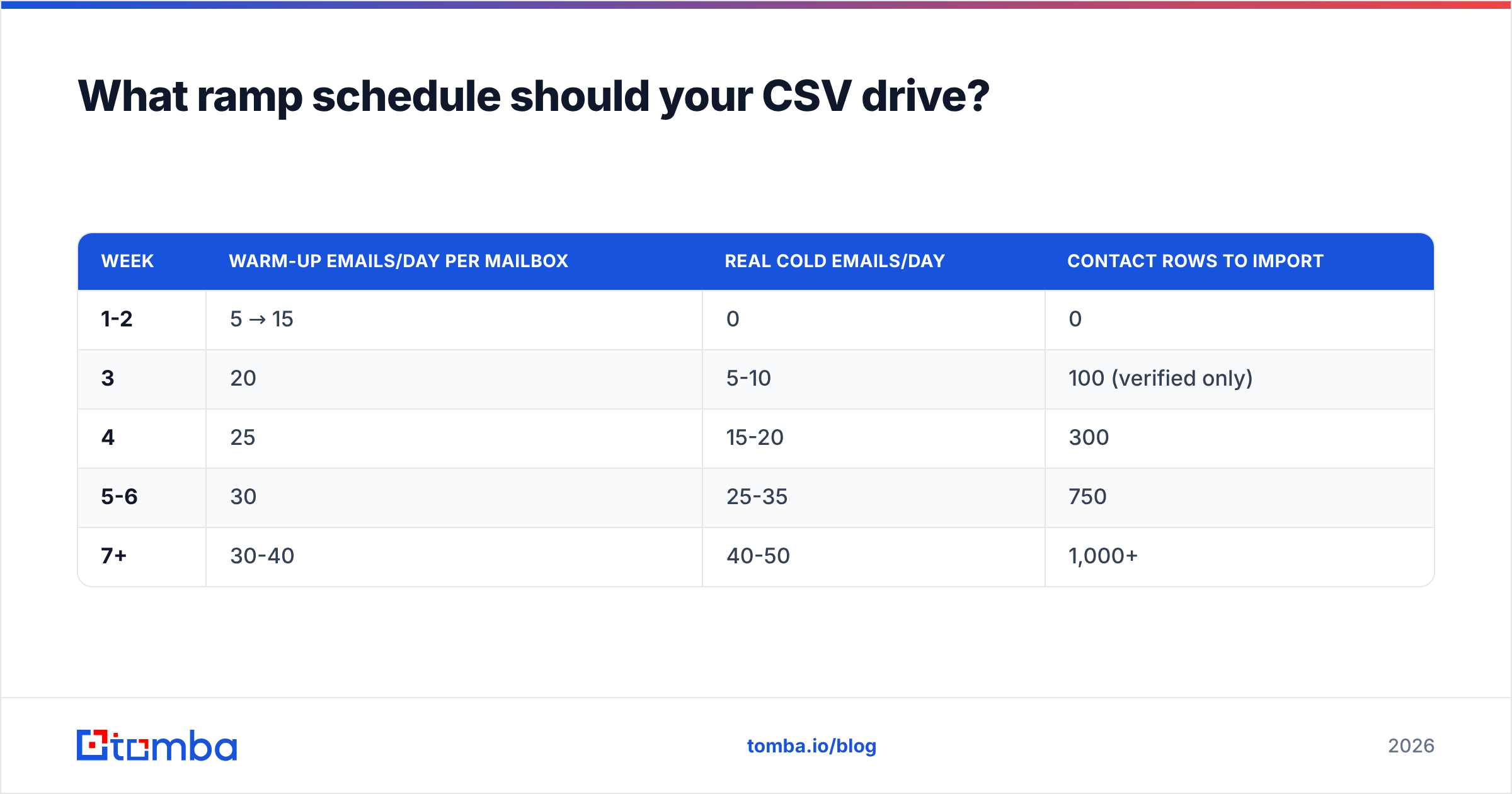
Your daily_limit column should override the tool's default. Warm-up platform defaults are calibrated for accounts with existing history; a domain registered last Tuesday needs a slower curve.
| Week | Warm-up emails/day per mailbox | Real cold emails/day | Contact rows to import |
|---|---|---|---|
| 1-2 | 5 → 15 | 0 | 0 |
| 3 | 20 | 5-10 | 100 (verified only) |
| 4 | 25 | 15-20 | 300 |
| 5-6 | 30 | 25-35 | 750 |
| 7+ | 30-40 | 40-50 | 1,000+ |
Two rules layered on top:
- Never import more contacts than the ramp can consume in 30 days. A 20,000-row file sitting in a tool decays at roughly 2-3% per month. By the time row 18,000 gets emailed, a chunk of it is dead.
- Re-verify anything older than 60 days before it sends. Export the pending segment, run it through a bulk verify pass, re-import the survivors.
You can model the curve for your specific mailbox count with a warmup calculator rather than guessing.
Is CSV import better than an API or CRM sync?#
CSV wins on control and loses on freshness. Pick based on how often your list changes.
| Dimension | CSV import | API push | CRM sync |
|---|---|---|---|
| Setup time | Minutes | Hours | Hours |
| Data freshness | Snapshot, decays | Real-time | Near real-time |
| Pre-send verification | Manual, before upload | Automatable in-pipeline | Depends on CRM fields |
| Dedupe across sources | Manual | Programmatic | Native (usually) |
| Best for | One-off campaigns, list tests | Scaled outbound, product-led motions | Existing pipeline nurture |
| Biggest risk | Stale rows, duplicate uploads | Silent failures without logging | Syncing unqualified records |
For most teams under 5,000 sends per month, CSV is the right call — it's auditable, and you can see exactly what you're about to send to. Once you're past that, an email verification API call in the pipeline removes the human step where stale files get uploaded by mistake.
What mistakes actually kill deliverability after import?#
Ranked by how much damage they do relative to how easy they are to avoid:
- Importing before authentication is live. SPF, DKIM, and DMARC records need to resolve before the first warm-up email leaves. Check with an SPF checker first.
- Warm-up mailboxes appearing in the contact CSV. Your sequencer emails your own warm-up pool, the pool auto-replies, and your engagement metrics become fiction.
- Uploading the same file twice after a failed import. Half-completed imports are common. Always check the row count in the platform before re-uploading.
- Ignoring the soft-bounce column. Soft bounces that repeat for 4+ days are effectively hard bounces. Suppress them.
- Treating
unknownverification results asvalid. They are not. Segment them, send later, or drop them. - One giant import across all mailboxes. Split contact files by sending mailbox so per-mailbox volume stays inside the ramp table above.
How do you confirm the import actually worked?#
Check three things within 24 hours, not three weeks:
- Row count parity. Rows in the file minus rows rejected should equal rows in the platform. A gap means silent filtering.
- Connection status per mailbox. Every account should show connected for both SMTP and IMAP. IMAP-only failures are the sneaky ones — warm-up sends fine but never registers replies, so reputation never builds.
- First-48-hour bounce rate. Under 2% is healthy. Between 2-5%, pause and re-verify. Above 5%, stop sending entirely and rebuild the list.
Monitor domain-level reputation independently through Google Postmaster Tools rather than relying only on your sending platform's dashboard, which reports what it can see rather than what Gmail thinks of you.
Start with a file worth importing#
Warm-up tools are good at what they do. None of them can repair a list that was wrong before upload — and the cost of that mistake lands on a domain you'll be using for years, not on the tool's monthly invoice.
Build the file correctly instead. Use the Tomba Email Finder to source verified, source-attributed addresses by domain or name, run the results through the built-in verifier, and export a CSV that's already deduplicated and status-tagged before it ever touches your warm-up platform. The free tier covers 25 searches a month if you want to test the workflow on a small segment first; paid plans start at $49/mo, with full details on Tomba pricing.
Clean file in, clean reputation out. Everything downstream is easier.
Related guides#
Ready to find emails that actually work?
Join 150,000+ professionals who stopped guessing and started sending. Free credits on signup — no credit card required.
Get the Tomba newsletter
Practical outbound tactics and product updates — once every two weeks.
About the author