FindThatLead vs Mystrika (2026): Which Tool Actually Wins?
FindThatLead finds the leads. Mystrika sends the emails. We break down pricing, data accuracy, deliverability, and which one you actually need in 2026 — plus where a dedicated email finder beats both.
FindThatLead vs Mystrika is the wrong fight to pick. One tool finds emails. The other sends them. Here is what each does well, what it costs, and which half of your stack it should own in 2026.
TL;DR
- FindThatLead and Mystrika are not rivals. FindThatLead sources leads — it finds emails by domain, LinkedIn, or location. Mystrika sends them, with warmup, unlimited inboxes, sequences, and a unibox.
- Already have a list and need volume? Mystrika's pricing is hard to beat. Need contacts? That is FindThatLead's job.
- Both are weak where they overlap. FindThatLead's sending features are thin. Mystrika's built-in lead data is not a real database.
- Verification is the weak point in both stacks. Neither tool replaces a dedicated verifier before you load a sequencer.
- The practical 2026 stack: a high-accuracy email finder and verifier (Tomba), plus a sending engine (Mystrika, Instantly, or Smartlead). All-in-one tools usually give you one good module and three mediocre ones.
FindThatLead vs Mystrika: what does each tool do?#
Start with the category confusion. It drives most bad purchases.
FindThatLead is a Spanish prospecting tool, launched in 2015. Its core job is simple: turn a name, domain, or LinkedIn profile into a work email. It ships a Chrome extension, a domain search, a "Lead Search" filter by role and location, and a prospector for local businesses. There is also a light email sender bolted on. The center of gravity is data.
Mystrika is a cold email platform. Its center of gravity is deliverability. You get AI warmup across a large network, unlimited inboxes on most tiers, inbox rotation, a unified inbox, A/Z testing, and sequence automation. It sells on volume economics: a lot of sending for a flat, low price.
Put plainly, FindThatLead fills the funnel and Mystrika pushes messages through it. Asking which is better is like asking whether a well beats a pipe. You need both. Buy each from whoever does that job well.
FindThatLead vs Mystrika: the head-to-head comparison#
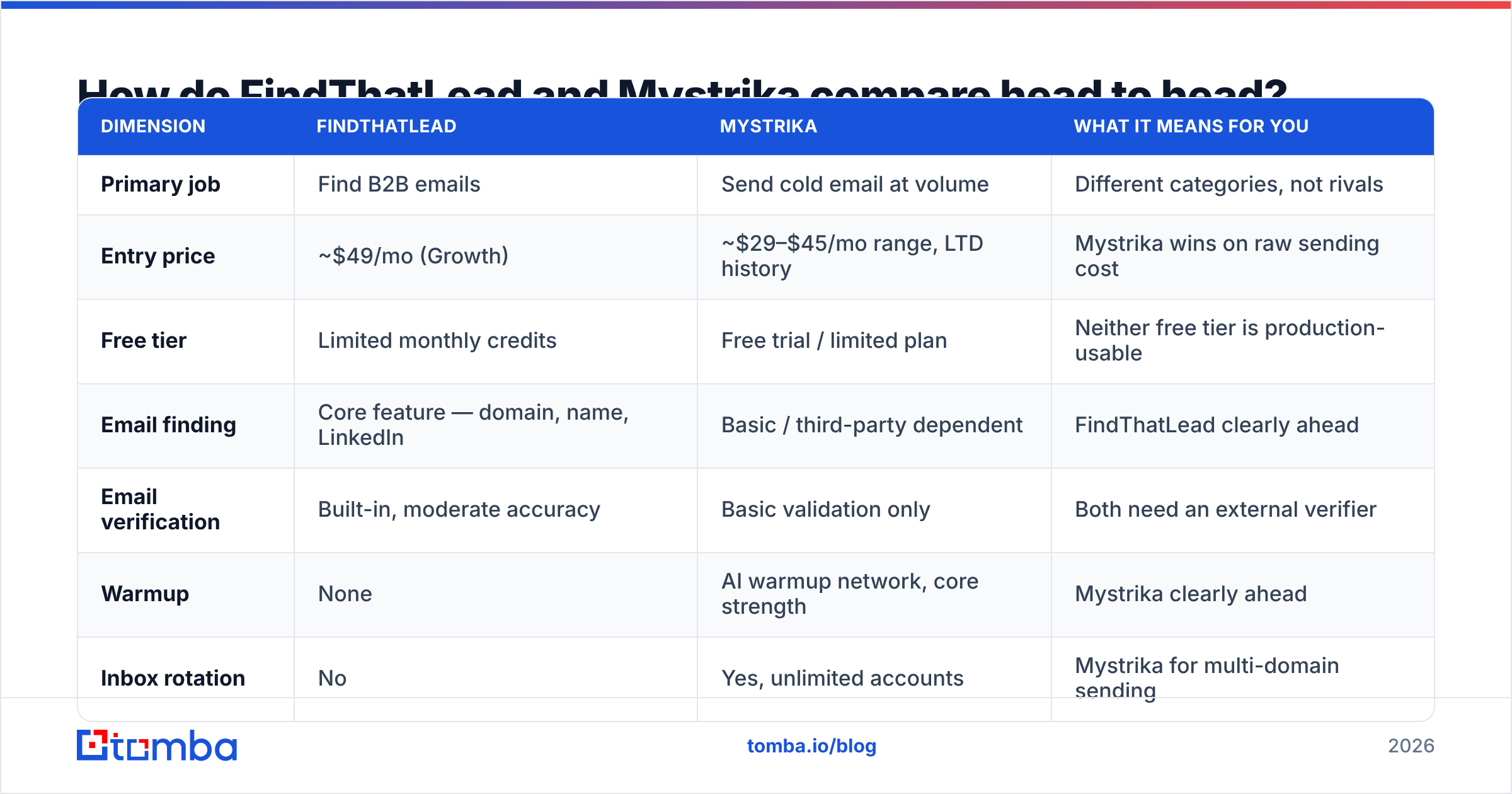
Here is the honest side-by-side. Prices reflect publicly listed plans as of early 2026. Both vendors have run AppSumo lifetime deals, so a grandfathered price may differ.
| Dimension | FindThatLead | Mystrika | What it means for you |
|---|---|---|---|
| Primary job | Find B2B emails | Send cold email at volume | Different categories, not rivals |
| Entry price | ~$49/mo (Growth) | ~$29–$45/mo range, LTD history | Mystrika wins on raw sending cost |
| Free tier | Limited monthly credits | Free trial / limited plan | Neither free tier is production-usable |
| Email finding | Core feature — domain, name, LinkedIn | Basic / third-party dependent | FindThatLead clearly ahead |
| Email verification | Built-in, moderate accuracy | Basic validation only | Both need an external verifier |
| Warmup | None | AI warmup network, core strength | Mystrika clearly ahead |
| Inbox rotation | No | Yes, unlimited accounts | Mystrika for multi-domain sending |
| Unified inbox | No | Yes | Mystrika for reply handling |
| Sequences | Basic campaigns | Full multi-step, A/Z testing | Mystrika ahead |
| CRM integrations | Zapier, HubSpot, Salesforce | Webhooks, Zapier | Comparable, both light |
| API | Yes, credit-metered | Limited | FindThatLead ahead for devs |
| Best for | Sourcing lists | Sending lists | Buy both, or replace the weak half |
The table exposes the real decision. You are not choosing one over the other. You are deciding which half of your stack each one owns — and whether that half is good enough to keep.
Is FindThatLead's data accurate enough in 2026?#
Short answer: fine for common patterns, shaky on everything else.
FindThatLead's finder works like most pattern-based finders. It reads known addresses on a domain, infers the format, builds a candidate, then tries SMTP validation. That works well on large public companies with a predictable first.last@ format. It breaks down in three cases:
- Catch-all domains. Some mail servers accept every address. SMTP validation then returns "valid" for
asdfgh@company.comtoo. Any finder that reports these as verified is padding its own hit rate. Use a dedicated catch-all verifier to tell a real mailbox from a server that says yes to everything. - Small and non-US companies. Fewer public data points mean fewer patterns to learn from. Hit rates drop sharply on sub-50-employee European and LATAM companies. That is true of every finder in this category.
- Role changes. The right pattern for someone who left six months ago still produces a deliverable email. It just reaches nobody. This quietly kills reply rates, and no pattern engine catches it.
This is where a dedicated tool earns its keep. Tomba's email finder pairs pattern inference with multi-source cross-checking. It returns a confidence score instead of a plain valid/invalid, so you set your own threshold. Want to see the method rather than a marketing claim? The data sources page spells it out.

The practical test is simple. Take 100 contacts you know are real: past customers, colleagues at other companies, people who have replied to you. Run them through any finder. Measure the hit rate and the false-positive rate separately. A tool that finds 80% but is wrong on a quarter of them is worse than one that finds 60% clean.
Does Mystrika actually solve deliverability?#
Partly. Mystrika solves sending infrastructure. It does not solve list quality. And list quality is what most cold email failures come down to.
What Mystrika genuinely does well:
- Warmup at scale. The warmup network is large and runs on every connected inbox. Spinning up 15 secondary domains? That is real, measurable value.
- Unlimited inboxes. Most rivals charge per inbox. Here, adding a domain costs you the domain, not a plan upgrade.
- Rotation. Spreading volume across many inboxes keeps daily counts inside safe limits. That is the biggest single lever on inbox placement.
- A/Z testing. More than two variants per step helps once you have the volume to reach significance.
What it does not do:
- It cannot fix bounces caused by unverified addresses. Google and Microsoft read a high hard-bounce rate as a spam signal, no matter how warm the inbox is. Past roughly 3–5%, warmup becomes damage control.
- It does not authenticate your domains. SPF, DKIM, and DMARC are still your job. Run an SPF checker on every sending domain before the first campaign. Re-run it whenever you switch providers.
- It does not check your copy for spam triggers. Run drafts through a spam checker before launch.
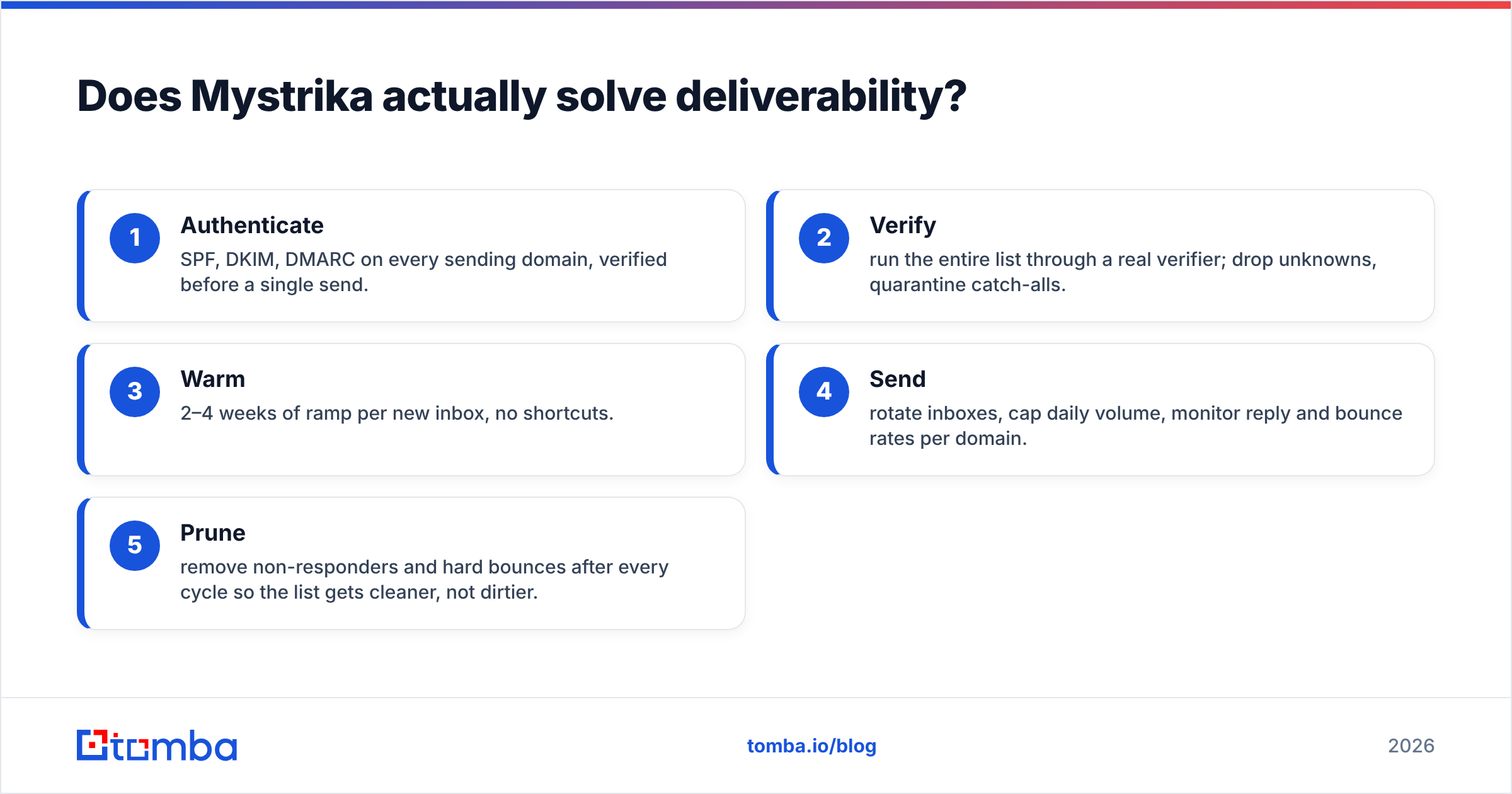
Real email deliverability follows five steps. Mystrika only owns step four:
- Authenticate — SPF, DKIM, and DMARC on every sending domain, checked before a single send.
- Verify — run the whole list through a real verifier. Drop unknowns. Quarantine catch-alls.
- Warm — two to four weeks of ramp per new inbox. No shortcuts.
- Send — rotate inboxes, cap daily volume, and watch reply and bounce rates per domain.
- Prune — remove non-responders and hard bounces after every cycle, so the list gets cleaner instead of dirtier.
Skip step two and the other four are wasted effort. That is why teams on Mystrika still buy a verifier. It is also why an all-in-one that does step two badly is a false economy.

Which one should you buy for your use case?#
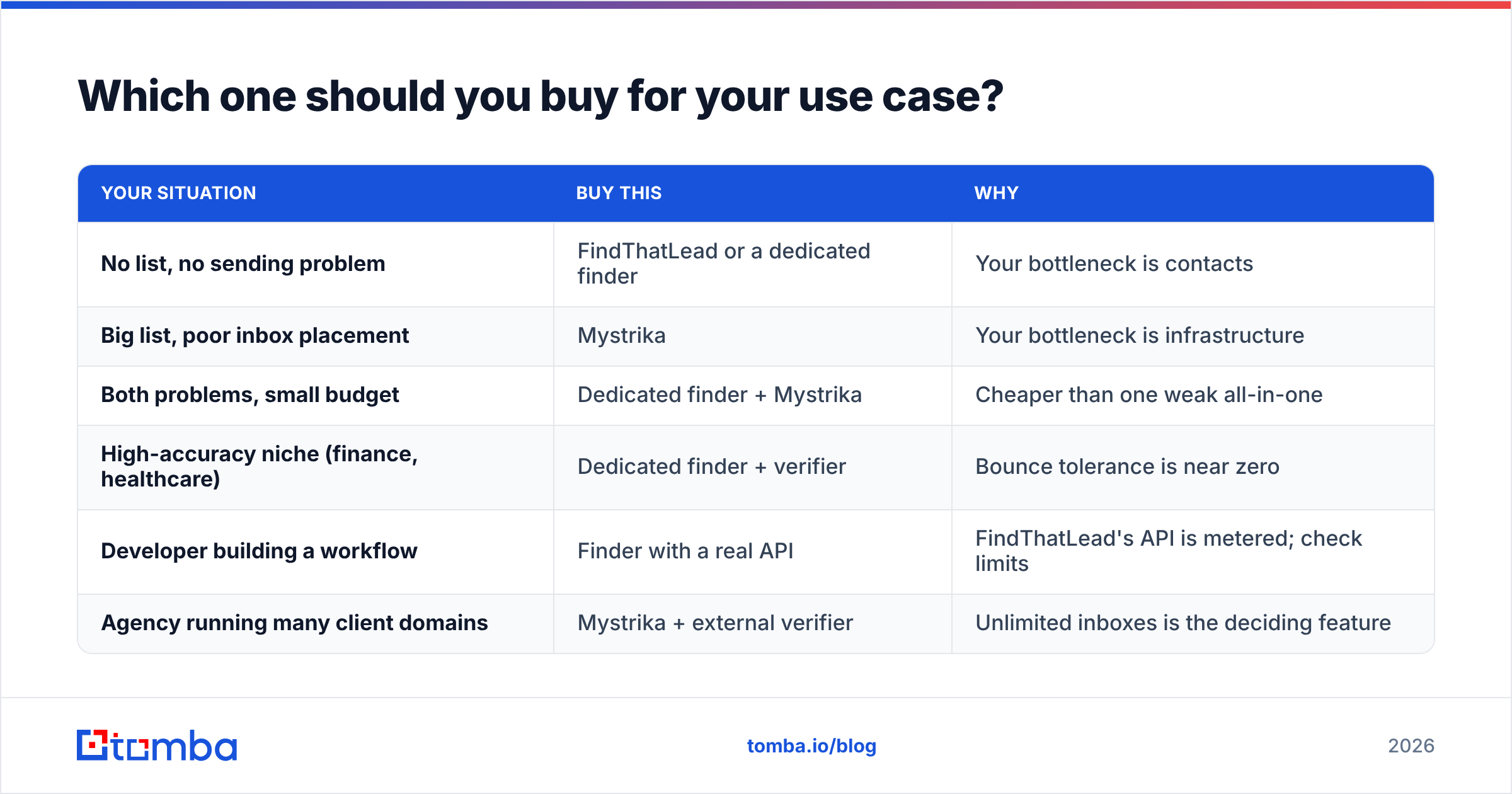
Match the tool to the bottleneck, not to the feature list.
| Your situation | Buy this | Why |
|---|---|---|
| No list, no sending problem | FindThatLead or a dedicated finder | Your bottleneck is contacts |
| Big list, poor inbox placement | Mystrika | Your bottleneck is infrastructure |
| Both problems, small budget | Dedicated finder + Mystrika | Cheaper than one weak all-in-one |
| High-accuracy niche (finance, healthcare) | Dedicated finder + verifier | Bounce tolerance is near zero |
| Developer building a workflow | Finder with a real API | FindThatLead's API is metered; check limits |
| Agency running many client domains | Mystrika + external verifier | Unlimited inboxes is the deciding feature |
One note on all-in-one platforms. Apollo, Instantly, and Saleshandy also bundle data and sending. The bundle is convenient, and it is almost always uneven. Vendors are good at one module and adequate at the rest.
If you are weighing those, the Apollo alternative and Instantly alternative breakdowns cover the same trade-off in more depth.
There is also a third path: buy verified contacts outright instead of searching for them. BookYourData sells curated B2B lists per contact, with verification built into the purchase. It suits teams that would rather buy one clean list than run a finder all month.
What does the full stack cost in 2026?#
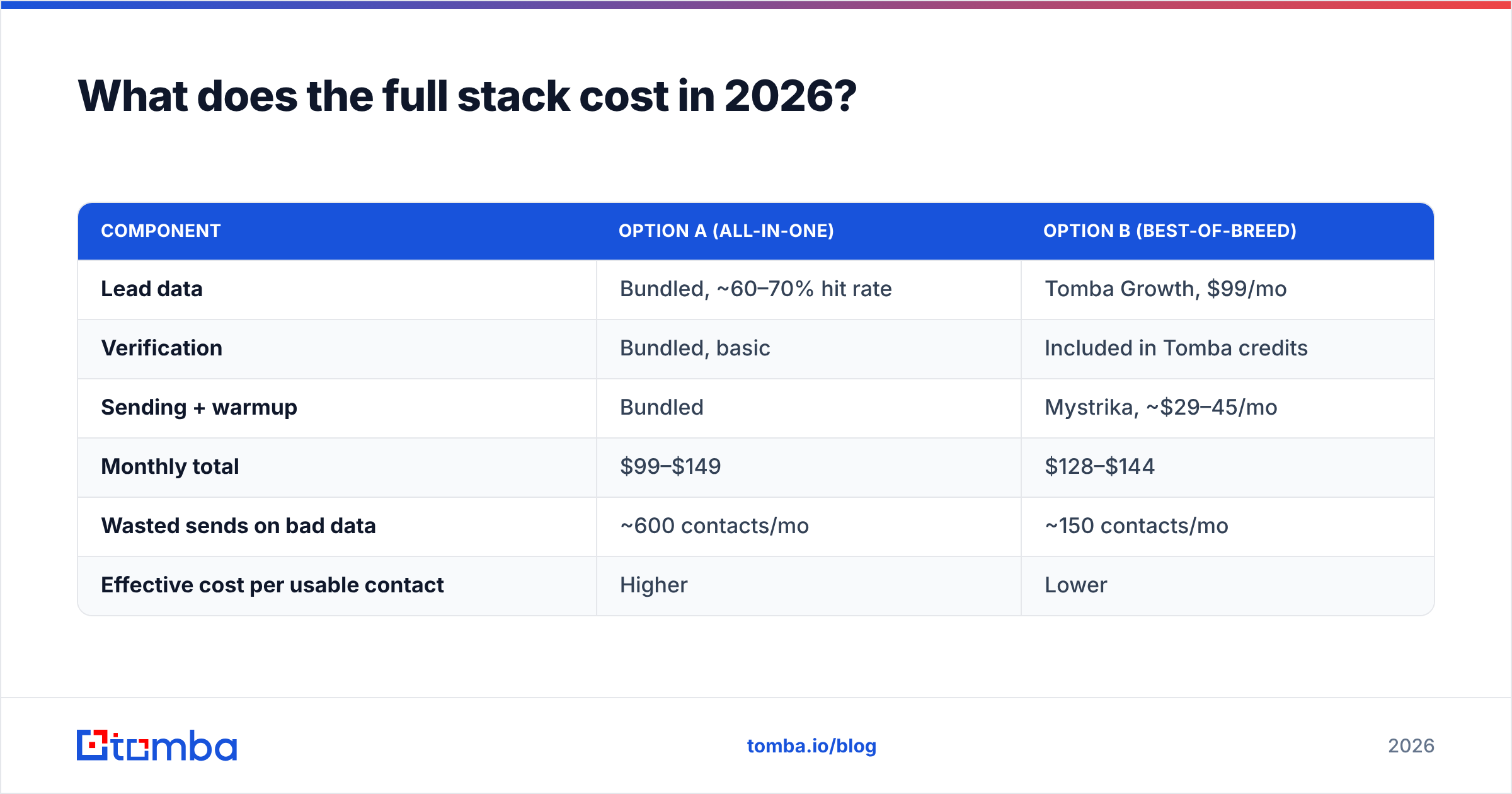
Run the numbers on a realistic mid-market setup: 2,000 new contacts per month, 5 sending domains, 15 inboxes.
| Component | Option A (all-in-one) | Option B (best-of-breed) |
|---|---|---|
| Lead data | Bundled, ~60–70% hit rate | Tomba Growth, $99/mo |
| Verification | Bundled, basic | Included in Tomba credits |
| Sending + warmup | Bundled | Mystrika, ~$29–45/mo |
| Monthly total | $99–$149 | $128–$144 |
| Wasted sends on bad data | ~600 contacts/mo | ~150 contacts/mo |
| Effective cost per usable contact | Higher | Lower |
The totals are close. The difference is what you get for the money. Best-of-breed buys a materially cleaner list at about the same spend. It also lets you swap either half without re-platforming.
Tomba's pricing is straightforward. Free tier: 25 searches a month. Starter: $49/mo. Growth: $99/mo. Pro: $249/mo. Enterprise is custom. Credits cover finding and verification from one pool. That matters, because a split-vendor setup makes you pay twice for the same contact.
How do you migrate without breaking your sending?#
If you are switching either half of the stack, sequence the change. Never send from an unwarmed inbox against an unverified list.
- Export everything first. Pull your contacts, campaign copy, and reply history out before you cancel anything. Both platforms let you export. Do it while the account is still active.
- Re-verify the whole list. Do not trust the old tool's status. Run it through an email verifier and split the results into deliverable, catch-all, and invalid. In week one, send only to deliverable.
- Warm new inboxes before you move volume. Two to four weeks, minimum. Keep existing campaigns on the old setup during that window.
- Migrate one campaign at a time. Move your lowest-value sequence first. Watch bounce rate, reply rate, and spam complaints for a full week before moving the next.
- Deduplicate on the way in. Overlapping lists from two vendors double-send to the same person. That is the fastest way to get marked as spam. A remove duplicates pass takes two minutes.
- Keep a rollback path. Do not cancel the old subscription until you have 30 days of clean sending on the new one.
The most common migration failure is skipping step two. The old tool said the emails were valid, so nobody re-checks. But verification decays. Roughly 2–3% of B2B addresses go stale every month as people change jobs. A list verified in November is measurably worse by February. G2's category data has third-party reviews if you want them. Note that neither vendor sells itself on verification depth.
What about the features nobody advertises?#
Four things decide day-to-day satisfaction. None of them show up on a pricing page.
Support responsiveness. Mystrika's community support is fast for the price — an active Facebook group and founder-level replies. FindThatLead's is standard email ticketing. If you run client campaigns on deadlines, this beats any feature checkbox.
Credit rollover and overage. FindThatLead credits reset monthly. Check whether unused credits roll over on your plan. Check what happens when you go over, too. Some tools hard-stop mid-export, which corrupts a workflow. Test it with a small overage before you depend on it.
Export fidelity. Some tools export a CSV that drops the confidence score, the source, or the verification date. If you feed a CRM or a scoring model, that metadata is the whole point. Check the export schema during the trial, not after you have 10,000 rows.
Bulk throughput. Finding 50 emails by hand is nothing like processing 20,000. If your workflow is list-based, test the bulk email finder path directly. Look at processing time, how partial batches fail, and whether you get charged for rows that returned nothing.
The verdict: FindThatLead vs Mystrika#
Neither wins, because they answer different questions. Here is the recommendation in plain terms.
Buy Mystrika if your problem is sending. The pricing is aggressive, the warmup network is real, and unlimited inboxes at that price is a genuinely good deal for agencies and high-volume teams. Pair it with an external verifier and you have a strong sending layer.
Skip FindThatLead as your primary data source if accuracy matters. It works, and it is fine for casual prospecting on well-known domains. But the finder category has moved on since 2015. The tools that now lead on hit rate do multi-source verification and return confidence scores, not binary answers. If you pay for contacts, pay for contacts that arrive clean.
The stack most teams should run in 2026: a dedicated finder and verifier for the data layer, a dedicated sending platform for delivery, and a CRM both write into. Roughly the same monthly spend as an all-in-one, with materially better output. And you can replace either half the day it stops performing.
Ready to fix the data half of your stack? Tomba's Email Finder finds professional email addresses by domain, name, or company. Every result comes with SMTP verification, catch-all detection, and a confidence score, so you know what you are sending to before you send it.
Start free with 25 searches a month, no card required. Run your existing list through it side by side with whatever you use now. If the hit rate does not beat what you have, you have lost ten minutes.
Related guides#
Ready to find emails that actually work?
Join 150,000+ professionals who stopped guessing and started sending. Free credits on signup — no credit card required.
Get the Tomba newsletter
Practical outbound tactics and product updates — once every two weeks.
About the author