Gmail Mass Email in 2026: Limits, Methods, and Safer Ways to Send
Gmail was never built for bulk sending, but most teams try anyway. Here are the real 2026 daily limits, the four ways to send a mass email from Gmail, and the point where staying on Gmail starts costing you your domain.
TL;DR
- Free Gmail caps you at roughly 500 recipients per rolling 24 hours. Google Workspace raises that to 2,000 external recipients per day, and Gmail's built-in multi-send tops out around 1,500 recipients per day on eligible plans.
- BCC blasts are the worst option available to you: no personalization, no unsubscribe link, no per-recipient tracking, and a fast track to the spam folder.
- Google's bulk sender rules require SPF, DKIM, DMARC, one-click unsubscribe, and a spam complaint rate under 0.3% for anyone sending 5,000+ messages a day to Gmail addresses.
- List quality beats send volume. A 12% bounce rate on 500 sends damages your domain more than 5,000 clean sends ever would.
- Gmail is fine up to a few hundred well-targeted, verified contacts per day. Past that, move to a dedicated sending platform on a separate domain.
What counts as a Gmail mass email?#
A Gmail mass email is any single campaign sent from a Gmail or Google Workspace account to more than a handful of recipients at once — a product announcement to 300 customers, a cold outreach sequence to 200 prospects, an event invite to your whole user list.
Google does not treat all of those the same way. Gmail is a personal and business correspondence tool. Its infrastructure, its rate limits, and its abuse filters are all tuned for one-to-one conversation. The moment your sending pattern looks one-to-many, you enter a different risk category, whether you meant to or not.
That distinction matters because the punishment for getting it wrong is not a bounced email. It is a temporary account lock, a degraded sender reputation, and in the worst case a domain that lands in spam for months afterward — including your normal one-to-one email.
What are Gmail's actual sending limits in 2026?#
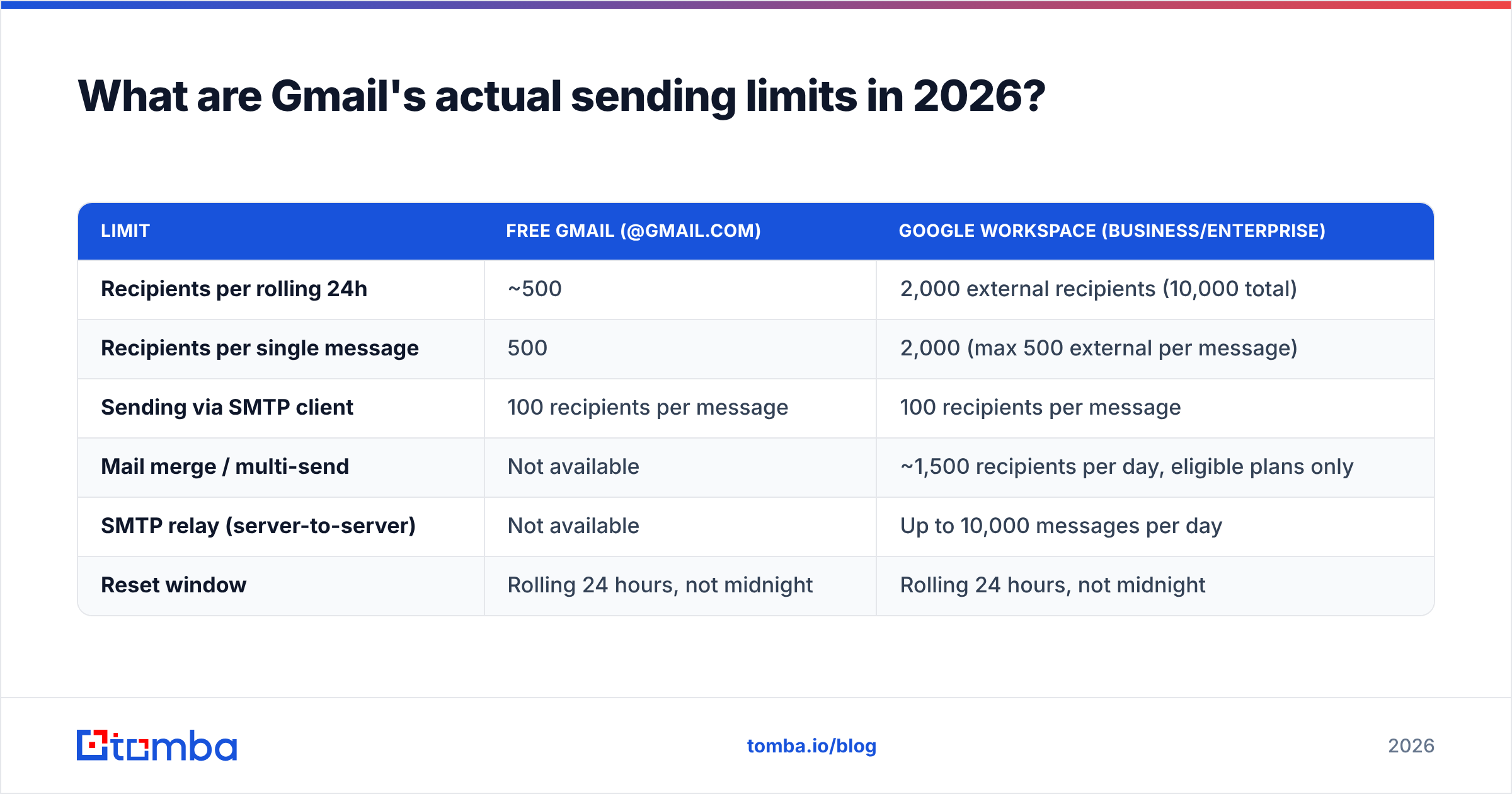
Google publishes these numbers and adjusts them occasionally, so treat the table below as the working baseline and confirm against Google's official Workspace sending limits page before you plan a large send.
| Limit | Free Gmail (@gmail.com) | Google Workspace (Business/Enterprise) |
|---|---|---|
| Recipients per rolling 24h | ~500 | 2,000 external recipients (10,000 total) |
| Recipients per single message | 500 | 2,000 (max 500 external per message) |
| Sending via SMTP client | 100 recipients per message | 100 recipients per message |
| Mail merge / multi-send | Not available | ~1,500 recipients per day, eligible plans only |
| SMTP relay (server-to-server) | Not available | Up to 10,000 messages per day |
| Reset window | Rolling 24 hours, not midnight | Rolling 24 hours, not midnight |
Three details trip people up constantly:
The window is rolling, not calendar-based. If you send 480 emails at 4pm Tuesday, you do not get a fresh 500 at midnight. You get capacity back gradually starting 4pm Wednesday.
A recipient is a recipient. Ten emails to 50 people each equals 500 recipients, same as one email to 500. CC and BCC addresses count individually.
Hitting the cap does not produce a polite warning. Gmail returns a temporary block on outbound sending — typically 24 hours, sometimes longer if the pattern repeats — and during that window you cannot send anything, including the customer reply you actually needed to get out.
How do you send a mass email in Gmail?#
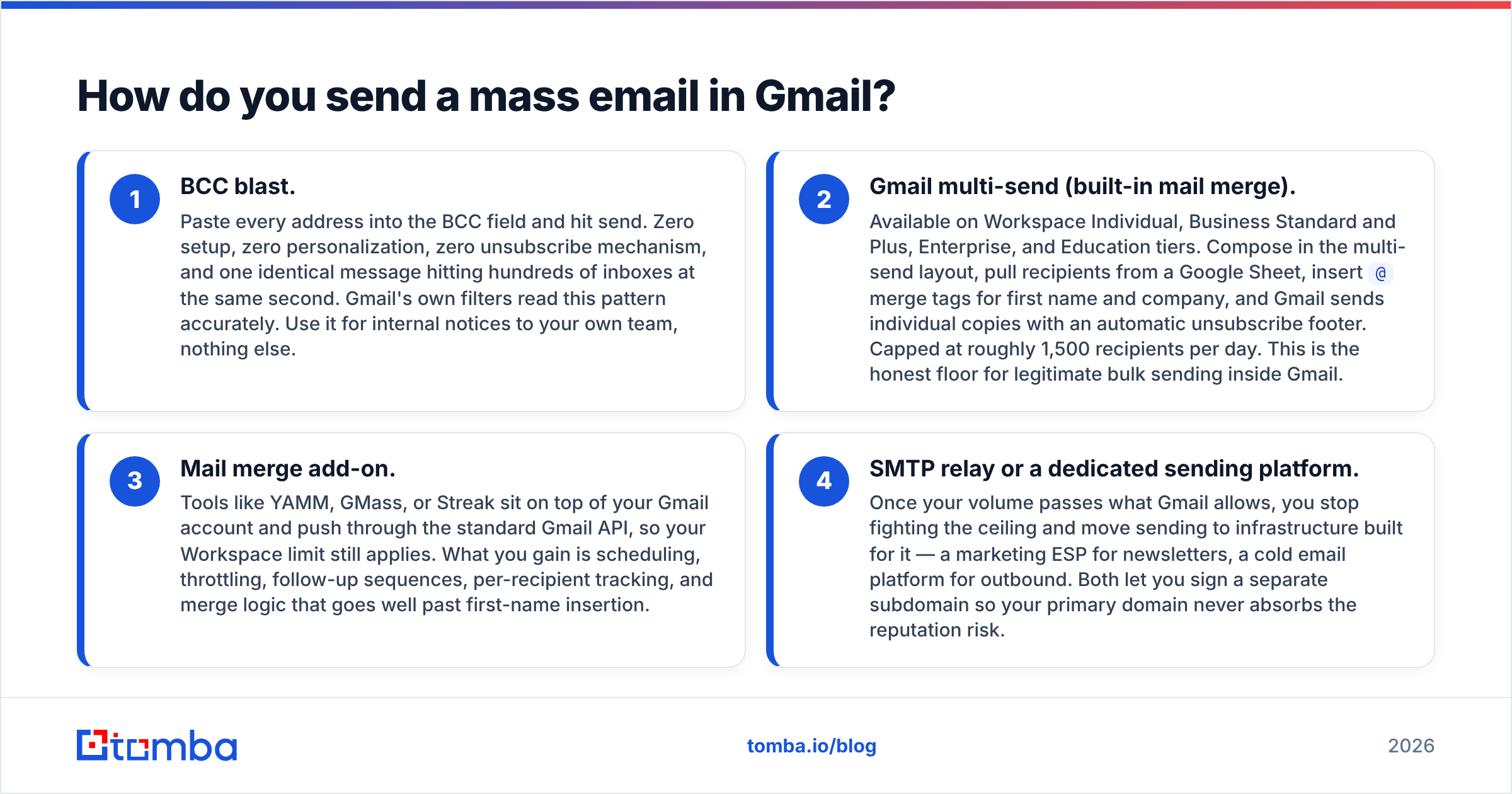
There are four realistic paths, in ascending order of how much they respect the recipient.
BCC blast. Paste every address into the BCC field and hit send. Zero setup, zero personalization, zero unsubscribe mechanism, and one identical message hitting hundreds of inboxes at the same second. Gmail's own filters read this pattern accurately. Use it for internal notices to your own team, nothing else.
Gmail multi-send (built-in mail merge). Available on Workspace Individual, Business Standard and Plus, Enterprise, and Education tiers. Compose in the multi-send layout, pull recipients from a Google Sheet, insert
@merge tags for first name and company, and Gmail sends individual copies with an automatic unsubscribe footer. Capped at roughly 1,500 recipients per day. This is the honest floor for legitimate bulk sending inside Gmail.Mail merge add-on. Tools like YAMM, GMass, or Streak sit on top of your Gmail account and push through the standard Gmail API, so your Workspace limit still applies. What you gain is scheduling, throttling, follow-up sequences, per-recipient tracking, and merge logic that goes well past first-name insertion.
SMTP relay or a dedicated sending platform. Once your volume passes what Gmail allows, you stop fighting the ceiling and move sending to infrastructure built for it — a marketing ESP for newsletters, a cold email platform for outbound. Both let you sign a separate subdomain so your primary domain never absorbs the reputation risk.

Which sending method should you actually use?#
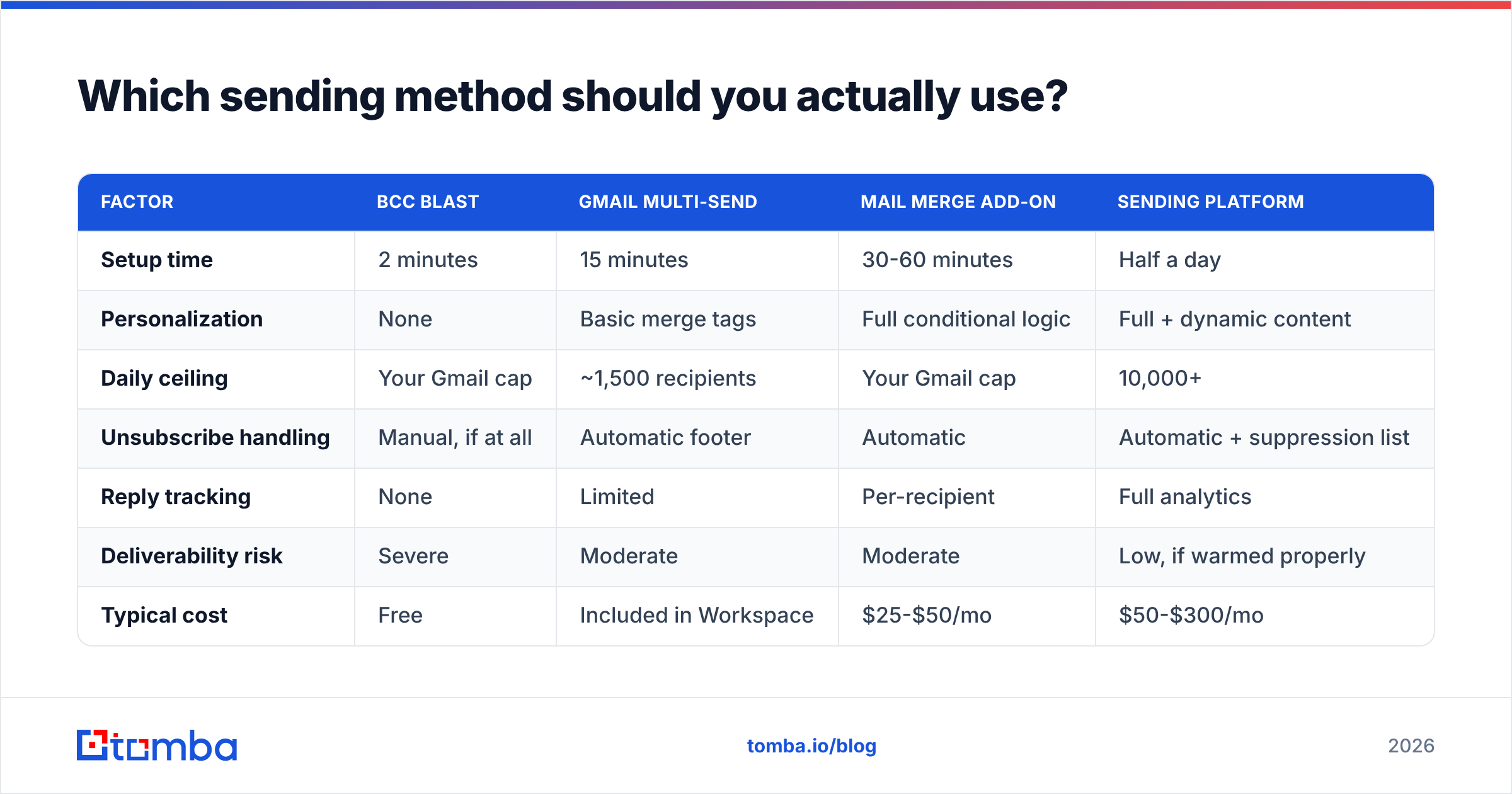
| Factor | BCC blast | Gmail multi-send | Mail merge add-on | Sending platform |
|---|---|---|---|---|
| Setup time | 2 minutes | 15 minutes | 30-60 minutes | Half a day |
| Personalization | None | Basic merge tags | Full conditional logic | Full + dynamic content |
| Daily ceiling | Your Gmail cap | ~1,500 recipients | Your Gmail cap | 10,000+ |
| Unsubscribe handling | Manual, if at all | Automatic footer | Automatic | Automatic + suppression list |
| Reply tracking | None | Limited | Per-recipient | Full analytics |
| Deliverability risk | Severe | Moderate | Moderate | Low, if warmed properly |
| Typical cost | Free | Included in Workspace | $25-$50/mo | $50-$300/mo |
| Best for | Never | 200-1,500 known contacts | Outbound under 1,000/day | Anything above that |
The practical read: if your list is under 1,500 people who already know who you are, Gmail multi-send is genuinely fine. If you are sending to strangers, or sending daily, the mail merge add-on buys you throttling and sequencing that materially protect your account. Once you are past 1,500 a day, no Gmail workaround exists — you are just choosing how you get caught.
Why do Gmail mass emails land in spam?#
Volume is rarely the actual trigger. Four things are.
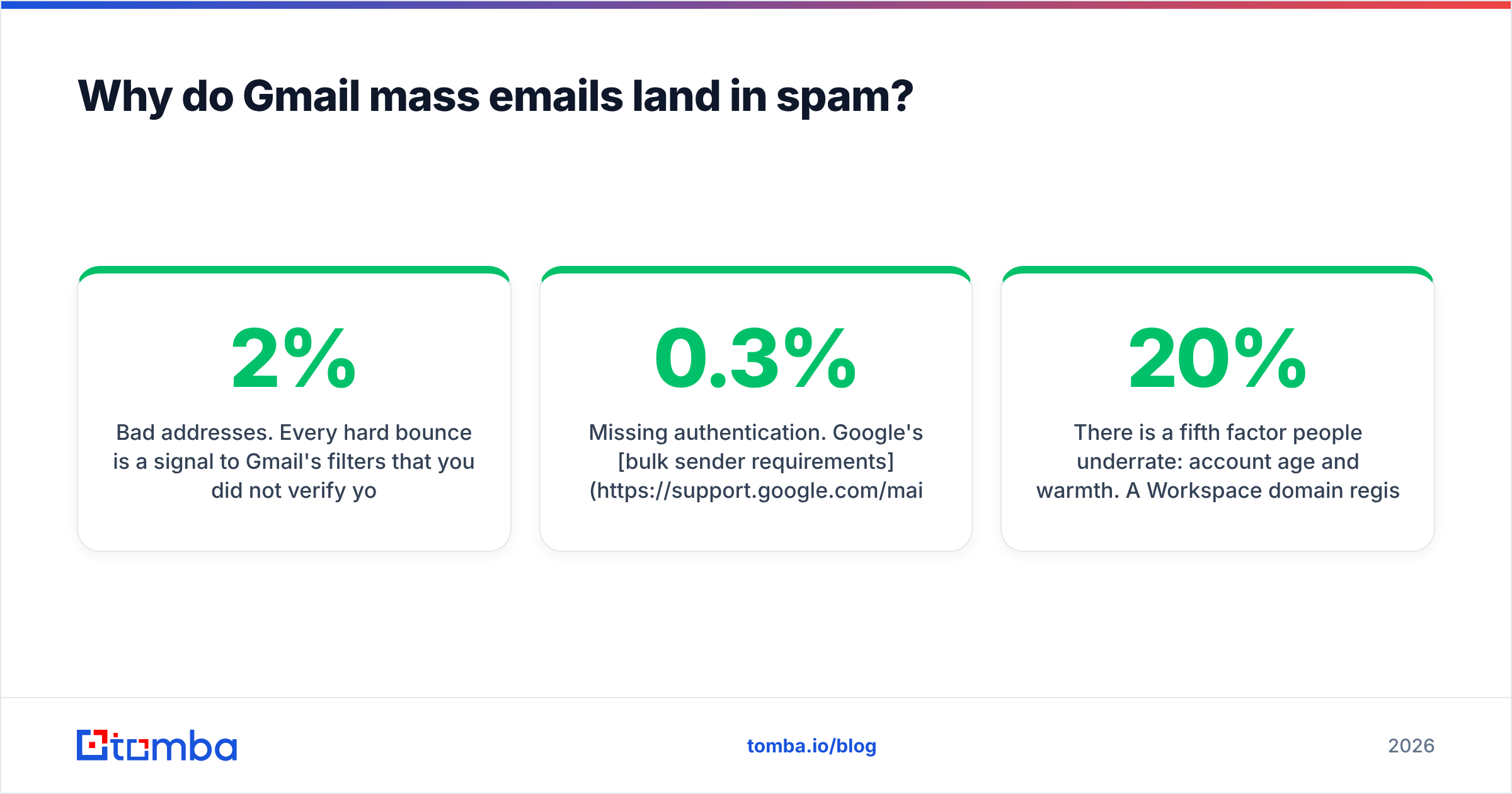
Bad addresses. Every hard bounce is a signal to Gmail's filters that you did not verify your list. Bounce rates above 2% start degrading your reputation; above 5% you are in visible trouble. This is the single highest-leverage thing you control, and the cheapest to fix — run the list through an email verifier before the send and you eliminate most of the risk in one step.
Missing authentication. Google's bulk sender requirements mandate SPF, DKIM, and DMARC for anyone sending 5,000+ messages a day to Gmail addresses, plus one-click unsubscribe and a spam complaint rate held under 0.3%. Even below that threshold, unauthenticated mail gets filtered harder. Check your records with an SPF checker before you plan any campaign.
Identical content at identical timestamps. Five hundred byte-identical messages arriving in the same second is the clearest bulk fingerprint there is. Merge tags and randomized send intervals break that pattern. A mail merge tool that spreads 400 sends across six hours looks dramatically more human than one that dumps them in ninety seconds.
Spam-trigger copy. Heavy link density, image-only bodies, all-caps subject lines, and the usual offer vocabulary. Run a draft through a spam checker before committing — it takes thirty seconds and catches the obvious ones.
There is a fifth factor people underrate: account age and warmth. A Workspace domain registered three weeks ago that suddenly sends 800 emails is treated very differently from a five-year-old domain with steady two-way conversation history. If the domain is new, ramp gradually — 20 to 30 sends a day, climbing 20% weekly. An email warmup calculator gives you a realistic schedule instead of a guess.
Should you use your primary domain for mass email?#
No, once you cross into regular outbound.
The standard setup for teams doing volume outreach is a separate sending domain — yourcompany-mail.com or go.yourcompany.com — with its own SPF, DKIM, and DMARC records, warmed independently. Your main domain keeps handling billing notifications, support replies, and executive email, and stays insulated if a campaign goes badly.
The economics are hard to argue with. A second domain costs about $12 a year. Rehabilitating a burned primary domain takes months of reduced sending and, in the meantime, invoices land in customers' spam folders. Most teams that have been through it once never send outbound from their primary domain again.
If you are running outbound from Workspace, spread the volume across three or four sending accounts on that secondary domain rather than pushing one account to its ceiling. Each account then sits comfortably below its limit, and one flagged inbox does not stop the whole program.

How do you build a list that survives a mass send?#
Gmail limits are a ceiling, not a target. The real constraint is how many people on your list actually want the email — and whether those addresses are real.
Start from verified data rather than scraped guesses. Pulling contacts by company through a domain search gives you addresses tied to a confirmed pattern, which bounces far less than permutating first.last@company.com and hoping. If you are working from a spreadsheet you inherited, run bulk verification across the whole file before it touches your sending account.
Then apply three filters before you send:
- Remove role addresses.
info@,sales@,support@,admin@. They generate complaints at several times the rate of personal addresses and almost never convert. - Remove anything unverified or risky. If the verifier cannot confirm the mailbox, leave it out. Catch-all domains need their own handling — a catch-all verifier tells you which ones are worth the gamble instead of treating them all as valid.
- Deduplicate. Two copies of the same address in one campaign reads as a bug to the recipient and as sloppiness to the filters. A duplicate remover handles it in a click.
A 300-contact list that passes all three filters will outperform a 2,000-contact raw export on every metric that matters — deliverability, reply rate, and how long your sending account stays alive. Reviewers on G2 consistently rank data accuracy above feature count for exactly this reason: the tool that hands you fewer, cleaner records saves you the reputation damage the bigger database causes.
When should you stop using Gmail entirely?#
Five signals, any one of which is enough:
You are sending to more than 1,500 recipients a day. Gmail has no configuration that gets you past this legitimately.
You need suppression lists, bounce automation, and complaint handling. Gmail gives you none of it, and manually maintaining an unsubscribe list in a spreadsheet is a compliance incident waiting to happen.
You need multi-step sequences with reply detection. Follow-ups are where most outbound revenue comes from, and Gmail cannot stop a sequence when someone replies.
Your bounce rate exceeds 3% on a clean send. That means your data source is the problem, and no amount of sending infrastructure fixes it — go upstream and fix the list.
You have been rate-limited more than once. Gmail is telling you your usage pattern does not match the product. Believe it.
Below all five thresholds, Gmail multi-send plus a verified list is a perfectly defensible setup, and it costs you nothing beyond the Workspace seat you already pay for. Above them, the workaround economy — rotating accounts, staggered sends, third-party relays — costs more in time and risk than a proper platform costs in money.
What does a safe Gmail mass email workflow look like?#
Put together, the sequence that keeps teams out of trouble:
- Source contacts from a verified provider, not a scrape or a purchased CSV of unknown age.
- Verify every address and drop unknowns, role accounts, and duplicates.
- Authenticate the sending domain with SPF, DKIM, and DMARC, and confirm the records resolve.
- Warm the account if it is new — weeks, not days.
- Send with merge tags and throttling through multi-send or a mail merge tool, spread across hours.
- Watch bounce and complaint rates after every campaign and pause immediately if bounces cross 3%.
Steps 1 and 2 do most of the work. Everything downstream is damage control for a list you should have cleaned first.
Ready to send to addresses that actually exist?#
Gmail's daily cap is not what limits your results. A list full of dead addresses is. Every bounce burns a slot you cannot get back for 24 hours and shaves a little more off your sender reputation.
Start with contacts you can trust. The Tomba Email Finder returns verified professional addresses by name, company, or domain, with a confidence score and the sources behind every result, so the 500 sends Gmail allows you go to 500 real inboxes. The free tier includes 25 searches a month, paid plans start at $49/mo, and bulk processing plus the API are available on every tier above free — see Tomba pricing for the full breakdown. Clean the list first, and Gmail's limits stop being the thing standing between you and replies.
Related guides#
Ready to find emails that actually work?
Join 150,000+ professionals who stopped guessing and started sending. Free credits on signup — no credit card required.
Get the Tomba newsletter
Practical outbound tactics and product updates — once every two weeks.
About the author