Free Email Extractor Tools in 2026: What Actually Works
Most free email extractors hand you a list that bounces. Here's how extraction actually works, which free tiers are worth using, and when scraping addresses stops paying off.
TL;DR
- A free email extractor pulls addresses out of pages, files, or text you already have. It does not tell you whether those addresses still receive mail.
- Extracted lists routinely bounce at 20-40% because scraped pages are full of stale, role-based, and honeypot addresses.
- The honest workflow is extract → dedupe → verify → enrich. Skipping verification is what gets domains blocked.
- Free tiers are real and useful at small volume: Tomba gives 25 searches/month free, and several browser extensions extract unlimited visible addresses from a page you are already viewing.
- Extraction is the wrong tool when you need contacts at a company you have never visited. That is a job for domain search or an email finder.
What is a free email extractor?#
An email extractor is a pattern matcher. Point it at a web page, a PDF, a spreadsheet, or a blob of pasted text, and it scans for anything shaped like name@domain.tld, then hands you the deduplicated list.
Think of it like a metal detector on a beach. It reliably beeps at metal. It has no opinion on whether you found a gold ring or a bottle cap. An extractor finds strings that look like email addresses — it cannot tell you whether that mailbox was abandoned in 2019.
That distinction drives everything else in this guide. Extraction answers "what addresses are visible here?" It never answers "will this address accept my message?"
Three things a free email extractor does well:
- Harvesting from pages you already trust — a conference speaker list, an association directory, a supplier page, your own CRM export.
- Rescuing addresses buried in unstructured text — email threads, meeting notes, scanned invoices, chat logs.
- Cleaning up messy inputs — stripping duplicates, normalising casing, separating personal from role-based addresses.
Three things it does badly:
- Finding a specific person's address when that address is not published anywhere.
- Judging deliverability — a syntactically valid address can be a spam trap.
- Working at scale on protected sites — LinkedIn, most modern SaaS marketing sites, and anything behind Cloudflare bot management will block naive scrapers.
How does email extraction actually work?#
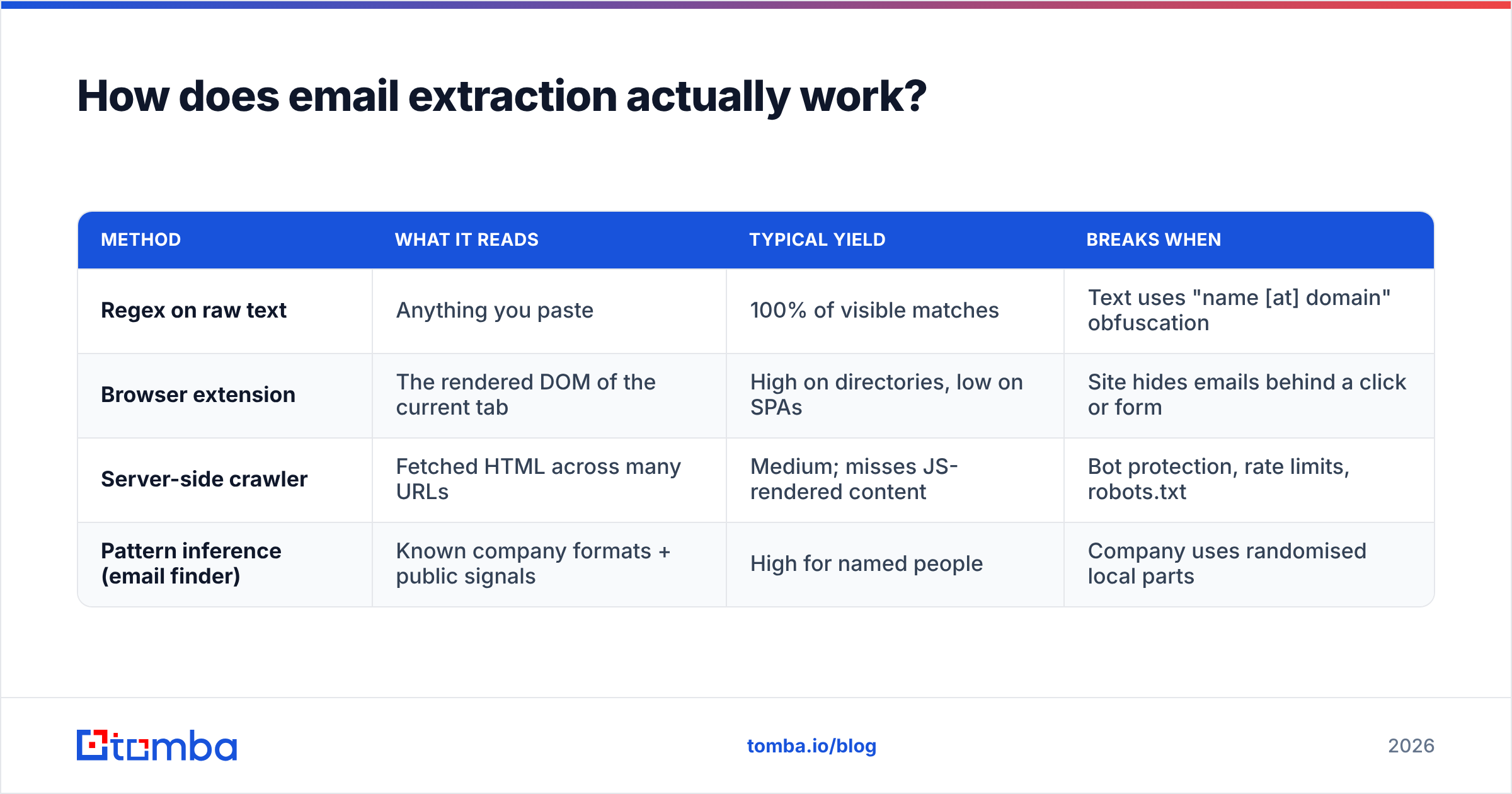
Four mechanisms sit behind almost every tool marketed as an extractor. They differ in what they can reach and how easily they break.
| Method | What it reads | Typical yield | Breaks when |
|---|---|---|---|
| Regex on raw text | Anything you paste | 100% of visible matches | Text uses "name [at] domain" obfuscation |
| Browser extension | The rendered DOM of the current tab | High on directories, low on SPAs | Site hides emails behind a click or form |
| Server-side crawler | Fetched HTML across many URLs | Medium; misses JS-rendered content | Bot protection, rate limits, robots.txt |
| Pattern inference (email finder) | Known company formats + public signals | High for named people | Company uses randomised local parts |
The first three are extraction. The fourth is not — and conflating them is the most common mistake in this category. Pattern inference constructs a likely address (first.last@company.com) and then validates it against the mail server. That is what a proper email finder does, and it works on people whose address appears nowhere on the public web.
If you are working with text you already have, a browser-based email extractor is genuinely the fastest path. Paste, extract, done. For files, an extract emails from file tool handles CSV, TXT, and document dumps without you writing a script.
Why do extracted lists bounce so badly?#
Because published addresses are a graveyard. A page published in 2021 lists the marketing director who left in 2023. The info@ alias forwards to a mailbox nobody opens. Some addresses were never mailboxes at all — they are honeypots planted specifically to catch scrapers.
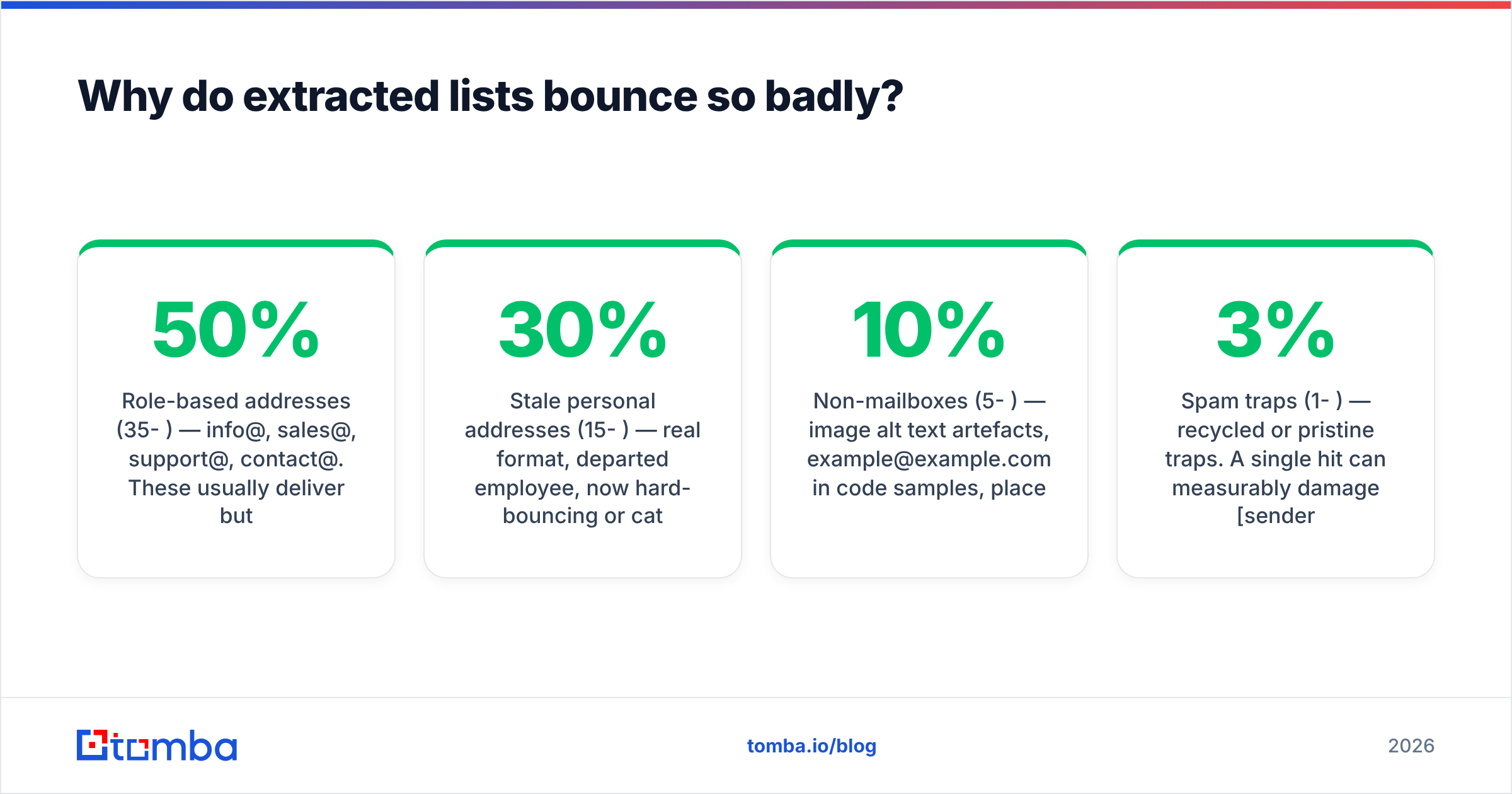
Typical composition of a raw extraction from mid-size company websites:
- Role-based addresses (35-50%) —
info@,sales@,support@,contact@. These usually deliver but rarely reach a decision maker, and many inbox providers weight cold mail to role accounts more suspiciously. - Stale personal addresses (15-30%) — real format, departed employee, now hard-bouncing or catch-all-swallowed.
- Non-mailboxes (5-10%) — image alt text artefacts,
example@example.comin code samples, placeholder addresses in templates. - Spam traps (1-3%) — recycled or pristine traps. A single hit can measurably damage sender reputation.
- Genuinely useful, currently-employed contacts (20-35%) — the part you actually wanted.
Google and Microsoft both publish guidance on list hygiene; Google's Email sender guidelines put a hard 0.3% spam-complaint ceiling on bulk senders, and bounce rate feeds directly into how aggressively your mail gets filtered. Sending a raw extracted list into a cold sequence is the single fastest way to trip those thresholds.
The fix is boring and non-negotiable: run every extracted address through an email verifier before it touches a sending tool. Verification does an MX lookup, an SMTP handshake, and a set of heuristic checks, then labels each address deliverable, risky, or invalid. On typical scraped data you should expect to discard 30-45% of what you extracted — and that discard is the whole point.
Catch-all domains are the awkward middle. A catch-all server accepts everything, so a normal SMTP check returns "valid" for asdfgh@company.com too. That is where a dedicated catch-all verifier earns its place, using additional signals rather than the accept/reject response alone.
Which free email extractor should you use in 2026?#
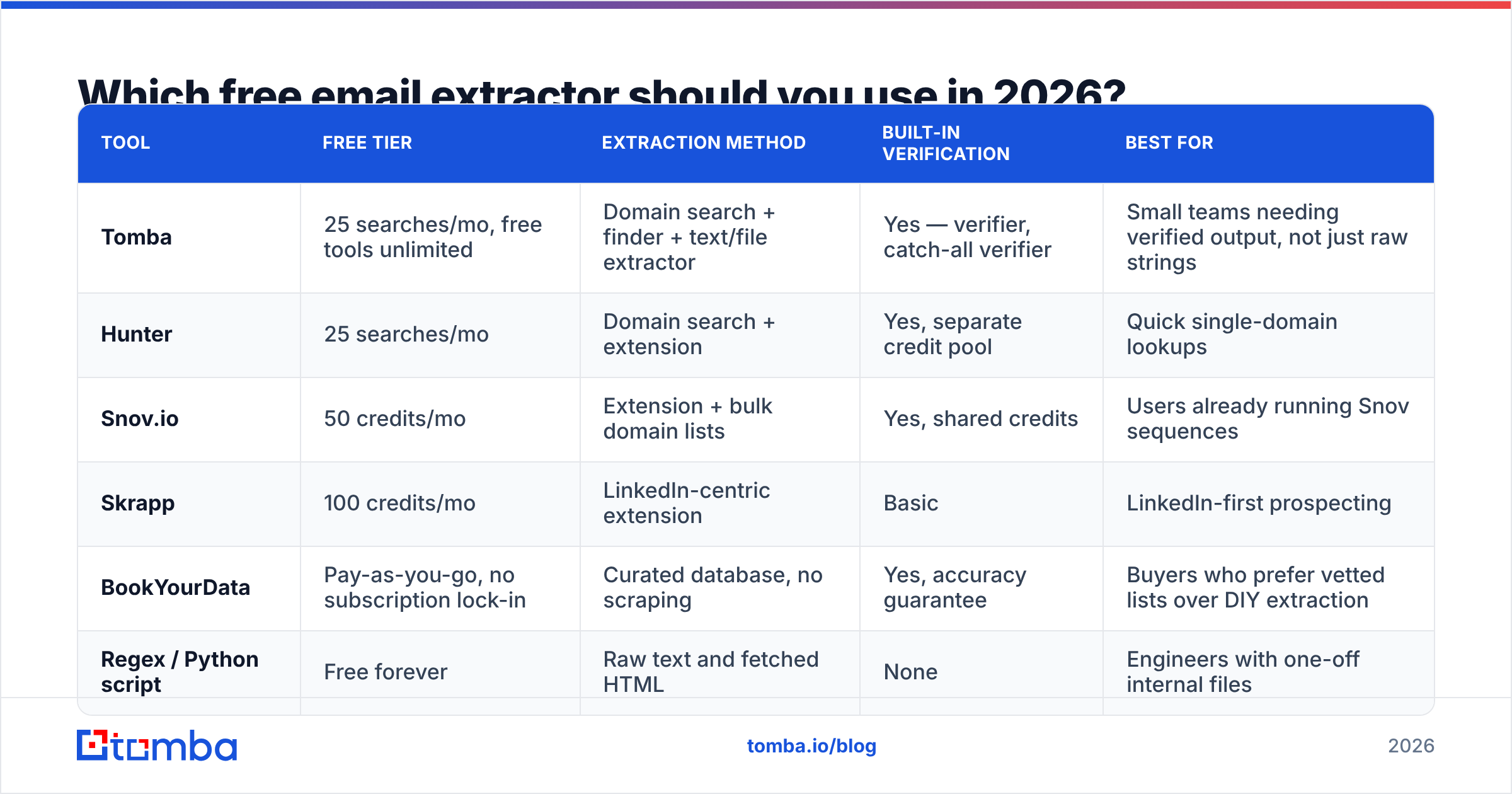
Free tiers in this category split into three shapes: unlimited-but-shallow browser tools, credit-limited finder platforms, and open-source scripts you run yourself. Here is how the realistic options compare.
| Tool | Free tier | Extraction method | Built-in verification | Best for |
|---|---|---|---|---|
| Tomba | 25 searches/mo, free tools unlimited | Domain search + finder + text/file extractor | Yes — verifier, catch-all verifier | Small teams needing verified output, not just raw strings |
| Hunter | 25 searches/mo | Domain search + extension | Yes, separate credit pool | Quick single-domain lookups |
| Snov.io | 50 credits/mo | Extension + bulk domain lists | Yes, shared credits | Users already running Snov sequences |
| Skrapp | 100 credits/mo | LinkedIn-centric extension | Basic | LinkedIn-first prospecting |
| BookYourData | Pay-as-you-go, no subscription lock-in | Curated database, no scraping | Yes, accuracy guarantee | Buyers who prefer vetted lists over DIY extraction |
| Regex / Python script | Free forever | Raw text and fetched HTML | None | Engineers with one-off internal files |
A few notes on reading that table honestly.
Credit counts are not comparable across tools. One "credit" at a database vendor may return a full contact record; one search at a finder platform may return every address on a domain. Compare on delivered, verified contacts per month, not on the headline number.
BookYourData sits in a different category on purpose. It sells pre-built, human-vetted lists rather than scraping tools, and for buyers who do not want to run an extraction-and-cleaning pipeline at all, that trade is reasonable. If your bottleneck is time rather than budget, buying vetted data beats building a scraper badly.
Open-source scripts are free and endlessly annoying. A 20-line regex over requests.get() works until the first JavaScript-rendered page, the first rate limit, and the first Cloudflare challenge. Budget for maintenance, not just for the initial hour.
For a broader look at where extraction sits relative to full prospecting platforms, Apollo alternatives covers the database-first end of the spectrum.
Is a free email extractor enough for real outbound?#
For under roughly 200 contacts a month, yes — if you verify. Above that, the arithmetic stops working.
Run the numbers. Say you extract 1,000 addresses from industry directories. After deduplication you have 820. After verification you keep 480 deliverable ones, of which maybe 180 are named individuals rather than shared inboxes. You spent several hours to get 180 usable contacts, and you have no titles, no company size, no funding stage — nothing to segment or personalise with.
Compare that to starting from a target account list and using domain search to pull every published address at each company, complete with names, roles, and confidence scores. Same output volume, a fraction of the cleanup, and the records arrive structured.
The practical decision rule:
- Use free extraction when the addresses are already in front of you — a member directory, a PDF attendee list, an inherited spreadsheet.
- Use a finder or domain search when you know the company and the person but not the address.
- Use bulk processing when volume exceeds a few hundred rows; bulk email finder workflows handle CSV in and enriched CSV out.
- Use an API when extraction needs to happen inside your product or CRM sync; the Tomba API returns finder and verifier results as JSON.
- Buy vetted data when you need coverage in a segment you cannot reach by crawling — BookYourData and similar vendors exist for exactly this.
What does extraction cost once you outgrow free?#
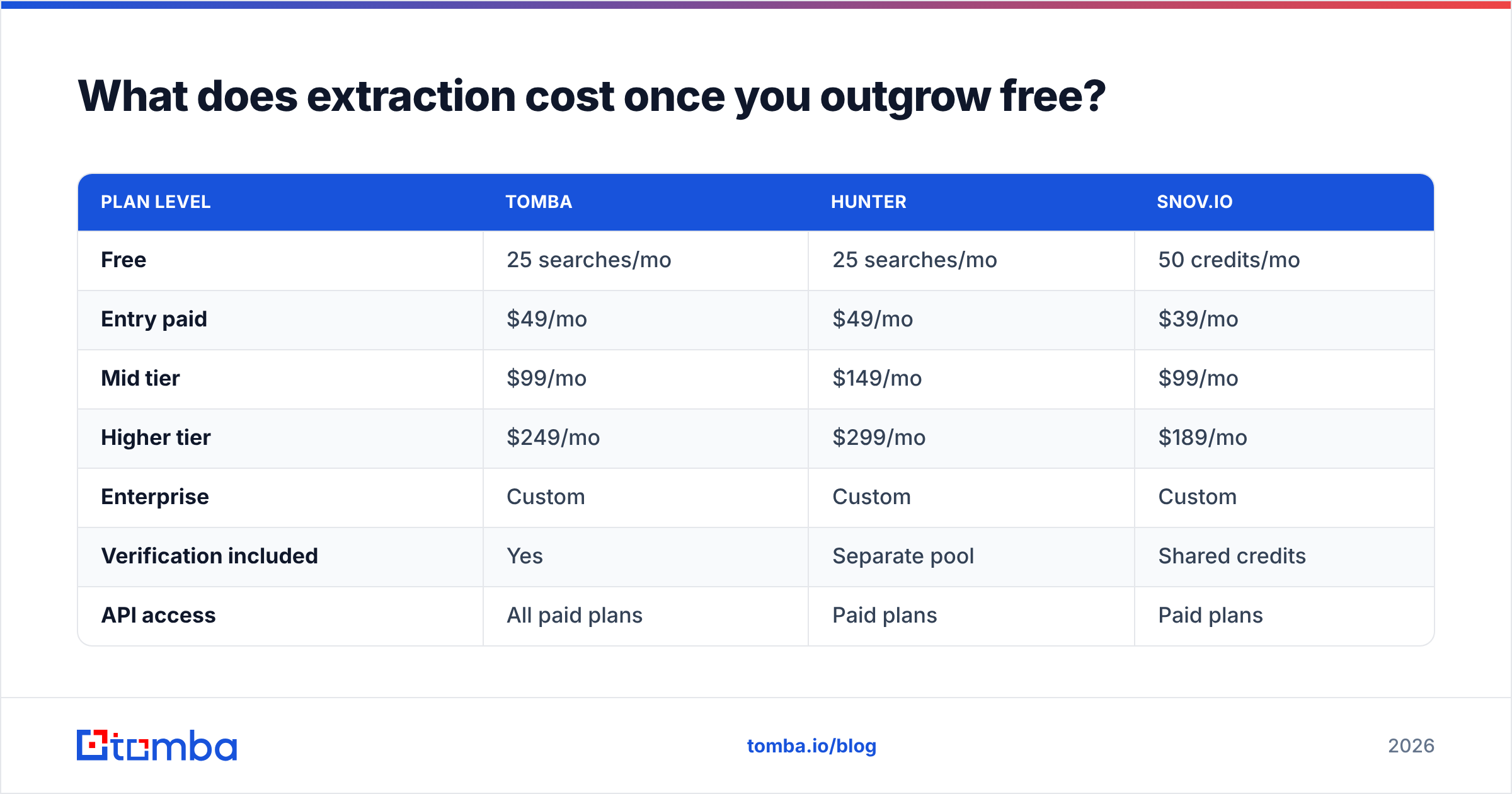
Free tiers are designed to run out, and pricing pages are where the category stops being comparable. Here is the shape of paid entry points among widely used tools.
| Plan level | Tomba | Hunter | Snov.io |
|---|---|---|---|
| Free | 25 searches/mo | 25 searches/mo | 50 credits/mo |
| Entry paid | $49/mo | $49/mo | $39/mo |
| Mid tier | $99/mo | $149/mo | $99/mo |
| Higher tier | $249/mo | $299/mo | $189/mo |
| Enterprise | Custom | Custom | Custom |
| Verification included | Yes | Separate pool | Shared credits |
| API access | All paid plans | Paid plans | Paid plans |
Full Tomba pricing breaks down credit allocation per plan. The number worth interrogating on any vendor's page is not the monthly price but whether verification consumes the same credits as finding. When it does, your effective cost per usable contact is roughly double the sticker rate, because every address gets charged twice.
Independent buyer reviews on G2 are useful for spotting where advertised accuracy diverges from what users report, particularly for smaller regional domains where every vendor's coverage thins out.
How do you build a clean pipeline from extracted addresses?#
Five steps, in this order. Reordering them is how lists rot.
- Extract with intent. Pick sources where addresses are published deliberately — association directories, speaker pages, supplier lists. Skip comment sections and forum archives; the addresses there are old and often trap-laden.
- Dedupe and normalise immediately. Lowercase everything, strip plus-aliases where appropriate, and drop obvious placeholders. A remove duplicates pass before verification saves credits, since you are not paying to check the same address three times.
- Verify everything. Discard hard invalids. Quarantine risky and catch-all results into a separate segment rather than deleting them — they are worth a lower-volume, higher-care approach later.
- Enrich what survives. An address alone is not a lead. Data enrichment attaches name, role, company, and location so your copy can reference something real.
- Warm before you send. New domain or new mailbox, ramp volume gradually. Check your SPF, DKIM, and DMARC records first — an SPF checker takes thirty seconds and catches misconfigurations that would otherwise land clean mail in spam.
One more habit worth building: measure bounce rate per source, not just overall. If directory A bounces at 8% and directory B bounces at 34%, stop extracting from B. Most teams never separate these numbers and end up blaming their sending infrastructure for a sourcing problem.
Is scraping emails legal?#
Short answer: it depends on jurisdiction and on what you do with the data, and this is not legal advice.
Under GDPR, a business email address for a named individual is personal data. Processing it requires a lawful basis — legitimate interest is commonly relied on for B2B outreach, but it comes with obligations: a clear privacy notice, an easy opt-out, and a genuine relevance between your offer and the recipient's role. The ICO's guidance on direct marketing is the clearest public reference on where the lines sit for UK and EU-facing senders.
In the US, CAN-SPAM permits cold commercial email but explicitly prohibits "harvesting" — automated collection of addresses from websites — as an aggravating factor that increases penalties. Practically, that makes indiscriminate crawling a materially worse legal position than targeted lookup of a named individual at a named company.
Regardless of jurisdiction, three practices reduce risk and happen to improve results: target narrowly, identify yourself honestly, and honour opt-outs on the first request without friction.
Where should you start?#
If you have a page or file in front of you right now, run it through a free extractor, verify the output, and see what your real yield is. That single measurement will tell you more than any comparison table about whether extraction fits your motion.
If you are working from a target account list instead, skip extraction entirely. Give Tomba Email Finder a name and a company domain and it returns a verified address with a confidence score — no crawling, no cleanup pass, no guessing which of the 40 addresses you scraped belongs to a person who still works there. The free tier includes 25 searches a month, which is enough to benchmark accuracy against whatever you are using today before you commit a dollar.
Related guides#
Ready to find emails that actually work?
Join 150,000+ professionals who stopped guessing and started sending. Free credits on signup — no credit card required.
Get the Tomba newsletter
Practical outbound tactics and product updates — once every two weeks.
About the author